
RadSec: Securing RADIUS Authentication Traffic with TLS
This comprehensive guide explores RadSec (RADIUS over TLS), detailing how it secures network authentication traffic for modern cloud and multi-site deployments. It provides network architects with practical implementation steps, certificate management strategies, and troubleshooting techniques to replace legacy UDP RADIUS.
Listen to this guide
View podcast transcript

Executive Summary
For decades, RADIUS over UDP has been the foundation of network authentication, relying on private networks and shared secrets for security. As enterprise architectures shift towards cloud-native infrastructure, distributed Retail and Hospitality venues, and SD-WAN overlays, the threat model has fundamentally changed. RADIUS traffic now frequently traverses public or shared networks, exposing authentication data to interception.
RadSec (RADIUS over TLS), defined in RFC 6614, solves this by encapsulating RADIUS packets within a mutually authenticated TLS tunnel. This guide provides a comprehensive technical reference for network architects and security engineers on deploying RadSec. We cover the architectural differences from traditional RADIUS, certificate management requirements, firewall configurations, and practical deployment considerations for integrating with cloud RADIUS platforms like Purple's Guest WiFi and WiFi Analytics infrastructure. By adopting RadSec, organisations can ensure robust security, meet stringent compliance requirements like PCI DSS and GDPR, and simplify multi-site authentication architectures.
Technical Deep-Dive
The Evolution of RADIUS Transport
The Remote Authentication Dial-In User Service (RADIUS) protocol, originally defined in RFC 2865, was designed for a different era of networking. It uses UDP as its transport layer (port 1812 for authentication, 1813 for accounting). In traditional RADIUS, the payload is largely unencrypted in transit. The only protection mechanism is the obfuscation of the User-Password attribute using a shared secret between the Network Access Server (NAS) and the RADIUS server.
While this was sufficient when NAS devices and RADIUS servers resided on the same physical LAN or dedicated MPLS circuits, modern architectures have outgrown this model. As explored in our discussion on The Core SD WAN Benefits for Modern Businesses , distributed enterprises now rely on internet transport for inter-site connectivity. Sending unencrypted RADIUS traffic over the public internet exposes user credentials, session identifiers, and network access policies to interception and tampering.
RadSec: RADIUS over TLS (RFC 6614)
RadSec addresses these vulnerabilities by changing the transport layer. Instead of UDP, RadSec uses TCP port 2083. Before any RADIUS packets are exchanged, the NAS and the RADIUS server establish a TLS (Transport Layer Security) connection.
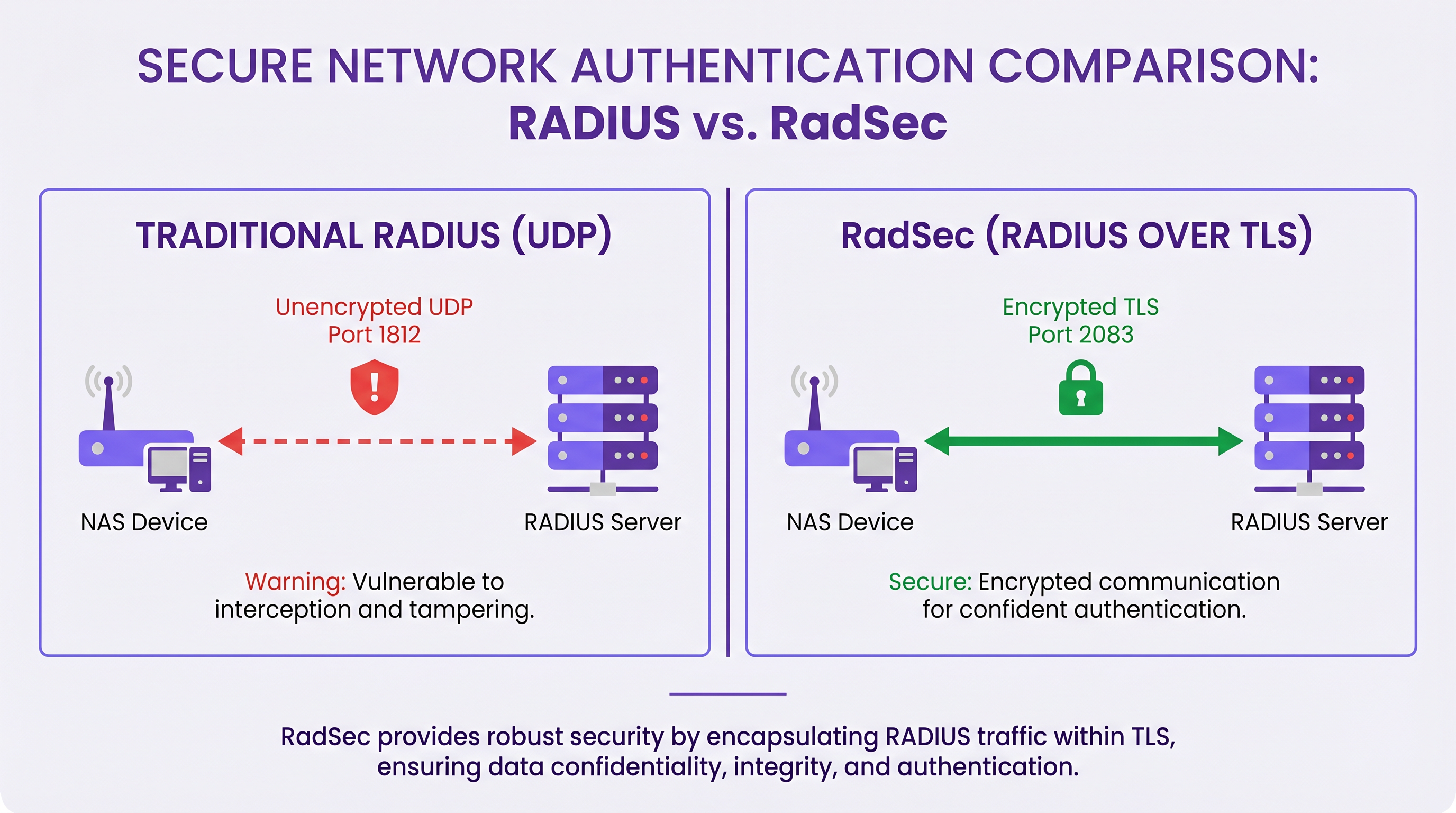
The core technical characteristics of RadSec include:
- TCP Transport: RadSec provides reliable, ordered delivery. This eliminates the need for application-layer retransmissions inherent in UDP RADIUS, which can cause issues in high-latency environments.
- Full Payload Encryption: The entire RADIUS packet—including headers and all attributes—is encrypted within the TLS tunnel.
- Mutual Authentication (mTLS): Both the RADIUS server and the NAS device authenticate each other using X.509 certificates. This replaces the weak shared secret model with robust Public Key Infrastructure (PKI).
- Persistent Connections: Unlike UDP RADIUS which is connectionless, RadSec maintains a persistent TCP connection. This reduces the overhead of establishing a new connection for every authentication request, which is highly efficient for busy venues.
Note: RFC 7360 defines RADIUS over DTLS (Datagram TLS), which uses UDP. While useful in specific high-throughput scenarios, TLS over TCP remains the standard for enterprise cloud RADIUS deployments.
Architecture in Distributed Environments
In a typical multi-site deployment—such as a national Healthcare provider or a chain of Transport hubs—RadSec significantly simplifies the architecture.
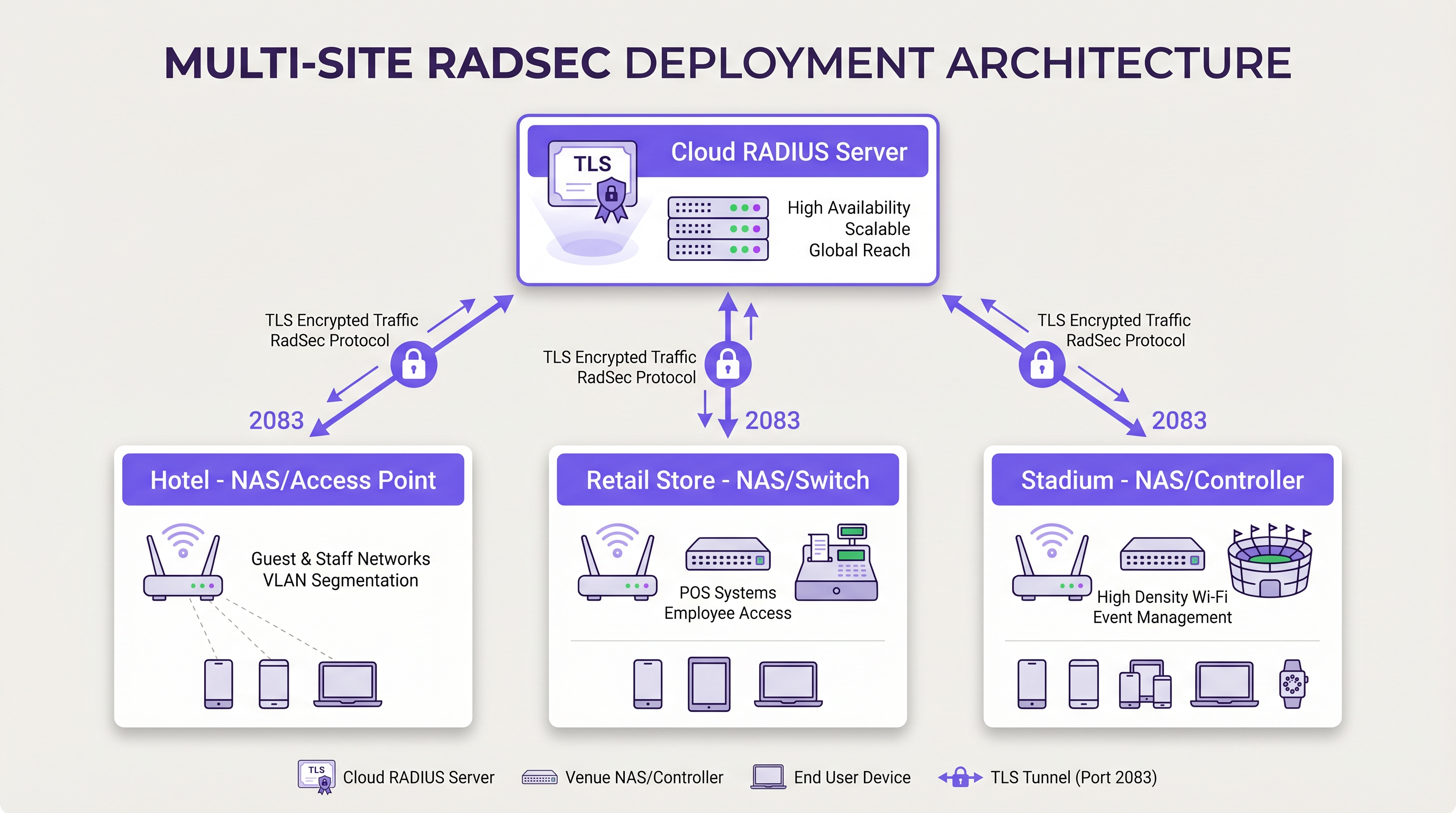
Instead of building complex IPsec VPN meshes from every branch location back to a central data centre to protect RADIUS traffic, each NAS device establishes a direct RadSec TLS connection over the internet to the cloud RADIUS provider. This is an application-layer security model that is cleaner to deploy and easier to troubleshoot than network-layer VPNs.
Implementation Guide
Deploying RadSec requires coordination between network infrastructure, certificate authorities, and firewall policies. Follow these vendor-neutral steps for a successful deployment.
1. Certificate Infrastructure Preparation
RadSec relies on mTLS. You need certificates for both the server and the clients (NAS devices).
- Server Certificate: Your cloud RADIUS provider (e.g., Purple) will present a server certificate signed by a public Certificate Authority (CA) or an internal CA. Your NAS devices must have the root CA certificate installed in their trust store to validate the server.
- Client Certificates: Each NAS device needs a client certificate to identify itself to the RADIUS server. Generate these via your internal PKI or network management system. Ensure they use at least RSA 2048-bit or ECDSA P-256 keys.
2. Firewall Configuration
RadSec requires specific egress rules from your NAS management interfaces:
- Protocol: TCP
- Destination Port: 2083
- Destination IP/FQDN: The addresses of your primary and secondary cloud RADIUS servers.
- Stateful Inspection: Ensure the firewall allows the return traffic for established TCP connections.
- Keepalives: Configure firewall TCP timeout values to be longer than the RadSec keepalive interval (typically 60 seconds) to prevent silent connection drops.
3. NAS Device Configuration (Generic Workflow)
While specific syntax varies by vendor (Cisco, Aruba, Juniper, etc.), the logical configuration steps are consistent:
- Import CA Certificate: Load the CA certificate that signed the RADIUS server's certificate into the NAS trust store.
- Import Client Certificate: Load the NAS device's client certificate and private key.
- Define RADIUS Server: Configure the RADIUS server IP/FQDN.
- Enable RadSec: Specify TLS as the transport protocol and set the port to 2083.
- Bind Certificates: Associate the imported certificates with the RadSec server configuration.
- Apply to AAA Profile: Add the RadSec server to the relevant AAA authentication and accounting groups.
4. Handling Legacy Devices (RadSec Proxy)
Not all NAS devices support RadSec natively. For older switches or consumer-grade access points, deploy a RadSec proxy (such as radsecproxy). The proxy sits on the local LAN, accepts traditional UDP RADIUS from legacy devices, and forwards it over a secure RadSec TLS tunnel to the cloud RADIUS server.
Best Practices
- Certificate Lifecycle Management: Implement automated certificate renewal for NAS devices. A mass expiry of client certificates will cause a widespread network outage. Monitor certificate validity and alert at 90, 60, and 30 days before expiry.
- High Availability: Always configure primary and secondary RadSec servers. Because TCP connection establishment takes longer than a UDP packet transmission, configure aggressive failover timers on the NAS to switch to the secondary server quickly if the primary connection drops.
- TCP Keepalives: Enable TCP keepalives on the NAS device to detect dead connections and prevent firewalls from dropping idle sessions. A 60-second interval is standard.
- Strict Certificate Validation: Ensure NAS devices are configured to strictly validate the server certificate, including checking the Subject Alternative Name (SAN) against the configured server hostname. Do not disable certificate validation in production.
- Future-Proofing: As wireless standards evolve, such as those discussed in our guide WiFi 6E vs WiFi 7: What Venues Need to Know , the volume of authentication traffic will increase. RadSec's persistent TCP connections are better suited to handle this density than UDP.
Troubleshooting & Risk Mitigation
When RadSec deployments fail, the issue is rarely the RADIUS protocol itself; it is almost always related to TLS or TCP.
Common Failure Modes
- TLS Handshake Failures (Unknown CA): The NAS device rejects the RADIUS server's certificate because the signing CA is not in the NAS trust store.
- Mitigation: Verify the exact CA chain used by the server and ensure the root (and any intermediate) CAs are installed on the NAS.
- Silent Connection Drops: The RadSec connection establishes successfully, but authentication requests timeout after a period of inactivity. This is usually a stateful firewall dropping the idle TCP connection.
- Mitigation: Enable TCP keepalives on the NAS and verify firewall session timeout settings for port 2083.
- Clock Skew: TLS certificate validation relies on accurate system time. If the NAS device's clock is significantly out of sync, it will evaluate valid certificates as expired or not yet valid.
- Mitigation: Ensure all NAS devices are synchronised with reliable NTP servers before initiating RadSec connections.
ROI & Business Impact
Transitioning to RadSec provides measurable business value beyond technical security improvements:
- Compliance and Risk Reduction: RadSec encrypts authentication data in transit, directly satisfying requirements for PCI DSS v4.0 and GDPR. This mitigates the financial and reputational risks associated with credential interception.
- Operational Efficiency: Replacing complex, site-to-site IPsec VPNs with application-layer RadSec reduces network engineering overhead. Troubleshooting a TLS connection to a cloud provider is significantly faster than debugging VPN routing and IKE phase negotiations across hundreds of branches.
- Cloud Readiness: RadSec is the enabling technology for cloud-native authentication. By adopting it, organisations can seamlessly integrate with modern identity providers and platforms like Purple, reducing on-premises server footprint and licensing costs.
Key Definitions
RadSec
A protocol that encapsulates RADIUS authentication and accounting data within a Transport Layer Security (TLS) tunnel.
Used to secure authentication traffic over untrusted networks, replacing legacy UDP RADIUS.
mTLS (Mutual TLS)
An authentication process where both the client (NAS) and the server (RADIUS) verify each other's X.509 certificates during the TLS handshake.
Provides stronger security than the traditional RADIUS shared secret model by ensuring both endpoints are cryptographically verified.
NAS (Network Access Server)
The device that provides network access to users and acts as a RADIUS client. In modern networks, this is typically a wireless access point, switch, or wireless LAN controller.
The NAS is responsible for initiating the RadSec connection to the cloud RADIUS server.
PKI (Public Key Infrastructure)
The framework of roles, policies, hardware, software, and procedures needed to create, manage, distribute, use, store, and revoke digital certificates.
Essential for managing the certificates required by RadSec deployments across large estates.
TCP Keepalive
A mechanism that sends empty TCP packets over an idle connection to verify the connection is still active and to prevent stateful firewalls from dropping the session.
Crucial for maintaining persistent RadSec connections during periods of low authentication activity.
RadSec Proxy
A software service that acts as an intermediary, receiving traditional UDP RADIUS traffic from legacy devices and forwarding it over a secure RadSec TLS connection.
Used to bridge the gap in environments where older network hardware does not natively support RadSec.
X.509 Certificate
A digital certificate that uses the widely accepted international X.509 PKI standard to verify that a public key belongs to the user, computer or service identity contained within the certificate.
The cryptographic foundation used by RadSec to establish identity and encrypt the TLS tunnel.
EAP (Extensible Authentication Protocol)
An authentication framework frequently used in wireless networks and point-to-point connections.
EAP traffic (like EAP-TLS or PEAP) is encapsulated within RADIUS packets, meaning RadSec securely transports the EAP exchange.
Worked Examples
A national retail chain with 500 locations is migrating from on-premises RADIUS servers to Purple's Cloud RADIUS. The existing architecture uses unencrypted RADIUS over UDP across a mix of MPLS and SD-WAN links. 450 locations have modern Aruba access points, while 50 locations use legacy hardware that does not support RadSec. How should the network architect design the new authentication transport?
The architect should implement a hybrid RadSec deployment. For the 450 locations with modern Aruba APs, configure native RadSec directly on the APs or local controllers. Install the root CA certificate of Purple's cloud RADIUS on the Aruba devices, and provision client certificates via the network management platform. Configure egress firewall rules for TCP 2083. For the 50 legacy locations, deploy a lightweight RadSec proxy (e.g., a small Linux VM or container running radsecproxy) at each site. The legacy APs will send standard UDP RADIUS to the local proxy, which will then encapsulate the traffic in a TLS tunnel to the Purple cloud.
During a RadSec deployment at a large conference centre, the network team observes that the NAS devices successfully authenticate users during busy periods, but fail to authenticate the first few users early in the morning. Packet captures show the NAS attempting to send RADIUS traffic, but receiving TCP RST packets from the firewall.
The issue is caused by the firewall's aggressive TCP session timeout dropping the idle RadSec connection overnight. The network team must configure TCP keepalives on the NAS devices for the RadSec connection, setting the interval to 60 seconds. Additionally, they should review the firewall's stateful inspection rules for TCP port 2083 and ensure the session timeout is greater than the keepalive interval.
Practice Questions
Q1. You are designing the firewall policy for a new RadSec deployment connecting 50 branch offices to Purple's Cloud RADIUS platform. What specific egress rules must be configured on the branch firewalls?
Hint: Consider both the protocol and the stateful nature of the connection.
View model answer
The branch firewalls must allow outbound TCP traffic on port 2083 originating from the NAS management IP addresses, destined for the IP addresses or FQDNs of the Purple Cloud RADIUS servers. Because TCP is stateful, the firewall will automatically allow the return traffic for established sessions. UDP ports 1812 and 1813 are not required for RadSec.
Q2. A junior engineer reports that a newly configured switch is failing to establish a RadSec connection with the cloud RADIUS server. The switch logs show: `TLS handshake failed: unknown CA`. How should you resolve this?
Hint: The switch does not inherently trust the certificate presented by the server.
View model answer
You need to identify the Certificate Authority (CA) that issued the cloud RADIUS server's certificate. Once identified, obtain the public Root CA certificate (and any intermediate CA certificates) and import them into the switch's trust store. This allows the switch to cryptographically verify the server's identity during the TLS handshake.
Q3. Your organisation mandates that all network infrastructure must survive a WAN outage. If the internet connection to the cloud RADIUS server fails, what happens to the RadSec connection, and how does the NAS handle subsequent authentication requests?
Hint: Consider TCP connection states and standard RADIUS failover mechanisms.
View model answer
When the WAN fails, the persistent TCP connection will eventually time out (or be explicitly reset if the local interface goes down). The NAS will mark the primary RadSec server as unreachable. If a secondary RadSec server is configured (e.g., in a different geographical region), the NAS will attempt to establish a new TLS connection to it. If all RADIUS servers are unreachable, new authentications will fail. However, users who are already authenticated and connected will typically remain connected until their session expires or they roam, as RADIUS is only involved during the initial authentication and periodic re-authentication phases.
Continue reading in this series
Staff WiFi Terms and Conditions: Legal and Compliance Essentials
This guide covers the legal and technical essentials of drafting and enforcing staff WiFi terms and conditions for enterprise venues. It details what to include in an Acceptable Use Policy (AUP), how to meet GDPR and PCI DSS requirements, and how to deploy identity-based authentication and network segmentation to protect corporate assets. IT managers, HR teams, and operations directors at hotels, retail chains, stadiums, and public-sector organisations will find actionable guidance they can implement this quarter.
Staff WiFi Policies for Retail: Securing Back-of-House Networks
This guide covers the critical technical and policy requirements for securing retail back-of-house WiFi networks - from VLAN segmentation and PCI DSS 4.0 compliance to managing employee BYOD on the shop floor. It gives IT managers, network architects, and operations directors a practical, vendor-neutral blueprint they can act on this quarter.
The Future of Wi-Fi Security: AI-Driven NAC and Threat Detection
This authoritative guide explores the evolution of enterprise Wi-Fi security from legacy WPA2 to AI-driven Network Access Control (NAC) and threat detection. Designed for IT leaders, it provides actionable deployment strategies for securing high-density environments like retail, hospitality, and stadiums using Purple's identity-based networks.