
RadSec: Proteggere il traffico di autenticazione RADIUS con TLS
Questa guida completa esplora RadSec (RADIUS over TLS), descrivendo in dettaglio come protegge il traffico di autenticazione di rete per le moderne implementazioni cloud e multi-sito. Fornisce agli architetti di rete passaggi pratici per l'implementazione, strategie di gestione dei certificati e tecniche di risoluzione dei problemi per sostituire il RADIUS UDP legacy.
Ascolta questa guida
Visualizza trascrizione del podcast

Riepilogo Esecutivo
Per decenni, RADIUS su UDP è stato il fondamento dell'autenticazione di rete, basandosi su reti private e segreti condivisi per la sicurezza. Poiché le architetture aziendali si spostano verso infrastrutture cloud-native, sedi distribuite di Retail e Hospitality , e overlay SD-WAN, il modello di minaccia è cambiato radicalmente. Il traffico RADIUS ora attraversa frequentemente reti pubbliche o condivise, esponendo i dati di autenticazione all'intercettazione.
RadSec (RADIUS over TLS), definito nella RFC 6614, risolve questo problema incapsulando i pacchetti RADIUS all'interno di un tunnel TLS reciprocamente autenticato. Questa guida fornisce un riferimento tecnico completo per architetti di rete e ingegneri della sicurezza sull'implementazione di RadSec. Copriamo le differenze architettoniche rispetto al RADIUS tradizionale, i requisiti di gestione dei certificati, le configurazioni dei firewall e le considerazioni pratiche per l'implementazione per l'integrazione con piattaforme RADIUS cloud come l'infrastruttura Guest WiFi e WiFi Analytics di Purple. Adottando RadSec, le organizzazioni possono garantire una sicurezza robusta, soddisfare rigorosi requisiti di conformità come PCI DSS e GDPR e semplificare le architetture di autenticazione multi-sito.
Approfondimento Tecnico
L'Evoluzione del Trasporto RADIUS
Il protocollo Remote Authentication Dial-In User Service (RADIUS), originariamente definito nella RFC 2865, è stato progettato per un'era diversa del networking. Utilizza UDP come livello di trasporto (porta 1812 per l'autenticazione, 1813 per la contabilità). Nel RADIUS tradizionale, il payload è in gran parte non crittografato in transito. L'unico meccanismo di protezione è l'offuscamento dell'attributo User-Password utilizzando un segreto condiviso tra il Network Access Server (NAS) e il server RADIUS.
Sebbene ciò fosse sufficiente quando i dispositivi NAS e i server RADIUS risiedevano sulla stessa LAN fisica o su circuiti MPLS dedicati, le architetture moderne hanno superato questo modello. Come esplorato nella nostra discussione su I Vantaggi Chiave dell'SD WAN per le Aziende Moderne , le aziende distribuite ora si affidano al trasporto internet per la connettività inter-sito. L'invio di traffico RADIUS non crittografato su internet pubblico espone le credenziali utente, gli identificatori di sessione e le policy di accesso alla rete a intercettazioni e manomissioni.
RadSec: RADIUS su TLS (RFC 6614)
RadSec affronta queste vulnerabilità modificando il livello di trasporto. Invece di UDP, RadSec utilizza la porta TCP 2083. Prima che vengano scambiati pacchetti RADIUS, il NAS e il server RADIUS stabiliscono una connessione TLS (Transport Layer Security).
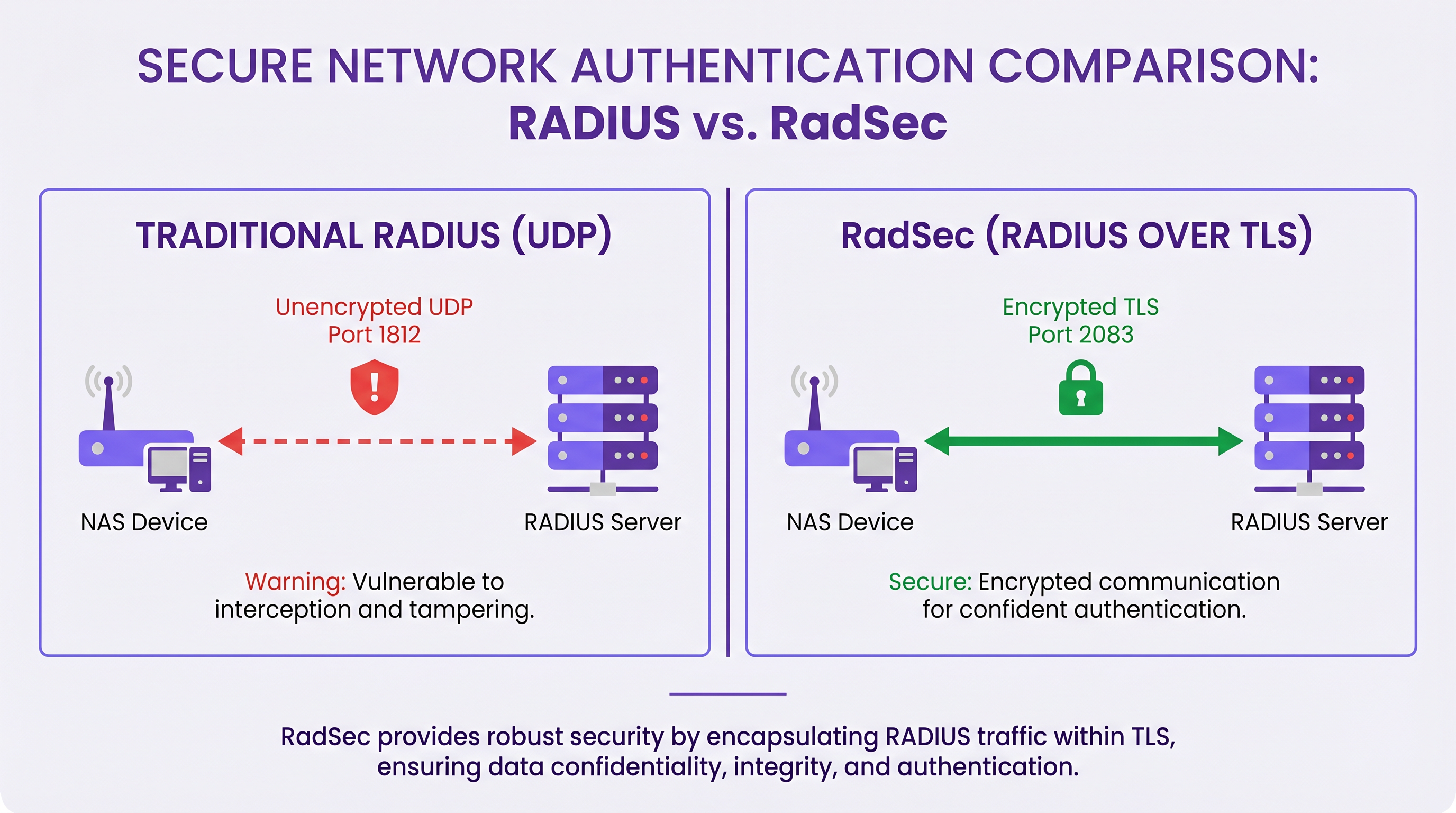
Le caratteristiche tecniche principali di RadSec includono:
- Trasporto TCP: RadSec fornisce una consegna affidabile e ordinata. Ciò elimina la necessità di ritrasmissioni a livello di applicazione inerenti al RADIUS UDP, che possono causare problemi in ambienti ad alta latenza.
- Crittografia Completa del Payload: L'intero pacchetto RADIUS—inclusi intestazioni e tutti gli attributi—è crittografato all'interno del tunnel TLS.
- Autenticazione Mutua (mTLS): Sia il server RADIUS che il dispositivo NAS si autenticano a vicenda utilizzando certificati X.509. Questo sostituisce il debole modello di segreto condiviso con una robusta Infrastruttura a Chiave Pubblica (PKI).
- Connessioni Persistenti: A differenza del RADIUS UDP che è senza connessione, RadSec mantiene una connessione TCP persistente. Ciò riduce il sovraccarico di stabilire una nuova connessione per ogni richiesta di autenticazione, il che è altamente efficiente per luoghi affollati.
Nota: la RFC 7360 definisce RADIUS su DTLS (Datagram TLS), che utilizza UDP. Sebbene utile in specifici scenari ad alta velocità, TLS su TCP rimane lo standard per le implementazioni RADIUS cloud aziendali.
Architettura in Ambienti Distribuiti
In una tipica implementazione multi-sito—come un fornitore nazionale di Healthcare o una catena di hub di Transport —RadSec semplifica significativamente l'architettura.
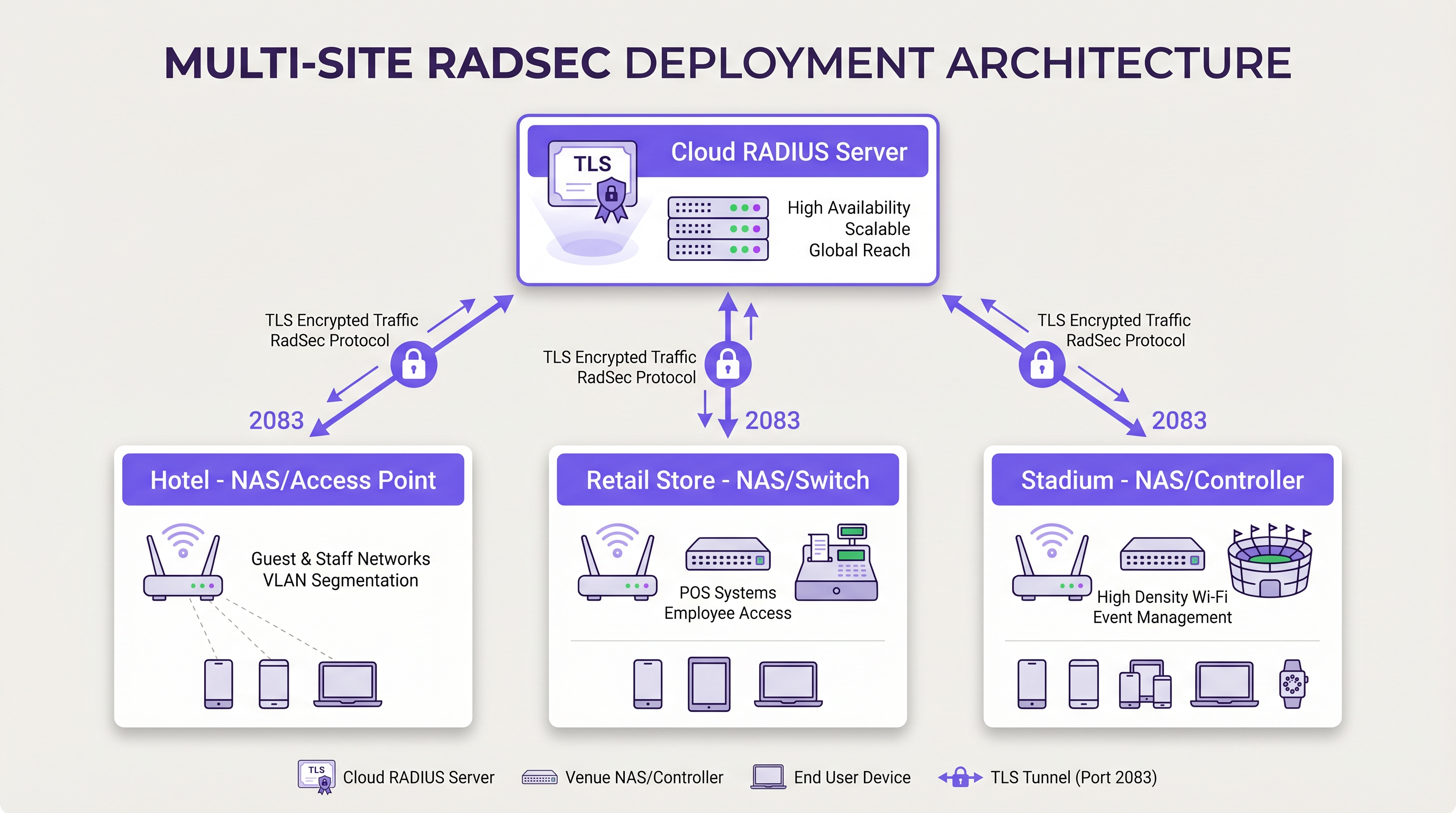
Invece di costruire complesse mesh VPN IPsec da ogni filiale a un data center centrale per proteggere il traffico RADIUS, ogni dispositivo NAS stabilisce una connessione RadSec TLS diretta su internet al provider RADIUS cloud. Questo è un modello di sicurezza a livello di applicazione più pulito da implementare e più facile da risolvere rispetto alle VPN a livello di rete.
Guida all'Implementazione
L'implementazione di RadSec richiede il coordinamento tra l'infrastruttura di rete, le autorità di certificazione e le policy del firewall. Segui questi passaggi indipendenti dal fornitore per un'implementazione di successo.
1. Preparazione dell'Infrastruttura dei Certificati
RadSec si basa su mTLS. Sono necessari certificati sia per il server che per i client (dispositivi NAS).
- Certificato Server: Il tuo provider RADIUS cloud (es. Purple) presenterà un certificato server firmato da un'Autorità di Certificazione (CA) pubblica o interna. I tuoi dispositivi NAS devono avere il certificato CA radice installato nel loro trust store per convalidare il server.
- Certificati Client: Ogni dispositivo NAS necessita di un certificato client per identificarsi al server RADIUS. Generali tramite la tua PKI interna o il sistema di gestione della rete. Assicurati che utilizzino chiavi RSA a 2048 bit o ECDSA P-256.
2. Configurazione del Firewall
RadSec richiede regole di uscita specifiche dalle interfacce di gestione del tuo NAS:
- Protocollo*: TCP
- Porta di destinazione: 2083
- IP/FQDN di destinazione: Gli indirizzi dei server RADIUS cloud primari e secondari.
- Ispezione stateful: Assicurarsi che il firewall consenta il traffico di ritorno per le connessioni TCP stabilite.
- Keepalive: Configurare i valori di timeout TCP del firewall in modo che siano più lunghi dell'intervallo di keepalive RadSec (tipicamente 60 secondi) per prevenire interruzioni silenziose della connessione.
3. Configurazione del dispositivo NAS (flusso di lavoro generico)
Sebbene la sintassi specifica vari a seconda del fornitore (Cisco, Aruba, Juniper, ecc.), i passaggi di configurazione logici sono coerenti:
- Importa certificato CA: Caricare il certificato CA che ha firmato il certificato del server RADIUS nell'archivio attendibile del NAS.
- Importa certificato client: Caricare il certificato client e la chiave privata del dispositivo NAS.
- Definisci server RADIUS: Configurare l'IP/FQDN del server RADIUS.
- Abilita RadSec: Specificare TLS come protocollo di trasporto e impostare la porta su 2083.
- Associa certificati: Associare i certificati importati alla configurazione del server RadSec.
- Applica al profilo AAA: Aggiungere il server RadSec ai gruppi di autenticazione e accounting AAA pertinenti.
4. Gestione dei dispositivi legacy (RadSec Proxy)
Non tutti i dispositivi NAS supportano RadSec nativamente. Per switch più vecchi o access point di livello consumer, implementare un RadSec proxy (come radsecproxy). Il proxy si trova sulla LAN locale, accetta il tradizionale RADIUS UDP dai dispositivi legacy e lo inoltra tramite un tunnel TLS RadSec sicuro al server RADIUS cloud.
Migliori Pratiche
- Gestione del ciclo di vita dei certificati: Implementare il rinnovo automatico dei certificati per i dispositivi NAS. Una scadenza di massa dei certificati client causerà un'interruzione diffusa della rete. Monitorare la validità dei certificati e inviare avvisi a 90, 60 e 30 giorni prima della scadenza.
- Alta disponibilità: Configurare sempre server RadSec primari e secondari. Poiché lo stabilirsi di una connessione TCP richiede più tempo della trasmissione di un pacchetto UDP, configurare timer di failover aggressivi sul NAS per passare rapidamente al server secondario se la connessione primaria si interrompe.
- TCP Keepalives: Abilitare i TCP keepalive sul dispositivo NAS per rilevare connessioni inattive e impedire ai firewall di interrompere le sessioni inattive. Un intervallo di 60 secondi è standard.
- Validazione rigorosa dei certificati: Assicurarsi che i dispositivi NAS siano configurati per convalidare rigorosamente il certificato del server, inclusa la verifica del Subject Alternative Name (SAN) rispetto al nome host del server configurato. Non disabilitare la validazione dei certificati in produzione.
- Prospettiva futura: Man mano che gli standard wireless si evolvono, come quelli discussi nella nostra guida WiFi 6E vs WiFi 7: Cosa devono sapere le sedi , il volume del traffico di autenticazione aumenterà. Le connessioni TCP persistenti di RadSec sono più adatte a gestire questa densità rispetto a UDP.
Risoluzione dei problemi e mitigazione dei rischi
Quando le implementazioni RadSec falliscono, il problema raramente è il protocollo RADIUS stesso; è quasi sempre correlato a TLS o TCP.
Modalità di guasto comuni
- Errori di handshake TLS (CA sconosciuta): Il dispositivo NAS rifiuta il certificato del server RADIUS perché la CA firmataria non è nell'archivio attendibile del NAS.
- Mitigazione: Verificare l'esatta catena di CA utilizzata dal server e assicurarsi che le CA radice (e qualsiasi intermedia) siano installate sul NAS.
- Interruzioni silenziose della connessione: La connessione RadSec si stabilisce con successo, ma le richieste di autenticazione vanno in timeout dopo un periodo di inattività. Questo è solitamente un firewall stateful che interrompe la connessione TCP inattiva.
- Mitigazione: Abilitare i TCP keepalive sul NAS e verificare le impostazioni di timeout della sessione del firewall per la porta 2083.
- Disallineamento dell'orologio: La validazione del certificato TLS si basa su un'ora di sistema accurata. Se l'orologio del dispositivo NAS è significativamente fuori sincronia, valuterà i certificati validi come scaduti o non ancora validi.
- Mitigazione: Assicurarsi che tutti i dispositivi NAS siano sincronizzati con server NTP affidabili prima di avviare le connessioni RadSec.
ROI e impatto aziendale
Il passaggio a RadSec offre un valore aziendale misurabile che va oltre i miglioramenti tecnici della sicurezza:
- Conformità e riduzione del rischio: RadSec crittografa i dati di autenticazione in transito, soddisfacendo direttamente i requisiti per PCI DSS v4.0 e GDPR. Ciò mitiga i rischi finanziari e reputazionali associati all'intercettazione delle credenziali.
- Efficienza operativa: La sostituzione di complesse VPN IPsec site-to-site con RadSec a livello di applicazione riduce il sovraccarico di ingegneria di rete. La risoluzione dei problemi di una connessione TLS a un provider cloud è significativamente più rapida del debug del routing VPN e delle negoziazioni di fase IKE su centinaia di filiali.
- Pronto per il Cloud: RadSec è la tecnologia abilitante per l'autenticazione cloud-native. Adottandola, le organizzazioni possono integrarsi senza problemi con i moderni provider di identità e piattaforme come Purple, riducendo l'ingombro dei server on-premise e i costi di licenza.
Definizioni chiave
RadSec
A protocol that encapsulates RADIUS authentication and accounting data within a Transport Layer Security (TLS) tunnel.
Used to secure authentication traffic over untrusted networks, replacing legacy UDP RADIUS.
mTLS (Mutual TLS)
An authentication process where both the client (NAS) and the server (RADIUS) verify each other's X.509 certificates during the TLS handshake.
Provides stronger security than the traditional RADIUS shared secret model by ensuring both endpoints are cryptographically verified.
NAS (Network Access Server)
The device that provides network access to users and acts as a RADIUS client. In modern networks, this is typically a wireless access point, switch, or wireless LAN controller.
The NAS is responsible for initiating the RadSec connection to the cloud RADIUS server.
PKI (Public Key Infrastructure)
The framework of roles, policies, hardware, software, and procedures needed to create, manage, distribute, use, store, and revoke digital certificates.
Essential for managing the certificates required by RadSec deployments across large estates.
TCP Keepalive
A mechanism that sends empty TCP packets over an idle connection to verify the connection is still active and to prevent stateful firewalls from dropping the session.
Crucial for maintaining persistent RadSec connections during periods of low authentication activity.
RadSec Proxy
A software service that acts as an intermediary, receiving traditional UDP RADIUS traffic from legacy devices and forwarding it over a secure RadSec TLS connection.
Used to bridge the gap in environments where older network hardware does not natively support RadSec.
X.509 Certificate
A digital certificate that uses the widely accepted international X.509 PKI standard to verify that a public key belongs to the user, computer or service identity contained within the certificate.
The cryptographic foundation used by RadSec to establish identity and encrypt the TLS tunnel.
EAP (Extensible Authentication Protocol)
An authentication framework frequently used in wireless networks and point-to-point connections.
EAP traffic (like EAP-TLS or PEAP) is encapsulated within RADIUS packets, meaning RadSec securely transports the EAP exchange.
Esempi pratici
A national retail chain with 500 locations is migrating from on-premise RADIUS servers to Purple's Cloud RADIUS. The existing architecture uses unencrypted RADIUS over UDP across a mix of MPLS and SD-WAN links. 450 locations have modern Aruba access points, while 50 locations use legacy hardware that does not support RadSec. How should the network architect design the new authentication transport?
The architect should implement a hybrid RadSec deployment. For the 450 locations with modern Aruba APs, configure native RadSec directly on the APs or local controllers. Install the root CA certificate of Purple's cloud RADIUS on the Aruba devices, and provision client certificates via the network management platform. Configure egress firewall rules for TCP 2083. For the 50 legacy locations, deploy a lightweight RadSec proxy (e.g., a small Linux VM or container running radsecproxy) at each site. The legacy APs will send standard UDP RADIUS to the local proxy, which will then encapsulate the traffic in a TLS tunnel to the Purple cloud.
During a RadSec deployment at a large conference centre, the network team observes that the NAS devices successfully authenticate users during busy periods, but fail to authenticate the first few users early in the morning. Packet captures show the NAS attempting to send RADIUS traffic, but receiving TCP RST packets from the firewall.
The issue is caused by the firewall's aggressive TCP session timeout dropping the idle RadSec connection overnight. The network team must configure TCP keepalives on the NAS devices for the RadSec connection, setting the interval to 60 seconds. Additionally, they should review the firewall's stateful inspection rules for TCP port 2083 and ensure the session timeout is greater than the keepalive interval.
Domande di esercitazione
Q1. You are designing the firewall policy for a new RadSec deployment connecting 50 branch offices to Purple's Cloud RADIUS platform. What specific egress rules must be configured on the branch firewalls?
Suggerimento: Consider both the protocol and the stateful nature of the connection.
Visualizza risposta modello
The branch firewalls must allow outbound TCP traffic on port 2083 originating from the NAS management IP addresses, destined for the IP addresses or FQDNs of the Purple Cloud RADIUS servers. Because TCP is stateful, the firewall will automatically allow the return traffic for established sessions. UDP ports 1812 and 1813 are not required for RadSec.
Q2. A junior engineer reports that a newly configured switch is failing to establish a RadSec connection with the cloud RADIUS server. The switch logs show: `TLS handshake failed: unknown CA`. How should you resolve this?
Suggerimento: The switch does not inherently trust the certificate presented by the server.
Visualizza risposta modello
You need to identify the Certificate Authority (CA) that issued the cloud RADIUS server's certificate. Once identified, obtain the public Root CA certificate (and any intermediate CA certificates) and import them into the switch's trust store. This allows the switch to cryptographically verify the server's identity during the TLS handshake.
Q3. Your organisation mandates that all network infrastructure must survive a WAN outage. If the internet connection to the cloud RADIUS server fails, what happens to the RadSec connection, and how does the NAS handle subsequent authentication requests?
Suggerimento: Consider TCP connection states and standard RADIUS failover mechanisms.
Visualizza risposta modello
When the WAN fails, the persistent TCP connection will eventually time out (or be explicitly reset if the local interface goes down). The NAS will mark the primary RadSec server as unreachable. If a secondary RadSec server is configured (e.g., in a different geographic region), the NAS will attempt to establish a new TLS connection to it. If all RADIUS servers are unreachable, new authentications will fail. However, users who are already authenticated and connected will typically remain connected until their session expires or they roam, as RADIUS is only involved during the initial authentication and periodic re-authentication phases.
Continua a leggere questa serie
Il Futuro della Sicurezza Wi-Fi: NAC basato su AI e Rilevamento delle Minacce
Questa guida autorevole esplora l'evoluzione della sicurezza Wi-Fi aziendale, dal WPA2 tradizionale al Network Access Control (NAC) basato su AI e al rilevamento delle minacce. Progettata per i leader IT, fornisce strategie di implementazione attuabili per la messa in sicurezza di ambienti ad alta densità come negozi al dettaglio, strutture ricettive e stadi, utilizzando le reti basate sull'identità di Purple.
Gestire la sicurezza dei dispositivi IoT con NAC e MPSK
Questa guida tecnica illustra come le aziende possano proteggere i dispositivi IoT headless utilizzando l'architettura Multiple Pre-Shared Key (MPSK) e il Network Access Control (NAC). Fornisce passaggi di implementazione pratici per ottenere la micro-segmentazione, contenere i raggi di esplosione della sicurezza e mantenere la conformità senza sacrificare la scalabilità.
RadSec: Come RADIUS su TLS migliora la sicurezza dell'autenticazione WiFi
Questo riferimento tecnico autorevole spiega come RadSec (RFC 6614) protegge l'autenticazione WiFi aziendale incapsulando il traffico RADIUS tradizionale nella crittografia TLS. Progettato per manager IT e architetti di rete, copre architettura, strategie di implementazione e passaggi pratici per mitigare i rischi del traffico RADIUS UDP non crittografato attraverso reti aziendali e guest.