
RadSec : Sécuriser le trafic d'authentification RADIUS avec TLS
Ce guide complet explore RadSec (RADIUS sur TLS), détaillant comment il sécurise le trafic d'authentification réseau pour les déploiements cloud modernes et multi-sites. Il fournit aux architectes réseau des étapes de mise en œuvre pratiques, des stratégies de gestion des certificats et des techniques de dépannage pour remplacer le RADIUS UDP hérité.
Écouter ce guide
Voir la transcription du podcast

Résumé Exécutif
Pendant des décennies, RADIUS sur UDP a été le fondement de l'authentification réseau, s'appuyant sur des réseaux privés et des secrets partagés pour la sécurité. À mesure que les architectures d'entreprise évoluent vers une infrastructure cloud-native, des sites de vente au détail et d' hôtellerie distribués, et des superpositions SD-WAN, le modèle de menace a fondamentalement changé. Le trafic RADIUS traverse désormais fréquemment des réseaux publics ou partagés, exposant les données d'authentification à l'interception.
RadSec (RADIUS sur TLS), défini dans la RFC 6614, résout ce problème en encapsulant les paquets RADIUS dans un tunnel TLS mutuellement authentifié. Ce guide fournit une référence technique complète aux architectes réseau et aux ingénieurs de sécurité sur le déploiement de RadSec. Nous couvrons les différences architecturales par rapport au RADIUS traditionnel, les exigences de gestion des certificats, les configurations de pare-feu et les considérations pratiques de déploiement pour l'intégration avec des plateformes RADIUS cloud comme l'infrastructure Guest WiFi et WiFi Analytics de Purple. En adoptant RadSec, les organisations peuvent garantir une sécurité robuste, répondre aux exigences de conformité strictes comme PCI DSS et GDPR, et simplifier les architectures d'authentification multi-sites.
Approfondissement Technique
L'Évolution du Transport RADIUS
Le protocole Remote Authentication Dial-In User Service (RADIUS), défini à l'origine dans la RFC 2865, a été conçu pour une ère différente de la mise en réseau. Il utilise UDP comme couche de transport (port 1812 pour l'authentification, 1813 pour la comptabilité). Dans le RADIUS traditionnel, la charge utile est largement non chiffrée en transit. Le seul mécanisme de protection est l'obscurcissement de l'attribut User-Password à l'aide d'un secret partagé entre le Network Access Server (NAS) et le serveur RADIUS.
Bien que cela ait été suffisant lorsque les périphériques NAS et les serveurs RADIUS résidaient sur le même LAN physique ou des circuits MPLS dédiés, les architectures modernes ont dépassé ce modèle. Comme exploré dans notre discussion sur Les Avantages Clés du SD-WAN pour les Entreprises Modernes , les entreprises distribuées s'appuient désormais sur le transport Internet pour la connectivité inter-sites. L'envoi de trafic RADIUS non chiffré sur l'Internet public expose les identifiants d'utilisateur, les identifiants de session et les politiques d'accès réseau à l'interception et à la falsification.
RadSec : RADIUS sur TLS (RFC 6614)
RadSec résout ces vulnérabilités en modifiant la couche de transport. Au lieu d'UDP, RadSec utilise le port TCP 2083. Avant l'échange de tout paquet RADIUS, le NAS et le serveur RADIUS établissent une connexion TLS (Transport Layer Security).
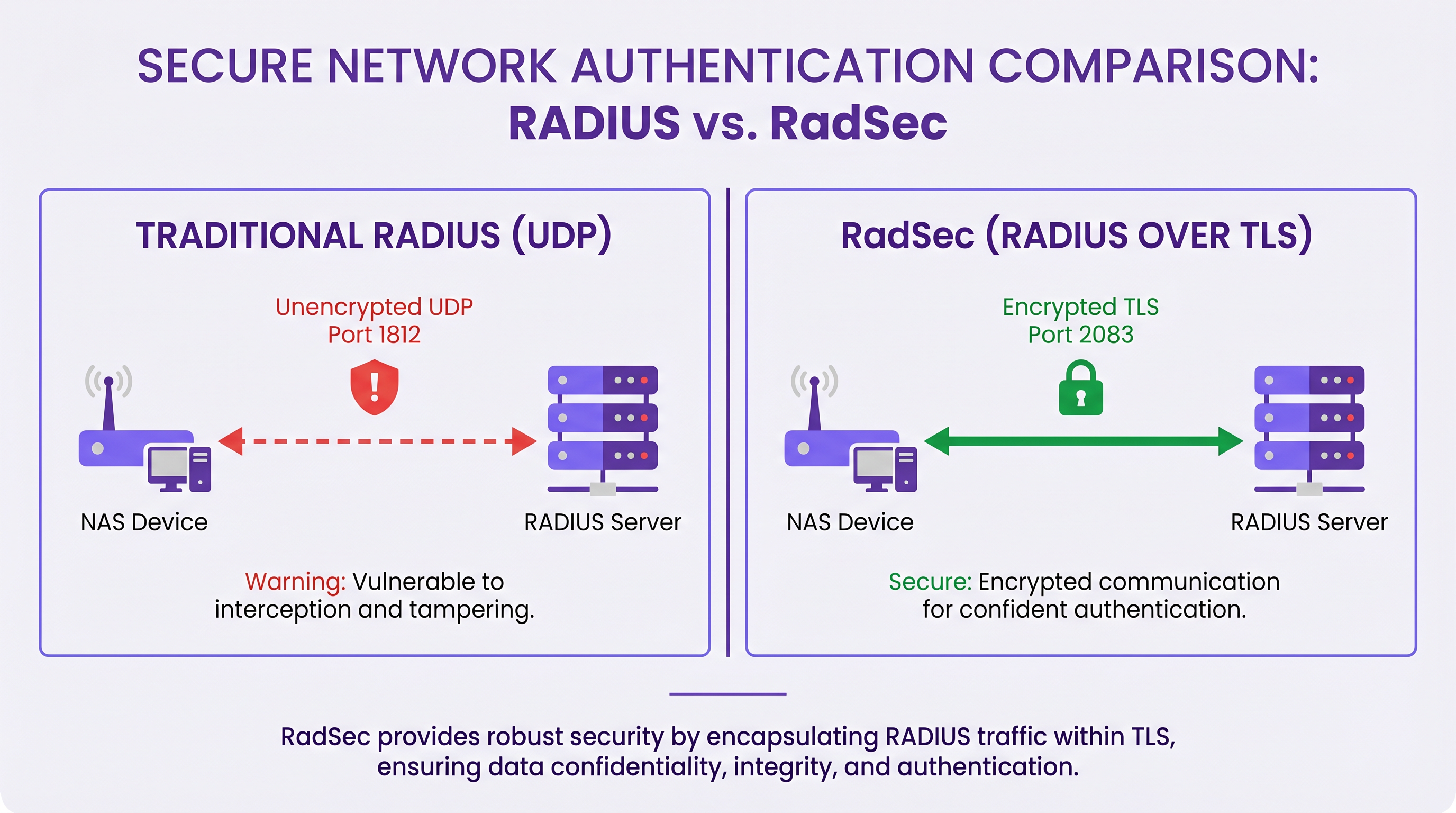
Les principales caractéristiques techniques de RadSec incluent :
- Transport TCP : RadSec assure une livraison fiable et ordonnée. Cela élimine le besoin de retransmissions au niveau de la couche application inhérentes au RADIUS UDP, qui peuvent causer des problèmes dans les environnements à forte latence.
- Chiffrement Complet de la Charge Utile : L'intégralité du paquet RADIUS — y compris les en-têtes et tous les attributs — est chiffrée dans le tunnel TLS.
- Authentification Mutuelle (mTLS) : Le serveur RADIUS et le périphérique NAS s'authentifient mutuellement à l'aide de certificats X.509. Cela remplace le modèle de secret partagé faible par une infrastructure à clé publique (PKI) robuste.
- Connexions Persistantes : Contrairement au RADIUS UDP qui est sans connexion, RadSec maintient une connexion TCP persistante. Cela réduit la surcharge liée à l'établissement d'une nouvelle connexion pour chaque demande d'authentification, ce qui est très efficace pour les sites très fréquentés.
Note : La RFC 7360 définit RADIUS sur DTLS (Datagram TLS), qui utilise UDP. Bien qu'utile dans des scénarios spécifiques à haut débit, TLS sur TCP reste la norme pour les déploiements RADIUS cloud d'entreprise.
Architecture dans les Environnements Distribués
Dans un déploiement multi-sites typique — tel qu'un fournisseur national de santé ou une chaîne de centres de transport — RadSec simplifie considérablement l'architecture.
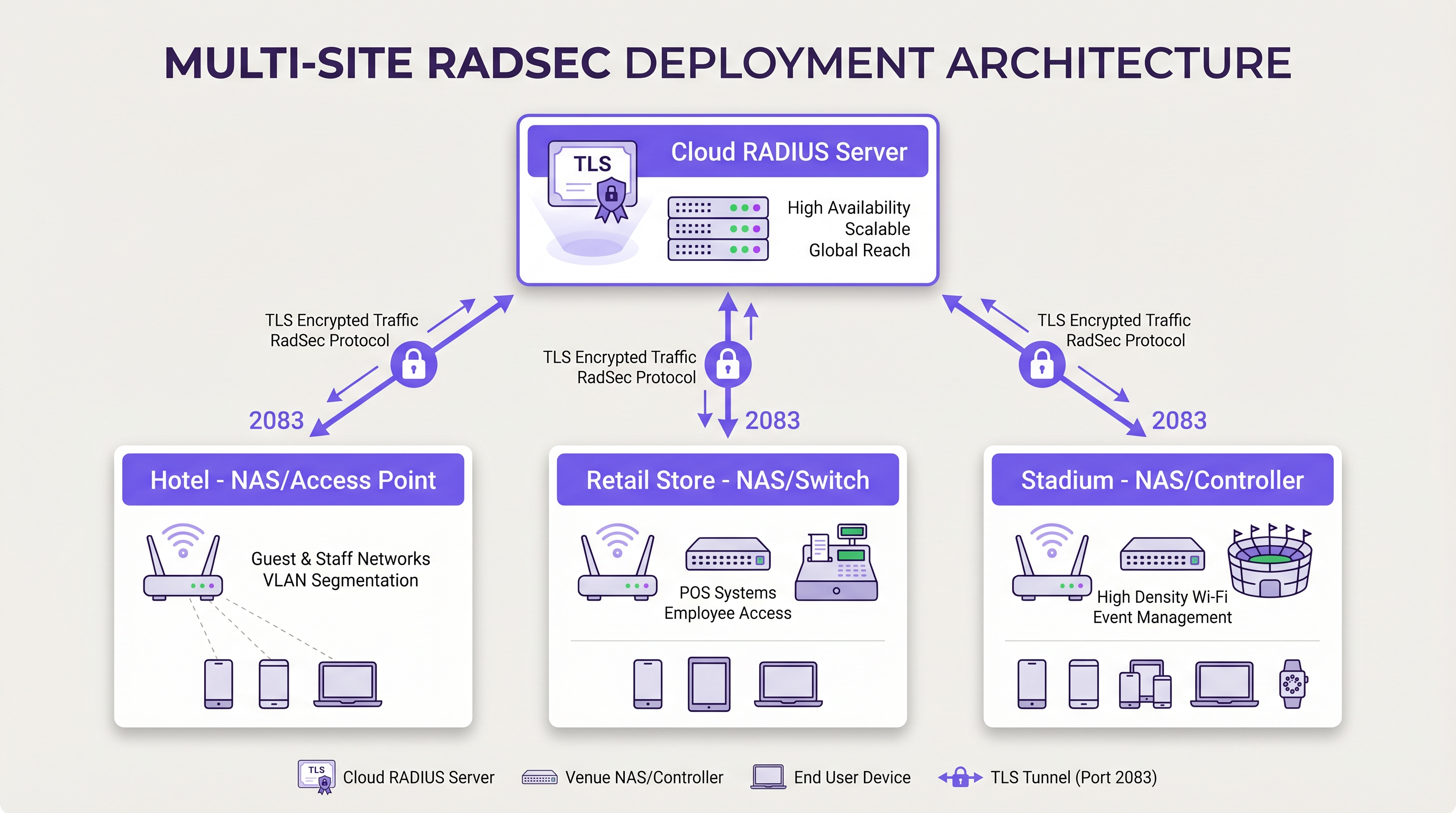
Au lieu de construire des maillages VPN IPsec complexes depuis chaque succursale vers un centre de données central pour protéger le trafic RADIUS, chaque périphérique NAS établit une connexion TLS RadSec directe sur Internet vers le fournisseur RADIUS cloud. Il s'agit d'un modèle de sécurité au niveau de la couche application qui est plus propre à déployer et plus facile à dépanner que les VPN au niveau de la couche réseau.
Guide d'Implémentation
Le déploiement de RadSec nécessite une coordination entre l'infrastructure réseau, les autorités de certification et les politiques de pare-feu. Suivez ces étapes indépendantes du fournisseur pour un déploiement réussi.
1. Préparation de l'Infrastructure de Certificats
RadSec repose sur mTLS. Vous avez besoin de certificats pour le serveur et pour les clients (périphériques NAS).
- Certificat Serveur : Votre fournisseur RADIUS cloud (par exemple, Purple) présentera un certificat serveur signé par une autorité de certification (CA) publique ou une CA interne. Vos périphériques NAS doivent avoir le certificat CA racine installé dans leur magasin de confiance pour valider le serveur.
- Certificats Clients : Chaque périphérique NAS a besoin d'un certificat client pour s'identifier auprès du serveur RADIUS. Générez-les via votre PKI interne ou votre système de gestion de réseau. Assurez-vous qu'ils utilisent au moins des clés RSA 2048 bits ou ECDSA P-256.
2. Configuration du Pare-feu
RadSec nécessite des règles de sortie spécifiques depuis vos interfaces de gestion NAS :
- Protocole* : TCP
- Port de destination : 2083
- IP/FQDN de destination : Les adresses de vos serveurs RADIUS cloud primaires et secondaires.
- Inspection d'état : Assurez-vous que le pare-feu autorise le trafic de retour pour les connexions TCP établies.
- Keepalives : Configurez les valeurs de délai d'expiration TCP du pare-feu pour qu'elles soient plus longues que l'intervalle keepalive RadSec (généralement 60 secondes) afin d'éviter les coupures de connexion silencieuses.
3. Configuration du périphérique NAS (flux de travail générique)
Bien que la syntaxe spécifique varie selon le fournisseur (Cisco, Aruba, Juniper, etc.), les étapes de configuration logique sont cohérentes :
- Importer le certificat CA : Chargez le certificat CA qui a signé le certificat du serveur RADIUS dans le magasin de confiance du NAS.
- Importer le certificat client : Chargez le certificat client et la clé privée du périphérique NAS.
- Définir le serveur RADIUS : Configurez l'IP/FQDN du serveur RADIUS.
- Activer RadSec : Spécifiez TLS comme protocole de transport et définissez le port sur 2083.
- Lier les certificats : Associez les certificats importés à la configuration du serveur RadSec.
- Appliquer au profil AAA : Ajoutez le serveur RadSec aux groupes d'authentification et de comptabilité AAA pertinents.
4. Gestion des périphériques hérités (proxy RadSec)
Tous les périphériques NAS ne prennent pas en charge RadSec nativement. Pour les commutateurs plus anciens ou les points d'accès grand public, déployez un proxy RadSec (tel que radsecproxy). Le proxy se trouve sur le LAN local, accepte le RADIUS UDP traditionnel des périphériques hérités et le transmet via un tunnel TLS RadSec sécurisé au serveur RADIUS cloud.
Bonnes pratiques
- Gestion du cycle de vie des certificats : Mettez en œuvre le renouvellement automatique des certificats pour les périphériques NAS. Une expiration massive des certificats clients entraînera une panne réseau généralisée. Surveillez la validité des certificats et alertez 90, 60 et 30 jours avant l'expiration.
- Haute disponibilité : Configurez toujours des serveurs RadSec primaires et secondaires. Étant donné que l'établissement d'une connexion TCP prend plus de temps qu'une transmission de paquets UDP, configurez des temporisateurs de basculement agressifs sur le NAS pour passer rapidement au serveur secondaire si la connexion primaire tombe.
- Keepalives TCP : Activez les keepalives TCP sur le périphérique NAS pour détecter les connexions inactives et empêcher les pare-feu de couper les sessions inactives. Un intervalle de 60 secondes est standard.
- Validation stricte des certificats : Assurez-vous que les périphériques NAS sont configurés pour valider strictement le certificat du serveur, y compris la vérification du nom alternatif du sujet (SAN) par rapport au nom d'hôte du serveur configuré. Ne désactivez pas la validation des certificats en production.
- Préparation à l'avenir : À mesure que les normes sans fil évoluent, comme celles abordées dans notre guide WiFi 6E vs WiFi 7: What Venues Need to Know , le volume de trafic d'authentification augmentera. Les connexions TCP persistantes de RadSec sont mieux adaptées pour gérer cette densité que l'UDP.
Dépannage et atténuation des risques
Lorsque les déploiements RadSec échouent, le problème est rarement lié au protocole RADIUS lui-même ; il est presque toujours lié à TLS ou TCP.
Modes de défaillance courants
- Échecs de la négociation TLS (CA inconnu) : Le périphérique NAS rejette le certificat du serveur RADIUS car l'autorité de certification signataire ne se trouve pas dans le magasin de confiance du NAS.
- Atténuation : Vérifiez la chaîne de CA exacte utilisée par le serveur et assurez-vous que les CA racine (et toute CA intermédiaire) sont installées sur le NAS.
- Coupures de connexion silencieuses : La connexion RadSec s'établit avec succès, mais les requêtes d'authentification expirent après une période d'inactivité. Il s'agit généralement d'un pare-feu à états qui coupe la connexion TCP inactive.
- Atténuation : Activez les keepalives TCP sur le NAS et vérifiez les paramètres de délai d'expiration de session du pare-feu pour le port 2083.
- Décalage d'horloge : La validation des certificats TLS repose sur une heure système précise. Si l'horloge du périphérique NAS est significativement désynchronisée, elle évaluera les certificats valides comme expirés ou non encore valides.
- Atténuation : Assurez-vous que tous les périphériques NAS sont synchronisés avec des serveurs NTP fiables avant d'initier des connexions RadSec.
ROI et impact commercial
La transition vers RadSec offre une valeur commerciale mesurable au-delà des améliorations techniques de sécurité :
- Conformité et réduction des risques : RadSec chiffre les données d'authentification en transit, satisfaisant directement aux exigences de PCI DSS v4.0 et GDPR. Cela atténue les risques financiers et de réputation associés à l'interception des identifiants.
- Efficacité opérationnelle : Le remplacement des VPN IPsec complexes de site à site par RadSec au niveau de l'application réduit la charge de travail d'ingénierie réseau. Le dépannage d'une connexion TLS à un fournisseur cloud est significativement plus rapide que le débogage du routage VPN et des négociations de phase IKE sur des centaines de succursales.
- Préparation au cloud : RadSec est la technologie habilitante pour l'authentification cloud-native. En l'adoptant, les organisations peuvent s'intégrer de manière transparente avec les fournisseurs d'identité modernes et les plateformes comme Purple, réduisant ainsi l'empreinte des serveurs sur site et les coûts de licence.
Définitions clés
RadSec
A protocol that encapsulates RADIUS authentication and accounting data within a Transport Layer Security (TLS) tunnel.
Used to secure authentication traffic over untrusted networks, replacing legacy UDP RADIUS.
mTLS (Mutual TLS)
An authentication process where both the client (NAS) and the server (RADIUS) verify each other's X.509 certificates during the TLS handshake.
Provides stronger security than the traditional RADIUS shared secret model by ensuring both endpoints are cryptographically verified.
NAS (Network Access Server)
The device that provides network access to users and acts as a RADIUS client. In modern networks, this is typically a wireless access point, switch, or wireless LAN controller.
The NAS is responsible for initiating the RadSec connection to the cloud RADIUS server.
PKI (Public Key Infrastructure)
The framework of roles, policies, hardware, software, and procedures needed to create, manage, distribute, use, store, and revoke digital certificates.
Essential for managing the certificates required by RadSec deployments across large estates.
TCP Keepalive
A mechanism that sends empty TCP packets over an idle connection to verify the connection is still active and to prevent stateful firewalls from dropping the session.
Crucial for maintaining persistent RadSec connections during periods of low authentication activity.
RadSec Proxy
A software service that acts as an intermediary, receiving traditional UDP RADIUS traffic from legacy devices and forwarding it over a secure RadSec TLS connection.
Used to bridge the gap in environments where older network hardware does not natively support RadSec.
X.509 Certificate
A digital certificate that uses the widely accepted international X.509 PKI standard to verify that a public key belongs to the user, computer or service identity contained within the certificate.
The cryptographic foundation used by RadSec to establish identity and encrypt the TLS tunnel.
EAP (Extensible Authentication Protocol)
An authentication framework frequently used in wireless networks and point-to-point connections.
EAP traffic (like EAP-TLS or PEAP) is encapsulated within RADIUS packets, meaning RadSec securely transports the EAP exchange.
Exemples concrets
A national retail chain with 500 locations is migrating from on-premise RADIUS servers to Purple's Cloud RADIUS. The existing architecture uses unencrypted RADIUS over UDP across a mix of MPLS and SD-WAN links. 450 locations have modern Aruba access points, while 50 locations use legacy hardware that does not support RadSec. How should the network architect design the new authentication transport?
The architect should implement a hybrid RadSec deployment. For the 450 locations with modern Aruba APs, configure native RadSec directly on the APs or local controllers. Install the root CA certificate of Purple's cloud RADIUS on the Aruba devices, and provision client certificates via the network management platform. Configure egress firewall rules for TCP 2083. For the 50 legacy locations, deploy a lightweight RadSec proxy (e.g., a small Linux VM or container running radsecproxy) at each site. The legacy APs will send standard UDP RADIUS to the local proxy, which will then encapsulate the traffic in a TLS tunnel to the Purple cloud.
During a RadSec deployment at a large conference centre, the network team observes that the NAS devices successfully authenticate users during busy periods, but fail to authenticate the first few users early in the morning. Packet captures show the NAS attempting to send RADIUS traffic, but receiving TCP RST packets from the firewall.
The issue is caused by the firewall's aggressive TCP session timeout dropping the idle RadSec connection overnight. The network team must configure TCP keepalives on the NAS devices for the RadSec connection, setting the interval to 60 seconds. Additionally, they should review the firewall's stateful inspection rules for TCP port 2083 and ensure the session timeout is greater than the keepalive interval.
Questions d'entraînement
Q1. You are designing the firewall policy for a new RadSec deployment connecting 50 branch offices to Purple's Cloud RADIUS platform. What specific egress rules must be configured on the branch firewalls?
Conseil : Consider both the protocol and the stateful nature of the connection.
Voir la réponse type
The branch firewalls must allow outbound TCP traffic on port 2083 originating from the NAS management IP addresses, destined for the IP addresses or FQDNs of the Purple Cloud RADIUS servers. Because TCP is stateful, the firewall will automatically allow the return traffic for established sessions. UDP ports 1812 and 1813 are not required for RadSec.
Q2. A junior engineer reports that a newly configured switch is failing to establish a RadSec connection with the cloud RADIUS server. The switch logs show: `TLS handshake failed: unknown CA`. How should you resolve this?
Conseil : The switch does not inherently trust the certificate presented by the server.
Voir la réponse type
You need to identify the Certificate Authority (CA) that issued the cloud RADIUS server's certificate. Once identified, obtain the public Root CA certificate (and any intermediate CA certificates) and import them into the switch's trust store. This allows the switch to cryptographically verify the server's identity during the TLS handshake.
Q3. Your organisation mandates that all network infrastructure must survive a WAN outage. If the internet connection to the cloud RADIUS server fails, what happens to the RadSec connection, and how does the NAS handle subsequent authentication requests?
Conseil : Consider TCP connection states and standard RADIUS failover mechanisms.
Voir la réponse type
When the WAN fails, the persistent TCP connection will eventually time out (or be explicitly reset if the local interface goes down). The NAS will mark the primary RadSec server as unreachable. If a secondary RadSec server is configured (e.g., in a different geographic region), the NAS will attempt to establish a new TLS connection to it. If all RADIUS servers are unreachable, new authentications will fail. However, users who are already authenticated and connected will typically remain connected until their session expires or they roam, as RADIUS is only involved during the initial authentication and periodic re-authentication phases.
Continuer la lecture de cette série
Conditions d'utilisation du WiFi pour le personnel : Essentiels juridiques et de conformité
Ce guide présente les aspects juridiques et techniques essentiels pour rédiger et appliquer les conditions d'utilisation du WiFi pour le personnel dans les établissements d'entreprise. Il détaille les éléments à inclure dans une charte d'utilisation acceptable (AUP), comment respecter les exigences du GDPR et de la norme PCI DSS, et comment déployer l'authentification basée sur l'identité et la segmentation du réseau pour protéger les actifs de l'entreprise. Les responsables informatiques, les équipes RH et les directeurs des opérations des hôtels, des chaînes de magasins, des stades et des organisations du secteur public y trouveront des conseils pratiques à mettre en œuvre dès ce trimestre.
L'avenir de la sécurité Wi-Fi : NAC et détection des menaces basés sur l'IA
Ce guide faisant autorité explore l'évolution de la sécurité Wi-Fi d'entreprise, du WPA2 hérité au contrôle d'accès réseau (NAC) basé sur l'IA et à la détection des menaces. Conçu pour les leaders informatiques, il fournit des stratégies de déploiement exploitables pour sécuriser les environnements à haute densité comme le commerce de détail, l'hôtellerie et les stades, en utilisant les réseaux basés sur l'identité de Purple.
Gestion de la sécurité des appareils IoT avec NAC et MPSK
Ce guide technique détaille comment les entreprises peuvent sécuriser les appareils IoT sans interface utilisateur en utilisant une architecture de clés pré-partagées multiples (MPSK) et le contrôle d'accès réseau (NAC). Il fournit des étapes de mise en œuvre concrètes pour réaliser la micro-segmentation, contenir les rayons d'explosion de sécurité et maintenir la conformité sans sacrifier l'évolutivité.