
RadSec: Sicherung des RADIUS-Authentifizierungsverkehrs mit TLS
Dieser umfassende Leitfaden beleuchtet RadSec (RADIUS over TLS) und erklärt detailliert, wie es den Netzwerk-Authentifizierungsverkehr für moderne Cloud- und Multi-Site-Bereitstellungen sichert. Er bietet Netzwerkarchitekten praktische Implementierungsschritte, Strategien zur Zertifikatsverwaltung und Fehlerbehebungstechniken, um veraltetes UDP RADIUS zu ersetzen.
Diesen Leitfaden anhören
Podcast-Transkript ansehen

Zusammenfassung für Führungskräfte
Seit Jahrzehnten ist RADIUS über UDP die Grundlage der Netzwerkauthentifizierung und stützt sich auf private Netzwerke und gemeinsame Geheimnisse für die Sicherheit. Da sich Unternehmensarchitekturen hin zu Cloud-nativen Infrastrukturen, verteilten Einzelhandels- und Gastgewerbe- Standorten sowie SD-WAN-Overlays verschieben, hat sich das Bedrohungsmodell grundlegend geändert. RADIUS-Verkehr durchläuft nun häufig öffentliche oder gemeinsam genutzte Netzwerke, wodurch Authentifizierungsdaten dem Abfangen ausgesetzt sind.
RadSec (RADIUS over TLS), definiert in RFC 6614, löst dieses Problem, indem es RADIUS-Pakete in einem gegenseitig authentifizierten TLS-Tunnel kapselt. Dieser Leitfaden bietet eine umfassende technische Referenz für Netzwerkarchitekten und Sicherheitsingenieure zur Bereitstellung von RadSec. Wir behandeln die architektonischen Unterschiede zum traditionellen RADIUS, Anforderungen an die Zertifikatsverwaltung, Firewall-Konfigurationen und praktische Bereitstellungsüberlegungen für die Integration mit Cloud-RADIUS-Plattformen wie der Guest WiFi - und WiFi Analytics -Infrastruktur von Purple. Durch die Einführung von RadSec können Unternehmen eine robuste Sicherheit gewährleisten, strenge Compliance-Anforderungen wie PCI DSS und GDPR erfüllen und Multi-Site-Authentifizierungsarchitekturen vereinfachen.
Technischer Einblick
Die Entwicklung des RADIUS-Transports
Das Remote Authentication Dial-In User Service (RADIUS)-Protokoll, ursprünglich in RFC 2865 definiert, wurde für eine andere Ära der Vernetzung entwickelt. Es verwendet UDP als Transportschicht (Port 1812 für Authentifizierung, 1813 für Accounting). Im traditionellen RADIUS ist die Nutzlast während der Übertragung weitgehend unverschlüsselt. Der einzige Schutzmechanismus ist die Verschleierung des User-Password-Attributs mittels eines gemeinsamen Geheimnisses zwischen dem Network Access Server (NAS) und dem RADIUS-Server.
Während dies ausreichend war, als NAS-Geräte und RADIUS-Server im selben physischen LAN oder dedizierten MPLS-Schaltungen angesiedelt waren, sind moderne Architekturen diesem Modell entwachsen. Wie in unserer Diskussion über Die zentralen SD-WAN-Vorteile für moderne Unternehmen erläutert, verlassen sich verteilte Unternehmen heute auf den Internet-Transport für die Konnektivität zwischen Standorten. Das Senden von unverschlüsseltem RADIUS-Verkehr über das öffentliche Internet setzt Benutzeranmeldeinformationen, Sitzungsidentifikatoren und Netzwerkzugriffsrichtlinien dem Abfangen und der Manipulation aus.
RadSec: RADIUS über TLS (RFC 6614)
RadSec begegnet diesen Schwachstellen, indem es die Transportschicht ändert. Anstelle von UDP verwendet RadSec TCP-Port 2083. Bevor RADIUS-Pakete ausgetauscht werden, stellen der NAS und der RADIUS-Server eine TLS (Transport Layer Security)-Verbindung her.
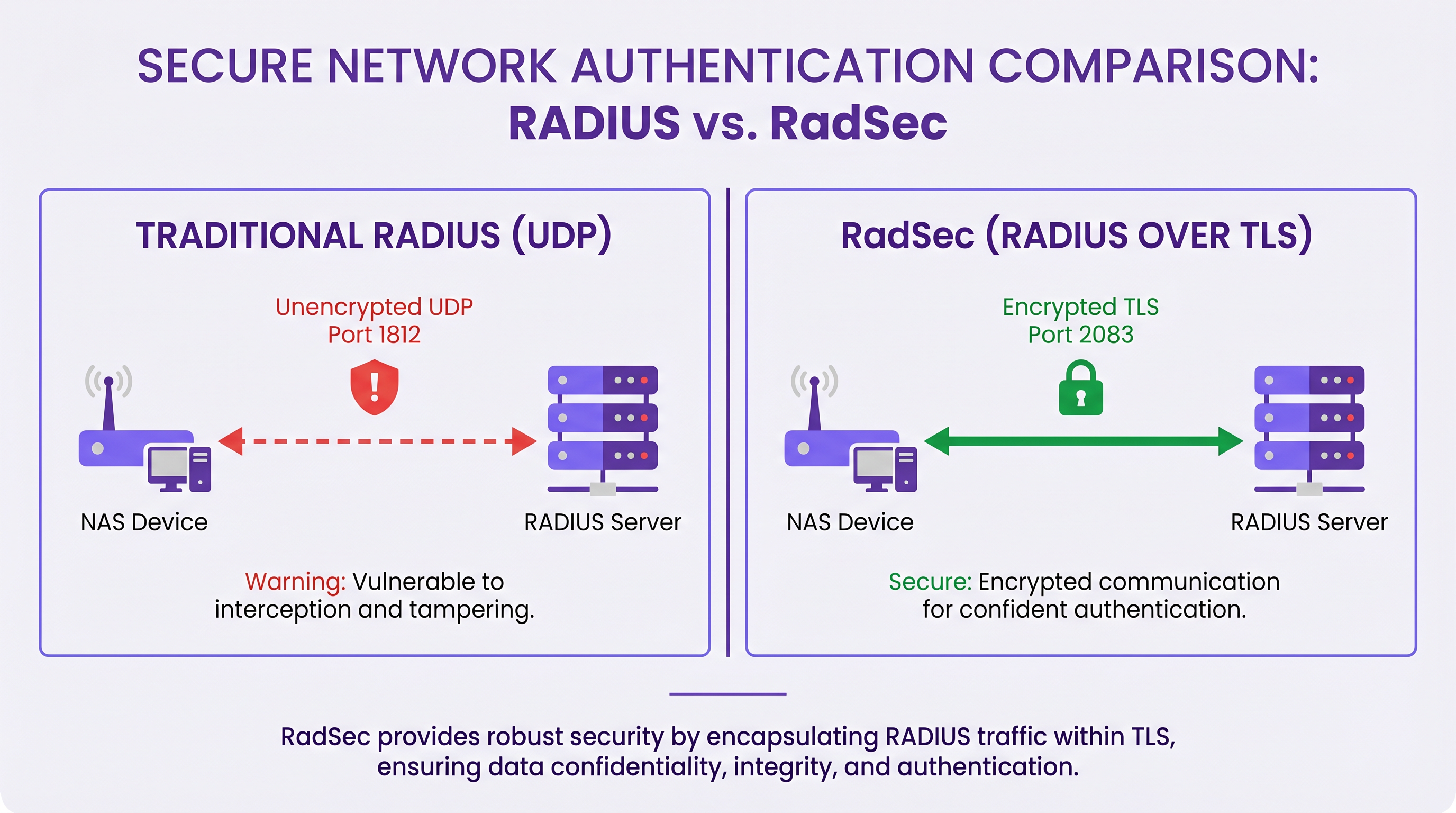
Die technischen Kernmerkmale von RadSec umfassen:
- TCP-Transport: RadSec bietet eine zuverlässige, geordnete Zustellung. Dies eliminiert die Notwendigkeit von Anwendungsschicht-Neuübertragungen, die bei UDP RADIUS inhärent sind und in Umgebungen mit hoher Latenz Probleme verursachen können.
- Vollständige Nutzlastverschlüsselung: Das gesamte RADIUS-Paket – einschließlich Header und aller Attribute – wird innerhalb des TLS-Tunnels verschlüsselt.
- Gegenseitige Authentifizierung (mTLS): Sowohl der RADIUS-Server als auch das NAS-Gerät authentifizieren sich gegenseitig mithilfe von X.509-Zertifikaten. Dies ersetzt das schwache Shared-Secret-Modell durch eine robuste Public Key Infrastructure (PKI).
- Persistente Verbindungen: Im Gegensatz zu UDP RADIUS, das verbindungslos ist, unterhält RadSec eine persistente TCP-Verbindung. Dies reduziert den Overhead beim Aufbau einer neuen Verbindung für jede Authentifizierungsanfrage, was für stark frequentierte Standorte äußerst effizient ist.
Hinweis: RFC 7360 definiert RADIUS über DTLS (Datagram TLS), das UDP verwendet. Obwohl in bestimmten Szenarien mit hohem Durchsatz nützlich, bleibt TLS über TCP der Standard für Enterprise Cloud RADIUS-Bereitstellungen.
Architektur in verteilten Umgebungen
In einer typischen Multi-Site-Bereitstellung – wie einem nationalen Gesundheitsdienstleister oder einer Kette von Verkehrsknotenpunkten – vereinfacht RadSec die Architektur erheblich.
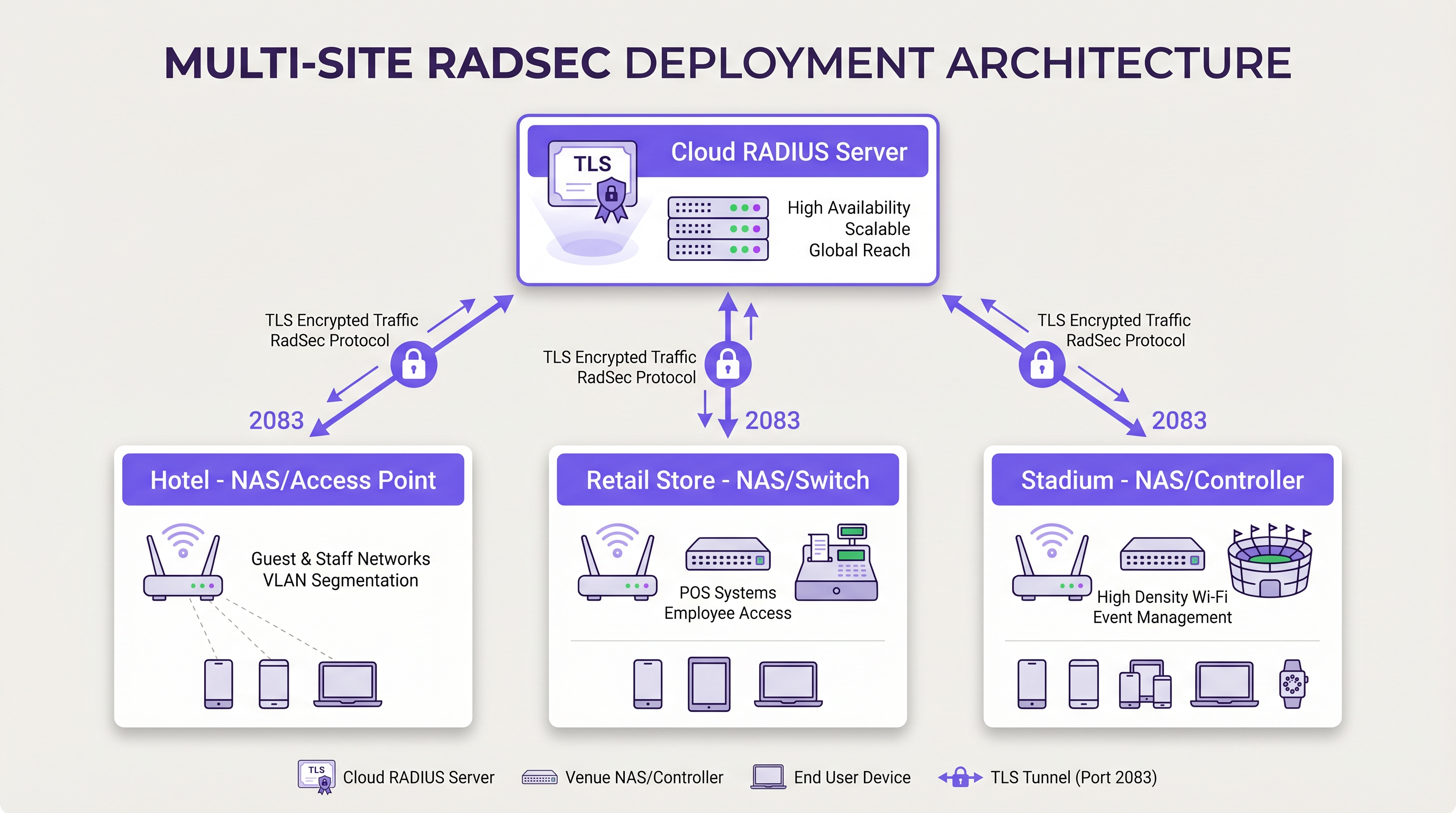
Anstatt komplexe IPsec-VPN-Meshes von jedem Zweigstandort zurück zu einem zentralen Rechenzentrum aufzubauen, um den RADIUS-Verkehr zu schützen, stellt jedes NAS-Gerät eine direkte RadSec TLS-Verbindung über das Internet zum Cloud-RADIUS-Anbieter her. Dies ist ein Sicherheitmodell auf Anwendungsebene, das einfacher bereitzustellen und zu beheben ist als VPNs auf Netzwerkebene.
Implementierungsleitfaden
Die Bereitstellung von RadSec erfordert die Koordination zwischen Netzwerkinfrastruktur, Zertifizierungsstellen und Firewall-Richtlinien. Befolgen Sie diese herstellerneutralen Schritte für eine erfolgreiche Bereitstellung.
1. Vorbereitung der Zertifikatsinfrastruktur
RadSec basiert auf mTLS. Sie benötigen Zertifikate sowohl für den Server als auch für die Clients (NAS-Geräte).
- Serverzertifikat: Ihr Cloud-RADIUS-Anbieter (z.B. Purple) stellt ein Serverzertifikat bereit, das von einer öffentlichen Zertifizierungsstelle (CA) oder einer internen CA signiert ist. Ihre NAS-Geräte müssen das Root-CA-Zertifikat in ihrem Vertrauensspeicher installiert haben, um den Server zu validieren.
- Clientzertifikate: Jedes NAS-Gerät benötigt ein Clientzertifikat, um sich gegenüber dem RADIUS-Server zu identifizieren. Generieren Sie diese über Ihre interne PKI oder Ihr Netzwerkmanagementsystem. Stellen Sie sicher, dass sie mindestens RSA 2048-Bit- oder ECDSA P-256-Schlüssel verwenden.
2. Firewall-Konfiguration
RadSec erfordert spezifische Egress-Regeln von Ihren NAS-Verwaltungsschnittstellen:
- Protokoll: TCP
- Zielport: 2083
- Ziel-IP/FQDN: Die Adressen Ihrer primären und sekundären Cloud RADIUS-Server.
- Stateful Inspection: Stellen Sie sicher, dass die Firewall den Rückverkehr für etablierte TCP-Verbindungen zulässt.
- Keepalives: Konfigurieren Sie die TCP-Timeout-Werte der Firewall so, dass sie länger sind als das RadSec-Keepalive-Intervall (typischerweise 60 Sekunden), um den Abbruch stiller Verbindungen zu verhindern.
3. NAS-Gerätekonfiguration (Generischer Workflow)
Obwohl die spezifische Syntax je nach Anbieter (Cisco, Aruba, Juniper usw.) variiert, sind die logischen Konfigurationsschritte konsistent:
- CA-Zertifikat importieren: Laden Sie das CA-Zertifikat, das das Zertifikat des RADIUS-Servers signiert hat, in den NAS-Vertrauensspeicher.
- Client-Zertifikat importieren: Laden Sie das Client-Zertifikat und den privaten Schlüssel des NAS-Geräts.
- RADIUS-Server definieren: Konfigurieren Sie die IP/FQDN des RADIUS-Servers.
- RadSec aktivieren: Geben Sie TLS als Transportprotokoll an und setzen Sie den Port auf 2083.
- Zertifikate binden: Verknüpfen Sie die importierten Zertifikate mit der RadSec-Serverkonfiguration.
- Auf AAA-Profil anwenden: Fügen Sie den RadSec-Server den relevanten AAA-Authentifizierungs- und Abrechnungsgruppen hinzu.
4. Umgang mit älteren Geräten (RadSec-Proxy)
Nicht alle NAS-Geräte unterstützen RadSec nativ. Für ältere Switches oder Access Points der Consumer-Klasse implementieren Sie einen RadSec-Proxy (wie z. B. radsecproxy). Der Proxy befindet sich im lokalen LAN, akzeptiert traditionelles UDP RADIUS von älteren Geräten und leitet es über einen sicheren RadSec TLS-Tunnel an den Cloud RADIUS-Server weiter.
Best Practices
- Zertifikats-Lebenszyklus-Management: Implementieren Sie eine automatisierte Zertifikatserneuerung für NAS-Geräte. Ein massenhaftes Ablaufen von Client-Zertifikaten führt zu einem weitreichenden Netzwerkausfall. Überwachen Sie die Gültigkeit von Zertifikaten und senden Sie Warnungen 90, 60 und 30 Tage vor dem Ablaufdatum.
- Hochverfügbarkeit: Konfigurieren Sie immer primäre und sekundäre RadSec-Server. Da der Aufbau einer TCP-Verbindung länger dauert als die Übertragung eines UDP-Pakets, konfigurieren Sie aggressive Failover-Timer auf dem NAS, um schnell auf den sekundären Server umzuschalten, falls die primäre Verbindung abbricht.
- TCP Keepalives: Aktivieren Sie TCP Keepalives auf dem NAS-Gerät, um tote Verbindungen zu erkennen und zu verhindern, dass Firewalls inaktive Sitzungen beenden. Ein Intervall von 60 Sekunden ist Standard.
- Strenge Zertifikatsvalidierung: Stellen Sie sicher, dass NAS-Geräte so konfiguriert sind, dass sie das Serverzertifikat streng validieren, einschließlich der Überprüfung des Subject Alternative Name (SAN) gegen den konfigurierten Server-Hostnamen. Deaktivieren Sie die Zertifikatsvalidierung nicht in der Produktion.
- Zukunftssicherheit: Mit der Weiterentwicklung der WLAN-Standards, wie sie in unserem Leitfaden WiFi 6E vs WiFi 7: What Venues Need to Know diskutiert werden, wird das Volumen des Authentifizierungsverkehrs zunehmen. Die persistenten TCP-Verbindungen von RadSec sind besser geeignet, diese Dichte zu bewältigen als UDP.
Fehlerbehebung & Risikominderung
Wenn RadSec-Implementierungen fehlschlagen, liegt das Problem selten am RADIUS-Protokoll selbst; es hängt fast immer mit TLS oder TCP zusammen.
Häufige Fehlerursachen
- TLS-Handshake-Fehler (Unbekannte CA): Das NAS-Gerät lehnt das Zertifikat des RADIUS-Servers ab, weil die signierende CA nicht im NAS-Vertrauensspeicher enthalten ist.
- Abhilfe: Überprüfen Sie die genaue vom Server verwendete CA-Kette und stellen Sie sicher, dass die Root- (und alle Zwischen-) CAs auf dem NAS installiert sind.
- Stiller Verbindungsabbruch: Die RadSec-Verbindung wird erfolgreich hergestellt, aber Authentifizierungsanfragen laufen nach einer Zeit der Inaktivität in einen Timeout. Dies ist in der Regel eine Stateful Firewall, die die inaktive TCP-Verbindung trennt.
- Abhilfe: Aktivieren Sie TCP Keepalives auf dem NAS und überprüfen Sie die Firewall-Sitzungs-Timeout-Einstellungen für Port 2083.
- Zeitversatz (Clock Skew): Die TLS-Zertifikatsvalidierung basiert auf einer genauen Systemzeit. Wenn die Uhr des NAS-Geräts erheblich abweicht, werden gültige Zertifikate als abgelaufen oder noch nicht gültig bewertet.
- Abhilfe: Stellen Sie sicher, dass alle NAS-Geräte mit zuverlässigen NTP-Servern synchronisiert sind, bevor Sie RadSec-Verbindungen initiieren.
ROI & Geschäftlicher Nutzen
Der Übergang zu RadSec bietet messbaren Geschäftswert, der über technische Sicherheitsverbesserungen hinausgeht:
- Compliance und Risikoreduzierung: RadSec verschlüsselt Authentifizierungsdaten während der Übertragung und erfüllt direkt die Anforderungen von PCI DSS v4.0 und GDPR. Dies mindert die finanziellen und reputativen Risiken, die mit der Abfangen von Anmeldeinformationen verbunden sind.
- Betriebliche Effizienz: Der Ersatz komplexer Site-to-Site-IPsec-VPNs durch anwendungsschichtbasiertes RadSec reduziert den Aufwand für die Netzwerktechnik. Die Fehlerbehebung einer TLS-Verbindung zu einem Cloud-Anbieter ist erheblich schneller als das Debuggen von VPN-Routing und IKE-Phasenverhandlungen über Hunderte von Niederlassungen hinweg.
- Cloud-Bereitschaft: RadSec ist die ermöglichende Technologie für Cloud-native Authentifizierung. Durch die Einführung können Organisationen nahtlos mit modernen Identitätsanbietern und Plattformen wie Purple integrieren, wodurch der On-Premise-Server-Footprint und die Lizenzkosten reduziert werden.
Schlüsseldefinitionen
RadSec
A protocol that encapsulates RADIUS authentication and accounting data within a Transport Layer Security (TLS) tunnel.
Used to secure authentication traffic over untrusted networks, replacing legacy UDP RADIUS.
mTLS (Mutual TLS)
An authentication process where both the client (NAS) and the server (RADIUS) verify each other's X.509 certificates during the TLS handshake.
Provides stronger security than the traditional RADIUS shared secret model by ensuring both endpoints are cryptographically verified.
NAS (Network Access Server)
The device that provides network access to users and acts as a RADIUS client. In modern networks, this is typically a wireless access point, switch, or wireless LAN controller.
The NAS is responsible for initiating the RadSec connection to the cloud RADIUS server.
PKI (Public Key Infrastructure)
The framework of roles, policies, hardware, software, and procedures needed to create, manage, distribute, use, store, and revoke digital certificates.
Essential for managing the certificates required by RadSec deployments across large estates.
TCP Keepalive
A mechanism that sends empty TCP packets over an idle connection to verify the connection is still active and to prevent stateful firewalls from dropping the session.
Crucial for maintaining persistent RadSec connections during periods of low authentication activity.
RadSec Proxy
A software service that acts as an intermediary, receiving traditional UDP RADIUS traffic from legacy devices and forwarding it over a secure RadSec TLS connection.
Used to bridge the gap in environments where older network hardware does not natively support RadSec.
X.509 Certificate
A digital certificate that uses the widely accepted international X.509 PKI standard to verify that a public key belongs to the user, computer or service identity contained within the certificate.
The cryptographic foundation used by RadSec to establish identity and encrypt the TLS tunnel.
EAP (Extensible Authentication Protocol)
An authentication framework frequently used in wireless networks and point-to-point connections.
EAP traffic (like EAP-TLS or PEAP) is encapsulated within RADIUS packets, meaning RadSec securely transports the EAP exchange.
Ausgearbeitete Beispiele
A national retail chain with 500 locations is migrating from on-premise RADIUS servers to Purple's Cloud RADIUS. The existing architecture uses unencrypted RADIUS over UDP across a mix of MPLS and SD-WAN links. 450 locations have modern Aruba access points, while 50 locations use legacy hardware that does not support RadSec. How should the network architect design the new authentication transport?
The architect should implement a hybrid RadSec deployment. For the 450 locations with modern Aruba APs, configure native RadSec directly on the APs or local controllers. Install the root CA certificate of Purple's cloud RADIUS on the Aruba devices, and provision client certificates via the network management platform. Configure egress firewall rules for TCP 2083. For the 50 legacy locations, deploy a lightweight RadSec proxy (e.g., a small Linux VM or container running radsecproxy) at each site. The legacy APs will send standard UDP RADIUS to the local proxy, which will then encapsulate the traffic in a TLS tunnel to the Purple cloud.
During a RadSec deployment at a large conference centre, the network team observes that the NAS devices successfully authenticate users during busy periods, but fail to authenticate the first few users early in the morning. Packet captures show the NAS attempting to send RADIUS traffic, but receiving TCP RST packets from the firewall.
The issue is caused by the firewall's aggressive TCP session timeout dropping the idle RadSec connection overnight. The network team must configure TCP keepalives on the NAS devices for the RadSec connection, setting the interval to 60 seconds. Additionally, they should review the firewall's stateful inspection rules for TCP port 2083 and ensure the session timeout is greater than the keepalive interval.
Übungsfragen
Q1. You are designing the firewall policy for a new RadSec deployment connecting 50 branch offices to Purple's Cloud RADIUS platform. What specific egress rules must be configured on the branch firewalls?
Hinweis: Consider both the protocol and the stateful nature of the connection.
Musterlösung anzeigen
The branch firewalls must allow outbound TCP traffic on port 2083 originating from the NAS management IP addresses, destined for the IP addresses or FQDNs of the Purple Cloud RADIUS servers. Because TCP is stateful, the firewall will automatically allow the return traffic for established sessions. UDP ports 1812 and 1813 are not required for RadSec.
Q2. A junior engineer reports that a newly configured switch is failing to establish a RadSec connection with the cloud RADIUS server. The switch logs show: `TLS handshake failed: unknown CA`. How should you resolve this?
Hinweis: The switch does not inherently trust the certificate presented by the server.
Musterlösung anzeigen
You need to identify the Certificate Authority (CA) that issued the cloud RADIUS server's certificate. Once identified, obtain the public Root CA certificate (and any intermediate CA certificates) and import them into the switch's trust store. This allows the switch to cryptographically verify the server's identity during the TLS handshake.
Q3. Your organisation mandates that all network infrastructure must survive a WAN outage. If the internet connection to the cloud RADIUS server fails, what happens to the RadSec connection, and how does the NAS handle subsequent authentication requests?
Hinweis: Consider TCP connection states and standard RADIUS failover mechanisms.
Musterlösung anzeigen
When the WAN fails, the persistent TCP connection will eventually time out (or be explicitly reset if the local interface goes down). The NAS will mark the primary RadSec server as unreachable. If a secondary RadSec server is configured (e.g., in a different geographic region), the NAS will attempt to establish a new TLS connection to it. If all RADIUS servers are unreachable, new authentications will fail. However, users who are already authenticated and connected will typically remain connected until their session expires or they roam, as RADIUS is only involved during the initial authentication and periodic re-authentication phases.
Weiterlesen in dieser Reihe
Die Zukunft der Wi-Fi-Sicherheit: KI-gesteuertes NAC und Bedrohungserkennung
Dieser maßgebliche Leitfaden beleuchtet die Entwicklung der Unternehmens-Wi-Fi-Sicherheit von veraltetem WPA2 zu KI-gesteuerter Netzwerkzugangskontrolle (NAC) und Bedrohungserkennung. Er wurde für IT-Führungskräfte entwickelt und bietet umsetzbare Bereitstellungsstrategien zur Sicherung von Umgebungen mit hoher Dichte wie Einzelhandel, Gastgewerbe und Stadien mithilfe der identitätsbasierten Netzwerke von Purple.
Verwaltung der IoT-Gerätesicherheit mit NAC und MPSK
Dieser technische Leitfaden beschreibt, wie Unternehmen ihre Headless-IoT-Geräte mithilfe der Multiple Pre-Shared Key (MPSK)-Architektur und Network Access Control (NAC) sichern können. Er bietet umsetzbare Implementierungsschritte zur Erreichung von Mikrosegmentierung, zur Eindämmung von Sicherheitsrisiken und zur Einhaltung von Vorschriften, ohne die Skalierbarkeit zu beeinträchtigen.
RadSec: Wie RADIUS über TLS die Sicherheit der WiFi-Authentifizierung verbessert
Diese maßgebliche technische Referenz erklärt, wie RadSec (RFC 6614) die Sicherheit der Unternehmens-WiFi-Authentifizierung verbessert, indem es den traditionellen RADIUS-Verkehr in TLS-Verschlüsselung einhüllt. Für IT-Manager und Netzwerkarchitekten konzipiert, behandelt sie Architektur, Bereitstellungsstrategien und praktische Schritte zur Minderung der Risiken von unverschlüsseltem UDP RADIUS-Verkehr in Unternehmens- und Gastnetzwerken.