

सुरक्षित गेस्ट WiFi नेटवर्क कसे सेट करावे: स्टेप-बाय-स्टेप
हे मार्गदर्शक आयटी टीम्ससाठी सुरक्षित गेस्ट WiFi नेटवर्क सुरुवातीपासून डिझाइन आणि डिप्लॉय करण्याबद्दल एक सर्वसमावेशक तांत्रिक माहिती देते. यात VLAN सेगमेंटेशन, फायरवॉल नियम डिझाइन, Captive Portal एकत्रीकरण आणि बँडविड्थ व्यवस्थापन यांचा समावेश आहे, ज्यात हॉस्पिटॅलिटी आणि रिटेल वातावरणातील वास्तविक-जगातील अंमलबजावणीच्या परिस्थितींचा समावेश आहे. स्थळ ऑपरेटर आणि नेटवर्क आर्किटेक्ट्सना सुरक्षा आणि अनुपालन दोन्ही आवश्यकता पूर्ण करणारे, कृती करण्यायोग्य, विक्रेता-तटस्थ मार्गदर्शन मिळेल.
🎧 हे मार्गदर्शक ऐका
ट्रान्सक्रिप्ट पहा
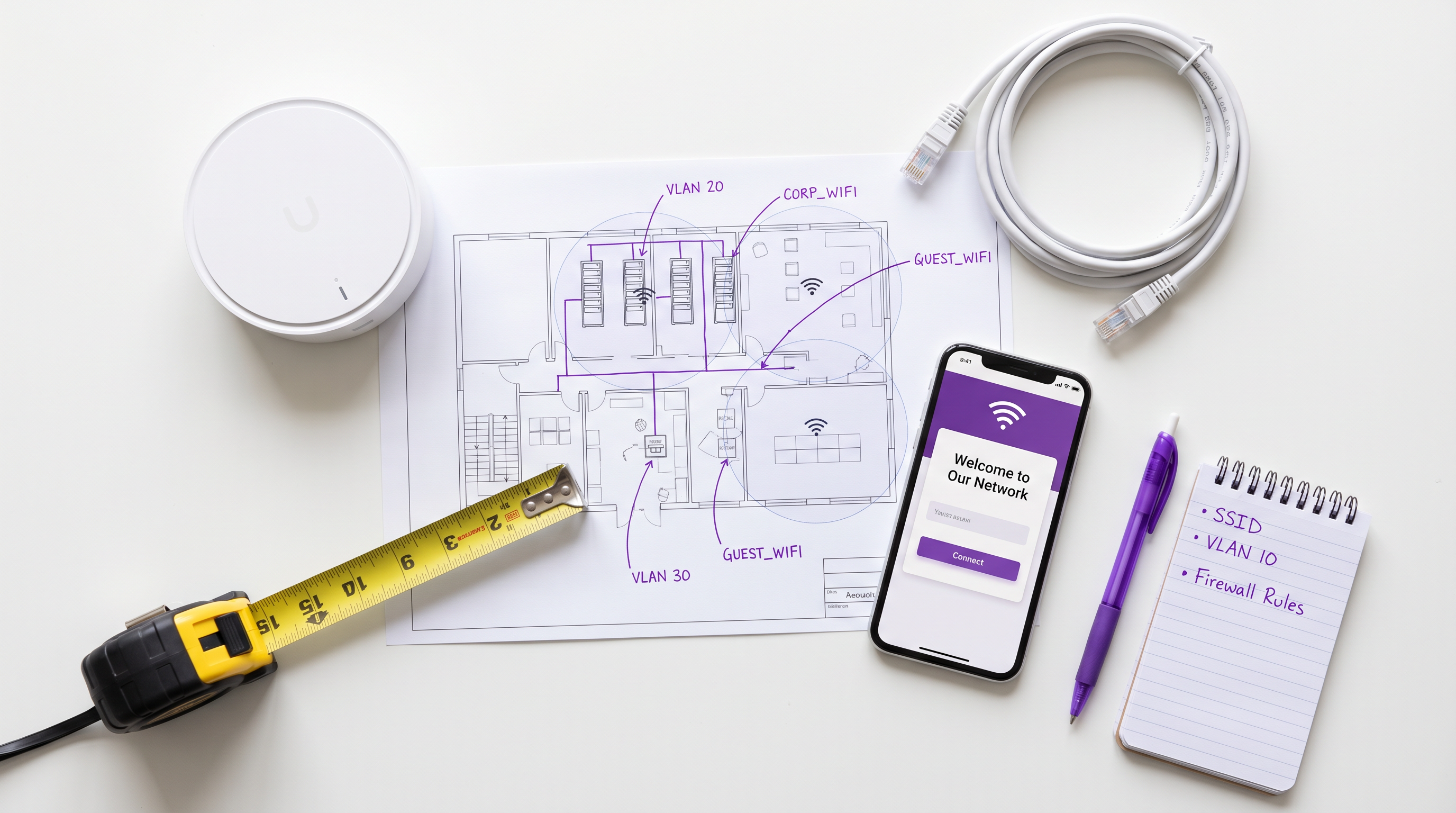
कार्यकारी सारांश
एंटरप्राइझ आयटी टीम्ससाठी, गेस्ट WiFi डिप्लॉय करणे आता ऐच्छिक सुविधा राहिलेली नाही — ती एक गंभीर व्यावसायिक आवश्यकता आहे. तथापि, तुमच्या भौतिक परिसरात अनियंत्रित, अविश्वसनीय उपकरणे आणल्याने महत्त्वपूर्ण सुरक्षा आणि अनुपालन धोके निर्माण होतात. हे तांत्रिक संदर्भ मार्गदर्शक आर्किटेक्ट्स आणि नेटवर्क अभियंत्यांसाठी सुरक्षित गेस्ट WiFi नेटवर्क डिझाइन, डिप्लॉय आणि व्यवस्थापित करण्यासाठी एक स्टेप-बाय-स्टेप पद्धत प्रदान करते. आम्ही VLANs वापरून नेटवर्क सेगमेंटेशनचे मूलभूत घटक, फायरवॉल पॉलिसी डिझाइन, ॲक्सेस पॉइंट कॉन्फिगरेशन आणि Captive Portal एकत्रीकरण यांचा समावेश करतो. या विक्रेता-तटस्थ सर्वोत्तम पद्धती लागू करून, संस्था अभ्यागतांसाठी अखंड कनेक्टिव्हिटी प्रदान करू शकतात, त्याच वेळी कॉर्पोरेट डेटा, पॉइंट ऑफ सेल (POS) सिस्टम्स आणि अंतर्गत सर्व्हरचे पूर्ण अलगीकरण राखू शकतात, ज्यामुळे PCI DSS, GDPR आणि IEEE 802.1X या मानकांचे अनुपालन सुनिश्चित होते. तुम्ही हॉटेल इस्टेट, रिटेल चेन किंवा सार्वजनिक क्षेत्रातील ठिकाणी डिप्लॉय करत असाल तरीही, या मार्गदर्शकातील आर्किटेक्चर तत्त्वे सार्वत्रिकपणे लागू होतात.
तांत्रिक सखोल माहिती
कोणत्याही सुरक्षित वायरलेस डिप्लॉयमेंटचा आधारस्तंभ म्हणजे लॉजिकल पृथक्करण. गेस्ट नेटवर्क कॉर्पोरेट इन्फ्रास्ट्रक्चरपासून पूर्णपणे स्वतंत्रपणे कार्य करण्यासाठी आर्किटेक्ट केले पाहिजे, जरी दोन्ही समान भौतिक हार्डवेअर — स्विचेस, ॲक्सेस पॉइंट्स आणि WAN लिंक्स सामायिक करत असले तरी. हे मजबूत VLAN कॉन्फिगरेशन, कठोर फायरवॉल नियम आणि ॲक्सेस पॉइंटवर लेयर 2 आयसोलेशनद्वारे साध्य केले जाते.
VLANs द्वारे नेटवर्क सेगमेंटेशन
सुरक्षित गेस्ट नेटवर्क तयार करण्यातील पहिली पायरी म्हणजे एक समर्पित व्हर्च्युअल लोकल एरिया नेटवर्क (VLAN) स्थापित करणे. सामान्य एंटरप्राइझ डिप्लॉयमेंटमध्ये, कॉर्पोरेट डेटा नेटवर्क VLAN 10 (उदा. 10.0.10.0/24) वर असते, तर गेस्ट ट्रॅफिक VLAN 20 (उदा. 10.0.20.0/22) ला नियुक्त केले जाते. हे लेयर 2 सेगमेंटेशन सुनिश्चित करते की ब्रॉडकास्ट डोमेन पूर्णपणे वेगळे आहेत. जेव्हा ॲक्सेस पॉइंट गेस्ट SSID ब्रॉडकास्ट करतो, तेव्हा तो त्या SSID मधील सर्व ट्रॅफिकला गेस्ट VLAN ID (802.1Q टॅगिंग) सह टॅग करतो, आणि नंतर ते ट्रंक पोर्टद्वारे स्विचकडे फॉरवर्ड करतो.
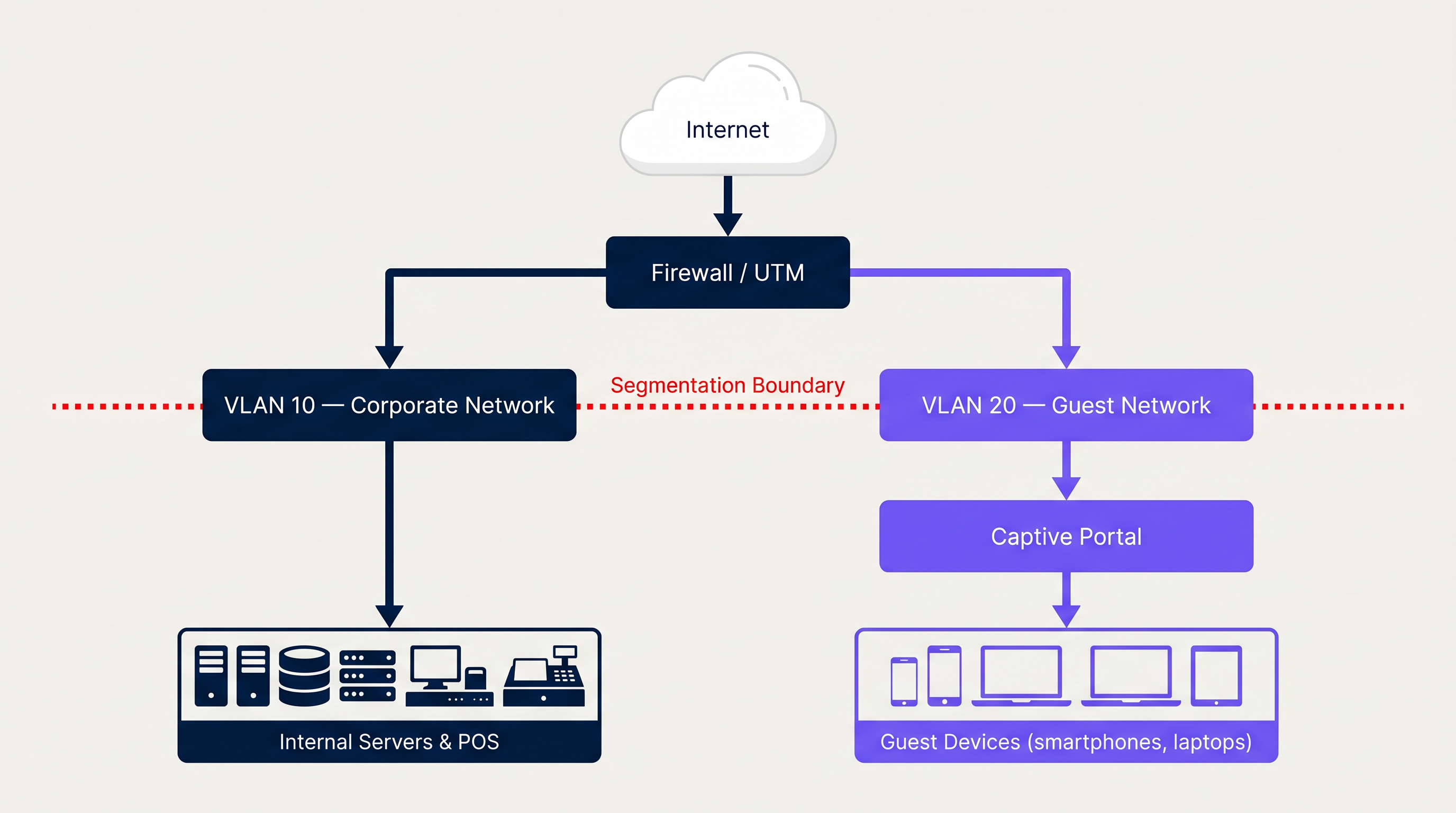
स्विच सर्व संबंधित ट्रंक पोर्ट्सवर गेस्ट VLAN सह कॉन्फिगर केलेला असणे आवश्यक आहे आणि ॲक्सेस पॉइंटच्या वायरलेस कंट्रोलरने गेस्ट SSID ला VLAN 20 वर मॅप केले पाहिजे. हे मॅपिंग साखळीतील एक महत्त्वाचा दुवा आहे — येथील चुकीच्या कॉन्फिगरेशनमुळे गेस्ट ट्रॅफिक कॉर्पोरेट VLAN वर दिसू शकते, जी एक गंभीर सुरक्षा भंग आहे.
फायरवॉल आणि राउटिंग पॉलिसीज
संबंधित लेयर 3 नियंत्रणांशिवाय स्विच स्तरावरील सेगमेंटेशन अपुरे आहे. फायरवॉल किंवा युनिफाइड थ्रेट मॅनेजमेंट (UTM) उपकरणाने कठोर इंटर-VLAN राउटिंग पॉलिसीज लागू केल्या पाहिजेत. गेस्ट VLAN साठी मूलभूत नियम संच खालीलप्रमाणे आहे:
| नियम | कृती | स्रोत | गंतव्यस्थान |
|---|---|---|---|
| 1 | नकार | VLAN 20 (गेस्ट) | VLAN 10 (कॉर्पोरेट) |
| 2 | नकार | VLAN 20 (गेस्ट) | व्यवस्थापन सबनेट |
| 3 | अनुमती | VLAN 20 (गेस्ट) | इंटरनेट (0.0.0.0/0) |
| 4 | नकार | कोणतेही | कोणतेही (अप्रत्यक्ष) |
नियम वरून खाली प्रक्रिया केले जातात. जर एखाद्या तडजोड केलेल्या गेस्ट डिव्हाइसने अंतर्गत नेटवर्क स्कॅन करण्याचा प्रयत्न केला, तर नियम 1 कॉर्पोरेट मालमत्तांपर्यंत पोहोचण्यापूर्वी पॅकेट्स ड्रॉप करतो. या आर्किटेक्चरसोबत SD-WAN क्षमता डिप्लॉय केल्याने वितरित साइट्सवर ट्रॅफिक व्यवस्थापन आणखी वाढवता येते — SD-WAN मल्टी-साइट गेस्ट नेटवर्क डिप्लॉयमेंट्सना कसे पूरक ठरते याच्या सविस्तर माहितीसाठी आधुनिक व्यवसायांसाठी मुख्य SD WAN फायदे पहा.
क्लायंट आयसोलेशन (लेयर 2 आयसोलेशन)
ॲक्सेस पॉइंट स्तरावर, क्लायंट आयसोलेशन (ज्याला AP आयसोलेशन किंवा लेयर 2 आयसोलेशन असेही म्हणतात) सक्षम करणे महत्त्वाचे आहे. हे वैशिष्ट्य एकाच गेस्ट SSID शी कनेक्ट केलेल्या डिव्हाइसेसना लेयर 2 वर एकमेकांशी थेट संवाद साधण्यापासून प्रतिबंधित करते. याशिवाय, गेस्ट नेटवर्कवरील एक दुर्भावनापूर्ण ॲक्टर ARP स्पूफिंग, मॅन-इन-द-मिडल हल्ले किंवा इतर गेस्ट डिव्हाइसेसविरुद्ध लॅटरल स्कॅनिंग सुरू करू शकतो. बहुतेक एंटरप्राइझ वायरलेस कंट्रोलर्स (Cisco, Aruba, Ruckus, Ubiquiti) हे SSID प्रोफाइलवर एक साधे टॉगल म्हणून उपलब्ध करतात.
Captive Portal आर्किटेक्चर
एक ओपन, अनएन्क्रिप्टेड नेटवर्क (ओपन सिस्टम ऑथेंटिकेशन) हे सर्वात सामान्य गेस्ट WiFi डिप्लॉयमेंट आहे, परंतु ते सर्वात कमी सुरक्षित देखील आहे. सर्व ट्रॅफिक प्लेनटेक्स्टमध्ये प्रसारित केले जाते आणि रेडिओ रेंजमधील कोणीही ते इंटरसेप्ट करू शकतो. गेस्ट ॲक्सेससाठी आधुनिक मानक म्हणजे Captive Portal जे WPA2 (सामायिक पासफ्रेजसह) किंवा, शक्यतो, WPA3-Enhanced Open (ऑपर्च्युनिस्टिक वायरलेस एन्क्रिप्शन — OWE) सह एकत्रित केले जाते, जे प्री-शेअर्ड कीची आवश्यकता नसताना प्रति-सत्र एन्क्रिप्शन प्रदान करते.
एक Captive Portal वापरकर्त्याच्या प्रारंभिक HTTP विनंतीला इंटरसेप्ट करते आणि इंटरनेट ॲक्सेस देण्यापूर्वी त्यांना लॉगिन पृष्ठावर पुनर्निर्देशित करते. पोर्टल एका समर्पित सर्व्हरवरून (ऑन-प्रिमाइसेस किंवा क्लाउड-होस्टेड) सर्व्ह केले जाते आणि ॲक्सेस देण्यासाठी किंवा नाकारण्यासाठी RADIUS द्वारे वायरलेस कंट्रोलरशी संवाद साधते.
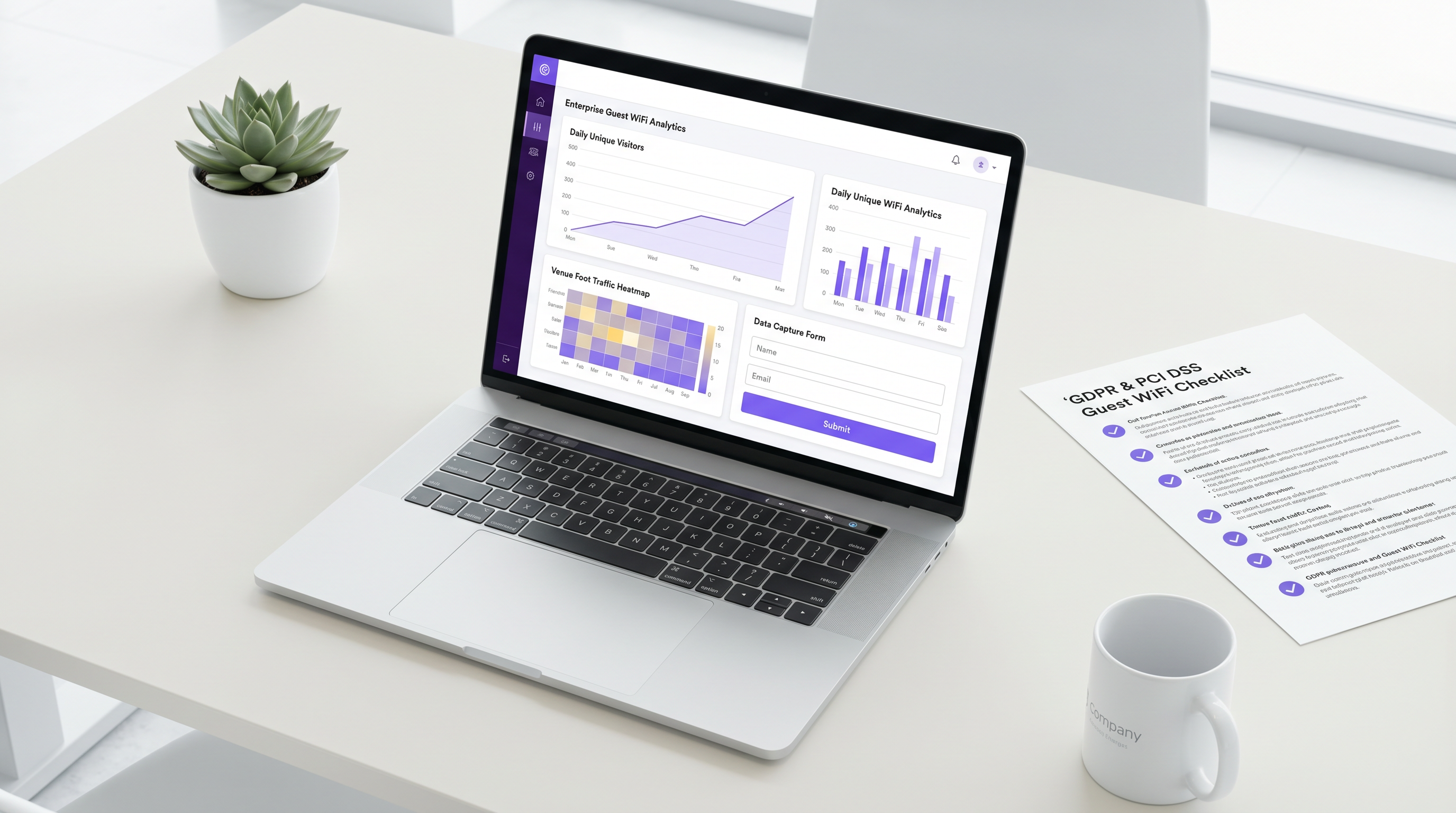
तुमच्या वायरलेस कंट्रोलरला RADIUS द्वारे Guest WiFi सारख्या प्लॅटफॉर्मसह एकत्रित केल्याने सुरक्षित, अनुपालनक्षम आणि वैशिष्ट्यपूर्ण ऑनबोर्डिंग अनुभव मिळतो. Captive Portal एकाच वेळी अनेक उद्देश पूर्ण करते: वापरकर्ता प्रमाणीकरण (सोशल लॉगिन, ईमेल किंवा SMS द्वारे), स्वीकारार्ह वापर धोरणांची (AUP) अनिवार्य स्वीकृती आणि सर्वसमावेशक WiFi Analytics डॅशबोर्डमध्ये फीड होणारे फर्स्ट-पार्टी डेटा कॅप्चर. प्लॅटफॉर्म प्रदात्यांचे मूल्यांकन करणाऱ्या संस्थांसाठी, Provedores de WiFi para Convidados: O que Procurar ao Escolher uma Plataforma de WiFi चे पुनरावलोकन करणे खरेदी प्रक्रियेतील एक मौल्यवान पाऊल आहे.
अंमलबजावणी मार्गदर्शक
व्यवस्थापित स्विचेस, समर्पित फायरवॉल/UTM आणि वायरलेस कंट्रोलर (क्लाउड-व्यवस्थापित किंवा ऑन-प्रिमाइसेस) वापरणाऱ्या एंटरप्राइझ वातावरणासाठी खालील चरण-दर-चरण उपयोजन क्रम लागू होतो.
पायरी 1: पायाभूत सुविधा कॉन्फिगरेशन
1a. कोअर स्विचवर गेस्ट VLAN तयार करा तुमच्या व्यवस्थापित स्विचवर VLAN 20 परिभाषित करा आणि त्याला वर्णनात्मक नाव द्या (उदा. "GUEST_WIFI"). ॲक्सेस लेयर स्विचेस आणि फायरवॉलशी कनेक्ट होणाऱ्या सर्व ट्रंक पोर्ट्सवर VLAN प्रसारित केले जाईल याची खात्री करा.
1b. गेस्ट VLAN साठी DHCP आणि DNS कॉन्फिगर करा VLAN 20 साठी एक समर्पित DHCP स्कोप सेट करा. एक मोठा सबनेट वापरा (मध्यम ठिकाणांसाठी किमान /22, स्टेडियम आणि कॉन्फरन्स सेंटर्ससाठी /20 किंवा त्याहून मोठा). कमी लीज वेळ (1-2 तास) कॉन्फिगर करा. महत्त्वाचे म्हणजे, गेस्ट क्लायंटना बाह्य DNS सर्व्हर (उदा. 1.1.1.1, 8.8.8.8) किंवा फिल्टर केलेली DNS सेवा नियुक्त करा — तुमच्या अंतर्गत कॉर्पोरेट DNS रिसॉल्व्हर्सना कधीही नाही.
1c. फायरवॉल नियम लागू करा वर वर्णन केलेले इंटर-VLAN ACL नियम लागू करा. गेस्ट SSID शी डिव्हाइस कनेक्ट करून आणि अंतर्गत IP ॲड्रेसना पिंग करण्याचा प्रयत्न करून चाचणी करा — सर्व पिंग टाइम आउट झाले पाहिजेत.
पायरी 2: वायरलेस ॲक्सेस पॉइंट कॉन्फिगरेशन
2a. गेस्ट SSID तयार करा स्पष्टपणे ओळखता येणारे नेटवर्क नाव प्रसारित करा (उदा. "VenueName_Guest"). या SSID ला वायरलेस कंट्रोलरमध्ये VLAN 20 शी मॅप करा.
2b. क्लायंट आयसोलेशन सक्षम करा गेस्ट SSID प्रोफाइलसाठी AP आयसोलेशन / क्लायंट आयसोलेशन चालू करा.
2c. बँडविड्थ लिमिटिंग आणि QoS कॉन्फिगर करा प्रत्येक क्लायंटसाठी दर मर्यादा लागू करा (उदा. 5 Mbps डाउन / 2 Mbps अप). WAN एजवर गेस्ट ट्रॅफिकपेक्षा कॉर्पोरेट ट्रॅफिकला प्राधान्य देण्यासाठी QoS DSCP मार्किंग कॉन्फिगर करा.
2d. प्रमाणीकरण पद्धत सेट करा जास्तीत जास्त सुरक्षिततेसाठी, WPA3-Enhanced Open (OWE) कॉन्फिगर करा. जुन्या डिव्हाइस सुसंगततेसाठी, Captive Portal पुनर्निर्देशनासह WPA2 स्वीकार्य राहते.
पायरी 3: Captive Portal उपयोजन
3a. वॉल्ड गार्डन कॉन्फिगर करा तुमच्या वायरलेस कंट्रोलरमध्ये पूर्व-प्रमाणीकरण परवानगी असलेले गंतव्यस्थान ("वॉल्ड गार्डन") परिभाषित करा. यामध्ये Captive Portal सर्व्हर IP/डोमेन आणि कोणतेही बाह्य प्रमाणीकरण प्रदाते (उदा. सोशल लॉगिनसाठी accounts.google.com, graph.facebook.com), तसेच Apple चे Captive Portal डिटेक्शन URL (captive.apple.com) आणि समतुल्य Android/Windows डिटेक्शन एंडपॉइंट्स समाविष्ट असणे आवश्यक आहे.
3b. RADIUS सह एकत्रित करा तुमच्या Captive Portal प्लॅटफॉर्मच्या RADIUS सर्व्हरकडे निर्देशित करण्यासाठी वायरलेस कंट्रोलर कॉन्फिगर करा. सामायिक रहस्य परिभाषित करा आणि योग्य RADIUS टाइमआउट मूल्ये सेट करा.
3c. पोर्टल पृष्ठ तयार करा पोर्टल पृष्ठात हे समाविष्ट असल्याची खात्री करा: ब्रँड ओळख, सेवांच्या स्पष्ट अटी, डेटा गोपनीयता सूचना (GDPR-अनुरूप), आणि प्रमाणीकरण पद्धत(ती). हॉस्पिटॅलिटी उपयोजनांसाठी, टियर केलेले ॲक्सेस (विनामूल्य मूलभूत टियर वि. प्रीमियम सशुल्क टियर) देण्याचा विचार करा.
3d. एंड-टू-एंड फ्लोची चाचणी करा एक चाचणी डिव्हाइस कनेक्ट करा. पोर्टल योग्यरित्या लोड होते, प्रमाणीकरण यशस्वी होते, प्रमाणीकरणानंतर इंटरनेट ॲक्सेस दिला जातो आणि अंतर्गत संसाधने दुर्गम राहतात याची पडताळणी करा.
सर्वोत्तम पद्धती
सुरक्षा ऑडिटिंग: गेस्ट नेटवर्क सेगमेंटचे नियतकालिक भेदक चाचणी आणि भेद्यता स्कॅनिंग करा. किमान त्रैमासिक VLAN सेगमेंटेशनची अखंडता पडताळा. अंतर्गत सबनेट दुर्गम आहेत याची पुष्टी करण्यासाठी Nmap सारखी साधने गेस्ट VLAN मधून वापरली जाऊ शकतात.
सामग्री फिल्टरिंग: दुर्भावनापूर्ण डोमेन, प्रौढ सामग्री आणि उच्च-बँडविड्थ गैरवापर श्रेणी (टॉरेंटिंग, अवैध स्ट्रीमिंग) ब्लॉक करण्यासाठी गेस्ट VLAN वर DNS-आधारित किंवा इनलाइन वेब सामग्री फिल्टरिंग लागू करा. हे तुमच्या IP प्रतिष्ठेचे संरक्षण करते आणि तुमच्या इंटरनेट कनेक्शनचा अवैध क्रियाकलापांसाठी वापर होण्यापासून प्रतिबंधित करते.
सत्र व्यवस्थापन: IP ॲड्रेस पूल संपणे व्यवस्थापित करण्यासाठी आणि वापरकर्ते वेळोवेळी अटी पुन्हा स्वीकारतात याची खात्री करण्यासाठी निष्क्रिय सत्र टाइमआउट्स (उदा. 30 मिनिटांची निष्क्रियता) आणि निरपेक्ष सत्र मर्यादा (उदा. 8-24 तास) कॉन्फिगर करा.
लॉगिंग आणि मॉनिटरिंग: गेस्ट VLAN साठी DHCP लॉग, RADIUS प्रमाणीकरण लॉग आणि फायरवॉल लॉग किमान 12 महिन्यांसाठी ठेवा. ही अनेक डेटा रिटेन्शन नियमांनुसार एक आवश्यकता आहे आणि घटना प्रतिसादासाठी आवश्यक आहे.
हार्डवेअर मानके: नवीन उपयोजनांसाठी, WPA3 समर्थनासह Wi-Fi 6 (802.11ax) ॲक्सेस पॉइंट निर्दिष्ट करा. उच्च थ्रूपुट आणि सुधारित MU-MIMO क्षमता रिटेल स्टोअर्स आणि वाहतूक हबसारख्या उच्च-घनतेच्या वातावरणात विशेषतः मौल्यवान आहेत. विशिष्ट उच्च-घनता कॉन्फिगरेशन मार्गदर्शनासाठी ट्रान्सपोर्ट उपयोजने पहा.
समस्यानिवारण आणि जोखीम कमी करणे
सामान्य अपयश पद्धती
VLAN ब्लीडिंग: सर्वात गंभीर अपयश पद्धत — चुकीच्या पद्धतीने कॉन्फिगर केलेल्या ट्रंक पोर्ट्स किंवा फायरवॉल नियमांमुळे कॉर्पोरेट VLAN कडे गेस्ट ट्रॅफिकचे राउटिंग. शमन: उपयोजनोत्तर नेहमी गेस्ट SSID मधून अंतर्गत IP पर्यंत पोहोचण्याचा प्रयत्न करून चाचणी करा. अनपेक्षित इंटर-VLAN ट्रॅफिक शोधण्यासाठी नेटवर्क ॲक्सेस कंट्रोल (NAC) साधने वापरा.
Captive Portal पुनर्निर्देशन अपयश: आधुनिक ऑपरेटिंग सिस्टम (iOS, Android, Windows) Captive Portal शोधण्यासाठी विशिष्ट प्रोब URL वापरतात. जर वॉल्ड गार्डन चुकीच्या पद्धतीने कॉन्फिगर केले असेल किंवा DNS ब्लॉक केले असेल, तर पोर्टल लोड होणार नाही आणि डिव्हाइस "इंटरनेट कनेक्शन नाही" असे दर्शवेल. शमन: सर्व OS-विशिष्ट Captive Portal डिटेक्शन डोमेन वॉल्ड गार्डनमध्ये असल्याची खात्री करा. iOS, Android आणि Windows डिव्हाइसेसवर चाचणी करा.
DHCP संपणे: जास्त गर्दी असलेल्या ठिकाणी, जर सबनेट खूप लहान असेल किंवा लीज वेळ खूप जास्त असेल तर DHCP पूलमध्ये ॲड्रेस संपू शकतात. शमन: /22 किंवा मोठे सबनेट वापरा; लीज वेळ 1-2 तासांवर सेट करा.
बँडविड्थ संपृक्तता: दर मर्यादेशिवाय, कमी संख्येतील वापरकर्ते संपूर्ण WAN लिंक वापरू शकतात. शमन: प्रत्येक क्लायंटसाठी दर मर्यादा आणि कॉर्पोरेट ट्रॅफिकला प्राधान्य देणारे WAN-स्तरीय QoS लागू करा.
अनुपालन अंतर: GDPR-अनुरूप डेटा कॅप्चर प्रक्रियेशिवाय गेस्ट WiFi उपयोजित केल्याने संस्थेला नियामक जोखमीचा सामना करावा लागतो. शमन: अंगभूत संमती व्यवस्थापन, डेटा विषय ॲक्सेस विनंती (DSAR) हाताळणी आणि कॉन्फिगर करण्यायोग्य डेटा रिटेन्शन धोरणे प्रदान करणारा प्लॅटफॉर्म वापरा.
ROI आणि व्यवसाय परिणाम
प्राथमिक IT उद्दिष्ट सुरक्षितता असले तरीty and कनेक्टिव्हिटी, योग्यरित्या डिझाइन केलेले गेस्ट नेटवर्क खर्च केंद्राचे मोजता येण्याजोग्या महसूल चालकामध्ये रूपांतर करते. हॉस्पिटॅलिटी आणि हेल्थकेअर क्षेत्रातील संस्था गेस्ट WiFi डेटाचा उपयोग ठोस व्यावसायिक परिणाम साधण्यासाठी करत आहेत.
| मापदंड | विशिष्ट परिणाम |
|---|---|
| फर्स्ट-पार्टी डेटा कॅप्चर दर | कनेक्ट होणाऱ्या पाहुण्यांपैकी 60-80% |
| ईमेल मार्केटिंग ओपन रेट (WiFi-द्वारे मिळवलेले संपर्क) | 25-35% (उद्योग सरासरी 15-20% च्या तुलनेत) |
| पुन्हा भेट देणाऱ्यांच्या दरात वाढ | लक्ष्यित पुन्हा-सहभाग मोहिमांसह 10-15% |
| आयटी घटनांमध्ये घट | सेगमेंटेशननंतर पाहुण्यांशी संबंधित नेटवर्क घटनांमध्ये लक्षणीय घट |
योग्य VLAN सेगमेंटेशन आणि मजबूत Captive Portal लागू करण्याचा खर्च, असुरक्षित गेस्ट नेटवर्कमधून उद्भवणाऱ्या डेटा उल्लंघनाच्या संभाव्य आर्थिक आणि प्रतिष्ठेच्या नुकसानीच्या तुलनेत नगण्य आहे. एका PCI DSS गैर-अनुपालनासाठी €20 दशलक्ष किंवा GDPR अंतर्गत जागतिक वार्षिक उलाढालीच्या 4% पर्यंत दंड होऊ शकतो — जो कोणत्याही पायाभूत सुविधांच्या गुंतवणुकीपेक्षा खूप मोठा आहे.
Purple च्या WiFi Analytics प्लॅटफॉर्मसह एकत्रित केल्याने, ठिकाणाचे ऑपरेटर पाऊलखुणांचे नमुने, थांबण्याचा वेळ आणि परत येणाऱ्या अभ्यागतांच्या दरांमध्ये रिअल-टाइम दृश्यमानता मिळवतात — ही माहिती कर्मचाऱ्यांच्या निर्णयांना, मार्केटिंग खर्चाला आणि ठिकाणाच्या मांडणीच्या ऑप्टिमायझेशनला थेट मार्गदर्शन करते.
महत्त्वाच्या संज्ञा आणि व्याख्या
VLAN (Virtual Local Area Network)
A logical grouping of devices on the same physical network infrastructure, isolating broadcast traffic at Layer 2 using IEEE 802.1Q tagging.
The foundational mechanism for separating guest traffic from corporate traffic on shared physical switches and access points.
Client Isolation (AP Isolation)
A wireless network feature that prevents devices connected to the same SSID from communicating directly with each other at Layer 2.
Crucial for guest networks to prevent malicious users from attacking other guests' devices via ARP spoofing or direct scanning.
Captive Portal
A web page that a user is redirected to and must interact with before being granted full internet access on a public or guest network.
Used for user authentication, AUP acceptance, GDPR-compliant data capture, and marketing opt-in on guest WiFi networks.
SSID (Service Set Identifier)
The broadcasted name of a wireless network that client devices see when scanning for available networks.
A dedicated guest SSID is mapped to the guest VLAN in the wireless controller, ensuring traffic is correctly tagged and isolated.
RADIUS (Remote Authentication Dial-In User Service)
A networking protocol providing centralised Authentication, Authorisation, and Accounting (AAA) management for network access.
Used by wireless controllers to communicate with captive portal platforms (like Purple) to authenticate guest users and grant/deny network access.
Walled Garden
A set of pre-authentication allowed network destinations that a guest device can reach before completing captive portal login.
Must include the captive portal server, external authentication providers (Google, Facebook), and OS-specific captive portal detection URLs to ensure the login page loads correctly.
WPA3-Enhanced Open (OWE)
Opportunistic Wireless Encryption — a Wi-Fi security standard that provides per-session encryption on open networks without requiring a pre-shared key, ratified under IEEE 802.11.
The recommended encryption standard for guest SSIDs, providing protection against passive eavesdropping without the UX friction of a password.
QoS (Quality of Service)
A set of technologies and policies that manage network traffic to ensure critical applications receive priority bandwidth, reducing latency and packet loss.
Applied at the WAN edge to prioritize corporate traffic (POS, VoIP, PMS) over guest internet browsing, preventing guest bandwidth consumption from impacting business operations.
DHCP Exhaustion
A condition where a DHCP server has no remaining IP addresses in its pool to assign to new clients, causing new devices to fail to connect.
A common operational issue in high-footfall guest networks if the subnet is undersized or lease times are too long. Mitigated with large subnets and short lease durations.
केस स्टडीज
A 200-room hotel needs to deploy guest WiFi across all rooms and public areas. They currently operate a single flat network (VLAN 1) for both corporate operations (PMS, POS, back-office) and guests. The IT manager has been tasked with redesigning the network to achieve PCI DSS compliance before their next audit. How should the architecture be redesigned?
Phase 1 — Network Redesign: Create VLAN 10 for Corporate (10.0.10.0/24) and VLAN 20 for Guests (10.0.20.0/22 to accommodate high device counts across 200 rooms plus public areas). Configure the core firewall with explicit deny rules from VLAN 20 to VLAN 10, ensuring POS terminals on VLAN 10 are completely unreachable from the guest segment.
Phase 2 — Wireless Configuration: Reconfigure all access points to broadcast two SSIDs: 'Hotel_Corporate' (VLAN 10, WPA2-Enterprise with 802.1X) and 'Hotel_Guest' (VLAN 20, WPA3-Enhanced Open with captive portal). Enable Client Isolation on the guest SSID.
Phase 3 — Captive Portal: Deploy a GDPR-compliant captive portal integrated via RADIUS. Configure the portal to capture guest email addresses, display the privacy policy, and require explicit consent for marketing communications. Set session timeout to 24 hours with idle timeout of 60 minutes.
Phase 4 — Bandwidth Management: Apply per-client rate limiting of 10 Mbps down / 5 Mbps up on the guest SSID. Configure QoS to prioritize PMS and POS traffic (DSCP EF) over guest traffic (DSCP BE).
A large retail chain with 50 stores is experiencing two problems: (1) slow POS transaction times during peak hours because guests are streaming video on the free in-store WiFi, and (2) the marketing team has no visibility into how many unique visitors the stores receive daily. How should the IT team address both issues simultaneously?
Problem 1 — Bandwidth: Implement per-client rate limiting on the Guest SSID (cap each client at 3 Mbps down). Configure QoS rules on the WAN edge router to mark POS application traffic (typically TCP 443 to payment gateway IPs) with DSCP EF (Expedited Forwarding) and guest traffic with DSCP BE (Best Effort). This guarantees POS transactions always have priority bandwidth regardless of guest usage.
Problem 2 — Analytics: Deploy a centralized captive portal platform (such as Purple) across all 50 sites via a cloud-managed wireless controller. The portal captures device MAC addresses (anonymised for GDPR compliance) and authenticated user profiles. The analytics dashboard provides daily unique visitor counts, repeat visitor rates, and dwell time data per store — feeding directly into the marketing team's reporting.
परिस्थिती विश्लेषण
Q1. You are deploying guest WiFi in a conference centre that hosts events with up to 5,000 concurrent attendees. What subnet mask should you configure for the guest VLAN DHCP scope, and what lease time would you recommend?
💡 संकेत:Consider the number of usable host IP addresses required, plus overhead for DHCP lease transitions and devices that hold leases without actively using them.
शिफारस केलेला दृष्टिकोन दाखवा
A /21 subnet (255.255.248.0) provides 2,046 usable addresses — insufficient for 5,000 concurrent users. A /20 subnet (255.255.240.0) provides 4,094 usable addresses, still marginal. A /19 subnet (255.255.224.0) provides 8,190 usable addresses, which safely accommodates 5,000 concurrent users with headroom for lease transitions. Configure DHCP lease times of 1 hour to ensure addresses are recycled quickly as attendees move in and out of the venue.
Q2. A guest reports that after connecting to the venue WiFi, their iPhone shows 'Connected, no internet' and the login page never appears. What are the three most likely configuration issues to investigate first?
💡 संकेत:Think about what the device needs to reach before authentication is complete.
शिफारस केलेला दृष्टिकोन दाखवा
- Walled Garden misconfiguration: The captive.apple.com domain (Apple's captive portal detection URL) is not in the pre-authentication allowed destinations, so iOS cannot detect the portal. 2. DNS blocking: The firewall is blocking DNS queries from the guest VLAN before authentication, so the device cannot resolve the captive portal hostname. 3. HTTPS interception: The device is attempting to load an HTTPS URL first, and the captive portal redirect is failing because the SSL certificate doesn't match — ensure the portal redirect targets an HTTP URL or has a valid certificate.
Q3. Your security team has flagged that guest devices on the WiFi network can ping each other's IP addresses. Which specific configuration change is required, and at which layer of the network stack does it operate?
💡 संकेत:This is a wireless-layer control, not a firewall rule.
शिफारस केलेला दृष्टिकोन दाखवा
Client Isolation (also called AP Isolation or Layer 2 Isolation) must be enabled on the guest SSID profile in the wireless controller. This operates at Layer 2 (Data Link Layer) of the OSI model, preventing direct frame forwarding between wireless clients associated to the same SSID. It is distinct from firewall rules, which operate at Layer 3 — firewall rules alone cannot prevent Layer 2 peer-to-peer communication between devices on the same subnet.
Q4. A retail client wants to use their guest WiFi data for GDPR-compliant email marketing. What specific technical and legal requirements must the captive portal implementation satisfy?
💡 संकेत:Consider both the data capture mechanism and the consent framework.
शिफारस केलेला दृष्टिकोन दाखवा
The captive portal must: (1) Present a clear privacy notice explaining what data is collected, the legal basis for processing, retention period, and data controller identity. (2) Use a double opt-in mechanism for marketing communications — a pre-ticked checkbox is not valid consent under GDPR. (3) Capture explicit, informed, freely given consent separately from the terms of service acceptance. (4) Provide a mechanism for data subjects to exercise their rights (access, erasure, portability). (5) Log the timestamp, IP address, and consent text version for each consent event as an audit trail. (6) Ensure the data processor agreement with the WiFi platform provider is in place and compliant with GDPR Article 28.




