

How to Set Up a Secure Guest WiFi Network: Step-by-Step
This guide provides a comprehensive technical walkthrough for IT teams on designing and deploying a secure guest WiFi network from scratch. It covers VLAN segmentation, firewall rule design, captive portal integration, and bandwidth management, with real-world implementation scenarios from hospitality and retail environments. Venue operators and network architects will find actionable, vendor-neutral guidance that addresses both security and compliance requirements.
🎧 Listen to this Guide
View Transcript
Executive Summary
For enterprise IT teams, deploying guest WiFi is no longer an optional amenity — it is a critical business requirement. However, introducing unmanaged, untrusted devices into your physical footprint presents significant security and compliance risks. This technical reference guide provides a step-by-step methodology for architects and network engineers to design, deploy, and manage a secure guest WiFi network. We cover the foundational elements of network segmentation using VLANs, firewall policy design, access point configuration, and captive portal integration. By implementing these vendor-neutral best practices, organisations can deliver seamless connectivity for visitors while maintaining absolute isolation of corporate data, Point of Sale (POS) systems, and internal servers, ensuring compliance with standards including PCI DSS, GDPR, and IEEE 802.1X. Whether you are deploying across a hotel estate, a retail chain, or a public-sector venue, the architecture principles in this guide apply universally.
Technical Deep-Dive
The cornerstone of any secure wireless deployment is logical separation. A guest network must be architected to operate entirely independently of the corporate infrastructure, even when both share the same physical hardware — switches, access points, and WAN links. This is achieved through robust VLAN configuration, strict firewall rules, and Layer 2 isolation at the access point.
Network Segmentation via VLANs
The first step in creating a secure guest network is establishing a dedicated Virtual Local Area Network (VLAN). In a typical enterprise deployment, the corporate data network resides on VLAN 10 (e.g., 10.0.10.0/24), while guest traffic is assigned to VLAN 20 (e.g., 10.0.20.0/22). This Layer 2 segmentation ensures that broadcast domains are completely isolated. When an access point broadcasts the guest SSID, it tags all traffic from that SSID with the guest VLAN ID (802.1Q tagging) before forwarding it upstream to the switch via a trunk port.
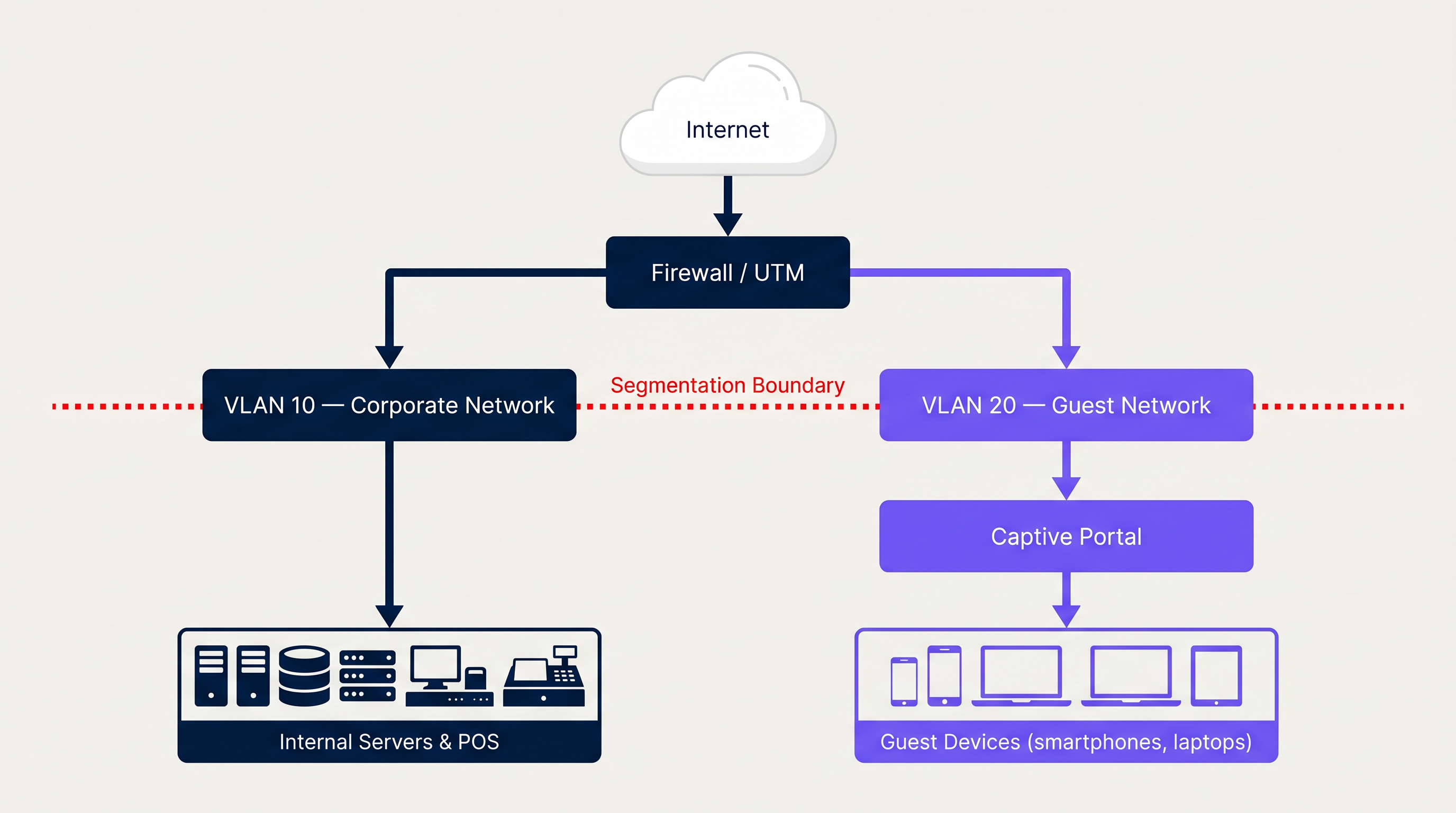
The switch must be configured with the guest VLAN on all relevant trunk ports, and the access point's wireless controller must map the guest SSID to VLAN 20. This mapping is the critical link in the chain — a misconfiguration here results in guest traffic appearing on the corporate VLAN, which is a serious security breach.
Firewall and Routing Policies
Segmentation at the switch level is insufficient without corresponding Layer 3 controls. The firewall or Unified Threat Management (UTM) appliance must enforce strict inter-VLAN routing policies. The fundamental rule set for the guest VLAN is:
| Rule | Action | Source | Destination |
|---|---|---|---|
| 1 | Deny | VLAN 20 (Guest) | VLAN 10 (Corporate) |
| 2 | Deny | VLAN 20 (Guest) | Management Subnets |
| 3 | Allow | VLAN 20 (Guest) | Internet (0.0.0.0/0) |
| 4 | Deny | Any | Any (implicit) |
Rules are processed top-down. If a compromised guest device attempts to scan the internal network, Rule 1 drops the packets before they ever reach corporate assets. Deploying SD-WAN capabilities alongside this architecture can further enhance traffic management across distributed sites — see The Core SD WAN Benefits for Modern Businesses for a detailed breakdown of how SD-WAN complements multi-site guest network deployments.
Client Isolation (Layer 2 Isolation)
At the access point level, it is critical to enable Client Isolation (also referred to as AP Isolation or Layer 2 Isolation). This feature prevents devices connected to the same guest SSID from communicating directly with each other at Layer 2. Without it, a malicious actor on the guest network could launch ARP spoofing, man-in-the-middle attacks, or lateral scanning against other guest devices. Most enterprise wireless controllers (Cisco, Aruba, Ruckus, Ubiquiti) expose this as a simple toggle on the SSID profile.
Captive Portal Architecture
An open, unencrypted network (Open System Authentication) is the most common guest WiFi deployment, but it is also the least secure. All traffic is transmitted in plaintext and is interceptable by anyone within radio range. The modern standard for guest access is a Captive Portal combined with either WPA2 (with a shared passphrase) or, preferably, WPA3-Enhanced Open (Opportunistic Wireless Encryption — OWE), which provides per-session encryption without requiring a pre-shared key.
A Captive Portal intercepts the user's initial HTTP request and redirects them to a login page before granting internet access. The portal is served from a dedicated server (either on-premises or cloud-hosted) and communicates with the wireless controller via RADIUS to grant or deny access.
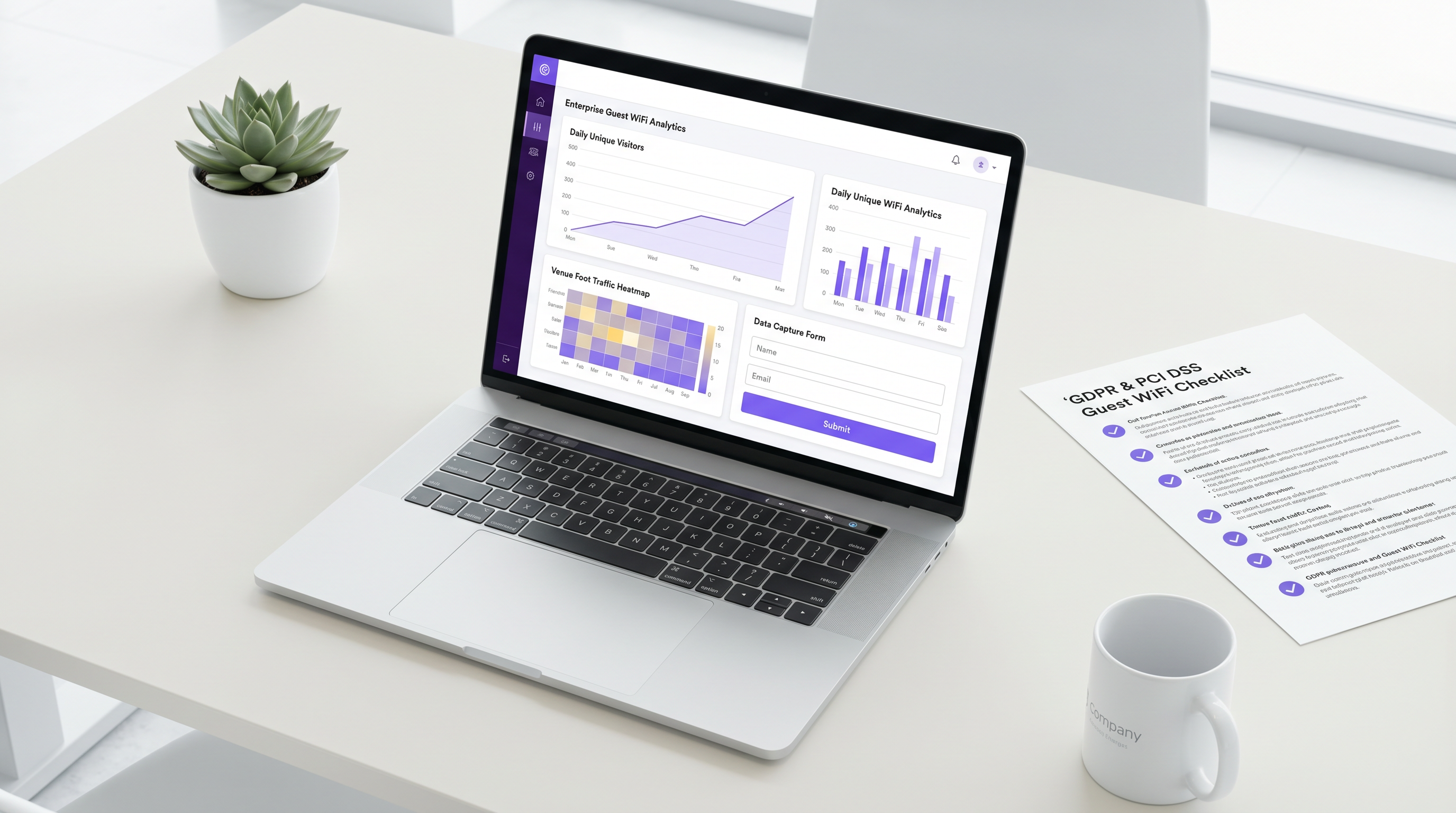
Integrating your wireless controller with a platform like Guest WiFi via RADIUS provides a secure, compliant, and feature-rich onboarding experience. The captive portal serves multiple purposes simultaneously: user authentication (via social login, email, or SMS), mandatory acceptance of Acceptable Use Policies (AUP), and first-party data capture feeding into a comprehensive WiFi Analytics dashboard. For organisations evaluating platform providers, reviewing a Provedores de WiFi para Convidados: O que Procurar ao Escolher uma Plataforma de WiFi is a valuable step in the procurement process.
Implementation Guide
The following step-by-step deployment sequence applies to enterprise environments using managed switches, a dedicated firewall/UTM, and a wireless controller (cloud-managed or on-premises).
Step 1: Infrastructure Configuration
1a. Create the Guest VLAN on the Core Switch Define VLAN 20 on your managed switch and assign it a descriptive name (e.g., "GUEST_WIFI"). Ensure the VLAN is propagated across all trunk ports connecting to access layer switches and the firewall.
1b. Configure DHCP and DNS for the Guest VLAN Set up a dedicated DHCP scope for VLAN 20. Use a large subnet (/22 minimum for medium venues, /20 or larger for stadiums and conference centres). Configure short lease times (1-2 hours). Critically, assign external DNS servers (e.g., 1.1.1.1, 8.8.8.8) or a filtered DNS service to guest clients — never your internal corporate DNS resolvers.
1c. Apply Firewall Rules Implement the inter-VLAN ACL ruleset described above. Test by connecting a device to the guest SSID and attempting to ping internal IP addresses — all pings should time out.
Step 2: Wireless Access Point Configuration
2a. Create the Guest SSID Broadcast a clearly identifiable network name (e.g., "VenueName_Guest"). Map this SSID to VLAN 20 in the wireless controller.
2b. Enable Client Isolation Toggle AP Isolation / Client Isolation on for the guest SSID profile.
2c. Configure Bandwidth Limiting and QoS Apply per-client rate limiting (e.g., 5 Mbps down / 2 Mbps up). Configure QoS DSCP markings to prioritize corporate traffic over guest traffic at the WAN edge.
2d. Set the Authentication Method For maximum security, configure WPA3-Enhanced Open (OWE). For legacy device compatibility, WPA2 with captive portal redirection remains acceptable.
Step 3: Captive Portal Deployment
3a. Configure the Walled Garden Define the pre-authentication allowed destinations (the "walled garden") in your wireless controller. This must include the captive portal server IP/domain and any external authentication providers (e.g., accounts.google.com, graph.facebook.com for social logins), as well as Apple's captive portal detection URL (captive.apple.com) and equivalent Android/Windows detection endpoints.
3b. Integrate with RADIUS Configure the wireless controller to point to your captive portal platform's RADIUS server. Define the shared secret and set appropriate RADIUS timeout values.
3c. Build the Portal Page Ensure the portal page includes: brand identity, clear terms of service, data privacy notice (GDPR-compliant), and the authentication method(s). For Hospitality deployments, consider offering tiered access (free basic tier vs. premium paid tier).
3d. Test End-to-End Flow Connect a test device. Verify the portal loads correctly, authentication succeeds, internet access is granted post-authentication, and internal resources remain inaccessible.
Best Practices
Security Auditing: Conduct periodic penetration testing and vulnerability scanning of the guest network segment. Verify VLAN segmentation integrity at least quarterly. Tools like Nmap can be used from the guest VLAN to confirm that internal subnets are unreachable.
Content Filtering: Implement DNS-based or inline web content filtering on the guest VLAN to block malicious domains, adult content, and high-bandwidth abuse categories (torrenting, illegal streaming). This protects your IP reputation and prevents your internet connection from being used for illegal activity.
Session Management: Configure idle session timeouts (e.g., 30 minutes of inactivity) and absolute session limits (e.g., 8-24 hours) to manage IP address pool exhaustion and ensure users periodically re-accept terms.
Logging and Monitoring: Retain DHCP logs, RADIUS authentication logs, and firewall logs for the guest VLAN for a minimum of 12 months. This is a requirement under many data retention regulations and is essential for incident response.
Hardware Standards: For new deployments, specify Wi-Fi 6 (802.11ax) access points with WPA3 support. The higher throughput and improved MU-MIMO capabilities are particularly valuable in high-density environments like Retail stores and transport hubs. See Transport deployments for specific high-density configuration guidance.
Troubleshooting & Risk Mitigation
Common Failure Modes
VLAN Bleeding: The most serious failure mode — guest traffic routing to the corporate VLAN due to misconfigured trunk ports or firewall rules. Mitigation: Always test post-deployment by attempting to reach internal IPs from the guest SSID. Use network access control (NAC) tools to detect unexpected inter-VLAN traffic.
Captive Portal Redirection Failure: Modern operating systems (iOS, Android, Windows) use specific probe URLs to detect captive portals. If the walled garden is misconfigured or DNS is blocked, the portal won't load and the device will show "No internet connection." Mitigation: Ensure all OS-specific captive portal detection domains are in the walled garden. Test across iOS, Android, and Windows devices.
DHCP Exhaustion: In high-footfall venues, the DHCP pool can run out of addresses if the subnet is too small or lease times are too long. Mitigation: Use /22 or larger subnets; set lease times to 1-2 hours.
Bandwidth Saturation: Without rate limiting, a small number of users can consume the entire WAN link. Mitigation: Implement per-client rate limiting and WAN-level QoS prioritizing corporate traffic.
Compliance Gaps: Deploying guest WiFi without a GDPR-compliant data capture process exposes the organisation to regulatory risk. Mitigation: Use a platform that provides built-in consent management, data subject access request (DSAR) handling, and configurable data retention policies.
ROI & Business Impact
While the primary IT objective is security and connectivity, a properly architected guest network transforms a cost centre into a measurable revenue driver. Organisations across Hospitality and Healthcare sectors are leveraging guest WiFi data to drive tangible business outcomes.
| Metric | Typical Outcome |
|---|---|
| First-party data capture rate | 60-80% of connecting guests |
| Email marketing open rates (WiFi-captured contacts) | 25-35% (vs. 15-20% industry average) |
| Repeat visit rate uplift | 10-15% with targeted re-engagement campaigns |
| IT incident reduction | Significant reduction in guest-related network incidents post-segmentation |
The cost of implementing proper VLAN segmentation and a robust captive portal is negligible compared to the potential financial and reputational damage of a data breach originating from an unsecured guest network. A single PCI DSS non-compliance fine can reach €20 million or 4% of global annual turnover under GDPR — dwarfing any infrastructure investment.
By integrating with Purple's WiFi Analytics platform, venue operators gain real-time visibility into footfall patterns, dwell times, and returning visitor rates — intelligence that directly informs staffing decisions, marketing spend, and venue layout optimisation.
Key Terms & Definitions
VLAN (Virtual Local Area Network)
A logical grouping of devices on the same physical network infrastructure, isolating broadcast traffic at Layer 2 using IEEE 802.1Q tagging.
The foundational mechanism for separating guest traffic from corporate traffic on shared physical switches and access points.
Client Isolation (AP Isolation)
A wireless network feature that prevents devices connected to the same SSID from communicating directly with each other at Layer 2.
Crucial for guest networks to prevent malicious users from attacking other guests' devices via ARP spoofing or direct scanning.
Captive Portal
A web page that a user is redirected to and must interact with before being granted full internet access on a public or guest network.
Used for user authentication, AUP acceptance, GDPR-compliant data capture, and marketing opt-in on guest WiFi networks.
SSID (Service Set Identifier)
The broadcasted name of a wireless network that client devices see when scanning for available networks.
A dedicated guest SSID is mapped to the guest VLAN in the wireless controller, ensuring traffic is correctly tagged and isolated.
RADIUS (Remote Authentication Dial-In User Service)
A networking protocol providing centralised Authentication, Authorisation, and Accounting (AAA) management for network access.
Used by wireless controllers to communicate with captive portal platforms (like Purple) to authenticate guest users and grant/deny network access.
Walled Garden
A set of pre-authentication allowed network destinations that a guest device can reach before completing captive portal login.
Must include the captive portal server, external authentication providers (Google, Facebook), and OS-specific captive portal detection URLs to ensure the login page loads correctly.
WPA3-Enhanced Open (OWE)
Opportunistic Wireless Encryption — a Wi-Fi security standard that provides per-session encryption on open networks without requiring a pre-shared key, ratified under IEEE 802.11.
The recommended encryption standard for guest SSIDs, providing protection against passive eavesdropping without the UX friction of a password.
QoS (Quality of Service)
A set of technologies and policies that manage network traffic to ensure critical applications receive priority bandwidth, reducing latency and packet loss.
Applied at the WAN edge to prioritize corporate traffic (POS, VoIP, PMS) over guest internet browsing, preventing guest bandwidth consumption from impacting business operations.
DHCP Exhaustion
A condition where a DHCP server has no remaining IP addresses in its pool to assign to new clients, causing new devices to fail to connect.
A common operational issue in high-footfall guest networks if the subnet is undersized or lease times are too long. Mitigated with large subnets and short lease durations.
Case Studies
A 200-room hotel needs to deploy guest WiFi across all rooms and public areas. They currently operate a single flat network (VLAN 1) for both corporate operations (PMS, POS, back-office) and guests. The IT manager has been tasked with redesigning the network to achieve PCI DSS compliance before their next audit. How should the architecture be redesigned?
Phase 1 — Network Redesign: Create VLAN 10 for Corporate (10.0.10.0/24) and VLAN 20 for Guests (10.0.20.0/22 to accommodate high device counts across 200 rooms plus public areas). Configure the core firewall with explicit deny rules from VLAN 20 to VLAN 10, ensuring POS terminals on VLAN 10 are completely unreachable from the guest segment.
Phase 2 — Wireless Configuration: Reconfigure all access points to broadcast two SSIDs: 'Hotel_Corporate' (VLAN 10, WPA2-Enterprise with 802.1X) and 'Hotel_Guest' (VLAN 20, WPA3-Enhanced Open with captive portal). Enable Client Isolation on the guest SSID.
Phase 3 — Captive Portal: Deploy a GDPR-compliant captive portal integrated via RADIUS. Configure the portal to capture guest email addresses, display the privacy policy, and require explicit consent for marketing communications. Set session timeout to 24 hours with idle timeout of 60 minutes.
Phase 4 — Bandwidth Management: Apply per-client rate limiting of 10 Mbps down / 5 Mbps up on the guest SSID. Configure QoS to prioritize PMS and POS traffic (DSCP EF) over guest traffic (DSCP BE).
A large retail chain with 50 stores is experiencing two problems: (1) slow POS transaction times during peak hours because guests are streaming video on the free in-store WiFi, and (2) the marketing team has no visibility into how many unique visitors the stores receive daily. How should the IT team address both issues simultaneously?
Problem 1 — Bandwidth: Implement per-client rate limiting on the Guest SSID (cap each client at 3 Mbps down). Configure QoS rules on the WAN edge router to mark POS application traffic (typically TCP 443 to payment gateway IPs) with DSCP EF (Expedited Forwarding) and guest traffic with DSCP BE (Best Effort). This guarantees POS transactions always have priority bandwidth regardless of guest usage.
Problem 2 — Analytics: Deploy a centralized captive portal platform (such as Purple) across all 50 sites via a cloud-managed wireless controller. The portal captures device MAC addresses (anonymised for GDPR compliance) and authenticated user profiles. The analytics dashboard provides daily unique visitor counts, repeat visitor rates, and dwell time data per store — feeding directly into the marketing team's reporting.
Scenario Analysis
Q1. You are deploying guest WiFi in a conference centre that hosts events with up to 5,000 concurrent attendees. What subnet mask should you configure for the guest VLAN DHCP scope, and what lease time would you recommend?
💡 Hint:Consider the number of usable host IP addresses required, plus overhead for DHCP lease transitions and devices that hold leases without actively using them.
Show Recommended Approach
A /21 subnet (255.255.248.0) provides 2,046 usable addresses — insufficient for 5,000 concurrent users. A /20 subnet (255.255.240.0) provides 4,094 usable addresses, still marginal. A /19 subnet (255.255.224.0) provides 8,190 usable addresses, which safely accommodates 5,000 concurrent users with headroom for lease transitions. Configure DHCP lease times of 1 hour to ensure addresses are recycled quickly as attendees move in and out of the venue.
Q2. A guest reports that after connecting to the venue WiFi, their iPhone shows 'Connected, no internet' and the login page never appears. What are the three most likely configuration issues to investigate first?
💡 Hint:Think about what the device needs to reach before authentication is complete.
Show Recommended Approach
- Walled Garden misconfiguration: The captive.apple.com domain (Apple's captive portal detection URL) is not in the pre-authentication allowed destinations, so iOS cannot detect the portal. 2. DNS blocking: The firewall is blocking DNS queries from the guest VLAN before authentication, so the device cannot resolve the captive portal hostname. 3. HTTPS interception: The device is attempting to load an HTTPS URL first, and the captive portal redirect is failing because the SSL certificate doesn't match — ensure the portal redirect targets an HTTP URL or has a valid certificate.
Q3. Your security team has flagged that guest devices on the WiFi network can ping each other's IP addresses. Which specific configuration change is required, and at which layer of the network stack does it operate?
💡 Hint:This is a wireless-layer control, not a firewall rule.
Show Recommended Approach
Client Isolation (also called AP Isolation or Layer 2 Isolation) must be enabled on the guest SSID profile in the wireless controller. This operates at Layer 2 (Data Link Layer) of the OSI model, preventing direct frame forwarding between wireless clients associated to the same SSID. It is distinct from firewall rules, which operate at Layer 3 — firewall rules alone cannot prevent Layer 2 peer-to-peer communication between devices on the same subnet.
Q4. A retail client wants to use their guest WiFi data for GDPR-compliant email marketing. What specific technical and legal requirements must the captive portal implementation satisfy?
💡 Hint:Consider both the data capture mechanism and the consent framework.
Show Recommended Approach
The captive portal must: (1) Present a clear privacy notice explaining what data is collected, the legal basis for processing, retention period, and data controller identity. (2) Use a double opt-in mechanism for marketing communications — a pre-ticked checkbox is not valid consent under GDPR. (3) Capture explicit, informed, freely given consent separately from the terms of service acceptance. (4) Provide a mechanism for data subjects to exercise their rights (access, erasure, portability). (5) Log the timestamp, IP address, and consent text version for each consent event as an audit trail. (6) Ensure the data processor agreement with the WiFi platform provider is in place and compliant with GDPR Article 28.




