
DNS Filtering म्हणजे काय? गेस्ट WiFi वरील हानिकारक कंटेंट कसा ब्लॉक करावा
हा सर्वसमावेशक तांत्रिक मार्गदर्शक एंटरप्राइझ गेस्ट WiFi सुरक्षित करण्यासाठी DNS filtering नेटवर्क लेयरवर कसे कार्य करते हे स्पष्ट करतो, ज्यामध्ये डिप्लॉयमेंट आर्किटेक्चर, इव्हेशन प्रिव्हेंशन आणि Captive Portal इंटिग्रेशन समाविष्ट आहे. रिटेल, हॉस्पिटॅलिटी आणि सार्वजनिक क्षेत्रातील ठिकाणांमधील IT लीडर्ससाठी हा अंमलबजावणीचे सुस्पष्ट मार्गदर्शन प्रदान करतो, ज्यांना कंटेंट पॉलिसी लागू करणे, ब्रँड प्रतिष्ठेचे रक्षण करणे आणि PCI-DSS व GDPR चे पालन दर्शवणे आवश्यक आहे. हॉटेल आणि रिटेल वातावरणातील वास्तविक केस स्टडीज व्यावहारिक तडजोड आणि कॉन्फिगरेशनचे निर्णय स्पष्ट करतात जे डिप्लॉयमेंटचे यश ठरवतात.
Video overview
हे मार्गदर्शक ऐका
पॉडकास्ट ट्रान्सक्रिप्ट पहा
आमच्या मुख्य मालिकेचा भाग: एंटरप्राइझ WiFi सुरक्षा मार्गदर्शक →
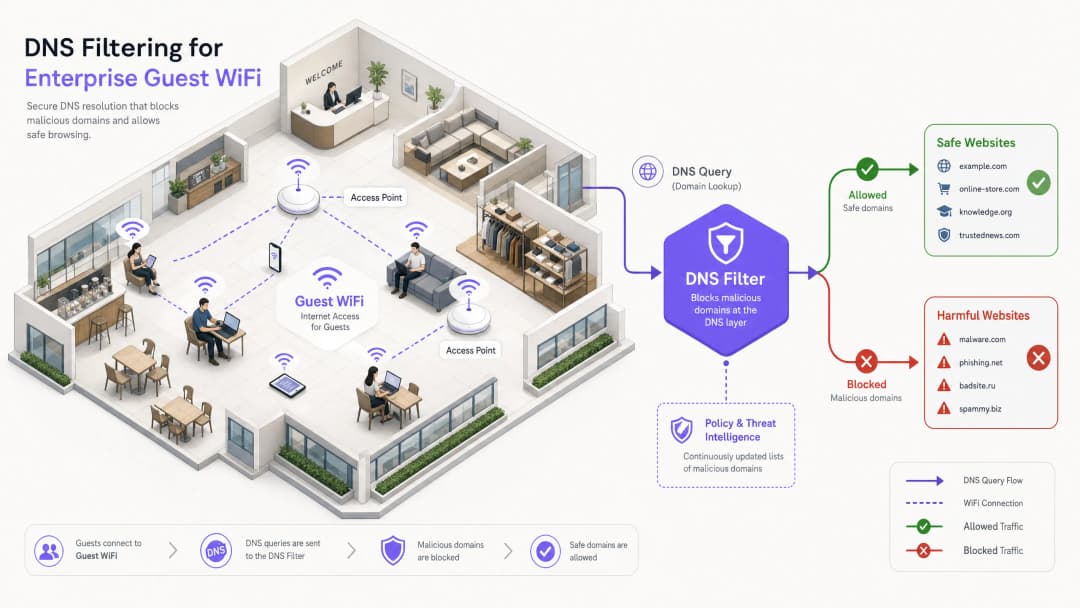
कार्यकारी सारांश
मोठ्या प्रमाणावर सार्वजनिक नेटवर्क्स व्यवस्थापित करणाऱ्या एंटरप्राइझ IT लीडर्ससाठी, एक सुरक्षित, सुसंगत आणि उच्च-कार्यक्षमता असलेला ब्राउझिंग अनुभव सुनिश्चित करणे हे एक अत्यंत महत्त्वाचे ऑपरेशनल कर्तव्य आहे. हॉस्पिटॅलिटी, रिटेल आणि सार्वजनिक जागांमधील अतिथी WiFi नेटवर्क्स हे दुर्भावनापूर्ण क्रियाकलाप आणि धोरण उल्लंघनांचे प्राथमिक लक्ष्य असतात - बॉटनेत कमांड - आणि - कंट्रोल ट्रॅफिकपासून ते बेकायदेशीर स्ट्रीमिंग आणि अयोग्य कंटेंटपर्यंत. हे मार्गदर्शक DNS filtering वरील एक निश्चित तांत्रिक संदर्भ प्रदान करते: नेटवर्कच्या काठावर हानीकारक कंटेंट ब्लॉक करण्यासाठी आणि जोखीम कमी करण्यासाठी सर्वात कार्यक्षम यंत्रणा.
रिसोर्स-इंटेन्सिव्ह डीप पॅकेट इन्स्पेक्शन (DPI) किंवा कठोर IP ब्लॉकलिस्ट्सच्या उलट, DNS filtering हे सुरुवातीच्या डोमेन रिझोल्यूशन विनंतीला अडवते. रिअल-टाइम थ्रेट इंटेलिजन्स फीड्सवर आधारित क्वेरींचे मूल्यमापन करून, ते कोणताही पेलोड देवाणघेवाण होण्यापूर्वी दुर्भावनापूर्ण किंवा अयोग्य डोमेन्सशी जोडणी रोखते. हा दृष्टिकोन उच्च थ्रूपुट आणि किमान लेटन्सी सुनिश्चित करतो - हजारो समवर्ती वापरकर्त्यांना सपोर्ट करणाऱ्या वातावरणासाठी हे अत्यंत आवश्यक आहे.
मजबूत DNS filtering लागू केल्याने केवळ वेन्यूच्या प्रतिष्ठेचे रक्षण होत नाही तर डेटा संरक्षण नियम आणि फॅमिली-फ्रेंडली वापर धोरणांचे पालन करण्यास देखील मदत होते. Guest WiFi आणि WiFi Analytics सारख्या सोल्यूशन्सचा लाभ घेणाऱ्या संस्थांसाठी, DNS-स्तरीय नियंत्रणे समाविष्ट करणे ही एक पायाभूत सुरक्षा आवश्यकता आहे जी अतिथी नेटवर्क स्टॅकच्या प्रत्येक इतर स्तराला आधार देते.
Technical Deep Dive: DNS Filtering कसे काम करते
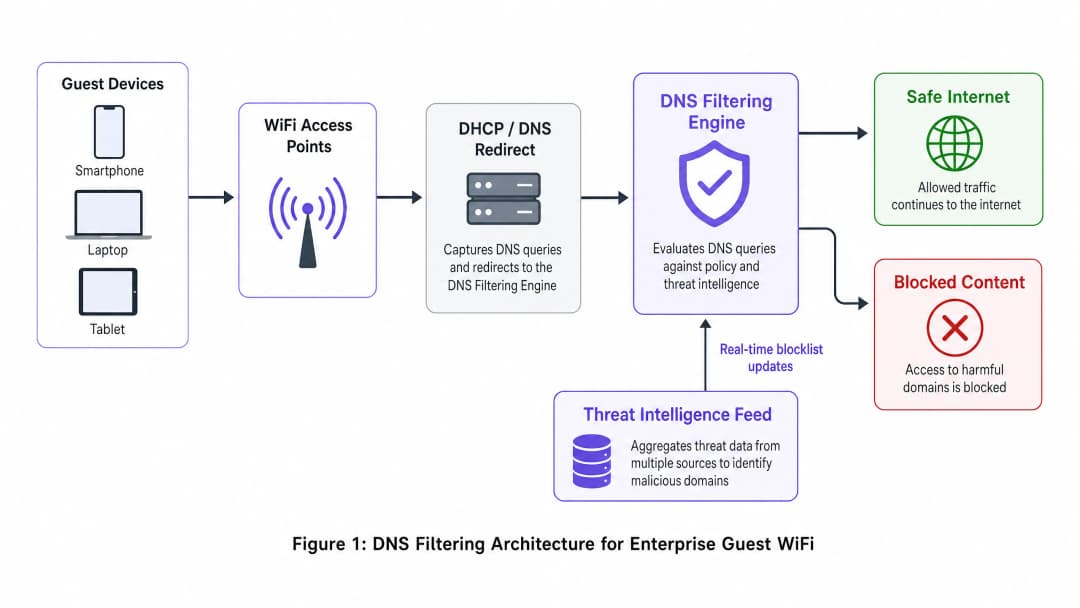
DNS filtering हे नेटवर्क आर्किटेक्चरमध्ये एक सक्रिय सुरक्षा स्तर म्हणून काम करते. जेव्हा एखादे क्लायंट डिव्हाइस डोमेनमध्ये प्रवेश करण्याचा प्रयत्न करते, तेव्हा स्थानिक DNS रिझॉल्व्हर त्या क्वेरीला अडवतो. त्वरित IP ॲड्रेस परत करण्याऐवजी, ही क्वेरी फिल्टरिंग इंजिनकडे पाठवली जाते जे ती सोडवायची की ब्लॉक करायची याचा निर्णय घेण्यापूर्वी पॉलिसी आणि थ्रेट इंटेलिजन्सच्या आधारे तिचे मूल्यमापन करते.
Resolution Pipeline
DNS filtering रिझोल्यूशन पाइपलाइन चार वेगवेगळ्या टप्प्यांत काम करते. पहिले, क्वेरी इंटरसेप्शन (query interception): गेस्ट डिव्हाइस नेटवर्कशी जोडले जाते आणि DHCP द्वारे IP कॉन्फिगरेशन प्राप्त करते, जे DNS filtering सर्व्हरला मुख्य रिझॉल्व्हर म्हणून नियुक्त करते. दुसरे, पॉलिसी इव्हॅल्युएशन (policy evaluation): फिल्टरिंग इंजिनला क्वेरी (उदा. malicious-domain.com) प्राप्त होते आणि रिअल टाइममध्ये अपडेट केलेल्या वर्गीकृत ब्लॉकलिस्ट आणि डायनॅमिक थ्रेट इंटेलिजन्स फीड्ससह त्याचे क्रॉस-रेफरन्स तपासले जाते. तिसरे, रिझोल्यूशन किंवा सिंकहोलिंग (resolution or sinkholing): जर डोमेन सुरक्षित असेल, तर इंजिन मूळ IP ॲड्रेस रिझॉल्व्ह करते आणि कनेक्शन नेहमीप्रमाणे पुढे सुरू राहते. जर डोमेन पॉलिसीचे उल्लंघन करत असेल, तर इंजिन नॉन-राउटिंग IP ॲड्रेस परत करते - ज्या तंत्राला सिंकहोलिंग (sinkholing) म्हटले जाते - किंवा वापरकर्त्याला ब्रँडेड ब्लॉक पेजवर रिडायरेक्ट करते. चौथे, लॉगिंग (logging): प्रत्येक क्वेरी, मग ती रिझॉल्व्ह झाली असो किंवा ब्लॉक झाली असो, ऑडिट आणि ॲनालिटिक्सच्या उद्देशाने लॉग केली जाते.
Architectural Benefits
इतर पर्यायी कंटेंट कंट्रोल पद्धतींपेक्षा DNS filtering लागू करण्याचे स्पष्ट फायदे आहेत. याद्वारे येणारा लेटन्सी ओव्हरहेड नगण्य असतो - DNS क्वेरी हे हलके UDP पॅकेट्स असतात आणि त्यांचे मूल्यमापन करण्यासाठी 2ms पेक्षा कमी वेळ लागतो, जो एंड-युझरला जाणवत नाही. हा दृष्टिकोन प्रोटोकॉल-अज्ञेयवादी (protocol-agnostic) देखील आहे: कनेक्शन स्थापित होण्यापूर्वीच फिल्टरिंग होत असल्याने, ते मूळ ॲप्लिकेशन प्रोटोकॉल (HTTP, HTTPS, FTP) किंवा पोर्ट नंबर काहीही असला तरीही प्रभावी ठरते. URL-आधारित प्रॉक्सी फिल्टरिंगच्या तुलनेत हा एक मोठा फायदा आहे, ज्यामध्ये प्रत्येक एंडपॉईंटवर कस्टम रूट सर्टिफिकेट स्थापित केल्याशिवाय एनक्रिप्टेड HTTPS ट्रॅफिकची तपासणी करता येत नाही - जे अनमॅनेज्ड गेस्ट डिव्हाइसेसवर करणे अशक्य आहे.
स्केलेबिलिटी हा आणखी एक मुख्य फायदा आहे. एकच मजबूत DNS क्लस्टर प्रति सेकंद लाखो क्वेरी हाताळू शकतो, ज्यामुळे स्टेडियम, मोठे कन्व्हेन्शन सेंटर्स किंवा बहु-साइट Retail डिप्लॉयमेंट्स यांसारख्या उच्च-घनतेच्या वातावरणासाठी हे आदर्श बनते. क्लिष्ट मल्टी-टेनंट टोपोलॉजीसाठी, DNS filtering हे VLAN-आधारित सेगमेंटेशन धोरणांसह अखंडपणे समाकलित होते, जसे की Designing a Multi-Tenant WiFi Architecture for MDUs मध्ये तपशीलवार स्पष्ट केले आहे.

| पद्धत | डिप्लॉयमेंट जटिलता | लेटन्सी प्रभाव | ग्रॅन्युलॅरिटी | गेस्ट नेटवर्कसाठी सुसंगतता |
|---|---|---|---|---|
| DNS Filtering | कमी | अत्यंत कमी (<2ms) | डोमेन-स्तर | शिफारस केलेले |
| URL/Proxy Filtering | मध्यम | मध्यम (10-50ms) | URL-स्तर | मर्यादित (HTTPS समस्या) |
| Deep Packet Inspection | उच्च | उच्च (50-200ms) | पेलोड-स्तर | शिफारस केलेले नाही |
| IP Blocklists | कमी | काही नाही | केवळ IP-स्तर | केवळ पूरक |
| Application Firewall | उच्च | मध्यम | ॲप-स्तर | पूरक |
तुमच्या विशिष्ट सेटअपबद्दल काही प्रश्न आहेत का?
आमची टीम ८०,००० हून अधिक वेन्यूजमधील वेन्यू ऑपरेटर्स, IT मॅनेजर्स आणि नेटवर्क इंजिनिअर्ससोबत काम करते. २० मिनिटांचा कॉल बुक करा आणि तुमच्यासारख्या इतरांनी ही समस्या कशी सोडवली हे आम्ही तुम्हाला दाखवू.
अंमलबजावणी मार्गदर्शक
वैध ट्रॅफिकला अडथळा न आणता व्यापक कव्हरेज सुनिश्चित करण्यासाठी DNS filtering उपयोजित करण्यासाठी काळजीपूर्वक नियोजनाची आवश्यकता असते. खालील पायऱ्या Hospitality, Healthcare, Transport आणि रिटेल वातावरणात लागू असणारी एक विक्रेता-तटस्थ उपयोजन धोरण दर्शवतात.
पायरी 1: नेटवर्क वर्गीकरण आणि DHCP कॉन्फिगरेशन
सर्वात मजबूत उपयोजन पद्धत म्हणजे सर्व गेस्ट क्लायंटना DNS filtering सर्व्हरचे IP पत्ते नियुक्त करण्यासाठी नेटवर्क गेटवे किंवा DHCP सर्व्हर कॉन्फिगर करणे. हे सुनिश्चित करते की नेटवर्कवर सामील होणारे कोणतेही डिव्हाइस एंडपॉइंटवर कोणतेही एजंट इंस्टॉल न करता स्वयंचलितपणे सुरक्षित रिझॉल्व्हर वापरते.
जटिल टोपोलॉजी असलेल्या वातावरणासाठी - जसे की Designing a Multi-Tenant WiFi Architecture for MDUs मध्ये वर्णन केलेल्या वातावरणासाठी - गेस्ट ट्रॅफिकसाठी समर्पित असलेले VLANs कठोरपणे फिल्टर केलेल्या DNS द्वारे रूट केले जातात, तर ऑपरेशनल VLANs (PMS, POS, बिल्डिंग मॅनेजमेंट) अंतर्गत रिझॉल्व्हर वापरणे सुरू ठेवतात याची खात्री करा. हे VLAN-आधारित अलगीकरण PCI-DSS अनुपालनासाठी एक पूर्वअट आहे, जे कार्डधारक डेटा वातावरण आणि अविश्वासू गेस्ट नेटवर्क्स दरम्यान कडक नेटवर्क वर्गीकरण अनिवार्य करते.
पायरी 2: बायपास रोखणे - पोर्ट 53 ब्लॉक करा
हा तो टप्पा आहे जिथे अनेक उपयोजने अयशस्वी ठरतात. केवळ DHCP द्वारे DNS सर्व्हर नियुक्त करणे पुरेसे नाही. वापरकर्त्याने त्यांच्या डिव्हाइसवर सानुकूल DNS सेटिंग्ज कॉन्फिगर केल्या असल्यास - 8.8.8.8 किंवा 1.1.1.1 कडे निर्देशित केल्यास - ते फिल्टरला पूर्णपणे बायपास करतील. यावर उपाय सोपा आहे: गेटवेवर फायरवॉल नियम लागू करा जे निर्दिष्ट फिल्टरिंग सर्व्हर्स व्यतिरिक्त इतर कोणत्याही IP पत्त्यासाठी पोर्ट 53 (UDP आणि TCP) वरील सर्व आउटबाउंड ट्रॅफिक ब्लॉक करतात. हे सर्व DNS ट्रॅफिक नियंत्रित रिझॉल्व्हरद्वारे जाण्यास भाग पाडते.
याव्यतिरिक्त, DNS over HTTPS (DoH) ब्लॉक करण्याचा विचार करा. DoH पोर्ट 443 वरील HTTPS ट्रॅफिकमध्ये DNS क्वेरी एनक्रिप्ट करते, ज्यामुळे नेटवर्क स्तरावर सामान्य वेब ट्रॅफिकपेक्षा ते वेगळे करणे अशक्य होते. सर्वात प्रभावी उपाय म्हणजे ज्ञात DoH प्रदाता IP पत्त्यांची (Cloudflare, Google, NextDNS) ब्लॉकलिस्ट राखणे आणि त्यांना फायरवॉलवर ब्लॉक करणे.
पायरी 3: धोरण व्याख्या आणि श्रेणी व्यवस्थापन
ठिकाणाच्या आवश्यकता आणि प्रेक्षकांच्या आधारावर तपशीलवार धोरणे स्थापित करा. सार्वजनिक WiFi साठी सामान्य मूलभूत धोरणामध्ये सुरक्षा धोके (मालवेअर, फिशिंग, बॉटनेट C2 सर्व्हर्स), प्रौढ सामग्री आणि बेकायदेशीर क्रियाकलाप (चाचेगिरी, बेकायदेशीर स्ट्रीमिंग) ब्लॉक करणे समाविष्ट आहे. विशिष्ट क्षेत्रांमध्ये, अतिरिक्त श्रेणी योग्य असू शकतात: Healthcare सुविधांसाठी जुगार आणि शस्त्रे, किंवा कॉर्पोरेट अतिथी नेटवर्कसाठी कामकाजाच्या तासांमध्ये सोशल मीडिया.
पायरी ४: Captive Portal एकत्रीकरण - The Walled Garden
हा उपयोजनाचा सर्वात तांत्रिकदृष्ट्या सूक्ष्म पैलू आहे. अतिथींना पूर्ण इंटरनेट प्रवेश मिळण्यापूर्वी Captive Portals ने प्रमाणीकरण करणे आवश्यक आहे. पूर्व-प्रमाणीकरण टप्प्यादरम्यान, अतिथी डिव्हाइस प्रतिबंधित स्थितीत असते - ते केवळ Captive Portal वर प्रवेश करू शकते. या टप्प्यादरम्यान DNS फिल्टरिंग सक्रिय असल्यास, ते सोशल लॉगिन (Google OAuth, Facebook Login) किंवा सेवा अटींच्या मंजुरी पृष्ठांसाठी आवश्यक असलेले बाह्य डोमेन ब्लॉक करू शकते.
यावर उपाय म्हणजे योग्यरित्या कॉन्फिगर केलेले walled garden: डोमेन्सचा असा संच ज्यांना प्रमाणीकरण पूर्ण होण्यापूर्वी DNS फिल्टरिंग धोरणामध्ये स्पष्टपणे परवानगी दिली जाते. या सूचीमध्ये Captive Portal चे स्वतःचे डोमेन, कोणतेही OAuth ओळख प्रदाता डोमेन आणि पोर्टलचे घटक रेंडर करण्यासाठी आवश्यक असलेले कोणतेही CDN एंडपॉइंट समाविष्ट असणे आवश्यक आहे. हे योग्यरित्या कॉन्फिगर करण्यात अयशस्वी होणे हे खंडित अतिथी ऑनबोर्डिंग अनुभवांचे सर्वात सामान्य कारण आहे. हा एकत्रीकरणाचा विचार कार्यालयीन वातावरणाला देखील तितकाच लागू होतो, जसे की Office WiFi: Optimise Your Modern Office WiFi Network मध्ये चर्चा केली आहे.
पायरी ५: ब्लॉक पृष्ठ कस्टमायझेशन आणि वापरकर्ता संवाद
स्पष्ट, ब्रँडेड ब्लॉक पृष्ठे प्रदान करा जी सामग्री का प्रतिबंधित केली गेली हे स्पष्ट करतात आणि ब्लॉक चुकीचा असल्यास पुनरावलोकनाची विनंती करण्याचा मार्ग देतात. यामुळे हेल्पडेस्क तिकिटे लक्षणीयरित्या कमी होतात आणि सुरक्षित ब्राउझिंग वातावरणासाठी ठिकाणाच्या वचनबद्धतेला बळकटी मिळते. एक चांगल्या प्रकारे डिझाइन केलेले ब्लॉक पृष्ठ प्रतिबंधाला ब्रँड टचपॉइंटमध्ये बदलते.
सर्वोत्तम पद्धती
DNS फिल्टरिंगची प्रभावीता वाढवण्यासाठी, खालील उद्योग मानक शिफारसींचे पालन करा.
उच्च-उपलब्धता आर्किटेक्चर: दुय्यम आणि तृतीयक DNS रिझोल्व्हर्स कॉन्फिगर करा. मुख्य फिल्टरिंग इंजिन अनुपलब्ध झाल्यास, ट्रॅफिक अखंडपणे दुय्यम रिझोल्व्हरकडे वळवले पाहिजे. आयएसपी (ISP) चे डीफॉल्ट रिझोल्व्हर्स फॉलबॅक म्हणून कॉन्फिगर करणे टाळा, कारण यामुळे आउटेज दरम्यान फिल्टरिंग पूर्णपणे बायपास होईल.
नियमित धोरण ऑडिट: चुकीचे ब्लॉक्स आणि उदयोन्मुख धोके ओळखण्यासाठी लॉग आणि विश्लेषणचे सतत पुनरावलोकन करा. ब्राउझिंग वर्तनाचा नेटवर्क कार्यप्रदर्शन मेट्रिक्सशी संबंध जोडण्यासाठी DNS क्वेरी लॉग तुमच्या WiFi Analytics प्लॅटफॉर्मसह एकत्रित करा.
थ्रेट इंटेलिजन्स फीड गुणवत्ता: DNS फिल्टरिंगची प्रभावीता थेट थ्रेट इंटेलिजन्स फीडच्या गुणवत्तेवर आणि ताजेपणावर अवलंबून असते. फीड अपडेटच्या वारंवारतेवर (तासाला हे सामान्य आहे; रिअल-टाइम प्राधान्य दिले जाते), श्रेणी कव्हरेजची व्याप्ती आणि चुकीच्या-सकारात्मक दरांवर विक्रेत्यांचे मूल्यमापन करा. DNSSEC Validation: जेथे समर्थित असेल, तेथे फिल्टरिंग सॉल्व्हर्सवर DNSSEC व्हॅलिडेशन सक्षम करा. हे DNS कॅशे पॉयझनिंग हल्ल्यांना प्रतिबंधित करते, जिथे हल्लेखोर वापरकर्त्यांना दुर्भावनापूर्ण साइट्सवर पुनर्निर्देशित करण्यासाठी खोट्या DNS नोंदी इंजेक्ट करतो.
ट्रबलशूटिंग आणि जोखीम निवारण
एक भक्कम आर्किटेक्चर असूनही, कार्यात्मक समस्या उद्भवू शकतात. खालील सर्वात सामान्य बिघाड प्रकार आणि त्यांचे निराकरण दिले आहे.
फॉल्स पॉझिटिव्ह्ज: कायदेशीर डोमेन्सचे वर्गीकरण चुकीच्या पद्धतीने दुर्भावनापूर्ण किंवा पॉलिसीचे उल्लंघन करणारे म्हणून केले जाणे. सहज प्रवेशयोग्य अलोवलिस्ट मॅनेजमेंट प्रक्रिया आणि वापरकर्त्यांच्या रिपोर्टसाठी त्वरित प्रतिसाद देणारे SLA राखा. एकूण क्वेरींच्या तुलनेत ब्लॉक केलेल्या क्वेरींचे गुणोत्तर मॉनिटर करा; असामान्यपणे उच्च ब्लॉक रेट हे अत्यंत कठोर पॉलिसी सेटिंग्जचे मजबूत संकेत आहे.
Captive Portal बिघाड: वर वर्णन केल्याप्रमाणे, हे वॉल्ड गार्डन एन्ट्रीज गहाळ असल्यामुळे होते. प्री-ऑथेंटिकेशन टप्प्यादरम्यान चाचणी डिव्हाइसवरून DNS क्वेरी कॅप्चर करून आणि कोणत्या क्वेरी ब्लॉक केल्या जात आहेत हे ओळखून याचे निदान करा. ते डोमेन्स प्री-ऑथेंटिकेशन अलोवलिस्टमध्ये जोडा.
कामगिरी खालावणे: अपुरे DNS इन्फ्रास्ट्रक्चर ब्राउझिंग धीमे करू शकते, जे थेट बिघाड म्हणून न दिसता उच्च पेज लोड टाइमच्या स्वरूपात समोर येते. अपस्ट्रीम फिल्टरिंग इंजिनवरील क्वेरी लोड कमी करण्यासाठी स्थानिक कॅशिंग सॉल्व्हर्स तैनात करा. DNS क्वेरी प्रतिसाद वेळेचे परीक्षण करा; 50ms पेक्षा जास्त वेळ असल्यास तपास करणे आवश्यक आहे.
DoH बायपास: जर फायरवॉल नियम असूनही विश्लेषणामध्ये ज्ञात DoH प्रदात्यांकडे ट्रॅफिक जात असल्याचे दिसत असेल, तर DoH प्रदाता IPs ची ब्लॉकलिस्ट अद्ययावत असल्याची आणि सर्व गेस्ट VLAN एग्रेस पॉईंट्सवर फायरवॉल नियम लागू केले असल्याची खात्री करा.
ROI आणि व्यावसायिक प्रभाव
DNS फिल्टरिंगचा रिटर्न ऑन इन्व्हेस्टमेंट (ROI) केवळ साध्या जोखीम निवारणापेक्षा खूप पुढे जातो. Hospitality ठिकाणांसाठी, कौटुंबिक अनुकूल वातावरण सुनिश्चित करणे थेट ब्रँड प्रतिष्ठा आणि नेट प्रमोटर स्कोअर (NPS) वर परिणाम करते. एखाद्या पाहुण्याने - विशेषतः अल्पवयीन मुलाने - वेन्यूच्या नेटवर्कवर अयोग्य सामग्री पाहिल्याची एकच घटना मोठी प्रतिष्ठित आणि कायदेशीर जोखीम निर्माण करू शकते.
बँडविड्थ जास्त वापरणारे बेकायदेशीर स्ट्रीमिंग ब्लॉक करून, वेन्यू नेटवर्कची कामगिरी देखील ऑप्टिमाइझ करू शकतात, ज्यामुळे खर्चिक इन्फ्रास्ट्रक्चर अपग्रेड पुढे ढकलले जातात. 500 खोल्यांच्या हॉटेलमध्ये जिथे पाहुण्यांचा मोठा हिस्सा पायरसी साइट्सवरून स्ट्रीमिंग करत होता, तिथे त्या डोमेन्सना ब्लॉक करण्यासाठी DNS फिल्टरिंग तैनात केल्याने पीक बँडविड्थ वापर 20 - 35% पर्यंत कमी होऊ शकतो, ज्यामुळे थेट सर्व पाहुण्यांचा अनुभव सुधारतो आणि अतिरिक्त अपलिंक क्षमतेची आवश्यकता पुढे ढकलली जाते.
अनुपालनाच्या दृष्टिकोनातून, मजबूत नेटवर्क सुरक्षा नियंत्रणे प्रदर्शित करणे हे बऱ्याचदा PCI-DSS प्रमाणपत्रासाठी आवश्यक असते आणि डिझाइनद्वारे डेटा संरक्षणाच्या GDPR तत्त्वाला समर्थन देते. DNS फिल्टरिंग तैनातीची किंमत, जी क्लाउड-आधारित उपायांसाठी प्रति वापरकर्ता प्रति महिना पैशाच्या काही अंशाच्या बरोबरीची आहे, संभाव्य नियामक दंड किंवा ब्रँडला हानी पोहोचवणाऱ्या सुरक्षा घटनेच्या तुलनेत नगण्य आहे. अनेक साइट्सवर हाय-फ्रीक्वेंसी उपयोजने व्यवस्थापित करणाऱ्या IT टीम्ससाठी, ऑपरेशनल ओव्हरहेड अत्यंत कमी आहे. क्लाउड-आधारित DNS filtering सोल्यूशन्ससाठी कोणत्याही ऑन-प्रिमाइसेस हार्डवेअरची आवश्यकता नसते, थ्रेट इंटेलिजन्स स्वयंचलितपणे अपडेट होते आणि एकाच डॅशबोर्डवरून शेकडो ठिकाणांवर केंद्रीकृत धोरण व्यवस्थापन प्रदान करते.
महत्वाच्या व्याख्या
DNS फिल्टरिंग
एक सुरक्षा तंत्रज्ञान जे DNS क्वेरी ब्लॉक किंवा रिसॉल्व्ह करण्यापूर्वी पॉलिसी आणि थ्रेट इंटेलिजन्सच्या आधारे त्यांची तपासणी करते.
एंटरप्राइझ गेस्ट WiFi नेटवर्कवरील कंटेंट नियंत्रणासाठी मुख्य यंत्रणा, जी एंडपॉइंट एजंट्सची आवश्यकता नसताना नेटवर्क लेयरवर कार्य करते.
DNS सिंकहोलिंग
एखाद्या दुर्भावनापूर्ण किंवा पॉलिसीचे उल्लंघन करणाऱ्या डोमेनसाठी DNS क्वेरीच्या बदल्यात चुकीचा, नॉन - राउटेबल IP ॲड्रेस परत करण्याची पद्धत, ज्यामुळे कनेक्शन स्थापित होण्यास प्रतिबंध होतो.
वापरकर्त्याला स्टँडर्ड कनेक्शन एरर न दाखवता मालवेअर कमांड - अँड - कंट्रोल ट्रॅफिक निष्प्रभ करण्यासाठी आणि हानिकारक साइट्सवरील प्रवेश रोखण्यासाठी वापरले जाते.
Captive Portal
एक वेब पेज ज्याच्याशी सार्वजनिक - प्रवेश नेटवर्कच्या वापरकर्त्याला पूर्ण इंटरनेट प्रवेश मिळण्यापूर्वी संवाद साधणे आवश्यक असते, सामान्यत: अटी स्वीकारणे, ऑथेंटिकेशन किंवा डेटा संकलनासाठी वापरले जाते.
गेस्ट ऑनबोर्डिंग आणि डेटा संकलनासाठी महत्त्वपूर्ण; walled garden च्या पेचाला प्रतिबंध करण्यासाठी DNS फिल्टरिंगसह काळजीपूर्वक समाकलित करणे आवश्यक आहे.
Walled Garden
अशा डोमेन्सचा संच ज्यांना प्री - ऑथेंटिकेशन टप्प्यादरम्यान DNS फिल्टरिंग पॉलिसीमध्ये स्पष्टपणे परवानगी दिली जाते, ज्यामुळे वापरकर्त्याने अटी स्वीकारण्यापूर्वी captive portal आणि ऑथेंटिकेशन सेवा कार्य करू शकतात.
DNS - फिल्टर केलेल्या गेस्ट नेटवर्कमध्ये captive portal चा अनुभव खंडित होण्याचे मुख्य कारण म्हणजे walled garden चे चुकीचे कॉन्फिगरेशन असणे हे आहे.
डीप पॅकेट इन्स्पेक्शन (DPI)
नेटवर्क पॅकेट फिल्टरिंगचा एक प्रकार जो पॅकेट्स तपासणी बिंदूतून जात असताना त्यांच्या डेटा पेलोडचे परीक्षण करतो, ज्यामुळे कंटेंट - लेव्हल विश्लेषण करणे शक्य होते.
DNS फिल्टरिंगसाठी एक अधिक रिसोर्स - इंटेन्सिव्ह पर्याय; उच्च - थ्रूपुट गेस्ट नेटवर्क्ससाठी अव्यवहार्य आणि सर्टिफिकेट इंटरसेप्शनशिवाय एन्क्रिप्टेड HTTPS ट्रॅफिकची तपासणी करण्यास असमर्थ.
DNS over HTTPS (DoH)
एक प्रोटोकॉल जो HTTPS ट्रॅफिकमध्ये DNS क्वेरी एन्क्रिप्ट करतो, ज्यामुळे DNS शोधांचे नेटवर्क - लेव्हल इंटरसेप्शन रोखले जाते.
पारंपारिक DNS फिल्टरिंग बायपास करण्यासाठी वापरले जाऊ शकते; फिल्टरिंग कव्हरेज राखण्यासाठी प्रशासकांनी फायरवॉलवर ज्ञात DoH प्रदाता IPs ब्लॉक केले पाहिजेत.
VLAN (Virtual Local Area Network)
एक लॉजिकल नेटवर्क सेगमेंट जे डिव्हाइसेसना त्यांच्या प्रत्यक्ष स्थानाचा विचार न करता समूहात ठेवते, जे स्विच किंवा राउटर लेव्हलवर लागू केले जाते.
गेस्ट WiFi ट्रॅफिकला अंतर्गत कॉर्पोरेट किंवा ऑपरेशनल नेटवर्कपासून वेगळे करण्यासाठी आवश्यक, जे PCI-DSS अनुपालनासाठी एक पूर्वअट आहे.
थ्रेट इंटेलिजन्स फीड
ज्ञात दुर्भावनापूर्ण डोमेन्स, IP ॲड्रेसेस आणि URLs बद्दलची माहिती असणारा सतत अद्ययावत होणारा डेटा प्रवाह, जो सुरक्षा प्रणालींना सक्षम करण्यासाठी वापरला जातो.
थ्रेट इंटेलिजन्स फीडची गुणवत्ता आणि अद्ययावतता थेट नवीन नोंदणीकृत दुर्भावनापूर्ण डोमेन्सविरुद्ध DNS फिल्टरिंगच्या परिणामकारकतेचे निर्धारण करते.
DNSSEC (DNS Security Extensions)
IETF वैशिष्ट्यांचा एक संच जो DNS प्रतिसादांमध्ये क्रिप्टोग्राफिक ऑथेंटिकेशन जोडतो, ज्यामुळे कॅशे पॉइझनिंग आणि स्पूफिंग हल्ले रोखले जातात.
हॅकर्सना वापरकर्त्यांना चुकीच्या मार्गावर नेण्यासाठी खोटे DNS रेकॉर्ड्स टाकण्यापासून रोखण्यासाठी जेथे सपोर्ट असेल तेथे DNS फिल्टरिंग रिसॉल्व्हर्सवर सक्षम केले पाहिजे.
सोडवलेली उदाहरणे
एका ५०० खोल्यांच्या लक्झरी हॉटेल चेनला त्यांच्या गेस्ट WiFi वर कंटेंट फिल्टरिंग लागू करायचे आहे. सध्या त्यांना बेकायदेशीर स्ट्रीमिंगमुळे जास्त बँडविड्थ वापराचा सामना करावा लागत आहे आणि सार्वजनिक ठिकाणी अयोग्य कंटेंट उपलब्ध असल्याच्या तक्रारी मिळाल्या आहेत. त्यांना अशा सोल्यूशनची आवश्यकता आहे ज्याचा परिणाम त्यांच्या प्रॉपर्टी मॅनेजमेंट सिस्टम (PMS) च्या कामगिरीवर होणार नाही, जी VLANs द्वारे समान फिजिकल इन्फ्रास्ट्रक्चर शेअर करते.
१. क्लाउड-आधारित DNS filtering सोल्यूशन डिप्लॉय करा. प्रायमरी आणि सेकंडरी रिझॉल्व्हर्स म्हणून क्लाउड DNS filtering IPs नियुक्त करण्यासाठी गेस्ट WiFi VLAN साठी DHCP स्कोप कॉन्फिगर करा. २. मंजूर DNS filtering सर्व्हर्सशिवाय इतर कोणत्याही बाह्य IP वर गेस्ट VLAN कडून पोर्ट ५३ वरील सर्व आउटबाउंड UDP आणि TCP ट्रॅफिक ब्लॉक करण्यासाठी गेटवेवर फायरवॉल नियम लागू करा. ३. 'Adult Content', 'Piracy/Copyright Theft', 'Malware/Phishing' आणि 'Botnet C2' ब्लॉक करणारी कंटेंट फिल्टरिंग पॉलिसी तयार करा. ४. हॉटेलच्या लोगो आणि स्पष्ट संदेशासह ब्रँडेड ब्लॉक पेज कॉन्फिगर करा. ५. महत्त्वाचे म्हणजे, PMS VLAN DHCP स्कोप अंतर्गत DNS सर्व्हर्स वापरत राहील याची खात्री करा. पोर्ट ५३ ब्लॉक करणारे फायरवॉल नियम केवळ गेस्ट VLAN साठी मर्यादित असले पाहिजेत, ते जागतिक स्तरावर (globally) लागू केले जाऊ नयेत. ६. कायदेशीर गेस्ट सेवांवर परिणाम करणारे कोणतेही चुकीचे ब्लॉक्स (false positives) ओळखण्यासाठी आणि त्यांचे निराकरण करण्यासाठी पहिल्या ३० दिवसांच्या DNS क्वेरी लॉग्सचे निरीक्षण करा.
एका मोठ्या रिटेल शॉपिंग सेंटरला मोफत सार्वजनिक WiFi ऑफर करायचे आहे परंतु त्यांनी कडक फॅमिली-फ्रेंडली कॉर्पोरेट पॉलिसींचे पालन केले पाहिजे. सोशल लॉगिन पर्यायांसह Captive Portal द्वारे त्यांना डेमोग्राफिक डेटा देखील गोळा करायचा आहे. ऑनबोर्डिंग प्रवाहात अडथळा न आणता दोन्ही आवश्यकता पूर्ण करण्यासाठी त्यांनी DNS filtering कसे कॉन्फिगर करावे?
१. गेस्ट SSID वर DHCP द्वारे फिल्टरिंग DNS IPs नियुक्त करून, विद्यमान नेटवर्क गेटवेसह DNS filtering सोल्यूशन इंटिग्रेट करा. २. कोणतीही ब्लॉकिंग पॉलिसी लागू करण्यापूर्वी, वॉल गार्डन कॉन्फिगर करा. प्री-ऑथेंटिकेशन अलाउलिस्टमध्ये पुढील गोष्टी जोडा: Captive Portal चे स्वतःचे डोमेन आणि CDN एंडपॉइंट्स, Google OAuth डोमेन्स (accounts.google.com, oauth2.googleapis.com), Facebook Login डोमेन्स (www.facebook.com, graph.facebook.com), आणि वापरात असलेले इतर कोणतेही आयडेंटिटी प्रोव्हाइडर्स. ३. केवळ यशस्वी ऑथेंटिकेशननंतरच सक्रिय करण्यासाठी कंटेंट फिल्टरिंग पॉलिसी (adult, gambling, malware, piracy कॅटेगरी) लागू करा. ४. गेस्ट VLAN वर पोर्ट ५३ इग्रेस ब्लॉकिंग लागू करा. ५. रिटेल सेंटरच्या ब्रँडिंगसह आणि फॅमिली-फ्रेंडली ब्राउझिंगबद्दल स्पष्ट, अनुकूल संदेशासह ब्लॉक पेज कस्टमाइझ करा. ६. लाइव्ह होण्यापूर्वी एकाधिक डिव्हाइस प्रकारांसह (iOS, Android, Windows) संपूर्ण ऑनबोर्डिंग प्रवाहाची चाचणी घ्या.
सराव प्रश्न
Q1. एक स्टेडियम आयटी संचालकाने कळवले आहे की, गेस्ट WiFi वर DNS filtering तैनात केल्यापासून, पाहुणे Captive Portal वर सोशल लॉगिन प्रक्रिया पूर्ण करू शकत नाहीत. हे पोर्टल Google आणि Facebook OAuth वापरते. सर्वात संभाव्य आर्किटेक्चरल त्रुटी कोणती आहे आणि आपण ती कशी सोडवाल?
टीप: वापरकर्त्याने सेवा अटी स्वीकारण्यापूर्वी, प्री - ऑथेंटिकेशन टप्प्यात कोणत्या बाह्य संसाधनांची आवश्यकता आहे याचा विचार करा.
नमुना उत्तर पहा
सोशल लॉगिन डोमेन्स (accounts.google.com, oauth2.googleapis.com, www.facebook.com, graph.facebook.com) वॉल्ड गार्डनमध्ये - म्हणजे DNS filtering पॉलिसीमधील प्री-ऑथेंटिकेशन परवानगी यादीत जोडलेले नाहीत. वापरकर्त्याने अद्याप प्रमाणीकरण केले नसल्यामुळे फिल्टर या क्वेरी ब्लॉक करत आहे, ज्यामुळे एक कोंडी निर्माण झाली आहे. याचे निवारण म्हणजे सर्व आवश्यक OAuth आणि आयडेंटिटी प्रोव्हाइडर डोमेन्स प्री-ऑथेंटिकेशन परवानगी यादीत स्पष्टपणे जोडणे, आणि नंतर पुन्हा तैनात करण्यापूर्वी iOS, Android आणि Windows डिव्हाइसेसवर संपूर्ण ऑनबोर्डिंग प्रवाहाची पुन्हा चाचणी घेणे.
Q2. नेटवर्कची कार्यक्षमता सुधारण्यासाठी, एक नेटवर्क आर्किटेक्ट DNS filtering ऐवजी सर्व गेस्ट ट्रॅफिक तपासण्यासाठी ट्रान्सपरंट HTTPS प्रॉक्सी लागू करण्याचा प्रस्ताव देतो. ही पद्धत सार्वजनिक गेस्ट WiFi वातावरणासाठी मूलभूतपणे अयोग्य का आहे?
टीप: एनक्रिप्टेड HTTPS रहदारीची तपासणी करण्याच्या आवश्यकतांबद्दल आणि अनमॅनेज्ड गेस्ट डिव्हाइसेसच्या स्वरूपाबद्दल विचार करा.
नमुना उत्तर पहा
ट्रान्सपरंट HTTPS तपासणीसाठी TLS ट्रॅफिकचे मॅन-इन-द-मिडल डिक्रीप्शन करण्यासाठी प्रत्येक क्लायंट डिव्हाइसवर कस्टम रूट प्रमाणपत्र तैनात करणे आवश्यक असते. मॅनेज्ड कॉर्पोरेट नेटवर्कवर हे MDM किंवा ग्रुप पॉलिसीद्वारे साध्य करता येते. सार्वजनिक गेस्ट नेटवर्कवर, ठिकाणाचे गेस्ट एंडपॉइंट्सवर कोणतेही नियंत्रण नसते, ज्यामुळे प्रमाणपत्र तैनात करणे अशक्य होते. प्रमाणपत्राशिवाय, प्रॉक्सी प्रत्येक HTTPS साइटवर गंभीर TLS प्रमाणपत्र चेतावणी जनरेट करेल, ज्यामुळे ब्राउझिंगचा अनुभव पूर्णपणे खराब होईल. BYOD वातावरणासाठी DNS filtering ही योग्य पद्धत आहे कारण यासाठी कोणत्याही एंडपॉइंट एजंट किंवा प्रमाणपत्राची आवश्यकता नसते.
Q3. एका रिटेल साखळीने गेस्ट SSID वर DHCP द्वारे फिल्टरिंग DNS आयपी नियुक्त करून DNS filtering तैनात केले आहे. विश्लेषण दर्शवते की अद्याप मोठ्या प्रमाणात प्रौढ कंटेंटमध्ये प्रवेश केला जात आहे. कोणती नेटवर्क कॉन्फिगरेशन पायरी बहुधा सुटली आहे, आणि त्याचे निवारण काय आहे?
टीप: तांत्रिकदृष्ट्या सक्षम वापरकर्ता DHCP द्वारे नियुक्त केलेल्या DNS सेटिंग्ज कशा प्रकारे ओव्हरराइड करू शकतो?
नमुना उत्तर पहा
नेटवर्क ॲडमिनिस्ट्रेटर गेस्ट VLAN कडून मंजूर केलेल्या DNS filtering सर्व्हर व्यतिरिक्त इतर कोणत्याही बाह्य आयपीवर पोर्ट 53 (UDP आणि TCP) ब्लॉक करणारे आउटबाउंड फायरवॉल नियम लागू करण्यात अपयशी ठरले. त्यांच्या डिव्हाइसवर हार्डकोड केलेल्या कस्टम DNS सेटिंग्ज (उदा. 8.8.8.8) असलेले वापरकर्ते DHCP-नियुक्त फिल्टरिंग रिझोल्व्हर्सना पूर्णपणे बायपास करत आहेत. याचे निवारण म्हणजे गेटवे फायरवॉल नियम जोडणे जे फिल्टरिंग सर्व्हरसाठी नसलेले सर्व आउटबाउंड पोर्ट 53 ट्रॅफिक रिडायरेक्ट किंवा ड्रॉप करतात. याव्यतिरिक्त, एनक्रिप्टेड DNS बायपास रोखण्यासाठी पोर्ट 443 वर ज्ञात DoH प्रोव्हाइडर आयपी ब्लॉक करण्याचा विचार करा.
Q4. एक कॉन्फरन्स सेंटर एका मोठ्या आंतरराष्ट्रीय कार्यक्रमाचे नियोजन करत आहे. त्यांना तीन दिवसांत 8,000 समवर्ती WiFi वापरकर्त्यांची अपेक्षा आहे. त्यांची सध्याची DNS पायाभूत सुविधा एकाच ऑन-प्रिमाइसेस फिल्टरिंग अप्लायन्सचा समावेश करते. यामुळे कोणते आर्किटेक्चरल धोके निर्माण होतात आणि आपण कोणत्या बदलांची शिफारस कराल?
टीप: कामगिरी क्षमता आणि उपलब्धता दोन्हीचा विचार करा. सिंगल अप्लायन्स अयशस्वी झाल्यास किंवा ओव्हरलोड झाल्यास काय होईल?
नमुना उत्तर पहा
एकच ऑन-प्रिमाइसेस अप्लायन्स दोन गंभीर धोके निर्माण करतो: सिंगल पॉईंट ऑफ फेल्युअर (ते ऑफलाइन गेल्यास, सर्व DNS रिझोल्यूशन अयशस्वी होते, ज्यामुळे संपूर्ण गेस्ट नेटवर्क बंद होते) आणि पीक लोड दरम्यान संभाव्य कामगिरीची अडचण. शिफारसी: 1) दर सेकंदाला लाखो क्वेरी हाताळण्यास सक्षम असलेल्या, भौगोलिकदृष्ट्या वितरित रिझोल्व्हर इन्फ्रास्ट्रक्चरसह क्लाउड-आधारित DNS filtering सेवेवर स्थलांतरित व्हा. 2) वेगवेगळ्या क्लाउड रिझोल्व्हर एंडपॉइंट्सकडे निर्देशित करणारे DHCP व्याप्तीमध्ये किमान दोन रिझोल्व्हर आयपी (प्राथमिक आणि दुय्यम) कॉन्फिगर करा. 3) अपस्ट्रीम क्वेरी लोड कमी करण्यासाठी आणि प्रतिसाद वेळ सुधारण्यासाठी कार्यक्रम स्थळी स्थानिक कॅशिंग रिझोल्व्हर्स लागू करा. 4) आर्किटेक्चर प्रमाणित करण्यासाठी पीक समवर्ती वापरकर्त्यांचे सिम्युलेशन करून कार्यक्रमापूर्वी लोड चाचणी आयोजित करा.
या मालिकेमध्ये पुढे वाचा
DNS Over HTTPS (DoH): Public WiFi Filtering साठीचे परिणाम
हे तांत्रिक संदर्भ मार्गदर्शक स्पष्ट करते की DNS over HTTPS (DoH) कशा प्रकारे public WiFi नेटवर्कवरील पारंपारिक पोर्ट 53 कंटेंट फिल्टरिंगला बायपास करते. हे नेटवर्क आर्किटेक्ट्स आणि आयटी व्यवस्थापकांसाठी एंटरप्राइझ वातावरणात पुन्हा व्हिजिबिलिटी मिळवण्यासाठी, कम्प्लायन्स लागू करण्यासाठी आणि सुरक्षित गेस्ट ऍक्सेस मिळवण्यासाठी व्यावहारिक, व्हेंडर - न्यूट्रल मिटिगेशन धोरणे प्रदान करते.
Public WiFi Liability: Content Filtering का अनिवार्य आहे
हे तांत्रिक संदर्भ मार्गदर्शक विना-फिल्टर केलेले सार्वजनिक WiFi प्रदान करण्याच्या कायदेशीर आणि ऑपरेशनल जोखमींची रूपरेषा स्पष्ट करते, तसेच स्थळ चालकांसाठी (venue operators) Content Filtering ही एक अनिवार्य उपयोजन (deployment) आवश्यकता का आहे याचे सविस्तर वर्णन करते. हे नेटवर्क्सचे बेकायदेशीर क्रियाकलाप, कॉपीराइट उल्लंघन आणि नियामक गैर-पालनापासून (regulatory non-compliance) संरक्षण करण्यासाठी व्यावहारिक आर्किटेक्चर धोरणे, अंमलबजावणीच्या पायऱ्या आणि जोखीम कमी करण्याचे मार्ग प्रदान करते. स्थळ चालक आणि CTOs ना एक सुरक्षित, सुसंगत Guest WiFi वातावरण लागू करण्यासाठी ठोस केस स्टडीज, निर्णय फ्रेमवर्क आणि कॉन्फिगरेशन मार्गदर्शन मिळेल.
नेटवर्क एजवर मालवेअर आणि फिशिंग ब्लॉक करणे
हा तांत्रिक संदर्भ मार्गदर्शक नेटवर्क एजवर अनमॅनेज्ड गेस्ट आणि IoT उपकरणांना सुरक्षित करण्यासाठी नेटवर्क-स्तरीय थ्रेट प्रोटेक्शन लागू करण्याचे आर्किटेक्चर, डिप्लॉयमेंट आणि व्यावसायिक प्रभावाचे वर्णन करतो. हे IT लीडर्सना मालवेअर आणि फिशिंग प्रो-ॲक्टिव्हली ब्लॉक करण्यासाठी कृतीयोग्य मार्गदर्शन प्रदान करते.
तुमच्या विशिष्ट सेटअपबद्दल काही प्रश्न आहेत का?
आमची टीम ८०,००० हून अधिक वेन्यूजमधील वेन्यू ऑपरेटर्स, IT मॅनेजर्स आणि नेटवर्क इंजिनिअर्ससोबत काम करते. २० मिनिटांचा कॉल बुक करा आणि तुमच्यासारख्या इतरांनी ही समस्या कशी सोडवली हे आम्ही तुम्हाला दाखवू.