
DNS फ़िल्टरिंग क्या है? गेस्ट WiFi पर हानिकारक सामग्री को कैसे ब्लॉक करें
यह व्यापक तकनीकी गाइड बताती है कि एंटरप्राइज गेस्ट WiFi को सुरक्षित करने के लिए नेटवर्क लेयर पर DNS फ़िल्टरिंग कैसे काम करती है, जिसमें परिनियोजन आर्किटेक्चर, अपवंचन रोकथाम और Captive Portal एकीकरण शामिल हैं। यह रिटेल, हॉस्पिटैलिटी और सार्वजनिक क्षेत्र के स्थानों में आईटी लीडर्स के लिए व्यावहारिक कार्यान्वयन मार्गदर्शन प्रदान करता है, जिन्हें सामग्री नीतियों को लागू करने, ब्रांड प्रतिष्ठा की रक्षा करने और PCI-DSS और GDPR का अनुपालन प्रदर्शित करने की आवश्यकता होती है। होटल और खुदरा वातावरण के वास्तविक दुनिया के मामले के अध्ययन व्यावहारिक ट्रेड - ऑफ और कॉन्फ़िगरेशन निर्णयों को स्पष्ट करते हैं जो परिनियोजन की सफलता को निर्धारित करते हैं।
Video overview
इस गाइड को सुनें
पॉडकास्ट ट्रांसक्रिप्ट देखें
हमारी मुख्य श्रृंखला का हिस्सा: एंटरप्राइज WiFi सुरक्षा गाइड →
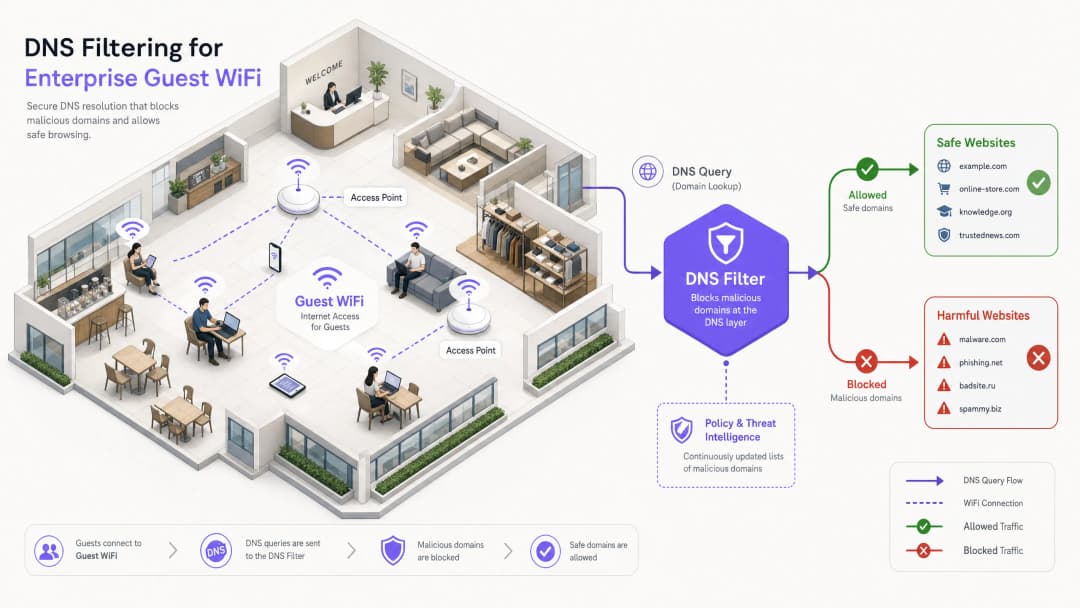
कार्यकारी सारांश
बड़े पैमाने पर सार्वजनिक नेटवर्क का प्रबंधन करने वाले एंटरप्राइज IT लीडर्स के लिए, एक सुरक्षित, अनुपालन योग्य और उच्च-प्रदर्शन वाला ब्राउज़िंग अनुभव सुनिश्चित करना एक महत्वपूर्ण परिचालन जनादेश है। हॉस्पिटैलिटी, रिटेल और सार्वजनिक स्थानों पर गेस्ट WiFi नेटवर्क दुर्भावनापूर्ण गतिविधियों और नीति उल्लंघनों के प्राथमिक लक्ष्य हैं - बोटनेट कमांड-एंड-कंट्रोल ट्रैफ़िक से लेकर अवैध स्ट्रीमिंग और अनुपयुक्त सामग्री तक। यह गाइड DNS फ़िल्टरिंग पर एक निश्चित तकनीकी संदर्भ प्रदान करती है: नेटवर्क एज पर हानिकारक सामग्री को ब्लॉक करने और जोखिम को कम करने का सबसे कुशल तंत्र।
संसाधन-गहन डीप पैकेट इंस्पेक्शन (DPI) या कठोर IP ब्लॉकलिस्ट के विपरीत, DNS फ़िल्टरिंग प्रारंभिक डोमेन रिज़ॉल्यूशन अनुरोध को बीच में ही रोक देती है। वास्तविक समय के थ्रेट इंटेलिजेंस फ़ीड के विरुद्ध प्रश्नों का मूल्यांकन करके, यह किसी भी पेलोड का आदान-प्रदान होने से पहले दुर्भावनापूर्ण या अनुपयुक्त डोमेन से कनेक्शन को रोकती है। यह दृष्टिकोण उच्च थ्रूपुट और न्यूनतम लेटेंसी सुनिश्चित करता है - जो हजारों समवर्ती उपयोगकर्ताओं का समर्थन करने वाले वातावरण के लिए आवश्यक है।
मजबूत DNS फ़िल्टरिंग को लागू करना न केवल स्थान की प्रतिष्ठा की रक्षा करता है बल्कि डेटा सुरक्षा नियमों और परिवार-अनुकूल उपयोग नीतियों के अनुपालन में भी सहायता करता है। Guest WiFi और WiFi Analytics जैसे समाधानों का लाभ उठाने वाले संगठनों के लिए, DNS-स्तर के नियंत्रणों को एकीकृत करना एक बुनियादी सुरक्षा आवश्यकता है जो गेस्ट नेटवर्क स्टैक की हर दूसरी परत को रेखांकित करती है।
Technical Deep Dive: DNS Filtering कैसे काम करता है
DNS filtering नेटवर्क आर्किटेक्चर के भीतर एक सक्रिय सुरक्षा परत के रूप में काम करता है। जब कोई क्लाइंट डिवाइस किसी डोमेन तक पहुँचने का प्रयास करता है, तो स्थानीय DNS रिज़ॉल्वर क्वेरी को इंटरसेप्ट करता है। IP एड्रेस को तुरंत वापस करने के बजाय, क्वेरी को एक फ़िल्टरिंग इंजन को फॉरवर्ड किया जाता है जो इसे हल करने या ब्लॉक करने का निर्णय लेने से पहले नीति और थ्रेट इंटेलिजेंस के विरुद्ध इसका मूल्यांकन करता है।
Resolution Pipeline
DNS filtering रिज़ॉल्यूशन पाइपलाइन चार अलग-अलग चरणों में काम करती है। पहला, क्वेरी इंटरसेप्शन (query interception): गेस्ट डिवाइस नेटवर्क से जुड़ता है और DHCP के माध्यम से एक IP कॉन्फ़िगरेशन प्राप्त करता है, जो DNS filtering सर्वर को प्राथमिक रिज़ॉल्वर के रूप में नामित करता है। दूसरा, नीति मूल्यांकन (policy evaluation): फ़िल्टरिंग इंजन क्वेरी (जैसे, malicious-domain.com) प्राप्त करता है और वास्तविक समय में अपडेट की गई श्रेणीबद्ध ब्लॉकलिस्ट और गतिशील थ्रेट इंटेलिजेंस फीड के साथ इसका मिलान करता है। तीसरा, रिज़ॉल्यूशन या सिंकहोलिंग (resolution or sinkholing): यदि डोमेन सुरक्षित है, तो इंजन वास्तविक IP एड्रेस को हल करता है और कनेक्शन सामान्य रूप से आगे बढ़ता है। यदि डोमेन नीति का उल्लंघन करता है, तो इंजन एक नॉन-रूटिंग IP एड्रेस वापस करता है - एक ऐसी तकनीक जिसे सिंकहोलिंग (sinkholing) के रूप में जाना जाता है - या उपयोगकर्ता को एक ब्रांडेड ब्लॉक पेज पर रीडायरेक्ट करता है। चौथा, लॉगिंग (logging): ऑडिट और एनालिटिक्स उद्देश्यों के लिए प्रत्येक क्वेरी को लॉग किया जाता है, चाहे वह हल की गई हो या ब्लॉक की गई हो।
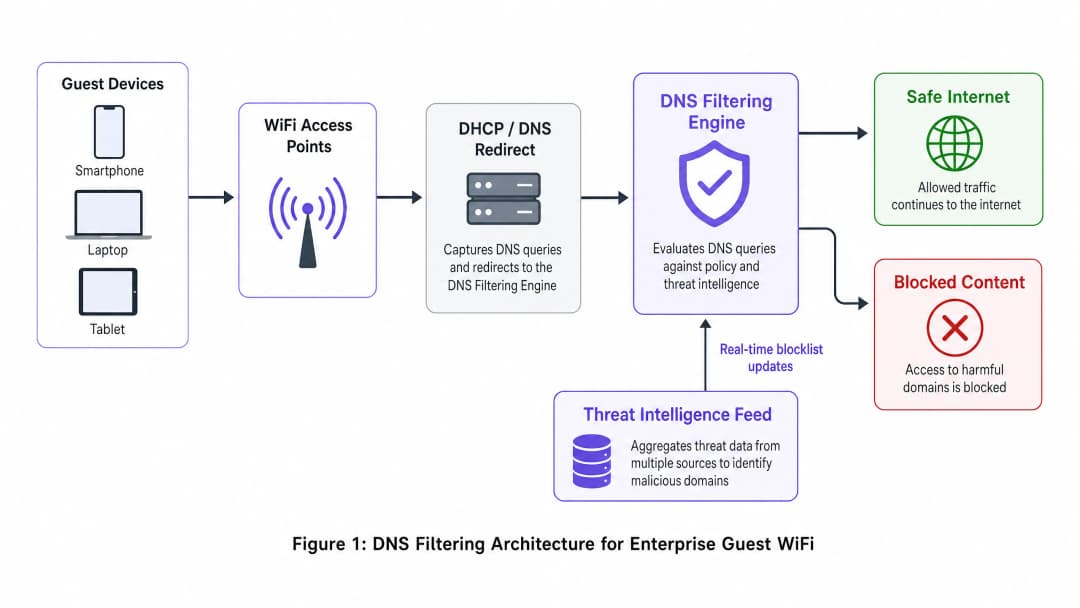
आर्किटेक्चरल लाभ
DNS filtering को तैनात करना वैकल्पिक कंटेंट नियंत्रण विधियों की तुलना में स्पष्ट लाभ प्रदान करता है। लेटेंसी ओवरहेड नगण्य है - DNS क्वेरीज़ लाइटवेट UDP पैकेट हैं, और उनका मूल्यांकन करने में 2ms से कम समय लगता है, जो अंतिम-उपयोगकर्ता के लिए अदृश्य है। यह दृष्टिकोण प्रोटोकॉल-अज्ञेयवादी (protocol-agnostic) भी है: चूंकि फ़िल्टरिंग कनेक्शन स्थापित होने से पहले होती है, इसलिए यह अंतर्निहित एप्लिकेशन प्रोटोकॉल (HTTP, HTTPS, FTP) या पोर्ट नंबर की परवाह किए बिना प्रभावी है। URL-आधारित प्रॉक्सी फ़िल्टरिंग की तुलना में यह एक महत्वपूर्ण लाभ है, जो प्रत्येक एंडपॉइंट पर एक कस्टम रूट सर्टिफिकेट तैनात किए बिना एन्क्रिप्टेड HTTPS ट्रैफ़िक का निरीक्षण नहीं कर सकता है - जो अप्रबंधित गेस्ट डिवाइसेस पर असंभव है।
स्केलेबिलिटी एक अन्य मुख्य ताकत है। एक सिंगल मजबूत DNS क्लस्टर प्रति सेकंड लाखों क्वेरीज़ को संभाल सकता है, जो इसे स्टेडियम, बड़े कन्वेंशन सेंटर, या मल्टी-साइट Retail परिनियोजन जैसे उच्च-घनत्व वाले वातावरण के लिए आदर्श बनाता है। जटिल मल्टी-टेंट टोपोलॉजी के लिए, DNS filtering VLAN-आधारित सेगमेंटेशन रणनीतियों के साथ सहजता से एकीकृत होता है, जैसा कि Designing a Multi-Tenant WiFi Architecture for MDUs में विस्तार से बताया गया है।

| विधि | परिनियोजन जटिलता | लेटेंसी प्रभाव | ग्रैन्युलैरिटी | गेस्ट नेटवर्क उपयुक्तता |
|---|---|---|---|---|
| DNS Filtering | निम्न | न्यूनतम (<2ms) | डोमेन-स्तर | अनुशंसित |
| URL/Proxy Filtering | मध्यम | मध्यम (10-50ms) | URL-स्तर | सीमित (HTTPS समस्याएं) |
| Deep Packet Inspection | उच्च | उच्च (50-200ms) | पेलोड-स्तर | अनुशंसित नहीं है |
| IP Blocklists | निम्न | कोई नहीं | केवल IP-स्तर | केवल पूरक |
| Application Firewall | उच्च | मध्यम | ऐप-स्तर | पूरक |
अपने विशिष्ट सेटअप को लेकर कोई सवाल हैं?
हमारी टीम 80,000 से अधिक वेन्यू में वेन्यू ऑपरेटरों, IT मैनेजरों और नेटवर्क इंजीनियरों के साथ काम करती है। 20 मिनट का कॉल बुक करें और हम आपको दिखाएंगे कि आपके जैसे अन्य लोगों ने इसे कैसे हल किया।
कार्यान्वयन गाइड
वैध ट्रैफ़िक को बाधित किए बिना व्यापक कवरेज सुनिश्चित करने के लिए DNS filtering को तैनात करने के लिए सावधानीपूर्वक योजना की आवश्यकता होती है। निम्नलिखित चरण एक वेंडर-न्यूट्रल परिनियोजन रणनीति को रेखांकित करते हैं जो Hospitality, Healthcare, Transport, और रिटेल वातावरणों में लागू होती है।
चरण 1: नेटवर्क सेगमेंटेशन और DHCP कॉन्फ़िगरेशन
सबसे मजबूत परिनियोजन विधि नेटवर्क गेटवे या DHCP सर्वर को सभी गेस्ट क्लाइंट्स को DNS filtering सर्वर के IP एड्रेस असाइन करने के लिए कॉन्फ़िगर करना है। यह सुनिश्चित करता है कि नेटवर्क में शामिल होने वाला कोई भी डिवाइस एंडपॉइंट पर किसी भी एजेंट इंस्टॉलेशन की आवश्यकता के बिना स्वचालित रूप से सुरक्षित रिज़ॉल्वर का उपयोग करता है।
जटिल टोपोलॉजी वाले वातावरणों के लिए - जैसे कि Designing a Multi-Tenant WiFi Architecture for MDUs में वर्णित हैं - यह सुनिश्चित करें कि गेस्ट ट्रैफ़िक के लिए समर्पित VLANs को कड़ाई से फ़िल्टर किए गए DNS के माध्यम से रूट किया जाए, जबकि परिचालन VLANs (PMS, POS, बिल्डिंग मैनेजमेंट) आंतरिक रिज़ॉल्वर्स का उपयोग करना जारी रखें। यह VLAN-आधारित अलगाव PCI-DSS अनुपालन के लिए एक पूर्वापेक्षा है, जो कार्डधारक डेटा वातावरण और अविश्वसनीय गेस्ट नेटवर्क के बीच सख्त नेटवर्क सेगमेंटेशन को अनिवार्य करता है।
चरण 2: बाईपास को रोकना - पोर्ट 53 को ब्लॉक करें
यह वह चरण है जहाँ कई परिनियोजन विफल हो जाते हैं। केवल DHCP के माध्यम से DNS सर्वर असाइन करना पर्याप्त नहीं है। एक उपयोगकर्ता जिसने अपने डिवाइस पर कस्टम DNS सेटिंग्स को कॉन्फ़िगर किया है - जो 8.8.8.8 या 1.1.1.1 की ओर इशारा करता है - वह फ़िल्टर को पूरी तरह से बायपास कर देगा। इसका समाधान सीधा है: गेटवे पर फ़ायरवॉल नियम लागू करें जो निर्दिष्ट फ़िल्टरिंग सर्वर के अलावा किसी भी IP एड्रेस पर पोर्ट 53 (UDP और TCP) पर सभी आउटबाउंड ट्रैफ़िक को ब्लॉक करते हैं। यह सभी DNS ट्रैफ़िक को नियंत्रित रिज़ॉल्वर के माध्यम से जाने के लिए बाध्य करता है।
इसके अतिरिक्त, DNS over HTTPS (DoH) को ब्लॉक करने पर विचार करें। DoH पोर्ट 443 पर HTTPS ट्रैफ़िक के भीतर DNS क्वेरीज़ को एन्क्रिप्ट करता है, जिससे नेटवर्क स्तर पर सामान्य वेब ट्रैफ़िक से इसे अलग करना असंभव हो जाता है। सबसे प्रभावी शमन ज्ञात DoH प्रदाता IP एड्रेस (Cloudflare, Google, NextDNS) की एक ब्लॉकलिस्ट बनाए रखना और उन्हें फ़ायरवॉल पर ब्लॉक करना है।
चरण 3: नीति परिभाषा और श्रेणी प्रबंधन
स्थान की आवश्यकताओं और दर्शकों के आधार पर सूक्ष्म नीतियां स्थापित करें। सार्वजनिक WiFi के लिए एक विशिष्ट आधारभूत नीति में सुरक्षा खतरों (malware, phishing, botnet C2 servers), वयस्क सामग्री और अवैध गतिविधियों (समुद्री डकैती, अवैध स्ट्रीमिंग) को ब्लॉक करना शामिल है। विशिष्ट क्षेत्रों में, अतिरिक्त श्रेणियां उपयुक्त हो सकती हैं: Healthcare सुविधाओं के लिए जुआ और हथियार, या कॉर्पोरेट गेस्ट नेटवर्क के लिए व्यावसायिक घंटों के दौरान सोशल मीडिया।
चरण 4: Captive Portal एकीकरण - The Walled Garden
यह परिनियोजन (deployment) का सबसे तकनीकी रूप से सूक्ष्म पहलू है। Captive Portals को पूर्ण इंटरनेट एक्सेस प्राप्त करने से पहले मेहमानों को प्रमाणित करने की आवश्यकता होती है। पूर्व-प्रमाणीकरण चरण के दौरान, अतिथि डिवाइस एक प्रतिबंधित स्थिति में होता है - यह केवल Captive Portal तक ही पहुंच सकता है। यदि इस चरण के दौरान DNS फ़िल्टरिंग सक्रिय है, तो यह सोशल लॉगिन (Google OAuth, Facebook Login) या सेवा की शर्तों के स्वीकृति पेजों के लिए आवश्यक बाहरी डोमेन को ब्लॉक कर सकती है।
समाधान एक सही ढंग से कॉन्फ़िगर किया गया walled garden है: डोमेन का एक सेट जिसे प्रमाणीकरण पूरा होने से पहले DNS फ़िल्टरिंग नीति में स्पष्ट रूप से अनुमति दी जाती है। इस सूची में Captive Portal का अपना डोमेन, कोई भी OAuth पहचान प्रदाता डोमेन, और पोर्टल की संपत्तियों को प्रस्तुत करने के लिए आवश्यक कोई भी CDN एंडपॉइंट शामिल होना चाहिए। इसे सही तरीके से कॉन्फ़िगर करने में विफलता टूटे हुए अतिथि ऑनबोर्डिंग अनुभवों का सबसे आम कारण है। यह एकीकरण विचार कार्यालय के वातावरण पर भी समान रूप से लागू होता है, जैसा कि Office WiFi: Optimise Your Modern Office WiFi Network में चर्चा की गई है।
चरण 5: ब्लॉक पेज कस्टमाइजेशन और उपयोगकर्ता संचार
स्पष्ट, ब्रांडेड ब्लॉक पेज प्रदान करें जो समझाते हैं कि सामग्री को क्यों प्रतिबंधित किया गया था और यदि ब्लॉक एक गलत सकारात्मक (false positive) है तो समीक्षा का अनुरोध करने का मार्ग प्रदान करते हैं। यह हेल्पडेस्क टिकटों को काफी कम करता है और एक सुरक्षित ब्राउज़िंग वातावरण के लिए स्थान की प्रतिबद्धता को सुदृढ़ करता है। एक अच्छी तरह से डिज़ाइन किया गया ब्लॉक पेज एक प्रतिबंध को ब्रांड टचपॉइंट में बदल देता है।
सर्वोत्तम प्रथाएं
DNS फ़िल्टरिंग की प्रभावशीलता को अधिकतम करने के लिए, निम्नलिखित उद्योग-मानक अनुशंसाओं का पालन करें।
उच्च-उपलब्धता आर्किटेक्चर: माध्यमिक और तृतीयक DNS रिज़ॉल्वर कॉन्फ़िगर करें। यदि प्राथमिक फ़िल्टरिंग इंजन अनुपलब्ध हो जाता है, तो ट्रैफ़िक को बिना किसी बाधा के द्वितीयक रिज़ॉल्वर पर स्थानांतरित (fail over) होना चाहिए। ISP के डिफ़ॉल्ट रिज़ॉल्वर को फ़ॉलबैक के रूप में कॉन्फ़िगर करने से बचें, क्योंकि यह आउटेज के दौरान फ़िल्टरिंग को पूरी तरह से बायपास कर देगा।
नियमित नीति ऑडिट: गलत सकारात्मकताओं (false positives) और उभरते खतरे के पैटर्न की पहचान करने के लिए लगातार लॉग और एनालिटिक्स की समीक्षा करें। ब्राउज़िंग व्यवहार को नेटवर्क प्रदर्शन मेट्रिक्स के साथ जोड़ने के लिए अपने WiFi Analytics प्लेटफ़ॉर्म के साथ DNS क्वेरी लॉग को एकीकृत करें।
थ्रेट इंटेलिजेंस फीड गुणवत्ता: DNS फ़िल्टरिंग की प्रभावशीलता सीधे थ्रेट इंटेलिजेंस फीड की गुणवत्ता और ताज़गी के समानुपाती होती है। फीड अपडेट की आवृत्ति (प्रति घंटा आधारभूत है; वास्तविक समय को प्राथमिकता दी जाती है), श्रेणी कवरेज की चौड़ाई, और गलत-सकारात्मक दरों पर विक्रेताओं का मूल्यांकन करें।DNSSEC Validation: जहाँ समर्थित हो, वहाँ फ़िल्टरिंग रिज़ॉल्वर पर DNSSEC validation को सक्षम करें। यह DNS कैश पॉइज़निंग हमलों को रोकता है, जहाँ कोई हमलावर उपयोगकर्ताओं को दुर्भावनापूर्ण साइटों पर रीडायरेक्ट करने के लिए गलत DNS रिकॉर्ड डाल देता है।
Troubleshooting and Risk Mitigation
एक मजबूत आर्किटेक्चर के साथ भी, परिचालन संबंधी समस्याएं उत्पन्न होती हैं। निम्नलिखित सबसे आम विफलता के तरीके और उनके समाधान हैं।
फॉल्स पॉजिटिव (False Positives): वैध डोमेन का गलत तरीके से दुर्भावनापूर्ण या नीति-उल्लंघन के रूप में वर्गीकृत होना। एक आसानी से सुलभ अनुमति सूची (allowlist) प्रबंधन प्रक्रिया और उपयोगकर्ता रिपोर्टों के लिए त्वरित-प्रतिक्रिया SLA बनाए रखें। कुल क्वेरी के सापेक्ष ब्लॉक की गई क्वेरी के अनुपात की निगरानी करें; एक असामान्य रूप से उच्च ब्लॉक दर अत्यधिक आक्रामक नीति सेटिंग्स का एक मजबूत संकेतक है।
Captive Portal विफलता: जैसा कि ऊपर बताया गया है, यह walled garden प्रविष्टियों के गायब होने के कारण होता है। प्री-ऑथेंटिकेशन चरण के दौरान एक परीक्षण डिवाइस से DNS क्वेरी को कैप्चर करके और यह पहचान कर निदान करें कि कौन सी क्वेरी ब्लॉक की जा रही हैं। उन डोमेन को प्री-ऑथेंटिकेशन अनुमति सूची (allowlist) में जोड़ें।
प्रदर्शन में गिरावट: अपर्याप्त DNS इन्फ्रास्ट्रक्चर धीमी ब्राउज़िंग का कारण बन सकता है, जो सीधे विफलता के बजाय उच्च पेज-लोड समय के रूप में प्रकट होता है। अपस्ट्रीम फ़िल्टरिंग इंजन पर क्वेरी लोड को कम करने के लिए स्थानीय कैशिंग रिज़ॉल्वर तैनात करें। DNS क्वेरी प्रतिक्रिया समय की निगरानी करें; 50ms से अधिक की कोई भी चीज़ जांच की मांग करती है।
DoH बायपास: यदि एनालिटिक्स फ़ायरवॉल नियमों के बावजूद ज्ञात DoH प्रदाताओं के ट्रैफ़िक को दिखाता है, तो सत्यापित करें कि DoH प्रदाता IPs की ब्लॉक सूची नवीनतम है और फ़ायरवॉल नियम सभी अतिथि VLAN निकास बिंदुओं पर लागू हैं।
ROI and Business Impact
DNS फ़िल्टरिंग के लिए निवेश पर रिटर्न (ROI) साधारण जोखिम शमन से कहीं अधिक है। Hospitality स्थानों के लिए, परिवार के अनुकूल वातावरण सुनिश्चित करना सीधे तौर पर ब्रांड प्रतिष्ठा और नेट प्रमोटर स्कोर (NPS) को प्रभावित करता है। किसी अतिथि द्वारा - विशेष रूप से एक नाबालिग द्वारा - किसी स्थान के नेटवर्क पर अनुचित सामग्री तक पहुँचने की एक भी घटना महत्वपूर्ण प्रतिष्ठित और कानूनी जोखिम पैदा कर सकती है।
बैंडविड्थ-गहन अवैध स्ट्रीमिंग को ब्लॉक करके, स्थान नेटवर्क प्रदर्शन को भी अनुकूलित कर सकते हैं, जिससे महंगे बुनियादी ढांचे के अपग्रेड में देरी होती है। एक 500-कमरों वाले होटल में जहाँ मेहमानों का एक बड़ा हिस्सा पायरेसी साइटों से स्ट्रीमिंग कर रहा था, उन डोमेन को ब्लॉक करने के लिए DNS फ़िल्टरिंग तैनात करने से पीक बैंडविड्थ उपयोग में 20-35% की कमी आ सकती है, जिससे सीधे सभी मेहमानों के अनुभव में सुधार होता है और अतिरिक्त अपलिंक क्षमता की आवश्यकता टल जाती है।
अनुपालन के दृष्टिकोण से, मजबूत नेटवर्क सुरक्षा नियंत्रणों का प्रदर्शन करना अक्सर PCI-DSS प्रमाणन के लिए एक पूर्वापेक्षा होती है और यह डिज़ाइन द्वारा डेटा सुरक्षा के GDPR सिद्धांत का समर्थन करता है। क्लाउड-आधारित समाधानों के लिए प्रति उपयोगकर्ता प्रति माह एक पैसे के अंश के बराबर होने वाली DNS फ़िल्टरिंग की तैनाती की लागत, नियामक जुर्मानों या ब्रांड को नुकसान पहुँचाने वाली सुरक्षा घटना की संभावित लागत की तुलना में नगण्य है।
कई साइटों पर हाई-फ्रीक्वेंसी परिनियोजन का प्रबंधन करने वाली IT टीमों के लिए, परिचालन ओवरहेड न्यूनतम है। क्लाउड-आधारित DNS filtering समाधानों के लिए किसी ऑन-प्रिमाइसेस हार्डवेयर की आवश्यकता नहीं होती है, ये थ्रेट इंटेलिजेंस को स्वचालित रूप से अपडेट करते हैं, और एकल डैशबोर्ड से सैकड़ों स्थानों पर केंद्रीकृत नीति प्रबंधन प्रदान करते हैं।
मुख्य परिभाषाएं
DNS फ़िल्टरिंग
एक सुरक्षा तकनीक जो DNS प्रश्नों को बीच में रोकती है और अनुरोधित डोमेन को हल करने या ब्लॉक करने से पहले नीति और सुरक्षा खतरों की जानकारी के आधार पर उनका मूल्यांकन करती है।
एंटरप्राइज़ गेस्ट WiFi नेटवर्क पर सामग्री नियंत्रण के लिए प्राथमिक तंत्र, जो बिना किसी एंडपॉइंट एजेंट की आवश्यकता के नेटवर्क परत पर काम करता है।
DNS सिंकहोलींग
किसी दुर्भावनापूर्ण या नीति का उल्लंघन करने वाले डोमेन के लिए DNS क्वेरी के उत्तर में एक गलत, गैर-रूट करने योग्य IP पता वापस भेजने की प्रथा, जिससे कनेक्शन स्थापित होने से रोका जा सके।
उपयोगकर्ता को एक सामान्य कनेक्शन त्रुटि संदेश दिखाए बिना, मैलवेयर कमांड-और-कंट्रोल ट्रैफ़िक को निष्क्रिय करने और हानिकारक साइटों तक पहुँच को रोकने के लिए उपयोग किया जाता है।
Captive Portal
एक वेब पेज जिसके साथ सार्वजनिक-पहुंच वाले नेटवर्क के उपयोगकर्ता को पूर्ण इंटरनेट एक्सेस दिए जाने से पहले इंटरैक्ट करना आवश्यक होता है, आमतौर पर शर्तों की स्वीकृति, प्रमाणीकरण या डेटा कैप्चर के लिए उपयोग किया जाता है।
अतिथि ऑनबोर्डिंग और डेटा संग्रह के लिए महत्वपूर्ण; walled garden के विरोधाभास को रोकने के लिए इसे DNS फ़िल्टरिंग के साथ सावधानीपूर्वक एकीकृत किया जाना चाहिए।
Walled Garden
डोमेन का एक सेट जिन्हें प्री-ऑथेंटिकेशन चरण के दौरान DNS फ़िल्टरिंग नीति में स्पष्ट रूप से अनुमति दी जाती है, जिससे उपयोगकर्ता द्वारा शर्तों को स्वीकार करने से पहले captive portal और प्रमाणीकरण सेवाएं काम कर सकें।
Walled garden का गलत कॉन्फ़िगरेशन DNS-फ़िल्टर किए गए गेस्ट नेटवर्क में बाधित captive portal अनुभवों का सबसे आम कारण है।
डीप पैकेट इंस्पेक्शन (DPI)
नेटवर्क पैकेट फ़िल्टरिंग का एक रूप जो पैकेट के डेटा पेलोड की जांच करता है क्योंकि वे एक निरीक्षण बिंदु से गुजरते हैं, जिससे सामग्री-स्तरीय विश्लेषण सक्षम होता है।
DNS फ़िल्टरिंग का एक अधिक संसाधन-गहन विकल्प; उच्च-थ्रूपुट गेस्ट नेटवर्क के लिए अव्यावहारिक और प्रमाणपत्र अवरोधन के बिना एन्क्रिप्टेड HTTPS ट्रैफ़िक का निरीक्षण करने में असमर्थ।
DNS over HTTPS (DoH)
एक प्रोटोकॉल जो HTTPS ट्रैफ़िक के भीतर DNS प्रश्नों को एन्क्रिप्ट करता है, जिससे DNS लुकअप के नेटवर्क-स्तरीय अवरोधन को रोका जा सकता है।
पारंपरिक DNS फ़िल्टरिंग को बायपास करने के लिए इसका उपयोग किया जा सकता है; फ़िल्टरिंग कवरेज बनाए रखने के लिए प्रशासकों को फ़ायरवॉल पर ज्ञात DoH प्रदाता IP को ब्लॉक करना चाहिए।
VLAN (Virtual Local Area Network)
एक तार्किक नेटवर्क खंड जो उपकरणों को उनके भौतिक स्थान से स्वतंत्र रूप से समूहित करता है, जिसे स्विच या राउटर स्तर पर लागू किया जाता है।
गेस्ट WiFi ट्रैफ़िक को आंतरिक कॉर्पोरेट या परिचालन नेटवर्क से अलग करने के लिए आवश्यक, जो PCI-DSS अनुपालन के लिए एक पूर्वापेक्षा है।
थ्रेट इंटेलिजेंस फीड
एक निरंतर अपडेट होने वाली डेटा स्ट्रीम जिसमें ज्ञात दुर्भावनापूर्ण डोमेन, IP पते और URL के बारे में जानकारी होती है, जिसका उपयोग सुरक्षा प्रणालियों को संचालित करने के लिए किया जाता है।
थ्रेट इंटेलिजेंस फीड की गुणवत्ता और नवीनता सीधे तौर पर नए पंजीकृत दुर्भावनापूर्ण डोमेन के खिलाफ DNS फ़िल्टरिंग परिनियोजन की प्रभावशीलता को निर्धारित करती है।
DNSSEC (DNS Security Extensions)
IETF विशिष्टताओं का एक सूट जो DNS प्रतिक्रियाओं में क्रिप्टोग्राफ़िक प्रमाणीकरण जोड़ता है, जिससे कैश पॉइज़निंग और स्पूफ़िंग हमलों को रोका जा सकता है।
हमलावरों को उपयोगकर्ताओं को रीडायरेक्ट करने के लिए झूठे DNS रिकॉर्ड डालने से रोकने के लिए समर्थित DNS फ़िल्टरिंग रिज़ॉल्वर पर सक्षम किया जाना चाहिए।
हल किए गए उदाहरण
एक 500 कमरों वाली लग्जरी होटल श्रृंखला को अपने गेस्ट WiFi पर सामग्री फ़िल्टरिंग लागू करने की आवश्यकता है। वर्तमान में वे अवैध स्ट्रीमिंग के कारण उच्च बैंडविड्थ उपयोग का अनुभव कर रहे हैं और सार्वजनिक क्षेत्रों में सुलभ अनुपयुक्त सामग्री के बारे में शिकायतें प्राप्त कर चुके हैं। उन्हें एक ऐसे समाधान की आवश्यकता है जो उनके प्रॉपर्टी मैनेजमेंट सिस्टम (PMS) के प्रदर्शन को प्रभावित न करे जो VLANs के माध्यम से समान भौतिक बुनियादी ढांचे को साझा करता है।
- क्लाउड - आधारित DNS फ़िल्टरिंग समाधान परिनियोजित करें। क्लाउड DNS फ़िल्टरिंग IPs को प्राथमिक और द्वितीयक रिज़ॉल्वर के रूप में असाइन करने के लिए गेस्ट WiFi VLAN के लिए DHCP स्कोप को कॉन्फ़िगर करें। 2. स्वीकृत DNS फ़िल्टरिंग सर्वर के अलावा किसी भी बाहरी IP के लिए गेस्ट VLAN से पोर्ट 53 पर सभी आउटबाउंड UDP और TCP ट्रैफ़िक को ब्लॉक करने के लिए गेटवे पर फ़ायरवॉल नियम लागू करें। 3. 'वयस्क सामग्री', 'पायरेसी/कॉपीराइट चोरी', 'मालवेयर/फ़िशिंग', और 'बॉटनेट C2' को ब्लॉक करने वाली एक सामग्री फ़िल्टरिंग नीति बनाएं। 4. होटल के लोगो और एक स्पष्ट संदेश के साथ एक ब्रांडेड ब्लॉक पेज कॉन्फ़िगर करें। 5. महत्वपूर्ण रूप से, सुनिश्चित करें कि PMS VLAN DHCP स्कोप आंतरिक DNS सर्वरों का उपयोग करना जारी रखे। पोर्ट 53 को ब्लॉक करने वाले फ़ायरवॉल नियमों को विशेष रूप से गेस्ट VLAN के लिए स्कोप किया जाना चाहिए, वैश्विक स्तर पर लागू नहीं किया जाना चाहिए। 6. वैध अतिथि सेवाओं को प्रभावित करने वाले किसी भी गलत सकारात्मक परिणाम की पहचान करने और उसे हल करने के लिए पहले 30 दिनों के लिए DNS क्वेरी लॉग की निगरानी करें।
एक बड़ा रिटेल शॉपिंग सेंटर मुफ्त सार्वजनिक WiFi की पेशकश करना चाहता है लेकिन उसे सख्त परिवार - अनुकूल कॉर्पोरेट नीतियों का पालन करना होगा। उन्हें सोशल लॉगिन विकल्पों के साथ एक Captive Portal के माध्यम से जनसांख्यिकीय डेटा एकत्र करने की भी आवश्यकता है। उन्हें ऑनबोर्डिंग प्रवाह को तोड़े बिना दोनों आवश्यकताओं का समर्थन करने के लिए DNS फ़िल्टरिंग को कैसे कॉन्फ़िगर करना चाहिए?
- DNS फ़िल्टरिंग समाधान को मौजूदा नेटवर्क गेटवे के साथ एकीकृत करें, गेस्ट SSID पर DHCP के माध्यम से फ़िल्टरिंग DNS IPs असाइन करें। 2. किसी भी ब्लॉकिंग नीति को लागू करने से पहले, वॉल्ड गार्डन को कॉन्फ़िगर करें। प्री - ऑथेंटिकेशन अनुमति सूची में निम्नलिखित जोड़ें: Captive Portal का अपना डोमेन और CDN एंडपॉइंट्स, Google OAuth डोमेन (accounts.google.com, oauth2.googleapis.com), Facebook Login डोमेन (www.facebook.com, graph.facebook.com), और उपयोग में आने वाले कोई अन्य पहचान प्रदाता। 3. सामग्री फ़िल्टरिंग नीति (वयस्क, जुआ, मालवेयर, पायरेसी श्रेणियां) को केवल सफल प्रमाणीकरण के बाद सक्रिय करने के लिए लागू करें। 4. गेस्ट VLAN पर पोर्ट 53 इग्रेस ब्लॉकिंग लागू करें। 5. खुदरा केंद्र की ब्रांडिंग और परिवार - अनुकूल ब्राउज़िंग के बारे में एक स्पष्ट, अनुकूल संदेश के साथ ब्लॉक पेज को अनुकूलित करें। 6. लाइव होने से पहले कई डिवाइस प्रकारों (iOS, Android, Windows) के साथ संपूर्ण ऑनबोर्डिंग प्रवाह का परीक्षण करें।
अभ्यास प्रश्न
Q1. एक स्टेडियम के IT डायरेक्टर ने बताया कि गेस्ट WiFi पर DNS फ़िल्टरिंग लागू करने के बाद से, गेस्ट Captive Portal पर सोशल लॉगिन प्रक्रिया पूरी नहीं कर पा रहे हैं। पोर्टल Google और Facebook OAuth का उपयोग करता है। सबसे संभावित आर्किटेक्चरल कमी क्या है और आप इसे कैसे हल करेंगे?
संकेत: विचार करें कि प्री-ऑथेंटिकेशन चरण के दौरान, उपयोगकर्ता द्वारा सेवा की शर्तों को स्वीकार करने से पहले, किन बाहरी संसाधनों की आवश्यकता होती है।
मॉडल उत्तर देखें
सोशल लॉगिन डोमेन (accounts.google.com, oauth2.googleapis.com, www.facebook.com, graph.facebook.com) को walled garden - यानी DNS फ़िल्टरिंग पॉलिसी में प्री-ऑथेंटिकेशन अलाउलिस्ट में नहीं जोड़ा गया है। फ़िल्टर इन क्वेरीज़ को ब्लॉक कर रहा है क्योंकि यूजर ने अभी तक ऑथेंटिकेट नहीं किया है, जिससे एक असमंजस वाली स्थिति बन गई है। इसका समाधान यह है कि सभी आवश्यक OAuth और आइडेंटिटी प्रोवाइडर डोमेन को प्री-ऑथेंटिकेशन अलाउलिस्ट में स्पष्ट रूप से जोड़ा जाए, और फिर री-डिप्लॉय करने से पहले iOS, Android और Windows डिवाइसों पर पूरे ऑनबोर्डिंग फ्लो का फिर से परीक्षण किया जाए।
Q2. नेटवर्क परफॉर्मेंस को बेहतर बनाने के लिए, एक नेटवर्क आर्किटेक्ट DNS फ़िल्टरिंग के बजाय सभी गेस्ट ट्रैफ़िक की जांच करने के लिए एक पारदर्शी HTTPS प्रॉक्सी लागू करने का प्रस्ताव करता है। यह दृष्टिकोण सार्वजनिक गेस्ट WiFi एनवायरनमेंट के लिए मूल रूप से अनुपयुक्त क्यों है?
संकेत: एन्क्रिप्टेड HTTPS ट्रैफ़िक की जांच करने की आवश्यकताओं और अनमैनेज्ड गेस्ट डिवाइसों की प्रकृति के बारे में सोचें।
मॉडल उत्तर देखें
पारदर्शी HTTPS जांच के लिए TLS ट्रैफ़िक का मैन-इन-द-मिडल डिक्रिप्शन करने के लिए प्रत्येक क्लाइंट डिवाइस पर एक कस्टम रूट सर्टिफिकेट इंस्टॉल करने की आवश्यकता होती है। एक मैनेज्ड कॉर्पोरेट नेटवर्क पर इसे MDM या ग्रुप पॉलिसी के माध्यम से प्राप्त किया जा सकता है। एक सार्वजनिक गेस्ट नेटवर्क पर, वेन्यू का गेस्ट एंडपॉइंट्स पर कोई नियंत्रण नहीं होता है, जिससे सर्टिफिकेट डिप्लॉयमेंट असंभव हो जाता है। सर्टिफिकेट के बिना, प्रॉक्सी प्रत्येक HTTPS साइट पर गंभीर TLS सर्टिफिकेट चेतावनियां जनरेट करेगा, जिससे ब्राउज़िंग का अनुभव पूरी तरह से खराब हो जाएगा। BYOD एनवायरनमेंट के लिए DNS फ़िल्टरिंग ही सही दृष्टिकोण है क्योंकि इसके लिए किसी एंडपॉइंट एजेंट या सर्टिफिकेट की आवश्यकता नहीं होती है।
Q3. एक रिटेल चेन ने गेस्ट SSID पर DHCP के माध्यम से फ़िल्टरिंग DNS IPs असाइन करके DNS फ़िल्टरिंग लागू की है। एनालिटिक्स से पता चलता है कि अभी भी बड़ी मात्रा में एडल्ट कंटेंट एक्सेस किया जा रहा है। नेटवर्क कॉन्फ़िगरेशन का कौन सा चरण संभवतः छूट गया था, और इसका समाधान क्या है?
संकेत: एक तकनीकी रूप से सक्षम यूजर DHCP द्वारा असाइन की गई DNS सेटिंग्स को कैसे ओवरराइड कर सकता है?
मॉडल उत्तर देखें
नेटवर्क एडमिनिस्ट्रेटर गेस्ट VLAN से स्वीकृत DNS फ़िल्टरिंग सर्वर के अलावा किसी भी बाहरी IP पर पोर्ट 53 (UDP और TCP) को ब्लॉक करने वाले आउटबाउंड फ़ायरवॉल नियमों को लागू करने में विफल रहा। अपने डिवाइसों पर कस्टम DNS सेटिंग्स (जैसे, 8.8.8.8) हार्डकोड करने वाले यूजर DHCP-असाइन किए गए फ़िल्टरिंग रिज़ॉल्वर को पूरी तरह से बायपास कर रहे हैं। इसका समाधान गेटवे फ़ायरवॉल नियमों को जोड़ना है जो फ़िल्टरिंग सर्वर के लिए निर्देशित न होने वाले सभी आउटबाउंड पोर्ट 53 ट्रैफ़िक को रीडायरेक्ट या ड्रॉप करते हैं। इसके अतिरिक्त, एन्क्रिप्टेड DNS बायपास को रोकने के लिए पोर्ट 443 पर ज्ञात DoH प्रोवाइडर IPs को ब्लॉक करने पर विचार करें।
Q4. एक कॉन्फ्रेंस सेंटर एक बड़े अंतरराष्ट्रीय कार्यक्रम की योजना बना रहा है। वे तीन दिनों में एक साथ 8,000 WiFi यूजर्स की उम्मीद कर रहे हैं। उनके वर्तमान DNS इंफ्रास्ट्रक्चर में एक सिंगल ऑन-प्रिमाइसेस फ़िल्टरिंग अप्लायंस शामिल है। यह कौन से आर्किटेक्चरल जोखिम प्रस्तुत करता है और आप किन बदलावों की सिफारिश करेंगे?
संकेत: परफॉर्मेंस क्षमता और उपलब्धता दोनों पर विचार करें। यदि सिंगल अप्लायंस विफल हो जाता है या ओवरलोड हो जाता है तो क्या होगा?
मॉडल उत्तर देखें
सिंगल ऑन-प्रिमाइसेस अप्लायंस दो गंभीर जोखिम प्रस्तुत करता है: सिंगल पॉइंट ऑफ़ फेलियर (यदि यह ऑफ़लाइन हो जाता है, तो सभी DNS रिज़ॉल्यूशन विफल हो जाते हैं, जिससे पूरा गेस्ट नेटवर्क ठप हो जाता है) और पीक लोड के दौरान संभावित परफॉर्मेंस बोटलनेक। सिफारिशें: 1) भौगोलिक रूप से वितरित रिज़ॉल्वर इंफ्रास्ट्रक्चर वाले क्लाउड-आधारित DNS फ़िल्टरिंग सर्विस पर माइग्रेट करें, जो प्रति सेकंड लाखों क्वेरीज़ को संभालने में सक्षम हो। 2) DHCP स्कोप में कम से कम दो रिज़ॉल्वर IPs (प्राइमरी और सेकेंडरी) कॉन्फ़िगर करें जो विभिन्न क्लाउड रिज़ॉल्वर एंडपॉइंट्स की ओर इशारा करते हों। 3) अपस्ट्रीम क्वेरी लोड को कम करने और रिस्पॉन्स टाइम को बेहतर बनाने के लिए वेन्यू पर लोकल कैशिंग रिज़ॉल्वर लागू करें। 4) आर्किटेक्चर को सत्यापित करने के लिए पीक कॉनकरेंट यूजर्स का अनुकरण करते हुए कार्यक्रम से पहले एक लोड टेस्ट आयोजित करें।
इस श्रृंखला में आगे पढ़ें
DNS Over HTTPS (DoH): Public WiFi Filtering पर प्रभाव
यह तकनीकी संदर्भ गाइड बताती है कि कैसे DNS over HTTPS (DoH) पब्लिक WiFi नेटवर्क पर पारंपरिक पोर्ट 53 कंटेंट फ़िल्टरिंग को बायपास करता है। यह नेटवर्क आर्किटेक्ट्स और IT प्रबंधकों को विजिबिलिटी वापस पाने, अनुपालन लागू करने और एंटरप्राइज वातावरण में गेस्ट एक्सेस सुरक्षित करने के लिए व्यावहारिक, वेंडर-न्यूट्रल समाधान रणनीतियाँ प्रदान करता है।
पब्लिक WiFi दायित्व: कंटेंट फ़िल्टरिंग क्यों अनिवार्य है
यह तकनीकी संदर्भ मार्गदर्शिका अनफ़िल्टर्ड पब्लिक WiFi प्रदान करने के कानूनी और परिचालन जोखिमों की रूपरेखा तैयार करती है, और विस्तार से बताती है कि वेन्यू ऑपरेटरों के लिए कंटेंट फ़िल्टरिंग एक अनिवार्य परिनियोजन आवश्यकता क्यों है। यह नेटवर्क को अवैध गतिविधि, कॉपीराइट उल्लंघन और नियामक गैर - अनुपालन से बचाने के लिए व्यावहारिक आर्किटेक्चर रणनीतियाँ, कार्यान्वयन कदम और जोखिम शमन रणनीतियाँ प्रदान करता है। वेन्यू ऑपरेटरों और CTOs को एक सुरक्षित, अनुपालन योग्य गेस्ट WiFi वातावरण लागू करने के लिए ठोस केस स्टडीज, निर्णय फ्रेमवर्क और कॉन्फ़िगरेशन मार्गदर्शन मिलेगा।
नेटवर्क एज (Network Edge) पर मैलवेयर और फ़िशिंग को ब्लॉक करना
यह तकनीकी संदर्भ मार्गदर्शिका नेटवर्क एज पर अप्रबंधित गेस्ट और IoT उपकरणों को सुरक्षित करने के लिए नेटवर्क - स्तरीय खतरा सुरक्षा लागू करने की वास्तुकला, परिनियोजन और व्यावसायिक प्रभाव की रूपरेखा तैयार करती है। यह IT लीडरों को सक्रिय रूप से मैलवेयर और फ़िशिंग को ब्लॉक करने के लिए व्यावहारिक मार्गदर्शन प्रदान करती है।
अपने विशिष्ट सेटअप को लेकर कोई सवाल हैं?
हमारी टीम 80,000 से अधिक वेन्यू में वेन्यू ऑपरेटरों, IT मैनेजरों और नेटवर्क इंजीनियरों के साथ काम करती है। 20 मिनट का कॉल बुक करें और हम आपको दिखाएंगे कि आपके जैसे अन्य लोगों ने इसे कैसे हल किया।