
What is DNS Filtering? How to Block Harmful Content on Guest WiFi
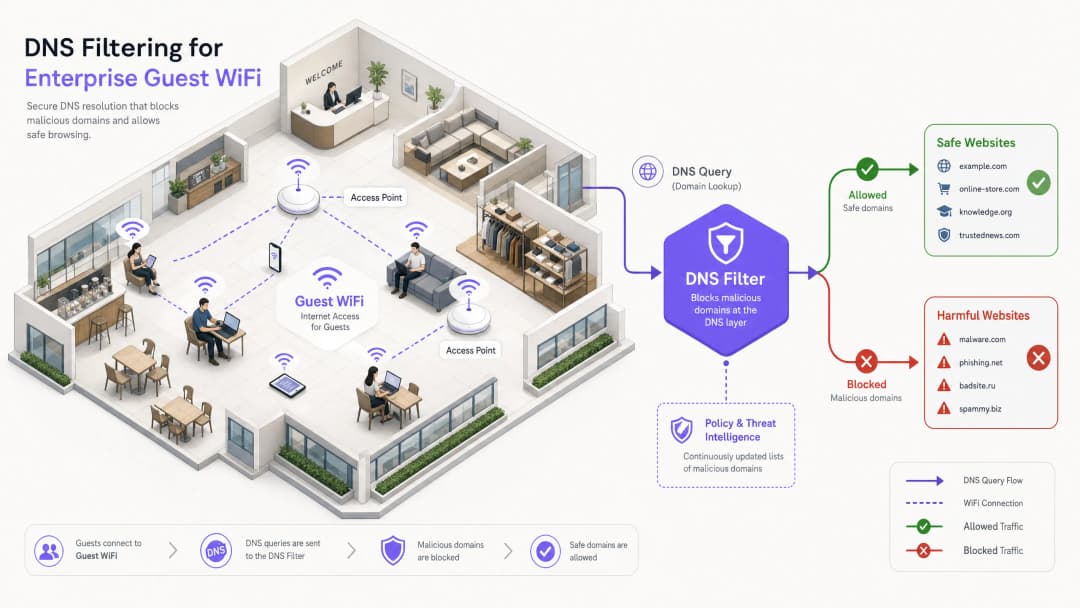
This comprehensive technical guide explains how DNS filtering operates at the network layer to secure enterprise guest WiFi, covering deployment architectures, evasion prevention, and captive portal integration. It provides actionable implementation guidance for IT leaders in retail, hospitality, and public-sector venues who need to enforce content policies, protect brand reputation, and demonstrate compliance with PCI DSS and GDPR. Real-world case studies from hotel and retail environments illustrate the practical trade-offs and configuration decisions that determine deployment success.
Video overview
Listen to this guide
View podcast transcript
Part of our core series: Enterprise WiFi Security Guide →
Executive Summary
For enterprise IT leaders managing large-scale public networks, ensuring a secure, compliant, and high-performing browsing experience is a critical operational mandate. Guest WiFi networks in hospitality, retail, and public spaces are primary targets for malicious activities and policy violations - from botnet command-and-control traffic to illegal streaming and inappropriate content. This guide provides a definitive technical reference on DNS filtering: the most efficient mechanism to block harmful content at the network edge and mitigate risk.
Unlike resource-intensive Deep Packet Inspection (DPI) or rigid IP blocklists, DNS filtering intercepts the initial domain resolution request. By evaluating queries against real-time threat intelligence feeds, it prevents connections to malicious or inappropriate domains before any payload is exchanged. This approach ensures high throughput and minimal latency - essential for environments supporting thousands of concurrent users.
Implementing robust DNS filtering not only protects venue reputation but also aids in compliance with data protection regulations and family-friendly usage policies. For organisations leveraging solutions like Guest WiFi and WiFi Analytics, integrating DNS-level controls is a foundational security requirement that underpins every other layer of the guest network stack.
Technical Deep Dive: How DNS Filtering Works
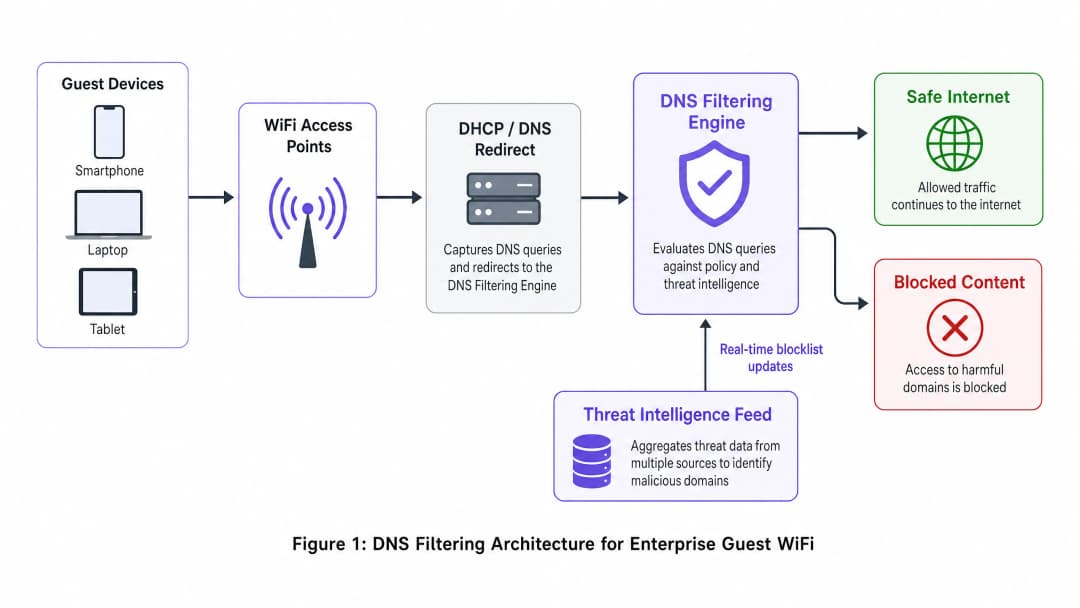
DNS filtering operates as a proactive security layer within the network architecture. When a client device attempts to access a domain, the local DNS resolver intercepts the query. Instead of immediately returning the IP address, the query is forwarded to a filtering engine that evaluates it against policy and threat intelligence before deciding whether to resolve or block it.
Resolution Pipeline
The DNS filtering resolution pipeline operates in four distinct stages. First, query interception: the guest device connects to the network and receives an IP configuration via DHCP, which designates the DNS filtering server as the primary resolver. Second, policy evaluation: the filtering engine receives the query (e.g., malicious-domain.com) and cross-references it with categorised blocklists and dynamic threat intelligence feeds updated in real time. Third, resolution or sinkholing: if the domain is safe, the engine resolves the actual IP address and the connection proceeds normally. If the domain violates policy, the engine returns a non-routing IP address - a technique known as sinkholing - or redirects the user to a branded block page. Fourth, logging: each query is logged for audit and analytics purposes, whether resolved or blocked.
Architectural Benefits
Deploying DNS filtering offers clear advantages over alternative content control methods. Latency overhead is negligible - DNS queries are lightweight UDP packets, and evaluating them takes less than 2ms, which is invisible to the end-user. This approach is also protocol-agnostic: because filtering occurs before a connection is established, it is effective regardless of the underlying application protocol (HTTP, HTTPS, FTP) or port number. This is a significant advantage over URL-based proxy filtering, which cannot inspect encrypted HTTPS traffic without deploying a custom root certificate on each endpoint - an impossibility on unmanaged guest devices.
Scalability is another core strength. A single robust DNS cluster can handle millions of queries per second, making it ideal for high-density environments such as stadiums, large convention centres, or multi-site Retail deployments. For complex multi-tenant topologies, DNS filtering integrates seamlessly with VLAN-based segmentation strategies, as detailed in Designing a Multi-Tenant WiFi Architecture for MDUs.

| Method | Deployment Complexity | Latency Impact | Granularity | Guest Network Suitability |
|---|---|---|---|---|
| DNS Filtering | Low | Minimal (<2ms) | Domain-level | Recommended |
| URL/Proxy Filtering | Medium | Medium (10-50ms) | URL-level | Limited (HTTPS issues) |
| Deep Packet Inspection | High | High (50-200ms) | Payload-level | Not recommended |
| IP Blocklists | Low | None | IP-level only | Supplementary only |
| Application Firewall | High | Medium | App-level | Supplementary |
Got questions about your specific setup?
Our team works with venue operators, IT managers, and network engineers across 80,000 venues. Book a 20-minute call and we will show you how others like you solved it.
Implementation Guide
Deploying DNS filtering requires careful planning to ensure comprehensive coverage without disrupting legitimate traffic. The following steps outline a vendor-neutral deployment strategy applicable across Hospitality, Healthcare, Transport, and retail environments.
Step 1: Network Segmentation and DHCP Configuration
The most robust deployment method is to configure the network gateway or DHCP server to assign the DNS filtering server's IP addresses to all guest clients. This ensures that any device joining the network automatically uses the secure resolver without requiring any agent installation on the endpoint.
For environments with complex topologies - such as those described in Designing a Multi-Tenant WiFi Architecture for MDUs - ensure that VLANs dedicated to guest traffic are routed through strictly filtered DNS, while operational VLANs (PMS, POS, building management) continue to use internal resolvers. This VLAN-based isolation is a prerequisite for PCI DSS compliance, which mandates strict network segmentation between the cardholder data environment and untrusted guest networks.
Step 2: Preventing Bypasses - Block Port 53
This is the stage where many deployments fail. Simply assigning DNS servers via DHCP is insufficient. A user with custom DNS settings configured on their device - pointing to 8.8.8.8 or 1.1.1.1 - will bypass the filter entirely. The solution is straightforward: implement firewall rules on the gateway that block all outbound traffic on Port 53 (UDP and TCP) to any IP address other than the designated filtering servers. This forces all DNS traffic through the controlled resolver.
Additionally, consider blocking DNS over HTTPS (DoH). DoH encrypts DNS queries within HTTPS traffic on port 443, making it impossible to distinguish from normal web traffic at the network level. The most effective mitigation is to maintain a blocklist of known DoH provider IP addresses (Cloudflare, Google, NextDNS) and block them at the firewall.
Step 3: Policy Definition and Category Management
Establish granular policies based on venue requirements and audience. A typical baseline policy for public WiFi includes blocking security threats (malware, phishing, botnet C2 servers), adult content, and illegal activity (piracy, illegal streaming). In specific sectors, additional categories may be appropriate: gambling and weapons for Healthcare facilities, or social media during business hours for corporate guest networks.
Step 4: Captive Portal Integration - The Walled Garden
This is the most technically nuanced aspect of deployment. Captive Portals require guests to authenticate before gaining full internet access. During the pre-authentication phase, the guest device is in a restricted state - it can only access the Captive Portal. If DNS filtering is active during this phase, it may block external domains required for social logins (Google OAuth, Facebook Login) or terms of service acceptance pages.
The solution is a correctly configured walled garden: a set of domains that are explicitly allowed in the DNS filtering policy before authentication is complete. This list must include the Captive Portal's own domain, any OAuth identity provider domains, and any CDN endpoints required to render the portal's assets. Failing to configure this correctly is the most common cause of broken guest onboarding experiences. This integration consideration applies equally to office environments, as discussed in Office WiFi: Optimise Your Modern Office WiFi Network.
Step 5: Block Page Customisation and User Communication
Provide clear, branded block pages that explain why content was restricted and offer a path to request a review if the block is a false positive. This significantly reduces helpdesk tickets and reinforces the venue's commitment to a safe browsing environment. A well-designed block page turns a restriction into a brand touchpoint.
Best Practices
To maximise the effectiveness of DNS filtering, adhere to the following industry-standard recommendations.
High-Availability Architecture: Configure secondary and tertiary DNS resolvers. If the primary filtering engine becomes unavailable, traffic should fail over seamlessly to a secondary resolver. Avoid configuring the ISP's default resolvers as a fallback, as this will bypass filtering entirely during an outage.
Regular Policy Audits: Continuously review logs and analytics to identify false positives and emerging threat patterns. Integrate DNS query logs with your WiFi Analytics platform to correlate browsing behaviour with network performance metrics.
Threat Intelligence Feed Quality: The effectiveness of DNS filtering is directly proportional to the quality and freshness of the threat intelligence feeds. Evaluate vendors on the frequency of feed updates (hourly is baseline; real-time is preferred), breadth of category coverage, and false-positive rates.
DNSSEC Validation: Where supported, enable DNSSEC validation on the filtering resolvers. This prevents DNS cache poisoning attacks, where an attacker injects false DNS records to redirect users to malicious sites.
Troubleshooting and Risk Mitigation
Even with a robust architecture, operational issues arise. The following are the most common failure modes and their resolutions.
False Positives: Legitimate domains being incorrectly categorised as malicious or policy-violating. Maintain an easily accessible allowlist management process and a rapid-response SLA for user reports. Monitor the ratio of blocked queries relative to total queries; an abnormally high block rate is a strong indicator of overly aggressive policy settings.
Captive Portal Failure: As described above, this is caused by missing walled garden entries. Diagnose by capturing DNS queries from a test device during the pre-authentication phase and identifying which queries are being blocked. Add those domains to the pre-authentication allowlist.
Performance Degradation: Insufficient DNS infrastructure can cause slow browsing, manifesting as high page-load times rather than outright failures. Deploy local caching resolvers to reduce the query load on the upstream filtering engine. Monitor DNS query response times; anything above 50ms warrants investigation.
DoH Bypass: If analytics show traffic to known DoH providers despite firewall rules, verify that the blocklist of DoH provider IPs is current and that firewall rules are applied to all guest VLAN egress points.
ROI and Business Impact
The return on investment (ROI) for DNS filtering extends far beyond simple risk mitigation. For Hospitality venues, ensuring a family-friendly environment directly impacts brand reputation and Net Promoter Scores (NPS). A single incident of a guest - especially a minor - accessing inappropriate content on a venue's network can create significant reputational and legal risk.
By blocking bandwidth-intensive illegal streaming, venues can also optimise network performance, delaying costly infrastructure upgrades. In a 500-room hotel where a large portion of guests were streaming from piracy sites, deploying DNS filtering to block those domains can reduce peak bandwidth utilisation by 20-35%, directly improving the experience for all guests and deferring the need for additional uplink capacity.
From a compliance perspective, demonstrating robust network security controls is often a prerequisite for PCI DSS certification and supports the GDPR principle of data protection by design. The cost of DNS filtering deployment, which equates to a fraction of a penny per user per month for cloud-based solutions, is negligible compared to the potential cost of regulatory fines or a brand-damaging security incident.
For IT teams managing high-frequency deployments across multiple sites, the operational overhead is minimal. Cloud-based DNS filtering solutions require no on-premises hardware, update threat intelligence automatically, and provide centralised policy management across hundreds of locations from a single dashboard.
Key Definitions
DNS Filtering
A security technique that intercepts DNS queries and evaluates them against policy and threat intelligence before resolving or blocking the requested domain.
The primary mechanism for content control on enterprise guest WiFi networks, operating at the network layer without requiring endpoint agents.
DNS Sinkholing
The practice of returning a false, non-routable IP address in response to a DNS query for a malicious or policy-violating domain, preventing the connection from being established.
Used to neutralise malware command-and-control traffic and prevent access to harmful sites without the user receiving a standard connection error.
Captive Portal
A web page that a user of a public-access network is required to interact with before full internet access is granted, typically used for terms acceptance, authentication, or data capture.
Crucial for guest onboarding and data collection; must be carefully integrated with DNS filtering to prevent the walled garden catch-22.
Walled Garden
A set of domains that are explicitly allowed in the DNS filtering policy during the pre-authentication phase, enabling the captive portal and authentication services to function before the user has accepted terms.
Misconfiguration of the walled garden is the most common cause of broken captive portal experiences in DNS-filtered guest networks.
Deep Packet Inspection (DPI)
A form of network packet filtering that examines the data payload of packets as they pass through an inspection point, enabling content-level analysis.
A more resource-intensive alternative to DNS filtering; impractical for high-throughput guest networks and unable to inspect encrypted HTTPS traffic without certificate interception.
DNS over HTTPS (DoH)
A protocol that encrypts DNS queries within HTTPS traffic, preventing network-level interception of DNS lookups.
Can be used to bypass traditional DNS filtering; administrators should block known DoH provider IPs at the firewall to maintain filtering coverage.
VLAN (Virtual Local Area Network)
A logical network segment that groups devices independently of their physical location, enforced at the switch or router level.
Essential for isolating guest WiFi traffic from internal corporate or operational networks, a prerequisite for PCI DSS compliance.
Threat Intelligence Feed
A continuously updated data stream containing information about known malicious domains, IP addresses, and URLs, used to power security systems.
The quality and freshness of the threat intelligence feed directly determines the effectiveness of a DNS filtering deployment against newly registered malicious domains.
DNSSEC (DNS Security Extensions)
A suite of IETF specifications that add cryptographic authentication to DNS responses, preventing cache poisoning and spoofing attacks.
Should be enabled on DNS filtering resolvers where supported to prevent attackers from injecting false DNS records to redirect users.
Worked Examples
A 500-room luxury hotel chain needs to implement content filtering on their guest WiFi. They currently experience high bandwidth utilisation due to illegal streaming and have received complaints about inappropriate content accessible in public areas. They require a solution that does not impact the performance of their property management system (PMS) which shares the same physical infrastructure via VLANs.
- Deploy a cloud-based DNS filtering solution. Configure the DHCP scope for the Guest WiFi VLAN to assign the cloud DNS filtering IPs as the primary and secondary resolvers. 2. Implement firewall rules on the gateway to block all outbound UDP and TCP traffic on port 53 from the Guest VLAN to any external IP other than the approved DNS filtering servers. 3. Create a content filtering policy blocking 'Adult Content', 'Piracy/Copyright Theft', 'Malware/Phishing', and 'Botnet C2'. 4. Configure a branded block page with the hotel's logo and a clear message. 5. Critically, ensure the PMS VLAN DHCP scope continues to use the internal DNS servers. The firewall rules blocking port 53 must be scoped exclusively to the Guest VLAN, not applied globally. 6. Monitor DNS query logs for the first 30 days to identify and resolve any false positives affecting legitimate guest services.
A large retail shopping centre wants to offer free public WiFi but must comply with strict family-friendly corporate policies. They also need to gather demographic data through a Captive Portal with social login options. How should they configure DNS filtering to support both requirements without breaking the onboarding flow?
- Integrate the DNS filtering solution with the existing network gateway, assigning filtering DNS IPs via DHCP on the guest SSID. 2. Before applying any blocking policy, configure the walled garden. Add the following to the pre-authentication allowlist: the Captive Portal's own domain and CDN endpoints, Google OAuth domains (accounts.google.com, oauth2.googleapis.com), Facebook Login domains (www.facebook.com, graph.facebook.com), and any other identity providers in use. 3. Apply the content filtering policy (adult, gambling, malware, piracy categories) to activate only after successful authentication. 4. Implement port 53 egress blocking on the guest VLAN. 5. Customise the block page with the retail centre's branding and a clear, friendly message about family-friendly browsing. 6. Test the complete onboarding flow with multiple device types (iOS, Android, Windows) before go-live.
Practice Questions
Q1. A stadium IT director reports that since deploying DNS filtering on the guest WiFi, guests are unable to complete the social login process on the Captive Portal. The portal uses Google and Facebook OAuth. What is the most likely architectural flaw and how would you resolve it?
Hint: Consider what external resources are required during the pre-authentication phase, before the user has accepted the terms of service.
View model answer
The social login domains (accounts.google.com, oauth2.googleapis.com, www.facebook.com, graph.facebook.com) have not been added to the walled garden - the pre-authentication allowlist in the DNS filtering policy. The filter is blocking these queries because the user has not yet authenticated, creating a catch-22. The resolution is to explicitly add all required OAuth and identity provider domains to the pre-authentication allowlist, then re-test the full onboarding flow across iOS, Android, and Windows devices before re-deploying.
Q2. To improve network performance, a network architect proposes implementing a transparent HTTPS proxy to inspect all guest traffic instead of DNS filtering. Why is this approach fundamentally unsuitable for a public guest WiFi environment?
Hint: Think about the requirements for inspecting encrypted HTTPS traffic and the nature of unmanaged guest devices.
View model answer
Transparent HTTPS inspection requires deploying a custom root certificate to every client device to perform a man-in-the-middle decryption of TLS traffic. On a managed corporate network this is achievable via MDM or Group Policy. On a public guest network, the venue has no control over guest endpoints, making certificate deployment impossible. Without the certificate, the proxy will generate severe TLS certificate warnings on every HTTPS site, completely breaking the browsing experience. DNS filtering is the correct approach for BYOD environments as it requires no endpoint agent or certificate.
Q3. A retail chain has deployed DNS filtering by assigning the filtering DNS IPs via DHCP on the guest SSID. Analytics show that a significant volume of adult content is still being accessed. What network configuration step was most likely missed, and what is the remediation?
Hint: How might a technically capable user override the DNS settings assigned by DHCP?
View model answer
The network administrator failed to implement outbound firewall rules blocking port 53 (UDP and TCP) from the guest VLAN to any external IP other than the approved DNS filtering servers. Users with custom DNS settings hardcoded on their devices (e.g., 8.8.8.8) are bypassing the DHCP-assigned filtering resolvers entirely. The remediation is to add gateway firewall rules that redirect or drop all outbound port 53 traffic not destined for the filtering servers. Additionally, consider blocking known DoH provider IPs on port 443 to prevent encrypted DNS bypass.
Q4. A conference centre is planning a major international event. They expect 8,000 concurrent WiFi users over three days. Their current DNS infrastructure consists of a single on-premises filtering appliance. What architectural risks does this present and what changes would you recommend?
Hint: Consider both performance capacity and availability. What happens if the single appliance fails or becomes overloaded?
View model answer
The single on-premises appliance presents two critical risks: a single point of failure (if it goes offline, all DNS resolution fails, taking down the entire guest network) and potential performance bottleneck under peak load. Recommendations: 1) Migrate to a cloud-based DNS filtering service with geographically distributed resolver infrastructure, capable of handling millions of queries per second. 2) Configure at least two resolver IPs in the DHCP scope (primary and secondary) pointing to different cloud resolver endpoints. 3) Implement local caching resolvers at the venue to reduce upstream query load and improve response times. 4) Conduct a load test prior to the event simulating peak concurrent users to validate the architecture.
Continue reading in this series
DNS Over HTTPS (DoH): Implications for Public WiFi Filtering
This technical reference guide explains how DNS over HTTPS (DoH) bypasses traditional port 53 content filtering on public WiFi networks. It provides actionable, vendor-neutral mitigation strategies for network architects and IT managers to regain visibility, enforce compliance, and secure guest access in enterprise environments.
Public WiFi Liability: Why Content Filtering is Mandatory
This technical reference guide outlines the legal and operational risks of providing unfiltered public WiFi, detailing why content filtering is a mandatory deployment requirement for venue operators. It provides actionable architecture strategies, implementation steps, and risk mitigation tactics to protect networks from illegal activity, copyright infringement, and regulatory non-compliance. Venue operators and CTOs will find concrete case studies, decision frameworks, and configuration guidance to implement a defensible, compliant Guest WiFi environment.
Blocking Malware and Phishing at the Network Edge
This technical reference guide outlines the architecture, deployment, and business impact of implementing network-level threat protection to secure unmanaged guest and IoT devices at the network edge. It provides actionable guidance for IT leaders to block malware and phishing proactively.
Got questions about your specific setup?
Our team works with venue operators, IT managers, and network engineers across 80,000 venues. Book a 20-minute call and we will show you how others like you solved it.