
802.1X প্রমাণীকরণ ব্যর্থতার সমস্যা সমাধান (RADIUS/EAP)
Step-by-step diagnostic guide for resolving 802.1X, EAP-TLS, PEAP, and RADIUS authentication errors on enterprise WiFi networks.
এই গাইডটি শুনুন
পডকাস্ট ট্রান্সক্রিপ্ট দেখুন
আমাদের মূল সিরিজের অংশ: Enterprise WiFi Security Guide →
Windows 11 802.1X & Network Authentication Troubleshooter
Select your Windows 11 build, authentication protocol, deployment mechanism, and error symptom below to generate an immediate CLI repair sequence and Intune/GPO remediation steps.
Wired AutoConfig Service Authentication Loop (EAPOL Timeout)
High ImpactRoot Cause Diagnosis: The 802.1X Wired AutoConfig service (dot3svc) did not initiate EAPOL Handshake after NIC driver initialization, or 802.1X authentication mode is disabled on the Ethernet adapter.
netsh lan set autoconfig enabled=yes interface="Ethernet"
netsh lan restart- Verify that Wired AutoConfig service (dot3svc) Startup Type is set to Automatic in services.msc.
- Execute netsh lan set autoconfig enabled=yes interface="Ethernet" from an elevated Command Prompt.
- Check switch port configuration to ensure 802.1X re-authentication timer is not expiring before client response.
- Re-enable 802.1X authentication in Ethernet Adapter Properties > Authentication tab.
Need Automated Cloud RADIUS & 802.1X Certificate Management?
Purple Cloud RADIUS eliminates Windows 11 upgrade authentication failures by providing automated Passpoint certificate provisioning, zero-touch Intune payload integration, and centralized IEEE 802.1X policy management for enterprise network environments.

এক্সিকিউটিভ সামারি
হোটেল, রিটেল চেইন, স্টেডিয়াম এবং পাবলিক-সেক্টর ভেন্যুতে এন্টারপ্রাইজ WiFi পরিচালনা করা আইটি লিডারদের জন্য, 802.1X অথেন্টিকেশন হল নেটওয়ার্ক অ্যাক্সেস নিয়ন্ত্রণের মূল ভিত্তি - এবং যখন এটি ব্যর্থ হয়, তখন এর প্রভাব তাৎক্ষণিক এবং পরিচালনগতভাবে মারাত্মক হয়। একটি ভুল কনফিগার করা সাপ্লিক্যান্ট প্রোফাইল, একটি মেয়াদোত্তীর্ণ RADIUS সার্টিফিকেট, বা একটি অমিল শেয়ার্ড সিক্রেট একসাথে শত শত ব্যবহারকারীকে ব্লক করতে পারে, যা সাপোর্ট এসকেলেশন, রাজস্বের ক্ষতি এবং সম্ভাব্য কমপ্লায়েন্স লঙ্ঘনের কারণ হতে পারে।
IEEE 802.1X পোর্ট-ভিত্তিক নেটওয়ার্ক অ্যাক্সেস নিয়ন্ত্রণকে সংজ্ঞায়িত করে, যা OSI মডেলের Layer 2-এ কাজ করে। এটি নেটওয়ার্ক অ্যাক্সেস দেওয়ার আগে প্রতিটি ডিভাইসকে অথেন্টিকেট করতে Extensible Authentication Protocol (EAP) এবং একটি RADIUS সার্ভারের সাথে কাজ করে। প্রোটোকলটি একাধিক EAP পদ্ধতি সমর্থন করে - EAP-TLS, PEAP-MSCHAPv2, EAP-TTLS, এবং EAP-FAST - যার প্রতিটির আলাদা সিকিউরিটি প্রোফাইল, সার্টিফিকেট প্রয়োজনীয়তা এবং পরিচালনগত জটিলতা রয়েছে।
এই গাইডটি থ্রি-কম্পোনেন্ট অথেন্টিকেশন চেইন জুড়ে 802.1X ব্যর্থতা সমাধানের জন্য একটি কাঠামোগত ডায়াগনস্টিক ফ্রেমওয়ার্ক প্রদান করে: সাপ্লিক্যান্ট (শেষ ডিভাইস), অথেন্টিকেটর (অ্যাক্সেস পয়েন্ট বা সুইচ), এবং অথেন্টিকেশন সার্ভার (RADIUS)। এর মধ্যে রয়েছে বাস্তব-জগতের কেস স্টাডি, একটি দ্রুত ট্রায়াজ ডিসিশন ট্রি, PCI DSS v4.0 এবং WPA3-Enterprise স্ট্যান্ডার্ডের সাথে সামঞ্জস্যপূর্ণ বাস্তবায়নের সর্বোত্তম অনুশীলন এবং হসপিটালিটি ও রিটেল ডেপ্লয়মেন্ট থেকে নেওয়া কাজের উদাহরণের একটি লাইব্রেরি।
যেসব প্রতিষ্ঠান স্টাফ নেটওয়ার্কের পাশাপাশি Guest WiFi ডেপ্লয় করছে, তাদের জন্য 802.1X কোথায় ভেঙে পড়ে - এবং কীভাবে এটি দ্রুত সমাধান করা যায় তা বোঝা একটি সরাসরি পরিচালনগত এবং বাণিজ্যিক অগ্রাধিকার।
টেকনিক্যাল ডিপ-ডাইভ
802.1X অথেন্টিকেশন আর্কিটেকচার
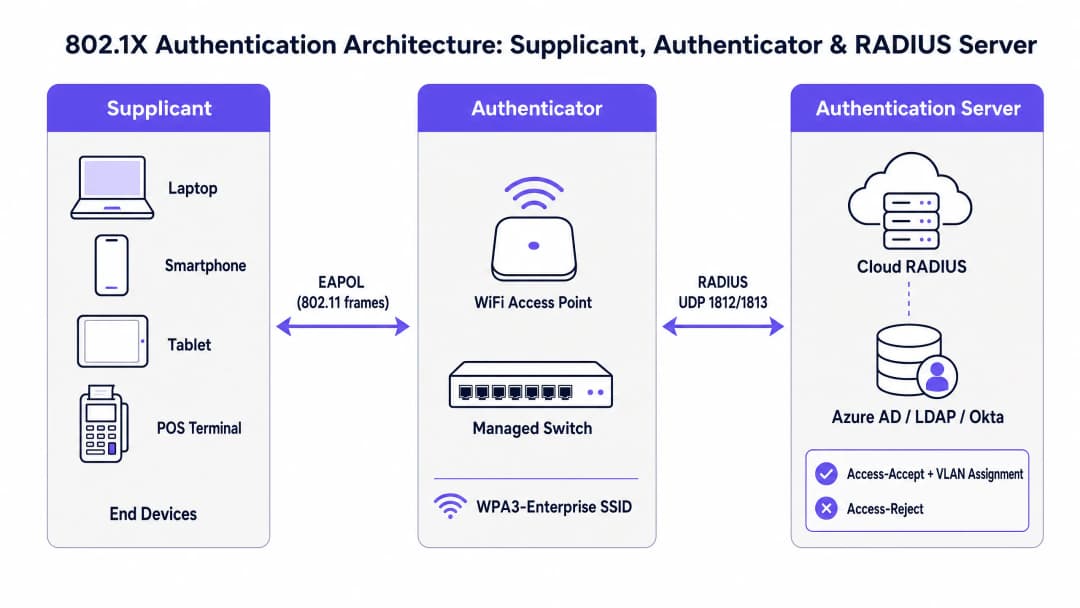
IEEE 802.1X স্ট্যান্ডার্ড একটি থ্রি-কম্পোনেন্ট মডেল সংজ্ঞায়িত করে যা প্রতিটি এন্টারপ্রাইজ WiFi অথেন্টিকেশন এক্সচেঞ্জকে নিয়ন্ত্রণ করে। কার্যকর সমস্যা সমাধানের জন্য প্রতিটি উপাদানের ভূমিকা বোঝা পূর্বশর্ত।
সাপ্লিক্যান্ট হল এন্ড-ইউজার ডিভাইস - একটি ল্যাপটপ, স্মার্টফোন, ট্যাবলেট বা পয়েন্ট-অফ-সেল টার্মিনাল। এটি একটি সফটওয়্যার উপাদান চালায় (সাপ্লিক্যান্ট ক্লায়েন্ট, যা Windows, macOS, iOS, এবং Android-এর OS-এ বিল্ট-ইন থাকে) যা EAP এক্সচেঞ্জ শুরু করে এবং নেটওয়ার্কে ক্রেডেনশিয়াল উপস্থাপন করে। সাপ্লিক্যান্ট কনফিগারেশন - বিশেষ করে EAP পদ্ধতি, সার্টিফিকেট ট্রাস্ট সেটিংস এবং ক্রেডেনশিয়াল সোর্স - অথেন্টিকেশন ব্যর্থতার অন্যতম সাধারণ উৎস।
Authenticator হলো ওয়্যারলেস অ্যাক্সেস পয়েন্ট বা ম্যানেজড সুইচ। সবচেয়ে গুরুত্বপূর্ণ বিষয় হলো, Authenticator কোনো অথেনটিকেশনের সিদ্ধান্ত নেয় না। এটি একটি স্টেটলেস রিলে হিসেবে কাজ করে, যা RADIUS সার্ভার একটি অথরাইজেশনের সিদ্ধান্ত না দেওয়া পর্যন্ত নিয়ন্ত্রিত পোর্টে সমস্ত ডেটা ট্রাফিক ব্লক করে রাখে। এটি ওয়্যারলেস বা ওয়্যারড মিডিয়ামে EAPOL (EAP over LAN) ফ্রেম ব্যবহার করে Supplicant-এর সাথে এবং UDP পোর্ট ১৮১২ (অথেনটিকেশন) ও ১৮১৩ (অ্যাকাউন্টিং)-এর মাধ্যমে RADIUS Access-Request এবং Access-Accept/Reject প্যাকেট ব্যবহার করে RADIUS সার্ভারের সাথে যোগাযোগ করে।
Authentication Server হলো RADIUS সার্ভার। এখানেই আসল ক্রেডেনশিয়াল যাচাইকরণের কাজ সম্পন্ন হয়। RADIUS সার্ভার Supplicant-এর সাথে EAP মেথড নিয়ে আলোচনা করে, একটি আইডেন্টিটি ডিরেক্টরির (Active Directory, Azure AD, Okta বা LDAP) বিপরীতে ক্রেডেনশিয়াল যাচাই করে এবং ঐচ্ছিক VLAN অ্যাসাইনমেন্ট অ্যাট্রিবিউটসহ একটি Access-Accept অথবা কারণ উল্লেখকারী কোডসহ একটি Access-Reject রিটার্ন করে। আধুনিক ডিপ্লয়মেন্টে, এটি ক্রমশ একটি ক্লাউড-হোস্টেড সার্ভিসে পরিণত হচ্ছে - একটি সম্পূর্ণ ইমপ্লিমেন্টেশন গাইডের জন্য How to Implement 802.1X Authentication with Cloud RADIUS দেখুন।
EAP মেথড তুলনা

EAP কোনো একক অথেনটিকেশন মেথড নয়, বরং এটি একটি ফ্রেমওয়ার্ক যা একাধিক ইনার মেথড সমর্থন করে। EAP মেথড নির্বাচনের সাথে সিকিউরিটি পোস্চার, সার্টিফিকেট পরিকাঠামোর প্রয়োজনীয়তা এবং আপনি যে ধরণের সমস্যার সম্মুখীন হতে পারেন তার সরাসরি সম্পর্ক রয়েছে।
| EAP মেথড | সার্টিফিকেটের প্রয়োজনীয়তা | সিকিউরিটি লেভেল | ডিপ্লয়মেন্টের জটিলতা | প্রাথমিক ব্যবহারের ক্ষেত্র |
|---|---|---|---|---|
| EAP-TLS | মিউচুয়াল (ক্লায়েন্ট + সার্ভার) | সর্বোচ্চ | উচ্চ (PKI + MDM প্রয়োজন) | ম্যানেজড কর্পোরেট ডিভাইস |
| PEAP-MSCHAPv2 | শুধুমাত্র সার্ভার-সাইড | মাঝারি | মাঝারি | AD-ইন্টিগ্রেটেড পরিবেশ |
| EAP-TTLS | শুধুমাত্র সার্ভার-সাইড | মাঝারি | মাঝারি | মিক্সড-OS BYOD পরিবেশ |
| EAP-FAST | কোনোটিই নয় (PAC ব্যবহার করে) | মাঝারি-উচ্চ | কম | লেগ্যাসি ডিভাইস সাপোর্ট |
ম্যানেজড কর্পোরেট ডিভাইস ফ্লিটের জন্য EAP-TLS সহ WPA3-Enterprise হলো বর্তমান ইন্ডাস্ট্রির সেরা প্র্যাকটিস। সমান্তরালভাবে Guest WiFi এবং স্টাফ নেটওয়ার্ক ডিপ্লয় করা ভেন্যুগুলোর জন্য - যা সাধারণত Hospitality এবং Retail পরিবেশে দেখা যায় - একটি হাইব্রিড পদ্ধতি অত্যন্ত সাধারণ: কর্পোরেট ডিভাইসের জন্য EAP-TLS এবং গেস্টদের জন্য RADIUS ব্যাকএন্ড সহ captive portal।
অথেনটিকেশন ফ্লো: ধাপে ধাপে
৮০২.১X এক্সচেঞ্জের সুনির্দিষ্ট সিকোয়েন্স বোঝা অত্যন্ত জরুরি যাতে কোথায় ব্যর্থতা ঘটছে তা সঠিকভাবে চিহ্নিত করা যায়। ফ্লোটি নিম্নরূপভাবে অগ্রসর হয়:
১. Supplicant ডিভাইসটি SSID-এর সাথে যুক্ত হয়। Authenticator একটি নিয়ন্ত্রিত পোর্ট ওপেন করে এবং সমস্ত নন-EAP ট্রাফিক ব্লক করে দেয়। ২. Authenticator ডিভাইসটি Supplicant-এর কাছে একটি EAP-Request/Identity পাঠায়। ৩. Supplicant একটি EAP-Response/Identity (ব্যবহারকারী বা ডিভাইসের আইডেন্টিটি) দিয়ে প্রতিক্রিয়া জানায়।4. Authenticator এটিকে একটি RADIUS Access-Request-এ এনক্যাপসুলেট করে এবং RADIUS সার্ভারে ফরোয়ার্ড করে। 5. RADIUS সার্ভার একটি Access-Challenge ইস্যু করে, EAP পদ্ধতি (যেমন, EAP-TLS বা PEAP) প্রস্তাব করে। 6. Supplicant এবং RADIUS সার্ভার EAP পদ্ধতি নিয়ে আলোচনা করে এবং Authenticator দ্বারা রিলে করা একাধিক Access-Request / Access-Challenge রাউন্ড ট্রিপের মাধ্যমে ক্রেডেনশিয়াল বিনিময় করে। 7. RADIUS সার্ভার আইডেন্টিটি ডিরেক্টরির বিপরীতে ক্রেডেনশিয়াল যাচাই করে এবং হয় একটি Access-Accept (ঐচ্ছিক VLAN অ্যাসাইনমেন্ট অ্যাট্রিবিউট সহ) অথবা একটি Access-Reject (একটি কারণ কোড সহ) প্রদান করে। 8. গৃহীত হলে, Authenticator নিয়ন্ত্রিত পোর্টটি উন্মুক্ত করে এবং ডিভাইসটি নেটওয়ার্ক অ্যাক্সেস লাভ করে। WPA2/WPA3-Enterprise-এর জন্য, সেশন এনক্রিপশন কী তৈরি করতে একটি 4-Way Handshake অনুসরণ করা হয়।
এই সিকোয়েন্সের যেকোনো ধাপে ব্যর্থতা একটি ভিন্ন লক্ষণের প্রোফাইল তৈরি করে। লক্ষণের সাথে ধাপের ম্যাপিং করা দ্রুত ট্রিয়েজের ভিত্তি।
সাধারণ ব্যর্থতার মোড এবং ডায়াগনস্টিক সূচকসমূহ
ব্যর্থতার মোড ১: সার্টিফিকেট মেয়াদোত্তীর্ণ (সার্ভার বা ক্লায়েন্ট)
এটি প্রোডাকশন 802.1X ডিপ্লয়মেন্টে সবচেয়ে বেশি বিঘ্ন সৃষ্টিকারী একক ব্যর্থতার মোড। যখন RADIUS সার্ভারের TLS সার্টিফিকেটের মেয়াদ শেষ হয়ে যায়, প্রতিটি ক্লায়েন্ট একই সাথে প্রমাণীকরণে ব্যর্থ হয় - একটি সম্পূর্ণ নেটওয়ার্ক বিভ্রাট। যখন একটি ক্লায়েন্ট সার্টিফিকেটের মেয়াদ শেষ হয় (EAP-TLS ডিপ্লয়মেন্টে), তখন নির্দিষ্ট ডিভাইসগুলি ব্যর্থ হয় এবং অন্যরা স্বাভাবিকভাবে প্রমাণীকরণ চালিয়ে যায়।
ডায়াগনস্টিক সূচকসমূহ: NPS/RADIUS ইভেন্ট লগগুলি রিজন কোড ২২ ("Client certificate has expired or is not yet valid") বা রিজন কোড ১৬ ("Authentication failed due to a user credentials mismatch") দেখায়। Windows NPS-এ, সিকিউরিটি ইভেন্ট লগে Event ID 6273 চেক করুন। FreeRADIUS-এ, ডিবাগ আউটপুটে TLS Alert read:fatal:certificate expired খুঁজুন।
সমাধান: মেয়াদোত্তীর্ণ সার্টিফিকেট রিনিউ করুন এবং MDM-এর মাধ্যমে সমস্ত ক্লায়েন্টে আপডেট করা CA সার্টিফিকেট পুশ করুন। ৯০ দিনের অ্যালার্ট থ্রেশহোল্ড সহ স্বয়ংক্রিয় সার্টিফিকেট মেয়াদোত্তীর্ণ পর্যবেক্ষণ প্রয়োগ করুন।
ব্যর্থতার মোড ২: RADIUS শেয়ার্ড সিক্রেট অমিল
Authenticator এবং RADIUS সার্ভারের মধ্যে RADIUS বার্তাগুলি প্রমাণীকরণ করতে শেয়ার্ড সিক্রেট ব্যবহৃত হয়। একটি অমিলের কারণে RADIUS সার্ভার নীরবে Access-Request প্যাকেটগুলি বাতিল করে দেয়। AP-এর দৃষ্টিকোণ থেকে, RADIUS সার্ভারটিকে প্রতিক্রিয়াহীন বলে মনে হয়।
ডায়াগনস্টিক সূচকসমূহ: AP লগগুলি RADIUS সার্ভার টাইমআউট এবং রিট্রান্সমিশন দেখায়। RADIUS সার্ভার ব্যর্থ প্রচেষ্টার জন্য কোনও সংশ্লিষ্ট লগ এন্ট্রি দেখায় না - অনুরোধগুলি প্রক্রিয়াকরণের আগেই ফেলে দেওয়া হচ্ছে। RADIUS সার্ভার ইন্টারফেসে একটি Wireshark ক্যাপচার পোর্ট ১৮১২-এ আগত UDP প্যাকেটগুলি দেখাবে যা নীরবে বাতিল করা হচ্ছে।
সমাধান: Authenticator (AP/কন্ট্রোলার কনফিগারেশন) এবং RADIUS সার্ভার (NAS ক্লায়েন্ট কনফিগারেশন) উভয় ক্ষেত্রেই শেয়ার্ড সিক্রেট যাচাই এবং সিঙ্ক্রোনাইজ করুন। কমপক্ষে ৩২ অক্ষরের একটি শক্তিশালী, এলোমেলোভাবে জেনারেট করা সিক্রেট ব্যবহার করুন। ক্লাউড RADIUS ডিপ্লয়মেন্টের জন্য শেয়ার্ড সিক্রেটের নির্ভরতা দূর করতে RadSec (TLS-এর মাধ্যমে RADIUS) প্রয়োগ করুন।
ব্যর্থতার মোড ৩: Supplicant প্রোফাইল ভুল কনফিগারেশন
PEAP-MSCHAPv2 ডেপ্লয়মেন্টে, ক্লায়েন্টদের অবশ্যই একটি বিশ্বস্ত CA-এর বিপরীতে RADIUS সার্ভারের সার্টিফিকেট যাচাই করার জন্য কনফিগার করতে হবে। যদি সার্টিফিকেট যাচাইকরণ নিষ্ক্রিয় করা হয় - যা প্রাথমিক ডেপ্লয়মেন্টের সময় একটি সাধারণ শর্টকাট - তাহলে নেটওয়ার্কটি ক্ষতিকারক AP ক্রেডেনশিয়াল হারভেস্টিং আক্রমণের ঝুঁকিতে পড়ে। যদি ভুল CA-কে বিশ্বাস করা হয়, অথবা সার্ভার সার্টিফিকেটের CN/SAN কনফিগার করা সার্ভার নামের সাথে মিল না খায়, তাহলে প্রমাণীকরণ ব্যর্থ হবে।
ডায়াগনস্টিক সূচক: নির্দিষ্ট কিছু ডিভাইস ব্যর্থ হয় যখন অন্যগুলো সফল হয়। RADIUS লগগুলো EAP-TLS হ্যান্ডশেক ব্যর্থতা বা PEAP টানেল স্থাপন ব্যর্থতা দেখায়। Windows-এ, Operational লগে WLAN-AutoConfig Event ID 8001 বা 8002 সাপ্লিক্যান্ট-সাইডের ব্যর্থতা নির্দেশ করে।
সমাধান: MDM (Microsoft Intune, Jamf বা সমতুল্য) এর মাধ্যমে মানসম্মত WiFi প্রোফাইল ডেপ্লয় করুন। নিশ্চিত করুন যে বিশ্বস্ত CA সার্টিফিকেট প্রোফাইলে অন্তর্ভুক্ত করা হয়েছে এবং সার্ভার সার্টিফিকেট যাচাইকরণ প্রয়োগ করা হয়েছে। প্রোডাকশনে কখনই সার্টিফিকেট যাচাইকরণ নিষ্ক্রিয় করবেন না।
ব্যর্থতার মোড ৪: নেটওয়ার্ক ট্রানজিট সমস্যা (MTU ফ্র্যাগমেন্টেশন)
EAP-TLS বিনিময়ের মধ্যে সম্পূর্ণ সার্টিফিকেট চেইনের ট্রান্সমিশন জড়িত থাকে, যা বড় আকারের RADIUS প্যাকেট তৈরি করতে পারে। যদি Authenticator এবং একটি ক্লাউড RADIUS সার্ভারের মধ্যকার WAN পাথে কম MTU থাকে (নির্দিষ্ট MPLS বা SD-WAN কনফিগারেশনে সাধারণ), তবে এই প্যাকেটগুলো ফ্র্যাগমেন্টেড বা খণ্ডিত হতে পারে। অনেক ফায়ারওয়াল এবং স্টেটফুল ইন্সপেকশন ডিভাইস ফ্র্যাগমেন্টেড UDP প্যাকেট ড্রপ করে দেয়, যার ফলে কোনো নোটিফিকেশন ছাড়াই TLS হ্যান্ডশেক থমকে যায়।
ডায়াগনস্টিক সূচক: WAN-এর মাধ্যমে সংযুক্ত সাইটগুলোতে EAP-TLS প্রমাণীকরণ মাঝে মাঝে বা ধারাবাহিকভাবে ব্যর্থ হয়, যেখানে স্থানীয় RADIUS থাকা সাইটগুলো সফল হয়। প্যাকেট ক্যাপচার WAN ইন্টারফেসে RADIUS Access-Request প্যাকেটগুলো ফ্র্যাগমেন্টেড হতে দেখায়। যখন RADIUS সার্ভার স্থানীয় LAN-এ থাকে তখন প্রমাণীকরণ সফল হয়।
সমাধান: RadSec (TCP পোর্ট ২০৮৩-এ RADIUS over TLS) ডেপ্লয় করুন। TCP নেটিভভাবেই ফ্র্যাগমেন্টেশন এবং রিট্রান্সমিশন পরিচালনা করে, যা এই ব্যর্থতার মোডটিকে সম্পূর্ণরূপে দূর করে। বিকল্পভাবে, WAN ইন্টারফেসে MTU সামঞ্জস্য করুন বা সার্ভারে RADIUS ফ্র্যাগমেন্টেশন প্যারামিটার কনফিগার করুন।
ব্যর্থতার মোড ৫: আইডেন্টিটি ডিরেক্টরি কানেক্টিভিটি ব্যর্থতা
ক্রেডেনশিয়াল যাচাই করতে RADIUS সার্ভার অবশ্যই আইডেন্টিটি ডিরেক্টরি (Active Directory, LDAP, Azure AD) পর্যন্ত পৌঁছাতে সক্ষম হতে হবে। একটি DNS ব্যর্থতা, ফায়ারওয়াল নিয়মের পরিবর্তন বা ডোমেইন কন্ট্রোলার বিভ্রাটের কারণে RADIUS পরিষেবা নিজেই সঠিকভাবে চলা সত্ত্বেও সমস্ত প্রমাণীকরণের প্রচেষ্টা ব্যর্থ হবে।
ডায়াগনস্টিক সূচক: RADIUS সার্ভার লগগুলো প্রমাণীকরণের প্রচেষ্টা প্রাপ্ত হতে দেখায় কিন্তু "Cannot contact the LDAP server" বা সমতুল্য ত্রুটির কারণে ব্যর্থ হয়। Reason Code ১৬ বা ৬৬ সহ NPS Event ID ৬২৭৩। ডিরেক্টরি কানেক্টিভিটি স্পষ্টভাবে মনিটর করা না হলে RADIUS সার্ভারের নিজস্ব হেলথ মনিটরিংয়ে এটি প্রকাশ নাও পেতে পারে।
সমাধান: RADIUS-টু-ডিরেক্টরি কানেকশন পাথের জন্য ডেডিকেটেড হেলথ মনিটরিং বাস্তবায়ন করুন। ফেইলওভার টার্গেট হিসেবে একাধিক ডোমেইন কন্ট্রোলার বা LDAP রেপ্লিকা কনফিগার করুন। ক্লাউড RADIUS ডেপ্লয়মেন্টের জন্য, নিশ্চিত করুন যে আপনার আইডেন্টিটি প্রোভাইডার ইন্টিগ্রেশন (Azure AD Connect, LDAP প্রক্সি) আপনার অ্যাভেইলেবিলিটি মনিটরিংয়ের অন্তর্ভুক্ত রয়েছে।
আপনার নির্দিষ্ট সেটআপ নিয়ে কোনো প্রশ্ন আছে?
আমাদের টিম ৮০,০০০ ভেন্যুতে ভেন্যু অপারেটর, IT ম্যানেজার এবং নেটওয়ার্ক ইঞ্জিনিয়ারদের সাথে কাজ করে। একটি ২০ মিনিটের কল বুক করুন এবং আপনার মতো অন্যরা কীভাবে এর সমাধান করেছেন তা আমরা আপনাকে দেখাব।
Implementation Guide
Phase 1: Pre-Deployment Validation
802.1X ব্যাপকভাবে ডেপ্লয় করার আগে, নিম্নলিখিত পূর্বশর্তগুলি যাচাই করুন। এই ধাপটি এড়িয়ে যাওয়া হলো ডেপ্লয়মেন্ট-পরবর্তী ব্যর্থতার প্রাথমিক কারণ।
প্রথমত, নিশ্চিত করুন যে আপনার RADIUS সার্ভার সার্টিফিকেটটি এমন একটি CA দ্বারা ইস্যু করা হয়েছে যা আপনার এস্টেটের সমস্ত ক্লায়েন্ট ডিভাইস প্ল্যাটফর্ম দ্বারা বিশ্বস্ত। Windows-এ, এর অর্থ হলো CA অবশ্যই Trusted Root Certification Authorities স্টোরে থাকতে হবে। iOS এবং Android-এ, CA সার্টিফিকেটটি অবশ্যই MDM প্রোফাইলের মাধ্যমে স্পষ্টভাবে বিতরণ করতে হবে। প্রোডাকশনে সেলফ-সাইন্ড সার্টিফিকেট ব্যবহার করবেন না।
দ্বিতীয়ত, সমস্ত Authenticator (APs এবং সুইচ) এবং RADIUS সার্ভারের মধ্যে UDP পোর্ট 1812 এবং 1813-এ নেটওয়ার্ক কানেক্টিভিটি যাচাই করুন। প্রোডাকশন SSID-গুলিতে ডেপ্লয় করার আগে এন্ড-টু-এন্ড অথেন্টিকেশন নিশ্চিত করতে একটি RADIUS টেস্ট ক্লায়েন্ট (যেমন Linux-এ radtest বা Windows-এ NPS টেস্ট টুল) ব্যবহার করুন।
তৃতীয়ত, আপনার আইডেন্টিটি ডিরেক্টরি ইন্টিগ্রেশন যাচাই করুন। নিশ্চিত করুন যে RADIUS সার্ভারটি আপনার ডিরেক্টরির বিপরীতে LDAP বাইন্ড এবং গ্রুপ মেম্বারশিপ কোয়েরি সম্পাদন করতে পারে। একটি সার্ভিস অ্যাকাউন্ট দিয়ে পরীক্ষা করুন এবং যাচাই করুন যে প্রত্যাশিত VLAN অ্যাসাইনমেন্ট অ্যাট্রিবিউটগুলি Access-Accept রেসপন্সে রিটার্ন করা হয়েছে কিনা।
Phase 2: EAP Method Selection and Certificate Strategy
ম্যানেজড কর্পোরেট ডিভাইসগুলির জন্য, MDM-এর মাধ্যমে বিতরণ করা ক্লায়েন্ট সার্টিফিকেটের সাথে EAP-TLS ডেপ্লয় করুন। এটি ক্রেডেনশিয়াল চুরির ঝুঁকি দূর করে এবং সবচেয়ে শক্তিশালী অথেন্টিকেশন প্রদান করে। নিশ্চিত করুন যে আপনার MDM প্ল্যাটফর্মটি মেয়াদ শেষ হওয়ার আগে ক্লায়েন্ট সার্টিফিকেট স্বয়ংক্রিয়ভাবে রিনিউ করার জন্য কনফিগার করা হয়েছে।
আনম্যানেজড বা BYOD ডিভাইস সহ পরিবেশের জন্য, PEAP-MSCHAPv2 হলো একটি বাস্তবসম্মত পছন্দ। সমস্ত ক্লায়েন্ট প্রোফাইলে সার্ভার সার্টিফিকেট ভ্যালিডেশন বাধ্যতামূলক করুন। সার্টিফিকেট ভ্যালিডেশন নিষ্ক্রিয় রেখে কখনই WiFi প্রোফাইল বিতরণ করবেন না।
লেগ্যাসি ডিভাইসগুলির (IoT সেন্সর, পুরানো POS টার্মিনাল) জন্য যা একটি 802.1X সাপ্লিক্যান্ট চালাতে পারে না, সেখানে ফলব্যাক হিসেবে MAC Authentication Bypass (MAB) প্রয়োগ করুন। MAB ডিভাইসগুলিকে একটি অত্যন্ত সীমাবদ্ধ VLAN-এ অ্যাসাইন করুন যার সাথে স্পষ্ট ফায়ারওয়াল নিয়ম থাকবে যা তাদের নেটওয়ার্ক অ্যাক্সেসকে শুধুমাত্র তাদের প্রয়োজনীয় পরিষেবাগুলিতে সীমাবদ্ধ করবে।
Phase 3: Deployment and Monitoring
ধাপে ধাপে ডেপ্লয় করুন: প্রথমে ২০ - ৫০টি ডিভাইসের একটি নিয়ন্ত্রিত গ্রুপের সাথে পাইলট রান করুন, অথেন্টিকেশন লগ যাচাই করুন, VLAN অ্যাসাইনমেন্ট নিশ্চিত করুন এবং পুরো এস্টেটে প্রসারিত করার আগে অ্যাকাউন্টিং রেকর্ডগুলি পরীক্ষা করুন। বড় ভেন্যু ডেপ্লয়মেন্টের ক্ষেত্রে - যেমন স্টেডিয়াম, কনফারেন্স সেন্টার, হোটেল - যেকোনো কনফিগারেশন ত্রুটির প্রভাব সীমিত রাখতে এই ধাপে ধাপে পদ্ধতিটি অত্যন্ত গুরুত্বপূর্ণ।
ক্রমাগত মনিটরিং ব্যবস্থা চালু করুন: RADIUS সার্ভার সার্টিফিকেটের মেয়াদ শেষ হওয়া (৯০ দিন আগে অ্যালার্ট), RADIUS সার্ভারের উপলব্ধতা এবং রেসপন্স টাইম, SSID এবং সাইট অনুসারে অথেন্টিকেশন সফল/ব্যর্থ হওয়ার হার এবং আইডেন্টিটি ডিরেক্টরি কানেক্টিভিটি। রেগুলেটরি অডিটের আওতাধীন Healthcare এবং Retail পরিবেশের জন্য, নিশ্চিত করুন যে RADIUS অ্যাকাউন্টিং লগগুলি প্রয়োজনীয় সময়ের জন্য (সাধারণত PCI-DSS-এর অধীনে ১২ মাস) সংরক্ষণ করা হয়েছে।Transport এবং বড় পাবলিক ভেন্যু স্থাপনার জন্য, স্বয়ংক্রিয় ফেইলওভার সহ রিডান্ড্যান্ট RADIUS সার্ভার স্থাপন করার কথা বিবেচনা করুন। একটি একক RADIUS সার্ভার পুরো নেটওয়ার্ক অ্যাক্সেস কন্ট্রোল অবকাঠামোর জন্য একটি একক ব্যর্থতার উৎস (single point of failure)।
সর্বোত্তম অনুশীলন (Best Practices)
নিম্নলিখিত সর্বোত্তম অনুশীলনগুলি IEEE 802.1X, WPA3-Enterprise স্পেসিফিকেশন, PCI-DSS v4.0 প্রয়োজনীয়তা এবং এন্টারপ্রাইজ ভেন্যু স্থাপনার ব্যবহারিক অভিজ্ঞতা থেকে নেওয়া হয়েছে।
সার্টিফিকেট লাইফসাইকেল ম্যানেজমেন্ট হলো সর্বোচ্চ অগ্রাধিকারের অপারেশনাল নিয়ন্ত্রণ। সমস্ত RADIUS সার্ভার সার্টিফিকেটের মেয়াদ শেষ হওয়ার ৯০, ৬০ এবং ৩০ দিন আগে অ্যালার্ট সহ স্বয়ংক্রিয় মনিটরিং বাস্তবায়ন করুন। EAP-TLS স্থাপনার জন্য, আপনার MDM প্ল্যাটফর্মের মাধ্যমে ক্লায়েন্ট সার্টিফিকেটের ক্ষেত্রেও এই মনিটরিং প্রসারিত করুন। সার্টিফিকেট মেয়াদ শেষ হওয়া হলো প্রোডাকশন 802.1X স্থাপনায় ব্যাপক প্রমাণীকরণ বিভ্রাটের প্রধান কারণ।
RadSec ডেপ্লয়মেন্ট যেকোনো 802.1X স্থাপনার জন্য ডিফল্ট হওয়া উচিত যেখানে RADIUS ট্রাফিক পাবলিক ইন্টারনেট বা WAN অতিক্রম করে। RadSec (RFC 6614) TCP-এর মাধ্যমে TLS-এ RADIUS-কে এনক্যাপসুলেট করে, যা ট্রান্সপোর্ট সিকিউরিটি প্রদান করে, UDP ফ্র্যাগমেন্টেশন সমস্যা দূর করে এবং শেয়ার্ড সিক্রেটের উপর নির্ভরতা দূর করে। বেশিরভাগ আধুনিক ক্লাউড RADIUS প্ল্যাটফর্ম এবং এন্টারপ্রাইজ AP বিক্রেতারা RadSec সমর্থন করে।
MDM-এনফোর্সড ক্লায়েন্ট প্রোফাইল সাপ্লিক্যান্টের ভুল কনফিগারেশনের একক বৃহত্তম উৎস দূর করে। সমস্ত কর্পোরেট-মালিকানাধীন ডিভাইসের তাদের WiFi প্রোফাইল MDM-এর মাধ্যমে প্রাপ্ত করা উচিত, ম্যানুয়াল কনফিগারেশনের মাধ্যমে নয়। প্রোফাইলগুলিতে অবশ্যই বিশ্বস্ত CA সার্টিফিকেট অন্তর্ভুক্ত থাকতে হবে, সার্ভার সার্টিফিকেট যাচাইকরণ প্রয়োগ করতে হবে এবং সঠিক EAP পদ্ধতি এবং অভ্যন্তরীণ প্রমাণীকরণ সেটিংস নির্দিষ্ট করতে হবে।
ডায়নামিক VLAN অ্যাসাইনমেন্টের মাধ্যমে নেটওয়ার্ক সেগমেন্টেশন হলো PCI-DSS কমপ্লায়েন্সের জন্য একটি বাধ্যতামূলক নিয়ন্ত্রণ এবং জিরো ট্রাস্ট নেটওয়ার্ক আর্কিটেকচারের একটি ভিত্তিপ্রস্তর। গ্রুপ মেম্বারশিপের উপর ভিত্তি করে ব্যবহারকারীদের উপযুক্ত VLAN-এ বরাদ্দ করতে RADIUS অনুমোদন নীতি কনফিগার করুন - কর্মীদের কর্পোরেট VLAN-এ, অতিথিদের একটি বিচ্ছিন্ন কেবল-ইন্টারনেট VLAN-এ, IoT ডিভাইসগুলিকে একটি সীমাবদ্ধ ম্যানেজমেন্ট VLAN-এ। এটি যেকোনো একক আপস করা ডিভাইসের ক্ষয়ক্ষতির পরিধিকে সীমিত করে।
RADIUS অ্যাকাউন্টিং লগ সংরক্ষণ PCI-DSS প্রয়োজনীয়তা ১০ দ্বারা নির্দেশিত অডিট ট্রেইল প্রদান করে এবং একটি নিরাপত্তা ঘটনার পর ফরেনসিক তদন্তের জন্য অপরিহার্য। অ্যাকাউন্টিং লগ যাতে সেশন শুরু/শেষের ঘটনা, ব্যবহারকারীর পরিচয়, ডিভাইসের MAC অ্যাড্রেস, নির্ধারিত VLAN, সেশনের সময়কাল এবং ডেটা ভলিউম ক্যাপচার করে তা নিশ্চিত করুন। রিয়েল-টাইম অসঙ্গতি সনাক্তকরণের জন্য আপনার SIEM-এর সাথে RADIUS অ্যাকাউন্টিং সংহত করুন।
যেসব প্রতিষ্ঠান 802.1X-এর পাশাপাশি WiFi Analytics স্থাপন করছে, তাদের জন্য প্রতি-ব্যবহারকারী প্রমাণীকরণ ডেটা এবং অ্যানালিটিক্সের সংমিশ্রণ একটি শক্তিশালী অপারেশনাল ইন্টেলিজেন্স লেয়ার প্রদান করে - যা একক সেশন স্তরে ডোয়েল টাইম বিশ্লেষণ, সক্ষমতা পরিকল্পনা এবং অসঙ্গতি সনাক্তকরণ সক্ষম করে।
Troubleshooting & Risk Mitigation
Rapid Triage Framework
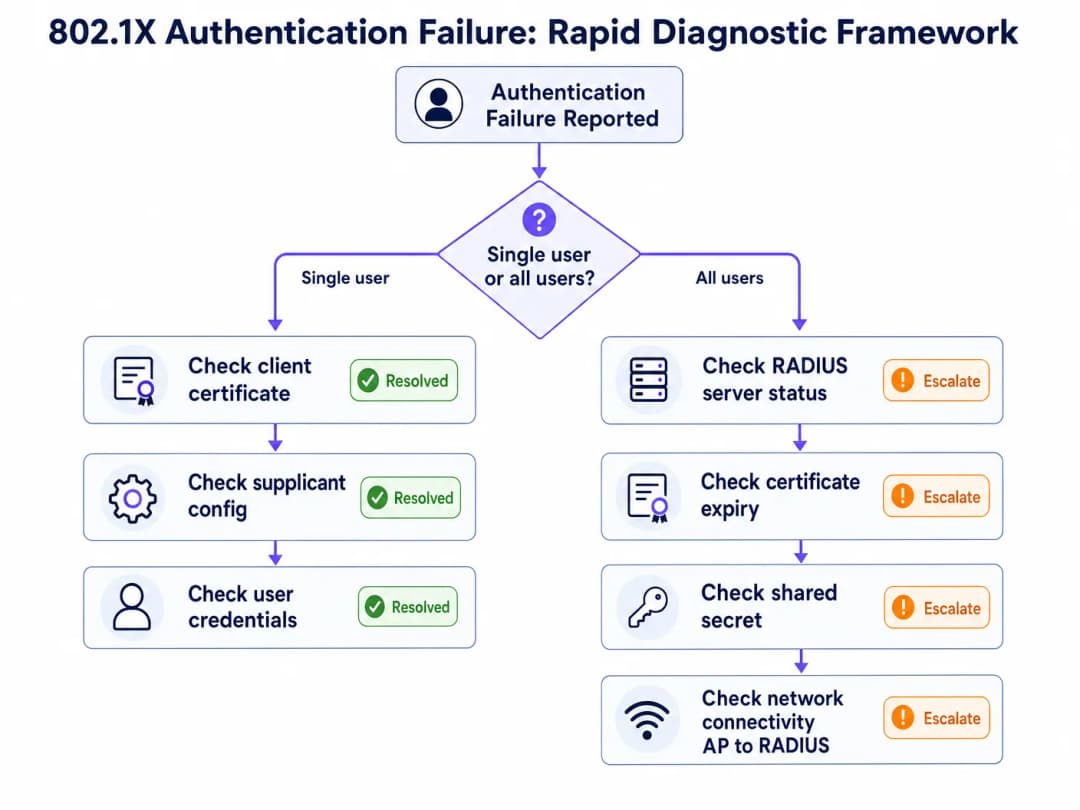
যখন একটি 802.1X অথেন্টিকেশন ব্যর্থতার রিপোর্ট পাওয়া যায়, তখন প্রথম ডায়াগনস্টিক প্রশ্নটিই সম্পূর্ণ ট্রাবলশুটিংয়ের পথ নির্ধারণ করে: এটি কি কেবল একজন একক ব্যবহারকারী/ডিভাইসকে প্রভাবিত করছে, নাকি নেটওয়ার্কের সমস্ত ব্যবহারকারীকে?
যদি ব্যর্থতা একই সাথে সমস্ত ব্যবহারকারীকে প্রভাবিত করে, তবে এর মূল কারণটি নিশ্চিতভাবেই ইনফ্রাস্ট্রাকচার-লেভেলের: একটি মেয়াদোত্তীর্ণ RADIUS সার্ভার সার্টিফিকেট, একটি RADIUS সার্ভার বিভ্রাট, একটি কনফিগারেশন পরিবর্তনের পর শেয়ার্ড সিক্রেট অমিল, অথবা Authenticator এবং RADIUS সার্ভারের মধ্যে সংযোগের ব্যর্থতা। প্রথমে RADIUS সার্ভারের উপলব্ধতা এবং সার্টিফিকেটের বৈধতা পরীক্ষা করে শুরু করুন।
যদি ব্যর্থতা কোনো একক ব্যবহারকারী বা ডিভাইসকে প্রভাবিত করে, তবে মূল কারণটি নিশ্চিতভাবেই ক্লায়েন্ট-লেভেলের: একটি মেয়াদোত্তীর্ণ ক্লায়েন্ট সার্টিফিকেট (EAP-TLS), একটি সাপ্লিক্যান্ট প্রোফাইল মিসকনফিগারেশন, ভুল ক্রেডেনশিয়াল, অথবা ডিভাইস-নির্দিষ্ট কোনো সফটওয়্যার সমস্যা। প্রথমে ক্লায়েন্টের সার্টিফিকেট স্টোর এবং সাপ্লিক্যান্ট কনফিগারেশন পরীক্ষা করে শুরু করুন।
Diagnostic Toolset
বিভিন্ন ইনফ্রাস্ট্রাকচার উপাদান জুড়ে 802.1X ট্রাবলশুটিংয়ের জন্য নিম্নলিখিত টুলগুলো অত্যন্ত প্রয়োজনীয়।
| টুল | প্ল্যাটফর্ম | ব্যবহারের ক্ষেত্র |
|---|---|---|
| NPS Event Log (Event IDs 6272/6273) | Windows Server | রিজন কোড সহ RADIUS অথেন্টিকেশন সফল/ব্যর্থতা |
| WLAN-AutoConfig Operational Log | Windows Client | সাপ্লিক্যান্ট-সাইড EAP এক্সচেঞ্জ ব্যর্থতা |
| CAPI2 Event Log | Windows Client | সার্টিফিকেট ভ্যালিডেশন ব্যর্থতা |
debug radius authentication |
Cisco IOS/WLC | Authenticator-এ RADIUS এক্সচেঞ্জ ডিবাগিং |
radiusd -X |
FreeRADIUS | EAP নেগোসিয়েশন সহ সম্পূর্ণ ডিবাগ আউটপুট |
| Wireshark (EAPOL filter) | যেকোনো | EAP ফ্রেমের ক্লায়েন্ট-সাইড প্যাকেট ক্যাপচার |
| Wireshark (EAP filter) | যেকোনো | সার্ভার-সাইড RADIUS প্যাকেট ক্যাপচার |
radtest |
Linux | ম্যানুয়াল RADIUS অথেন্টিকেশন পরীক্ষা |
NPS Reason Code Reference
Microsoft NPS Event ID 6273 (অথেন্টিকেশন ব্যর্থতা)-এর মধ্যে একটি Reason Code অন্তর্ভুক্ত থাকে যা সরাসরি ব্যর্থতার কারণ নির্দেশ করে। অপারেশনালভাবে সবচেয়ে গুরুত্বপূর্ণ কোডগুলো হলো:
| রিজন কোড | বিবরণ | সম্ভাব্য মূল কারণ |
|---|---|---|
| 16 | ব্যবহারকারীর ক্রেডেনশিয়ালের অমিলের কারণে অথেন্টিকেশন ব্যর্থ হয়েছে | ভুল পাসওয়ার্ড, মেয়াদোত্তীর্ণ ক্লায়েন্ট সার্টিফিকেট, অথবা ডিরেক্টরি লুকআপ ব্যর্থতা |
| 22 | ক্লায়েন্ট সার্টিফিকেটের মেয়াদ শেষ হয়েছে অথবা এটি এখনও বৈধ নয় | ক্লায়েন্ট সার্টিফিকেটের মেয়াদোত্তীর্ণতা - MDM সার্টিফিকেট রিনিউয়াল পরীক্ষা করুন |
| 23 | ব্যবহারকারীর অ্যাকাউন্ট মেয়াদোত্তীর্ণ হয়েছে | AD অ্যাকাউন্টের মেয়াদোত্তীর্ণতা - অ্যাকাউন্টের স্ট্যাটাস পরীক্ষা করুন |
| 48 | সংযোগের অনুরোধটি কোনো কনফিগার করা পলিসির সাথে মেলেনি | RADIUS পলিসি মিসকনফিগারেশন - NPS নেটওয়ার্ক পলিসিগুলো পরীক্ষা করুন |
| 66 | ব্যবহারকারী এমন একটি অথেন্টিকেশন পদ্ধতি ব্যবহার করার চেষ্টা করেছেন যা ম্যাচিং নেটওয়ার্ক পলিসিতে সক্রিয় নয় | ক্লায়েন্ট এবং সার্ভারের মধ্যে EAP পদ্ধতির অমিল |
Risk Mitigation: The Certificate Expiry Disaster
সবচেয়ে সাধারণ এবং সবচেয়ে সহজে প্রতিরোধযোগ্য 802.1X বিভ্রাট হলো RADIUS সার্ভারের সার্টিফিকেটের মেয়াদ শেষ হওয়া। জানুয়ারী 2025-এ, একটি বড় রিটেল চেইন সোমবার সকাল 3:00 টায় তাদের RADIUS সার্ভার সার্টিফিকেটের মেয়াদ শেষ হওয়ার সাথে সাথে একটি সম্পূর্ণ কর্মী নেটওয়ার্ক বিভ্রাটের সম্মুখীন হয়েছিল। সকাল 9:00 টার মধ্যে, 45টি স্টোর জুড়ে 300টিরও বেশি পয়েন্ট-অফ-সেল টার্মিনাল নেটওয়ার্ক সংযোগ হারিয়ে ফেলে। সার্টিফিকেটটি কোনো স্বয়ংক্রিয় পর্যবেক্ষণ ছাড়াই দুই বছর আগে ডেপ্লয় করা হয়েছিল এবং টিম পুনর্গঠনের সময় রিনিউয়ালের অনুস্মারকটি এড়িয়ে যাওয়া হয়েছিল।
এর প্রতিকার অত্যন্ত সহজ: আপনার অ্যালার্টিং প্ল্যাটফর্মের (PagerDuty, OpsGenie, বা এর সমতুল্য) সাথে একীভূত একটি স্বয়ংক্রিয় সার্টিফিকেট এক্সপায়ারি মনিটরিং সিস্টেম চালু করুন। অ্যালার্টের থ্রেশহোল্ড 90, 60 এবং 30 দিনে সেট করুন। আপনার IT অপারেশন রানবুকে সার্টিফিকেট রিনিউয়ালকে একটি নির্দিষ্ট দায়িত্ব হিসেবে বরাদ্দ করুন। ক্লাউড RADIUS প্ল্যাটফর্মের জন্য, প্রোভাইডার আপনার পক্ষে সার্টিফিকেট রিনিউয়াল পরিচালনা করে কিনা তা যাচাই করুন - এটি ম্যানেজড এবং সেলফ-সার্ভিস অফারগুলির মধ্যে একটি প্রধান পার্থক্যকারী বৈশিষ্ট্য।
ROI এবং ব্যবসায়িক প্রভাব
অথেন্টিকেশন ডাউনটাইমের খরচ
ভেন্যু অপারেটরদের জন্য, 802.1X অথেন্টিকেশন ব্যর্থতা সরাসরি পরিমাপযোগ্য ব্যবসায়িক প্রভাবে রূপান্তরিত হয়। Hospitality পরিবেশে, একটি কর্মী নেটওয়ার্ক বিভ্রাট প্রপার্টি ম্যানেজমেন্ট সিস্টেম, পয়েন্ট-অফ-সেল টার্মিনাল এবং অতিথি পরিষেবা প্রদানকে প্রভাবিত করে। Retail-এ, POS টার্মিনালের অথেন্টিকেশন ব্যর্থতা লেনদেন সম্পূর্ণরূপে বন্ধ করে দেয়। কনফারেন্স সেন্টার এবং স্টেডিয়ামগুলোতে, পিক ইভেন্টের সময় অথেন্টিকেশন ব্যর্থতা তাৎক্ষণিক এবং দৃশ্যমান পরিষেবা ব্যর্থতা তৈরি করে।
200-রুমের একটি হোটেলে 30 মিনিটের অথেন্টিকেশন বিভ্রাটের কর্মক্ষম খরচ - যা PMS অ্যাক্সেস, রেস্তোরাঁর POS এবং কনসিয়ার্জ টার্মিনালকে প্রভাবিত করে - অতিথিদের অভিজ্ঞতার প্রভাব এবং সম্ভাব্য SLA জরিমানা হিসাব করার আগেই সাধারণত £5,000-এর বেশি সরাসরি কর্মক্ষম ব্যাঘাত সৃষ্টি করে।
কমপ্লায়েন্স ভ্যালু
PCI DSS v4.0 এর আওতায় থাকা সংস্থাগুলির জন্য, একটি সঠিকভাবে ডেপ্লয় করা 802.1X অবকাঠামো সরাসরি একাধিক প্রয়োজনীয়তা পূরণ করে: Requirement 1 (নেটওয়ার্ক অ্যাক্সেস কন্ট্রোল), Requirement 7 (সিস্টেম উপাদানগুলিতে অ্যাক্সেস সীমিত করা), Requirement 8 (ব্যবহারকারীদের সনাক্ত করা এবং অ্যাক্সেস অথেন্টিকেট করা) এবং Requirement 10 (সমস্ত অ্যাক্সেস লগ এবং মনিটর করা)। এর বিকল্প - শেয়ারড PSK নেটওয়ার্ক - এই চারটি প্রয়োজনীয়তা পূরণ করতেই ব্যর্থ হয় এবং উল্লেখযোগ্য অডিট দায়বদ্ধতা তৈরি করে।
সরকারি খাতের সংস্থা এবং ডেটা সুরক্ষা নিয়মের আওতাধীন Healthcare ডেপ্লয়মেন্টের জন্য, প্রতি-ব্যবহারকারী অথেন্টিকেশন এবং ব্যাপক অ্যাকাউন্টিং লগ অ্যাক্সেস কন্ট্রোল বাধ্যবাধকতাগুলির কমপ্লায়েন্স প্রদর্শনের জন্য প্রয়োজনীয় অডিট ট্রেইল সরবরাহ করে।
সাফল্য পরিমাপ করা
একটি সুপরিচালিত 802.1X ডেপ্লয়মেন্টের মূল পারফরম্যান্স সূচকগুলি হলো: অথেন্টিকেশন সফলতার হার (লক্ষ্য >99.5%), অথেন্টিকেশনের গড় সময় (ক্লাউড RADIUS-এর জন্য <150ms), সার্টিফিকেট এক্সপায়ারি সংক্রান্ত ঘটনা (লক্ষ্য শূন্য) এবং RADIUS সার্ভারের প্রাপ্যতা (লক্ষ্য 99.9%)। এই মেট্রিকগুলি আপনার নেটওয়ার্ক ম্যানেজমেন্ট প্ল্যাটফর্মে ট্র্যাক করা উচিত এবং আপনার নেটওয়ার্ক অপারেশন ক্যাডেন্সের অংশ হিসাবে প্রতি মাসে পর্যালোচনা করা উচিত।যেসব সংস্থা WiFi Analytics ব্যবহার করছে, তাদের জন্য বিশ্লেষণসহ প্রতি-ব্যবহারকারীর 802.1X সেশন ডেটার সংমিশ্রণ অতিরিক্ত ব্যবসায়িক বুদ্ধিমত্তা প্রদান করে: সঠিক ডdwell সময় পরিমাপ, ডিভাইসের প্রকার বিন্যাস এবং নেটওয়ার্ক ব্যবহারের প্যাটার্ন যা ধারণক্ষমতা পরিকল্পনা এবং ভেন্যু অপারেশন সংক্রান্ত সিদ্ধান্তগুলিকে সহজতর করে।
সম্পর্কিত নেটওয়ার্ক অ্যাক্সেস কন্ট্রোল সমাধানগুলি সম্পর্কে আরও পড়ার জন্য, 10 Best Network Access Control (NAC) Solutions for 2026 এবং Cisco Wireless APs: 2026 Guide to Products & Deployment দেখুন। স্কুল এবং শিক্ষা প্রতিষ্ঠানে স্থাপনের জন্য, WiFi in Schools: The 2026 Administrator & IT Guide বহু-ব্যবহারকারী বিশিষ্ট শিক্ষা পরিবেশে 802.1X বাস্তবায়নের বিষয়গুলি কভার করে।
মূল সংজ্ঞাসমূহ
802.1X
IEEE 802.1X হলো একটি পোর্ট-ভিত্তিক নেটওয়ার্ক অ্যাক্সেস কন্ট্রোল স্ট্যান্ডার্ড যা OSI মডেলের Layer 2-তে কাজ করে এমন একটি প্রমাণীকরণ ফ্রেমওয়ার্ক সংজ্ঞায়িত করে। RADIUS সার্ভার যতক্ষণ না কোনো ডিভাইসকে ইতিবাচকভাবে প্রমাণীকরণ করছে, এটি ডিভাইসটি থেকে সমস্ত নেটওয়ার্ক ট্রাফিক ব্লক করে রাখে, যেখানে ক্রেডেনশিয়াল আদান-প্রদান প্রোটোকল হিসেবে EAP ব্যবহার করা হয়। এটি তারযুক্ত ইথারনেট এবং ওয়্যারলেস (WiFi) নেটওয়ার্ক উভয়ের ক্ষেত্রেই প্রযোজ্য।
IT টিমগুলি WPA2-Enterprise এবং WPA3-Enterprise SSID-এর জন্য প্রমাণীকরণ ব্যবস্থা (authentication mechanism) হিসেবে 802.1X-এর সম্মুখীন হয়। এটি এমন একটি স্ট্যান্ডার্ড যা প্রতি-ব্যবহারকারী প্রমাণীকরণ, ডাইনামিক VLAN অ্যাসাইনমেন্ট এবং PCI DSS কমপ্লায়েন্সের জন্য প্রয়োজনীয় অডিট ট্রেইল সক্ষম করে।
RADIUS (Remote Authentication Dial-In User Service)
একটি ক্লায়েন্ট-সার্ভার নেটওয়ার্কিং প্রোটোকল (RFC 2865) যা নেটওয়ার্ক অ্যাক্সেসের জন্য সেন্ট্রালাইজড প্রমাণীকরণ, অনুমোদন এবং অ্যাকাউন্টিং (AAA) ম্যানেজমেন্ট প্রদান করে। 802.1X ডেপ্লয়মেন্টে, RADIUS সার্ভার একটি আইডেন্টিটি ডিরেক্টরির বিপরীতে ব্যবহারকারীর ক্রেডেনশিয়াল যাচাই করে এবং Authenticator-এর কাছে Access-Accept বা Access-Reject প্রতিক্রিয়া পাঠায়। এটি UDP পোর্ট 1812 (প্রমাণীকরণ) এবং 1813 (অ্যাকাউন্টিং)-এর মাধ্যমে কাজ করে।
802.1X-এ RADIUS সার্ভার হলো সিদ্ধান্ত গ্রহণকারী উপাদান। যখন প্রমাণীকরণ ব্যর্থ হয়, তখন RADIUS সার্ভার লগে কারণ কোড থাকে যা মূল কারণটি সনাক্ত করে। সাধারণ ইমপ্লিমেন্টেশনের মধ্যে রয়েছে Microsoft NPS, FreeRADIUS এবং ক্লাউড-হোস্টেড পরিষেবা।
EAP (Extensible Authentication Protocol)
একটি প্রোটোকল ফ্রেমওয়ার্ক (RFC 3748) যা 802.1X-এর মধ্যে ব্যবহৃত প্রমাণীকরণ পদ্ধতিগুলির একটি সেট সংজ্ঞায়িত করে। EAP নিজেই কোনো প্রমাণীকরণ পদ্ধতি নয় বরং এটি একটি কন্টেইনার যা EAP-TLS, PEAP-MSCHAPv2, EAP-TTLS এবং EAP-FAST সহ একাধিক অভ্যন্তরীণ পদ্ধতি সমর্থন করে। EAP পদ্ধতিটি Supplicant এবং RADIUS সার্ভারের মধ্যে আলোচনা করে ঠিক করা হয়; Authenticator কোনো ব্যাখ্যা ছাড়াই EAP ফ্রেমগুলি রিলে করে।
EAP পদ্ধতি নির্বাচন ডেপ্লয়মেন্টের নিরাপত্তা ব্যবস্থা এবং পরিচালনগত জটিলতা নির্ধারণ করে। EAP-TLS-এর জন্য একটি PKI এবং MDM পরিকাঠামো প্রয়োজন কিন্তু এটি সবচেয়ে শক্তিশালী নিরাপত্তা প্রদান করে। PEAP-MSCHAPv2 ডেপ্লয় করা সহজ কিন্তু ক্রেডেনশিয়াল চুরি প্রতিরোধ করতে কঠোর সার্টিফিকেট যাচাইকরণের প্রয়োজন হয়।
Supplicant
এন্ড-ইউজার ডিভাইসের (ল্যাপটপ, স্মার্টফোন, POS টার্মিনাল) সফটওয়্যার উপাদান যা 802.1X প্রমাণীকরণ আদান-প্রদান শুরু করে। Windows-এ, supplicant-টি OS-এর মধ্যে WLAN AutoConfig বা Wired AutoConfig পরিষেবা হিসেবে বিল্ট-ইন থাকে। iOS এবং Android-এ, এটি ডিভাইসের WiFi প্রোফাইল কনফিগারেশনের মাধ্যমে পরিচালিত হয়।
Supplicant-এর ভুল কনফিগারেশন - বিশেষ করে PEAP ডেপ্লয়মেন্টে নিষ্ক্রিয় করা সার্টিফিকেট যাচাইকরণ - প্রমাণীকরণ ব্যর্থতা এবং নিরাপত্তা দুর্বলতা উভয়েরই অন্যতম সাধারণ উৎস। MDM-এর মাধ্যমে supplicant কনফিগারেশন স্ট্যান্ডার্ডাইজ করা একটি অত্যন্ত গুরুত্বপূর্ণ পরিচালনগত নিয়ন্ত্রণ।
Authenticator
নেটওয়ার্ক ডিভাইস (ওয়্যারলেস অ্যাক্সেস পয়েন্ট বা ম্যানেজড সুইচ) যা একটি 802.1X ডেপ্লয়মেন্টে পোর্ট-ভিত্তিক অ্যাক্সেস কন্ট্রোল কার্যকর করে। Authenticator নিজে কোনো অথেন্টিকেশন সিদ্ধান্ত নেয় না - এটি Supplicant (যা EAPOL ব্যবহার করে) এবং RADIUS সার্ভার (যা RADIUS ব্যবহার করে)-এর মধ্যে একটি রিলে হিসেবে কাজ করে। RADIUS সার্ভার একটি Access-Accept ইস্যু না করা পর্যন্ত এটি নিয়ন্ত্রিত পোর্টে সমস্ত নন-EAP ট্রাফিক ব্লক করে রাখে।
Authenticator-এর কনফিগারেশন - বিশেষ করে RADIUS সার্ভার IP/হোস্টনাম, শেয়ার্ড সিক্রেট এবং টাইমআউট সেটিংস - ব্যর্থতার একটি সাধারণ উৎস। পরিকাঠামো পরিবর্তনের পর, সর্বদা যাচাই করুন যে Authenticator-এর RADIUS ক্লায়েন্ট কনফিগারেশনটি RADIUS সার্ভারের NAS ক্লায়েন্ট কনফিগারেশনের সাথে মিলছে কিনা।
EAPOL (EAP over LAN)
ওয়্যার্ড বা ওয়্যারলেস মিডিয়ামের মাধ্যমে Supplicant এবং Authenticator-এর মধ্যে EAP ফ্রেম পরিবহনের জন্য ব্যবহৃত প্রোটোকল। EAPOL ফ্রেমগুলি হল Layer 2 ফ্রেম (Ethernet টাইপ 0x888E) এবং এর জন্য IP কানেক্টিভিটির প্রয়োজন হয় না। Authenticator মূলত EAPOL ফ্রেমগুলিকে RADIUS প্যাকেটে এনক্যাপসুলেট করে Authentication Server-এ পাঠানোর জন্য।
EAPOL ক্লায়েন্ট সাইডে Wireshark ক্যাপচারে দেখা যায়। ওয়্যারলেস প্যাকেট ক্যাপচারে EAPOL ফ্রেমের জন্য ফিল্টার করলে ইঞ্জিনিয়াররা EAP বিনিময় পর্যবেক্ষণ করতে পারেন এবং কোন ধাপে অথেন্টিকেশন ব্যর্থ হচ্ছে তা চিহ্নিত করতে পারেন।
RadSec (RADIUS over TLS)
RADIUS প্রোটোকলের একটি এক্সটেনশন (RFC 6614) যা TCP পোর্ট ২০৮৩-এর মাধ্যমে একটি TLS টানেলে RADIUS প্যাকেটগুলিকে এনক্যাপসুলেট করে। RadSec অবিশ্বাস্য নেটওয়ার্কগুলির (যেমন পাবলিক ইন্টারনেট থেকে ক্লাউড RADIUS সার্ভার) মাধ্যমে যাতায়াতকারী RADIUS ট্রাফিকের জন্য ট্রান্সপোর্ট সিকিউরিটি প্রদান করে, UDP ফ্র্যাগমেন্টেশন সমস্যা দূর করে এবং প্যাকেট অথেন্টিকেশনের জন্য শেয়ার্ড সিক্রেটের উপর নির্ভরতা দূর করে।
ক্লাউড RADIUS ডেপ্লয়মেন্টের জন্য RadSec হল প্রস্তাবিত ট্রান্সপোর্ট। এটি দুটি সাধারণ ব্যর্থতার মোড একযোগে সমাধান করে: MTU ফ্র্যাগমেন্টেশনের কারণে EAP-TLS হ্যান্ডশেক ব্যর্থতা, এবং বিতরণ করা সাইট জুড়ে শেয়ার্ড সিক্রেট ম্যানেজমেন্টের জটিলতা।
Dynamic VLAN Assignment
একটি RADIUS অথরাইজেশন ফিচার যা RADIUS সার্ভারকে ব্যবহারকারীর গ্রুপ মেম্বারশিপ বা ডিভাইসের ধরনের উপর ভিত্তি করে একটি নির্দিষ্ট VLAN-এ অথেন্টিকেটেড ডিভাইস রাখার জন্য Authenticator-কে নির্দেশ দেওয়ার অনুমতি দেয়। RADIUS সার্ভার Access-Accept রেসপন্সে VLAN অ্যাসাইনমেন্ট অ্যাট্রিবিউটগুলি (Tunnel-Type, Tunnel-Medium-Type, Tunnel-Private-Group-ID) রিটার্ন করে।
Dynamic VLAN assignment হল এমন একটি মেকানিজম যা 802.1X ডেপ্লয়মেন্টে নেটওয়ার্ক সেগমেন্টেশন কার্যকর করে। PCI DSS কমপ্লায়েন্সের (কার্ডহোল্ডার ডেটা এনভায়রনমেন্টকে আলাদা করা) জন্য এটি একটি বাধ্যতামূলক নিয়ন্ত্রণ এবং Zero Trust নেটওয়ার্ক আর্কিটেকচারের একটি ভিত্তিপ্রস্তর। RADIUS পলিসিতে ভুল কনফিগার করা VLAN অ্যাট্রিবিউটগুলি ব্যবহারকারীদের অথেন্টিকেশনের পরে ভুল নেটওয়ার্ক সেগমেন্টে রাখার একটি সাধারণ কারণ।
MAC Authentication Bypass (MAB)
একটি ফলব্যাক অথেন্টিকেশন মেকানিজম যা 802.1X supplicants ছাড়া ডিভাইসগুলিকে একটি RADIUS বিনিময়ে তাদের MAC অ্যাড্রেসকে ইউজারনেম এবং পাসওয়ার্ড উভয় হিসাবে ব্যবহার করে অথেন্টিকেট করার অনুমতি দেয়। যেহেতু MAC অ্যাড্রেস স্পুফ করা যেতে পারে, তাই MAB ন্যূনতম সিকিউরিটি নিশ্চয়তা প্রদান করে এবং এটি শুধুমাত্র সেইসব ডিভাইসের জন্য ব্যবহার করা উচিত যা আসলেই 802.1X সমর্থন করতে পারে না।
লিগ্যাসি IoT ডিভাইস, পুরানো POS টার্মিনাল এবং নেটওয়ার্ক প্রিন্টারগুলির জন্য সাধারণত MAB-এর প্রয়োজন হয়। MAB-এর মাধ্যমে অথেন্টিকেটেড ডিভাইসগুলিকে অবশ্যই সুনির্দিষ্ট ফায়ারওয়াল নিয়ম সহ একটি অত্যন্ত সীমাবদ্ধ VLAN-এ স্থাপন করতে হবে। 802.1X সমর্থন করতে পারে এমন ডিভাইসগুলির জন্য সুবিধাজনক শর্টকাট হিসাবে কখনই MAB ব্যবহার করবেন না।
NPS (Network Policy Server)
Microsoft-এর RADIUS সার্ভারের ইমপ্লিমেন্টেশন, যা Windows Server-এর সাথে অন্তর্ভুক্ত। NPS মূলত PEAP-MSCHAPv2, EAP-TLS, এবং EAP-TTLS সমর্থন করে এবং ক্রেডেনশিয়াল যাচাইকরণের জন্য Active Directory-এর সাথে নেটিভভাবে একীভূত হয়। অথেন্টিকেশন ব্যর্থতাগুলি Windows সিকিউরিটি ইভেন্ট লগে Event ID 6273 (ব্যর্থতা) এবং 6272 (সফলতা) হিসাবে লগ করা হয়, সাথে রিজন কোড থাকে যা নির্দিষ্ট ব্যর্থতার কারণ চিহ্নিত করে।
Windows-কেন্দ্রিক এন্টারপ্রাইজ পরিবেশে NPS হল সবচেয়ে ব্যাপকভাবে ডেপ্লয় করা RADIUS সার্ভার। এই পরিবেশগুলিতে 802.1X ব্যর্থতার জন্য NPS সার্ভারের সিকিউরিটি ইভেন্ট লগ হল প্রাথমিক ডায়াগনস্টিক টুল। সফল এবং ব্যর্থ উভয় ইভেন্টের জন্যই NPS অডিট পলিসি সক্রিয় করা আছে তা নিশ্চিত করুন।
সমাধানকৃত উদাহরণসমূহ
১২টি প্রোপার্টি সহ একটি ৪৫০-রুমের হোটেল গ্রুপ প্রতিটি লোকেশনে একটি অন-প্রিমিসেস Windows NPS সার্ভার ব্যবহার করে সমস্ত সাইট জুড়ে PEAP-MSCHAPv2 সহ WPA2 এন্টারপ্রাইজ ডেপ্লয় করেছে। নেটওয়ার্ক অবকাঠামো রিফ্রেশের পর, IT টিম রিপোর্ট করেছে যে তিনটি সাইটের কর্মীরা কর্পোরেট SSID-এ প্রমাণীকরণ করতে পারছেন না। Captive Portal নেটওয়ার্কে থাকা অতিথিরা প্রভাবিত হননি। আক্রান্ত সাইটগুলোর NPS সার্ভারগুলি চলছে এবং Windows সিকিউরিটি ইভেন্ট লগ Reason Code 16 সহ Event ID 6273 দেখাচ্ছে। এর সম্ভাব্য কারণ কী এবং কীভাবে টিমের এটি সমাধান করা উচিত?
NPS Event ID 6273-এ Reason Code 16 ক্রেডেনশিয়ালের অমিলের কারণে প্রমাণীকরণ ব্যর্থতা নির্দেশ করে - কিন্তু একটি পোস্ট-ইনফ্রাস্ট্রাকচার-রিফ্রেশ বিভ্রাটের প্রেক্ষাপটে যা একসঙ্গে একাধিক সাইটকে প্রভাবিত করে, সেখানে সবচেয়ে সম্ভাব্য কারণটি ভুল ব্যবহারকারীর পাসওয়ার্ড নয় বরং নতুন কনফিগার করা অ্যাক্সেস পয়েন্ট বা ওয়্যারলেস কন্ট্রোলার এবং NPS সার্ভারের মধ্যে একটি RADIUS শেয়ার্ড সিক্রেটের অমিল।
ধাপ ১: আক্রান্ত সাইটগুলির একটির NPS সার্ভারে, RADIUS Clients and Servers > RADIUS Clients-এ যান এবং প্রতিটি AP বা ওয়্যারলেস কন্ট্রোলার IP ঠিকানার জন্য কনফিগার করা শেয়ার্ড সিক্রেটটি যাচাই করুন। AP/কন্ট্রোলারে RADIUS সার্ভার কনফিগারেশনের সাথে এটি তুলনা করুন।
ধাপ ২: যদি শেয়ার্ড সিক্রেটগুলি মিলে যায়, তাহলে NPS নেটওয়ার্ক পলিসি PEAP-MSCHAPv2 অনুমোদন করার জন্য সঠিকভাবে কনফিগার করা আছে কিনা তা পরীক্ষা করুন। Policies > Network Policies-এ যান, প্রাসঙ্গিক পলিসিটি খুলুন এবং যাচাই করুন যে Microsoft: Protected EAP (PEAP) একটি অনুমোদিত প্রমাণীকরণ পদ্ধতি হিসাবে তালিকাভুক্ত রয়েছে এবং EAP-MSCHAPv2 ইনার মেথড হিসাবে রয়েছে।
ধাপ ৩: যদি পলিসিটি সঠিক হয়, তাহলে NPS কানেকশন রিকোয়েস্ট পলিসিটি পরীক্ষা করে নিশ্চিত করুন যে অনুরোধটি স্থানীয়ভাবে প্রসেস করা হচ্ছে (কোন দূরবর্তী RADIUS সার্ভারে ফরোয়ার্ড করা হচ্ছে না)। নতুন AP হার্ডওয়্যার থেকে আসা RADIUS অ্যাট্রিবিউটগুলির সাথে শর্তগুলি মিলছে কিনা তা যাচাই করুন।
ধাপ ৪: AP/কন্ট্রোলারে RADIUS অ্যাকাউন্টিং ডিবাগ সক্ষম করুন এবং যাচাই করুন যে Access-Request প্যাকেটগুলি সঠিক NPS সার্ভার IP এবং পোর্ট ১৮১২-এ পাঠানো হচ্ছে। যদি কোনো অনুরোধ NPS সার্ভারে না পৌঁছায়, তবে সমস্যাটি অথেনটিকেটর কনফিগারেশনে রয়েছে, RADIUS সার্ভারে নয়।
ধাপ ৫: যদি অনুরোধগুলি NPS-এ পৌঁছায় কিন্তু Reason Code 16-এর মাধ্যমে রিজেক্ট হয় এবং ক্রেডেনশিয়াল সঠিক বলে নিশ্চিত হওয়া যায়, তবে Active Directory ডোমেন কন্ট্রোলারটি NPS সার্ভার থেকে অ্যাক্সেসযোগ্য কিনা তা পরীক্ষা করুন। DC-তে একটি DNS বা সংযোগের সমস্যা NPS-কে এই রিজন কোড সহ ক্রেডেনশিয়াল যাচাইকরণে ব্যর্থ করবে।
সমাধান: বেশিরভাগ পোস্ট-রিফ্রেশ পরিস্থিতিতে, মূল কারণটি হলো একটি শেয়ার্ড সিক্রেট অমিল যা নতুন AP হার্ডওয়্যার কনফিগার করার সময় তৈরি হয়েছিল। সমস্ত RADIUS ক্লায়েন্ট এবং NPS সার্ভার জুড়ে শেয়ার্ড সিক্রেটটি সিঙ্ক করুন। শেয়ার্ড সিক্রেট ম্যানেজমেন্ট সম্পূর্ণরূপে দূর করতে RadSec-এ স্থানান্তরিত হওয়ার কথা বিবেচনা করুন।
৮৫টি স্টোর পরিচালনাকারী একটি বড় রিটেইল চেইন Microsoft Intune-এর মাধ্যমে পরিচালিত ক্লায়েন্ট সার্টিফিকেট সহ EAP-TLS মোতায়েন করেছে। সোমবার সকালে, আইটি হেল্পডেস্ক স্টোর ম্যানেজারদের কাছ থেকে প্রচুর রিপোর্ট পায় যে স্টাফদের ডিভাইসগুলো কর্পোরেট WiFi নেটওয়ার্কের সাথে সংযোগ করতে পারছে না। সমস্যাটি একই সাথে সমস্ত স্টোরকে প্রভাবিত করছে। RADIUS সার্ভার লগগুলো 'TLS Alert: certificate expired' বার্তা সহ Access-Reject প্রতিক্রিয়া দেখায়। RADIUS সার্ভারটি নিজেই স্বাভাবিকভাবে চলছে এবং এর নিজস্ব সার্টিফিকেট আরও ১৮ মাসের জন্য বৈধ। কী ঘটেছে এবং তাৎক্ষণিক প্রতিকারের পথ কী?
RADIUS সার্ভার লগে 'TLS Alert: certificate expired' বার্তা, এবং একই সাথে সমস্ত ৮৫টি স্টোরে ব্যর্থতা ঘটা এবং RADIUS সার্ভার সার্টিফিকেটটি বৈধ থাকার ঘটনাটি নির্দেশ করে যে স্টাফদের ডিভাইসে মোতায়েন করা ক্লায়েন্ট সার্টিফিকেটগুলোর মেয়াদ শেষ হয়ে গেছে। EAP-TLS-এ, ক্লায়েন্ট এবং সার্ভার উভয়ই সার্টিফিকেট প্রদর্শন করে। যদি ক্লায়েন্ট সার্টিফিকেটের মেয়াদ শেষ হয়ে যায়, RADIUS সার্ভার TLS হ্যান্ডশেক প্রত্যাখ্যান করবে এবং একটি Access-Reject ইস্যু করবে।
তাৎক্ষণিক প্রতিকার (০ - ২ ঘণ্টা):
ধাপ ১: একটি প্রভাবিত ডিভাইসে সার্টিফিকেটের মেয়াদ শেষ হওয়ার তারিখ পরীক্ষা করে রোগ নির্ণয় নিশ্চিত করুন। Windows-এ, certmgr.msc খুলুন, Personal > Certificates-এ যান এবং WiFi অথেন্টিকেশন সার্টিফিকেটের মেয়াদ শেষ হওয়ার তারিখ পরীক্ষা করুন। যদি এটির মেয়াদ শেষ হয়ে থাকে, তবে এটি মূল কারণ নিশ্চিত করে।
ধাপ ২: Microsoft Intune-এ, Devices > Configuration Profiles-এ যান এবং WiFi অথেন্টিকেশনের জন্য ব্যবহৃত SCEP বা PKCS সার্টিফিকেট প্রোফাইলটি খুঁজুন। সার্টিফিকেটের বৈধতার সময়কাল এবং রিনিউয়াল থ্রেশহোল্ড সেটিংস পরীক্ষা করুন।
ধাপ ৩: যদি সার্টিফিকেট প্রোফাইলটি স্বয়ংক্রিয়ভাবে রিনিউ করার জন্য কনফিগার করা থাকে, তবে ডিভাইসগুলো সম্প্রতি Intune ম্যানেজমেন্ট সার্ভিসে পৌঁছাতে পেরেছে কিনা তা পরীক্ষা করুন। যদি ডিভাইসগুলো অফলাইনে থাকে বা আন-এনরোলড থাকে, তবে স্বয়ংক্রিয় রিনিউয়াল নাও হতে পারে।
ধাপ ৪: Intune-এ একটি ডিভাইস সিঙ্ক ট্রিগার করে (Devices > All Devices > Sync) একটি সার্টিফিকেট রিনিউয়াল জোরদার করুন। যেসব ডিভাইস WiFi-এর সাথে সংযোগ করতে পারছে না, সেগুলোর জন্য রিনিউয়ালের উদ্দেশ্যে Intune সার্ভিসে পৌঁছাতে একটি বিকল্প কানেক্টিভিটি পাথ (মোবাইল ডেটা বা তারযুক্ত ইথারনেট) রয়েছে কিনা তা নিশ্চিত করুন।
ধাপ ৫: সার্টিফিকেট রিনিউ করার সময় একটি সাময়িক ব্যবস্থা হিসাবে, প্রভাবিত স্টোরগুলোর জন্য অপারেশনাল সক্ষমতা পুনরুদ্ধার করতে একটি সাময়িক PEAP-MSCHAPv2 SSID তৈরি করার কথা বিবেচনা করুন। এটিকে একটি সাময়িক সেতু হিসাবে বিবেচনা করা উচিত, কোনো স্থায়ী সমাধান নয়।
দীর্ঘমেয়াদী প্রতিরোধ:
সার্টিফিকেটের অবশিষ্ট মেয়াদের ২০% সময় থাকতে (যেমন, ১ বছরের সার্টিফিকেটের জন্য, মেয়াদ শেষ হওয়ার প্রায় ৭৩ দিন আগে রিনিউ করতে) Intune সার্টিফিকেট প্রোফাইলগুলো কনফিগার করুন। সার্টিফিকেটের মেয়াদ শেষ হওয়ার রিজন কোড সহ RADIUS Access-Reject ইভেন্টগুলোতে SIEM অ্যালার্টিং প্রয়োগ করুন। আপনার মাসিক আইটি অপারেশনাল রিভিউতে সার্টিফিকেটের মেয়াদ শেষ হওয়ার মনিটরিং যুক্ত করুন।
অনুশীলনী প্রশ্নসমূহ
Q1. আপনার প্রতিষ্ঠানে ৬০,০০০ আসন বিশিষ্ট একটি স্টেডিয়াম রয়েছে যেখানে কনকোর্স, হসপিটালিটি স্যুট এবং ব্যাক-অফ-হাউস এলাকায় ৮০০টি অ্যাক্সেস পয়েন্ট স্থাপন করা হয়েছে। স্টাফদের ডিভাইসে Jamf-এর মাধ্যমে পরিচালনা করা সার্টিফিকেট সহ EAP-TLS ব্যবহার করা হয়। একটি বড় ইভেন্ট চলাকালীন, একাধিক জোনে ১৫% স্টাফ ডিভাইসে প্রমাণীকরণ ব্যর্থতার রিপোর্ট পাওয়া যায়। RADIUS সার্ভার লগগুলিতে Access-Reject প্রতিক্রিয়া দেখা যাচ্ছে। বাকি ৮৫% স্টাফ স্বাভাবিকভাবে প্রমাণীকরণ করছেন। আপনার ডায়াগনস্টিক পদ্ধতি কী হবে এবং সম্ভাব্য মূল কারণ কী?
ইঙ্গিত: আংশিক ব্যর্থতার প্যাটার্নটি (সব ডিভাইস নয়, ১৫% ডিভাইস) হল প্রধান ডায়াগনস্টিক সংকেত। ব্যর্থ হওয়া ডিভাইসগুলিকে সফল ডিভাইসগুলি থেকে কী আলাদা করে - ডিভাইসের মডেল, OS সংস্করণ, সার্টিফিকেট ইস্যু করার তারিখ, নাকি Jamf এনরোলমেন্ট স্ট্যাটাস - সেটির উপর ফোকাস করুন।
মডেল উত্তর দেখুন
আংশিক ব্যর্থতার প্যাটার্নটি অবিলম্বে পরিকাঠামো স্তরের কারণগুলিকে বাতিল করে দেয় (RADIUS সার্ভার সার্টিফিকেটের মেয়াদ শেষ হওয়া, শেয়ার্ড সিক্রেট অমিল বা সার্ভার বিভ্রাট হলে সমস্ত ডিভাইস প্রভাবিত হতো)। মূল কারণটি প্রায় নিশ্চিতভাবেই ক্লায়েন্ট সার্টিফিকেটের একটি অংশ যার মেয়াদ শেষ হয়ে গেছে বা রিনিউ করতে ব্যর্থ হয়েছে।
ডায়াগনস্টিক পদ্ধতি: RADIUS সার্ভার লগগুলি সংগ্রহ করুন এবং Access-Reject ইভেন্টগুলির জন্য ফিল্টার করুন। ব্যর্থ হওয়া ডিভাইসগুলির ডিভাইস আইডেন্টিটি (সার্টিফিকেট CN বা MAC অ্যাড্রেস) নোট করুন। Jamf-এ, সার্টিফিকেট প্রোফাইল ডিপ্লয়মেন্ট স্ট্যাটাসের বিপরীতে এই ডিভাইসগুলি ক্রস-রেফারেন্স করুন। ব্যর্থ হওয়া ডিভাইসগুলির একটি সাধারণ সার্টিফিকেট ইস্যু করার তারিখ রয়েছে কিনা তা পরীক্ষা করুন - যদি সেগুলি একই ব্যাচে নথিভুক্ত করা হয়ে থাকে, তবে তাদের একই মেয়াদের তারিখ থাকতে পারে।
সম্ভাব্য মূল কারণ: একই সময়ে ইস্যু করা ক্লায়েন্ট সার্টিফিকেটের একটি ব্যাচের মেয়াদ শেষ হয়ে গেছে। অতি সম্প্রতি নথিভুক্ত ডিভাইসগুলিতে বৈধ সার্টিফিকেট রয়েছে এবং সেগুলি স্বাভাবিকভাবে প্রমাণীকরণ করছে।
সমাধান: Jamf-এ, ক্ষতিগ্রস্ত ডিভাইসগুলি চিহ্নিত করুন এবং একটি সার্টিফিকেট রিনিউ পুশ ট্রিগার করুন। সার্টিফিকেট প্রোফাইলটি একটি উপযুক্ত রিনিউ থ্রেশহোল্ড (সার্টিফিকেট লাইফটাইমের ২০%) সহ কনফিগার করা হয়েছে তা নিশ্চিত করুন। যে ডিভাইসগুলি WiFi-এর মাধ্যমে Jamf MDM পরিষেবাতে পৌঁছাতে পারছে না (কারণ তারা প্রমাণীকরণ করতে পারছে না), সেগুলির জন্য ইভেন্ট চলাকালীন একটি অস্থায়ী তারযুক্ত ইথারনেট সংযোগ বা একটি অস্থায়ী PEAP SSID প্রদান করুন। ইভেন্ট পরবর্তী সময়ে, পুনরাবৃত্তি রোধ করতে সার্টিফিকেটের মেয়াদ শেষ হওয়ার কারণ কোড সহ RADIUS Access-Reject ইভেন্টগুলিতে SIEM অ্যালার্ট প্রয়োগ করুন।
Q2. ৩৫টি স্টোর সহ একটি আঞ্চলিক খুচরা চেইন অন-প্রিমিসেস NPS সার্ভার থেকে একটি ক্লাউড RADIUS পরিষেবাতে মাইগ্রেট করছে। তিনটি স্টোরে পাইলট চলাকালীন, EAP-TLS প্রমাণীকরণ দুটি স্টোরে সঠিকভাবে কাজ করছে কিন্তু তৃতীয় স্টোরে মাঝে মাঝে ব্যর্থ হচ্ছে। তৃতীয় স্টোরটি একটি MPLS WAN লিঙ্কের মাধ্যমে ক্লাউড RADIUS পরিষেবার সাথে সংযোগ স্থাপন করে। প্রমাণীকরণ ব্যর্থতাগুলি সামঞ্জস্যপূর্ণ নয় - কিছু প্রচেষ্টা সফল হয়, কিছু ব্যর্থ হয়। ক্লাউড RADIUS প্রদানকারী নিশ্চিত করেছে যে পরিষেবাটি সচল রয়েছে এবং লগগুলিতে কিছু Access-Request প্যাকেট আসার প্রমাণ দেখালেও কোনও অনুরূপ Access-Accept পাঠানো হচ্ছে না। সম্ভাব্য কারণ কী?
ইঙ্গিত: একটি নির্দিষ্ট WAN-সংযুক্ত সাইটে মাঝে মাঝে ব্যর্থতা, এবং ক্লায়েন্ট RADIUS প্রদানকারীর কিছু কিন্তু সমস্ত প্যাকেট না দেখার ঘটনাটি কনফিগারেশন ত্রুটির চেয়ে নেটওয়ার্ক ট্রানজিট সমস্যার দিকে জোরালোভাবে ইঙ্গিত করে।
মডেল উত্তর দেখুন
একটি WAN-সংযুক্ত সাইটে মাঝে মাঝে ব্যর্থতা এবং ক্লাউড RADIUS প্রদানকারীর অসম্পূর্ণ প্যাকেট সিকোয়েন্স দেখার সংমিশ্রণটি MTU ফ্র্যাগমেন্টেশনের একটি ক্লাসিক লক্ষণ। EAP-TLS সার্টিফিকেট চেইনগুলো বড় RADIUS প্যাকেট তৈরি করে যা MPLS WAN লিঙ্কের MTU অতিক্রম করতে পারে। যখন এই প্যাকেটগুলো ফ্র্যাগমেন্টেড হয়, তখন ক্লাউড RADIUS সার্ভার প্রথম ফ্র্যাগমেন্টটি পেতে পারে কিন্তু পরবর্তী ফ্র্যাগমেন্টগুলো নাও পেতে পারে, যার ফলে TLS হ্যান্ডশেক আটকে যায় এবং অবশেষে টাইম আউট হয়ে যায়।
ডায়াগনস্টিক নিশ্চিতকরণ: আক্রান্ত স্টোরের WAN ইন্টারফেসে একটি Wireshark ক্যাপচার সম্পাদন করুন। পোর্ট 1812-এ UDP ট্রাফিকের জন্য ফিল্টার করুন। RADIUS বিনিময়ে ফ্র্যাগমেন্টেড IP প্যাকেটগুলো খুঁজুন। সফল স্টোর বনাম ব্যর্থ স্টোরের প্যাকেটের আকার তুলনা করুন।
সমাধান বিকল্প ১ (পছন্দনীয়): আক্রান্ত সাইটটিকে RadSec-এ (TCP পোর্ট 2083-এ RADIUS over TLS) মাইগ্রেট করুন। TCP ফ্র্যাগমেন্টেশন এবং রিট্রান্সমিশনকে নেটিভভাবে পরিচালনা করে, যা এই ব্যর্থতার মোডটিকে সম্পূর্ণরূপে দূর করে। বেশিরভাগ ক্লাউড RADIUS প্রদানকারী এবং আধুনিক AP বিক্রেতারা RadSec সমর্থন করে।
সমাধান বিকল্প ২: MPLS পাথ MTU-এর সাথে মিল রাখতে আক্রান্ত স্টোরের WAN ইন্টারফেসে MTU কমিয়ে দিন, যাতে RADIUS প্যাকেটগুলো ফ্র্যাগমেন্টেড না হয়। এটি একটি কম মার্জিত সমাধান কারণ এটি WAN লিঙ্কের সমস্ত ট্রাফিককে প্রভাবিত করে।
সমাধান বিকল্প ৩: প্যাকেট ফ্র্যাগমেন্টেশন কমাতে ছোট TLS রেকর্ড সাইজ ব্যবহার করার জন্য RADIUS সার্ভার কনফিগার করুন। এটি কিছু RADIUS ইমপ্লিমেন্টেশনে উপলব্ধ একটি সার্ভার-সাইড কনফিগারেশন বিকল্প।
দীর্ঘমেয়াদী সুপারিশ: ক্লাউড RADIUS রোলআউটের অংশ হিসেবে সমস্ত সাইটকে RadSec-এ মাইগ্রেট করুন। এটি ফ্র্যাগমেন্টেশনের ঝুঁকি দূর করে, ট্রানজিটে RADIUS ট্রাফিক এনক্রিপ্ট করে এবং শেয়ার্ড সিক্রেট ম্যানেজমেন্টের জটিলতা দূর করে।
Q3. একটি কনফারেন্স সেন্টারের IT ডিরেক্টর কর্মীদের জন্য 802.1X সহ WPA3-Enterprise এবং ইভেন্ট ডেলিগেটদের জন্য একটি captive portal সমর্থন করার জন্য একটি নেটওয়ার্ক আপগ্রেডের পরিকল্পনা করছেন। ভেন্যুটি বছরে ২০০টিরও বেশি ইভেন্ট হোস্ট করে, যেখানে ডেলিগেট সংখ্যা ৫০ থেকে ৫,০০০ পর্যন্ত হয়। IT টিমের সীমিত ইন-হাউস নেটওয়ার্ক দক্ষতা রয়েছে এবং কোনো বিদ্যমান PKI অবকাঠামো নেই। ডিরেক্টর কর্মীদের জন্য 802.1X বাস্তবায়ন করতে চান কিন্তু অপারেশনাল জটিলতা নিয়ে চিন্তিত। কোন EAP পদ্ধতি সুপারিশ করা উচিত, কী ধরনের অবকাঠামো প্রয়োজন এবং প্রশমন করার জন্য প্রধান অপারেশনাল ঝুঁকিগুলো কী কী?
ইঙ্গিত: অপারেশনাল সীমাবদ্ধতাগুলো বিবেচনা করুন: সীমিত ইন-হাউস দক্ষতা, কোনো বিদ্যমান PKI নেই, এবং এমন একটি সমাধানের প্রয়োজন যা নির্ভরযোগ্যভাবে রক্ষণাবেক্ষণ করা যায়। অপারেশনাল সম্ভাব্যতার বিপরীতে নিরাপত্তার প্রয়োজনীয়তার ভারসাম্য বজায় রাখুন।
মডেল উত্তর দেখুন
পরিচালনগত সীমাবদ্ধতা - যেমন সীমিত ইন-হাউস দক্ষতা এবং বিদ্যমান কোনো PKI না থাকার কারণে - কর্মীদের প্রমাণীকরণের (authentication) জন্য প্রস্তাবিত EAP পদ্ধতি হলো PEAP-MSCHAPv2, EAP-TLS নয়। যদিও EAP-TLS অত্যন্ত উন্নত নিরাপত্তা প্রদান করে, তবুও এর জন্য একটি PKI অবকাঠামো এবং সার্টিফিকেট বিতরণের জন্য একটি MDM প্ল্যাটফর্ম প্রয়োজন। এগুলি ছাড়া, EAP-TLS স্থাপনে উল্লেখযোগ্য পরিচালনগত ঝুঁকি থাকে: সার্টিফিকেট মেয়াদ শেষ হওয়ার বিষয়টি ম্যানুয়ালি পরিচালনা করতে হয়, এবং চাপের মুহূর্তে সার্টিফিকেট চেইনের সমস্যাগুলি সমাধান করার জন্য টিমের প্রয়োজনীয় দক্ষতা নেই।
PEAP-MSCHAPv2 সরাসরি Active Directory (অথবা Azure AD) এর সাথে সংহত হয়, এতে কেবল একটি সার্ভার-সাইড সার্টিফিকেট প্রয়োজন এবং গভীর PKI দক্ষতা ছাড়াই একটি টিম এটি পরিচালনা করতে পারে। নিরাপত্তার এই আপসটি গ্রহণযোগ্য, যদি সমস্ত ক্লায়েন্ট ডিভাইসে সার্ভার সার্টিফিকেট যাচাইকরণ কঠোরভাবে প্রয়োগ করা হয় - এটিই সেই অলঙ্ঘনীয় নিয়ন্ত্রণ যা ক্ষতিকারক অ্যাক্সেস পয়েন্টের মাধ্যমে ক্রেডেনশিয়াল চুরি হওয়া প্রতিরোধ করে।
প্রয়োজনীয় অবকাঠামো: একটি ক্লাউড RADIUS পরিষেবা (অন-প্রিমিসেস সার্ভার পরিচালনা এড়াতে), RADIUS পরিষেবার জন্য একটি বিশ্বস্ত পাবলিক CA থেকে প্রাপ্ত সার্ভার সার্টিফিকেট, কর্মীদের ডিভাইসে WiFi প্রোফাইল স্থাপন করতে একটি MDM সমাধান (Microsoft Intune বা সমতুল্য), এবং আইডেন্টিটি ডিরেক্টরি হিসেবে Active Directory বা Azure AD।
হ্রাস করার মতো প্রধান পরিচালনগত ঝুঁকিগুলি:
১. ক্লায়েন্ট ডিভাইসে সার্টিফিকেট যাচাইকরণ নিষ্ক্রিয় থাকা: সার্টিফিকেট যাচাইকরণ বাধ্যতামূলক করে MDM এর মাধ্যমে সমস্ত WiFi প্রোফাইল স্থাপন করুন। কর্মীদের ডিভাইসে কখনও ম্যানুয়ালি WiFi প্রোফাইল কনফিগার করার অনুমতি দেবেন না।
২. RADIUS সার্ভার সার্টিফিকেটের মেয়াদ শেষ হওয়া: ৯০ দিনের অ্যালার্ট সহ স্বয়ংক্রিয় মনিটরিং সেট আপ করুন। একটি ক্লাউড RADIUS পরিষেবার ক্ষেত্রে, প্রোভাইডার সার্টিফিকেটের মেয়াদ নবায়ন পরিচালনা করে কিনা তা যাচাই করুন - এটি একটি অন্যতম প্রধান নির্বাচনের মানদণ্ড।
৩. বড় ইভেন্টের সময় সক্ষমতা: ক্লাউড RADIUS পরিষেবাটি যেন সর্বোচ্চ সমসাময়িক প্রমাণীকরণ লোড পরিচালনা করার মতো ক্ষমতাসম্পন্ন হয় তা নিশ্চিত করুন। ৫,০০০ প্রতিনিধির একটি ইভেন্ট চলাকালীন যদি কর্মীদের ডিভাইসগুলি একসাথে পুনরায় প্রমাণীকরণ করে (যেমন, নেটওয়ার্ক রিস্টার্টের পর), তাহলে RADIUS পরিষেবাটিকে অবশ্যই এই আকস্মিক চাপ সামলাতে হবে।
৪. অতিথি/কর্মী নেটওয়ার্ক পৃথকীকরণ: ক্যাপটিভ পোর্টাল অতিথি নেটওয়ার্ক এবং 802.1X কর্মী নেটওয়ার্ক যেন উপযুক্ত ফায়ারওয়াল নিয়ম সহ পৃথক VLAN-এ থাকে তা নিশ্চিত করুন। যদি কর্মী নেটওয়ার্কের কোনো ডিভাইস পেমেন্ট কার্ডের তথ্য প্রক্রিয়াজাত করে, তবে এটি একটি PCI DSS প্রয়োজনীয়তা।
এই সিরিজে পড়া চালিয়ে যান
কোনো কর্মী চাকরি ছেড়ে চলে গেলে কীভাবে তার WiFi অ্যাক্সেস বাতিল করবেন
এই নির্দেশিকাটি IT এবং ভেন্যু অপারেশনস টিমকে দেখায় যে কীভাবে অন্যান্য কর্মীদের কোনো ব্যাঘাত না ঘটিয়ে একজন কর্মী চলে যাওয়ার পর তার Staff WiFi অ্যাক্সেস বন্ধ করতে হয়। এটি সার্টিফিকেট-ভিত্তিক 802.1X, আইডি-নির্দিষ্ট iPSK এবং SCIM-চালিত ডিপ্রোভিশনিংয়ের তুলনা করে, তারপর একই দিনের একটি রানবুক, পরীক্ষার পদ্ধতি এবং অডিট প্রমাণ মডেল প্রদান করে।
একটি ক্লিনিক্যাল পরিবেশে WiFi 7 ডেপ্লয়মেন্টের পরিকল্পনা: IoMT ডিভাইস, ইন্টারফেয়ারেন্স এবং HIPAA
এই ব্যাপক নির্দেশিকাটি একটি ক্লিনিক্যাল পরিবেশে WiFi 7 ডেপ্লয়মেন্টের পরিকল্পনা অন্বেষণ করে, যেখানে 6 GHz ব্যান্ড স্ট্র্যাটেজি, লেগ্যাসি IoMT ডিভাইসের সামঞ্জস্যতা, IEC 60601-1-2 RF ইন্টারফেয়ারেন্স বাধ্যবাধকতা এবং HIPAA -সংযুক্ত নেটওয়ার্ক সেগমেন্টেশনের ওপর আলোকপাত করা হয়েছে। এটি Purple-এর ক্লাউড RADIUS প্ল্যাটফর্ম ব্যবহার করে মিশ্র ডিভাইস ফ্লিট সুরক্ষিত করার জন্য হেলথকেয়ার আইটি লিডারদের জন্য কার্যকরী আর্কিটেকচার পরামর্শ প্রদান করে।
কীভাবে কর্মী এবং গেস্ট WiFi নেটওয়ার্ক সুরক্ষিতভাবে সেগমেন্ট করবেন: এন্টারপ্রাইজ LAN-এর জন্য সেরা অনুশীলনসমূহ
কর্মী এবং গেস্ট WiFi ট্রাফিক সঠিকভাবে সেগমেন্ট করে এন্টারপ্রাইজ LAN সুরক্ষিত করার জন্য এই নির্দেশিকাটি IT ম্যানেজার এবং নেটওয়ার্ক স্থপতিদের একটি ভেন্ডর-নিরপেক্ষ, প্রযুক্তিগত ব্লুপ্রিন্ট প্রদান করে। এতে শেয়ার্ড পাসফ্রেজ দূর করতে এবং কর্পোরেট সম্পদ রক্ষা করতে প্রয়োজনীয় 802.1X প্রমাণীকরণ, ক্লাউড RADIUS, VLAN আইসোলেশন এবং ক্রেডেনশিয়াল লাইফসাইকেল ম্যানেজমেন্ট কভার করা হয়েছে।
আপনার নির্দিষ্ট সেটআপ নিয়ে কোনো প্রশ্ন আছে?
আমাদের টিম ৮০,০০০ ভেন্যুতে ভেন্যু অপারেটর, IT ম্যানেজার এবং নেটওয়ার্ক ইঞ্জিনিয়ারদের সাথে কাজ করে। একটি ২০ মিনিটের কল বুক করুন এবং আপনার মতো অন্যরা কীভাবে এর সমাধান করেছেন তা আমরা আপনাকে দেখাব।