
802.1X प्रमाणीकरण विफलताओं (RADIUS/EAP) का निवारण
एंटरप्राइज़ WiFi नेटवर्क पर 802.1X, EAP-TLS, PEAP, और RADIUS प्रमाणीकरण त्रुटियों को हल करने के लिए चरण-दर-चरण नैदानिक गाइड।
Video overview
इस गाइड को सुनें
पॉडकास्ट ट्रांसक्रिप्ट देखें
हमारी मुख्य श्रृंखला का हिस्सा: एंटरप्राइज़ WiFi सुरक्षा गाइड →
802.1X & RADIUS authentication failure diagnostic tool
Select your failure component stage, error scenario, and network vendor to generate exact root-cause analysis, packet-level diagnostics, and vendor-specific CLI verification commands.
Observed symptom
The access point transmits RADIUS Access-Request datagrams to the authentication server over UDP 1812, but receives zero response, causing client timeouts and fallback states.
Technical root cause
RADIUS shared secret mismatch between the Network Access Server (NAS IP) and RADIUS server, intermediate firewall blocking UDP ports 1812/1813, missing NAS IP definition in the RADIUS clients table, or RADIUS server service freeze.
Automate 802.1X and eliminate authentication downtime
Purple Cloud RADIUS and automated certificate lifecycle management eliminate shared secret mismatches, expired certificate outages, and complex on-premises server maintenance across Cisco, Aruba, Ruckus, and Meraki.

कार्यकारी सारांश (Executive Summary)
होटल, रिटेल चेन, स्टेडियम और सार्वजनिक क्षेत्र के स्थानों पर एंटरप्राइज WiFi का प्रबंधन करने वाले IT लीडर्स के लिए, 802.1X प्रमाणीकरण नेटवर्क एक्सेस कंट्रोल की रीढ़ है - और जब यह विफल होता है, तो इसका प्रभाव तत्काल और परिचालन रूप से गंभीर होता है। एक भी गलत तरीके से कॉन्फ़िगर किया गया सप्लीकेंट प्रोफाइल, एक समाप्त हो चुका RADIUS प्रमाणपत्र, या एक बेमेल साझा रहस्य (shared secret) एक साथ सैकड़ों उपयोगकर्ताओं को ब्लॉक कर सकता है, जिससे सपोर्ट एस्केलेशन, राजस्व की हानि और संभावित अनुपालन उल्लंघन हो सकते हैं।
IEEE 802.1X पोर्ट-आधारित नेटवर्क एक्सेस कंट्रोल को परिभाषित करता है, जो OSI मॉडल के लेयर 2 पर काम करता है। यह नेटवर्क एक्सेस देने से पहले प्रत्येक डिवाइस को प्रमाणित करने के लिए एक्सटेंसिबल ऑथेंटिकेशन प्रोटोकॉल (EAP) और एक RADIUS सर्वर के साथ मिलकर काम करता है। यह प्रोटोकॉल कई EAP विधियों - EAP-TLS, PEAP-MSCHAPv2, EAP-TTLS और EAP-FAST - का समर्थन करता है, जिनमें से प्रत्येक की अलग सुरक्षा प्रोफाइल, प्रमाणपत्र आवश्यकताएं और परिचालन जटिलता होती है।
यह गाइड तीन-घटक प्रमाणीकरण श्रृंखला में 802.1X विफलताओं को हल करने के लिए एक संरचित नैदानिक ढांचा प्रदान करता है: सप्लीकेंट (अंतिम डिवाइस), ऑथेंटिकेटर (एक्सेस पॉइंट या स्विच), और ऑथेंटिकेशन सर्वर (RADIUS)। इसमें वास्तविक दुनिया के केस स्टडीज, एक त्वरित ट्राइएज निर्णय ट्री, PCI DSS v4.0 और WPA3-एंटरप्राइज मानकों के अनुरूप कार्यान्वयन के सर्वोत्तम तरीके, और आतिथ्य और रिटेल तैनाती से ली गई एक व्यावहारिक उदाहरण लाइब्रेरी शामिल है।
कर्मचारी नेटवर्क के साथ-साथ Guest WiFi को तैनात करने वाले संगठनों के लिए, यह समझना कि 802.1X कहाँ टूटता है - और इसे जल्दी से कैसे ठीक किया जाए - एक सीधा परिचालन और व्यावसायिक प्राथमिकता है।
तकनीकी गहन विश्लेषण
802.1X प्रमाणीकरण आर्किटेक्चर
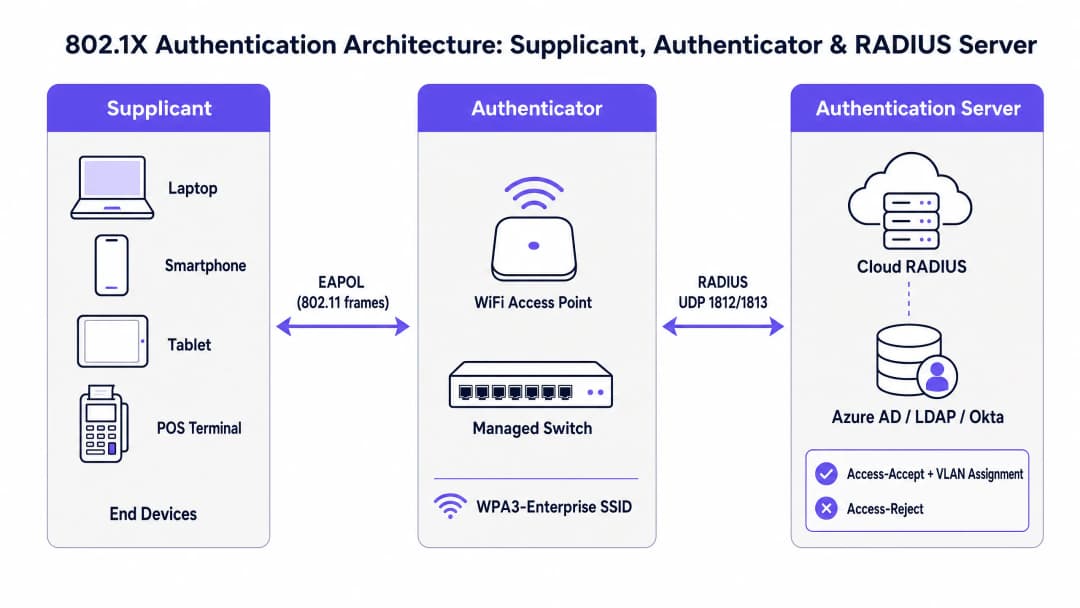
IEEE 802.1X मानक एक तीन-घटक मॉडल को परिभाषित करता है जो प्रत्येक एंटरप्राइज WiFi प्रमाणीकरण एक्सचेंज को नियंत्रित करता है। प्रभावी समस्या निवारण के लिए प्रत्येक घटक की भूमिका को समझना पहली आवश्यकता है।
सप्लीकेंट (Supplicant) अंतिम-उपयोगकर्ता डिवाइस है - एक लैपटॉप, स्मार्टफोन, टैबलेट, या पॉइंट-ऑफ-सेल टर्मिनल। यह एक सॉफ्टवेयर घटक चलाता है (सप्लीकेंट क्लाइंट, जो Windows, macOS, iOS और Android पर OS में निर्मित होता है) जो EAP एक्सचेंज शुरू करता है और नेटवर्क को क्रेडेंशियल प्रस्तुत करता है। सप्लीकेंट कॉन्फ़िगरेशन - विशेष रूप से EAP विधि, प्रमाणपत्र ट्रस्ट सेटिंग्स, और क्रेडेंशियल स्रोत - प्रमाणीकरण विफलताओं के सबसे आम स्रोतों में से एक है।Authenticator एक वायरलेस एक्सेस पॉइंट या प्रबंधित स्विच है। विशेष रूप से, Authenticator प्रमाणीकरण के निर्णय नहीं लेता है। यह एक स्टेटलेस रिले के रूप में कार्य करता है, जो नियंत्रित पोर्ट पर सभी डेटा ट्रैफ़िक को तब तक ब्लॉक करता है जब तक कि RADIUS सर्वर प्राधिकरण का निर्णय जारी नहीं कर देता। यह वायरलेस या वायर्ड माध्यम पर EAPOL (EAP over LAN) फ़्रेम का उपयोग करके Supplicant के साथ संचार करता है, और UDP पोर्ट्स 1812 (प्रमाणीकरण) और 1813 (अकाउंटिंग) पर RADIUS Access-Request और Access-Accept/Reject पैकेट का उपयोग करके RADIUS सर्वर के साथ संचार करता है।
Authentication Server एक RADIUS सर्वर है। यहीं पर वास्तविक क्रेडेंशियल सत्यापन होता है। RADIUS सर्वर Supplicant के साथ EAP विधि पर बातचीत करता है, पहचान निर्देशिका (Active Directory, Azure AD, Okta, या LDAP) के खिलाफ क्रेडेंशियल को सत्यापित करता है, और वैकल्पिक VLAN असाइनमेंट विशेषताओं के साथ एक Access-Accept, या कारण कोड के साथ एक Access-Reject लौटाता है। आधुनिक परिनियोजन में, यह तेजी से क्लाउड-होस्टेड सेवा बनता जा रहा है - पूर्ण कार्यान्वयन मार्गदर्शिका के लिए How to Implement 802.1X Authentication with Cloud RADIUS देखें।
EAP विधियों की तुलना

EAP कोई एकल प्रमाणीकरण विधि नहीं है बल्कि एक ढांचा है जो कई आंतरिक विधियों का समर्थन करता है। EAP विधि का चुनाव सीधे सुरक्षा स्थिति, प्रमाणपत्र बुनियादी ढांचे की आवश्यकताओं और उन विफलताओं के प्रकारों को प्रभावित करता है जिनका सामना आपको करना पड़ सकता है।
| EAP विधि | प्रमाणपत्र आवश्यकता | सुरक्षा स्तर | परिनियोजन जटिलता | प्राथमिक उपयोग मामला |
|---|---|---|---|---|
| EAP-TLS | पारस्परिक (क्लाइंट + सर्वर) | उच्चतम | उच्च (PKI + MDM की आवश्यकता है) | प्रबंधित कॉर्पोरेट डिवाइस |
| PEAP-MSCHAPv2 | केवल सर्वर-साइड | मध्यम | मध्यम | AD-एकीकृत वातावरण |
| EAP-TTLS | केवल सर्वर-साइड | मध्यम | मध्यम | मिश्रित-OS BYOD वातावरण |
| EAP-FAST | कोई नहीं (PAC का उपयोग करता है) | मध्यम-उच्च | कम | लीगेसी डिवाइस समर्थन |
प्रबंधित कॉर्पोरेट डिवाइस फ़्लीट के लिए EAP-TLS के साथ WPA3-Enterprise वर्तमान उद्योग का सर्वोत्तम अभ्यास है। उन स्थानों के लिए जो समानांतर में Guest WiFi और स्टाफ नेटवर्क तैनात कर रहे हैं - जो Hospitality और Retail वातावरण में आम है - एक हाइब्रिड दृष्टिकोण विशिष्ट है: कॉर्पोरेट उपकरणों के लिए EAP-TLS, और मेहमानों के लिए RADIUS बैकएंड के साथ कैप्टिव पोर्टल।
प्रमाणीकरण प्रवाह: चरण दर चरण
802.1X एक्सचेंज के सटीक अनुक्रम को समझना यह पता लगाने के लिए आवश्यक है कि विफलता कहाँ हो रही है। प्रवाह इस प्रकार आगे बढ़ता है:
- Supplicant SSID के साथ जुड़ता है। Authenticator एक नियंत्रित पोर्ट खोलता है, जिससे सभी गैर-EAP ट्रैफ़िक ब्लॉक हो जाते हैं।
- Authenticator, Supplicant को एक EAP-Request/Identity भेजता है।
- Supplicant एक EAP-Response/Identity (उपयोगकर्ता या डिवाइस पहचान) के साथ प्रतिक्रिया देता है।
- Authenticator इसे RADIUS Access-Request में एन्कैप्सुलेट करता है और इसे RADIUS सर्वर पर फॉरवर्ड करता है।
- RADIUS सर्वर एक Access-Challenge जारी करता है, जो EAP विधि (जैसे, EAP-TLS या PEAP) का प्रस्ताव करता है।
- Supplicant और RADIUS सर्वर EAP विधि पर बातचीत करते हैं और Authenticator द्वारा रिले किए गए कई Access-Request / Access-Challenge राउंड ट्रिप्स के माध्यम से क्रेडेंशियल्स का आदान-प्रदान करते हैं।
- RADIUS सर्वर पहचान निर्देशिका (identity directory) के विरुद्ध क्रेडेंशियल्स को सत्यापित करता है और या तो एक Access-Accept (वैकल्पिक VLAN असाइनमेंट विशेषताओं के साथ) या एक Access-Reject (कारण कोड के साथ) देता है।
- यदि स्वीकार किया जाता है, तो Authenticator नियंत्रित पोर्ट खोलता है और डिवाइस को नेटवर्क एक्सेस मिल जाता है। WPA2/WPA3-Enterprise के लिए, सत्र एन्क्रिप्शन कुंजियाँ प्राप्त करने के लिए 4-Way Handshake का पालन किया जाता है।
इस क्रम में किसी भी चरण में विफलता एक अलग लक्षण प्रोफाइल उत्पन्न करती है। लक्षण को चरण से मैप करना त्वरित ट्राइएज का आधार है।
सामान्य विफलता मोड और नैदानिक संकेतक
विफलता मोड 1: प्रमाणपत्र की समाप्ति (सर्वर या क्लाइंट)
यह प्रोडक्शन 802.1X परिनियोजन में सबसे अधिक विघटनकारी विफलता मोड है। जब RADIUS सर्वर का TLS प्रमाणपत्र समाप्त हो जाता है, तो प्रत्येक क्लाइंट एक साथ प्रमाणीकरण में विफल हो जाता है - एक पूर्ण नेटवर्क आउटेज। जब एक क्लाइंट प्रमाणपत्र समाप्त हो जाता है (EAP-TLS परिनियोजन में), तो अलग-अलग डिवाइस विफल हो जाते हैं जबकि अन्य सामान्य रूप से प्रमाणित होते रहते हैं।
नैदानिक संकेतक: NPS/RADIUS इवेंट लॉग कारण कोड 22 ("क्लाइंट प्रमाणपत्र समाप्त हो गया है या अभी तक मान्य नहीं है") या कारण कोड 16 ("उपयोगकर्ता क्रेडेंशियल बेमेल होने के कारण प्रमाणीकरण विफल रहा") दिखाते हैं। Windows NPS पर, सुरक्षा इवेंट लॉग में इवेंट आईडी 6273 की जाँच करें। FreeRADIUS पर, डिबग आउटपुट में TLS Alert read:fatal:certificate expired देखें।
समाधान: समाप्त हो चुके प्रमाणपत्र को नवीनीकृत करें और MDM के माध्यम से सभी क्लाइंट्स को अपडेटेड CA प्रमाणपत्र पुश करें। 90 दिनों की अलर्ट सीमा के साथ स्वचालित प्रमाणपत्र समाप्ति निगरानी लागू करें।
विफलता मोड 2: RADIUS साझा रहस्य (Shared Secret) बेमेल होना
साझा रहस्य का उपयोग Authenticator और RADIUS सर्वर के बीच RADIUS संदेशों को प्रमाणित करने के लिए किया जाता है। एक बेमेल होने के कारण RADIUS सर्वर चुपचाप Access-Request पैकेट को खारिज कर देता है। AP के दृष्टिकोण से, RADIUS सर्वर अनुत्तरदायी दिखाई देता है।
नैदानिक संकेतक: AP लॉग RADIUS सर्वर टाइमआउट और रिट्रांसमिशन दिखाते हैं। RADIUS सर्वर विफल प्रयासों के लिए कोई संबंधित लॉग प्रविष्टियाँ नहीं दिखाता है - अनुरोधों को संसाधित करने से पहले ही छोड़ दिया जा रहा है। RADIUS सर्वर इंटरफ़ेस पर एक Wireshark कैप्चर पोर्ट 1812 पर आने वाले UDP पैकेट दिखाएगा जो चुपचाप खारिज कर दिए जाते हैं।
समाधान: Authenticator (AP/कंट्रोलर कॉन्फ़िगरेशन) और RADIUS सर्वर (NAS क्लाइंट कॉन्फ़िगरेशन) दोनों पर साझा रहस्य को सत्यापित और सिंक्रनाइज़ करें। कम से कम 32 वर्णों के एक मजबूत, बेतरतीब ढंग से उत्पन्न रहस्य का उपयोग करें। क्लाउड RADIUS परिनियोजन के लिए साझा रहस्य निर्भरता को समाप्त करने के लिए RadSec (RADIUS over TLS) लागू करें।
विफलता मोड 3: Supplicant प्रोफ़ाइल गलत कॉन्फ़िगरेशन
PEAP-MSCHAPv2 डिप्लॉयमेंट में, क्लाइंट्स को एक विश्वसनीय CA के खिलाफ RADIUS सर्वर के सर्टिफिकेट को वैलिडेट करने के लिए कॉन्फ़िगर किया जाना चाहिए। यदि सर्टिफिकेट वैलिडेशन को अक्षम कर दिया जाता है - जो शुरुआती डिप्लॉयमेंट के दौरान एक आम शॉर्टकट है - तो नेटवर्क पर दुष्ट AP क्रेडेंशियल हार्वेस्टिंग हमलों का खतरा रहता है। यदि गलत CA पर भरोसा किया जाता है, या यदि सर्वर सर्टिफिकेट CN/SAN कॉन्फ़िगर किए गए सर्वर नाम से मेल नहीं खाता है, तो ऑथेंटिकेशन विफल हो जाएगा।
डायग्नोस्टिक संकेतक: व्यक्तिगत डिवाइस विफल हो जाते हैं जबकि अन्य सफल होते हैं। RADIUS लॉग्स EAP-TLS हैंडशेक विफलताएं या PEAP टनल स्थापना विफलताएं दिखाते हैं। Windows पर, Operational लॉग में WLAN-AutoConfig Event ID 8001 या 8002 सप्लीकेंट-साइड विफलताओं को दर्शाता है।
समाधान: MDM (Microsoft Intune, Jamf, या समकक्ष) के माध्यम से मानकीकृत WiFi प्रोफाइल तैनात करें। सुनिश्चित करें कि विश्वसनीय CA सर्टिफिकेट प्रोफाइल में शामिल है और सर्वर सर्टिफिकेट वैलिडेशन को लागू किया गया है। प्रोडक्शन में कभी भी सर्टिफिकेट वैलिडेशन को अक्षम न करें।
विफलता मोड 4: नेटवर्क ट्रांजिट समस्याएं (MTU फ्रैगमेंटेशन)
EAP-TLS एक्सचेंजों में पूर्ण सर्टिफिकेट चेन का ट्रांसमिशन शामिल होता है, जिससे बड़े RADIUS पैकेट बन सकते हैं। यदि ऑथेंटिकेटर और क्लाउड RADIUS सर्वर के बीच WAN पाथ में कम MTU है (कुछ MPLS या SD-WAN कॉन्फ़िगरेशन में आम है), तो ये पैकेट फ्रैगमेंटेड हो सकते हैं। कई फ़ायरवॉल और स्टेटफुल इंस्पेक्शन डिवाइस फ्रैगमेंटेड UDP पैकेट्स को ड्रॉप कर देते हैं, जिससे TLS हैंडशेक चुपचाप रुक जाता है।
डायग्नोस्टिक संकेतक: WAN के माध्यम से जुड़े साइटों पर EAP-TLS ऑथेंटिकेशन रुक-रुक कर या लगातार विफल होता है, जबकि स्थानीय RADIUS वाले साइट सफल होते हैं। पैकेट कैप्चर दिखाता है कि WAN इंटरफ़ेस पर RADIUS Access-Request पैकेट फ्रैगमेंटेड हो रहे हैं। जब RADIUS सर्वर स्थानीय LAN पर होता है तो ऑथेंटिकेशन सफल हो जाता है।
समाधान: RadSec (TCP पोर्ट 2083 पर TLS के माध्यम से RADIUS) तैनात करें। TCP स्वाभाविक रूप से फ्रैगमेंटेशन और रीट्रांसमिशन को संभालता है, जिससे यह विफलता मोड पूरी तरह से समाप्त हो जाता है। वैकल्पिक रूप से, WAN इंटरफ़ेस पर MTU को एडजस्ट करें या सर्वर पर RADIUS फ्रैगमेंटेशन पैरामीटर्स को कॉन्फ़िगर करें।
विफलता मोड 5: पहचान डायरेक्टरी कनेक्टिविटी विफलता
RADIUS सर्वर को क्रेडेंशियल्स को वैलिडेट करने के लिए पहचान डायरेक्टरी (Active Directory, LDAP, Azure AD) तक पहुँचने में सक्षम होना चाहिए। एक DNS विफलता, फ़ायरवॉल नियम में बदलाव, या डोमेन कंट्रोलर आउटेज के कारण सभी ऑथेंटिकेशन प्रयास विफल हो जाएंगे, भले ही RADIUS सेवा खुद सही ढंग से चल रही हो।
डायग्नोस्टिक संकेतक: RADIUS सर्वर लॉग दिखाते हैं कि ऑथेंटिकेशन प्रयास प्राप्त हो रहे हैं लेकिन "Cannot contact the LDAP server" या समकक्ष त्रुटियों के साथ विफल हो रहे हैं। Reason Code 16 या 66 के साथ NPS Event ID 6273। यदि डायरेक्टरी कनेक्टिविटी की स्पष्ट रूप से निगरानी नहीं की जाती है, तो RADIUS सर्वर की अपनी हेल्थ मॉनिटरिंग इसे सतह पर नहीं ला सकती है।
समाधान: RADIUS-टू-डायरेक्टरी कनेक्शन पाथ के लिए समर्पित हेल्थ मॉनिटरिंग लागू करें। फ़ेलओवर टारगेट के रूप में कई डोमेन कंट्रोलर या LDAP रेप्लिकास को कॉन्फ़िगर करें। क्लाउड RADIUS डिप्लॉयमेंट के लिए, सुनिश्चित करें कि पहचान प्रदाता इंटीग्रेशन (Azure AD Connect, LDAP प्रॉक्सी) आपकी उपलब्धता निगरानी में शामिल है।
अपने विशिष्ट सेटअप को लेकर कोई सवाल हैं?
हमारी टीम 80,000 से अधिक वेन्यू में वेन्यू ऑपरेटरों, IT मैनेजरों और नेटवर्क इंजीनियरों के साथ काम करती है। 20 मिनट का कॉल बुक करें और हम आपको दिखाएंगे कि आपके जैसे अन्य लोगों ने इसे कैसे हल किया।
कार्यान्वयन गाइड
चरण 1: प्री-डिप्लॉयमेंट सत्यापन
बड़े पैमाने पर 802.1X को डिप्लॉय करने से पहले, निम्नलिखित पूर्वापेक्षाओं को सत्यापित करें। इस चरण को छोड़ना ही डिप्लॉयमेंट के बाद की विफलताओं का प्राथमिक कारण है।
सबसे पहले, पुष्टि करें कि आपका RADIUS सर्वर प्रमाणपत्र एक CA द्वारा जारी किया गया है जो आपके एस्टेट के सभी क्लाइंट डिवाइस प्लेटफ़ॉर्म द्वारा विश्वसनीय है। Windows पर, इसका मतलब है कि CA को Trusted Root Certification Authorities स्टोर में होना चाहिए। iOS और Android पर, CA प्रमाणपत्र को MDM प्रोफ़ाइल के माध्यम से स्पष्ट रूप से वितरित किया जाना चाहिए। प्रोडक्शन में स्व-हस्ताक्षरित (self-signed) प्रमाणपत्रों का उपयोग न करें।
दूसरा, सभी Authenticators (APs और स्विच) और RADIUS सर्वर के बीच UDP पोर्ट 1812 और 1813 पर नेटवर्क कनेक्टिविटी को सत्यापित करें। प्रोडक्शन SSIDs पर डिप्लॉय करने से पहले एंड-टू-एंड ऑथेंटिकेशन की पुष्टि करने के लिए एक RADIUS टेस्ट क्लाइंट (जैसे Linux पर radtest या Windows पर NPS टेस्ट टूल) का उपयोग करें।
तीसरा, अपने पहचान निर्देशिका (identity directory) एकीकरण को सत्यापित करें। पुष्टि करें कि RADIUS सर्वर आपकी निर्देशिका के विरुद्ध LDAP बाइंड और समूह सदस्यता प्रश्नों को निष्पादित कर सकता है। एक सर्विस अकाउंट के साथ परीक्षण करें और सत्यापित करें कि Access-Accept प्रतिक्रिया में अपेक्षित VLAN असाइनमेंट विशेषताएं वापस आ रही हैं।
चरण 2: EAP विधि चयन और प्रमाणपत्र रणनीति
प्रबंधित कॉर्पोरेट उपकरणों के लिए, MDM के माध्यम से वितरित क्लाइंट प्रमाणपत्रों के साथ EAP-TLS डिप्लॉय करें। यह क्रेडेंशियल चोरी के जोखिम को समाप्त करता है और सबसे मजबूत ऑथेंटिकेशन स्थिति प्रदान करता है। सुनिश्चित करें कि आपका MDM प्लेटफ़ॉर्म समाप्ति से पहले क्लाइंट प्रमाणपत्रों को ऑटो-रिन्यू करने के लिए कॉन्फ़िगर किया गया है।
अप्रबंधित या BYOD उपकरणों वाले वातावरण के लिए, PEAP-MSCHAPv2 एक व्यावहारिक विकल्प है। सभी क्लाइंट प्रोफ़ाइलों में सर्वर प्रमाणपत्र सत्यापन लागू करें। प्रमाणपत्र सत्यापन अक्षम होने के साथ WiFi प्रोफ़ाइल कभी भी वितरित न करें।
विरासत उपकरणों (IoT सेंसर, पुराने POS टर्मिनल) के लिए जो 802.1X सप्लीकेंट नहीं चला सकते हैं, फ़ॉलबैक के रूप में MAC Authentication Bypass (MAB) लागू करें। MAB उपकरणों को एक अत्यधिक प्रतिबंधित VLAN पर असाइन करें जिसमें स्पष्ट फ़ायरवॉल नियम हों जो उनकी नेटवर्क पहुंच को केवल उन्हीं सेवाओं तक सीमित करें जिनकी उन्हें आवश्यकता है।
चरण 3: डिप्लॉयमेंट और मॉनिटरिंग
चरणबद्ध तरीके से डिप्लॉय करें: पूरे एस्टेट में विस्तार करने से पहले 20 - 50 उपकरणों के एक नियंत्रित समूह के साथ पायलट परीक्षण करें, ऑथेंटिकेशन लॉग सत्यापित करें, VLAN असाइनमेंट की पुष्टि करें, और अकाउंटिंग रिकॉर्ड्स की जांच करें। बड़े स्थानों के डिप्लॉयमेंट - जैसे स्टेडियम, सम्मेलन केंद्र, होटल - के लिए किसी भी कॉन्फ़िगरेशन त्रुटियों के प्रभाव क्षेत्र को सीमित करने के लिए यह चरणबद्ध दृष्टिकोण आवश्यक है।
इनकी निरंतर निगरानी लागू करें: RADIUS सर्वर प्रमाणपत्र की समाप्ति (90 दिनों पर अलर्ट), RADIUS सर्वर की उपलब्धता और प्रतिक्रिया समय, SSID और साइट द्वारा ऑथेंटिकेशन सफलता/विफलता दर, और पहचान निर्देशिका कनेक्टिविटी। Healthcare और Retail वातावरण जो नियामक ऑडिट के अधीन हैं, उनके लिए सुनिश्चित करें कि RADIUS अकाउंटिंग लॉग को आवश्यक अवधि के लिए सुरक्षित रखा गया है (आमतौर पर PCI-DSS के तहत 12 महीने)।
)Transport और बड़े सार्वजनिक स्थानों पर डिप्लॉयमेंट के लिए, ऑटोमैटिक फ़ेलओवर के साथ रिडंडेंट RADIUS सर्वर डिप्लॉय करने पर विचार करें। एक सिंगल RADIUS सर्वर पूरे नेटवर्क एक्सेस कंट्रोल इन्फ्रास्ट्रक्चर के लिए सिंगल पॉइंट ऑफ़ फेलियर होता है।
बेस्ट प्रैक्टिस
निम्नलिखित बेस्ट प्रैक्टिस IEEE 802.1X, WPA3-Enterprise स्पेसिफिकेशन, PCI-DSS v4.0 आवश्यकताओं, और एंटरप्राइज वेन्यू डिप्लॉयमेंट के परिचालन अनुभव से लिए गए हैं।
सर्टिफिकेट लाइफसाइकिल मैनेजमेंट सबसे उच्च प्राथमिकता वाला ऑपरेशनल कंट्रोल है। सभी RADIUS सर्वर सर्टिफिकेट के समाप्त होने से 90, 60, और 30 दिन पहले अलर्ट के साथ ऑटोमैटिक मॉनिटरिंग लागू करें। EAP-TLS डिप्लॉयमेंट के लिए, अपने MDM प्लेटफॉर्म के माध्यम से इस मॉनिटरिंग को क्लाइंट सर्टिफिकेट पॉपुलेशन तक बढ़ाएं। प्रोडक्शन 802.1X डिप्लॉयमेंट में बड़े पैमाने पर ऑथेंटिकेशन आउटेज का मुख्य कारण सर्टिफिकेट की समाप्ति है।
RadSec डिप्लॉयमेंट किसी भी ऐसे 802.1X डिप्लॉयमेंट के लिए डिफ़ॉल्ट होना चाहिए जहां RADIUS ट्रैफ़िक पब्लिक इंटरनेट या WAN से होकर गुजरता है। RadSec (RFC 6614) TCP पर TLS में RADIUS को एनकैप्सुलेट करता है, जो ट्रांसपोर्ट सिक्योरिटी प्रदान करता है, UDP फ्रेगमेंटेशन की समस्याओं को समाप्त करता है, और शेयर्ड सीक्रेट्स पर निर्भरता को हटाता है। अधिकांश आधुनिक क्लाउड RADIUS प्लेटफॉर्म और एंटरप्राइज AP वेंडर RadSec का समर्थन करते हैं।
MDM-एन्फोर्सड क्लाइंट प्रोफाइल सप्लिकेंट मिसकॉन्फ़िगरेशन के सबसे बड़े स्रोत को समाप्त करते हैं। सभी कॉर्पोरेट स्वामित्व वाले डिवाइस को अपने WiFi प्रोफाइल MDM के माध्यम से मिलने चाहिए, न कि मैन्युअल कॉन्फ़िगरेशन से। प्रोफाइल में विश्वसनीय CA सर्टिफिकेट शामिल होना चाहिए, सर्वर सर्टिफिकेट वैलिडेशन को लागू करना चाहिए, और सही EAP विधि और इनर ऑथेंटिकेशन सेटिंग्स को स्पेसिफाई करना चाहिए।
डायनेमिक VLAN असाइनमेंट के माध्यम से नेटवर्क सेगमेंटेशन PCI-DSS अनुपालन के लिए एक अनिवार्य नियंत्रण है और जीरो ट्रस्ट नेटवर्क आर्किटेक्चर का एक आधारशिला है। ग्रुप मेंबरशिप के आधार पर यूजर्स को उपयुक्त VLAN असाइन करने के लिए RADIUS ऑथराइजेशन पॉलिसी कॉन्फ़िगर करें - स्टाफ को कॉर्पोरेट VLAN पर, मेहमानों को एक आइसोलेटेड केवल-इंटरनेट VLAN पर, और IoT डिवाइस को एक प्रतिबंधित मैनेजमेंट VLAN पर। यह किसी भी सिंगल कॉम्प्रोमाइज्ड डिवाइस के ब्लास्ट रेडियस को सीमित करता है।
RADIUS एकाउंटिंग लॉग रिटेंशन PCI-DSS आवश्यकता 10 द्वारा आवश्यक ऑडिट ट्रेल प्रदान करता है और सुरक्षा घटना के बाद फोरेंसिक जांच के लिए आवश्यक है। सुनिश्चित करें कि एकाउंटिंग लॉग सेशन स्टार्ट/स्टॉप इवेंट, यूजर आइडेंटिटी, डिवाइस MAC एड्रेस, असाइन किया गया VLAN, सेशन की अवधि, और डेटा वॉल्यूम को कैप्चर करें। रियल-टाइम विसंगति का पता लगाने के लिए RADIUS एकाउंटिंग को अपने SIEM के साथ एकीकृत करें।
802.1X के साथ WiFi Analytics को डिप्लॉय करने वाले संगठनों के लिए, प्रति-यूजर ऑथेंटिकेशन डेटा और एनालिटिक्स का संयोजन एक शक्तिशाली ऑपरेशनल इंटेलिजेंस लेयर प्रदान करता है - जो व्यक्तिगत सेशन स्तर पर ड्वेल टाइम एनालिसिस, कैपेसिटी प्लानिंग, और विसंगति का पता लगाने में सक्षम बनाता है।
समस्या निवारण और जोखिम न्यूनीकरण
त्वरित जांच ढांचा
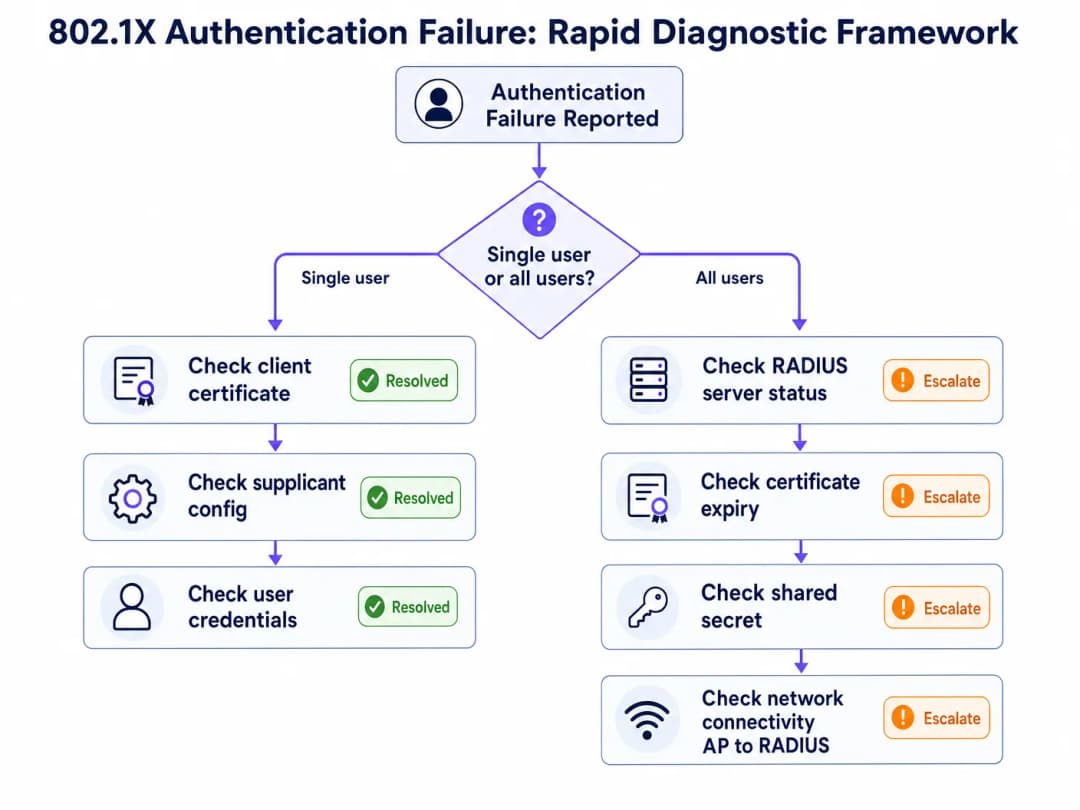
जब 802.1X प्रमाणीकरण विफलता की सूचना मिलती है, तो पहला नैदानिक प्रश्न संपूर्ण समस्या निवारण पथ तय करता है: क्या यह किसी एकल उपयोगकर्ता/डिवाइस को प्रभावित कर रहा है, या नेटवर्क पर सभी उपयोगकर्ताओं को?
यदि विफलता एक साथ सभी उपयोगकर्ताओं को प्रभावित करती है, तो मूल कारण लगभग निश्चित रूप से इन्फ्रास्ट्रक्चर-स्तर का है: एक समाप्त हो चुका RADIUS सर्वर प्रमाणपत्र, एक RADIUS सर्वर आउटेज, कॉन्फ़िगरेशन परिवर्तन के बाद एक साझा सीक्रेट बेमेल, या Authenticator और RADIUS सर्वर के बीच एक कनेक्टिविटी विफलता। RADIUS सर्वर की उपलब्धता और प्रमाणपत्र की वैधता की जाँच करके शुरुआत करें।
यदि विफलता किसी एकल उपयोगकर्ता या डिवाइस को प्रभावित करती है, तो मूल कारण लगभग निश्चित रूप से क्लाइंट-स्तर का है: एक समाप्त हो चुका क्लाइंट प्रमाणपत्र (EAP-TLS), एक सप्लीकेंट प्रोफाइल गलत कॉन्फ़िगरेशन, गलत क्रेडेंशियल, या एक डिवाइस-विशिष्ट सॉफ़्टवेयर समस्या। क्लाइंट के प्रमाणपत्र स्टोर और सप्लीकेंट कॉन्फ़िगरेशन की जाँच करके शुरुआत करें।
नैदानिक उपकरण
विभिन्न इन्फ्रास्ट्रक्चर घटकों में 802.1X समस्या निवारण के लिए निम्नलिखित उपकरण आवश्यक हैं।
| उपकरण | प्लेटफ़ॉर्म | उपयोग का मामला |
|---|---|---|
| NPS इवेंट लॉग (इवेंट आईडी 6272/6273) | Windows Server | कारण कोड के साथ RADIUS प्रमाणीकरण सफलता/विफलता |
| WLAN-AutoConfig ऑपरेशनल लॉग | Windows क्लाइंट | सप्लीकेंट-साइड EAP एक्सचेंज विफलताएं |
| CAPI2 इवेंट लॉग | Windows क्लाइंट | प्रमाणपत्र सत्यापन विफलताएं |
debug radius authentication |
Cisco IOS/WLC | Authenticator पर RADIUS एक्सचेंज डिबगिंग |
radiusd -X |
FreeRADIUS | EAP बातचीत सहित पूर्ण डिबग आउटपुट |
| Wireshark (EAPOL फ़िल्टर) | कोई भी | EAP फ्रेम का क्लाइंट-साइड पैकेट कैप्चर |
| Wireshark (EAP फ़िल्टर) | कोई भी | सर्वर-साइड RADIUS पैकेट कैप्चर |
radtest |
Linux | मैन्युअल RADIUS प्रमाणीकरण परीक्षण |
NPS कारण कोड संदर्भ
Microsoft NPS इवेंट आईडी 6273 (प्रमाणीकरण विफलता) में एक कारण कोड शामिल होता है जो सीधे विफलता के कारण की पहचान करता है। सबसे महत्वपूर्ण परिचालन कोड इस प्रकार हैं:
| कारण कोड | विवरण | संभावित मूल कारण |
|---|---|---|
| 16 | उपयोगकर्ता क्रेडेंशियल बेमेल के कारण प्रमाणीकरण विफल रहा | गलत पासवर्ड, समाप्त हो चुका क्लाइंट प्रमाणपत्र, या डायरेक्टरी लुकअप विफलता |
| 22 | क्लाइंट प्रमाणपत्र समाप्त हो गया है या अभी तक मान्य नहीं है | क्लाइंट प्रमाणपत्र की समाप्ति - MDM प्रमाणपत्र नवीनीकरण की जाँच करें |
| 23 | उपयोगकर्ता खाता समाप्त हो गया है | AD खाता समाप्ति - खाते की स्थिति की जाँच करें |
| 48 | कनेक्शन अनुरोध किसी कॉन्फ़िगर की गई नीति से मेल नहीं खाता था | RADIUS नीति गलत कॉन्फ़िगरेशन - NPS नेटवर्क नीतियों की जाँच करें |
| 66 | उपयोगकर्ता ने ऐसे प्रमाणीकरण तरीके का उपयोग करने का प्रयास किया जो मिलान वाली नेटवर्क नीति पर सक्षम नहीं है | क्लाइंट और सर्वर के बीच EAP तरीका बेमेल |
जोखिम न्यूनीकरण: प्रमाणपत्र समाप्ति की आपदा
सबसे आम और सबसे आसानी से टाली जा सकने वाली 802.1X खराबी RADIUS सर्वर सर्टिफिकेट की समाप्ति है। जनवरी 2025 में, एक बड़ी रिटेल चेन को तब कर्मचारियों के नेटवर्क की पूरी तरह से ठप होने का सामना करना पड़ा जब सोमवार की सुबह 3:00 बजे उनके RADIUS सर्वर सर्टिफिकेट की अवधि समाप्त हो गई। सुबह 9:00 बजे तक, 45 स्टोरों में 300 से अधिक पॉइंट-ऑफ-सेल टर्मिनल नेटवर्क कनेक्टिविटी खो चुके थे। सर्टिफिकेट को बिना किसी स्वचालित निगरानी के दो साल पहले तैनात किया गया था, और टीम के पुनर्गठन के दौरान रिन्यूअल रिमाइंडर छूट गया था।
इसका समाधान सीधा है: अपने अलर्टिंग प्लेटफ़ॉर्म (PagerDuty, OpsGenie, या इसके समकक्ष) के साथ एकीकृत स्वचालित सर्टिफिकेट समाप्ति निगरानी लागू करें। अलर्ट थ्रेसहोल्ड को 90, 60 और 30 दिनों पर सेट करें। अपने IT ऑपरेशन्स रनबुक में सर्टिफिकेट रिन्यूअल को एक नामित जिम्मेदारी के रूप में सौंपें। क्लाउड RADIUS प्लेटफ़ॉर्म के लिए, सत्यापित करें कि क्या प्रदाता आपकी ओर से सर्टिफिकेट रिन्यूअल का प्रबंधन करता है - यह प्रबंधित और स्व-सेवा (सेल्फ-सर्विस) पेशकशों के बीच एक प्रमुख अंतर है।
ROI और व्यावसायिक प्रभाव
ऑथेंटिकेशन डाउनटाइम की लागत
वेन्यू ऑपरेटरों के लिए, 802.1X ऑथेंटिकेशन की विफलताएं सीधे तौर पर मापने योग्य व्यावसायिक प्रभाव में बदल जाती हैं। Hospitality परिवेशों में, स्टाफ नेटवर्क आउटेज प्रॉपर्टी मैनेजमेंट सिस्टम, पॉइंट-ऑफ-सेल टर्मिनलों और अतिथि सेवा वितरण को प्रभावित करता है। Retail में, POS टर्मिनल ऑथेंटिकेशन विफलताएं लेनदेन को पूरी तरह से रोक देती हैं। कॉन्फ्रेंस सेंटरों और स्टेडियमों में, पीक इवेंट्स के दौरान ऑथेंटिकेशन विफलताओं से तत्काल और प्रत्यक्ष सेवा विफलताएं होती हैं।
एक 200 कमरों वाले होटल में 30 मिनट के ऑथेंटिकेशन आउटेज की परिचालन लागत - जो PMS एक्सेस, रेस्टोरेंट POS और कंसीयज टर्मिनलों को प्रभावित करती है - अतिथि अनुभव के प्रभाव और संभावित SLA दंडों को शामिल करने से पहले, आमतौर पर £5,000 से अधिक के प्रत्यक्ष परिचालन व्यवधान तक पहुँच जाती है।
अनुपालन मूल्य (Compliance Value)
PCI-DSS v4.0 के दायरे में आने वाले संगठनों के लिए, ठीक से तैनात 802.1X इन्फ्रास्ट्रक्चर सीधे कई आवश्यकताओं को पूरा करता है: आवश्यकता 1 (नेटवर्क एक्सेस कंट्रोल), आवश्यकता 7 (सिस्टम घटकों तक पहुंच को प्रतिबंधित करना), आवश्यकता 8 (उपयोगकर्ताओं की पहचान करना और पहुंच को ऑथेंटिकेट करना), और आवश्यकता 10 (सभी पहुंच को लॉग और मॉनिटर करना)। इसका विकल्प - साझा PSK नेटवर्क - इन चारों आवश्यकताओं में विफल रहता है और महत्वपूर्ण ऑडिट जोखिम पैदा करता है।
सार्वजनिक क्षेत्र के संगठनों और Healthcare डिप्लॉयमेंट के लिए जो डेटा सुरक्षा नियमों के अधीन हैं, प्रति-उपयोगकर्ता ऑथेंटिकेशन और व्यापक अकाउंटिंग लॉग एक्सेस कंट्रोल दायित्वों के अनुपालन को प्रदर्शित करने के लिए आवश्यक ऑडिट ट्रेल प्रदान करते हैं।
सफलता को मापना
एक अच्छी तरह से काम करने वाले 802.1X डिप्लॉयमेंट के लिए प्रमुख प्रदर्शन संकेतक (KPI) हैं: ऑथेंटिकेशन सफलता दर (लक्ष्य >99.5%), ऑथेंटिकेट करने का औसत समय (क्लाउड RADIUS के लिए <150ms), सर्टिफिकेट समाप्ति की घटनाएं (लक्ष्य शून्य), और RADIUS सर्वर उपलब्धता (लक्ष्य 99.9%)। इन मेट्रिक्स को आपके नेटवर्क प्रबंधन प्लेटफ़ॉर्म में ट्रैक किया जाना चाहिए और आपके नेटवर्क संचालन क्रम के हिस्से के रूप में मासिक समीक्षा की जानी चाहिए।
WiFi Analytics का उपयोग करने वाले संगठनों के लिए, 802.1X प्रति-उपयोगकर्ता सत्र डेटा का एनालिटिक्स के साथ संयोजन अतिरिक्त व्यावसायिक बुद्धिमत्ता प्रदान करता है: सटीक निवास समय माप, डिवाइस प्रकार वितरण, और नेटवर्क उपयोग पैटर्न जो क्षमता नियोजन और स्थल संचालन निर्णयों को सूचित करते हैं।
संबंधित नेटवर्क एक्सेस कंट्रोल समाधानों पर आगे पढ़ने के लिए, 2026 के लिए 10 सर्वश्रेष्ठ नेटवर्क एक्सेस कंट्रोल (NAC) समाधान और Cisco वायरलेस AP: उत्पादों और परिनियोजन के लिए 2026 गाइड देखें। स्कूलों और शिक्षा परिनियोजन के लिए, स्कूलों में WiFi: 2026 एडमिनिस्ट्रेटर और IT गाइड बहु-उपयोगकर्ता शिक्षा वातावरण में 802.1X कार्यान्वयन को कवर करता है।
मुख्य परिभाषाएं
802.1X
IEEE 802.1X एक पोर्ट-आधारित नेटवर्क एक्सेस कंट्रोल मानक है जो OSI मॉडल के लेयर 2 पर काम करने वाले एक ऑथेंटिकेशन फ्रेमवर्क को परिभाषित करता है। यह क्रेडेंशियल एक्सचेंज प्रोटोकॉल के रूप में EAP का उपयोग करते हुए, RADIUS सर्वर द्वारा सकारात्मक रूप से प्रमाणित किए जाने तक किसी डिवाइस से सभी नेटवर्क ट्रैफ़िक को ब्लॉक कर देता है। यह वायर्ड ईथरनेट और वायरलेस (WiFi) नेटवर्क दोनों पर लागू होता है।
IT टीमों को WPA2-Enterprise और WPA3-Enterprise SSID के लिए प्रमाणीकरण तंत्र के रूप में 802.1X का सामना करना पड़ता है। यह वह मानक है जो प्रति-उपयोगकर्ता प्रमाणीकरण, गतिशील VLAN असाइनमेंट, और PCI-DSS अनुपालन के लिए आवश्यक ऑडिट ट्रेल को सक्षम बनाता है।
RADIUS (रिमोट ऑथेंटिकेशन डायल-इन यूजर सर्विस)
एक क्लाइंट-सर्वर नेटवर्किंग प्रोटोकॉल (RFC 2865) जो नेटवर्क एक्सेस के लिए केंद्रीकृत ऑथेंटिकेशन, ऑथराइजेशन और अकाउंटिंग (AAA) प्रबंधन प्रदान करता है। 802.1X डिप्लॉयमेंट में, RADIUS सर्वर एक पहचान निर्देशिका के विरुद्ध उपयोगकर्ता क्रेडेंशियल्स को सत्यापित करता है और ऑथेंटिकेटर को Access-Accept या Access-Reject प्रतिक्रियाएं लौटाता है। यह UDP पोर्ट 1812 (ऑथेंटिकेशन) और 1813 (अकाउंटिंग) पर काम करता है।
802.1X में RADIUS सर्वर निर्णय लेने वाला घटक है। जब ऑथेंटिकेशन विफल हो जाता है, तो RADIUS सर्वर लॉग में कारण कोड होता है जो मूल कारण की पहचान करता है। सामान्य कार्यान्वयनों में Microsoft NPS, FreeRADIUS और क्लाउड-होस्टेड सेवाएं शामिल हैं।
EAP (एक्सटेंसिबल ऑथेंटिकेशन प्रोटोकॉल)
एक प्रोटोकॉल फ्रेमवर्क (RFC 3748) जो 802.1X के भीतर उपयोग की जाने वाली ऑथेंटिकेशन विधियों के एक सेट को परिभाषित करता है। EAP स्वयं एक ऑथेंटिकेशन विधि नहीं है, बल्कि एक कंटेनर है जो EAP-TLS, PEAP-MSCHAPv2, EAP-TTLS और EAP-FAST सहित कई आंतरिक विधियों का समर्थन करता है। EAP विधि पर सप्लीकेंट और RADIUS सर्वर के बीच बातचीत होती है; ऑथेंटिकेटर EAP फ्रेम को बिना व्याख्या किए रिले करता है।
EAP पद्धति का चयन डिप्लॉयमेंट की सुरक्षा स्थिति और परिचालन जटिलता को निर्धारित करता है। EAP-TLS को PKI और MDM बुनियादी ढांचे की आवश्यकता होती है लेकिन यह सबसे मजबूत सुरक्षा प्रदान करता है। PEAP-MSCHAPv2 को लागू करना आसान है लेकिन क्रेडेंशियल चोरी को रोकने के लिए सख्त प्रमाणपत्र सत्यापन की आवश्यकता होती है।
सप्लीकेंट (Supplicant)
अंतिम-उपयोगकर्ता डिवाइस (लैपटॉप, स्मार्टफोन, POS टर्मिनल) पर वह सॉफ्टवेयर घटक जो 802.1X ऑथेंटिकेशन एक्सचेंज शुरू करता है। Windows पर, सप्लीकेंट OS में WLAN AutoConfig या Wired AutoConfig सेवा के रूप में बनाया गया है। iOS और Android पर, इसे डिवाइस के WiFi प्रोफाइल कॉन्फ़िगरेशन के माध्यम से प्रबंधित किया जाता है।
सप्लीकेंट का गलत कॉन्फ़िगरेशन - विशेष रूप से PEAP डिप्लॉयमेंट में अक्षम प्रमाणपत्र सत्यापन - ऑथेंटिकेशन विफलताओं और सुरक्षा कमजोरियों दोनों के सबसे आम स्रोतों में से एक है। MDM के माध्यम से सप्लीकेंट कॉन्फ़िगरेशन को मानकीकृत करना एक महत्वपूर्ण परिचालन नियंत्रण है।
ऑथेंटिकेटर (Authenticator)
वह नेटवर्क डिवाइस (वायरलेस एक्सेस पॉइंट या प्रबंधित स्विच) जो 802.1X डिप्लॉयमेंट में पोर्ट-आधारित एक्सेस कंट्रोल को लागू करता है। ऑथेंटिकेटर ऑथेंटिकेशन का निर्णय नहीं लेता है - यह सप्लीकेंट (EAPOL का उपयोग करके) और RADIUS सर्वर (RADIUS का उपयोग करके) के बीच एक रिले के रूप में कार्य करता है। यह नियंत्रित पोर्ट पर सभी गैर-EAP ट्रैफ़िक को तब तक ब्लॉक करता है जब तक कि RADIUS सर्वर Access-Accept जारी नहीं कर देता।
ऑथेंटिकेटर का कॉन्फ़िगरेशन - विशेष रूप से RADIUS सर्वर IP/होस्टनाम, साझा रहस्य (shared secret), और टाइमआउट सेटिंग्स - विफलताओं का एक सामान्य स्रोत है। बुनियादी ढांचे में बदलाव के बाद, हमेशा सत्यापित करें कि ऑथेंटिकेटर का RADIUS क्लाइंट कॉन्फ़िगरेशन RADIUS सर्वर के NAS क्लाइंट कॉन्फ़िगरेशन से मेल खाता है।
EAPOL (EAP ओवर LAN)
वायर्ड या वायरलेस माध्यम पर सप्लीकेंट और ऑथेंटिकेटर के बीच EAP फ्रेम को ले जाने के लिए उपयोग किया जाने वाला प्रोटोकॉल। EAPOL फ्रेम लेयर 2 फ्रेम (ईथरनेट प्रकार 0x888E) हैं और इनके लिए IP कनेक्टिविटी की आवश्यकता नहीं होती है। ऑथेंटिकेटर ऑथेंटिकेशन सर्वर को अग्रेषित करने के लिए EAPOL फ्रेम को RADIUS पैकेट में इनकैप्सुलेट करता है।
EAPOL क्लाइंट की ओर Wireshark कैप्चर में दिखाई देता है। वायरलेस पैकेट कैप्चर में EAPOL फ्रेम को फ़िल्टर करने से इंजीनियरों को EAP एक्सचेंज का निरीक्षण करने और यह पहचानने की अनुमति मिलती है कि ऑथेंटिकेशन किस चरण में विफल होता है।
RadSec (TLS पर RADIUS)
RADIUS प्रोटोकॉल (RFC 6614) का एक विस्तार जो TCP पोर्ट 2083 पर TLS टनल में RADIUS पैकेट को समाहित करता है। RadSec अविश्वसनीय नेटवर्क (जैसे क्लाउड RADIUS सर्वर के लिए सार्वजनिक इंटरनेट) से गुजरने वाले RADIUS ट्रैफ़िक के लिए ट्रांसपोर्ट सुरक्षा प्रदान करता है, UDP फ़्रैग्मेंटेशन की समस्याओं को समाप्त करता है, और पैकेट प्रमाणीकरण के लिए साझा रहस्यों पर निर्भरता को हटाता है।
क्लाउड RADIUS डिप्लॉयमेंट के लिए RadSec अनुशंसित ट्रांसपोर्ट है। यह एक साथ दो सामान्य विफलता मोड को हल करता है: MTU विखंडन जिसके कारण EAP-TLS हैंडशेक विफलताएं होती हैं, और वितरित साइटों पर साझा रहस्य प्रबंधन की जटिलता।
Dynamic VLAN Assignment
एक RADIUS प्राधिकरण विशेषता जो RADIUS सर्वर को उपयोगकर्ता की समूह सदस्यता या डिवाइस प्रकार के आधार पर एक विशिष्ट VLAN पर प्रमाणित डिवाइस को रखने के लिए Authenticator को निर्देश देने की अनुमति देती है। RADIUS सर्वर Access-Accept प्रतिक्रिया में VLAN असाइनमेंट एट्रिब्यूट (Tunnel-Type, Tunnel-Medium-Type, Tunnel-Private-Group-ID) लौटाता है।
Dynamic VLAN assignment वह तंत्र है जो 802.1X परिनियोजन में नेटवर्क सेगमेंटेशन को लागू करता है। यह PCI-DSS अनुपालन (कार्डधारक डेटा वातावरण को अलग करने) के लिए एक अनिवार्य नियंत्रण है और जीरो ट्रस्ट नेटवर्क आर्किटेक्चर का एक आधारशिला है। RADIUS नीतियों में गलत तरीके से कॉन्फ़िगर किए गए VLAN एट्रिब्यूट प्रमाणीकरण के बाद उपयोगकर्ताओं को गलत नेटवर्क सेगमेंट में रखे जाने का एक सामान्य कारण हैं।
MAC Authentication Bypass (MAB)
एक फ़ॉलबैक प्रमाणीकरण तंत्र जो बिना 802.1X सप्लीकेंट वाले उपकरणों को RADIUS एक्सचेंज में उपयोगकर्ता नाम और पासवर्ड दोनों के रूप में अपने MAC पते का उपयोग करके प्रमाणित करने की अनुमति देता है। चूंकि MAC पतों को स्पूफ़ किया जा सकता है, इसलिए MAB न्यूनतम सुरक्षा आश्वासन प्रदान करता है और इसका उपयोग केवल उन उपकरणों के लिए किया जाना चाहिए जो वास्तव में 802.1X का समर्थन नहीं कर सकते हैं।
लीगेसी IoT डिवाइस, पुराने POS टर्मिनल और नेटवर्क प्रिंटर के लिए आमतौर पर MAB की आवश्यकता होती है। MAB के माध्यम से प्रमाणित उपकरणों को स्पष्ट फ़ायरवॉल नियमों के साथ अत्यधिक प्रतिबंधित VLAN पर रखा जाना चाहिए। 802.1X का समर्थन करने वाले उपकरणों के लिए सुविधा के शॉर्टकट के रूप में कभी भी MAB का उपयोग न करें।
NPS (Network Policy Server)
Microsoft का RADIUS सर्वर का कार्यान्वयन, जो Windows Server के साथ शामिल है। NPS, PEAP-MSCHAPv2, EAP-TLS और EAP-TTLS का समर्थन करता है, और क्रेडेंशियल सत्यापन के लिए Active Directory के साथ मूल रूप से एकीकृत होता है। प्रमाणीकरण विफलताओं को Windows सुरक्षा इवेंट लॉग में इवेंट ID 6273 (विफलता) और 6272 (सफलता) के रूप में दर्ज किया जाता है, जिसमें कारण कोड होते हैं जो विशिष्ट विफलता के कारण की पहचान करते हैं।
NPS, Windows-केंद्रित एंटरप्राइज वातावरण में सबसे व्यापक रूप से तैनात किया जाने वाला RADIUS सर्वर है। NPS सर्वर पर सुरक्षा इवेंट लॉग इन वातावरणों में 802.1X विफलताओं के लिए प्राथमिक नैदानिक उपकरण है। सुनिश्चित करें कि सफलता और विफलता दोनों घटनाओं के लिए NPS ऑडिट नीति सक्षम है।
हल किए गए उदाहरण
12 संपत्तियों वाले एक 450-कमरों के होटल समूह ने प्रत्येक स्थान पर ऑन-प्रिमाइसेस Windows NPS सर्वर का उपयोग करते हुए, सभी साइटों पर PEAP-MSCHAPv2 के साथ WPA2-Enterprise तैनात किया है। नेटवर्क इन्फ्रास्ट्रक्चर रिफ्रेश के बाद, IT टीम ने रिपोर्ट दी कि तीन साइटों पर कर्मचारी कॉर्पोरेट SSID पर प्रमाणित नहीं हो पा रहे हैं। Captive Portal नेटवर्क पर अतिथि इससे अप्रभावित हैं। प्रभावित साइटों पर NPS सर्वर चल रहे हैं और Windows सुरक्षा इवेंट लॉग कारण कोड 16 के साथ इवेंट ID 6273 दिखाता है। सबसे संभावित कारण क्या है और टीम को इसका समाधान कैसे करना चाहिए?
NPS इवेंट ID 6273 पर कारण कोड 16 क्रेडेंशियल बेमेल होने के कारण प्रमाणीकरण विफलता का संकेत देता है - लेकिन एक साथ कई साइटों को प्रभावित करने वाले पोस्ट-इन्फ्रास्ट्रक्चर-रिफ्रेश आउटेज के संदर्भ में, सबसे संभावित कारण गलत उपयोगकर्ता पासवर्ड नहीं है, बल्कि नए कॉन्फ़िगर किए गए एक्सेस पॉइंट या वायरलेस कंट्रोलर और NPS सर्वर के बीच एक RADIUS साझा गुप्त (shared secret) बेमेल होना है।
चरण 1: प्रभावित साइटों में से एक पर NPS सर्वर पर, RADIUS क्लाइंट और सर्वर > RADIUS क्लाइंट पर जाएं और प्रत्येक AP या वायरलेस कंट्रोलर IP पते के लिए कॉन्फ़िगर किए गए साझा गुप्त की पुष्टि करें। AP/कंट्रोलर पर RADIUS सर्वर कॉन्फ़िगरेशन के साथ इसकी तुलना करें।
चरण 2: यदि साझा गुप्त मेल खाते हैं, तो जांचें कि क्या NPS नेटवर्क नीति PEAP-MSCHAPv2 को अनुमति देने के लिए सही ढंग से कॉन्फ़िगर की गई है। नीतियों > नेटवर्क नीतियों पर जाएं, प्रासंगिक नीति खोलें, और सत्यापित करें कि Microsoft: Protected EAP (PEAP) को आंतरिक विधि के रूप में EAP-MSCHAPv2 के साथ एक स्वीकृत प्रमाणीकरण विधि के रूप में सूचीबद्ध किया गया है।
चरण 3: यदि नीति सही है, तो यह पुष्टि करने के लिए NPS कनेक्शन अनुरोध नीति की जांच करें कि अनुरोध स्थानीय रूप से संसाधित किया जा रहा है (किसी दूरस्थ RADIUS सर्वर पर अग्रेषित नहीं किया गया है)। सत्यापित करें कि स्थितियां नए AP हार्डवेयर से आने वाले RADIUS विशेषताओं से मेल खाती हैं।
चरण 4: AP/कंट्रोलर पर RADIUS अकाउंटिंग डिबग सक्षम करें और सत्यापित करें कि Access-Request पैकेट सही NPS सर्वर IP और पोर्ट 1812 पर भेजे जा रहे हैं। यदि NPS सर्वर तक कोई अनुरोध नहीं पहुंच रहा है, तो समस्या प्रमाणक कॉन्फ़िगरेशन में है, RADIUS सर्वर में नहीं।
चरण 5: यदि अनुरोध NPS तक पहुंच रहे हैं लेकिन कारण कोड 16 के साथ अस्वीकार किए जा रहे हैं, और क्रेडेंशियल सही होने की पुष्टि की गई है, तो जांचें कि क्या Active Directory डोमेन कंट्रोलर NPS सर्वर से सुलभ है। DC के लिए DNS या कनेक्टिविटी समस्या के कारण NPS इस कारण कोड के साथ क्रेडेंशियल सत्यापन में विफल हो जाएगा।
समाधान: अधिकांश पोस्ट-रिफ्रेश परिदृश्यों में, मूल कारण एक साझा गुप्त बेमेल है जो नए AP हार्डवेयर को कॉन्फ़िगर करते समय उत्पन्न हुआ था। सभी RADIUS क्लाइंट और NPS सर्वरों में साझा गुप्त को सिंक्रनाइज़ करें। साझा गुप्त प्रबंधन को पूरी तरह से समाप्त करने के लिए RadSec पर माइग्रेट करने पर विचार करें।
85 स्टोर संचालित करने वाली एक बड़ी रिटेल चेन ने Microsoft Intune के माध्यम से प्रबंधित क्लाइंट सर्टिफिकेट के साथ EAP-TLS को तैनात किया है। सोमवार की सुबह, IT हेल्पडेस्क को स्टोर प्रबंधकों से बड़ी संख्या में रिपोर्ट मिलती है कि कर्मचारियों के डिवाइस कॉर्पोरेट WiFi नेटवर्क से कनेक्ट नहीं हो पा रहे हैं। यह समस्या सभी स्टोरों को एक साथ प्रभावित करती है। RADIUS सर्वर लॉग 'TLS Alert: certificate expired' संदेश के साथ Access-Reject प्रतिक्रियाएं दिखाते हैं। RADIUS सर्वर स्वयं सामान्य रूप से चल रहा है और उसका अपना सर्टिफिकेट अगले 18 महीनों के लिए वैध है। क्या हुआ है और तत्काल सुधार का मार्ग क्या है?
RADIUS सर्वर लॉग में 'TLS Alert: certificate expired' संदेश, इस तथ्य के साथ कि विफलता सभी 85 स्टोरों में एक साथ हो रही है और RADIUS सर्वर सर्टिफिकेट वैध है, यह दर्शाता है कि कर्मचारियों के डिवाइस पर तैनात क्लाइंट सर्टिफिकेट समाप्त हो गए हैं। EAP-TLS में, क्लाइंट और सर्वर दोनों सर्टिफिकेट प्रस्तुत करते हैं। यदि क्लाइंट सर्टिफिकेट समाप्त हो गया है, तो RADIUS सर्वर TLS हैंडशेक को अस्वीकार कर देगा और एक Access-Reject जारी करेगा।
तत्काल सुधार (0 - 2 घंटे):
चरण 1: प्रभावित डिवाइस पर सर्टिफिकेट की समाप्ति तिथि की जांच करके निदान की पुष्टि करें। Windows पर, certmgr.msc खोलें, Personal > Certificates पर जाएं, और WiFi प्रमाणीकरण सर्टिफिकेट की समाप्ति तिथि की जांच करें। यदि यह समाप्त हो गया है, तो यह मूल कारण की पुष्टि करता है।
चरण 2: Microsoft Intune में, Devices > Configuration Profiles पर जाएं और WiFi प्रमाणीकरण के लिए उपयोग किए जाने वाले SCEP या PKCS सर्टिफिकेट प्रोफाइल का पता लगाएं। सर्टिफिकेट वैधता अवधि और नवीनीकरण सीमा सेटिंग्स की जांच करें।
चरण 3: यदि सर्टिफिकेट प्रोफाइल स्वचालित रूप से नवीनीकृत होने के लिए कॉन्फ़िगर किया गया है, तो जांचें कि क्या डिवाइस हाल ही में Intune प्रबंधन सेवा तक पहुंचने में सक्षम रहे हैं। यदि डिवाइस ऑफ़लाइन थे या अनएन्रोल थे, तो स्वचालित नवीनीकरण नहीं हुआ होगा।
चरण 4: Intune (Devices > All Devices > Sync) में डिवाइस सिंक को ट्रिगर करके सर्टिफिकेट नवीनीकरण के लिए बाध्य करें। जो डिवाइस WiFi से कनेक्ट नहीं हो सकते हैं, सुनिश्चित करें कि नवीनीकरण के लिए Intune सेवा तक पहुंचने के लिए उनके पास एक वैकल्पिक कनेक्टिविटी पथ (मोबाइल डेटा या वायर्ड ईथरनेट) है।
चरण 5: सर्टिफिकेट नवीनीकृत होने के दौरान एक अस्थायी उपाय के रूप में, परिचालन क्षमता को बहाल करने के लिए प्रभावित स्टोरों के लिए एक अस्थायी PEAP-MSCHAPv2 SSID बनाने पर विचार करें। इसे एक अस्थायी सेतु के रूप में माना जाना चाहिए, स्थायी समाधान के रूप में नहीं।
दीर्घकालिक रोकथाम:
बचे हुए सर्टिफिकेट जीवनकाल के 20% पर नवीनीकृत करने के लिए Intune सर्टिफिकेट प्रोफाइल को कॉन्फ़िगर करें (जैसे, 1 साल के सर्टिफिकेट के लिए, समाप्ति से लगभग 73 दिन पहले नवीनीकृत करें)। सर्टिफिकेट समाप्ति के कारण कोड के साथ RADIUS Access-Reject घटनाओं पर SIEM अलर्ट लागू करें। अपनी मासिक IT संचालन समीक्षा में सर्टिफिकेट समाप्ति निगरानी जोड़ें।
अभ्यास प्रश्न
Q1. आपका संगठन एक 60,000 सीटों वाले स्टेडियम का संचालन करता है जिसमें कॉन्कोर्स, हॉस्पिटैलिटी सुइट्स और बैक-ऑफ-हाउस क्षेत्रों में 800 एक्सेस पॉइंट्स तैनात हैं। स्टाफ डिवाइस Jamf के माध्यम से प्रबंधित प्रमाणपत्रों के साथ EAP-TLS का उपयोग करते हैं। एक बड़े इवेंट के दौरान, कई ज़ोन में 15% स्टाफ डिवाइस प्रमाणीकरण विफलताओं की रिपोर्ट करते हैं। RADIUS सर्वर लॉग Access-Reject प्रतिक्रियाएं दिखाते हैं। शेष 85% स्टाफ सामान्य रूप से प्रमाणित हो रहे हैं। आपका नैदानिक दृष्टिकोण क्या है और सबसे संभावित मूल कारण क्या है?
संकेत: आंशिक विफलता पैटर्न (15% डिवाइस, सभी नहीं) प्रमुख नैदानिक संकेत है। इस बात पर ध्यान केंद्रित करें कि विफल होने वाले उपकरणों को सफल होने वाले उपकरणों से क्या अलग करता है - डिवाइस मॉडल, OS संस्करण, प्रमाणपत्र जारी करने की तिथि, या Jamf नामांकन स्थिति।
मॉडल उत्तर देखें
आंशिक विफलता का पैटर्न तुरंत बुनियादी ढांचा-स्तरीय कारणों (RADIUS सर्वर प्रमाणपत्र की समाप्ति, साझा गुप्त बेमेल, या सर्वर आउटेज जो सभी उपकरणों को प्रभावित करेगा) को खारिज कर देता है। मूल कारण निश्चित रूप से क्लाइंट प्रमाणपत्रों का एक सबसेट है जो समाप्त हो गए हैं या नवीनीकृत होने में विफल रहे हैं।
नैदानिक दृष्टिकोण: RADIUS सर्वर लॉग खींचें और Access-Reject इवेंट्स के लिए फ़िल्टर करें। विफल होने वाले उपकरणों की डिवाइस पहचान (प्रमाणपत्र CNs या MAC पते) पर ध्यान दें। Jamf में, प्रमाणपत्र प्रोफ़ाइल परिनियोजन स्थिति के विरुद्ध इन उपकरणों का क्रॉस-संदर्भ लें। जांचें कि क्या विफल होने वाले उपकरण एक समान प्रमाणपत्र जारी करने की तिथि साझा करते हैं - यदि वे सभी एक ही बैच में नामांकित थे, तो उनकी समाप्ति तिथि समान हो सकती है।
सबसे संभावित मूल कारण: एक ही समय में जारी किए गए क्लाइंट प्रमाणपत्रों का एक बैच समाप्ति तक पहुंच गया है। हाल ही में नामांकित उपकरणों के पास वैध प्रमाणपत्र हैं और वे सामान्य रूप से प्रमाणित हो रहे हैं।
समाधान: Jamf में, प्रभावित उपकरणों की पहचान करें और प्रमाणपत्र नवीनीकरण पुश को ट्रिगर करें। सुनिश्चित करें कि प्रमाणपत्र प्रोफ़ाइल को उचित नवीनीकरण सीमा (प्रमाणपत्र जीवनकाल का 20%) के साथ कॉन्फ़िगर किया गया है। उन उपकरणों के लिए जो WiFi (क्योंकि वे प्रमाणित नहीं कर सकते) पर Jamf MDM सेवा तक नहीं पहुंच सकते हैं, इवेंट की अवधि के लिए एक अस्थायी वायर्ड ईथरनेट कनेक्शन या एक अस्थायी PEAP SSID प्रदान करें। इवेंट के बाद, पुनरावृत्ति को रोकने के लिए प्रमाणपत्र समाप्ति कारण कोड के साथ RADIUS Access-Reject इवेंट्स पर SIEM अलर्टिंग लागू करें।
Q2. 35 स्टोरों वाली एक क्षेत्रीय रिटेल श्रृंखला ऑन-प्रिमाइसेस NPS सर्वर से क्लाउड RADIUS सेवा में माइग्रेट कर रही है। तीन स्टोरों पर पायलट के दौरान, EAP-TLS प्रमाणीकरण दो स्टोरों पर सही ढंग से काम कर रहा है लेकिन तीसरे स्टोर पर रुक-रुक कर विफल हो रहा है। तीसरा स्टोर MPLS WAN लिंक के माध्यम से क्लाउड RADIUS सेवा से जुड़ता है। प्रमाणीकरण विफलताएं सुसंगत नहीं हैं - कुछ प्रयास सफल होते हैं, कुछ विफल होते हैं। क्लाउड RADIUS प्रदाता पुष्टि करता है कि सेवा स्वस्थ है और लॉग दिखाते हैं कि कुछ Access-Request पैकेट आ रहे हैं लेकिन कोई संबंधित Access-Accept नहीं भेजा जा रहा है। सबसे संभावित कारण क्या है?
संकेत: एक विशिष्ट WAN-कनेक्टेड साइट पर रुक-रुक कर होने वाली विफलताएं, क्लाउड RADIUS प्रदाता द्वारा कुछ पैकेट देखने लेकिन सभी नहीं देखने के साथ मिलकर, कॉन्फ़िगरेशन त्रुटि के बजाय नेटवर्क ट्रांजिट समस्या का दृढ़ता से सुझाव देती हैं।
मॉडल उत्तर देखें
WAN-कनेक्टेड साइट पर रुक-रुक कर होने वाली विफलताओं और क्लाउड RADIUS प्रदाता द्वारा अपूर्ण पैकेट अनुक्रमों को देखने का संयोजन MTU विखंडन का एक क्लासिक संकेत है। EAP-TLS प्रमाणपत्र श्रृंखलाएं बड़े RADIUS पैकेट उत्पन्न करती हैं जो MPLS WAN लिंक के MTU से अधिक हो सकते हैं। जब ये पैकेट खंडित होते हैं, तो क्लाउड RADIUS सर्वर पहला खंड प्राप्त कर सकता है लेकिन बाद के खंड नहीं, जिससे TLS हैंडशेक रुक जाता है और अंततः टाइमआउट हो जाता है।
नैदानिक पुष्टि: प्रभावित स्टोर पर WAN इंटरफ़ेस पर एक Wireshark कैप्चर करें। पोर्ट 1812 पर UDP ट्रैफ़िक के लिए फ़िल्टर करें। RADIUS एक्सचेंज में खंडित IP पैकेट की तलाश करें। सफल स्टोरों बनाम विफल स्टोरों पर पैकेट आकारों की तुलना करें।
समाधान विकल्प 1 (पसंदीदा): प्रभावित साइट को RadSec (TCP पोर्ट 2083 पर TLS पर RADIUS) में माइग्रेट करें। TCP मूल रूप से विखंडन और रिट्रांसमिशन को संभालता है, जिससे यह विफलता मोड पूरी तरह से समाप्त हो जाता है। अधिकांश क्लाउड RADIUS प्रदाता और आधुनिक AP विक्रेता RadSec का समर्थन करते हैं।
समाधान विकल्प 2: MPLS पथ MTU से मेल खाने के लिए प्रभावित स्टोर पर WAN इंटरफ़ेस पर MTU को कम करें, यह सुनिश्चित करते हुए कि RADIUS पैकेट खंडित न हों। यह एक कम सुरुचिपूर्ण समाधान है क्योंकि यह WAN लिंक पर सभी ट्रैफ़िक को प्रभावित करता है।
समाधान विकल्प 3: पैकेट विखंडन को कम करने के लिए छोटे TLS रिकॉर्ड आकारों का उपयोग करने के लिए RADIUS सर्वर को कॉन्फ़िगर करें। यह कुछ RADIUS कार्यान्वयनों में उपलब्ध एक सर्वर-साइड कॉन्फ़िगरेशन विकल्प है।
दीर्घकालिक अनुशंसा: क्लाउड RADIUS रोलआउट के हिस्से के रूप में सभी साइटों को RadSec में माइग्रेट करें। यह विखंडन के जोखिम को समाप्त करता है, पारगमन में RADIUS ट्रैफ़िक को एन्क्रिप्ट करता है, और साझा गुप्त प्रबंधन जटिलता को हटाता है।
Q3. एक कॉन्फ्रेंस सेंटर के IT डायरेक्टर स्टाफ के लिए 802.1X के साथ WPA3-Enterprise और इवेंट डेलिगेट्स के लिए एक Captive Portal का समर्थन करने के लिए नेटवर्क अपग्रेड की योजना बना रहे हैं। यह वेन्यू प्रति वर्ष 200+ इवेंट्स की मेजबानी करता है, जिसमें डेलिगेट्स की संख्या 50 से 5,000 तक होती है। IT टीम के पास सीमित आंतरिक नेटवर्क विशेषज्ञता है और कोई मौजूदा PKI इन्फ्रास्ट्रक्चर नहीं है। डायरेक्टर स्टाफ के लिए 802.1X लागू करना चाहते हैं लेकिन परिचालन जटिलता को लेकर चिंतित हैं। किस EAP तरीके की सिफारिश की जानी चाहिए, किस इन्फ्रास्ट्रक्चर की आवश्यकता है, और कम करने के लिए प्रमुख परिचालन जोखिम क्या हैं?
संकेत: परिचालन बाधाओं पर विचार करें: सीमित आंतरिक विशेषज्ञता, कोई मौजूदा PKI नहीं, और एक ऐसे समाधान की आवश्यकता जिसे विश्वसनीय रूप से बनाए रखा जा सके। सुरक्षा आवश्यकताओं और परिचालन व्यवहार्यता के बीच संतुलन बनाएं।
मॉडल उत्तर देखें
परिचालन बाधाओं - सीमित आंतरिक विशेषज्ञता और कोई मौजूदा PKI नहीं - को देखते हुए, स्टाफ प्रमाणीकरण के लिए अनुशंसित EAP तरीका PEAP-MSCHAPv2 है, न कि EAP-TLS। हालांकि EAP-TLS बेहतर सुरक्षा प्रदान करता है, इसके लिए एक PKI इन्फ्रास्ट्रक्चर और सर्टिफिकेट वितरण के लिए एक MDM प्लेटफॉर्म की आवश्यकता होती है। इनके बिना, EAP-TLS परिनियोजन में महत्वपूर्ण परिचालन जोखिम होता है: सर्टिफिकेट समाप्ति प्रबंधन एक मैनुअल प्रक्रिया बन जाता है, और टीम के पास दबाव में सर्टिफिकेट चेन की समस्याओं का निवारण करने के लिए विशेषज्ञता की कमी होती है।
PEAP-MSCHAPv2 सीधे Active Directory (या Azure AD) के साथ एकीकृत होता है, इसके लिए केवल सर्वर-साइड सर्टिफिकेट की आवश्यकता होती है, और यह बिना गहन PKI विशेषज्ञता वाली टीम द्वारा परिचालन रूप से प्रबंधनीय है। सुरक्षा से समझौता स्वीकार्य है बशर्ते कि सभी क्लाइंट डिवाइसों पर सर्वर सर्टिफिकेट सत्यापन कड़ाई से लागू किया जाए - यह वह गैर-परक्राम्य नियंत्रण है जो नकली एक्सेस पॉइंट्स के माध्यम से क्रेडेंशियल चोरी को रोकता है।
आवश्यक इन्फ्रास्ट्रक्चर: एक क्लाउड RADIUS सेवा (ऑन-प्रिमाइसेस सर्वर प्रबंधन से बचने के लिए), RADIUS सेवा के लिए एक विश्वसनीय सार्वजनिक CA से सर्वर सर्टिफिकेट, स्टाफ उपकरणों पर WiFi प्रोफाइल तैनात करने के लिए एक MDM समाधान (Microsoft Intune या समकक्ष), और पहचान निर्देशिका के रूप में Active Directory या Azure AD।
कम करने के लिए प्रमुख परिचालन जोखिम:
क्लाइंट्स पर सर्टिफिकेट सत्यापन अक्षम होना: सर्टिफिकेट सत्यापन लागू होने के साथ MDM के माध्यम से सभी WiFi प्रोफाइल तैनात करें। स्टाफ उपकरणों पर कभी भी मैनुअल WiFi प्रोफाइल कॉन्फ़िगरेशन की अनुमति न दें।
RADIUS सर्वर सर्टिफिकेट की समाप्ति: 90-दिन के अलर्ट के साथ स्वचालित निगरानी सेट करें। क्लाउड RADIUS सेवा के साथ, सत्यापित करें कि क्या प्रदाता सर्टिफिकेट रिन्यूअल का प्रबंधन करता है - यह एक प्रमुख चयन मानदंड है।
बड़े इवेंट्स के दौरान क्षमता: सुनिश्चित करें कि क्लाउड RADIUS सेवा का आकार चरम समवर्ती प्रमाणीकरण लोड के लिए उपयुक्त है। 5,000-डेलिगेट वाले इवेंट के दौरान, यदि स्टाफ डिवाइस एक साथ पुनः प्रमाणित होते हैं (जैसे, नेटवर्क रीस्टार्ट के बाद), तो RADIUS सेवा को इस दबाव को संभालना चाहिए।
गेस्ट/स्टाफ नेटवर्क पृथक्करण: सुनिश्चित करें कि Captive Portal गेस्ट नेटवर्क और 802.1X स्टाफ नेटवर्क उपयुक्त फ़ायरवॉल नियमों के साथ अलग-अलग VLAN पर हों। यदि कोई भी स्टाफ नेटवर्क डिवाइस भुगतान कार्ड डेटा को प्रोसेस करता है तो यह एक PCI-DSS आवश्यकता है।
अक्सर पूछे जाने वाले प्रश्न
Why does 802.1X authentication fail with an EAPOL timeout?
An EAPOL timeout occurs when the client transmits EAPOL-Start frames but receives no EAP-Request/Identity response from the authenticator (access point or switch). Common root causes include: the switch port or wireless SSID lacking an active 802.1X AAA method list, the access point losing CAPWAP or RADIUS connectivity to the controller, or the client operating system 802.1X supplicant service (such as Windows Wired AutoConfig dot3svc) being stopped or misconfigured.
What causes RADIUS Access-Reject errors during EAP-TLS authentication?
EAP-TLS Access-Reject errors typically stem from mutual certificate validation failures (TLS Alert 48 or Alert 46). Either the client device lacks the Root or Intermediate CA certificate that signed the RADIUS server certificate, or the RADIUS server cannot validate the client certificate due to an expired Certificate Revocation List (CRL) or unreachable OCSP responder. Other frequent causes include expired client certificates and missing Client Authentication Extended Key Usage (EKU) attributes.
Why does PEAP-MSCHAPv2 fail on Windows 11 enterprise endpoints?
Windows 11 22H2 and later versions enable Windows Defender Credential Guard by default. Credential Guard isolates LSASS and blocks legacy NTLMv2 and MS-CHAPv2 password-derived hashes from traversing the operating system, causing authentication to fail with RADIUS Reason 23 or Event 5402. Migrating from PEAP to passwordless EAP-TLS with hardware TPM-backed certificates resolves this incompatibility and eliminates credential theft risks.
How do I troubleshoot RADIUS server timeouts and UDP 1812 packet drops?
A RADIUS server timeout occurs when the access point or switch sends Access-Request packets on UDP 1812 but receives no reply. To troubleshoot: first, verify that the RADIUS shared secret configured on the network device matches the RADIUS client record byte-for-byte; second, confirm that intermediate firewalls permit UDP port 1812 (Authentication) and 1813 (Accounting); third, verify that the source IP used by the NAS matches the IP registered in the RADIUS server client list; and fourth, verify RADIUS server service health and CPU load.
Why does a client fail to obtain an IP address after successful 802.1X authentication?
When 802.1X authentication succeeds with Access-Accept but the client receives an APIPA address (169.254.x.x) or DHCP NAK, the issue is Dynamic VLAN assignment. The RADIUS server must return all three required RFC 3580 attributes: Tunnel-Type (Attribute 64, value 13), Tunnel-Medium-Type (Attribute 65, value 6), and Tunnel-Private-Group-ID (Attribute 81, specifying the VLAN ID). Furthermore, the assigned VLAN ID must exist in the switch database, be allowed across trunk ports to the AP, and possess an active DHCP pool with available leases.
How does Purple Cloud RADIUS prevent 802.1X authentication failures?
Purple Cloud RADIUS eliminates on-premises AAA server infrastructure, outdated shared secrets, and manual certificate distribution bottlenecks. It integrates directly with Microsoft Entra ID, Google Workspace, and Okta, automates passwordless EAP-TLS certificate enrollment via SCEP, and provides real-time diagnostic logging and role-based dynamic VLAN assignment across Cisco, Aruba, Ruckus, and Meraki networks.
इस श्रृंखला में आगे पढ़ें
Cyber Essentials और Staff WiFi: अपने वायरलेस नेटवर्क पर पांच नियंत्रणों को पास करना
आप अपने staff WiFi के लिए पांच Cyber Essentials नियंत्रणों में से प्रत्येक का मिलान करने और मूल्यांकनकर्ताओं को मिलने वाली कमियों को दूर करने में सक्षम होंगे। फिर आप प्रत्येक डिवाइस श्रेणी के लिए 802.1X, iPSK और एक अलग किए गए WPA2-PSK नेटवर्क के बीच चयन कर सकते हैं। अंत में, आप जानेंगे कि Cyber Essentials Plus ऑडिट के लिए एक्सेस पॉइंट्स, कंट्रोलर्स और BYOD को कैसे तैयार किया जाए।
HPE Aruba Central presence analytics: सेटअप, एक्सपोर्ट और सीमाएं
आप प्रति साइट Aruba Central presence analytics को सक्षम करने, ग्राउंड-ट्रुथ काउंट के आधार पर RSSI थ्रेशोल्ड और ड्वेल सीमाओं को कैलिब्रेट करने, और Central REST API के माध्यम से साइट-स्तरीय एग्रीगेट्स को एक्सपोर्ट करने में सक्षम होंगे। आप यह भी जानेंगे कि मूल presence analytics कहाँ समाप्त होती है और आपके मौजूदा Aruba एक्सेस पॉइंट्स पर Purple जैसे हार्डवेयर-अज्ञेयवादी प्लेटफॉर्म लेयर की आवश्यकता कब होती है।
CIPA अनुपालन: वेन्यू ऑपरेटरों के लिए अनुपालन चेकलिस्ट
आप यह तय कर सकेंगे कि CIPA आपके WiFi को बाध्य करता है या नहीं, फिर नेटवर्क को विभाजित करें, DNS को Purple Shield के माध्यम से रूट करें और बाईपास मार्गों को बंद करें। आपको यह भी पता चल जाएगा कि Form 486 या Form 479 प्रमाणन के लिए कौन से साक्ष्य रखने हैं। चेकलिस्ट प्रत्येक आवश्यकता के लिए एक मालिक सौंपती है, ताकि आपके अगले फंडिंग वर्ष के प्रमाणन में कुछ भी न छूटे।
अपने विशिष्ट सेटअप को लेकर कोई सवाल हैं?
हमारी टीम 80,000 से अधिक वेन्यू में वेन्यू ऑपरेटरों, IT मैनेजरों और नेटवर्क इंजीनियरों के साथ काम करती है। 20 मिनट का कॉल बुक करें और हम आपको दिखाएंगे कि आपके जैसे अन्य लोगों ने इसे कैसे हल किया।