
Troubleshooting 802.1X Authentication Failures (RADIUS/EAP)
Step-by-step diagnostic guide for resolving 802.1X, EAP-TLS, PEAP, and RADIUS authentication errors on enterprise WiFi networks.
Video overview
Listen to this guide
View podcast transcript
Part of our core series: Enterprise WiFi Security Guide →
802.1X & RADIUS authentication failure diagnostic tool
Select your failure component stage, error scenario, and network vendor to generate exact root-cause analysis, packet-level diagnostics, and vendor-specific CLI verification commands.
Observed symptom
The access point transmits RADIUS Access-Request datagrams to the authentication server over UDP 1812, but receives zero response, causing client timeouts and fallback states.
Technical root cause
RADIUS shared secret mismatch between the Network Access Server (NAS IP) and RADIUS server, intermediate firewall blocking UDP ports 1812/1813, missing NAS IP definition in the RADIUS clients table, or RADIUS server service freeze.
Automate 802.1X and eliminate authentication downtime
Purple Cloud RADIUS and automated certificate lifecycle management eliminate shared secret mismatches, expired certificate outages, and complex on-premises server maintenance across Cisco, Aruba, Ruckus, and Meraki.

Executive Summary
For IT leaders managing enterprise WiFi at hotels, retail chains, stadiums, and public-sector venues, 802.1X authentication is the backbone of network access control - and when it fails, the impact is immediate and operationally severe. A single misconfigured supplicant profile, an expired RADIUS certificate, or a mismatched shared secret can block hundreds of users simultaneously, triggering support escalations, revenue loss, and potential compliance violations.
IEEE 802.1X defines port-based network access control, operating at Layer 2 of the OSI model. It works in conjunction with the Extensible Authentication Protocol (EAP) and a RADIUS server to authenticate every device before granting network access. The protocol supports multiple EAP methods - EAP-TLS, PEAP-MSCHAPv2, EAP-TTLS, and EAP-FAST - each with distinct security profiles, certificate requirements, and operational complexity.
This guide provides a structured diagnostic framework for resolving 802.1X failures across the three-component authentication chain: the Supplicant (end device), the Authenticator (access point or switch), and the Authentication Server (RADIUS). It includes real-world case studies, a rapid triage decision tree, implementation best practices aligned with PCI DSS v4.0 and WPA3-Enterprise standards, and a worked example library drawn from hospitality and retail deployments.
For organisations deploying Guest WiFi alongside staff networks, understanding where 802.1X breaks - and how to fix it quickly - is a direct operational and commercial priority.
Technical Deep-Dive
The 802.1X Authentication Architecture
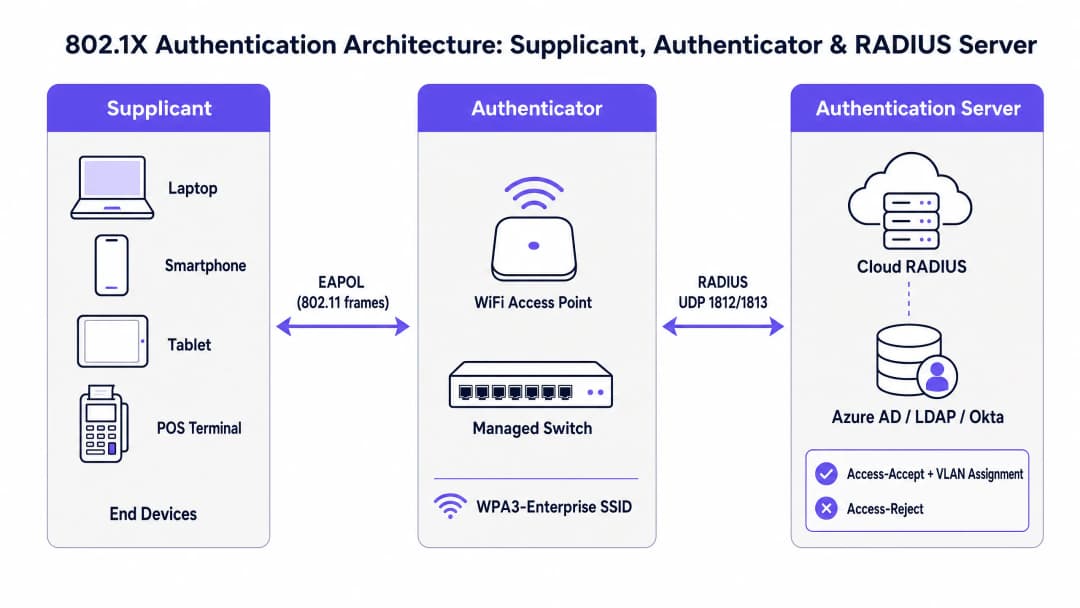
The IEEE 802.1X standard defines a three-component model that governs every enterprise WiFi authentication exchange. Understanding each component's role is the prerequisite for effective troubleshooting.
The Supplicant is the end-user device - a laptop, smartphone, tablet, or point-of-sale terminal. It runs a software component (the supplicant client, built into the OS on Windows, macOS, iOS, and Android) that initiates the EAP exchange and presents credentials to the network. Supplicant configuration - specifically the EAP method, certificate trust settings, and credential source - is one of the most common sources of authentication failures.
The Authenticator is the wireless access point or managed switch. Critically, the Authenticator does not make authentication decisions. It acts as a stateless relay, blocking all data traffic on the controlled port until the RADIUS server issues an authorisation decision. It communicates with the Supplicant using EAPOL (EAP over LAN) frames over the wireless or wired medium, and with the RADIUS server using RADIUS Access-Request and Access-Accept/Reject packets over UDP ports 1812 (authentication) and 1813 (accounting).
The Authentication Server is the RADIUS server. This is where the actual credential validation occurs. The RADIUS server negotiates the EAP method with the Supplicant, validates credentials against an identity directory (Active Directory, Azure AD, Okta, or LDAP), and returns an Access-Accept with optional VLAN assignment attributes, or an Access-Reject with a reason code. In modern deployments, this is increasingly a cloud-hosted service - see How to Implement 802.1X Authentication with Cloud RADIUS for a full implementation guide.
EAP Method Comparison

EAP is not a single authentication method but a framework supporting multiple inner methods. The choice of EAP method has direct implications for security posture, certificate infrastructure requirements, and the types of failures you are likely to encounter.
| EAP Method | Certificate Requirement | Security Level | Deployment Complexity | Primary Use Case |
|---|---|---|---|---|
| EAP-TLS | Mutual (client + server) | Highest | High (requires PKI + MDM) | Managed corporate devices |
| PEAP-MSCHAPv2 | Server-side only | Medium | Medium | AD-integrated environments |
| EAP-TTLS | Server-side only | Medium | Medium | Mixed-OS BYOD environments |
| EAP-FAST | None (uses PAC) | Medium-High | Low | Legacy device support |
WPA3-Enterprise with EAP-TLS is the current industry best practice for managed corporate device fleets. For venues deploying Guest WiFi and staff networks in parallel - common in Hospitality and Retail environments - a hybrid approach is typical: EAP-TLS for corporate devices, captive portal with RADIUS backend for guests.
The Authentication Flow: Step by Step
Understanding the precise sequence of the 802.1X exchange is essential for pinpointing where a failure occurs. The flow proceeds as follows:
- The Supplicant associates with the SSID. The Authenticator opens a controlled port, blocking all non-EAP traffic.
- The Authenticator sends an EAP-Request/Identity to the Supplicant.
- The Supplicant responds with an EAP-Response/Identity (the user or device identity).
- The Authenticator encapsulates this in a RADIUS Access-Request and forwards it to the RADIUS server.
- The RADIUS server issues an Access-Challenge, proposing the EAP method (e.g., EAP-TLS or PEAP).
- The Supplicant and RADIUS server negotiate the EAP method and exchange credentials through multiple Access-Request / Access-Challenge round trips, relayed by the Authenticator.
- The RADIUS server validates credentials against the identity directory and returns either an Access-Accept (with optional VLAN assignment attributes) or an Access-Reject (with a reason code).
- If accepted, the Authenticator opens the controlled port and the device gains network access. For WPA2/WPA3-Enterprise, a 4-Way Handshake follows to derive session encryption keys.
A failure at any step in this sequence produces a different symptom profile. Mapping the symptom to the step is the foundation of rapid triage.
Common Failure Modes and Diagnostic Indicators
Failure Mode 1: Certificate Expiry (Server or Client)
This is the single most disruptive failure mode in production 802.1X deployments. When the RADIUS server's TLS certificate expires, every client simultaneously fails authentication - a complete network outage. When a client certificate expires (in EAP-TLS deployments), individual devices fail while others continue to authenticate normally.
Diagnostic indicators: NPS/RADIUS event logs show Reason Code 22 ("Client certificate has expired or is not yet valid") or Reason Code 16 ("Authentication failed due to a user credentials mismatch"). On Windows NPS, check Event ID 6273 in the Security event log. On FreeRADIUS, look for TLS Alert read:fatal:certificate expired in the debug output.
Resolution: Renew the expired certificate and push the updated CA certificate to all clients via MDM. Implement automated certificate expiry monitoring with a 90-day alert threshold.
Failure Mode 2: RADIUS Shared Secret Mismatch
The shared secret is used to authenticate RADIUS messages between the Authenticator and the RADIUS server. A mismatch causes the RADIUS server to silently discard Access-Request packets. From the AP's perspective, the RADIUS server appears unresponsive.
Diagnostic indicators: The AP logs show RADIUS server timeouts and retransmissions. The RADIUS server shows no corresponding log entries for the failed attempts - the requests are being dropped before processing. A Wireshark capture on the RADIUS server interface will show incoming UDP packets on port 1812 that are silently discarded.
Resolution: Verify and synchronise the shared secret on both the Authenticator (AP/controller configuration) and the RADIUS server (NAS client configuration). Use a strong, randomly generated secret of at least 32 characters. Implement RadSec (RADIUS over TLS) to eliminate shared secret dependency for cloud RADIUS deployments.
Failure Mode 3: Supplicant Profile Misconfiguration
In PEAP-MSCHAPv2 deployments, clients must be configured to validate the RADIUS server's certificate against a trusted CA. If certificate validation is disabled - a common shortcut during initial deployment - the network is vulnerable to rogue AP credential harvesting attacks. If the wrong CA is trusted, or if the server certificate CN/SAN does not match the configured server name, authentication will fail.
Diagnostic indicators: Individual devices fail while others succeed. RADIUS logs show EAP-TLS handshake failures or PEAP tunnel establishment failures. On Windows, WLAN-AutoConfig Event ID 8001 or 8002 in the Operational log indicates supplicant-side failures.
Resolution: Deploy standardised WiFi profiles via MDM (Microsoft Intune, Jamf, or equivalent). Ensure the trusted CA certificate is included in the profile and that server certificate validation is enforced. Never disable certificate validation in production.
Failure Mode 4: Network Transit Issues (MTU Fragmentation)
EAP-TLS exchanges involve the transmission of full certificate chains, which can produce large RADIUS packets. If the WAN path between the Authenticator and a cloud RADIUS server has a low MTU (common in certain MPLS or SD-WAN configurations), these packets may be fragmented. Many firewalls and stateful inspection devices drop fragmented UDP packets, causing the TLS handshake to stall silently.
Diagnostic indicators: EAP-TLS authentication fails intermittently or consistently on sites connected via WAN, while sites with local RADIUS succeed. Packet captures show RADIUS Access-Request packets being fragmented at the WAN interface. Authentication succeeds when the RADIUS server is on the local LAN.
Resolution: Deploy RadSec (RADIUS over TLS on TCP port 2083). TCP handles fragmentation and retransmission natively, eliminating this failure mode entirely. Alternatively, adjust the MTU on the WAN interface or configure RADIUS fragmentation parameters on the server.
Failure Mode 5: Identity Directory Connectivity Failure
The RADIUS server must be able to reach the identity directory (Active Directory, LDAP, Azure AD) to validate credentials. A DNS failure, firewall rule change, or domain controller outage will cause all authentication attempts to fail even though the RADIUS service itself is running correctly.
Diagnostic indicators: RADIUS server logs show authentication attempts being received but failing with "Cannot contact the LDAP server" or equivalent errors. NPS Event ID 6273 with Reason Code 16 or 66. The RADIUS server's own health monitoring may not surface this if directory connectivity is not explicitly monitored.
Resolution: Implement dedicated health monitoring for the RADIUS-to-directory connection path. Configure multiple domain controllers or LDAP replicas as failover targets. For cloud RADIUS deployments, ensure the identity provider integration (Azure AD Connect, LDAP proxy) is included in your availability monitoring.
Got questions about your specific setup?
Our team works with venue operators, IT managers, and network engineers across 80,000 venues. Book a 20-minute call and we will show you how others like you solved it.
Implementation Guide
Phase 1: Pre-Deployment Validation
Before deploying 802.1X at scale, validate the following prerequisites. Skipping this phase is the primary cause of post-deployment failures.
First, confirm that your RADIUS server certificate is issued by a CA that is trusted by all client device platforms in your estate. On Windows, this means the CA must be in the Trusted Root Certification Authorities store. On iOS and Android, the CA certificate must be explicitly distributed via MDM profiles. Do not use self-signed certificates in production.
Second, verify network connectivity between all Authenticators (APs and switches) and the RADIUS server on UDP ports 1812 and 1813. Use a RADIUS test client (such as radtest on Linux or the NPS test tool on Windows) to confirm end-to-end authentication before deploying to production SSIDs.
Third, validate your identity directory integration. Confirm that the RADIUS server can perform LDAP binds and group membership queries against your directory. Test with a service account and verify that the expected VLAN assignment attributes are returned in the Access-Accept response.
Phase 2: EAP Method Selection and Certificate Strategy
For managed corporate devices, deploy EAP-TLS with client certificates distributed via MDM. This eliminates credential theft risk and provides the strongest authentication posture. Ensure your MDM platform is configured to auto-renew client certificates before expiry.
For environments with unmanaged or BYOD devices, PEAP-MSCHAPv2 is the pragmatic choice. Enforce server certificate validation in all client profiles. Never distribute WiFi profiles with certificate validation disabled.
For legacy devices (IoT sensors, older POS terminals) that cannot run an 802.1X supplicant, implement MAC Authentication Bypass (MAB) as a fallback. Assign MAB devices to a highly restricted VLAN with explicit firewall rules limiting their network access to only the services they require.
Phase 3: Deployment and Monitoring
Deploy in a phased approach: pilot with a controlled group of 20–50 devices, validate authentication logs, confirm VLAN assignment, and verify accounting records before expanding to the full estate. For large venue deployments - stadiums, conference centres, hotels - this phased approach is essential to contain the blast radius of any configuration errors.
Implement continuous monitoring of: RADIUS server certificate expiry (alert at 90 days), RADIUS server availability and response time, authentication success/failure rates by SSID and site, and identity directory connectivity. For Healthcare and Retail environments subject to regulatory audit, ensure RADIUS accounting logs are retained for the required period (typically 12 months under PCI DSS).
For Transport and large public venue deployments, consider deploying redundant RADIUS servers with automatic failover. A single RADIUS server is a single point of failure for the entire network access control infrastructure.
Best Practices
The following best practices are drawn from IEEE 802.1X, WPA3-Enterprise specifications, PCI DSS v4.0 requirements, and operational experience across enterprise venue deployments.
Certificate Lifecycle Management is the highest-priority operational control. Implement automated monitoring with alerts at 90, 60, and 30 days before expiry for all RADIUS server certificates. For EAP-TLS deployments, extend this monitoring to client certificate populations via your MDM platform. Certificate expiry is the leading cause of mass authentication outages in production 802.1X deployments.
RadSec Deployment should be the default for any 802.1X deployment where RADIUS traffic traverses the public internet or a WAN. RadSec (RFC 6614) encapsulates RADIUS in TLS over TCP, providing transport security, eliminating UDP fragmentation issues, and removing the dependency on shared secrets. Most modern cloud RADIUS platforms and enterprise AP vendors support RadSec.
MDM-Enforced Client Profiles eliminate the single largest source of supplicant misconfiguration. All corporate-owned devices should receive their WiFi profiles via MDM, not manual configuration. Profiles must include the trusted CA certificate, enforce server certificate validation, and specify the correct EAP method and inner authentication settings.
Network Segmentation via Dynamic VLAN Assignment is a mandatory control for PCI DSS compliance and a cornerstone of Zero Trust network architecture. Configure RADIUS authorisation policies to assign users to the appropriate VLAN based on group membership - staff to the corporate VLAN, guests to an isolated internet-only VLAN, IoT devices to a restricted management VLAN. This limits the blast radius of any single compromised device.
RADIUS Accounting Log Retention provides the audit trail required by PCI DSS Requirement 10 and is essential for forensic investigation following a security incident. Ensure accounting logs capture session start/stop events, user identity, device MAC address, assigned VLAN, session duration, and data volume. Integrate RADIUS accounting with your SIEM for real-time anomaly detection.
For organisations deploying WiFi Analytics alongside 802.1X, the combination of per-user authentication data and analytics provides a powerful operational intelligence layer - enabling dwell time analysis, capacity planning, and anomaly detection at the individual session level.
Troubleshooting & Risk Mitigation
Rapid Triage Framework
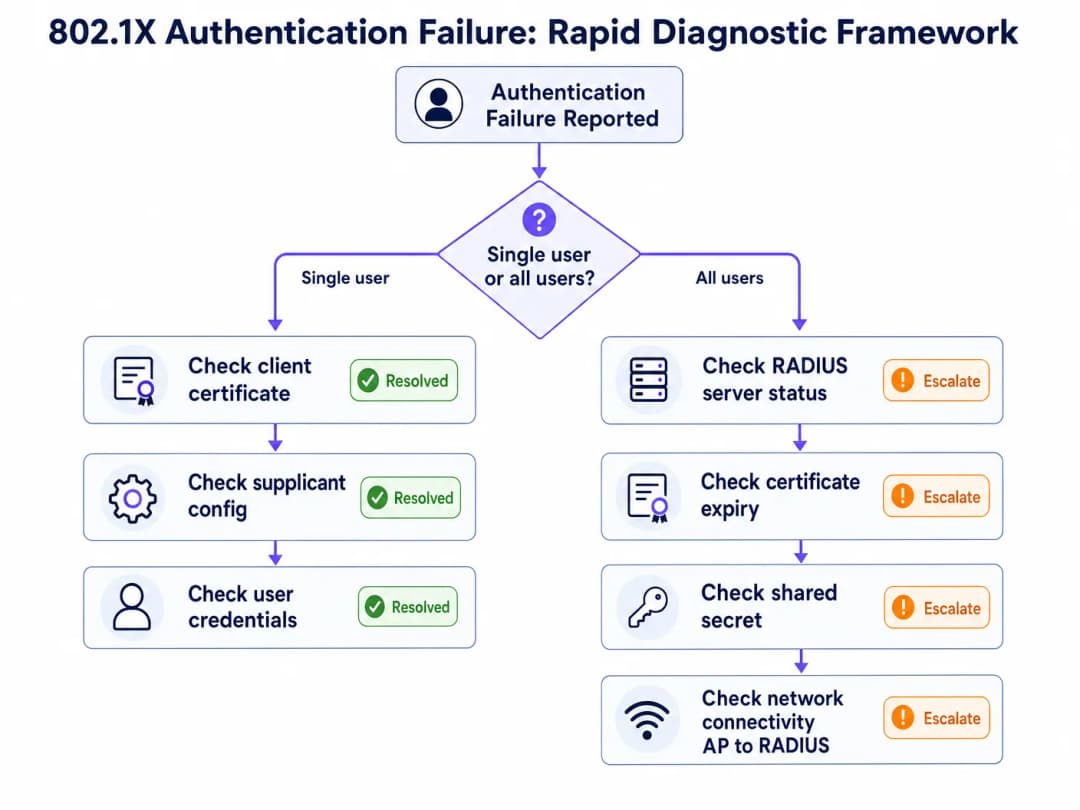
When an 802.1X authentication failure is reported, the first diagnostic question determines the entire troubleshooting path: Is this affecting a single user/device, or all users on the network?
If the failure affects all users simultaneously, the root cause is almost certainly infrastructure-level: an expired RADIUS server certificate, a RADIUS server outage, a shared secret mismatch following a configuration change, or a connectivity failure between the Authenticator and the RADIUS server. Begin by checking RADIUS server availability and certificate validity.
If the failure affects a single user or device, the root cause is almost certainly client-level: an expired client certificate (EAP-TLS), a supplicant profile misconfiguration, incorrect credentials, or a device-specific software issue. Begin by checking the client's certificate store and supplicant configuration.
Diagnostic Toolset
The following tools are essential for 802.1X troubleshooting across different infrastructure components.
| Tool | Platform | Use Case |
|---|---|---|
| NPS Event Log (Event IDs 6272/6273) | Windows Server | RADIUS authentication success/failure with reason codes |
| WLAN-AutoConfig Operational Log | Windows Client | Supplicant-side EAP exchange failures |
| CAPI2 Event Log | Windows Client | Certificate validation failures |
debug radius authentication |
Cisco IOS/WLC | RADIUS exchange debugging on Authenticator |
radiusd -X |
FreeRADIUS | Full debug output including EAP negotiation |
| Wireshark (EAPOL filter) | Any | Client-side packet capture of EAP frames |
| Wireshark (EAP filter) | Any | Server-side RADIUS packet capture |
radtest |
Linux | Manual RADIUS authentication test |
NPS Reason Code Reference
Microsoft NPS Event ID 6273 (authentication failure) includes a Reason Code that directly identifies the failure cause. The most operationally significant codes are:
| Reason Code | Description | Likely Root Cause |
|---|---|---|
| 16 | Authentication failed due to user credentials mismatch | Wrong password, expired client cert, or directory lookup failure |
| 22 | Client certificate has expired or is not yet valid | Client certificate expiry - check MDM certificate renewal |
| 23 | User account expired | AD account expiry - check account status |
| 48 | The connection request did not match any configured policy | RADIUS policy misconfiguration - check NPS network policies |
| 66 | The user attempted to use an authentication method not enabled on the matching network policy | EAP method mismatch between client and server |
Risk Mitigation: The Certificate Expiry Disaster
The most common and most preventable 802.1X outage is RADIUS server certificate expiry. In January 2025, a major retail chain experienced a complete staff network outage when their RADIUS server certificate expired at 3:00 AM on a Monday morning. By 9:00 AM, over 300 point-of-sale terminals across 45 stores had lost network connectivity. The certificate had been deployed two years prior with no automated monitoring, and the renewal reminder had been missed during a team restructure.
The mitigation is straightforward: implement automated certificate expiry monitoring integrated with your alerting platform (PagerDuty, OpsGenie, or equivalent). Set alert thresholds at 90, 60, and 30 days. Assign certificate renewal as a named responsibility in your IT operations runbook. For cloud RADIUS platforms, verify whether the provider manages certificate renewal on your behalf - this is a key differentiator between managed and self-service offerings.
ROI & Business Impact
The Cost of Authentication Downtime
For venue operators, 802.1X authentication failures translate directly into measurable business impact. In Hospitality environments, a staff network outage affects property management systems, point-of-sale terminals, and guest service delivery. In Retail, POS terminal authentication failures halt transactions entirely. In conference centres and stadiums, authentication failures during peak events generate immediate and visible service failures.
The operational cost of a 30-minute authentication outage at a 200-room hotel - affecting PMS access, restaurant POS, and concierge terminals - typically exceeds £5,000 in direct operational disruption, before accounting for guest experience impact and potential SLA penalties.
Compliance Value
For organisations in scope for PCI DSS v4.0, a properly deployed 802.1X infrastructure directly satisfies multiple requirements: Requirement 1 (network access controls), Requirement 7 (restrict access to system components), Requirement 8 (identify users and authenticate access), and Requirement 10 (log and monitor all access). The alternative - shared PSK networks - fails all four requirements and creates significant audit liability.
For public-sector organisations and Healthcare deployments subject to data protection regulations, per-user authentication and comprehensive accounting logs provide the audit trail required to demonstrate compliance with access control obligations.
Measuring Success
The key performance indicators for a well-functioning 802.1X deployment are: authentication success rate (target >99.5%), mean time to authenticate (<150ms for cloud RADIUS), certificate expiry incidents (target zero), and RADIUS server availability (target 99.9%). These metrics should be tracked in your network management platform and reviewed monthly as part of your network operations cadence.
For organisations using WiFi Analytics, the combination of 802.1X per-user session data with analytics provides additional business intelligence: accurate dwell time measurement, device type distribution, and network utilisation patterns that inform capacity planning and venue operations decisions.
For further reading on related network access control solutions, see 10 Best Network Access Control (NAC) Solutions for 2026 and Cisco Wireless APs: 2026 Guide to Products & Deployment. For school and education deployments, WiFi in Schools: The 2026 Administrator & IT Guide covers 802.1X implementation in multi-user education environments.
Key Definitions
802.1X
IEEE 802.1X is a port-based network access control standard that defines an authentication framework operating at Layer 2 of the OSI model. It blocks all network traffic from a device until the RADIUS server has positively authenticated it, using EAP as the credential exchange protocol. It applies to both wired Ethernet and wireless (WiFi) networks.
IT teams encounter 802.1X as the authentication mechanism for WPA2-Enterprise and WPA3-Enterprise SSIDs. It is the standard that enables per-user authentication, dynamic VLAN assignment, and the audit trail required for PCI DSS compliance.
RADIUS (Remote Authentication Dial-In User Service)
A client-server networking protocol (RFC 2865) that provides centralised Authentication, Authorisation, and Accounting (AAA) management for network access. In 802.1X deployments, the RADIUS server validates user credentials against an identity directory and returns Access-Accept or Access-Reject responses to the Authenticator. It operates over UDP ports 1812 (authentication) and 1813 (accounting).
The RADIUS server is the decision-making component in 802.1X. When authentication fails, the RADIUS server logs contain the reason code that identifies the root cause. Common implementations include Microsoft NPS, FreeRADIUS, and cloud-hosted services.
EAP (Extensible Authentication Protocol)
A protocol framework (RFC 3748) that defines a set of authentication methods used within 802.1X. EAP itself is not an authentication method but a container that supports multiple inner methods including EAP-TLS, PEAP-MSCHAPv2, EAP-TTLS, and EAP-FAST. The EAP method is negotiated between the Supplicant and the RADIUS server; the Authenticator relays EAP frames without interpreting them.
EAP method selection determines the security posture and operational complexity of the deployment. EAP-TLS requires a PKI and MDM infrastructure but provides the strongest security. PEAP-MSCHAPv2 is simpler to deploy but requires strict certificate validation to prevent credential harvesting.
Supplicant
The software component on the end-user device (laptop, smartphone, POS terminal) that initiates the 802.1X authentication exchange. On Windows, the supplicant is built into the OS as the WLAN AutoConfig or Wired AutoConfig service. On iOS and Android, it is managed through the device's WiFi profile configuration.
Supplicant misconfiguration - particularly disabled certificate validation in PEAP deployments - is one of the most common sources of both authentication failures and security vulnerabilities. Standardising supplicant configuration via MDM is a critical operational control.
Authenticator
The network device (wireless access point or managed switch) that enforces port-based access control in an 802.1X deployment. The Authenticator does not make authentication decisions - it acts as a relay between the Supplicant (using EAPOL) and the RADIUS server (using RADIUS). It blocks all non-EAP traffic on the controlled port until the RADIUS server issues an Access-Accept.
The Authenticator's configuration - specifically the RADIUS server IP/hostname, shared secret, and timeout settings - is a common source of failures. After infrastructure changes, always verify that the Authenticator's RADIUS client configuration matches the RADIUS server's NAS client configuration.
EAPOL (EAP over LAN)
The protocol used to transport EAP frames between the Supplicant and the Authenticator over the wired or wireless medium. EAPOL frames are Layer 2 frames (Ethernet type 0x888E) and do not require IP connectivity. The Authenticator encapsulates EAPOL frames into RADIUS packets for forwarding to the Authentication Server.
EAPOL is visible in Wireshark captures on the client side. Filtering for EAPOL frames in a wireless packet capture allows engineers to observe the EAP exchange and identify at which step the authentication fails.
RadSec (RADIUS over TLS)
An extension to the RADIUS protocol (RFC 6614) that encapsulates RADIUS packets in a TLS tunnel over TCP port 2083. RadSec provides transport security for RADIUS traffic traversing untrusted networks (such as the public internet to a cloud RADIUS server), eliminates UDP fragmentation issues, and removes the dependency on shared secrets for packet authentication.
RadSec is the recommended transport for cloud RADIUS deployments. It resolves two common failure modes simultaneously: MTU fragmentation causing EAP-TLS handshake failures, and shared secret management complexity across distributed sites.
Dynamic VLAN Assignment
A RADIUS authorisation feature that allows the RADIUS server to instruct the Authenticator to place an authenticated device on a specific VLAN, based on the user's group membership or device type. The RADIUS server returns VLAN assignment attributes (Tunnel-Type, Tunnel-Medium-Type, Tunnel-Private-Group-ID) in the Access-Accept response.
Dynamic VLAN assignment is the mechanism that enforces network segmentation in 802.1X deployments. It is a mandatory control for PCI DSS compliance (isolating the Cardholder Data Environment) and a cornerstone of Zero Trust network architecture. Misconfigured VLAN attributes in RADIUS policies are a common cause of users being placed on the wrong network segment after authentication.
MAC Authentication Bypass (MAB)
A fallback authentication mechanism that allows devices without 802.1X supplicants to authenticate using their MAC address as both the username and password in a RADIUS exchange. Because MAC addresses can be spoofed, MAB provides minimal security assurance and should only be used for devices that genuinely cannot support 802.1X.
MAB is commonly required for legacy IoT devices, older POS terminals, and network printers. Devices authenticated via MAB must be placed on a highly restricted VLAN with explicit firewall rules. Never use MAB as a convenience shortcut for devices that could support 802.1X.
NPS (Network Policy Server)
Microsoft's implementation of a RADIUS server, included with Windows Server. NPS supports PEAP-MSCHAPv2, EAP-TLS, and EAP-TTLS, and integrates natively with Active Directory for credential validation. Authentication failures are logged to the Windows Security event log as Event ID 6273 (failure) and 6272 (success), with reason codes that identify the specific failure cause.
NPS is the most widely deployed RADIUS server in Windows-centric enterprise environments. The Security event log on the NPS server is the primary diagnostic tool for 802.1X failures in these environments. Ensure NPS audit policy is enabled for both success and failure events.
Worked Examples
A 450-room hotel group with 12 properties has deployed WPA2-Enterprise with PEAP-MSCHAPv2 across all sites, using an on-premises Windows NPS server at each location. Following a network infrastructure refresh, the IT team reports that staff at three sites cannot authenticate to the corporate SSID. Guests on the captive portal network are unaffected. The NPS servers at the affected sites are running and the Windows Security event log shows Event ID 6273 with Reason Code 16. What is the most likely cause and how should the team resolve it?
Reason Code 16 on NPS Event ID 6273 indicates an authentication failure due to a credentials mismatch - but in the context of a post-infrastructure-refresh outage affecting multiple sites simultaneously, the most likely cause is not incorrect user passwords but a RADIUS shared secret mismatch between the newly configured access points or wireless controller and the NPS servers.
Step 1: On the NPS server at one of the affected sites, navigate to RADIUS Clients and Servers > RADIUS Clients and verify the shared secret configured for each AP or wireless controller IP address. Compare this against the RADIUS server configuration on the AP/controller.
Step 2: If the shared secrets match, check whether the NPS Network Policy is correctly configured to allow PEAP-MSCHAPv2. Navigate to Policies > Network Policies, open the relevant policy, and verify that Microsoft: Protected EAP (PEAP) is listed as an allowed authentication method with EAP-MSCHAPv2 as the inner method.
Step 3: If the policy is correct, check the NPS Connection Request Policy to confirm that the request is being processed locally (not forwarded to a remote RADIUS server). Verify that the conditions match the incoming RADIUS attributes from the new AP hardware.
Step 4: Enable RADIUS accounting debug on the AP/controller and verify that Access-Request packets are being sent to the correct NPS server IP and port 1812. If no requests are reaching the NPS server, the issue is in the Authenticator configuration, not the RADIUS server.
Step 5: If requests are reaching NPS but being rejected with Reason Code 16, and credentials are confirmed correct, check whether the Active Directory domain controller is reachable from the NPS server. A DNS or connectivity issue to the DC will cause NPS to fail credential validation with this reason code.
Resolution: In most post-refresh scenarios, the root cause is a shared secret mismatch introduced when the new AP hardware was configured. Synchronise the shared secret across all RADIUS clients and NPS servers. Consider migrating to RadSec to eliminate shared secret management entirely.
A major retail chain operating 85 stores has deployed EAP-TLS with client certificates managed via Microsoft Intune. On a Monday morning, the IT helpdesk receives a surge of reports from store managers that staff devices cannot connect to the corporate WiFi network. The issue affects all stores simultaneously. RADIUS server logs show Access-Reject responses with the message 'TLS Alert: certificate expired'. The RADIUS server itself is running normally and its own certificate is valid for another 18 months. What has happened and what is the immediate remediation path?
The 'TLS Alert: certificate expired' message in the RADIUS server logs, combined with the fact that the failure is simultaneous across all 85 stores and the RADIUS server certificate is valid, indicates that the client certificates deployed to staff devices have expired. In EAP-TLS, both the client and server present certificates. If the client certificate has expired, the RADIUS server will reject the TLS handshake and issue an Access-Reject.
Immediate Remediation (0-2 hours):
Step 1: Confirm the diagnosis by checking the certificate expiry date on an affected device. On Windows, open certmgr.msc, navigate to Personal > Certificates, and check the expiry date of the WiFi authentication certificate. If it has expired, this confirms the root cause.
Step 2: In Microsoft Intune, navigate to Devices > Configuration Profiles and locate the SCEP or PKCS certificate profile used for WiFi authentication. Check the certificate validity period and renewal threshold settings.
Step 3: If the certificate profile is configured to renew automatically, check whether devices have been able to reach the Intune management service recently. If devices were offline or unenrolled, automatic renewal may not have occurred.
Step 4: Force a certificate renewal by triggering a device sync in Intune (Devices > All Devices > Sync). For devices that cannot connect to WiFi, ensure they have an alternative connectivity path (mobile data or wired Ethernet) to reach the Intune service for the renewal.
Step 5: As a temporary measure while certificates are being renewed, consider creating a temporary PEAP-MSCHAPv2 SSID for affected stores to restore operational capability. This should be treated as a temporary bridge, not a permanent solution.
Long-term Prevention:
Configure Intune certificate profiles to renew at 20% of the certificate lifetime remaining (e.g., for a 1-year certificate, renew at approximately 73 days before expiry). Implement SIEM alerting on RADIUS Access-Reject events with certificate expiry reason codes. Add certificate expiry monitoring to your monthly IT operations review.
Practice Questions
Q1. Your organisation operates a 60,000-seat stadium with 800 access points deployed across concourses, hospitality suites, and back-of-house areas. Staff devices use EAP-TLS with certificates managed via Jamf. During a major event, 15% of staff devices across multiple zones report authentication failures. The RADIUS server logs show Access-Reject responses. The remaining 85% of staff are authenticating normally. What is your diagnostic approach and what is the most likely root cause?
Hint: The partial failure pattern (15% of devices, not all) is the key diagnostic signal. Focus on what distinguishes the failing devices from the succeeding ones - device model, OS version, certificate issuance date, or Jamf enrolment status.
View model answer
The partial failure pattern immediately rules out infrastructure-level causes (RADIUS server certificate expiry, shared secret mismatch, or server outage would affect all devices). The root cause is almost certainly a subset of client certificates that have expired or failed to renew.
Diagnostic approach: Pull the RADIUS server logs and filter for Access-Reject events. Note the device identities (certificate CNs or MAC addresses) of the failing devices. In Jamf, cross-reference these devices against the certificate profile deployment status. Check whether the failing devices share a common certificate issuance date - if they were all enrolled in the same batch, they may have the same expiry date.
Most likely root cause: A batch of client certificates issued at the same time has reached expiry. Devices enrolled more recently have valid certificates and are authenticating normally.
Resolution: In Jamf, identify the affected devices and trigger a certificate renewal push. Ensure the certificate profile is configured with an appropriate renewal threshold (20% of certificate lifetime). For devices that cannot reach the Jamf MDM service over WiFi (because they cannot authenticate), provide a temporary wired Ethernet connection or a temporary PEAP SSID for the duration of the event. Post-event, implement SIEM alerting on RADIUS Access-Reject events with certificate expiry reason codes to prevent recurrence.
Q2. A regional retail chain with 35 stores is migrating from on-premises NPS servers to a cloud RADIUS service. During the pilot at three stores, EAP-TLS authentication is working correctly at two stores but failing intermittently at the third. The third store connects to the cloud RADIUS service via an MPLS WAN link. Authentication failures are not consistent - some attempts succeed, some fail. The cloud RADIUS provider confirms the service is healthy and logs show some Access-Request packets arriving but no corresponding Access-Accept being sent. What is the most likely cause?
Hint: Intermittent failures on a specific WAN-connected site, combined with the cloud RADIUS provider seeing some but not all packets, strongly suggests a network transit issue rather than a configuration error.
View model answer
The combination of intermittent failures on a WAN-connected site and the cloud RADIUS provider seeing incomplete packet sequences is a classic signature of MTU fragmentation. EAP-TLS certificate chains produce large RADIUS packets that may exceed the MTU of the MPLS WAN link. When these packets are fragmented, the cloud RADIUS server may receive the first fragment but not subsequent fragments, causing the TLS handshake to stall and eventually time out.
Diagnostic confirmation: Perform a Wireshark capture on the WAN interface at the affected store. Filter for UDP traffic on port 1812. Look for fragmented IP packets in the RADIUS exchange. Compare the packet sizes at the successful stores versus the failing store.
Resolution option 1 (preferred): Migrate the affected site to RadSec (RADIUS over TLS on TCP port 2083). TCP handles fragmentation and retransmission natively, eliminating this failure mode entirely. Most cloud RADIUS providers and modern AP vendors support RadSec.
Resolution option 2: Reduce the MTU on the WAN interface at the affected store to match the MPLS path MTU, ensuring RADIUS packets are not fragmented. This is a less elegant solution as it affects all traffic on the WAN link.
Resolution option 3: Configure the RADIUS server to use smaller TLS record sizes to reduce packet fragmentation. This is a server-side configuration option available in some RADIUS implementations.
Long-term recommendation: Migrate all sites to RadSec as part of the cloud RADIUS rollout. This eliminates fragmentation risk, encrypts RADIUS traffic in transit, and removes shared secret management complexity.
Q3. A conference centre IT director is planning a network upgrade to support WPA3-Enterprise with 802.1X for staff and a captive portal for event delegates. The venue hosts 200+ events per year, with delegate counts ranging from 50 to 5,000. The IT team has limited in-house network expertise and no existing PKI infrastructure. The director wants to implement 802.1X for staff but is concerned about operational complexity. What EAP method should be recommended, what infrastructure is required, and what are the key operational risks to mitigate?
Hint: Consider the operational constraints: limited in-house expertise, no existing PKI, and the need for a solution that can be maintained reliably. Balance security requirements against operational feasibility.
View model answer
Given the operational constraints - limited in-house expertise and no existing PKI - the recommended EAP method for staff authentication is PEAP-MSCHAPv2, not EAP-TLS. While EAP-TLS provides superior security, it requires a PKI infrastructure and an MDM platform for certificate distribution. Without these in place, EAP-TLS deployment carries significant operational risk: certificate expiry management becomes a manual process, and the team lacks the expertise to troubleshoot certificate chain issues under pressure.
PEAP-MSCHAPv2 integrates directly with Active Directory (or Azure AD), requires only a server-side certificate, and is operationally manageable by a team without deep PKI expertise. The security trade-off is acceptable provided that server certificate validation is strictly enforced on all client devices - this is the non-negotiable control that prevents credential harvesting via rogue access points.
Infrastructure required: A cloud RADIUS service (to avoid on-premises server management), a server certificate from a trusted public CA for the RADIUS service, an MDM solution (Microsoft Intune or equivalent) to deploy WiFi profiles to staff devices, and Active Directory or Azure AD as the identity directory.
Key operational risks to mitigate:
Certificate validation disabled on clients: Deploy all WiFi profiles via MDM with certificate validation enforced. Never allow manual WiFi profile configuration on staff devices.
RADIUS server certificate expiry: Set up automated monitoring with 90-day alerts. With a cloud RADIUS service, verify whether the provider manages certificate renewal - this is a key selection criterion.
Capacity during large events: Ensure the cloud RADIUS service is sized for peak concurrent authentication load. During a 5,000-delegate event, if staff devices re-authenticate simultaneously (e.g., after a network restart), the RADIUS service must handle the burst.
Guest/staff network separation: Ensure the captive portal guest network and the 802.1X staff network are on separate VLANs with appropriate firewall rules between them. This is a PCI DSS requirement if any staff network devices process payment card data.
Frequently asked questions
Why does 802.1X authentication fail with an EAPOL timeout?
An EAPOL timeout occurs when the client transmits EAPOL-Start frames but receives no EAP-Request/Identity response from the authenticator (access point or switch). Common root causes include: the switch port or wireless SSID lacking an active 802.1X AAA method list, the access point losing CAPWAP or RADIUS connectivity to the controller, or the client operating system 802.1X supplicant service (such as Windows Wired AutoConfig dot3svc) being stopped or misconfigured.
What causes RADIUS Access-Reject errors during EAP-TLS authentication?
EAP-TLS Access-Reject errors typically stem from mutual certificate validation failures (TLS Alert 48 or Alert 46). Either the client device lacks the Root or Intermediate CA certificate that signed the RADIUS server certificate, or the RADIUS server cannot validate the client certificate due to an expired Certificate Revocation List (CRL) or unreachable OCSP responder. Other frequent causes include expired client certificates and missing Client Authentication Extended Key Usage (EKU) attributes.
Why does PEAP-MSCHAPv2 fail on Windows 11 enterprise endpoints?
Windows 11 22H2 and later versions enable Windows Defender Credential Guard by default. Credential Guard isolates LSASS and blocks legacy NTLMv2 and MS-CHAPv2 password-derived hashes from traversing the operating system, causing authentication to fail with RADIUS Reason 23 or Event 5402. Migrating from PEAP to passwordless EAP-TLS with hardware TPM-backed certificates resolves this incompatibility and eliminates credential theft risks.
How do I troubleshoot RADIUS server timeouts and UDP 1812 packet drops?
A RADIUS server timeout occurs when the access point or switch sends Access-Request packets on UDP 1812 but receives no reply. To troubleshoot: first, verify that the RADIUS shared secret configured on the network device matches the RADIUS client record byte-for-byte; second, confirm that intermediate firewalls permit UDP port 1812 (Authentication) and 1813 (Accounting); third, verify that the source IP used by the NAS matches the IP registered in the RADIUS server client list; and fourth, verify RADIUS server service health and CPU load.
Why does a client fail to obtain an IP address after successful 802.1X authentication?
When 802.1X authentication succeeds with Access-Accept but the client receives an APIPA address (169.254.x.x) or DHCP NAK, the issue is Dynamic VLAN assignment. The RADIUS server must return all three required RFC 3580 attributes: Tunnel-Type (Attribute 64, value 13), Tunnel-Medium-Type (Attribute 65, value 6), and Tunnel-Private-Group-ID (Attribute 81, specifying the VLAN ID). Furthermore, the assigned VLAN ID must exist in the switch database, be allowed across trunk ports to the AP, and possess an active DHCP pool with available leases.
How does Purple Cloud RADIUS prevent 802.1X authentication failures?
Purple Cloud RADIUS eliminates on-premises AAA server infrastructure, outdated shared secrets, and manual certificate distribution bottlenecks. It integrates directly with Microsoft Entra ID, Google Workspace, and Okta, automates passwordless EAP-TLS certificate enrollment via SCEP, and provides real-time diagnostic logging and role-based dynamic VLAN assignment across Cisco, Aruba, Ruckus, and Meraki networks.
Continue reading in this series
SOC 2 Type II and Staff WiFi: Passing the Key Controls on Your Wireless Network
You will be able to map each of the key SOC 2 Type II controls to your staff WiFi and close the gaps auditors find. You can then choose between 802.1X, iPSK and a segregated WPA2-PSK network for each device class. Finally, you will know how to prepare access points, controllers and BYOD for a SOC 2 Type II audit.
HPE Aruba Central presence analytics: setup, exports and limits
You will be able to enable Aruba Central presence analytics per site, calibrate the RSSI threshold and dwell boundaries against a ground-truth count, and export site-level aggregates through the Central REST API. You will also know where native presence analytics stops and when a hardware-agnostic platform layer such as Purple earns its place on your existing Aruba access points.
CIPA compliance: compliance checklist for venue operators
You will be able to decide whether CIPA binds your WiFi, then segment networks, route DNS through Purple Shield and close bypass routes. You will also know what evidence to keep for Form 486 or Form 479 certification. The checklist assigns every requirement an owner, so your next funding year certification has nothing missing.
Got questions about your specific setup?
Our team works with venue operators, IT managers, and network engineers across 80,000 venues. Book a 20-minute call and we will show you how others like you solved it.