

Guest WiFi for Airports: Roaming, Transit, and Throughput
This technical reference guide provides senior IT professionals and network architects with actionable strategies for designing and deploying high-performance airport guest WiFi. It covers seamless roaming across terminals, throughput provisioning by zone, secure segmentation for concession tenants, and the implementation of Passpoint (Hotspot 2.0) for frictionless connectivity. By treating the wireless network as a strategic asset, airport operators can enhance passenger satisfaction, ensure compliance, and drive measurable non-aeronautical revenue.
🎧 Listen to this Guide
View Transcript

Executive Summary
Designing airport guest WiFi is categorically different from a standard enterprise deployment. With tens of millions of transient users annually, varying dwell times across zones, and the need to support a complex multi-stakeholder environment — passengers, airline staff, retail concession tenants, and operational systems — the network architecture must be robust, scalable, and rigorously segmented. This guide details the technical requirements for deploying airport guest WiFi at scale, focusing on roaming mechanisms, transit considerations, and throughput provisioning by zone. We explore how modern standards including Passpoint (Hotspot 2.0), IEEE 802.11r, and WPA3 can streamline the user experience while providing the security posture required for PCI DSS and GDPR compliance. By implementing these strategies, IT directors can transform their wireless infrastructure from a utility cost centre into a strategic platform that enhances passenger satisfaction, supports operational efficiency, and drives non-aeronautical revenue through WiFi Analytics .
Technical Deep-Dive
The Airport WiFi Problem Space
Airport WiFi sits at the intersection of three competing demands: high-density performance, seamless mobility, and multi-tenant security. A major international hub may see 50,000 to 100,000 concurrent devices during peak periods, distributed across check-in halls, security queues, retail concourses, lounges, and gate holding areas — each with fundamentally different traffic profiles and dwell-time characteristics. The network must handle all of this while maintaining strict logical separation between guest traffic, airline operational systems, retail tenant POS networks, and building management systems.
The failure mode most commonly encountered in legacy airport deployments is a flat, SSID-based architecture that was designed for coverage rather than capacity. When passenger volumes grew and device counts per person increased — today's average traveller carries 3.5 connected devices — these networks became saturated, and the captive portal re-authentication cycle became a persistent source of passenger complaints.
Roaming and Seamless Re-Connect
Seamless roaming is the defining technical challenge of airport WiFi. A passenger arriving at the check-in hall, moving through security, traversing a retail concourse, and boarding a transit train to a satellite terminal expects their connection to persist throughout. In a poorly architected network, each zone boundary triggers a full re-authentication cycle, breaking active sessions and degrading the experience.
The solution architecture relies on two complementary standards working in concert.
Passpoint (Hotspot 2.0 / IEEE 802.11u) enables devices to automatically discover and authenticate to the network using credentials provisioned by a mobile network operator (MNO) or a third-party identity provider. Rather than presenting a list of SSIDs and requiring manual selection, Passpoint-enabled devices query the network's Generic Advertisement Service (GAS) and Interworking Service to determine whether a trusted credential exists. If it does, the device authenticates silently via 802.1X/EAP, bypassing the captive portal entirely. This is the mechanism that underpins OpenRoaming — the global roaming federation that allows passengers to connect seamlessly using credentials from participating providers. Purple operates as a free identity provider for OpenRoaming under the Connect licence, enabling airports to offer this experience without requiring passengers to have a specific MNO relationship.
IEEE 802.11r (Fast BSS Transition) addresses the handoff latency problem. In a standard 802.11 deployment, moving between access points requires a full four-way EAPOL handshake, which introduces 50–200ms of latency — enough to drop a VoIP call or interrupt a video stream. 802.11r pre-distributes the Pairwise Master Key (PMK) to neighbouring APs via the Mobility Domain, reducing handoff time to under 50ms. When combined with 802.11k (neighbour reports) and 802.11v (BSS transition management), the client device is guided proactively to the optimal AP before the connection degrades, rather than reactively after it has already dropped.
For airports operating transit trains or people movers between terminals, the roaming domain must span the entire campus. This requires a centralised WLAN controller architecture — either on-premises or cloud-managed — that maintains a single mobility domain across all terminals and enforces consistent policy regardless of which AP the device is associated with.
Throughput Provisioning by Zone
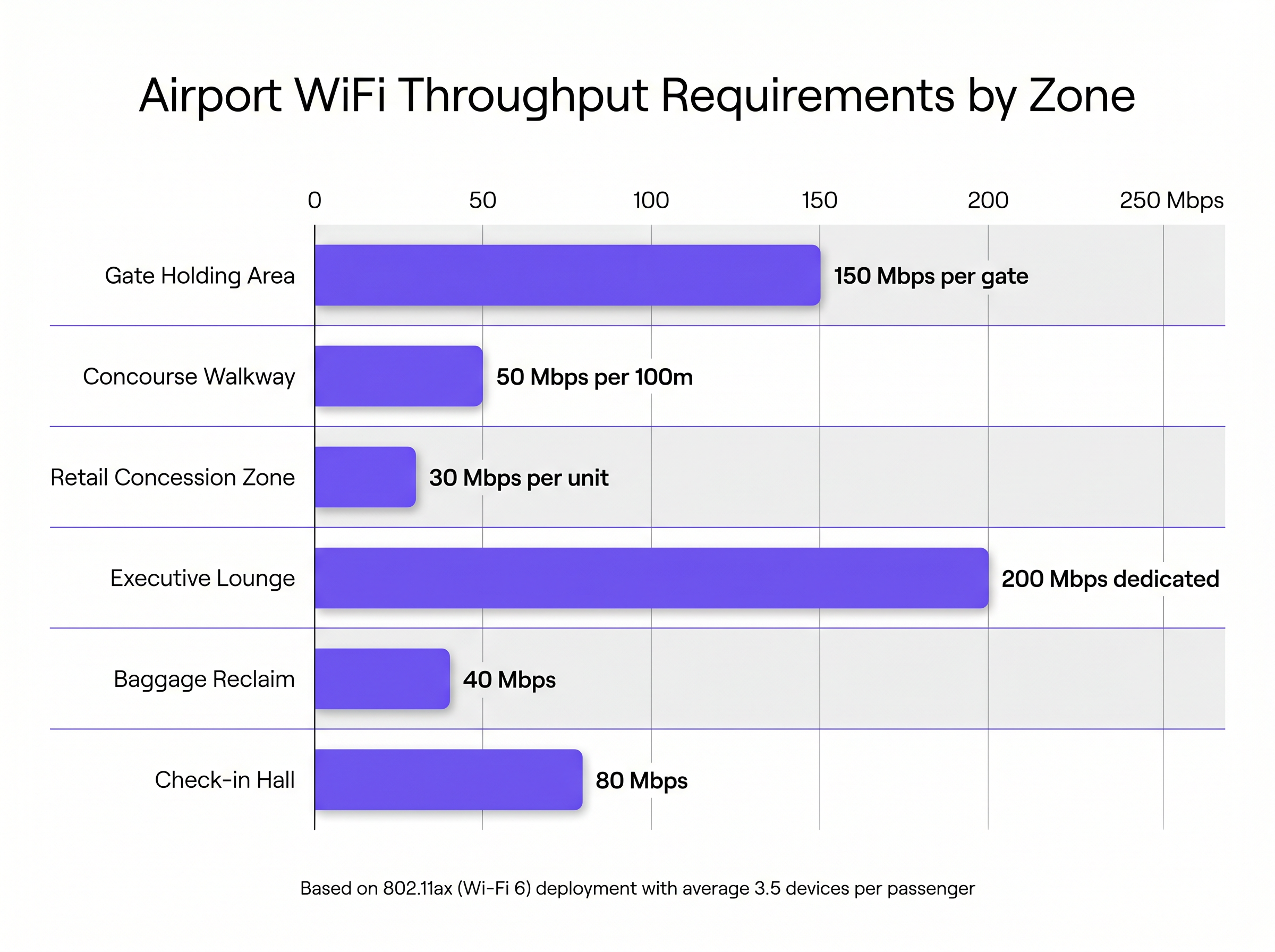
Airport environments are not homogenous, and throughput provisioning must reflect the distinct usage profiles of each zone. A one-size-fits-all approach invariably results in over-provisioning in low-demand areas and severe under-provisioning in the zones that matter most.
| Zone | Peak Throughput Requirement | Primary Traffic Type | Recommended AP Density |
|---|---|---|---|
| Gate Holding Area | 150 Mbps per gate | Video streaming, large downloads | 1 AP per 30m² |
| Concourse Walkway | 50 Mbps per 100m | Background sync, messaging | 1 AP per 100m² |
| Retail Concession Zone | 30 Mbps per unit + POS | POS transactions, customer engagement | 1 AP per 50m² |
| Executive Lounge | 200 Mbps dedicated | Video conferencing, enterprise apps | 1 AP per 20m² |
| Baggage Reclaim | 40 Mbps | Messaging, flight notifications | 1 AP per 80m² |
| Check-in Hall | 80 Mbps (bursty) | Initial onboarding, messageing | 1 AP per 60m² |
Gate holding areas are the most demanding zone. Passengers typically dwell for 45–90 minutes and exhibit the highest per-device bandwidth consumption. Deploying 802.11ax (Wi-Fi 6) APs with directional antennas — oriented to cover the seating area rather than the adjacent gate — is essential for managing co-channel interference in these dense environments. Wi-Fi 6's OFDMA (Orthogonal Frequency Division Multiple Access) capability allows a single AP to simultaneously serve multiple clients on different sub-channels, dramatically improving spectral efficiency compared to 802.11ac.
For airports planning infrastructure upgrades, Wi-Fi 6E — which adds the 6 GHz band — provides a significant capacity uplift in the most congested areas. The 6 GHz band is currently unencumbered by legacy devices, meaning all clients operating in that band are Wi-Fi 6E capable and can take full advantage of the wider channel widths (up to 160 MHz).
Network Segmentation and Concession Tenant Architecture
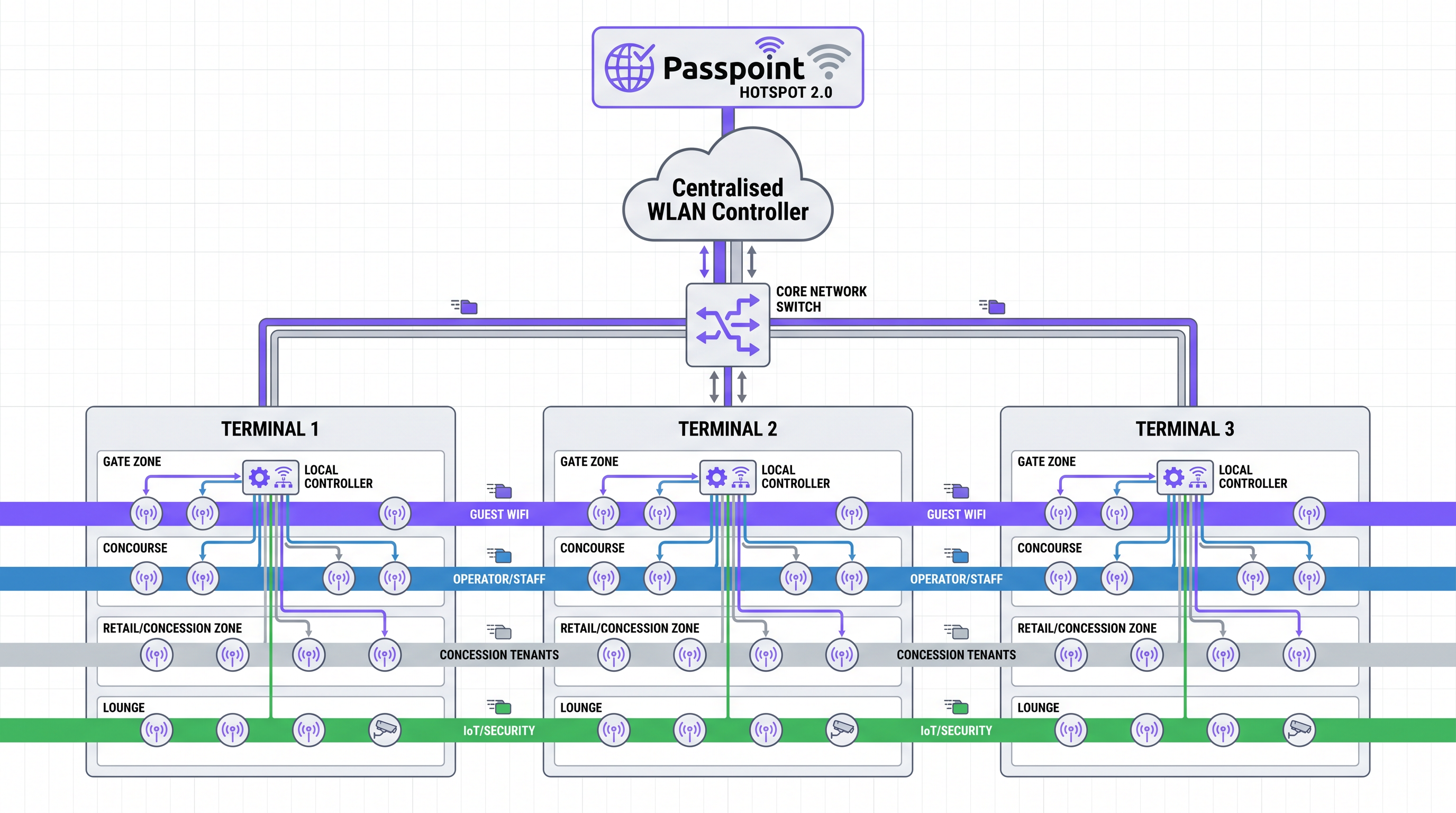
The multi-tenant nature of an airport creates a complex network segmentation requirement. The architecture must simultaneously support:
- Public guest WiFi for passengers, with captive portal onboarding and GDPR-compliant data capture
- Airline operational networks for check-in systems, boarding gate readers, and ground crew devices
- Retail concession tenant networks with PCI DSS-compliant POS isolation
- Airport authority operational networks for security, building management, and staff
- IoT and building systems for CCTV, environmental sensors, and wayfinding displays
Each of these traffic classes must be logically isolated via dedicated VLANs, with inter-VLAN routing strictly controlled by firewall policy. The guest WiFi VLAN should be configured with client isolation enabled, preventing direct device-to-device communication and reducing the attack surface.
For retail concession tenants, the recommended architecture is dynamic VLAN assignment via 802.1X/RADIUS. Each tenant's devices authenticate against a centralised RADIUS server, which returns the appropriate VLAN assignment based on the device's credentials. This allows the airport IT team to manage all tenant network access from a single control plane, without requiring per-tenant SSID proliferation — which degrades RF performance by consuming airtime with beacon frames.
PCI DSS compliance for tenant POS networks requires the following controls to be in place: network segmentation verified by penetration testing, Wireless Intrusion Prevention Systems (WIPS) to detect and contain rogue APs, encrypted transmission of cardholder data (TLS 1.2 minimum), and quarterly vulnerability scanning of the network segment. The centralised WLAN controller provides the WIPS capability, automatically classifying and containing rogue devices without manual intervention.
Passpoint's Role in the Airport Context
Passpoint deserves specific attention because its value proposition in an airport context extends beyond simple onboarding convenience. For an airport operator, Passpoint enables three strategically important capabilities.
First, it enables carrier offload partnerships. MNOs pay airports to offload cellular data traffic onto the WiFi network via Passpoint, creating a direct revenue stream from the infrastructure investment. This is particularly valuable in areas with poor cellular penetration, such as underground terminals or heavily shielded buildings.
Second, it enables seamless re-authentication for returning passengers. A frequent flyer who connected on their last visit and accepted a Passpoint profile will connect automatically on every subsequent visit, with no portal interaction required. This dramatically improves the experience for the airport's most valuable passengers.
Third, it provides a standards-based foundation for identity federation. As airports participate in global OpenRoaming networks, passengers arriving from partner venues — hotels, conference centres, other airports — can connect automatically using their existing credentials. This is the direction the industry is moving, and airports that deploy Passpoint today are positioning themselves for this future state.
Implementation Guide
Deploying a robust airport WiFi network requires a phased approach that balances technical requirements with the operational constraints of a live airport environment. Downtime is not an option; all infrastructure work must be planned around operational schedules.
Phase 1 — Assessment and Planning (Weeks 1–6)
Conduct a comprehensive RF site survey using both predictive modelling (Ekahau, AirMagnet) and active measurement. The predictive survey identifies optimal AP placement based on architectural drawings; the active survey validates the model against real-world conditions. Pay particular attention to areas with high metal content (structural steelwork, aircraft visible through windows) and large glass partitions, which create complex multipath environments. Simultaneously, audit the existing wired infrastructure to identify switches that require upgrading to Multi-Gigabit Ethernet and PoE++ to support high-performance APs.
Phase 2 — Core Infrastructure Upgrade (Weeks 7–16)
Upgrade the wired backbone to support the anticipated wireless traffic. This includes deploying Multi-Gigabit Ethernet (2.5 or 5 Gbps) to AP locations in high-density zones, ensuring the core switching fabric can handle aggregated wireless throughput, and deploying a centralised WLAN controller with sufficient capacity for the full AP estate. For large airports with multiple terminals, a cloud-managed architecture simplifies management and provides the geographic redundancy required for high availability.
Phase 3 — Wireless Deployment and Segmentation (Weeks 17–28)
Deploy Wi-Fi 6/6E APs according to the RF plan, configuring OFDMA, MU-MIMO, and BSS Colouring to maximise spectral efficiency. Implement the VLAN segmentation architecture, configuring RADIUS for dynamic VLAN assignment and deploying firewall policies to enforce inter-VLAN access controls. Enable WIPS on the WLAN controller and configure rogue AP containment policies.
Phase 4 — Authentication and Analytics Integration (Weeks 29–36)
Deploy the captive portal and integrate with a Guest WiFi management platform. Configure Passpoint profiles and integrate with OpenRoaming if applicable. Implement the analytics platform to begin capturing dwell-time data, zone occupancy metrics, and device counts. Ensure GDPR compliance by implementing consent management, data retention policies, and the ability to process subject access requests.
Best Practices
Embrace Wi-Fi 6/6E as the Baseline Standard. The high-density capabilities of 802.11ax are not optional in a modern airport deployment. OFDMA, MU-MIMO, and Target Wake Time (TWT) collectively deliver a step-change in performance under load compared to 802.11ac. For new deployments, Wi-Fi 6E should be the default specification, with Wi-Fi 6 as the minimum acceptable standard for AP refresh programmes.
Implement WPA3 Across All Network Segments. WPA3-Enterprise (using 192-bit mode for operational networks) and WPA3-Personal (using SAE) provide significantly stronger security than WPA2. For guest networks where authentication is not required, Enhanced Open (OWE) provides unauthenticated data encryption, protecting passengers from passive eavesdropping on open networks — a meaningful security improvement with no impact on the user experience.
Design for Failure. In a live airport environment, AP failures must not create coverage gaps. Deploy APs with sufficient overlap (15–20%) that the WLAN controller can automatically increase transmit power on neighbouring APs to compensate for a failed unit. Ensure the WLAN controller itself is deployed in a high-availability configuration with automatic failover.
Leverage SD-WAN for Multi-Terminal Environments. For airports with multiple terminals or distributed facilities connected via WAN links, SD-WAN provides application-aware traffic routing, improved resilience, and centralised security policy enforcement. See The Core SD WAN Benefits for Modern Businesses for a detailed analysis of the operational benefits.
Treat Analytics as a Core Deliverable. The data generated by a well-instrumented airport WiFi network — dwell times, zone occupancy, repeat visitor rates, device demographics — has significant operational and commercial value. Integrate WiFi Analytics from day one, and establish clear internal processes for using this data to inform terminal operations, retail tenant negotiations, and marketing initiatives.
Troubleshooting & Risk Mitigation
Co-Channel Interference (CCI). The most common cause of poor performance in high-density deployments. Mitigate through careful channel planning (using non-overlapping channels in the 2.4 GHz band, and leveraging the wider channel availability in 5 GHz and 6 GHz), Dynamic Radio Management (DRM/RRM) on the WLAN controller, and directional antennas in open-plan areas. Avoid the temptation to maximise transmit power; lower power with higher AP density almost always outperforms high-power, low-density deployments in airport environments.
Captive Portal Abandonment. A poorly designed captive portal is a significant operational risk. Key failure modes include: pages that are too heavy to load on congested networks, incompatibility with Apple's Captive Network Assistant (CNA) or Android's Network Login feature, and overly complex registration forms. Mitigate by keeping the portal page under 200KB, testing against the CNA and Android equivalents, and minimising the number of required fields. Implement profile-based authentication so returning users bypass the portal entirely.
Rogue Access Points. Unauthorised APs deployed by tenants, passengers, or malicious actors are a persistent threat. They can disrupt the legitimate network through RF interference and pose a security risk by capturing credentials. WIPS — deployed as a feature of the centralised WLAN controller — provides continuous monitoring and automatic containment of rogue devices. Ensure WIPS policies are configured to contain, not just detect, rogue APs.
GDPR and Data Privacy Compliance. Capturing passenger data through the captive portal creates obligations under GDPR (and equivalent legislation in other jurisdictions). Ensure the privacy notice is clear and accessible, consent is granular and freely given, data is stored securely and only for the stated purpose, and mechanisms exist for passengers to exercise their data subject rights. Engage your Data Protection Officer (DPO) during the design phase, not after deployment.
ROI & Business Impact
The business case for enterprise-grade airport WiFi extends well beyond passenger satisfaction. A well-instrumented deployment delivers measurable returns across multiple dimensions.
Passenger Experience and ASQ Scores. Airport Service Quality (ASQ) surveys consistently identify WiFi quality as a top-five driver of passenger satisfaction. Airports that invest in seamless, high-performance connectivity see measurable improvements in their ASQ rankings, which directly influence airline route decisions and terminal concession contract negotiations.
Non-Aeronautical Revenue. The WiFi network provides a platform for retail media monetisation — delivering targeted, location-aware advertising to passengers based on their position in the terminal and their dwell time. With retail media networks generating significant revenue for venue operators across Retail and Hospitality sectors, airports are increasingly recognising the commercial potential of their WiFi infrastructure.
Carrier Offload Revenue. Passpoint-enabled carrier offload agreements with MNOs create a direct revenue stream from the infrastructure investment. The economics vary by market, but in high-traffic airports, carrier offload agreements can contribute meaningfully to the total cost of ownership equation.
Operational Efficiency. Location analytics derived from the WiFi network enable data-driven optimisation of terminal operations: staffing levels at security checkpoints, queue management at check-in, and retail tenant placement decisions. These operational improvements have a direct impact on the airport's cost base and revenue per passenger.
Data Asset Value. The first-party data captured through the captive portal — with appropriate consent — builds a CRM database of verified passenger profiles. This asset has significant value for direct marketing, loyalty programme integration, and commercial partnerships with airlines and retail tenants. For airports in the Transport sector, this data capability is increasingly a competitive differentiator.
Key Terms & Definitions
Passpoint (Hotspot 2.0 / IEEE 802.11u)
A Wi-Fi Alliance certification programme that enables devices to automatically discover and authenticate to Wi-Fi networks using pre-provisioned credentials, without requiring user interaction with a captive portal. Authentication is performed via 802.1X/EAP, providing enterprise-grade security.
Essential for delivering a seamless, cellular-like roaming experience across large airport footprints and enabling carrier offload partnerships with MNOs.
IEEE 802.11r (Fast BSS Transition)
An amendment to the IEEE 802.11 standard that reduces the latency of access point handoffs by pre-distributing cryptographic keys (PMK) to neighbouring APs within a mobility domain, reducing handoff time from 200ms+ to under 50ms.
Critical for maintaining VoIP calls and active application sessions as passengers move between APs or terminals, particularly on transit trains.
OpenRoaming
A global Wi-Fi roaming federation operated by the Wireless Broadband Alliance (WBA) that enables automatic, secure connectivity across participating venues and networks using Passpoint credentials. Participants include MNOs, identity providers, and venue operators.
Allows passengers to connect automatically at participating airports using credentials from their home network or identity provider, with no manual interaction required.
OFDMA (Orthogonal Frequency Division Multiple Access)
A multi-user version of OFDM that subdivides a Wi-Fi channel into smaller sub-channels (Resource Units), allowing a single AP to simultaneously serve multiple clients on different sub-channels within a single transmission.
A key Wi-Fi 6 feature that significantly improves spectral efficiency in high-density environments like gate holding areas, where many clients are active simultaneously.
Dynamic VLAN Assignment
A network access control mechanism where the VLAN a device is placed into is determined dynamically by a RADIUS server at authentication time, based on the device's credentials, rather than being statically configured on the switch port or SSID.
The recommended approach for managing concession tenant network access, allowing centralised policy control without per-tenant SSID proliferation.
WIPS (Wireless Intrusion Prevention System)
A network security component that continuously monitors the radio spectrum for unauthorised access points and client devices, and can automatically take countermeasures (containment) to prevent them from operating.
Mandatory for PCI DSS compliance in environments with retail tenant POS systems, and essential for maintaining overall network security in a public venue.
BSS Colouring (IEEE 802.11ax)
A mechanism introduced in Wi-Fi 6 that assigns a colour identifier to each Basic Service Set (BSS), allowing APs to distinguish between overlapping transmissions from their own network and those from neighbouring networks, reducing unnecessary backoff and improving spectral reuse.
Particularly valuable in dense airport deployments where multiple APs are operating in close proximity, improving overall network throughput.
Dwell Time
The duration a passenger spends within a specific zone of the airport, measured from entry to exit. Dwell time varies significantly by zone: typically 45–90 minutes at gates, under 5 minutes in concourse walkways.
The primary input variable for throughput provisioning decisions. High dwell time zones require higher per-device bandwidth allocation and more robust AP density.
Enhanced Open (OWE / Opportunistic Wireless Encryption)
A Wi-Fi Alliance security protocol that provides data encryption for open (unauthenticated) Wi-Fi networks without requiring a password or user interaction. Each client session uses a unique encryption key.
The recommended security standard for public guest WiFi networks, protecting passengers from passive eavesdropping without adding friction to the connection process.
Case Studies
A major international airport with three terminals connected by an automated people mover is experiencing significant passenger complaints. Users report that their WiFi connection drops every time they board the transit train between terminals, forcing them to re-authenticate via the captive portal on arrival. The existing network uses a legacy controller-based architecture with per-terminal WLAN controllers and no inter-controller roaming domain.
The root cause is the absence of a unified roaming domain spanning all three terminals. The remediation requires: (1) Migrating to a single centralised WLAN controller — either on-premises or cloud-managed — that manages all APs across all three terminals within a single mobility domain. (2) Enabling IEEE 802.11r (Fast BSS Transition) across all APs, ensuring the PMK is distributed to all APs within the mobility domain so handoffs complete in under 50ms. (3) Deploying Passpoint profiles to eliminate captive portal re-authentication for returning users. (4) Ensuring AP coverage is continuous along the transit train route, with overlapping cells (15–20%) to guarantee signal availability throughout the journey. (5) Enabling 802.11k and 802.11v to proactively guide client devices to the optimal AP as they move, rather than waiting for the connection to degrade before initiating a handoff.
An airport operator is planning a major retail concession expansion, adding 40 new food and beverage and retail units to a newly constructed pier. Each tenant requires WiFi for cloud-based POS systems, staff devices, and customer-facing digital signage. The airport IT team wants to use the existing wireless infrastructure being deployed for passenger guest WiFi, rather than deploying a separate network for tenants.
The shared infrastructure approach is viable and cost-effective, provided the segmentation architecture is correctly implemented. The recommended design uses dynamic VLAN assignment via 802.1X/RADIUS: (1) Each tenant is provisioned with a unique set of credentials in the RADIUS server. When a tenant device authenticates, the RADIUS server returns a VLAN assignment attribute, placing the device in the tenant's dedicated VLAN. (2) Each tenant VLAN is isolated from the guest WiFi VLAN and the airport operational network via firewall ACLs. Internet access is provided via a shared uplink, but inter-VLAN routing is blocked. (3) For PCI DSS compliance, the tenant VLANs are scoped as the Cardholder Data Environment (CDE). Firewall rules restrict inbound and outbound traffic to only what is required for POS operation. WIPS is enabled to detect and contain rogue APs within the tenant zones. (4) A dedicated SSID for tenant devices is configured with WPA3-Enterprise, ensuring all traffic is encrypted. The SSID is hidden to prevent passenger devices from attempting to connect. (5) The airport IT team retains centralised management of all tenant network access, with the ability to revoke or modify access for individual tenants without physical intervention.
Scenario Analysis
Q1. An airport IT director is reviewing complaints about poor WiFi performance in the international departure lounge. The lounge has 12 access points deployed across 1,200m², all using 802.11ac with omnidirectional antennas and maximum transmit power. Peak occupancy is 400 passengers. What is the most likely root cause of the performance issues, and what remediation steps would you recommend?
💡 Hint:Consider the relationship between transmit power, cell size, and co-channel interference in a high-density environment.
Show Recommended Approach
The most likely root cause is co-channel interference (CCI) caused by the combination of high transmit power and omnidirectional antennas. At maximum power, each AP's cell extends far beyond its intended coverage area, causing significant overlap with neighbouring APs on the same channel. This forces devices to defer transmission, reducing effective throughput. The remediation steps are: (1) Reduce transmit power on all APs to create tighter, more defined cells. (2) Replace omnidirectional antennas with directional antennas oriented toward the seating areas. (3) Enable Dynamic Radio Management (RRM) on the WLAN controller to automatically optimise channel and power assignments. (4) Upgrade APs to Wi-Fi 6 (802.11ax) to leverage OFDMA and BSS Colouring, which significantly improve performance under high-density conditions. (5) Consider increasing AP density (adding 4–6 additional APs) rather than increasing power on existing APs.
Q2. A retail concession tenant at an airport has requested permission to deploy their own wireless access point in their unit, citing poor signal from the airport's infrastructure. How should the IT team respond, and what is the correct technical resolution?
💡 Hint:Consider both the security implications and the RF impact of an unauthorised AP deployment.
Show Recommended Approach
The IT team must deny the request to deploy an unauthorised AP. An unmanaged AP introduces two critical risks: (1) Security risk — the AP would not be subject to the airport's security policies, WIPS monitoring, or PCI DSS controls, creating a potential attack vector. (2) RF interference — an unmanaged AP operating on an uncoordinated channel would interfere with the managed network, degrading performance for all users in the vicinity. The correct resolution is to investigate the root cause of the poor signal in the tenant's unit. This may require a targeted RF survey to identify coverage gaps or interference sources. The remediation should involve deploying an additional managed AP — or repositioning an existing one — to provide adequate coverage in the tenant's zone, with the tenant's devices assigned to their dedicated VLAN via dynamic VLAN assignment.
Q3. An airport is planning to deploy Passpoint for the first time. The IT director wants to understand what infrastructure changes are required and what the passenger experience will look like for both first-time and returning visitors.
💡 Hint:Think through the end-to-end journey for both a new and a returning passenger, and the infrastructure components required to support each.
Show Recommended Approach
Infrastructure requirements for Passpoint deployment include: (1) WLAN controller and APs that support 802.11u (GAS/ANQP) and 802.1X/EAP. (2) A RADIUS server configured to handle EAP authentication for Passpoint credentials. (3) An identity provider relationship — either with an MNO for carrier credentials or with a platform like Purple for OpenRoaming. (4) Passpoint profile provisioning capability, typically delivered via the captive portal or an MDM system. For a first-time visitor: they connect to the open guest SSID, are redirected to the captive portal, register and accept terms, and are then provisioned with a Passpoint profile on their device. They experience the portal once. For a returning visitor: their device detects the Passpoint network via 802.11u GAS queries, authenticates silently via 802.1X/EAP using the stored profile, and connects without any portal interaction. For a visitor with MNO credentials in an OpenRoaming-enabled network: their device connects automatically on first visit, with no portal interaction at all.
Q4. An airport operator is negotiating a new five-year WiFi infrastructure contract. The vendor is proposing a flat per-AP licensing model regardless of zone type. What counter-proposal should the IT director make, and what data should they use to support it?
💡 Hint:Consider the significant variation in AP capability requirements and management complexity across different airport zones.
Show Recommended Approach
The IT director should counter-propose a tiered licensing model that reflects the different capability requirements and management overhead of APs in different zones. High-density zones (gates, lounges) require Wi-Fi 6/6E APs with advanced features (OFDMA, MU-MIMO, WIPS), higher management overhead, and more frequent capacity reviews — these should command a higher per-AP cost. Low-density transit zones (walkways, baggage reclaim) can be served by lower-specification APs with simpler management requirements. Supporting data should include: the RF site survey results showing the density differential between zones, the throughput provisioning model demonstrating the capability gap between zone types, and a total cost of ownership analysis showing that a flat model either over-pays for low-density APs or under-provisions high-density zones. The director should also negotiate SLA terms that differentiate by zone criticality — gate zones should have a higher availability SLA than walkway zones.
Key Takeaways
- ✓Seamless roaming is the baseline expectation: deploy Passpoint (Hotspot 2.0) and IEEE 802.11r to eliminate re-authentication as passengers move between terminals and zones.
- ✓Provision throughput dynamically by zone: gate holding areas require 150 Mbps per gate; concourse walkways need only 50 Mbps per 100m. Design for density and dwell time, not square footage.
- ✓Strict VLAN segmentation is non-negotiable: retail concession tenants must be isolated from guest and operational traffic, with PCI DSS controls applied to all POS network segments.
- ✓Wi-Fi 6 (802.11ax) is the minimum viable standard for new airport deployments; Wi-Fi 6E should be the target specification for high-density zones.
- ✓Passpoint enables three strategic capabilities: carrier offload revenue, seamless re-authentication for frequent flyers, and participation in global OpenRoaming federations.
- ✓Treat the WiFi network as a revenue platform: location analytics, retail media monetisation, and first-party data capture can generate measurable non-aeronautical revenue.
- ✓GDPR and PCI DSS compliance must be designed in from the start — not retrofitted. Engage your DPO and security team during the architecture phase.




