
Bloqueo de Malware y Phishing en el borde de la red
Esta guía de referencia técnica describe la arquitectura, la implementación y el impacto empresarial de aplicar la protección contra amenazas a nivel de red para proteger los dispositivos no gestionados de invitados y de IoT en el borde de la red. Proporciona orientación práctica para que los líderes de TI bloqueen proactivamente el malware y el phishing.
Escucha esta guía
Ver transcripción del podcast
Parte de nuestra serie principal: Enterprise WiFi Security Guide →
Resumen Ejecutivo
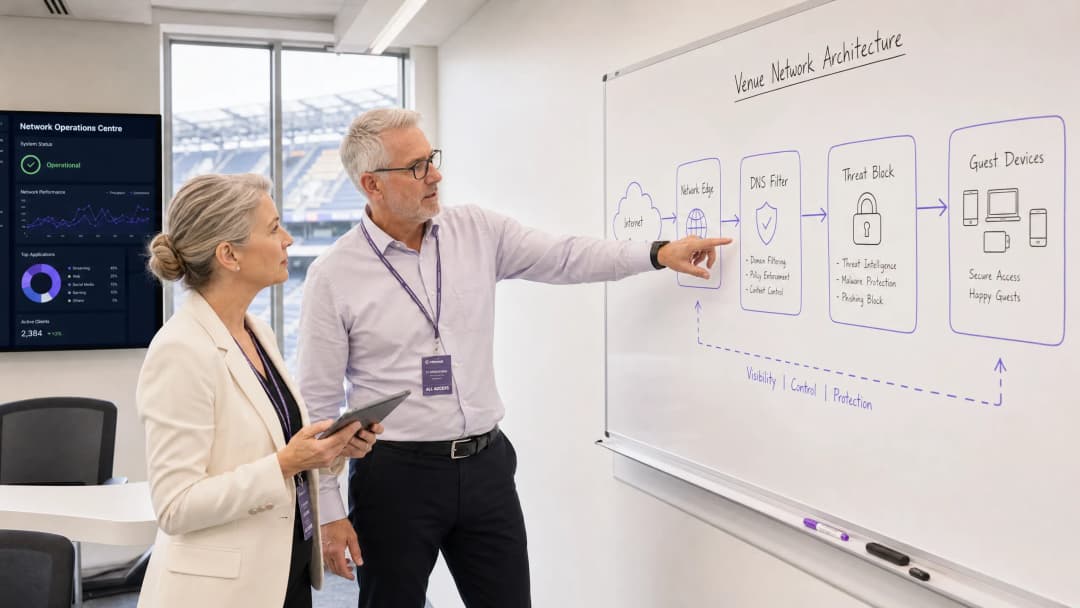
Para los CTO y arquitectos de red que gestionan recintos de gran afluencia, proteger los dispositivos no administrados es un desafío operativo crítico. No se puede implementar un agente de endpoint en el teléfono inteligente de un invitado, y no se puede confiar en que los usuarios eviten de manera proactiva los enlaces maliciosos. Esta guía detalla cómo la implementación de la protección contra amenazas a nivel de red puede bloquear el malware y el phishing en el borde de la red antes de que lleguen al dispositivo de un invitado. Al aplicar políticas de seguridad en la puerta de enlace a través del filtrado DNS y la integración de inteligencia de amenazas, los recintos pueden proteger proactivamente el tráfico de dispositivos BYOD, IoT e invitados. Este enfoque reduce la carga de trabajo de respuesta a incidentes, garantiza el cumplimiento de normativas como GDPR y PCI-DSS, y mantiene un entorno seguro para los usuarios de WiFi de Invitados en los sectores de Hospitalidad, Retail y Transporte.
Análisis Técnico Detallado
Arquitectura de Protección en el Borde de la Red
La protección contra malware en el borde de la red traslada el punto de aplicación de la seguridad desde el endpoint hacia la puerta de enlace. Cuando un dispositivo se conecta a la red del recinto e intenta resolver un dominio, la consulta DNS es interceptada por la puerta de enlace de borde. En lugar de someterse a una resolución estándar, la consulta se evalúa frente a fuentes de inteligencia de amenazas continuamente actualizadas.
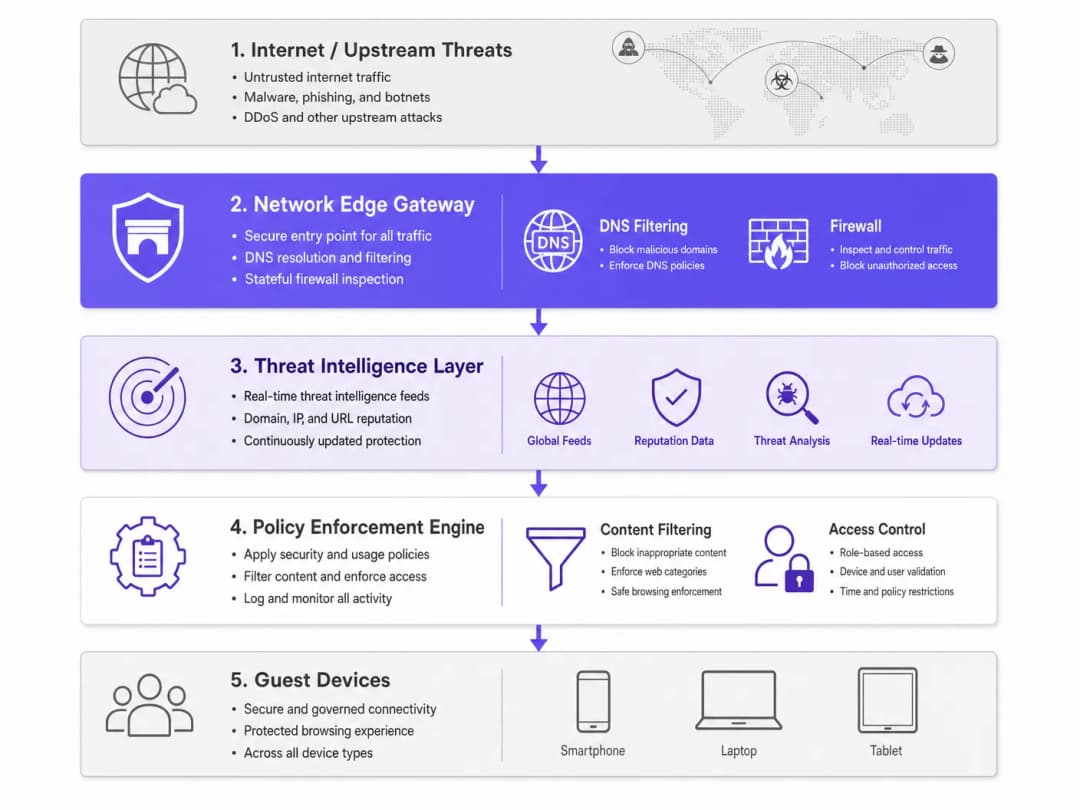
Si el dominio está asociado con la distribución de malware, campañas de phishing o infraestructura de comando y control (C2) de botnets, la solicitud DNS se desvía (sinkhole). La conexión se interrumpe antes de que se descargue cualquier carga maliciosa. Este bloqueo proactivo evita el movimiento lateral y protege la reputación de la IP del recinto.
Componentes Clave
- Motor de filtrado DNS: Inspecciona todas las solicitudes DNS salientes. Configurar este motor para bloquear resolutores DoH (DNS sobre HTTPS) públicos conocidos es esencial para evitar que los usuarios evadan el DNS seguro del recinto.
- Integración de inteligencia de amenazas: Se suscribe a fuentes de inteligencia global que clasifican los dominios en tiempo real según su reputación, el estado de dominios recién registrados y la actividad maliciosa conocida.
- Aplicación de políticas: Aplica reglas granulares basadas en el rol del usuario (por ejemplo, personal frente a invitados) y la categoría de contenido, garantizando el cumplimiento de las normativas locales y de protección del usuario.
¿Tiene preguntas sobre su configuración específica?
Nuestro equipo trabaja con gestores de espacios, responsables de TI e ingenieros de redes en 80 000 establecimientos. Reserve una llamada de 20 minutos y le mostraremos cómo lo resolvieron otros profesionales como usted.
Guía de Implementación
Implementar la protección del borde de la red requiere un enfoque por fases para lograr la máxima cobertura de seguridad con la menor interrupción posible.
Paso 1: Segmentación de red
Asegúrese de que su red esté segmentada correctamente mediante VLAN. El tráfico de invitados, el personal corporativo, los dispositivos IoT y los sistemas POS deben residir en segmentos aislados. Esto limita el radio de impacto si un dispositivo se ve comprometido antes de unirse a la red.
Paso 2: Configuración de la puerta de enlace (Gateway)
Configure su router de borde o firewall para redirigir todo el tráfico DNS a un servicio seguro de filtrado DNS. Implemente reglas de firewall que bloqueen el tráfico saliente en el puerto 53 (DNS) y el puerto 853 (DoT) hacia cualquier destino que no sean los servidores seguros aprobados. Para obtener más información sobre la optimización de redes modernas, consulte Office Wi Fi: Optimize Your Modern Office Wi-Fi Network.
Paso 3: Definición de políticas
Establezca políticas de referencia. Bloquee categorías maliciosas conocidas a nivel global. Para el filtrado de contenido, aplique políticas específicas para cada lugar - por ejemplo, aplique un filtrado más estricto en un entorno de Healthcare en comparación con el comercio minorista general.
Mejores prácticas
- Aplicación de políticas granulares: Evite los bloqueos masivos que generan reportes de soporte. Utilice el control de acceso basado en roles (RBAC) integrado con su proveedor de identidad (por ejemplo, la licencia Connect de Purple).
- Registro integral (Logging): Mantenga un historial de auditoría completo de las consultas DNS y las amenazas bloqueadas. Esto es esencial para la respuesta a incidentes y los informes de cumplimiento. Consulte Explain what is audit trail for IT Security in 2026 para conocer los requisitos detallados.
- Monitoreo continuo: Utilice WiFi Analytics para monitorear el rendimiento de la red y los eventos de seguridad en tiempo real.
Resolución de problemas y mitigación de riesgos
Manejo de DNS cifrado
Los sistemas operativos modernos utilizan cada vez más DoH y DoT, los cuales cifran las consultas DNS y pueden evadir el filtrado de borde tradicional. Para mitigar esto, mantenga una lista de bloqueo actualizada de servidores DoH públicos conocidos (como 8.8.8.8 y 1.1.1.1) para forzar a los dispositivos a recurrir al DNS seguro del lugar que se ofrece a través del puerto estándar 53.
Bloqueo excesivo de tráfico legítimo
Las fuentes de inteligencia de amenazas agresivas a veces pueden marcar dominios legítimos, en particular dominios recién registrados que se utilizan para campañas de marketing. Establezca un proceso rápido de lista de permitidos y capacite al equipo de operaciones de TI para resolver los falsos positivos rápidamente.

ROI e impacto empresarial
La justificación comercial de la protección contra malware en el borde de la red se basa en la reducción de riesgos y la eficiencia operativa. Al bloquear las amenazas en la puerta de enlace, los establecimientos eliminan los costos de licencia por dispositivo asociados con la seguridad de endpoints para dispositivos BYOD y de invitados. También reduce drásticamente el tiempo que el personal de la mesa de ayuda de TI dedica a investigar dispositivos comprometidos o a lidiar con direcciones IP en listas negras. La conectividad segura y confiable resultante no solo mejora la experiencia del invitado, sino que también protege la reputación de la marca del establecimiento.
Definiciones clave
Borde de la red
El límite donde una red local se conecta a internet, generalmente administrado por un router, firewall o puerta de enlace.
Esta es la ubicación óptima para implementar controles de seguridad para dispositivos no gestionados, ya que todo el tráfico debe pasar por aquí.
Filtrado de DNS
El proceso de bloquear el acceso a ciertos sitios web o direcciones IP al interceptar las consultas DNS y evaluarlas frente a una política o un flujo de información de amenazas.
Se utiliza para evitar de forma proactiva que los dispositivos se conecten a dominios maliciosos antes de que se transfiera cualquier dato.
Sinkholing
Redirección del tráfico malicioso a una dirección IP segura y controlada en lugar de a su destino previsto.
Cuando el dispositivo de un invitado intenta comunicarse con un servidor de malware, la puerta de enlace del borde de la red redirige la solicitud mediante sinkholing, evitando la infección.
Flujo de información de amenazas
Un flujo de datos continuamente actualizado sobre amenazas cibernéticas potenciales o actuales, incluidos dominios y direcciones IP maliciosos conocidos.
Las puertas de enlace en el borde utilizan estos flujos para tomar decisiones en tiempo real sobre si permitir o bloquear el tráfico.
DoH (DNS sobre HTTPS)
Un protocolo para realizar la resolución remota del Sistema de Nombres de Dominio a través del protocolo HTTPS, cifrando los datos.
Aunque es bueno para la privacidad, DoH puede eludir el filtrado perimetral corporativo a menos que se bloqueen explícitamente los resolutores DoH conocidos.
Segmentación de VLAN
Dividir una sola red física en múltiples redes lógicas para aislar el tráfico.
Esencial para separar el tráfico de invitados no confiable de los sistemas corporativos o terminales de punto de venta sensibles.
BYOD (Trae tu propio dispositivo)
La práctica de permitir que los empleados o invitados utilicen sus dispositivos personales en la red de la organización.
Los dispositivos BYOD suelen ser no gestionados, lo que imposibilita la seguridad del endpoint y exige protección en el borde de la red.
Registro de auditoría
Un registro cronológico de las actividades del sistema, que incluye consultas DNS y conexiones bloqueadas.
Requerido para cumplir con marcos regulatorios como PCI DSS y GDPR para demostrar que los controles de seguridad están activos.
Ejemplos resueltos
Un hotel de 500 habitaciones necesita proteger la red WiFi de invitados y, al mismo tiempo, garantizar que los dispositivos de IoT (pantallas inteligentes, controles de habitación) estén protegidos de servidores externos de comando y control.
Implementar una puerta de enlace en el borde de la red con filtrado de DNS. Segmentar la red en VLAN de invitados, de IoT y corporativas. Configurar la puerta de enlace para interceptar todas las consultas DNS de las VLAN de IoT y de invitados, reenviándolas al servicio de DNS seguro. Aplicar una política estricta para la VLAN de IoT que solo permita la resolución de dominios conocidos y requeridos (lista de permitidos), al tiempo que se aplica una política estándar de bloqueo de amenazas para la VLAN de invitados.
Una gran cadena minorista experimenta bloqueos frecuentes de direcciones IP debido a que los dispositivos de los invitados envían spam mientras están conectados al WiFi de la tienda.
Implementar protección contra malware en el borde de la red con flujos de información de amenazas activos. Configurar el firewall para bloquear el tráfico SMTP saliente (puerto 25) para todo el tráfico de invitados. Habilitar el filtrado de DNS para redirigir mediante sinkholing las solicitudes a dominios conocidos de botnets y distribución de spam.
Preguntas de práctica
Q1. El administrador de la red de un estadio nota que, aunque el filtrado de DNS está habilitado, algunos dispositivos de invitados siguen comunicándose con dominios maliciosos conocidos. ¿Cuál es la causa más probable y cómo debería abordarse?
Sugerencia: Considere los protocolos modernos que podrían eludir el filtrado estándar del puerto 53.
Ver respuesta modelo
Es probable que los dispositivos estén utilizando protocolos DNS cifrados como DNS sobre HTTPS (DoH) o DNS sobre TLS (DoT), los cuales evaden el filtrado estándar del puerto 53. El administrador debe actualizar las reglas del firewall para bloquear los resolvedores públicos de DoH/DoT conocidos y bloquear el tráfico de salida en el puerto 853, obligando a los dispositivos a recurrir al DNS seguro del establecimiento.
Q2. Al implementar la protección en el borde de la red en el entorno de un hospital, ¿cómo deberían diferir las políticas entre el WiFi de invitados y la VLAN de los dispositivos médicos de IoT?
Sugerencia: Piense en el concepto de privilegio mínimo y en el comportamiento predecible.
Ver respuesta modelo
El WiFi de invitados debe utilizar una política estándar de bloqueo de amenazas (que bloquee malware, phishing y contenido inapropiado según las directrices de la IWF), pero permitiendo el acceso general a internet. La VLAN de IoT médica debe aplicar una política estricta de "denegación por defecto" con una lista de permitidos, autorizando la comunicación únicamente con servidores de proveedores específicos y requeridos. Los dispositivos de IoT tienen patrones de tráfico predecibles, lo que hace que las listas de permitidos sean sumamente efectivas.
Q3. Un cliente de retail desea implementar el filtrado en el borde, pero le preocupa bloquear dominios legítimos de campañas de marketing que acaban de registrarse. ¿Qué proceso se debería implementar?
Sugerencia: Enfóquese en los flujos de trabajo operativos y en equilibrar la seguridad con las necesidades del negocio.
Ver respuesta modelo
Implementar un flujo de trabajo rápido de lista de permitidos. Aunque los "dominios recién registrados" son una categoría de amenaza común, el equipo de TI debe contar con un proceso para verificar e incluir rápidamente en la lista de permitidos los dominios proporcionados por el equipo de marketing antes del lanzamiento de las campañas, garantizando que la seguridad no obstaculice las operaciones comerciales.
Continúe leyendo esta serie
DNS Over HTTPS (DoH): Implicaciones para el filtrado de WiFi público
Esta guía de referencia técnica explica cómo DNS over HTTPS (DoH) evade el filtrado de contenido tradicional de puerto 53 en redes de WiFi público. Proporciona estrategias de mitigación accionables y neutras respecto al proveedor para que los arquitectos de red y gerentes de TI recuperen la visibilidad, garanticen el cumplimiento y protejan el acceso de invitados en entornos empresariales.
Responsabilidad en redes WiFi públicas: por qué el filtrado de contenido es obligatorio
Esta guía de referencia técnica describe los riesgos legales y operativos de ofrecer WiFi público sin filtrar, detallando por qué el filtrado de contenido es un requisito de implementación obligatorio para los operadores de establecimientos. Proporciona estrategias de arquitectura accionables, pasos de implementación y tácticas de mitigación de riesgos para proteger las redes contra actividades ilegales, infracciones de derechos de autor y el incumplimiento normativo. Los operadores de establecimientos y CTOs encontrarán casos de estudio concretos, marcos de decisión y pautas de configuración para implementar un entorno de Guest WiFi defendible y conforme a las normas.
Cumplimiento de IWF para redes WiFi públicas en el Reino Unido
Esta guía autorizada detalla los requisitos técnicos, la arquitectura y las estrategias de despliegue para implementar redes WiFi públicas que cumplan con IWF en sedes de todo el Reino Unido. Proporciona a los líderes de TI marcos de trabajo accionables para mitigar riesgos legales al mismo tiempo que se mantiene un acceso a la red de alto rendimiento.
¿Tiene preguntas sobre su configuración específica?
Nuestro equipo trabaja con gestores de espacios, responsables de TI e ingenieros de redes en 80 000 establecimientos. Reserve una llamada de 20 minutos y le mostraremos cómo lo resolvieron otros profesionales como usted.