
Blocking Malware and Phishing at the Network Edge
This technical reference guide outlines the architecture, deployment, and business impact of implementing network-level threat protection to secure unmanaged guest and IoT devices at the network edge. It provides actionable guidance for IT leaders to block malware and phishing proactively.
Video overview
Listen to this guide
View podcast transcript
Part of our core series: Enterprise WiFi Security Guide →
कार्यकारी सारांश (Executive Summary)
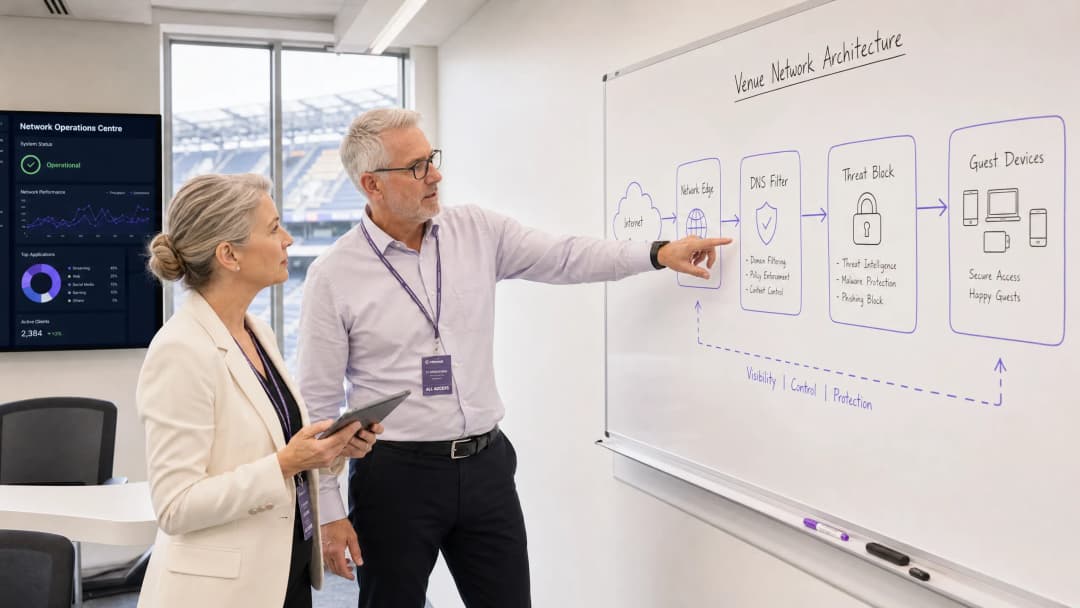
अतिशय जास्त गर्दीच्या ठिकाणांचे व्यवस्थापन करणाऱ्या CTOs आणि नेटवर्क आर्किटेक्ट्ससाठी, अनमॅनेज्ड डिव्हाइसेस सुरक्षित ठेवणे हे एक अत्यंत आव्हानात्मक काम आहे. तुम्ही पाहुण्यांच्या स्मार्टफोनवर एंडपॉईंट एजंट तैनात करू शकत नाही, आणि युजर्स स्वतःहून धोकादायक लिंक्स टाळतील यावर तुम्ही अवलंबून राहू शकत नाही. हे मार्गदर्शक नेटवर्क-लेव्हल थ्रेट प्रोटेक्शन लागू करून मालवेअर आणि फिशिंगला पाहुण्यांच्या डिव्हाइसवर पोहोचण्यापूर्वीच नेटवर्क एजवर कसे ब्लॉक करावे याचे सविस्तर वर्णन करते. DNS फिल्टरिंग आणि थ्रेट इंटेलिजन्स इंटिग्रेशनद्वारे गेटवेवर सुरक्षा पॉलिसी लागू करून, ही ठिकाणे BYOD, IoT आणि गेस्ट ट्रॅफिकचे सक्रियपणे संरक्षण करू शकतात. हा दृष्टिकोन इन्सिडेंट रिस्पॉन्सचा ताण कमी करतो, GDPR आणि PCI-DSS सारख्या मानकांचे पालन सुनिश्चित करतो आणि Hospitality , Retail , आणि Transport उद्योगांमधील Guest WiFi युजर्ससाठी एक सुरक्षित वातावरण राखतो.
तांत्रिक सखोल विश्लेषण (Technical Deep-Dive)
नेटवर्क एज प्रोटेक्शन आर्किटेक्चर (Network Edge Protection Architecture)
नेटवर्क एज मालवेअर प्रोटेक्शन सुरक्षा अंमलबजावणीचा बिंदू एंडपॉईंटवरून थेट गेटवेवर हलवते. जेव्हा एखादे डिव्हाइस ठिकाणाच्या नेटवर्कशी कनेक्ट होते आणि डोमेन रिझॉल्व्ह करण्याचा प्रयत्न करते, तेव्हा DNS क्वेरी एज गेटवेद्वारे इंटरसेप्ट केली जाते. नेहमीच्या रिझोल्यूशनऐवजी, या क्वेरीचे सातत्याने अपडेट होणाऱ्या थ्रेट इंटेलिजन्स फीड्सच्या आधारे मूल्यांकन केले जाते.
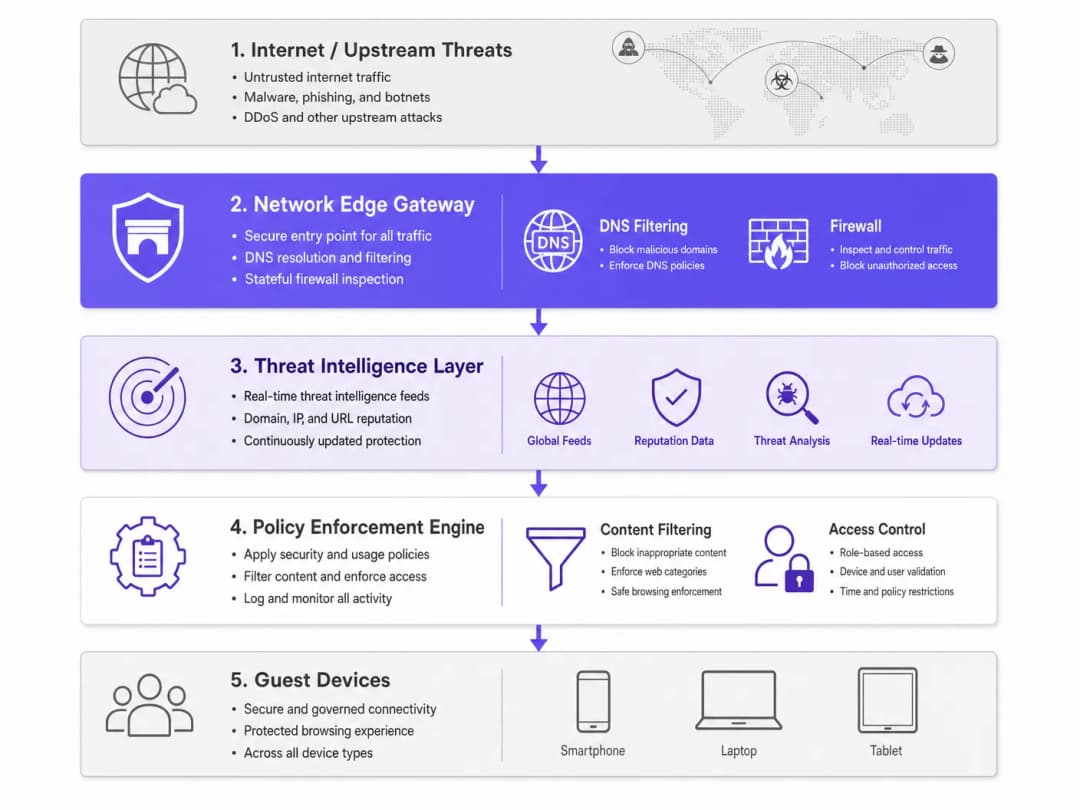
जर ते डोमेन मालवेअर वितरण, फिशिंग मोहिमा किंवा बॉटनेट कमांड-अँड-कंट्रोल (C2) इन्फ्रास्ट्रक्चरशी संबंधित असेल, तर ती DNS विनंती सिंकहोल (sinkhole) केली जाते. कोणताही मालवेअर पेलोड डाउनलोड होण्यापूर्वीच कनेक्शन बंद केले जाते. हे सक्रिय ब्लॉकिंग नेटवर्कमधील अंतर्गत हालचाली (lateral movement) रोखते आणि त्या ठिकाणच्या IP प्रतिष्ठेचे रक्षण करते.
मुख्य घटक (Key Components)
- DNS फिल्टरिंग इंजिन: सर्व आउटबाउंड DNS विनंत्यांची तपासणी करते. युजर्सनी त्या ठिकाणचे सुरक्षित DNS बायपास करू नये म्हणून हे इंजिन माहित असलेल्या पब्लिक DoH (DNS over HTTPS) रिझॉल्व्हर्सना ब्लॉक करण्यासाठी कॉन्फिगर करणे आवश्यक आहे.
- थ्रेट इंटेलिजन्स इंटिग्रेशन: जागतिक इंटेलिजन्स फीड्सचे सबस्क्रिप्शन घेते जे डोमेनच्या प्रतिष्ठेवर, नवीन नोंदणीकृत डोमेनच्या स्थितीवर आणि माहित असलेल्या संशयास्पद कारवायांवर आधारित रिअल-टाइममध्ये त्यांचे वर्गीकरण करतात.
- पॉलिसी अंमलबजावणी: युजरच्या भूमिकेनुसार (उदा. कर्मचारी विरुद्ध पाहुणे) आणि कंटेंट कॅटेगरीनुसार नियम लागू करते, ज्यामुळे IWF Compliance for Public WiFi Networks in the UK चे पालन सुनिश्चित होते.
Got questions about your specific setup?
Our team works with venue operators, IT managers, and network engineers across 80,000 venues. Book a 20-minute call and we will show you how others like you solved it.
अंमलबजावणी मार्गदर्शक (Implementation Guide)
कमीत कमी व्यत्ययासह जास्तीत जास्त सुरक्षा कव्हरेज मिळवण्यासाठी नेटवर्क एज प्रोटेक्शन तैनात करताना टप्प्याटप्प्याने मार्ग अवलंबणे आवश्यक आहे.
पायरी १: नेटवर्क सेगमेंटेशन (Network Segmentation)
VLANs चा वापर करून तुमचे नेटवर्क योग्यरित्या सेगमेंट केले असल्याची खात्री करा. अतिथी ट्रॅफिक (Guest traffic), कॉर्पोरेट कर्मचारी, IoT उपकरणे आणि POS सिस्टम स्वतंत्र आयसोलेटेड सेगमेंटवर असणे आवश्यक आहे. यामुळे नेटवर्कमध्ये सामील होण्यापूर्वी एखादे उपकरण धोक्यात आले असल्यास त्याचा परिणाम मर्यादित राहतो.
पायरी २: गेटवे कॉन्फिगरेशन (Gateway Configuration)
तुमचा एज राउटर किंवा फायरवॉल सर्व DNS ट्रॅफिक एका सुरक्षित DNS फिल्टरिंग सेवेकडे फॉरवर्ड करण्यासाठी कॉन्फिगर करा. मंजूर केलेल्या सुरक्षित रिझॉल्व्हर्स व्यतिरिक्त इतर कोणत्याही डेस्टिनेशनसाठी पोर्ट ५३ (DNS) आणि पोर्ट ८५३ (DoT) वर आउटबाउंड ट्रॅफिक ब्लॉक करणारे फायरवॉल नियम लागू करा. आधुनिक नेटवर्क ऑप्टिमायझेशनबद्दल अधिक माहितीसाठी, Office WiFi: Optimize Your Modern Office WiFi Network पहा.
पायरी ३: पॉलिसी व्याख्या (Policy Definition)
मूलभूत पॉलिसी सेट करा. जागतिक स्तरावर ज्ञात दुर्भावनापूर्ण (malicious) श्रेणी ब्लॉक करा. कंटेंट फिल्टरिंगसाठी, ठिकाण-विशिष्ट पॉलिसी लागू करा - उदाहरणार्थ, सामान्य रिटेलच्या तुलनेत Healthcare वातावरणात अधिक कडक फिल्टरिंग लागू करा.
सर्वोत्तम पद्धती (Best Practices)
- ग्रॅन्युलर पॉलिसी ॲप्लिकेशन (Granular policy application): सपोर्ट तिकीट वाढवणारे सरसकट ब्लॉकिंग टाळा. तुमच्या आयडेंटिटी प्रोव्हायडरसह (उदाहरणार्थ, Purple चे Connect लायसन्स) समाकलित रोल-बेस्ड ॲक्सेस कंट्रोल (RBAC) चा वापर करा.
- सर्वसमावेशक लॉगिंग (Comprehensive logging): DNS क्वेरी आणि ब्लॉक केलेल्या थ्रेट्सचा संपूर्ण ऑडिट ट्रेल ठेवा. इन्सिडेंट रिस्पॉन्स आणि कंप्लायन्स रिपोर्टिंगसाठी हे आवश्यक आहे. तपशीलवार आवश्यकतांसाठी Explain what is audit trail for IT Security in 2026 पहा.
- सतत मॉनिटरिंग (Continuous monitoring): रिअल-टाइममध्ये नेटवर्क परफॉर्मन्स आणि सुरक्षा इव्हेंट्सचे परीक्षण करण्यासाठी WiFi Analytics चा वापर करा.
ट्रबलशूटिंग आणि जोखीम निवारण (Troubleshooting and Risk Mitigation)
एन्क्रिप्टेड DNS हाताळणे (Handling Encrypted DNS)
आधुनिक ऑपरेटिंग सिस्टीम वाढत्या प्रमाणात DoH आणि DoT चा वापर करतात, जे DNS क्वेरी एन्क्रिप्ट करतात आणि पारंपारिक एज फिल्टरिंगला बायपास करू शकतात. हे टाळण्यासाठी, उपकरणांना मानक पोर्ट ५३ वरून पुरवल्या जाणाऱ्या सुरक्षित DNS वर येण्यास भाग पाडण्यासाठी ज्ञात सार्वजनिक DoH रिझॉल्व्हर्सची (जसे की ८.८.८.८ आणि १.१.१.१) अपडेट केलेली ब्लॉकलिस्ट ठेवा.
कायदेशीर ट्रॅफिक प्रमाणाबाहेर ब्लॉक करणे (Over-Blocking Legitimate Traffic)
आक्रमक थ्रेट इंटेलिजन्स फीड्स काहीवेळा कायदेशीर डोमेन्सना, विशेषतः मार्केटिंग मोहिमांसाठी वापरल्या जाणाऱ्या नवीन नोंदणीकृत डोमेन्सना ब्लॉक करू शकतात. जलद अलोलिस्टिंग (allowlisting) प्रक्रिया स्थापित करा आणि फॉल्स पॉझिटिव्हचे त्वरित निराकरण करण्यासाठी IT ऑपरेशन्स टीमला सक्षम करा.

ROI आणि व्यावसायिक प्रभाव (ROI and Business Impact)
नेटवर्क एज मालवेअर संरक्षणासाठीचा बिझनेस केस हा जोखीम कमी करणे आणि ऑपरेशनल कार्यक्षमतेवर आधारित आहे. गेटवेवरच धोके रोखून, संस्था BYOD आणि अतिथी उपकरणांसाठीच्या एंडपॉइंट सुरक्षेशी संबंधित प्रति-डिव्हाइस परवाना खर्च पूर्णपणे काढून टाकतात. हे आयटी सर्व्हिस डेस्क कर्मचाऱ्यांचा तडजोड केलेल्या उपकरणांचा तपास करण्यासाठी किंवा ब्लॅकलिस्ट केलेल्या IP पत्त्यांची समस्या सोडवण्यासाठी लागणारा वेळ देखील लक्षणीयरीत्या कमी करते. परिणामी मिळणारी सुरक्षित, विश्वासार्ह कनेक्टिव्हिटी केवळ अतिथींचा अनुभवच सुधारत नाही तर संस्थेच्या ब्रँडच्या प्रतिष्ठेचे देखील रक्षण करते.
Key Definitions
Network Edge
The boundary where a local network connects to the internet, typically managed by a router, firewall, or gateway.
This is the optimal location to deploy security controls for unmanaged devices, as all traffic must pass through it.
DNS Filtering
The process of blocking access to certain websites or IP addresses by intercepting DNS queries and evaluating them against a policy or threat feed.
Used to proactively stop devices from connecting to malicious domains before any data is transferred.
Sinkholing
Redirecting malicious traffic to a safe, controlled IP address instead of its intended destination.
When a guest device tries to reach a malware server, the edge gateway sinkholes the request, preventing infection.
Threat Intelligence Feed
A continuously updated stream of data regarding potential or current cyber threats, including known malicious domains and IP addresses.
Edge gateways use these feeds to make real-time decisions on whether to allow or block traffic.
DoH (DNS over HTTPS)
A protocol for performing remote Domain Name System resolution via the HTTPS protocol, encrypting the data.
While good for privacy, DoH can bypass corporate edge filtering unless known DoH resolvers are explicitly blocked.
VLAN Segmentation
Dividing a single physical network into multiple logical networks to isolate traffic.
Essential for separating untrusted guest traffic from sensitive corporate or POS systems.
BYOD (Bring Your Own Device)
The practice of allowing employees or guests to use their personal devices on the organisation's network.
BYOD devices are typically unmanaged, making endpoint security impossible and necessitating network edge protection.
Audit Trail
A chronological record of system activities, including DNS queries and blocked connections.
Required for compliance with frameworks like PCI DSS and GDPR to prove security controls are active.
Worked Examples
A 500-room hotel needs to secure guest WiFi while ensuring IoT devices (smart TVs, room controls) are protected from external command-and-control servers.
Deploy a network edge gateway with DNS filtering. Segment the network into Guest, IoT, and Corporate VLANs. Configure the gateway to intercept all DNS queries from the IoT and Guest VLANs, forwarding them to the secure DNS service. Apply a strict policy for the IoT VLAN that only allows resolution of known, required domains (allowlisting), while applying a standard threat-blocking policy for the Guest VLAN.
A large retail chain experiences frequent IP blocklisting due to guest devices sending spam while connected to the in-store WiFi.
Implement network edge malware protection with active threat intelligence feeds. Configure the firewall to block outbound SMTP (port 25) for all guest traffic. Enable DNS filtering to sinkhole requests to known botnet and spam-distribution domains.
Practice Questions
Q1. A stadium network administrator notices that while DNS filtering is enabled, some guest devices are still reaching known malicious domains. What is the most likely cause and how should it be addressed?
Hint: Consider modern protocols that might bypass standard port 53 filtering.
View model answer
The devices are likely using encrypted DNS protocols like DNS over HTTPS (DoH) or DNS over TLS (DoT), which bypass standard port 53 filtering. The administrator should update firewall rules to block known public DoH/DoT resolvers and block outbound traffic on port 853, forcing devices to fall back to the venue's secure DNS.
Q2. When deploying network edge protection in a hospital environment, how should the policies differ between the guest WiFi and the medical IoT device VLAN?
Hint: Think about the concept of least privilege and predictable behaviour.
View model answer
The guest WiFi should use a standard threat-blocking policy (blocking malware, phishing, and inappropriate content per IWF guidelines) but generally allow internet access. The medical IoT VLAN should use a strict 'default deny' policy with an allowlist, permitting communication only with specific, required vendor servers. IoT devices have predictable traffic patterns, making allowlisting highly effective.
Q3. A retail client wants to implement edge filtering but is concerned about blocking legitimate marketing campaign domains that are newly registered. What process should be implemented?
Hint: Focus on operational workflows and balancing security with business needs.
View model answer
Implement a rapid allowlisting workflow. While 'Newly Registered Domains' is a common threat category, the IT team should have a process to quickly verify and allowlist domains provided by the marketing team before campaigns launch, ensuring security does not impede business operations.
Continue reading in this series
How to revoke WiFi access when an employee leaves
This guide shows IT and venue operations teams how to remove Staff WiFi access when an employee leaves without disrupting the rest of the workforce. It compares certificate-based 802.1X, identity-specific iPSK and SCIM-driven deprovisioning, then provides a same-day runbook, test method and audit evidence model.
A Network Administrator’s Guide to Configuring RADIUS Authentication for Guest WiFi
A comprehensive technical reference for network administrators on deploying RADIUS authentication for guest WiFi. Covers architecture, vendor-neutral configuration steps, security best practices, and troubleshooting common deployment failures.
Secure BYOD WiFi: Passpoint certificate onboarding vs xPSK (iPSK)
A comprehensive technical guide for IT teams on securing unmanaged employee and student devices (BYOD) using zero-touch Passpoint EAP-TLS certificates vs vendor-specific xPSK (iPSK/easyPSK, DPSK, PPSK, MPSK).
Got questions about your specific setup?
Our team works with venue operators, IT managers, and network engineers across 80,000 venues. Book a 20-minute call and we will show you how others like you solved it.