
Blocking Malware and Phishing at the Network Edge
This technical reference guide outlines the architecture, deployment, and business impact of implementing network-level threat protection to secure unmanaged guest and IoT devices at the network edge. It provides actionable guidance for IT leaders to block malware and phishing proactively.
Video overview
Listen to this guide
View podcast transcript
Part of our core series: Enterprise WiFi Security Guide →
Executive Summary
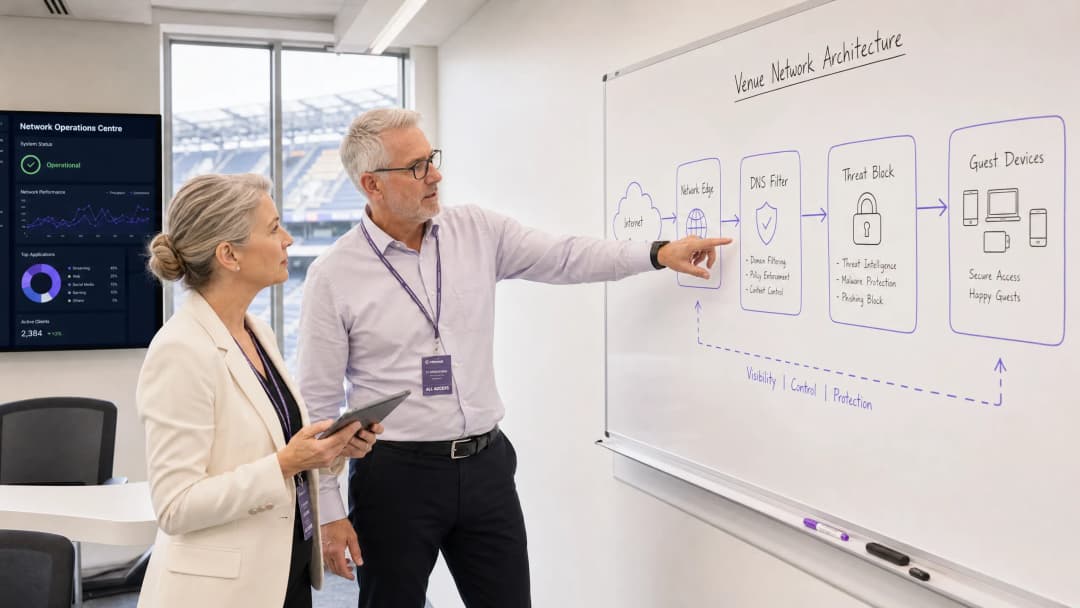
For CTOs and network architects managing high-footfall venues, securing unmanaged devices is a critical operational challenge. You cannot deploy an endpoint agent on a guest's smartphone, and you cannot rely on users to proactively avoid malicious links. This guide details how implementing network-level threat protection can block malware and phishing at the network edge before they ever reach a guest's device. By enforcing security policy at the gateway through DNS filtering and threat intelligence integration, venues can proactively protect BYOD, IoT, and guest traffic. This approach reduces incident response overhead, ensures compliance with standards such as CCPA/CPRA and PCI-DSS, and maintains a safe environment for Guest WiFi users across the Hospitality, Retail, and Transport industries.
Technical Deep-Dive
Network Edge Protection Architecture
Network edge malware protection moves the security enforcement point from the endpoint to the gateway. When a device connects to the venue network and attempts to resolve a domain, the DNS query is intercepted by the edge gateway. Rather than undergoing standard resolution, the query is evaluated against continuously updated threat intelligence feeds.
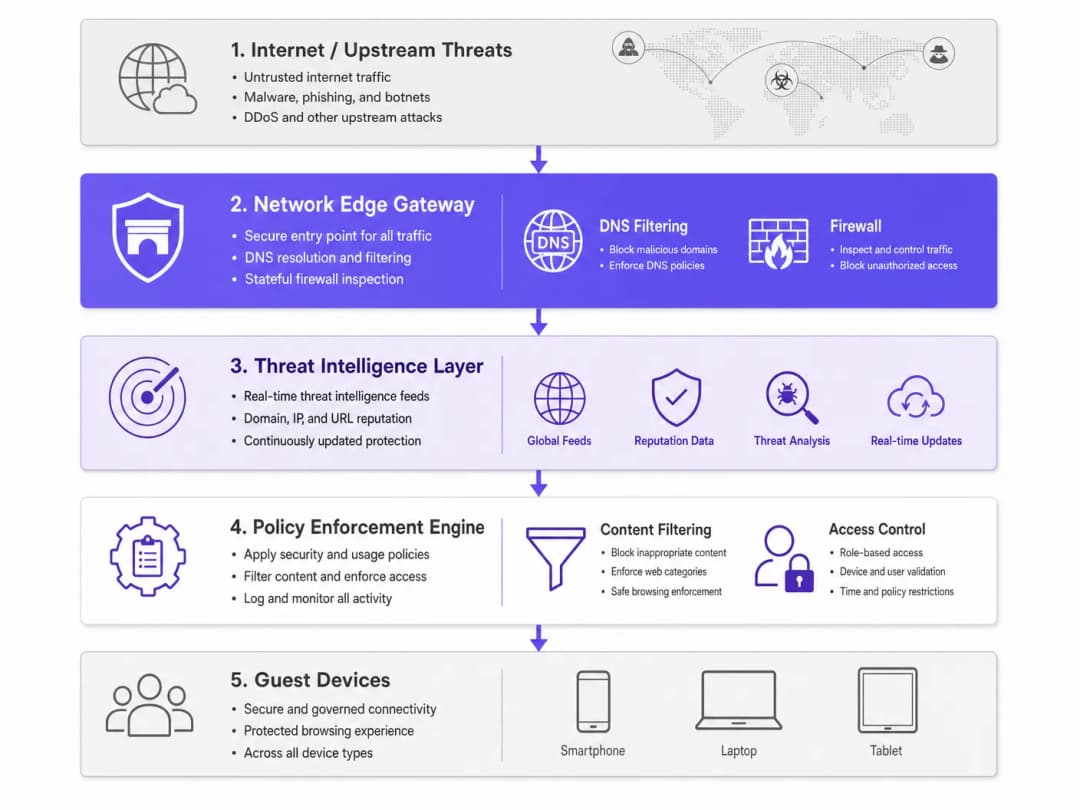
If the domain is associated with malware distribution, phishing campaigns, or botnet command-and-control (C2) infrastructure, the DNS request is sinkholed. The connection is dropped before any malicious payload is downloaded. This proactive blocking prevents lateral movement and protects the venue's IP reputation.
Key Components
- DNS filtering engine: Inspects all outbound DNS requests. Configuring this engine to block known public DoH (DNS over HTTPS) resolvers is essential to prevent users from bypassing the venue's secure DNS.
- Threat intelligence integration: Subscribes to global intelligence feeds that classify domains in real time based on reputation, newly registered domain status, and known malicious activity.
- Policy enforcement: Applies granular rules based on user role (for example, staff versus guest) and content category, ensuring adherence to IWF Compliance for Public WiFi Networks in the UK.
Got questions about your specific setup?
Our team works with venue operators, IT managers, and network engineers across 80,000 venues. Book a 20-minute call and we will show you how others like you solved it.
Implementation Guide
Deploying network edge protection requires a phased approach to achieve maximum security coverage with minimal disruption.
Step 1: Network Segmentation
Ensure your network is properly segmented using VLANs. Guest traffic, corporate staff, IoT devices, and POS systems must sit on isolated segments. This limits the blast radius if a device is compromised before joining the network.
Step 2: Gateway Configuration
Configure your edge router or firewall to forward all DNS traffic to a secure DNS filtering service. Implement firewall rules that block outbound traffic on port 53 (DNS) and port 853 (DoT) to any destination other than the approved secure resolvers. For more on modern network optimization, see Office Wi Fi: Optimize Your Modern Office Wi-Fi Network.
Step 3: Policy Definition
Establish baseline policies. Block known malicious categories globally. For content filtering, apply venue-specific policies - for example, enforce stricter filtering in a Healthcare environment compared to general retail.
Best Practices
- Granular policy application: Avoid blanket blocking that generates support tickets. Use role-based access control (RBAC) integrated with your identity provider (for example, Purple's Connect license).
- Comprehensive logging: Maintain a full audit trail of DNS queries and blocked threats. This is essential for incident response and compliance reporting. See Explain what is audit trail for IT Security in 2026 for detailed requirements.
- Continuous monitoring: Use WiFi Analytics to monitor network performance and security events in real time.
Troubleshooting and Risk Mitigation
Handling Encrypted DNS
Modern operating systems increasingly use DoH and DoT, which encrypt DNS queries and can bypass traditional edge filtering. To mitigate this, maintain an updated blocklist of known public DoH resolvers (such as 8.8.8.8 and 1.1.1.1) to force devices to fall back to the venue's secure DNS served over standard port 53.
Over-Blocking Legitimate Traffic
Aggressive threat intelligence feeds can sometimes flag legitimate domains, particularly newly registered domains used for marketing campaigns. Establish a rapid allowlisting process and empower the IT operations team to resolve false positives quickly.

ROI and Business Impact
The business case for network edge malware protection is built on risk reduction and operational efficiency. By blocking threats at the gateway, venues eliminate the per-device licensing costs associated with endpoint security for BYOD and guest devices. It also dramatically reduces the time IT service desk staff spend investigating compromised devices or dealing with blacklisted IP addresses. The resulting secure, reliable connectivity not only improves the guest experience but also protects the venue's brand reputation.
Key Definitions
Network Edge
The boundary where a local network connects to the internet, typically managed by a router, firewall, or gateway.
This is the optimal location to deploy security controls for unmanaged devices, as all traffic must pass through it.
DNS Filtering
The process of blocking access to certain websites or IP addresses by intercepting DNS queries and evaluating them against a policy or threat feed.
Used to proactively stop devices from connecting to malicious domains before any data is transferred.
Sinkholing
Redirecting malicious traffic to a safe, controlled IP address instead of its intended destination.
When a guest device tries to reach a malware server, the edge gateway sinkholes the request, preventing infection.
Threat Intelligence Feed
A continuously updated stream of data regarding potential or current cyber threats, including known malicious domains and IP addresses.
Edge gateways use these feeds to make real-time decisions on whether to allow or block traffic.
DoH (DNS over HTTPS)
A protocol for performing remote Domain Name System resolution via the HTTPS protocol, encrypting the data.
While good for privacy, DoH can bypass corporate edge filtering unless known DoH resolvers are explicitly blocked.
VLAN Segmentation
Dividing a single physical network into multiple logical networks to isolate traffic.
Essential for separating untrusted guest traffic from sensitive corporate or POS systems.
BYOD (Bring Your Own Device)
The practice of allowing employees or guests to use their personal devices on the organization's network.
BYOD devices are typically unmanaged, making endpoint security impossible and necessitating network edge protection.
Audit Trail
A chronological record of system activities, including DNS queries and blocked connections.
Required for compliance with frameworks like PCI DSS and CCPA/CPRA to prove security controls are active.
Worked Examples
A 500-room hotel needs to secure guest WiFi while ensuring IoT devices (smart TVs, room controls) are protected from external command-and-control servers.
Deploy a network edge gateway with DNS filtering. Segment the network into Guest, IoT, and Corporate VLANs. Configure the gateway to intercept all DNS queries from the IoT and Guest VLANs, forwarding them to the secure DNS service. Apply a strict policy for the IoT VLAN that only allows resolution of known, required domains (allowlisting), while applying a standard threat-blocking policy for the Guest VLAN.
A large retail chain experiences frequent IP blocklisting due to guest devices sending spam while connected to the in-store WiFi.
Implement network edge malware protection with active threat intelligence feeds. Configure the firewall to block outbound SMTP (port 25) for all guest traffic. Enable DNS filtering to sinkhole requests to known botnet and spam-distribution domains.
Practice Questions
Q1. A stadium network administrator notices that while DNS filtering is enabled, some guest devices are still reaching known malicious domains. What is the most likely cause and how should it be addressed?
Hint: Consider modern protocols that might bypass standard port 53 filtering.
View model answer
The devices are likely using encrypted DNS protocols like DNS over HTTPS (DoH) or DNS over TLS (DoT), which bypass standard port 53 filtering. The administrator should update firewall rules to block known public DoH/DoT resolvers and block outbound traffic on port 853, forcing devices to fall back to the venue's secure WiFi DNS.
Q2. When deploying network edge protection in a hospital environment, how should the policies differ between the guest WiFi and the medical IoT device VLAN?
Hint: Think about the concept of least privilege and predictable behavior.
View model answer
The guest WiFi should use a standard threat-blocking policy (blocking malware, phishing, and inappropriate content per industry guidelines) but generally allow internet access. The medical IoT VLAN should use a strict 'default deny' policy with an allowlist, permitting communication only with specific, required vendor servers. IoT devices have predictable traffic patterns, making allowlisting highly effective.
Q3. A retail client wants to implement edge filtering but is concerned about blocking legitimate marketing campaign domains that are newly registered. What process should be implemented?
Hint: Focus on operational workflows and balancing security with business needs.
View model answer
Implement a rapid allowlisting workflow. While 'Newly Registered Domains' is a common threat category, the IT team should have a process to quickly verify and allowlist domains provided by the marketing team before campaigns launch, ensuring security does not impede business operations.
Continue reading in this series
DNS Over HTTPS (DoH): Implications for Public WiFi Filtering
This technical reference guide explains how DNS over HTTPS (DoH) bypasses traditional port 53 content filtering on public WiFi networks. It provides actionable, vendor-neutral mitigation strategies for network architects and IT managers to regain visibility, enforce compliance, and secure guest access in enterprise environments.
Public WiFi Liability: Why Content Filtering is Mandatory
This technical reference guide outlines the legal and operational risks of providing unfiltered public WiFi, detailing why content filtering is a mandatory deployment requirement for venue operators. It provides actionable architecture strategies, implementation steps, and risk mitigation tactics to protect networks from illegal activity, copyright infringement, and regulatory non-compliance. Venue operators and CTOs will find concrete case studies, decision frameworks, and configuration guidance to implement a defensible, compliant Guest WiFi environment.
IWF Compliance for Public WiFi Networks in the US
This authoritative guide details the technical requirements, architecture, and deployment strategies for implementing IWF-compliant public WiFi networks across US venues. It provides IT leaders with actionable frameworks to mitigate legal risks while maintaining high-performance network access.
Got questions about your specific setup?
Our team works with venue operators, IT managers, and network engineers across 80,000 venues. Book a 20-minute call and we will show you how others like you solved it.