
IWF Compliance for Public WiFi Networks in the US
This authoritative guide details the technical requirements, architecture, and deployment strategies for implementing IWF-compliant public WiFi networks across US venues. It provides IT leaders with actionable frameworks to mitigate legal risks while maintaining high-performance network access.
Video overview
Listen to this guide
View podcast transcript
Part of our core series: Enterprise WiFi Security Guide →
Executive Summary
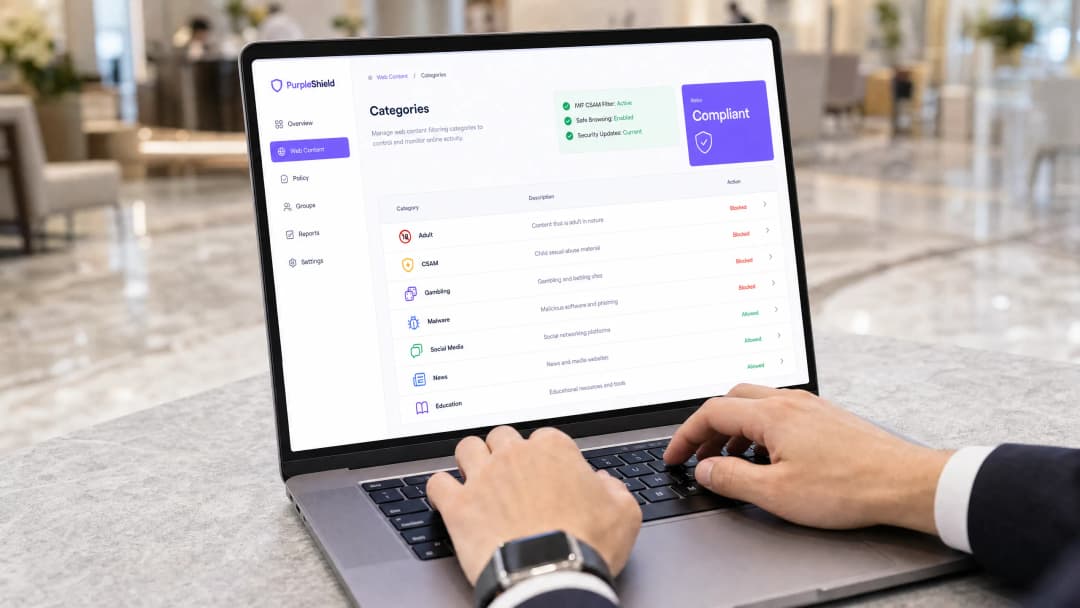
The provision of public WiFi in the US is no longer just a guest convenience but has become a critical compliance requirement. For IT directors and CTOs managing Retail, Hospitality, and public sector environments, deploying open networks without robust content filtering exposes the organization to significant legal and reputational risks. The Internet Watch Foundation (IWF) maintains the definitive blocklist for child sexual abuse material (CSAM). Integrating this list at the network edge is not just a best practice; it is a fundamental requirement for responsible venue operation.
This guide outlines the technical architecture required to achieve IWF compliance, detailing deployment strategies at the DNS and HTTP layers. It provides actionable, vendor-neutral advice on implementing certified web filtering without degrading network throughput or user experience. From securing Guest WiFi to integrating with modern authentication standards such as IEEE 802.1X and OpenRoaming, we explore how to build a compliant, high-performance network.
Technical Deep-Dive: IWF Compliance Architecture
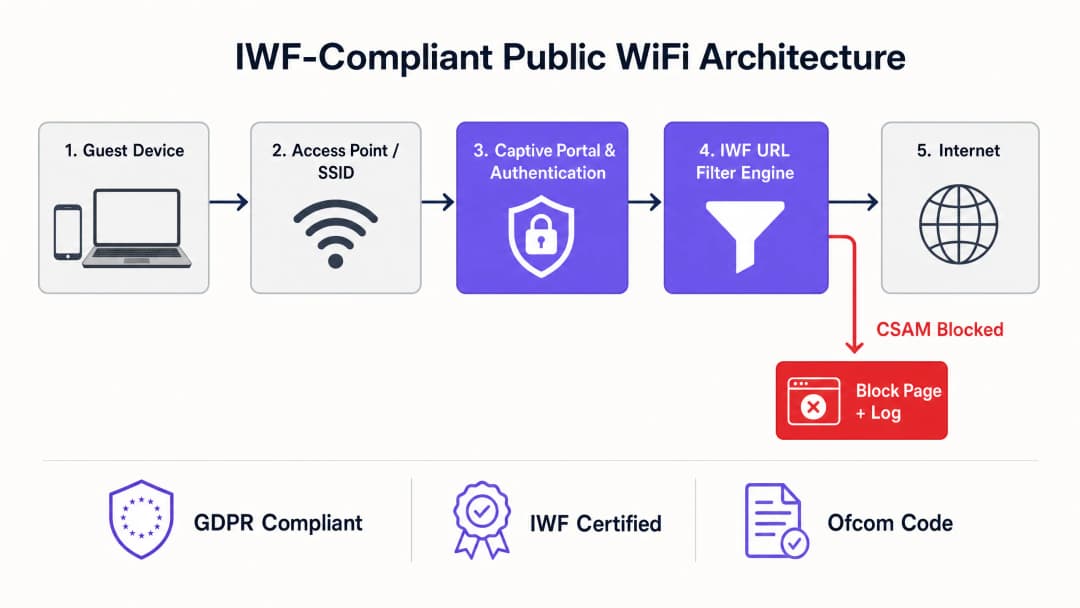
Implementing IWF compliance requires a multi-layered approach to network security. The core requirement is the dynamic integration of the IWF URL list into the venue's web filtering engine. This cannot be a static, manually updated list; it requires real-time or near-real-time synchronization with the IWF database.
Layer 1: DNS Filtering
At the most basic level, DNS filtering intercepts requests to known CSAM domains and resolves them to a block page or a null route. Despite being highly efficient and low-latency, DNS filtering alone is insufficient because it operates at the domain level, whereas the IWF list often specifies precise URLs. Relying solely on DNS can lead to over-blocking (blocking an entire legitimate domain due to a single offending URL) or under-blocking (failing to block IP-based access).
Layer 2: HTTP/HTTPS Deep Packet Inspection (DPI)
To accurately enforce the IWF URL list, the filtering engine must inspect the entire HTTP request path. For encrypted HTTPS traffic, this presents a challenge. Modern approaches involve Server Name Indication (SNI) inspection alongside targeted SSL decryption for specific, high-risk categories. However, deploying SSL decryption on public networks raises severe privacy and certificate trust issues. Therefore, the standard deployment model for public venues relies on advanced SNI filtering and dynamic IP categorization, which is cross-referenced with the IWF URL database.
Integration with Authentication and Analytics
Compliance is not limited to blocking; it requires accountability. Integrating the filtering engine with a Captive Portal ensures that users accept an Acceptable Use Policy (AUP) before gaining access. Furthermore, linking network access to robust WiFi Analytics allows IT teams to monitor block events, identify potential security incidents, and demonstrate compliance during audits. Understanding WiFi Frequencies: A Guide to WiFi Frequencies in 2026 is also crucial, as different bands require specific QoS configurations to handle the minor latency introduced by deep packet inspection.
Got questions about your specific setup?
Our team works with venue operators, IT managers, and network engineers across 80,000 venues. Book a 20-minute call and we will show you how others like you solved it.
Implementation Guide: Deploying IWF Filtering
Deploying IWF-compliant filtering across distributed environments - such as a national Transport hub or a chain of Healthcare facilities - requires a structured approach.
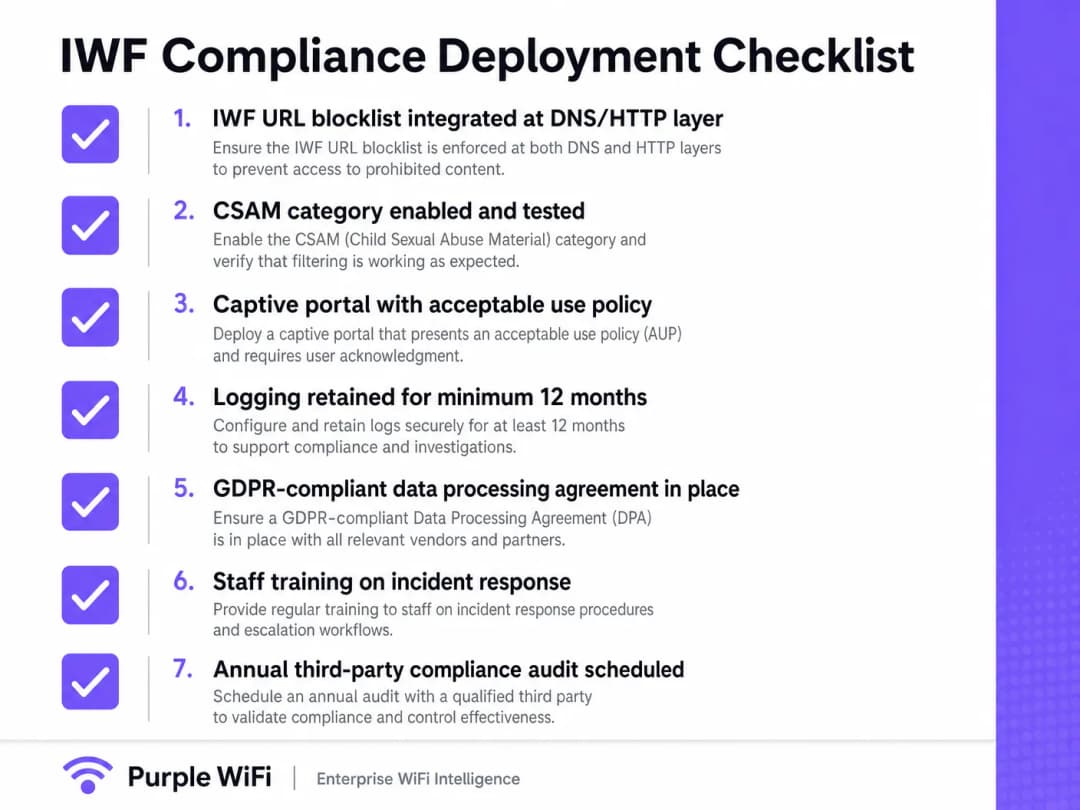
- Select a Certified Vendor: Ensure your web filtering provider is an official IWF member and utilizes their dynamic feed. Do not attempt to build bespoke integrations.
- Network Edge Configuration: Configure venue routers or access points to force all guest DNS traffic to the compliant filtering service. Block outbound ports 53 and 853 (DoT) to prevent users from bypassing the filter using custom DNS servers.
- Captive Portal Alignment: Update the Captive Portal AUP to clearly state that content filtering is in place and that access to illegal content is monitored and blocked.
- Testing and Verification: Do not use real IWF URLs for testing. The IWF provides specific, safe test URLs to verify that the filtering engine is correctly intercepting and blocking restricted content.
- Logging and Retention: Configure the firewall or filtering service to maintain logs of blocked access attempts for at least 12 months, in alignment with CCPA/CPRA and local law enforcement requirements.
Best Practices for Public Venues
When designing network architecture, IT leaders must strike a balance between security and user experience.
- Avoid Over-Blocking: Ensure that the filtering policy is strictly targeted at illegal content (CSAM) and highly malicious categories (malware, phishing). Overly aggressive filtering (e.g., blocking legitimate social media or streaming) leads to user frustration and an increase in support tickets.
- Handle Encrypted DNS: With the rise of DNS over HTTPS (DoH), users' browsers may attempt to bypass local DNS filters. Implement network policies to block known DoH resolvers (such as 8.8.8.8 or 1.1.1.1) at the firewall level, forcing a fallback to the venue's secure DNS.
- Seamless Authentication: Consider transitioning from open networks to secure authentication frameworks. While Passpoint/OpenRoaming are the future, ensuring robust filtering on these networks is paramount. For information on managing complex enterprise setups, see Resolving Roaming Issues in Corporate WLANs.
Troubleshooting and Risk Mitigation
The most common failure mode in public WiFi compliance is "bypass." Users, intentionally or unintentionally, circumvent filtering controls.
- Rogue Access Points (Rogue APs): Regular checks for rogue APs are essential. A compliant wired network is useless if an employee plugs in an unmanaged, unfiltered consumer router.
- VPN Usage: While blocking all VPN traffic is often impractical in venues like hotels where business travelers require corporate access, IT teams should monitor excessive, sustained encrypted tunnels that may indicate abuse.
- Latency Spikes: If the filtering engine is cloud-based, ensure that regional POPs are utilized. Routing traffic from an American hotel to a European-based filtering server will introduce unacceptable latency. Optimize routing to maintain a seamless experience, just as one would for Office WiFi: Optimise Your Modern Office WiFi Network.
ROI and Business Impact
While compliance is often viewed as a cost center, robust IWF filtering protects the brand. The damage to a venue's reputation from being associated with illegal downloads or CSAM distribution far outweighs deployment costs. Furthermore, a secure, compliant network is a prerequisite for leveraging advanced technologies like BLE Low Energy Explained for Enterprise for location-based services, as users must trust the underlying infrastructure before opting into tracking and analytics. Success is measured by zero compliance breaches, minimal false-positive support tickets, and seamless network performance.
Key Definitions
Internet Watch Foundation (IWF)
An international organization that compiles a dynamic list of URLs containing Child Sexual Abuse Material (CSAM).
Integration with the IWF list is the baseline standard for public WiFi compliance in the US.
Server Name Indication (SNI)
An extension to the TLS protocol that indicates which hostname the client is attempting to connect to at the start of the handshaking process.
SNI inspection allows IT teams to block specific malicious websites on HTTPS connections without needing to decrypt the entire traffic stream.
DNS over HTTPS (DoH)
A protocol for performing remote Domain Name System resolution via the HTTPS protocol, encrypting the DNS queries.
DoH can bypass traditional DNS-based web filters, requiring network administrators to block known DoH endpoints to enforce compliance.
Captive Portal
A web page that the user of a public-access network is obliged to view and interact with before access is granted.
Crucial for enforcing the Acceptable Use Policy (AUP) and establishing the legal framework for network usage.
Acceptable Use Policy (AUP)
A document stipulating constraints and practices that a user must agree to for access to a corporate network or the internet.
Provides the legal cover for venue operators to block content and terminate sessions for non-compliant users.
VLAN Segmentation
The practice of dividing a physical network into multiple logical networks.
Essential for separating untrusted guest traffic (which requires IWF filtering) from trusted corporate or POS traffic.
Deep Packet Inspection (DPI)
A form of computer network packet filtering that examines the data part of a packet as it passes an inspection point.
Used to identify and block specific applications or protocols (like BitTorrent or VPNs) that might be used to bypass standard filters.
False Positive
When a legitimate website is incorrectly categorized and blocked by the filtering engine.
High false-positive rates lead to user complaints and IT support overhead; selecting a highly accurate, IWF-certified vendor minimizes this.
Worked Examples
A 200-room hotel needs to implement IWF filtering but has noticed a high volume of guests using DNS over HTTPS (DoH) via modern browsers, bypassing the current DNS-based filter.
The IT team must implement a dual-layer approach. First, configure the edge firewall to block outbound traffic to known DoH providers (e.g., blocking IPs for Cloudflare, Google, and Quad9 DoH endpoints). Second, utilize SNI (Server Name Indication) inspection on the firewall to intercept the initial TLS handshake and block IWF-listed URLs before the encrypted session is established.
A large retail chain is rolling out free guest WiFi across 500 stores and needs to ensure compliance while minimizing latency at the Point of Sale (POS).
The network architect segments the VLANs. The Guest VLAN is routed through a cloud-based IWF-certified web filter using redundant regional POPs to minimize latency. The POS VLAN is strictly isolated, utilizing an explicit allow-list for payment gateways and inventory systems, completely bypassing the web filter to ensure zero latency impact on transactions.
Practice Questions
Q1. You are deploying guest WiFi at a major convention center. The marketing team wants to use a generic, open SSID with no Captive Portal to reduce "friction." How do you respond from a compliance perspective?
Hint: Consider the legal requirement for user consent and accountability.
View model answer
I would advise against an open, frictionless SSID. Without a Captive Portal, users cannot agree to the Acceptable Use Policy (AUP). This leaves the venue legally exposed if illegal activity occurs on the network. A Captive Portal is a mandatory control gate for enforcing terms of service and logging MAC addresses against accepted sessions, which is critical for incident response.
Q2. During a network audit, you discover that 15% of guest traffic is successfully bypassing the web filter using custom DNS servers configured on their devices. What is the immediate technical remediation?
Hint: Look at edge firewall port configurations.
View model answer
The immediate remediation is to configure the edge firewall to block outbound traffic on UDP/TCP port 53 and TCP port 853 (DNS over TLS) from the Guest VLAN to any external IP address. All DNS requests must be forced (or transparently proxied) to the venue's secure, IWF-integrated DNS servers.
Q3. A hotel IT manager suggests using full SSL decryption (SSL Inspection/Termination) on the guest network to ensure 100% visibility into HTTPS traffic for IWF compliance. Why is this a flawed approach for public WiFi?
Hint: Consider device trust and user privacy.
View model answer
Full SSL decryption requires installing a custom root certificate on every guest device. In a public WiFi scenario, this is impossible to enforce, will cause severe browser certificate errors for all users, and represents a massive privacy violation. The correct approach is to rely on DNS filtering combined with SNI (Server Name Indication) inspection, which allows categorization of encrypted traffic without breaking the TLS tunnel.
Continue reading in this series
DNS Over HTTPS (DoH): Implications for Public WiFi Filtering
This technical reference guide explains how DNS over HTTPS (DoH) bypasses traditional port 53 content filtering on public WiFi networks. It provides actionable, vendor-neutral mitigation strategies for network architects and IT managers to regain visibility, enforce compliance, and secure guest access in enterprise environments.
Public WiFi Liability: Why Content Filtering is Mandatory
This technical reference guide outlines the legal and operational risks of providing unfiltered public WiFi, detailing why content filtering is a mandatory deployment requirement for venue operators. It provides actionable architecture strategies, implementation steps, and risk mitigation tactics to protect networks from illegal activity, copyright infringement, and regulatory non-compliance. Venue operators and CTOs will find concrete case studies, decision frameworks, and configuration guidance to implement a defensible, compliant Guest WiFi environment.
Blocking Malware and Phishing at the Network Edge
This technical reference guide outlines the architecture, deployment, and business impact of implementing network-level threat protection to secure unmanaged guest and IoT devices at the network edge. It provides actionable guidance for IT leaders to block malware and phishing proactively.
Got questions about your specific setup?
Our team works with venue operators, IT managers, and network engineers across 80,000 venues. Book a 20-minute call and we will show you how others like you solved it.