
Mejores Prácticas de WiFi para Invitados: Seguridad, Rendimiento y Cumplimiento
Esta guía completa describe las decisiones operativas críticas necesarias para implementar una red WiFi para invitados segura y de alto rendimiento en entornos empresariales. Proporciona marcos de trabajo accionables para la segmentación de red, autenticación, gestión de ancho de banda y cumplimiento normativo — cubriendo PCI DSS, GDPR e IEEE 802.1X — para ayudar a los equipos de TI a mitigar riesgos y ofrecer valor empresarial medible. La plataforma de WiFi para invitados y análisis de Purple se referencia a lo largo de la guía como un vehículo de implementación concreto para cada mejor práctica.
Escucha esta guía
Ver transcripción del podcast

Resumen Ejecutivo
Implementar una red WiFi para invitados en un entorno empresarial moderno — ya sea un estadio, una cadena minorista, un establecimiento de hostelería o una instalación del sector público — ya no es una simple decisión de infraestructura. Conlleva implicaciones directas para la postura de seguridad, el cumplimiento normativo y la reputación de la marca. Para los gerentes de TI, arquitectos de red y CTOs, el desafío es equilibrar la conectividad fluida para los invitados con controles robustos que protejan los activos corporativos y satisfagan a los auditores.
Esta guía proporciona un marco práctico y neutral respecto al proveedor para implementar las mejores prácticas de WiFi para invitados, con orientación concreta sobre segmentación de red, mecanismos de autenticación, gestión de ancho de banda y retención de datos. Se basa en estándares establecidos como IEEE 802.1X, WPA3, PCI DSS y GDPR. Cuando es relevante, hace referencia a la plataforma Guest WiFi de Purple como un vehículo de implementación, y a sus capacidades de WiFi Analytics como un mecanismo para convertir la inversión en infraestructura en inteligencia de negocio accionable.
Análisis Técnico Detallado
1. Segmentación de Red: La Base Innegociable
El control más crítico en cualquier configuración de WiFi para invitados es la segmentación estricta de la red. El tráfico de invitados debe estar lógica — y, cuando sea posible, físicamente — aislado de la LAN corporativa. Sin esto, un dispositivo de invitado comprometido tiene una ruta directa a los sistemas internos, incluyendo terminales de punto de venta, bases de datos de RRHH y tecnología operativa.
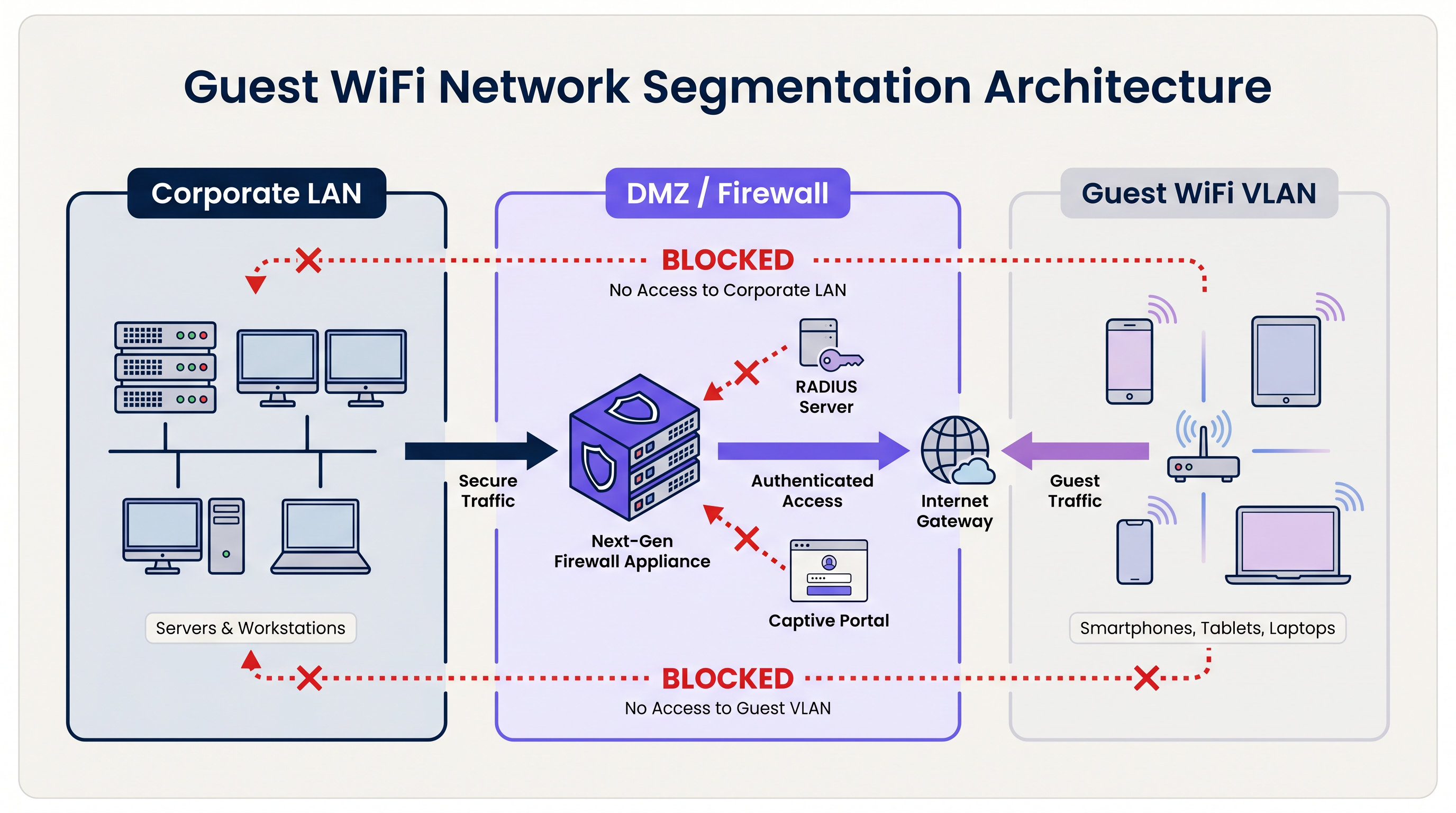
La arquitectura estándar utiliza Redes de Área Local Virtuales (VLANs) dedicadas. El SSID de invitados está asociado a una VLAN específica, que termina en un firewall perimetral o DMZ. El firewall aplica una política de denegación por defecto: solo se permite el tráfico saliente de internet (TCP 80, 443 y UDP 53 para DNS). Todo el enrutamiento entre la VLAN de invitados y cualquier subred interna está explícitamente bloqueado.
Para las organizaciones sujetas a PCI DSS, esta segmentación es obligatoria. El Estándar de Seguridad de Datos de la Industria de Tarjetas de Pago (Payment Card Industry Data Security Standard) requiere que el entorno de datos del titular de la tarjeta (CDE) esté completamente aislado de cualquier red de acceso público. No lograr esto resultará en una auditoría fallida por parte de un Evaluador de Seguridad Calificado (QSA).
Más allá de la segmentación de VLAN, la Aislamiento de Cliente de Capa 2 debe estar habilitada en cada SSID de invitados. Esto evita que los dispositivos en la misma red inalámbrica se comuniquen directamente entre sí, mitigando el riesgo de ataques laterales entre dispositivos de invitados — un control crítico en entornos como Hostelería donde los invitados comparten el mismo espacio físico.
2. Autenticación y Control de Acceso
El modelo de autenticación elegido para un sistema WiFi para invitados determina tanto el nivel de seguridad como la calidad de la experiencia del invitado.
Claves Precompartidas (PSKs): WPA2/WPA3-Personal con una contraseña compartida es el modelo de implementación más simple, pero ofrece la postura de seguridad más débil para entornos empresariales. Las PSKs no proporcionan responsabilidad individual, no pueden ser revocadas por usuario y se comparten con frecuencia más allá de la audiencia prevista.
Captive Portals: El estándar de la industria para lugares públicos. Un Captive Portal intercepta la solicitud HTTP inicial del invitado y lo redirige a una página de destino de marca. El invitado debe aceptar los Términos de Servicio (ToS) antes de que se le conceda el acceso. Esto crea un registro legal de consentimiento, permite la recopilación de datos de primera parte (correo electrónico, inicio de sesión social, datos de formulario) y permite al lugar aplicar políticas de uso aceptable. Plataformas como el Guest WiFi de Purple proporcionan un Captive Portal completamente gestionado con flujos de consentimiento GDPR integrados e integración con CRM.
Autenticación Basada en Perfiles (Passpoint / OpenRoaming): El modelo de implementación más avanzado. Utilizando IEEE 802.1X y WPA3-Enterprise, los dispositivos se autentican usando un perfil de credenciales en lugar de una contraseña. El usuario se registra una vez — típicamente a través de una aplicación móvil o Captive Portal — y su dispositivo se conecta automáticamente y de forma segura en visitas posteriores. Purple actúa como un proveedor de identidad gratuito para OpenRoaming bajo la licencia Connect, permitiendo a los lugares ofrecer conectividad fluida y segura a escala. Para un desglose técnico detallado sobre cómo asegurar el tráfico de autenticación RADIUS que sustenta 802.1X, consulte nuestra guía sobre RadSec: Asegurando el Tráfico de Autenticación RADIUS con TLS .
3. Estándares de Cifrado
Todas las nuevas implementaciones de WiFi para invitados deberían apuntar a WPA3. Las mejoras clave sobre WPA2 son significativas:
| Característica | WPA2 | WPA3 |
|---|---|---|
| Intercambio de Claves | Handshake de 4 vías (vulnerable a KRACK) | Simultaneous Authentication of Equals (SAE) |
| Cifrado de Red Abierta | Ninguno | Opportunistic Wireless Encryption (OWE) |
| Secreto Hacia Adelante | No | Sí |
| Resistencia a Fuerza Bruta | Baja | Alta (SAE limita ataques fuera de línea) |
Para las redes de invitados abiertas específicamente, el Cifrado Inalámbrico Oportunista (OWE) de WPA3 es una mejora transformadora. OWE cifra el tráfico entre cada cliente y el AP sin requerir una contraseña, protegiendo a los usuarios de la escucha pasiva en lo que de otro modo sería un canal sin cifrar.
4. Gestión de Ancho de Banda y QoS
En entornos de alta densidad — estadios, centros de conferencias, plantas minoristas — la gestión del ancho de banda es tan importante como la seguridad. Sin controles, un pequeño número de usuarios puede consumir la mayor parte del rendimiento disponible, degradando la experiencia para todos.
Los controles clave incluyen:
- Limitación de Tasa por Usuario: Limitar a los usuarios individuales a un defrendimiento definido (por ejemplo, 5 Mbps de bajada / 2 Mbps de subida). Esto se configura a nivel del controlador de LAN inalámbrica (WLC) o de la plataforma de gestión en la nube.
- Control de aplicaciones de capa 7: Bloquee o despriorice aplicaciones de alto ancho de banda como el intercambio de archivos peer-to-peer, servicios de transmisión de video y descargas de actualizaciones de software durante las horas pico.
- Tiempos de espera de sesión: Configure tiempos de espera de inactividad (por ejemplo, 30 minutos) y tiempos de espera de sesión absolutos (por ejemplo, 4 horas) para recuperar direcciones IP y tiempo de aire de clientes inactivos.
- Gestión de arrendamiento DHCP: En entornos transitorios como centros de Transporte y estadios, establezca los tiempos de arrendamiento DHCP en 15-30 minutos y aprovisione subredes grandes (/21 o /20) para evitar el agotamiento del pool durante la demanda máxima.
Guía de Implementación
Fase 1: Diseño de la Arquitectura
Comience con una revisión de la topología de red. Identifique todas las VLAN existentes y confirme que se puede aprovisionar una VLAN de invitado dedicada sin enrutamiento a ninguna subred interna. Defina el conjunto de reglas del firewall y confirme que el hardware del AP elegido soporta el aislamiento de clientes.
Fase 2: Configuración de Hardware y Controlador
Seleccione APs de grado empresarial con soporte para WPA3, 802.11ax (Wi-Fi 6) o 802.11be (Wi-Fi 6E) para entornos de alta densidad, y controladores gestionados en la nube para la aplicación centralizada de políticas. Configure el SSID de invitado, vincúlelo a la VLAN de invitado y habilite el aislamiento de clientes. Establezca límites de velocidad por usuario y tiempos de espera de sesión.
Fase 3: Implementación del Captive Portal
Integre el WLC o la plataforma AP en la nube con un servicio gestionado de Guest WiFi . Configure el portal con activos de marca, aceptación de los Términos de Servicio (ToS) y campos de captura de datos. Asegúrese de que el mecanismo de consentimiento cumpla con el GDPR: opt-in explícito para comunicaciones de marketing, un aviso de privacidad claro y una política de retención de datos documentada. Para entornos de Retail y Healthcare , asegúrese de que los ToS del portal incluyan cláusulas de uso aceptable apropiadas para el tipo de lugar.
Fase 4: Monitoreo y Análisis
Una vez implementada, conecte la plataforma a un panel de WiFi Analytics . Configure alertas para la detección de APs no autorizados, umbrales de utilización del pool DHCP y patrones de tráfico inusuales. Revise regularmente los datos de afluencia y tiempo de permanencia para informar las decisiones operativas.
Mejores Prácticas
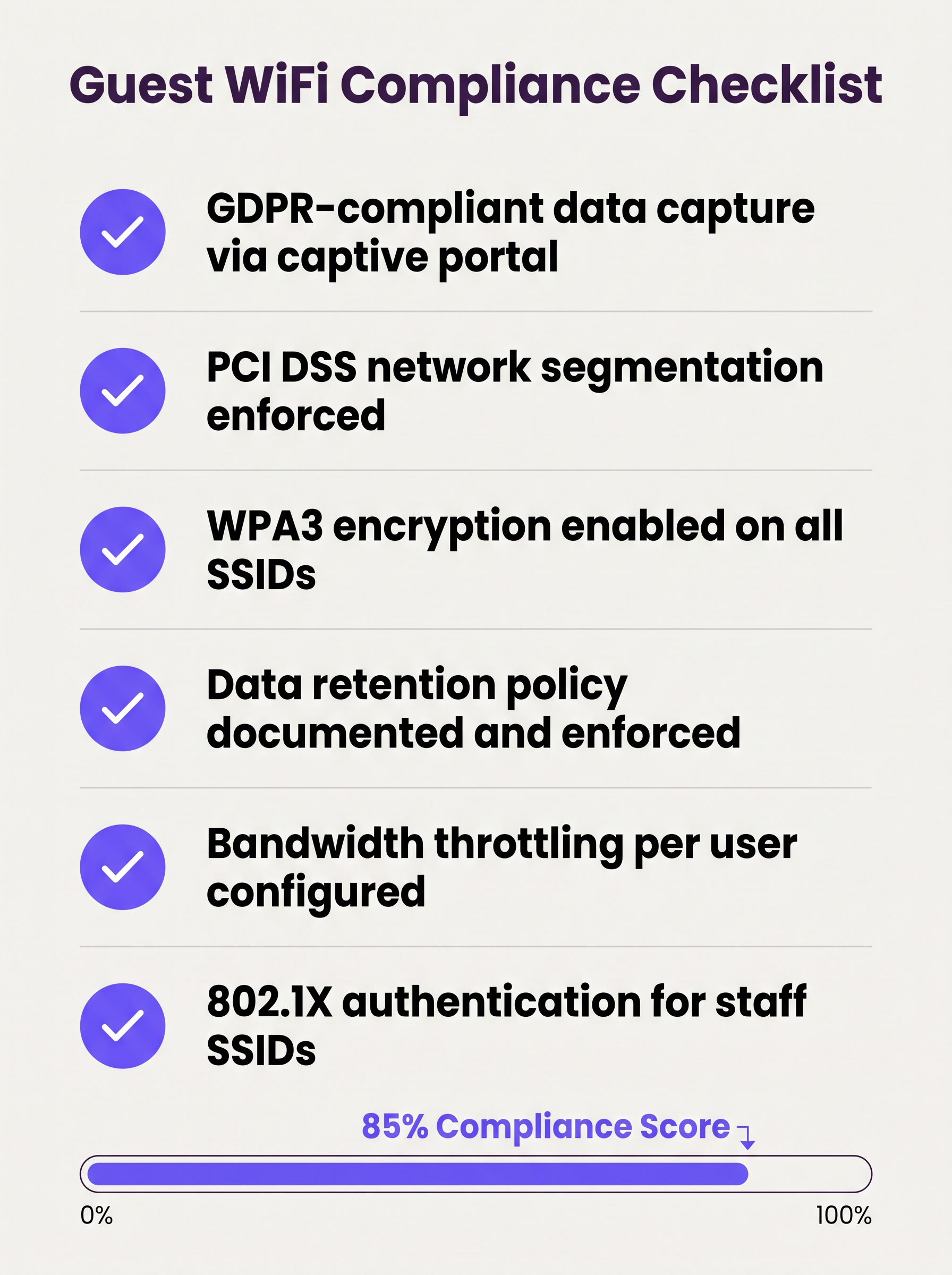
La siguiente lista de verificación representa la postura mínima viable de seguridad y cumplimiento para cualquier implementación de wifi para invitados empresarial:
- Segmentación de VLAN aplicada con reglas de firewall de denegación por defecto entre redes de invitados y corporativas.
- Aislamiento de cliente de capa 2 habilitado en todos los SSIDs de invitado.
- Cifrado WPA3 configurado en todos los nuevos SSIDs; WPA2 se mantiene solo donde los dispositivos heredados lo requieran.
- Captive portal con consentimiento compatible con GDPR implementado y probado.
- Límites de ancho de banda por usuario configurados a nivel del controlador.
- Tiempos de arrendamiento DHCP ajustados al tiempo de permanencia esperado del lugar.
- Política de retención de datos documentada, con purga automatizada de registros de invitados más allá de la ventana de retención.
- Sistema de Prevención de Intrusiones Inalámbricas (WIPS) activo para detectar APs no autorizados.
- Pruebas de penetración regulares del perímetro de la red de invitados, como mínimo anualmente.
- 802.1X / RADIUS implementado para SSIDs de personal, con RadSec asegurando el tráfico de autenticación en tránsito.
Solución de Problemas y Mitigación de Riesgos
Puntos de Acceso Maliciosos
Un AP no autorizado que suplanta el SSID de invitado es un riesgo significativo en grandes recintos. Los atacantes configuran un dispositivo que transmite el mismo nombre de SSID, capturando credenciales y datos de sesión de usuarios desprevenidos. La mitigación requiere un WIPS activo que monitoree el entorno de RF y pueda contener automáticamente los dispositivos no autorizados. Este es un control obligatorio bajo PCI DSS 11.2.
Aleatorización de Direcciones MAC
Los sistemas operativos móviles modernos (iOS 14+, Android 10+) implementan la aleatorización de direcciones MAC por defecto. Esto rompe la lógica de omisión del captive portal basada en MAC (donde los usuarios que regresan son reconocidos por la MAC de su dispositivo y omiten la reautenticación). Las plataformas de Guest WiFi deben manejar las MAC aleatorizadas de manera elegante, típicamente emitiendo tokens de sesión o utilizando autenticación basada en perfiles.
Agotamiento del Pool DHCP
En lugares con alta afluencia transitoria, el agotamiento del pool DHCP es una falla común y fácilmente prevenible. La solución es una combinación de tiempos de arrendamiento cortos y subredes de tamaño adecuado. Monitoree la utilización del pool DHCP a través de SNMP o la plataforma de gestión en la nube y configure alertas al 80% de utilización.
Errores de Certificado del Captive Portal
Si el captive portal utiliza un certificado autofirmado, los usuarios recibirán advertencias de seguridad del navegador que dañan la confianza y reducen las tasas de registro. Utilice siempre un certificado de una Autoridad de Certificación (CA) de confianza para el dominio del portal.
ROI e Impacto Comercial
Un sistema de wifi para invitados bien implementado genera retornos medibles en múltiples dimensiones comerciales:
| Métrica | Método de Medición | Resultado Típico |
|---|---|---|
| Captura de Datos de Primera Parte | Registros del portal por mes | 15–40% de visitantes únicos |
| Alcance de Marketing | Tasa de crecimiento de la lista de correo electrónico | Crecimiento compuesto del 20–50% anual |
| Conocimiento Operacional | Análisis de afluencia y tiempo de permanencia | Informa sobre personal, diseño y promociones |
| Reducción del Riesgo de Cumplimiento | Hallazgos de auditoría | Cero hallazgos de PCI DSS relacionados con la segmentación de red |
| Gastos Generales de TI | Gestión centralizada vs. configuración in situ | Reducción del 30–50% en la frecuencia de visitas al sitio |
Para organizaciones que operan propiedades distribuidas — múltiples sucursales minoristas, propiedades hoteleras o centros de transporte — la arquitectura WAN subyacente también juega un papel en asegurar una conectividad confiable a las plataformas de gestión de Guest WiFi alojadas en la nube. Consulte Los Beneficios Clave de SD WAN para Empresas Modernas para orientación sobre la optimización de la conectividad WAN para infraestructura de red gestionada en la nube.
El valor estratégico del WiFi para invitados se extiende mucho más allá de TI. Al tratar la red como un activo de datos, las organizaciones en Comercio minorista , Hostelería , Salud y Transporte pueden construir perfiles de clientes verificados de primera mano, impulsar programas de fidelización y generar ingresos por medios minoristas, transformando un gasto de utilidad en un activo comercial medible.
Definiciones clave
VLAN (Virtual Local Area Network)
A logical grouping of network devices that behave as if they are on an independent network segment, regardless of their physical location on the infrastructure.
The primary mechanism for separating guest traffic from corporate traffic on shared physical hardware. Mandatory for PCI DSS compliance.
Client Isolation
A wireless network security feature, configured at the access point level, that prevents devices connected to the same SSID from communicating directly with each other at Layer 2.
Essential for any public-facing SSID. Prevents a compromised guest device from scanning or attacking other guests on the same network.
Captive Portal
A web page that intercepts a user's initial HTTP/HTTPS request and redirects them to an authentication or registration page before granting internet access.
The standard onboarding mechanism for guest WiFi. Used to enforce Terms of Service, collect first-party data, and create a legal record of consent.
IEEE 802.1X
An IEEE standard for port-based network access control that provides an authentication framework for devices connecting to a LAN or WLAN, using a RADIUS server as the authentication backend.
The foundation of enterprise WiFi security. Used for staff SSIDs and advanced guest deployments using Passpoint or OpenRoaming.
WPA3
The third generation of the Wi-Fi Protected Access security protocol, introducing Simultaneous Authentication of Equals (SAE) for stronger key exchange and Opportunistic Wireless Encryption (OWE) for open networks.
The current encryption standard for all new WiFi deployments. Mandatory for any network handling sensitive data or subject to compliance frameworks.
OWE (Opportunistic Wireless Encryption)
A WPA3 feature that provides encryption on open (passwordless) WiFi networks by performing an anonymous Diffie-Hellman key exchange between the client and the access point.
Allows venues to offer open guest WiFi without exposing user traffic to passive eavesdropping. A significant security uplift over legacy open networks.
DHCP Lease Time
The duration for which a DHCP server assigns an IP address to a client device before the address must be renewed or released back to the pool.
Critical to manage in high-density, transient environments. Excessively long lease times cause IP pool exhaustion, preventing new devices from connecting.
Passpoint / Hotspot 2.0
A Wi-Fi Alliance certification programme based on the IEEE 802.11u standard that enables automatic, secure network discovery and authentication without requiring user interaction.
The technical foundation for seamless roaming experiences. Devices connect automatically using a provisioned credential profile, eliminating the captive portal for returning users.
WIPS (Wireless Intrusion Prevention System)
A security system that continuously monitors the radio frequency (RF) spectrum for unauthorized access points and client devices, and can automatically contain or block detected threats.
Required by PCI DSS 11.2. Detects rogue APs spoofing the guest SSID and alerts the security team to potential man-in-the-middle attacks.
PCI DSS
The Payment Card Industry Data Security Standard — a set of security standards designed to ensure that all companies that accept, process, store, or transmit credit card information maintain a secure environment.
Directly relevant to any venue that processes card payments. Network segmentation between the guest WiFi and the cardholder data environment is a mandatory control.
Ejemplos resueltos
A 200-room hotel currently operates a single flat network shared between guests, the property management system (PMS), and back-office workstations. The IT director has been told they need to achieve PCI DSS compliance before the next audit. Where do they start?
The immediate priority is network segmentation. The IT director should provision three VLANs: VLAN 10 (Corporate) for the PMS, back-office workstations, and staff devices; VLAN 20 (Guest) for visitor WiFi; and VLAN 30 (IoT) for smart TVs, thermostats, and door lock controllers. The firewall must be configured to block all inter-VLAN routing between VLAN 20 and VLAN 10, and between VLAN 30 and VLAN 10. The guest SSID should be configured with WPA3-Personal (or OWE for an open SSID), client isolation enabled, and a captive portal integrated with the hotel's loyalty CRM. Bandwidth should be capped at 10 Mbps per user, with a premium tier (25 Mbps) available for loyalty programme members. A WIPS should be activated to monitor for rogue APs. The data retention policy for portal registrations should be set to 24 months, with automated purging thereafter.
A large retail chain with 150 stores is experiencing poor guest WiFi performance during peak trading hours (12pm–2pm and 5pm–7pm). Captive portal registration rates have dropped by 35% compared to six months ago, and the IT team is receiving complaints from store managers. The internet backhaul at each site is 500 Mbps — well above what should be needed.
The issue is almost certainly not backhaul capacity but a combination of DHCP pool exhaustion, airtime contention, and the absence of per-user rate limiting. The remediation steps are: (1) Reduce DHCP lease times from the default 24 hours to 20 minutes to ensure IP addresses are recycled quickly as customers move through the store. (2) Expand the DHCP scope from a /24 (254 addresses) to a /22 (1022 addresses) to accommodate peak concurrent connections. (3) Implement per-user rate limiting at 3 Mbps to prevent any single device from monopolising airtime. (4) Enable Layer 7 application control to block video streaming services during peak hours. (5) Review AP channel utilisation and enable band steering to push capable devices to the 5 GHz or 6 GHz band, reducing congestion on 2.4 GHz. (6) Ensure the captive portal redirect is using HTTPS with a valid certificate to eliminate browser security warnings that deter registrations.
Preguntas de práctica
Q1. A hospital IT director is planning to offer free WiFi to patients and visitors across a 500-bed facility. They are concerned about HIPAA compliance and the risk of malware spreading from guest devices to networked medical equipment. What architecture and controls should they implement?
Sugerencia: Consider how network traffic is separated across three distinct user groups: patients/visitors, clinical staff, and medical devices. Think about what happens if a guest device is infected.
Ver respuesta modelo
The IT director must implement a minimum of three VLANs: Guest (patients and visitors), Clinical Staff, and Medical IoT. The guest VLAN must terminate at a firewall with default-deny rules blocking all routing to the clinical and IoT VLANs. Layer 2 Client Isolation must be enabled on the guest SSID to prevent guest devices from communicating with each other or with any medical device. A captive portal with ToS acceptance should be deployed. The medical IoT VLAN should be on a separate physical or logically isolated network segment with strict access controls. Regular WIPS scanning should be active to detect rogue APs. This architecture ensures that even a fully compromised guest device has no path to clinical systems or medical equipment.
Q2. A stadium CTO reports that during halftime at a sold-out event (60,000 attendees), the guest WiFi becomes completely unusable. Users cannot connect at all — they receive 'unable to obtain IP address' errors. The internet backhaul is a 10 Gbps dedicated fibre connection. What is the most likely cause and how should it be resolved?
Sugerencia: The backhaul is not the bottleneck. Think about what happens at the IP address allocation layer when 60,000 devices connect simultaneously after being in an area with no WiFi coverage for 45 minutes.
Ver respuesta modelo
The root cause is DHCP pool exhaustion. With 60,000 devices attempting to connect simultaneously, the DHCP server is running out of available IP addresses to assign. The resolution requires two changes: (1) Reduce the DHCP lease time to 15–20 minutes, ensuring that IP addresses from devices that have left the coverage area are recycled quickly. (2) Expand the DHCP scope to a /19 or /18 subnet to provide sufficient addresses for the peak concurrent connection count. Additionally, the CTO should review AP density and channel planning to ensure adequate airtime capacity, and consider deploying 802.11ax (Wi-Fi 6) APs which handle high client density significantly more efficiently than previous generations.
Q3. A retail chain wants to capture customer email addresses via a captive portal to build a marketing database, but their marketing team reports that repeat customers are complaining about having to re-register every visit. The IT team wants to fix this without removing the portal entirely. What is the recommended approach?
Sugerencia: How can the system recognise a returning device without requiring the user to fill in a form again? Consider what identifier is available at the network layer.
Ver respuesta modelo
The recommended approach is MAC address caching combined with a session token. On the first visit, the user completes the portal registration and their device MAC address is stored against their profile in the guest WiFi platform. On subsequent visits, the captive portal system checks the connecting device's MAC address against the stored database. If a match is found, the user is authenticated silently in the background and redirected directly to the internet, bypassing the registration form. The visit is still logged for analytics purposes. It is important to note that MAC address randomisation on modern iOS and Android devices may interfere with this approach — in those cases, the platform should fall back to a session cookie or prompt for a one-click email re-confirmation rather than the full registration form.
Q4. A conference centre IT manager is preparing for a major three-day industry event with 5,000 attendees. The event organiser wants to offer tiered WiFi: free basic access for all attendees and a premium paid tier for exhibitors requiring high-bandwidth video conferencing. How should this be architected?
Sugerencia: Think about how to enforce different bandwidth policies for different user groups on the same physical infrastructure, and how to authenticate each tier.
Ver respuesta modelo
The architecture requires two separate SSIDs mapped to two separate VLANs: a 'Conference-Guest' SSID for free basic access (rate limited to 2 Mbps per user, with video streaming blocked via Layer 7 filtering) and a 'Conference-Premium' SSID for paid exhibitor access (rate limited to 25 Mbps per user, with video conferencing applications prioritised via QoS). The premium SSID should use a voucher-based or 802.1X authentication mechanism to restrict access to paying exhibitors. Both VLANs must be isolated from the venue's corporate network. The premium VLAN should be allocated a dedicated internet circuit or MPLS path to guarantee throughput, independent of the general attendee traffic.
Continúe leyendo esta serie
Gestión de ancho de banda para WiFi de personal: modelado, QoS y reducción de tráfico
Esta guía detalla métodos prácticos para gestionar el ancho de banda para el WiFi de personal en entornos corporativos. Cubre el modelado de tráfico, la implementación de QoS y cómo el despliegue de Purple Shield reduce la carga de la red sin requerir actualizaciones de infraestructura.
¿Qué es una Solicitud de Sondeo? Entendiendo Cómo los Dispositivos Descubren Redes
Esta guía de referencia técnica ofrece un análisis profundo de las solicitudes de sondeo IEEE 802.11, el escaneo activo versus pasivo, y el impacto de la aleatorización de MAC en el análisis de ubicaciones. Proporciona estrategias de implementación prácticas para que los arquitectos de red optimicen despliegues de alta densidad, mitiguen las tormentas de sondeo y aseguren una recopilación de datos precisa y compatible con GDPR utilizando capas de identidad autenticadas.
Cómo solucionar el WiFi lento sin actualizar tu plan de internet
Una guía de referencia técnica completa para gerentes de TI y arquitectos de red sobre cómo optimizar el rendimiento del WiFi empresarial sin aumentar el ancho de banda del ISP. Cubre la sintonización de RF, la gestión de la densidad de clientes, la implementación de QoS y cómo aprovechar el análisis de WiFi para diagnosticar y resolver cuellos de botella.