
Guest WiFi Best Practices: Security, Performance and Compliance
This comprehensive guide outlines the critical operational decisions required to deploy a secure, high-performing guest WiFi network across enterprise venues. It provides actionable frameworks for network segmentation, authentication, bandwidth management, and regulatory compliance — covering PCI DSS, GDPR, and IEEE 802.1X — to help IT teams mitigate risk and deliver measurable business value. Purple's guest WiFi and analytics platform is referenced throughout as a concrete implementation vehicle for each best practice.
Listen to this guide
View podcast transcript

Executive Summary
Deploying a guest WiFi network in a modern enterprise environment — whether a stadium, retail chain, hospitality venue, or public-sector facility — is no longer a simple infrastructure decision. It carries direct implications for security posture, regulatory compliance, and brand reputation. For IT managers, network architects, and CTOs, the challenge is balancing seamless guest connectivity with robust controls that protect corporate assets and satisfy auditors.
This guide provides a practical, vendor-neutral framework for implementing guest wifi best practices, with concrete guidance on network segmentation, authentication mechanisms, bandwidth management, and data retention. It draws on established standards including IEEE 802.1X, WPA3, PCI DSS, and GDPR. Where relevant, it references Purple's Guest WiFi platform as a deployment vehicle, and its WiFi Analytics capabilities as a mechanism for converting infrastructure investment into actionable business intelligence.
Technical Deep-Dive
1. Network Segmentation: The Non-Negotiable Foundation
The single most critical control in any guest wifi setup is strict network segmentation. Guest traffic must be logically — and where possible physically — isolated from the corporate LAN. Without this, a compromised guest device has a direct route to internal systems including point-of-sale terminals, HR databases, and operational technology.
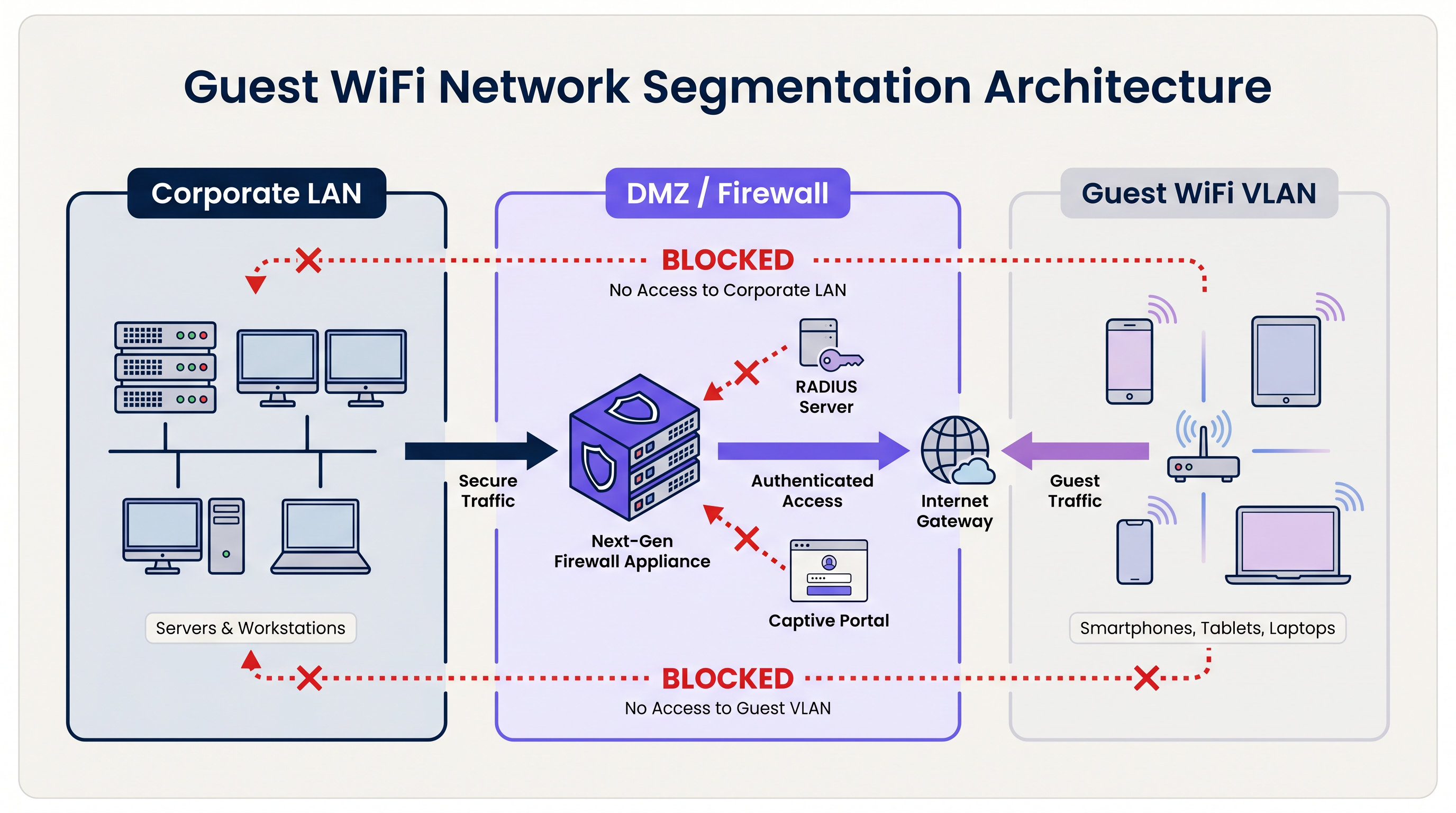
The standard architecture uses dedicated Virtual Local Area Networks (VLANs). The guest SSID is bound to a specific VLAN, which terminates at a perimeter firewall or DMZ. The firewall enforces a default-deny policy: only outbound internet traffic (TCP 80, 443, and UDP 53 for DNS) is permitted. All routing between the guest VLAN and any internal subnet is explicitly blocked.
For organisations subject to PCI DSS, this segmentation is mandatory. The Payment Card Industry Data Security Standard requires that the cardholder data environment (CDE) be completely isolated from any public-facing network. Failure to achieve this will result in a failed Qualified Security Assessor (QSA) audit.
Beyond VLAN segmentation, Layer 2 Client Isolation must be enabled on every guest SSID. This prevents devices on the same wireless network from communicating directly with each other, mitigating the risk of lateral attacks between guest devices — a critical control in environments like Hospitality where guests share the same physical space.
2. Authentication and Access Control
The authentication model chosen for a guest wifi system determines both the security level and the quality of the guest experience.
Pre-Shared Keys (PSKs): WPA2/WPA3-Personal with a shared password is the simplest deployment model but offers the weakest security posture for enterprise environments. PSKs provide no individual accountability, cannot be revoked per-user, and are frequently shared beyond the intended audience.
Captive Portals: The industry standard for public venues. A captive portal intercepts the guest's initial HTTP request and redirects them to a branded landing page. The guest must accept Terms of Service (ToS) before access is granted. This creates a legal record of consent, enables first-party data collection (email, social login, form data), and allows the venue to enforce acceptable use policies. Platforms like Purple's Guest WiFi provide a fully managed captive portal with built-in GDPR consent flows and CRM integration.
Profile-Based Authentication (Passpoint / OpenRoaming): The most advanced deployment model. Using IEEE 802.1X and WPA3-Enterprise, devices authenticate using a credential profile rather than a password. The user registers once — typically via a mobile app or captive portal — and their device connects automatically and securely on subsequent visits. Purple acts as a free identity provider for OpenRoaming under the Connect licence, enabling venues to offer seamless, secure connectivity at scale. For a detailed technical breakdown of securing the RADIUS authentication traffic that underpins 802.1X, refer to our guide on RadSec: Securing RADIUS Authentication Traffic with TLS .
3. Encryption Standards
All new guest wifi deployments should target WPA3. The key improvements over WPA2 are significant:
| Feature | WPA2 | WPA3 |
|---|---|---|
| Key Exchange | 4-way handshake (vulnerable to KRACK) | Simultaneous Authentication of Equals (SAE) |
| Open Network Encryption | None | Opportunistic Wireless Encryption (OWE) |
| Forward Secrecy | No | Yes |
| Brute-Force Resistance | Low | High (SAE limits offline attacks) |
For open guest networks specifically, WPA3's Opportunistic Wireless Encryption (OWE) is a transformative improvement. OWE encrypts traffic between each client and the AP without requiring a password, protecting users from passive eavesdropping on what would otherwise be an unencrypted channel.
4. Bandwidth Management and QoS
In high-density environments — stadiums, conference centres, retail floors — bandwidth management is as important as security. Without controls, a small number of users can consume the majority of available throughput, degrading the experience for everyone.
Key controls include:
- Per-User Rate Limiting: Cap individual users at a defined throughput (e.g., 5 Mbps down / 2 Mbps up). This is configured at the wireless LAN controller (WLC) or cloud management platform level.
- Layer 7 Application Control: Block or deprioritise high-bandwidth applications such as peer-to-peer file sharing, video streaming services, and software update downloads during peak hours.
- Session Timeouts: Configure idle timeouts (e.g., 30 minutes) and absolute session timeouts (e.g., 4 hours) to reclaim IP addresses and airtime from inactive clients.
- DHCP Lease Management: In transient environments like Transport hubs and stadiums, set DHCP lease times to 15–30 minutes and provision large subnets (/21 or /20) to prevent pool exhaustion during peak demand.
Implementation Guide
Phase 1: Architecture Design
Begin with a network topology review. Identify all existing VLANs and confirm that a dedicated guest VLAN can be provisioned without routing to any internal subnet. Define the firewall ruleset and confirm that client isolation is supported by the chosen AP hardware.
Phase 2: Hardware and Controller Configuration
Select enterprise-grade APs with support for WPA3, 802.11ax (Wi-Fi 6) or 802.11be (Wi-Fi 6E) for high-density environments, and cloud-managed controllers for centralised policy enforcement. Configure the guest SSID, bind it to the guest VLAN, and enable client isolation. Set per-user rate limits and session timeouts.
Phase 3: Captive Portal Deployment
Integrate the WLC or cloud AP platform with a managed Guest WiFi service. Configure the portal with branded assets, ToS acceptance, and data capture fields. Ensure that the consent mechanism is GDPR-compliant: explicit opt-in for marketing communications, a clear privacy notice, and a documented data retention policy. For Retail and Healthcare environments, ensure the portal ToS includes acceptable use clauses appropriate to the venue type.
Phase 4: Monitoring and Analytics
Once deployed, connect the platform to a WiFi Analytics dashboard. Configure alerts for rogue AP detection, DHCP pool utilisation thresholds, and unusual traffic patterns. Review footfall and dwell time data regularly to inform operational decisions.
Best Practices
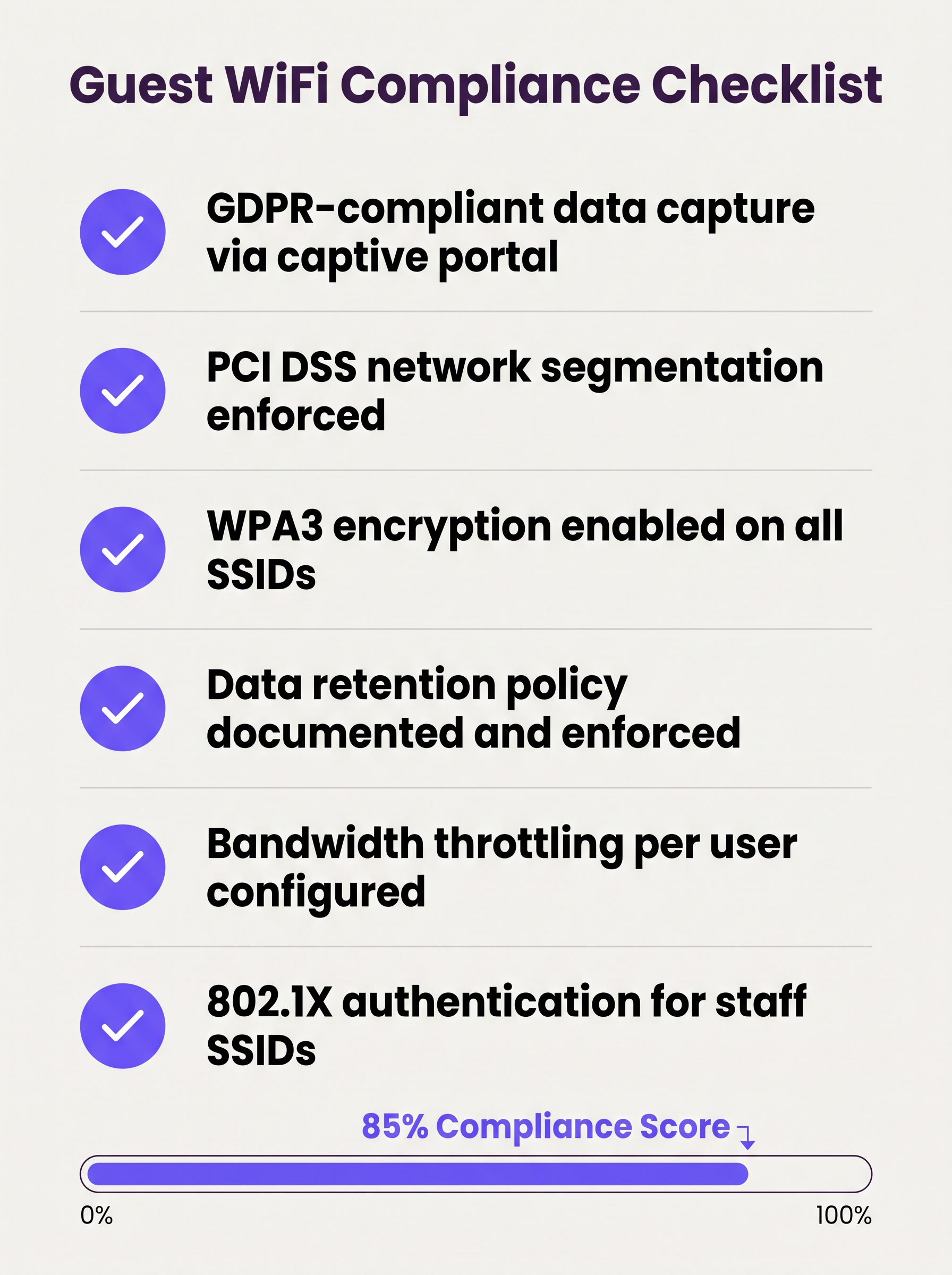
The following checklist represents the minimum viable security and compliance posture for any enterprise guest wifi deployment:
- VLAN segmentation enforced with default-deny firewall rules between guest and corporate networks.
- Layer 2 Client Isolation enabled on all guest SSIDs.
- WPA3 encryption configured on all new SSIDs; WPA2 retained only where legacy devices require it.
- Captive portal with GDPR-compliant consent flows deployed and tested.
- Per-user bandwidth limits configured at the controller level.
- DHCP lease times tuned to the expected dwell time of the venue.
- Data retention policy documented, with automated purging of guest records beyond the retention window.
- Wireless Intrusion Prevention System (WIPS) active to detect rogue APs.
- Regular penetration testing of the guest network perimeter, at minimum annually.
- 802.1X / RADIUS deployed for staff SSIDs, with RadSec securing authentication traffic in transit.
Troubleshooting & Risk Mitigation
Rogue Access Points
A rogue AP spoofing the guest SSID is a significant risk in large venues. Attackers set up a device broadcasting the same SSID name, capturing credentials and session data from unsuspecting users. Mitigation requires an active WIPS that monitors the RF environment and can automatically contain rogue devices. This is a mandatory control under PCI DSS 11.2.
MAC Address Randomisation
Modern mobile operating systems (iOS 14+, Android 10+) implement MAC address randomisation by default. This breaks MAC-based captive portal bypass logic (where returning users are recognised by their device MAC and skip re-authentication). Guest WiFi platforms must handle randomised MACs gracefully, typically by issuing session tokens or using profile-based authentication instead.
DHCP Pool Exhaustion
In venues with high transient footfall, DHCP pool exhaustion is a common and easily preventable failure. The fix is a combination of short lease times and adequately sized subnets. Monitor DHCP pool utilisation via SNMP or the cloud management platform and set alerts at 80% utilisation.
Captive Portal Certificate Errors
If the captive portal uses a self-signed certificate, users will receive browser security warnings that damage trust and reduce registration rates. Always use a certificate from a trusted Certificate Authority (CA) for the portal domain.
ROI & Business Impact
A well-deployed guest wifi system generates measurable returns across multiple business dimensions:
| Metric | Measurement Method | Typical Outcome |
|---|---|---|
| First-Party Data Capture | Portal registrations per month | 15–40% of unique visitors |
| Marketing Reach | Email list growth rate | Compound growth of 20–50% per year |
| Operational Insight | Footfall and dwell time analytics | Informs staffing, layout, and promotions |
| Compliance Risk Reduction | Audit findings | Zero PCI DSS findings related to network segmentation |
| IT Overhead | Centralised management vs. on-site config | 30–50% reduction in site visit frequency |
For organisations operating distributed estate — multiple retail branches, hotel properties, or transport hubs — the underlying WAN architecture also plays a role in ensuring reliable connectivity to cloud-hosted guest WiFi management platforms. Refer to The Core SD WAN Benefits for Modern Businesses for guidance on optimising WAN connectivity for cloud-managed network infrastructure.
The strategic value of guest WiFi extends well beyond IT. By treating the network as a data asset, organisations in Retail , Hospitality , Healthcare , and Transport can build verified first-party customer profiles, power loyalty programmes, and generate retail media revenue — transforming a utility expenditure into a measurable commercial asset.
Key Definitions
VLAN (Virtual Local Area Network)
A logical grouping of network devices that behave as if they are on an independent network segment, regardless of their physical location on the infrastructure.
The primary mechanism for separating guest traffic from corporate traffic on shared physical hardware. Mandatory for PCI DSS compliance.
Client Isolation
A wireless network security feature, configured at the access point level, that prevents devices connected to the same SSID from communicating directly with each other at Layer 2.
Essential for any public-facing SSID. Prevents a compromised guest device from scanning or attacking other guests on the same network.
Captive Portal
A web page that intercepts a user's initial HTTP/HTTPS request and redirects them to an authentication or registration page before granting internet access.
The standard onboarding mechanism for guest WiFi. Used to enforce Terms of Service, collect first-party data, and create a legal record of consent.
IEEE 802.1X
An IEEE standard for port-based network access control that provides an authentication framework for devices connecting to a LAN or WLAN, using a RADIUS server as the authentication backend.
The foundation of enterprise WiFi security. Used for staff SSIDs and advanced guest deployments using Passpoint or OpenRoaming.
WPA3
The third generation of the Wi-Fi Protected Access security protocol, introducing Simultaneous Authentication of Equals (SAE) for stronger key exchange and Opportunistic Wireless Encryption (OWE) for open networks.
The current encryption standard for all new WiFi deployments. Mandatory for any network handling sensitive data or subject to compliance frameworks.
OWE (Opportunistic Wireless Encryption)
A WPA3 feature that provides encryption on open (passwordless) WiFi networks by performing an anonymous Diffie-Hellman key exchange between the client and the access point.
Allows venues to offer open guest WiFi without exposing user traffic to passive eavesdropping. A significant security uplift over legacy open networks.
DHCP Lease Time
The duration for which a DHCP server assigns an IP address to a client device before the address must be renewed or released back to the pool.
Critical to manage in high-density, transient environments. Excessively long lease times cause IP pool exhaustion, preventing new devices from connecting.
Passpoint / Hotspot 2.0
A Wi-Fi Alliance certification programme based on the IEEE 802.11u standard that enables automatic, secure network discovery and authentication without requiring user interaction.
The technical foundation for seamless roaming experiences. Devices connect automatically using a provisioned credential profile, eliminating the captive portal for returning users.
WIPS (Wireless Intrusion Prevention System)
A security system that continuously monitors the radio frequency (RF) spectrum for unauthorised access points and client devices, and can automatically contain or block detected threats.
Required by PCI DSS 11.2. Detects rogue APs spoofing the guest SSID and alerts the security team to potential man-in-the-middle attacks.
PCI DSS
The Payment Card Industry Data Security Standard — a set of security standards designed to ensure that all companies that accept, process, store, or transmit credit card information maintain a secure environment.
Directly relevant to any venue that processes card payments. Network segmentation between the guest WiFi and the cardholder data environment is a mandatory control.
Worked Examples
A 200-room hotel currently operates a single flat network shared between guests, the property management system (PMS), and back-office workstations. The IT director has been told they need to achieve PCI DSS compliance before the next audit. Where do they start?
The immediate priority is network segmentation. The IT director should provision three VLANs: VLAN 10 (Corporate) for the PMS, back-office workstations, and staff devices; VLAN 20 (Guest) for visitor WiFi; and VLAN 30 (IoT) for smart TVs, thermostats, and door lock controllers. The firewall must be configured to block all inter-VLAN routing between VLAN 20 and VLAN 10, and between VLAN 30 and VLAN 10. The guest SSID should be configured with WPA3-Personal (or OWE for an open SSID), client isolation enabled, and a captive portal integrated with the hotel's loyalty CRM. Bandwidth should be capped at 10 Mbps per user, with a premium tier (25 Mbps) available for loyalty programme members. A WIPS should be activated to monitor for rogue APs. The data retention policy for portal registrations should be set to 24 months, with automated purging thereafter.
A large retail chain with 150 stores is experiencing poor guest WiFi performance during peak trading hours (12pm–2pm and 5pm–7pm). Captive portal registration rates have dropped by 35% compared to six months ago, and the IT team is receiving complaints from store managers. The internet backhaul at each site is 500 Mbps — well above what should be needed.
The issue is almost certainly not backhaul capacity but a combination of DHCP pool exhaustion, airtime contention, and the absence of per-user rate limiting. The remediation steps are: (1) Reduce DHCP lease times from the default 24 hours to 20 minutes to ensure IP addresses are recycled quickly as customers move through the store. (2) Expand the DHCP scope from a /24 (254 addresses) to a /22 (1022 addresses) to accommodate peak concurrent connections. (3) Implement per-user rate limiting at 3 Mbps to prevent any single device from monopolising airtime. (4) Enable Layer 7 application control to block video streaming services during peak hours. (5) Review AP channel utilisation and enable band steering to push capable devices to the 5 GHz or 6 GHz band, reducing congestion on 2.4 GHz. (6) Ensure the captive portal redirect is using HTTPS with a valid certificate to eliminate browser security warnings that deter registrations.
Practice Questions
Q1. A hospital IT director is planning to offer free WiFi to patients and visitors across a 500-bed facility. They are concerned about HIPAA compliance and the risk of malware spreading from guest devices to networked medical equipment. What architecture and controls should they implement?
Hint: Consider how network traffic is separated across three distinct user groups: patients/visitors, clinical staff, and medical devices. Think about what happens if a guest device is infected.
View model answer
The IT director must implement a minimum of three VLANs: Guest (patients and visitors), Clinical Staff, and Medical IoT. The guest VLAN must terminate at a firewall with default-deny rules blocking all routing to the clinical and IoT VLANs. Layer 2 Client Isolation must be enabled on the guest SSID to prevent guest devices from communicating with each other or with any medical device. A captive portal with ToS acceptance should be deployed. The medical IoT VLAN should be on a separate physical or logically isolated network segment with strict access controls. Regular WIPS scanning should be active to detect rogue APs. This architecture ensures that even a fully compromised guest device has no path to clinical systems or medical equipment.
Q2. A stadium CTO reports that during halftime at a sold-out event (60,000 attendees), the guest WiFi becomes completely unusable. Users cannot connect at all — they receive 'unable to obtain IP address' errors. The internet backhaul is a 10 Gbps dedicated fibre connection. What is the most likely cause and how should it be resolved?
Hint: The backhaul is not the bottleneck. Think about what happens at the IP address allocation layer when 60,000 devices connect simultaneously after being in an area with no WiFi coverage for 45 minutes.
View model answer
The root cause is DHCP pool exhaustion. With 60,000 devices attempting to connect simultaneously, the DHCP server is running out of available IP addresses to assign. The resolution requires two changes: (1) Reduce the DHCP lease time to 15–20 minutes, ensuring that IP addresses from devices that have left the coverage area are recycled quickly. (2) Expand the DHCP scope to a /19 or /18 subnet to provide sufficient addresses for the peak concurrent connection count. Additionally, the CTO should review AP density and channel planning to ensure adequate airtime capacity, and consider deploying 802.11ax (Wi-Fi 6) APs which handle high client density significantly more efficiently than previous generations.
Q3. A retail chain wants to capture customer email addresses via a captive portal to build a marketing database, but their marketing team reports that repeat customers are complaining about having to re-register every visit. The IT team wants to fix this without removing the portal entirely. What is the recommended approach?
Hint: How can the system recognise a returning device without requiring the user to fill in a form again? Consider what identifier is available at the network layer.
View model answer
The recommended approach is MAC address caching combined with a session token. On the first visit, the user completes the portal registration and their device MAC address is stored against their profile in the guest WiFi platform. On subsequent visits, the captive portal system checks the connecting device's MAC address against the stored database. If a match is found, the user is authenticated silently in the background and redirected directly to the internet, bypassing the registration form. The visit is still logged for analytics purposes. It is important to note that MAC address randomisation on modern iOS and Android devices may interfere with this approach — in those cases, the platform should fall back to a session cookie or prompt for a one-click email re-confirmation rather than the full registration form.
Q4. A conference centre IT manager is preparing for a major three-day industry event with 5,000 attendees. The event organiser wants to offer tiered WiFi: free basic access for all attendees and a premium paid tier for exhibitors requiring high-bandwidth video conferencing. How should this be architected?
Hint: Think about how to enforce different bandwidth policies for different user groups on the same physical infrastructure, and how to authenticate each tier.
View model answer
The architecture requires two separate SSIDs mapped to two separate VLANs: a 'Conference-Guest' SSID for free basic access (rate limited to 2 Mbps per user, with video streaming blocked via Layer 7 filtering) and a 'Conference-Premium' SSID for paid exhibitor access (rate limited to 25 Mbps per user, with video conferencing applications prioritised via QoS). The premium SSID should use a voucher-based or 802.1X authentication mechanism to restrict access to paying exhibitors. Both VLANs must be isolated from the venue's corporate network. The premium VLAN should be allocated a dedicated internet circuit or MPLS path to guarantee throughput, independent of the general attendee traffic.
Continue reading in this series
Managing Bandwidth for Staff WiFi: Shaping, QoS and Reducing Traffic
This guide details practical methods for managing bandwidth for staff WiFi in enterprise venues. It covers traffic shaping, QoS implementation, and how deploying Purple Shield reduces network load without requiring infrastructure upgrades.
Managing Bandwidth for Staff WiFi: Shaping, QoS and Reducing Traffic
This guide details practical methods for managing bandwidth for staff WiFi in enterprise venues. It covers traffic shaping, QoS implementation, and how deploying Purple Shield reduces network load without requiring infrastructure upgrades.
How to Reduce the Number of WiFi SSIDs Using Per-Device PSK (iPSK, DPSK, MPSK)
This authoritative technical reference guide explains how IT teams can eliminate WiFi performance degradation caused by SSID beacon overhead by collapsing multiple purpose-built networks into a single SSID using per-device PSK (xPSK). It covers the vendor landscape across Cisco iPSK, HPE Aruba MPSK, Ruckus DPSK, Juniper Mist PPSK, and Ubiquiti UniFi PPSK, with practical implementation guidance on dynamic VLAN assignment, IoT onboarding, and PCI DSS compliance. Venue operators in hospitality, retail, stadiums, and public-sector organisations will find actionable architecture guidance and real-world worked examples.