
Best practice per il WiFi Ospiti: Sicurezza, Prestazioni e Conformità
Questa guida completa delinea le decisioni operative critiche necessarie per implementare una rete WiFi per ospiti sicura e ad alte prestazioni in tutte le sedi aziendali. Fornisce framework attuabili per la segmentazione della rete, l'autenticazione, la gestione della larghezza di banda e la conformità normativa — coprendo PCI DSS, GDPR e IEEE 802.1X — per aiutare i team IT a mitigare i rischi e a fornire un valore aziendale misurabile. La piattaforma di WiFi per ospiti e analisi di Purple è citata in tutto il testo come veicolo di implementazione concreto per ogni best practice.
Ascolta questa guida
Visualizza trascrizione del podcast

Sintesi Esecutiva
L'implementazione di una rete WiFi per ospiti in un moderno ambiente aziendale — che si tratti di uno stadio, una catena di negozi, una struttura ricettiva o una struttura del settore pubblico — non è più una semplice decisione infrastrutturale. Comporta implicazioni dirette per la postura di sicurezza, la conformità normativa e la reputazione del marchio. Per i responsabili IT, gli architetti di rete e i CTO, la sfida è bilanciare una connettività ospite senza interruzioni con controlli robusti che proteggano le risorse aziendali e soddisfino gli auditor.
Questa guida fornisce un framework pratico e indipendente dal fornitore per l'implementazione delle best practice del WiFi per ospiti, con indicazioni concrete sulla segmentazione della rete, i meccanismi di autenticazione, la gestione della larghezza di banda e la conservazione dei dati. Si basa su standard consolidati tra cui IEEE 802.1X, WPA3, PCI DSS e GDPR. Ove pertinente, fa riferimento alla piattaforma Guest WiFi di Purple come veicolo di implementazione, e alle sue capacità di WiFi Analytics come meccanismo per convertire gli investimenti infrastrutturali in business intelligence attuabile.
Approfondimento Tecnico
1. Segmentazione della Rete: La Fondazione Non Negoziabile
Il controllo più critico in qualsiasi configurazione WiFi per ospiti è la rigorosa segmentazione della rete. Il traffico degli ospiti deve essere logicamente — e ove possibile fisicamente — isolato dalla LAN aziendale. Senza questo, un dispositivo ospite compromesso avrebbe un percorso diretto verso i sistemi interni, inclusi i terminali punto vendita, i database HR e la tecnologia operativa.
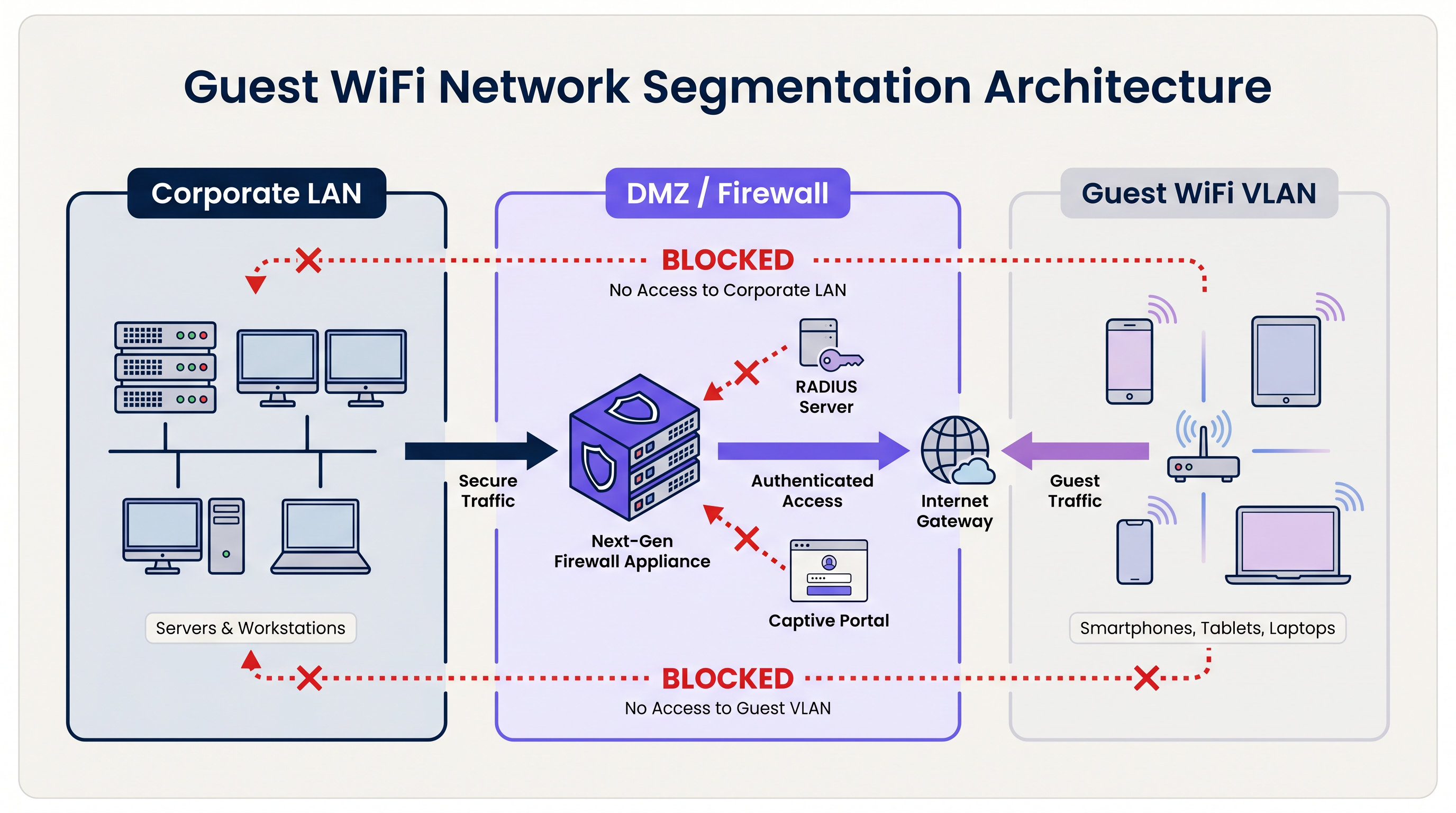
L'architettura standard utilizza Virtual Local Area Networks (VLAN) dedicate. L'SSID ospite è associato a una VLAN specifica, che termina in un firewall perimetrale o in una DMZ. Il firewall applica una politica di default-deny: è consentito solo il traffico Internet in uscita (TCP 80, 443 e UDP 53 per DNS). Tutto il routing tra la VLAN ospite e qualsiasi sottorete interna è esplicitamente bloccato.
Per le organizzazioni soggette a PCI DSS, questa segmentazione è obbligatoria. Il Payment Card Industry Data Security Standard richiede che l'ambiente dei dati del titolare della carta (CDE) sia completamente isolato da qualsiasi rete pubblica. Il mancato raggiungimento di questo obiettivo comporterà un audit fallito da parte di un Qualified Security Assessor (QSA).
Oltre alla segmentazione VLAN, l'isolamento client di Livello 2 deve essere abilitato su ogni SSID ospite. Questo impedisce ai dispositivi sulla stessa rete wireless di comunicare direttamente tra loro, mitigando il rischio di attacchi laterali tra i dispositivi ospiti — un controllo critico in ambienti come l' Hospitality dove gli ospiti condividono lo stesso spazio fisico.
2. Autenticazione e Controllo degli Accessi
Il modello di autenticazione scelto per un sistema WiFi per ospiti determina sia il livello di sicurezza che la qualità dell'esperienza dell'ospite.
Chiavi Pre-Condivise (PSK): WPA2/WPA3-Personal con una password condivisa è il modello di implementazione più semplice ma offre la postura di sicurezza più debole per gli ambienti aziendali. Le PSK non forniscono responsabilità individuale, non possono essere revocate per utente e sono frequentemente condivise oltre il pubblico previsto.
Captive Portal: Lo standard di settore per le sedi pubbliche. Un Captive Portal intercetta la richiesta HTTP iniziale dell'ospite e lo reindirizza a una landing page personalizzata. L'ospite deve accettare i Termini di Servizio (ToS) prima che l'accesso sia concesso. Questo crea una registrazione legale del consenso, abilita la raccolta di dati di prima parte (e-mail, social login, dati di moduli) e consente alla sede di applicare politiche di utilizzo accettabile. Piattaforme come il Guest WiFi di Purple forniscono un Captive Portal completamente gestito con flussi di consenso GDPR integrati e integrazione CRM.
Autenticazione Basata su Profilo (Passpoint / OpenRoaming): Il modello di implementazione più avanzato. Utilizzando IEEE 802.1X e WPA3-Enterprise, i dispositivi si autenticano usando un profilo di credenziali piuttosto che una password. L'utente si registra una volta — tipicamente tramite un'app mobile o un Captive Portal — e il suo dispositivo si connette automaticamente e in modo sicuro nelle visite successive. Purple agisce come fornitore di identità gratuito per OpenRoaming sotto la licenza Connect, consentendo alle sedi di offrire connettività sicura e senza interruzioni su larga scala. Per una ripartizione tecnica dettagliata della protezione del traffico di autenticazione RADIUS che è alla base di 802.1X, fare riferimento alla nostra guida su RadSec: Securing RADIUS Authentication Traffic with TLS .
3. Standard di Crittografia
Tutte le nuove implementazioni WiFi per ospiti dovrebbero puntare a WPA3. I miglioramenti chiave rispetto a WPA2 sono significativi:
| Caratteristica | WPA2 | WPA3 |
|---|---|---|
| Scambio Chiavi | Handshake a 4 vie (vulnerabile a KRACK) | Autenticazione Simultanea degli Eguali (SAE) |
| Crittografia Rete Aperta | Nessuna | Crittografia Wireless Opportunistica (OWE) |
| Segretezza in Avanti | No | Sì |
| Resistenza a Forza Bruta | Bassa | Alta (SAE limita gli attacchi offline) |
Per le reti ospiti aperte in particolare, la Crittografia Wireless Opportunistica (OWE) di WPA3 è un miglioramento trasformativo. OWE crittografa il traffico tra ogni client e l'AP senza richiedere una password, proteggendo gli utenti dall'intercettazione passiva su quello che altrimenti sarebbe un canale non crittografato.
4. Gestione della Larghezza di Banda e QoS
In ambienti ad alta densità — stadi, centri congressi, aree commerciali — la gestione della larghezza di banda è importante quanto la sicurezza. Senza controlli, un piccolo numero di utenti può consumare la maggior parte della larghezza di banda disponibile, degradando l'esperienza per tutti.
I controlli chiave includono:
- Limitazione della Velocità per Utente: Limita i singoli utenti a un defthroughput limitato (ad esempio, 5 Mbps in download / 2 Mbps in upload). Questo viene configurato a livello del controller LAN wireless (WLC) o della piattaforma di gestione cloud.
- Controllo Applicazioni Layer 7: Blocca o deprioritizza le applicazioni ad alta larghezza di banda come la condivisione di file peer-to-peer, i servizi di streaming video e i download di aggiornamenti software durante le ore di punta.
- Timeout di Sessione: Configura timeout di inattività (ad esempio, 30 minuti) e timeout di sessione assoluti (ad esempio, 4 ore) per recuperare indirizzi IP e tempo di trasmissione dai client inattivi.
- Gestione del Lease DHCP: In ambienti transitori come gli hub Transport e gli stadi, imposta i tempi di lease DHCP a 15-30 minuti e prevedi subnet di grandi dimensioni (/21 o /20) per prevenire l'esaurimento del pool durante i picchi di domanda.
Guida all'Implementazione
Fase 1: Progettazione dell'Architettura
Inizia con una revisione della topologia di rete. Identifica tutte le VLAN esistenti e conferma che una VLAN guest dedicata possa essere predisposta senza routing verso alcuna subnet interna. Definisci il set di regole del firewall e conferma che l'isolamento del client sia supportato dall'hardware AP scelto.
Fase 2: Configurazione Hardware e Controller
Seleziona AP di livello enterprise con supporto per WPA3, 802.11ax (Wi-Fi 6) o 802.11be (Wi-Fi 6E) per ambienti ad alta densità e controller gestiti tramite cloud per l'applicazione centralizzata delle policy. Configura l'SSID guest, collegalo alla VLAN guest e abilita l'isolamento del client. Imposta limiti di velocità per utente e timeout di sessione.
Fase 3: Implementazione del Captive Portal
Integra il WLC o la piattaforma AP cloud con un servizio Guest WiFi gestito. Configura il portale con elementi di branding, accettazione dei ToS e campi di acquisizione dati. Assicurati che il meccanismo di consenso sia conforme al GDPR: opt-in esplicito per le comunicazioni di marketing, un'informativa sulla privacy chiara e una politica di conservazione dei dati documentata. Per gli ambienti Retail e Healthcare , assicurati che i ToS del portale includano clausole di utilizzo accettabile appropriate al tipo di struttura.
Fase 4: Monitoraggio e Analisi
Una volta implementata, collega la piattaforma a una dashboard di WiFi Analytics . Configura avvisi per il rilevamento di AP non autorizzati, soglie di utilizzo del pool DHCP e modelli di traffico insoliti. Rivedi regolarmente i dati di affluenza e tempo di permanenza per informare le decisioni operative.
Migliori Pratiche
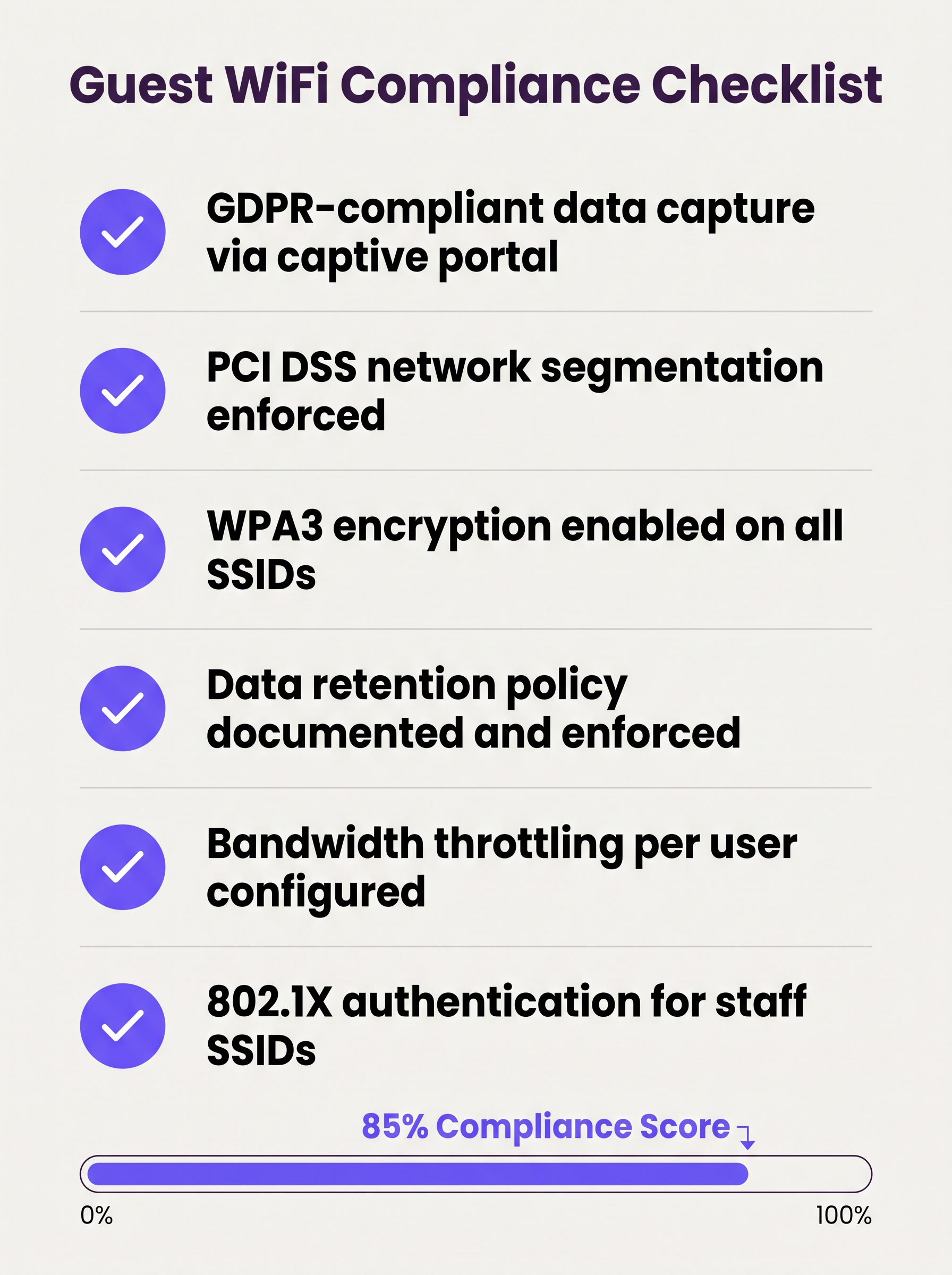
La seguente checklist rappresenta la postura minima di sicurezza e conformità per qualsiasi implementazione di guest WiFi aziendale:
- Segmentazione VLAN applicata con regole firewall di default-deny tra reti guest e aziendali.
- Isolamento client Layer 2 abilitato su tutti gli SSID guest.
- Crittografia WPA3 configurata su tutti i nuovi SSID; WPA2 mantenuto solo dove richiesto da dispositivi legacy.
- Captive portal con consenso conforme al GDPR implementato e testato.
- Limiti di banda per utente configurati a livello di controller.
- Tempi di lease DHCP ottimizzati in base al tempo di permanenza previsto nella struttura.
- Politica di conservazione dei dati documentata, con eliminazione automatica dei record guest oltre la finestra di conservazione.
- Wireless Intrusion Prevention System (WIPS) attivo per rilevare AP non autorizzati.
- Penetration testing regolare del perimetro della rete guest, almeno annualmente.
- 802.1X / RADIUS implementato per gli SSID del personale, con RadSec che protegge il traffico di autenticazione in transito.
Risoluzione dei Problemi e Mitigazione dei Rischi
Access Point Non Autorizzati
Un AP non autorizzato che simula l'SSID guest è un rischio significativo in grandi strutture. Gli attaccanti configurano un dispositivo che trasmette lo stesso nome SSID, catturando credenziali e dati di sessione da utenti ignari. La mitigazione richiede un WIPS attivo che monitora l'ambiente RF e può contenere automaticamente i dispositivi non autorizzati. Questo è un controllo obbligatorio ai sensi del PCI DSS 11.2.
Randomizzazione dell'Indirizzo MAC
I moderni sistemi operativi mobili (iOS 14+, Android 10+) implementano la randomizzazione dell'indirizzo MAC per impostazione predefinita. Questo interrompe la logica di bypass del captive portal basata su MAC (dove gli utenti di ritorno vengono riconosciuti dal MAC del loro dispositivo e saltano la riautenticazione). Le piattaforme Guest WiFi devono gestire i MAC randomizzati in modo elegante, tipicamente emettendo token di sessione o utilizzando l'autenticazione basata su profilo.
Esaurimento del Pool DHCP
In strutture con un'elevata affluenza transitoria, l'esaurimento del pool DHCP è un guasto comune e facilmente prevenibile. La soluzione è una combinazione di tempi di lease brevi e subnet di dimensioni adeguate. Monitora l'utilizzo del pool DHCP tramite SNMP o la piattaforma di gestione cloud e imposta avvisi all'80% di utilizzo.
Errori del Certificato del Captive Portal
Se il captive portal utilizza un certificato autofirmato, gli utenti riceveranno avvisi di sicurezza del browser che danneggiano la fiducia e riducono i tassi di registrazione. Utilizza sempre un certificato di un'Autorità di Certificazione (CA) fidata per il dominio del portale.
ROI e Impatto Commerciale
Un sistema guest WiFi ben implementato genera ritorni misurabili su molteplici dimensioni aziendali:
| Metrica | Metodo di Misurazione | Risultato Tipico |
|---|---|---|
| Acquisizione Dati di Prima Parte | Registrazioni al portale al mese | 15–40% dei visitatori unici |
| Portata di Marketing | Tasso di crescita della lista email | Crescita composta del 20–50% all'anno |
| Insight Operativi | Analisi di affluenza e tempo di permanenza | Informa il personale, il layout e le promozioni |
| Riduzione del Rischio di Conformità | Risultati degli audit | Zero riscontri PCI DSS relativi alla segmentazione della rete |
| Overhead IT | Gestione centralizzata vs. configurazione in loco | Riduzione del 30–50% della frequenza delle visite in loco |
Per le organizzazioni che operano con proprietà distribuite — più filiali retail, proprietà alberghiere o hub di trasporto — l'architettura WAN sottostante gioca anche un ruolo nel garantire una connettività affidabile alle piattaforme di gestione guest WiFi ospitate nel cloud. Fai riferimento a The Core SD WAN Benefits for Modern Businesses per guida all'ottimizzazione della connettività WAN per l'infrastruttura di rete gestita in cloud.
Il valore strategico del guest WiFi si estende ben oltre l'IT. Trattando la rete come un asset di dati, le organizzazioni in Vendita al dettaglio , Ospitalità , Sanità e Trasporti possono costruire profili cliente verificati di prima parte, alimentare programmi fedeltà e generare ricavi da media retail — trasformando una spesa di utilità in un asset commerciale misurabile.
Definizioni chiave
VLAN (Virtual Local Area Network)
A logical grouping of network devices that behave as if they are on an independent network segment, regardless of their physical location on the infrastructure.
The primary mechanism for separating guest traffic from corporate traffic on shared physical hardware. Mandatory for PCI DSS compliance.
Client Isolation
A wireless network security feature, configured at the access point level, that prevents devices connected to the same SSID from communicating directly with each other at Layer 2.
Essential for any public-facing SSID. Prevents a compromised guest device from scanning or attacking other guests on the same network.
Captive Portal
A web page that intercepts a user's initial HTTP/HTTPS request and redirects them to an authentication or registration page before granting internet access.
The standard onboarding mechanism for guest WiFi. Used to enforce Terms of Service, collect first-party data, and create a legal record of consent.
IEEE 802.1X
An IEEE standard for port-based network access control that provides an authentication framework for devices connecting to a LAN or WLAN, using a RADIUS server as the authentication backend.
The foundation of enterprise WiFi security. Used for staff SSIDs and advanced guest deployments using Passpoint or OpenRoaming.
WPA3
The third generation of the Wi-Fi Protected Access security protocol, introducing Simultaneous Authentication of Equals (SAE) for stronger key exchange and Opportunistic Wireless Encryption (OWE) for open networks.
The current encryption standard for all new WiFi deployments. Mandatory for any network handling sensitive data or subject to compliance frameworks.
OWE (Opportunistic Wireless Encryption)
A WPA3 feature that provides encryption on open (passwordless) WiFi networks by performing an anonymous Diffie-Hellman key exchange between the client and the access point.
Allows venues to offer open guest WiFi without exposing user traffic to passive eavesdropping. A significant security uplift over legacy open networks.
DHCP Lease Time
The duration for which a DHCP server assigns an IP address to a client device before the address must be renewed or released back to the pool.
Critical to manage in high-density, transient environments. Excessively long lease times cause IP pool exhaustion, preventing new devices from connecting.
Passpoint / Hotspot 2.0
A Wi-Fi Alliance certification programme based on the IEEE 802.11u standard that enables automatic, secure network discovery and authentication without requiring user interaction.
The technical foundation for seamless roaming experiences. Devices connect automatically using a provisioned credential profile, eliminating the captive portal for returning users.
WIPS (Wireless Intrusion Prevention System)
A security system that continuously monitors the radio frequency (RF) spectrum for unauthorized access points and client devices, and can automatically contain or block detected threats.
Required by PCI DSS 11.2. Detects rogue APs spoofing the guest SSID and alerts the security team to potential man-in-the-middle attacks.
PCI DSS
The Payment Card Industry Data Security Standard — a set of security standards designed to ensure that all companies that accept, process, store, or transmit credit card information maintain a secure environment.
Directly relevant to any venue that processes card payments. Network segmentation between the guest WiFi and the cardholder data environment is a mandatory control.
Esempi pratici
A 200-room hotel currently operates a single flat network shared between guests, the property management system (PMS), and back-office workstations. The IT director has been told they need to achieve PCI DSS compliance before the next audit. Where do they start?
The immediate priority is network segmentation. The IT director should provision three VLANs: VLAN 10 (Corporate) for the PMS, back-office workstations, and staff devices; VLAN 20 (Guest) for visitor WiFi; and VLAN 30 (IoT) for smart TVs, thermostats, and door lock controllers. The firewall must be configured to block all inter-VLAN routing between VLAN 20 and VLAN 10, and between VLAN 30 and VLAN 10. The guest SSID should be configured with WPA3-Personal (or OWE for an open SSID), client isolation enabled, and a captive portal integrated with the hotel's loyalty CRM. Bandwidth should be capped at 10 Mbps per user, with a premium tier (25 Mbps) available for loyalty programme members. A WIPS should be activated to monitor for rogue APs. The data retention policy for portal registrations should be set to 24 months, with automated purging thereafter.
A large retail chain with 150 stores is experiencing poor guest WiFi performance during peak trading hours (12pm–2pm and 5pm–7pm). Captive portal registration rates have dropped by 35% compared to six months ago, and the IT team is receiving complaints from store managers. The internet backhaul at each site is 500 Mbps — well above what should be needed.
The issue is almost certainly not backhaul capacity but a combination of DHCP pool exhaustion, airtime contention, and the absence of per-user rate limiting. The remediation steps are: (1) Reduce DHCP lease times from the default 24 hours to 20 minutes to ensure IP addresses are recycled quickly as customers move through the store. (2) Expand the DHCP scope from a /24 (254 addresses) to a /22 (1022 addresses) to accommodate peak concurrent connections. (3) Implement per-user rate limiting at 3 Mbps to prevent any single device from monopolising airtime. (4) Enable Layer 7 application control to block video streaming services during peak hours. (5) Review AP channel utilisation and enable band steering to push capable devices to the 5 GHz or 6 GHz band, reducing congestion on 2.4 GHz. (6) Ensure the captive portal redirect is using HTTPS with a valid certificate to eliminate browser security warnings that deter registrations.
Domande di esercitazione
Q1. A hospital IT director is planning to offer free WiFi to patients and visitors across a 500-bed facility. They are concerned about HIPAA compliance and the risk of malware spreading from guest devices to networked medical equipment. What architecture and controls should they implement?
Suggerimento: Consider how network traffic is separated across three distinct user groups: patients/visitors, clinical staff, and medical devices. Think about what happens if a guest device is infected.
Visualizza risposta modello
The IT director must implement a minimum of three VLANs: Guest (patients and visitors), Clinical Staff, and Medical IoT. The guest VLAN must terminate at a firewall with default-deny rules blocking all routing to the clinical and IoT VLANs. Layer 2 Client Isolation must be enabled on the guest SSID to prevent guest devices from communicating with each other or with any medical device. A captive portal with ToS acceptance should be deployed. The medical IoT VLAN should be on a separate physical or logically isolated network segment with strict access controls. Regular WIPS scanning should be active to detect rogue APs. This architecture ensures that even a fully compromised guest device has no path to clinical systems or medical equipment.
Q2. A stadium CTO reports that during halftime at a sold-out event (60,000 attendees), the guest WiFi becomes completely unusable. Users cannot connect at all — they receive 'unable to obtain IP address' errors. The internet backhaul is a 10 Gbps dedicated fibre connection. What is the most likely cause and how should it be resolved?
Suggerimento: The backhaul is not the bottleneck. Think about what happens at the IP address allocation layer when 60,000 devices connect simultaneously after being in an area with no WiFi coverage for 45 minutes.
Visualizza risposta modello
The root cause is DHCP pool exhaustion. With 60,000 devices attempting to connect simultaneously, the DHCP server is running out of available IP addresses to assign. The resolution requires two changes: (1) Reduce the DHCP lease time to 15–20 minutes, ensuring that IP addresses from devices that have left the coverage area are recycled quickly. (2) Expand the DHCP scope to a /19 or /18 subnet to provide sufficient addresses for the peak concurrent connection count. Additionally, the CTO should review AP density and channel planning to ensure adequate airtime capacity, and consider deploying 802.11ax (Wi-Fi 6) APs which handle high client density significantly more efficiently than previous generations.
Q3. A retail chain wants to capture customer email addresses via a captive portal to build a marketing database, but their marketing team reports that repeat customers are complaining about having to re-register every visit. The IT team wants to fix this without removing the portal entirely. What is the recommended approach?
Suggerimento: How can the system recognise a returning device without requiring the user to fill in a form again? Consider what identifier is available at the network layer.
Visualizza risposta modello
The recommended approach is MAC address caching combined with a session token. On the first visit, the user completes the portal registration and their device MAC address is stored against their profile in the guest WiFi platform. On subsequent visits, the captive portal system checks the connecting device's MAC address against the stored database. If a match is found, the user is authenticated silently in the background and redirected directly to the internet, bypassing the registration form. The visit is still logged for analytics purposes. It is important to note that MAC address randomisation on modern iOS and Android devices may interfere with this approach — in those cases, the platform should fall back to a session cookie or prompt for a one-click email re-confirmation rather than the full registration form.
Q4. A conference centre IT manager is preparing for a major three-day industry event with 5,000 attendees. The event organiser wants to offer tiered WiFi: free basic access for all attendees and a premium paid tier for exhibitors requiring high-bandwidth video conferencing. How should this be architected?
Suggerimento: Think about how to enforce different bandwidth policies for different user groups on the same physical infrastructure, and how to authenticate each tier.
Visualizza risposta modello
The architecture requires two separate SSIDs mapped to two separate VLANs: a 'Conference-Guest' SSID for free basic access (rate limited to 2 Mbps per user, with video streaming blocked via Layer 7 filtering) and a 'Conference-Premium' SSID for paid exhibitor access (rate limited to 25 Mbps per user, with video conferencing applications prioritised via QoS). The premium SSID should use a voucher-based or 802.1X authentication mechanism to restrict access to paying exhibitors. Both VLANs must be isolated from the venue's corporate network. The premium VLAN should be allocated a dedicated internet circuit or MPLS path to guarantee throughput, independent of the general attendee traffic.
Continua a leggere questa serie
Cos'è una Probe Request? Capire come i dispositivi scoprono le reti
Questa guida di riferimento tecnico offre un'analisi approfondita delle probe request IEEE 802.11, della scansione attiva versus passiva e dell'impatto della randomizzazione MAC sull'analisi dei dati dei luoghi. Fornisce strategie di implementazione attuabili per gli architetti di rete al fine di ottimizzare le implementazioni ad alta densità, mitigare le probe storm e garantire una raccolta dati accurata e conforme al GDPR utilizzando livelli di identità autenticati.
Come Risolvere il WiFi Lento Senza Aggiornare il Tuo Piano Internet
Una guida tecnica di riferimento completa per IT managers e network architects sull'ottimizzazione delle prestazioni WiFi aziendali senza aumentare la ISP bandwidth. Copre RF tuning, la gestione della densità dei client, l'implementazione di QoS e come sfruttare WiFi analytics per diagnosticare e risolvere i colli di bottiglia.
La Checklist per la Migrazione da NAC Legacy a NAC Cloud-Native
Questa guida tecnica di riferimento autorevole fornisce una checklist strutturata in tre fasi per la migrazione da Network Access Control (NAC) legacy a un'architettura cloud-native. Fornisce a manager IT e architetti di rete strategie attuabili per gestire l'integrazione dell'identità, la parità delle policy e la conformità senza interrompere le operazioni della sede.