
Best Practices für Gast-WiFi: Sicherheit, Leistung und Compliance
Dieser umfassende Leitfaden skizziert die entscheidenden operativen Entscheidungen, die für die Bereitstellung eines sicheren, leistungsstarken Gast-WiFi-Netzwerks in Unternehmensumgebungen erforderlich sind. Er bietet umsetzbare Frameworks für Netzwerksegmentierung, Authentifizierung, Bandbreitenmanagement und die Einhaltung gesetzlicher Vorschriften – einschließlich PCI DSS, GDPR und IEEE 802.1X –, um IT-Teams dabei zu unterstützen, Risiken zu mindern und messbaren Geschäftswert zu liefern. Die Gast-WiFi- und Analyseplattform von Purple wird durchgehend als konkretes Implementierungsvehikel für jede Best Practice referenziert.
Diesen Leitfaden anhören
Podcast-Transkript ansehen

Zusammenfassung für die Geschäftsleitung
Die Bereitstellung eines Gast-WiFi-Netzwerks in einer modernen Unternehmensumgebung – sei es ein Stadion, eine Einzelhandelskette, ein Hotel oder eine Einrichtung des öffentlichen Sektors – ist keine einfache Infrastrukturentscheidung mehr. Sie hat direkte Auswirkungen auf die Sicherheitslage, die Einhaltung gesetzlicher Vorschriften und den Markenruf. Für IT-Manager, Netzwerkarchitekten und CTOs besteht die Herausforderung darin, nahtlose Gastkonnektivität mit robusten Kontrollen in Einklang zu bringen, die Unternehmenswerte schützen und Auditoren zufriedenstellen.
Dieser Leitfaden bietet ein praktisches, herstellerneutrales Framework zur Implementierung von Best Practices für Gast-WiFi, mit konkreten Anleitungen zu Netzwerksegmentierung, Authentifizierungsmechanismen, Bandbreitenmanagement und Datenaufbewahrung. Er stützt sich auf etablierte Standards wie IEEE 802.1X, WPA3, PCI DSS und GDPR. Wo relevant, verweist er auf die Guest WiFi -Plattform von Purple als Bereitstellungsvehikel und auf deren WiFi Analytics -Funktionen als Mechanismus zur Umwandlung von Infrastrukturinvestitionen in umsetzbare Business Intelligence.
Technischer Deep-Dive
1. Netzwerksegmentierung: Die unverzichtbare Grundlage
Die wichtigste Kontrolle in jeder Gast-WiFi-Einrichtung ist die strikte Netzwerksegmentierung. Der Gast-Traffic muss logisch – und wo möglich physisch – vom Unternehmens-LAN isoliert werden. Ohne dies hätte ein kompromittiertes Gastgerät direkten Zugriff auf interne Systeme, einschließlich Kassenterminals, HR-Datenbanken und Betriebstechnologie.
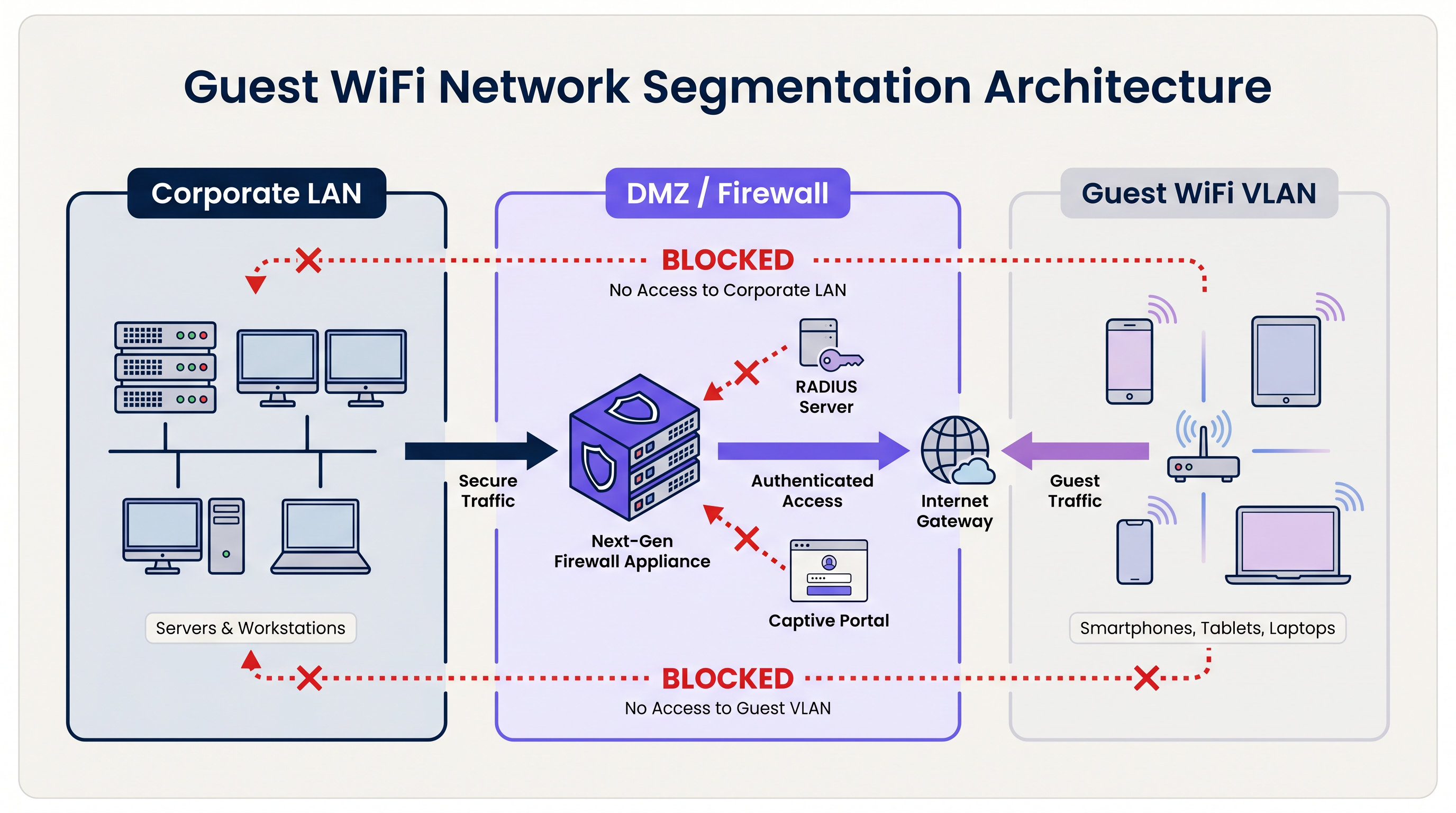
Die Standardarchitektur verwendet dedizierte Virtual Local Area Networks (VLANs). Die Gast-SSID ist an ein bestimmtes VLAN gebunden, das an einer Perimeter-Firewall oder DMZ endet. Die Firewall erzwingt eine Default-Deny-Richtlinie: Nur ausgehender Internet-Traffic (TCP 80, 443 und UDP 53 für DNS) ist erlaubt. Jegliches Routing zwischen dem Gast-VLAN und internen Subnetzen ist explizit blockiert.
Für Organisationen, die dem PCI DSS unterliegen, ist diese Segmentierung obligatorisch. Der Payment Card Industry Data Security Standard verlangt, dass die Umgebung für Kartendaten (CDE) vollständig von jedem öffentlichen Netzwerk isoliert ist. Ein Versäumnis, dies zu erreichen, führt zu einem fehlgeschlagenen Audit durch einen Qualified Security Assessor (QSA).
Über die VLAN-Segmentierung hinaus muss die Layer-2-Client-Isolation auf jeder Gast-SSID aktiviert werden. Dies verhindert, dass Geräte im selben drahtlosen Netzwerk direkt miteinander kommunizieren, und mindert das Risiko lateraler Angriffe zwischen Gastgeräten – eine kritische Kontrolle in Umgebungen wie dem Gastgewerbe , wo Gäste denselben physischen Raum teilen.
2. Authentifizierung und Zugriffskontrolle
Das für ein Gast-WiFi-System gewählte Authentifizierungsmodell bestimmt sowohl das Sicherheitsniveau als auch die Qualität des Gasterlebnisses.
Pre-Shared Keys (PSKs): WPA2/WPA3-Personal mit einem gemeinsamen Passwort ist das einfachste Bereitstellungsmodell, bietet jedoch die schwächste Sicherheitslage für Unternehmensumgebungen. PSKs bieten keine individuelle Verantwortlichkeit, können nicht pro Benutzer widerrufen werden und werden häufig über den beabsichtigten Personenkreis hinaus geteilt.
Captive Portals: Der Industriestandard für öffentliche Orte. Ein Captive Portal fängt die anfängliche HTTP-Anfrage des Gastes ab und leitet ihn auf eine gebrandete Landing Page um. Der Gast muss die Nutzungsbedingungen (ToS) akzeptieren, bevor der Zugriff gewährt wird. Dies schafft eine rechtliche Einverständniserklärung, ermöglicht die Erfassung von Erstanbieterdaten (E-Mail, Social Login, Formulardaten) und erlaubt dem Veranstaltungsort, Richtlinien zur akzeptablen Nutzung durchzusetzen. Plattformen wie die Guest WiFi -Plattform von Purple bieten ein vollständig verwaltetes Captive Portal mit integrierten GDPR-Einwilligungsabläufen und CRM-Integration.
Profilbasierte Authentifizierung (Passpoint / OpenRoaming): Das fortschrittlichste Bereitstellungsmodell. Mit IEEE 802.1X und WPA3-Enterprise authentifizieren sich Geräte mithilfe eines Anmeldeinformationsprofils statt eines Passworts. Der Benutzer registriert sich einmal – typischerweise über eine mobile App oder ein Captive Portal – und sein Gerät verbindet sich bei späteren Besuchen automatisch und sicher. Purple fungiert als kostenloser Identitätsanbieter für OpenRoaming unter der Connect-Lizenz und ermöglicht es Veranstaltungsorten, nahtlose, sichere Konnektivität in großem Maßstab anzubieten. Für eine detaillierte technische Erläuterung zur Absicherung des RADIUS-Authentifizierungs-Traffics, der 802.1X zugrunde liegt, verweisen wir auf unseren Leitfaden zu RadSec: Absicherung des RADIUS-Authentifizierungs-Traffics mit TLS .
3. Verschlüsselungsstandards
Alle neuen Gast-WiFi-Bereitstellungen sollten auf WPA3 abzielen. Die wichtigsten Verbesserungen gegenüber WPA2 sind signifikant:
| Funktion | WPA2 | WPA3 |
|---|---|---|
| Schlüsselaustausch | 4-Wege-Handshake (anfällig für KRACK) | Simultaneous Authentication of Equals (SAE) |
| Verschlüsselung offener Netzwerke | Keine | Opportunistic Wireless Encryption (OWE) |
| Vorwärtsgeheimnis | Nein | Ja |
| Brute-Force-Resistenz | Gering | Hoch (SAE begrenzt Offline-Angriffe) |
Speziell für offene Gastnetzwerke ist die Opportunistic Wireless Encryption (OWE) von WPA3 eine transformative Verbesserung. OWE verschlüsselt den Traffic zwischen jedem Client und dem AP, ohne ein Passwort zu erfordern, und schützt Benutzer vor passivem Abhören auf einem ansonsten unverschlüsselten Kanal.
4. Bandbreitenmanagement und QoS
In Umgebungen mit hoher Dichte – Stadien, Konferenzzentren, Einzelhandelsflächen – ist Bandbreitenmanagement ebenso wichtig wie Sicherheit. Ohne Kontrollen kann eine kleine Anzahl von Benutzern den Großteil des verfügbaren Durchsatzes verbrauchen, was die Erfahrung für alle beeinträchtigt.
Wichtige Kontrollen umfassen:
- Pro-Benutzer-Ratenbegrenzung: Begrenzt einzelne Benutzer auf eine defbegrenzte Bandbreite (z.B. 5 Mbit/s Down / 2 Mbit/s Up). Dies wird auf der Ebene des Wireless LAN Controllers (WLC) oder der Cloud-Management-Plattform konfiguriert.
- Layer-7-Anwendungssteuerung: Blockieren oder depriorisieren Sie bandbreitenintensive Anwendungen wie Peer-to-Peer-Filesharing, Video-Streaming-Dienste und Software-Update-Downloads während der Spitzenzeiten.
- Sitzungs-Timeouts: Konfigurieren Sie Inaktivitäts-Timeouts (z.B. 30 Minuten) und absolute Sitzungs-Timeouts (z.B. 4 Stunden), um IP-Adressen und Sendezeit von inaktiven Clients zurückzugewinnen.
- DHCP-Lease-Management: In transienten Umgebungen wie Transport -Drehkreuzen und Stadien sollten DHCP-Lease-Zeiten auf 15–30 Minuten eingestellt und große Subnetze (/21 oder /20) bereitgestellt werden, um eine Pool-Erschöpfung während der Spitzenlast zu verhindern.
Implementierungsleitfaden
Phase 1: Architekturdesign
Beginnen Sie mit einer Überprüfung der Netzwerktopologie. Identifizieren Sie alle vorhandenen VLANs und bestätigen Sie, dass ein dediziertes Gast-VLAN ohne Routing zu internen Subnetzen bereitgestellt werden kann. Definieren Sie den Firewall-Regelsatz und bestätigen Sie, dass die Client-Isolation von der gewählten AP-Hardware unterstützt wird.
Phase 2: Hardware- und Controller-Konfiguration
Wählen Sie APs der Enterprise-Klasse mit Unterstützung für WPA3, 802.11ax (Wi-Fi 6) oder 802.11be (Wi-Fi 6E) für Umgebungen mit hoher Dichte und Cloud-verwaltete Controller für die zentralisierte Richtliniendurchsetzung. Konfigurieren Sie die Gast-SSID, binden Sie sie an das Gast-VLAN und aktivieren Sie die Client-Isolation. Legen Sie Bandbreitenbegrenzungen pro Benutzer und Sitzungs-Timeouts fest.
Phase 3: Captive Portal Bereitstellung
Integrieren Sie die WLC- oder Cloud-AP-Plattform in einen verwalteten Guest WiFi -Dienst. Konfigurieren Sie das Portal mit Marken-Assets, der Annahme der Nutzungsbedingungen (ToS) und Datenerfassungsfeldern. Stellen Sie sicher, dass der Zustimmungsmechanismus GDPR-konform ist: explizites Opt-in für Marketingkommunikation, eine klare Datenschutzerklärung und eine dokumentierte Datenaufbewahrungsrichtlinie. Für Retail - und Healthcare -Umgebungen stellen Sie sicher, dass die Portal-ToS angemessene Nutzungsbedingungen für den jeweiligen Veranstaltungsort enthält.
Phase 4: Überwachung und Analyse
Nach der Bereitstellung verbinden Sie die Plattform mit einem WiFi Analytics -Dashboard. Konfigurieren Sie Warnmeldungen für die Erkennung von Rogue APs, Schwellenwerte für die DHCP-Pool-Auslastung und ungewöhnliche Verkehrsmuster. Überprüfen Sie regelmäßig Daten zu Besucherfrequenz und Verweildauer, um operative Entscheidungen zu treffen.
Best Practices
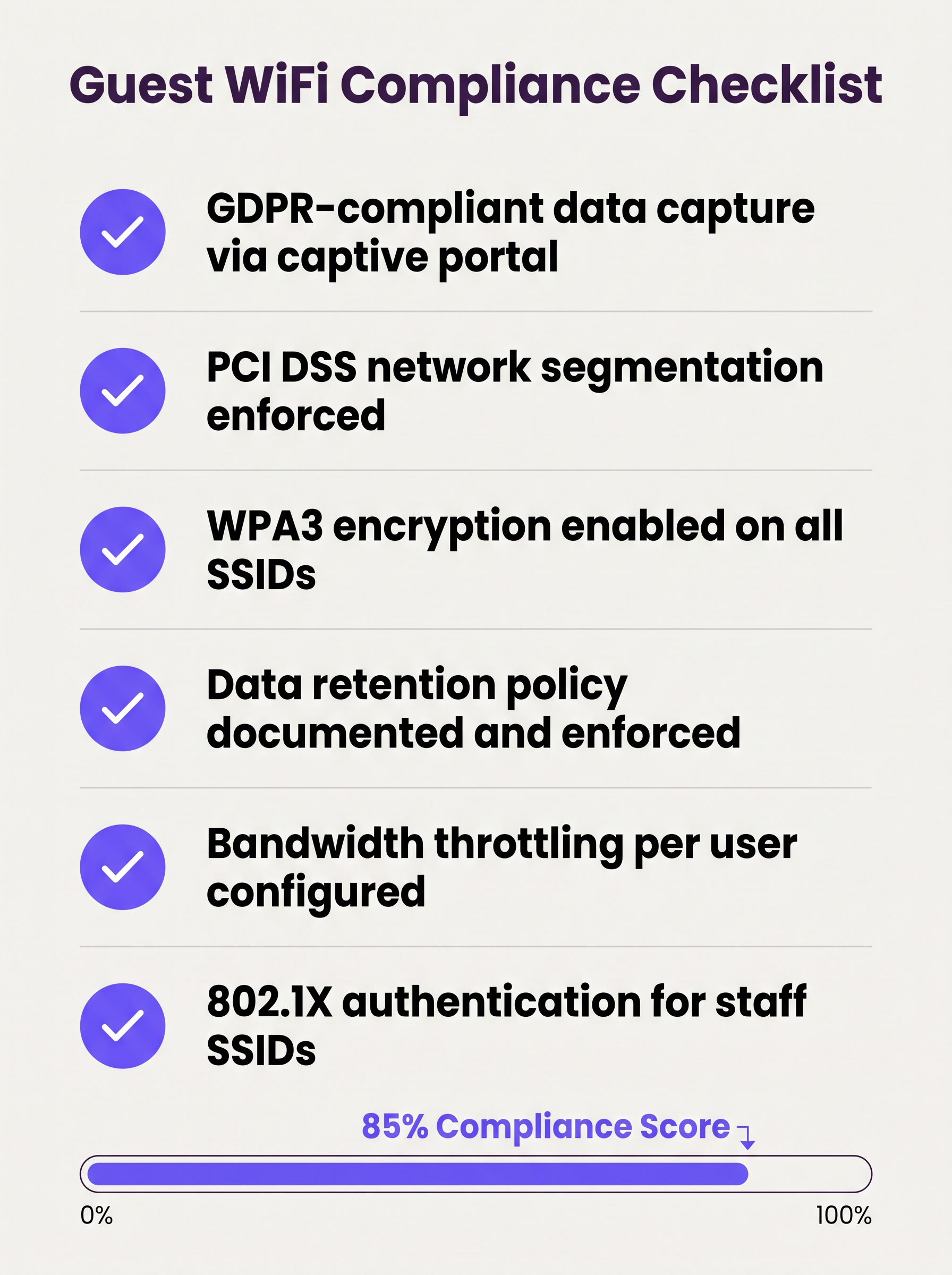
Die folgende Checkliste stellt die minimal erforderliche Sicherheits- und Compliance-Haltung für jede Enterprise-Gast-WiFi-Bereitstellung dar:
- VLAN-Segmentierung durchgesetzt mit Default-Deny-Firewall-Regeln zwischen Gast- und Unternehmensnetzwerken.
- Layer-2-Client-Isolation aktiviert auf allen Gast-SSIDs.
- WPA3-Verschlüsselung auf allen neuen SSIDs konfiguriert; WPA2 nur dort beibehalten, wo ältere Geräte dies erfordern.
- Captive Portal mit GDPR-konformen Zustimmungs-Workflows bereitgestellt und getestet.
- Bandbreitenbegrenzungen pro Benutzer auf Controllerebene konfiguriert.
- DHCP-Lease-Zeiten an die erwartete Verweildauer am Veranstaltungsort angepasst.
- Datenaufbewahrungsrichtlinie dokumentiert, mit automatischer Löschung von Gastdatensätzen nach Ablauf des Aufbewahrungszeitraums.
- Wireless Intrusion Prevention System (WIPS) aktiv zur Erkennung von Rogue APs.
- Regelmäßige Penetrationstests des Gastnetzwerk-Perimeters, mindestens jährlich.
- 802.1X / RADIUS für Mitarbeiter-SSIDs bereitgestellt, wobei RadSec den Authentifizierungsverkehr während der Übertragung sichert.
Fehlerbehebung & Risikominderung
Rogue Access Points
Ein Rogue AP, der die Gast-SSID spoofen, stellt ein erhebliches Risiko in großen Veranstaltungsorten dar. Angreifer richten ein Gerät ein, das denselben SSID-Namen sendet und Anmeldeinformationen sowie Sitzungsdaten von ahnungslosen Benutzern abfängt. Die Minderung erfordert ein aktives WIPS, das die HF-Umgebung überwacht und Rogue-Geräte automatisch eindämmen kann. Dies ist eine obligatorische Kontrolle gemäß PCI DSS 11.2.
MAC-Adressen-Randomisierung
Moderne mobile Betriebssysteme (iOS 14+, Android 10+) implementieren standardmäßig die MAC-Adressen-Randomisierung. Dies unterbricht die MAC-basierte Captive Portal Bypass-Logik (bei der wiederkehrende Benutzer anhand ihrer Geräte-MAC erkannt werden und die erneute Authentifizierung überspringen). Guest WiFi-Plattformen müssen randomisierte MACs elegant handhaben, typischerweise durch die Ausgabe von Sitzungstoken oder die Verwendung einer profilbasierten Authentifizierung.
DHCP-Pool-Erschöpfung
An Veranstaltungsorten mit hoher transienter Besucherfrequenz ist die DHCP-Pool-Erschöpfung ein häufiges und leicht vermeidbares Problem. Die Lösung ist eine Kombination aus kurzen Lease-Zeiten und ausreichend dimensionierten Subnetzen. Überwachen Sie die DHCP-Pool-Auslastung über SNMP oder die Cloud-Management-Plattform und stellen Sie Warnmeldungen bei 80 % Auslastung ein.
Captive Portal Zertifikatsfehler
Wenn das Captive Portal ein selbstsigniertes Zertifikat verwendet, erhalten Benutzer Browser-Sicherheitswarnungen, die das Vertrauen beeinträchtigen und die Registrierungsraten senken. Verwenden Sie immer ein Zertifikat einer vertrauenswürdigen Zertifizierungsstelle (CA) für die Portal-Domain.
ROI & Geschäftsauswirkungen
Ein gut implementiertes Gast-WiFi-System generiert messbare Erträge in verschiedenen Geschäftsbereichen:
| Metrik | Messmethode | Typisches Ergebnis |
|---|---|---|
| Erfassung von Erstanbieterdaten | Portalregistrierungen pro Monat | 15–40 % der einzelnen Besucher |
| Marketingreichweite | Wachstumsrate der E-Mail-Liste | Kumuliertes Wachstum von 20–50 % pro Jahr |
| Operative Einblicke | Analyse von Besucherfrequenz und Verweildauer | Informiert über Personalplanung, Layout und Promotionen |
| Reduzierung des Compliance-Risikos | Audit-Ergebnisse | Keine PCI DSS-Feststellungen bezüglich der Netzwerksegmentierung |
| IT-Overhead | Zentralisierte Verwaltung vs. Vor-Ort-Konfiguration | 30–50 % Reduzierung der Häufigkeit von Standortbesuchen |
Für Organisationen mit verteilten Standorten – mehreren Einzelhandelsfilialen, Hotelimmobilien oder Verkehrsknotenpunkten – spielt auch die zugrunde liegende WAN-Architektur eine Rolle bei der Sicherstellung einer zuverlässigen Konnektivität zu Cloud-gehosteten Guest WiFi-Management-Plattformen. Weitere Informationen finden Sie unter Die wichtigsten SD WAN-Vorteile für moderne Unternehmen für Anleitung zur Optimierung der WAN-Konnektivität für cloud-verwaltete Netzwerkinfrastrukturen.
Der strategische Wert von Gast-WiFi reicht weit über die IT hinaus. Indem sie das Netzwerk als Datenressource behandeln, können Organisationen in Einzelhandel , Gastgewerbe , Gesundheitswesen und Transport verifizierte Erstanbieter-Kundenprofile erstellen, Loyalitätsprogramme vorantreiben und Einnahmen aus Retail Media generieren – wodurch eine Versorgungsaufwendung in einen messbaren kommerziellen Vermögenswert umgewandelt wird.
Schlüsseldefinitionen
VLAN (Virtual Local Area Network)
A logical grouping of network devices that behave as if they are on an independent network segment, regardless of their physical location on the infrastructure.
The primary mechanism for separating guest traffic from corporate traffic on shared physical hardware. Mandatory for PCI DSS compliance.
Client Isolation
A wireless network security feature, configured at the access point level, that prevents devices connected to the same SSID from communicating directly with each other at Layer 2.
Essential for any public-facing SSID. Prevents a compromised guest device from scanning or attacking other guests on the same network.
Captive Portal
A web page that intercepts a user's initial HTTP/HTTPS request and redirects them to an authentication or registration page before granting internet access.
The standard onboarding mechanism for guest WiFi. Used to enforce Terms of Service, collect first-party data, and create a legal record of consent.
IEEE 802.1X
An IEEE standard for port-based network access control that provides an authentication framework for devices connecting to a LAN or WLAN, using a RADIUS server as the authentication backend.
The foundation of enterprise WiFi security. Used for staff SSIDs and advanced guest deployments using Passpoint or OpenRoaming.
WPA3
The third generation of the Wi-Fi Protected Access security protocol, introducing Simultaneous Authentication of Equals (SAE) for stronger key exchange and Opportunistic Wireless Encryption (OWE) for open networks.
The current encryption standard for all new WiFi deployments. Mandatory for any network handling sensitive data or subject to compliance frameworks.
OWE (Opportunistic Wireless Encryption)
A WPA3 feature that provides encryption on open (passwordless) WiFi networks by performing an anonymous Diffie-Hellman key exchange between the client and the access point.
Allows venues to offer open guest WiFi without exposing user traffic to passive eavesdropping. A significant security uplift over legacy open networks.
DHCP Lease Time
The duration for which a DHCP server assigns an IP address to a client device before the address must be renewed or released back to the pool.
Critical to manage in high-density, transient environments. Excessively long lease times cause IP pool exhaustion, preventing new devices from connecting.
Passpoint / Hotspot 2.0
A Wi-Fi Alliance certification programme based on the IEEE 802.11u standard that enables automatic, secure network discovery and authentication without requiring user interaction.
The technical foundation for seamless roaming experiences. Devices connect automatically using a provisioned credential profile, eliminating the captive portal for returning users.
WIPS (Wireless Intrusion Prevention System)
A security system that continuously monitors the radio frequency (RF) spectrum for unauthorized access points and client devices, and can automatically contain or block detected threats.
Required by PCI DSS 11.2. Detects rogue APs spoofing the guest SSID and alerts the security team to potential man-in-the-middle attacks.
PCI DSS
The Payment Card Industry Data Security Standard — a set of security standards designed to ensure that all companies that accept, process, store, or transmit credit card information maintain a secure environment.
Directly relevant to any venue that processes card payments. Network segmentation between the guest WiFi and the cardholder data environment is a mandatory control.
Ausgearbeitete Beispiele
A 200-room hotel currently operates a single flat network shared between guests, the property management system (PMS), and back-office workstations. The IT director has been told they need to achieve PCI DSS compliance before the next audit. Where do they start?
The immediate priority is network segmentation. The IT director should provision three VLANs: VLAN 10 (Corporate) for the PMS, back-office workstations, and staff devices; VLAN 20 (Guest) for visitor WiFi; and VLAN 30 (IoT) for smart TVs, thermostats, and door lock controllers. The firewall must be configured to block all inter-VLAN routing between VLAN 20 and VLAN 10, and between VLAN 30 and VLAN 10. The guest SSID should be configured with WPA3-Personal (or OWE for an open SSID), client isolation enabled, and a captive portal integrated with the hotel's loyalty CRM. Bandwidth should be capped at 10 Mbps per user, with a premium tier (25 Mbps) available for loyalty programme members. A WIPS should be activated to monitor for rogue APs. The data retention policy for portal registrations should be set to 24 months, with automated purging thereafter.
A large retail chain with 150 stores is experiencing poor guest WiFi performance during peak trading hours (12pm–2pm and 5pm–7pm). Captive portal registration rates have dropped by 35% compared to six months ago, and the IT team is receiving complaints from store managers. The internet backhaul at each site is 500 Mbps — well above what should be needed.
The issue is almost certainly not backhaul capacity but a combination of DHCP pool exhaustion, airtime contention, and the absence of per-user rate limiting. The remediation steps are: (1) Reduce DHCP lease times from the default 24 hours to 20 minutes to ensure IP addresses are recycled quickly as customers move through the store. (2) Expand the DHCP scope from a /24 (254 addresses) to a /22 (1022 addresses) to accommodate peak concurrent connections. (3) Implement per-user rate limiting at 3 Mbps to prevent any single device from monopolising airtime. (4) Enable Layer 7 application control to block video streaming services during peak hours. (5) Review AP channel utilisation and enable band steering to push capable devices to the 5 GHz or 6 GHz band, reducing congestion on 2.4 GHz. (6) Ensure the captive portal redirect is using HTTPS with a valid certificate to eliminate browser security warnings that deter registrations.
Übungsfragen
Q1. A hospital IT director is planning to offer free WiFi to patients and visitors across a 500-bed facility. They are concerned about HIPAA compliance and the risk of malware spreading from guest devices to networked medical equipment. What architecture and controls should they implement?
Hinweis: Consider how network traffic is separated across three distinct user groups: patients/visitors, clinical staff, and medical devices. Think about what happens if a guest device is infected.
Musterlösung anzeigen
The IT director must implement a minimum of three VLANs: Guest (patients and visitors), Clinical Staff, and Medical IoT. The guest VLAN must terminate at a firewall with default-deny rules blocking all routing to the clinical and IoT VLANs. Layer 2 Client Isolation must be enabled on the guest SSID to prevent guest devices from communicating with each other or with any medical device. A captive portal with ToS acceptance should be deployed. The medical IoT VLAN should be on a separate physical or logically isolated network segment with strict access controls. Regular WIPS scanning should be active to detect rogue APs. This architecture ensures that even a fully compromised guest device has no path to clinical systems or medical equipment.
Q2. A stadium CTO reports that during halftime at a sold-out event (60,000 attendees), the guest WiFi becomes completely unusable. Users cannot connect at all — they receive 'unable to obtain IP address' errors. The internet backhaul is a 10 Gbps dedicated fibre connection. What is the most likely cause and how should it be resolved?
Hinweis: The backhaul is not the bottleneck. Think about what happens at the IP address allocation layer when 60,000 devices connect simultaneously after being in an area with no WiFi coverage for 45 minutes.
Musterlösung anzeigen
The root cause is DHCP pool exhaustion. With 60,000 devices attempting to connect simultaneously, the DHCP server is running out of available IP addresses to assign. The resolution requires two changes: (1) Reduce the DHCP lease time to 15–20 minutes, ensuring that IP addresses from devices that have left the coverage area are recycled quickly. (2) Expand the DHCP scope to a /19 or /18 subnet to provide sufficient addresses for the peak concurrent connection count. Additionally, the CTO should review AP density and channel planning to ensure adequate airtime capacity, and consider deploying 802.11ax (Wi-Fi 6) APs which handle high client density significantly more efficiently than previous generations.
Q3. A retail chain wants to capture customer email addresses via a captive portal to build a marketing database, but their marketing team reports that repeat customers are complaining about having to re-register every visit. The IT team wants to fix this without removing the portal entirely. What is the recommended approach?
Hinweis: How can the system recognise a returning device without requiring the user to fill in a form again? Consider what identifier is available at the network layer.
Musterlösung anzeigen
The recommended approach is MAC address caching combined with a session token. On the first visit, the user completes the portal registration and their device MAC address is stored against their profile in the guest WiFi platform. On subsequent visits, the captive portal system checks the connecting device's MAC address against the stored database. If a match is found, the user is authenticated silently in the background and redirected directly to the internet, bypassing the registration form. The visit is still logged for analytics purposes. It is important to note that MAC address randomisation on modern iOS and Android devices may interfere with this approach — in those cases, the platform should fall back to a session cookie or prompt for a one-click email re-confirmation rather than the full registration form.
Q4. A conference centre IT manager is preparing for a major three-day industry event with 5,000 attendees. The event organiser wants to offer tiered WiFi: free basic access for all attendees and a premium paid tier for exhibitors requiring high-bandwidth video conferencing. How should this be architected?
Hinweis: Think about how to enforce different bandwidth policies for different user groups on the same physical infrastructure, and how to authenticate each tier.
Musterlösung anzeigen
The architecture requires two separate SSIDs mapped to two separate VLANs: a 'Conference-Guest' SSID for free basic access (rate limited to 2 Mbps per user, with video streaming blocked via Layer 7 filtering) and a 'Conference-Premium' SSID for paid exhibitor access (rate limited to 25 Mbps per user, with video conferencing applications prioritised via QoS). The premium SSID should use a voucher-based or 802.1X authentication mechanism to restrict access to paying exhibitors. Both VLANs must be isolated from the venue's corporate network. The premium VLAN should be allocated a dedicated internet circuit or MPLS path to guarantee throughput, independent of the general attendee traffic.
Weiterlesen in dieser Reihe
Was ist eine Probe Request? Verstehen, wie Geräte Netzwerke entdecken
Dieser technische Leitfaden bietet einen tiefen Einblick in IEEE 802.11 Probe Requests, aktives versus passives Scannen und die Auswirkungen der MAC randomisation auf Standortanalysen. Er liefert umsetzbare Implementierungsstrategien für Netzwerkarchitekten zur Optimierung von High-Density-Bereitstellungen, zur Minderung von Probe Storms und zur Sicherstellung einer genauen, GDPR-konformen Datenerfassung mithilfe authentifizierter Identitätsschichten.
Wie man langsames WiFi behebt, ohne Ihr Internetpaket zu aktualisieren
Ein umfassender technischer Leitfaden für IT-Manager und Netzwerkarchitekten zur Optimierung der Unternehmens-WiFi-Leistung, ohne die ISP-Bandbreite zu erhöhen. Behandelt HF-Tuning, Client-Dichte-Management, QoS-Implementierung und wie man WiFi-Analysen nutzt, um Engpässe zu diagnostizieren und zu beheben.
Die Checkliste für die Migration von Legacy NAC zu Cloud-Native NAC
Dieser maßgebliche technische Leitfaden bietet eine strukturierte, dreiphasige Checkliste für die Migration von der traditionellen Netzwerkzugriffskontrolle (NAC) zu einer Cloud-nativen Architektur. Er stattet IT-Manager und Netzwerkarchitekten mit umsetzbaren Strategien aus, um die Identitätsintegration, Richtlinienkonsistenz und Compliance zu gewährleisten, ohne den Veranstaltungsbetrieb zu stören.