
Melhores Práticas de Guest WiFi: Segurança, Desempenho e Conformidade
Este guia abrangente descreve as decisões operacionais críticas necessárias para implantar uma rede Guest WiFi segura e de alto desempenho em locais corporativos. Ele fornece estruturas acionáveis para segmentação de rede, autenticação, gerenciamento de largura de banda e conformidade regulatória — cobrindo PCI DSS, GDPR e IEEE 802.1X — para ajudar as equipes de TI a mitigar riscos e entregar valor de negócio mensurável. A plataforma de Guest WiFi e análise de dados da Purple é referenciada ao longo do texto como um veículo de implementação concreto para cada melhor prática.
Ouça este guia
Ver transcrição do podcast

Resumo Executivo
Implantar uma rede Guest WiFi em um ambiente corporativo moderno — seja um estádio, cadeia de varejo, local de hospitalidade ou instalação do setor público — não é mais uma simples decisão de infraestrutura. Isso acarreta implicações diretas para a postura de segurança, conformidade regulatória e reputação da marca. Para gerentes de TI, arquitetos de rede e CTOs, o desafio é equilibrar a conectividade perfeita para convidados com controles robustos que protejam os ativos corporativos e satisfaçam os auditores.
Este guia fornece uma estrutura prática e neutra em relação ao fornecedor para implementar as melhores práticas de Guest WiFi, com orientação concreta sobre segmentação de rede, mecanismos de autenticação, gerenciamento de largura de banda e retenção de dados. Ele se baseia em padrões estabelecidos, incluindo IEEE 802.1X, WPA3, PCI DSS e GDPR. Onde relevante, ele referencia a plataforma Guest WiFi da Purple como um veículo de implantação, e suas capacidades de WiFi Analytics como um mecanismo para converter o investimento em infraestrutura em inteligência de negócios acionável.
Análise Técnica Detalhada
1. Segmentação de Rede: A Base Inegociável
O controle mais crítico em qualquer configuração de Guest WiFi é a segmentação de rede rigorosa. O tráfego de convidados deve ser lógica — e, quando possível, fisicamente — isolado da LAN corporativa. Sem isso, um dispositivo de convidado comprometido tem uma rota direta para sistemas internos, incluindo terminais de ponto de venda, bancos de dados de RH e tecnologia operacional.
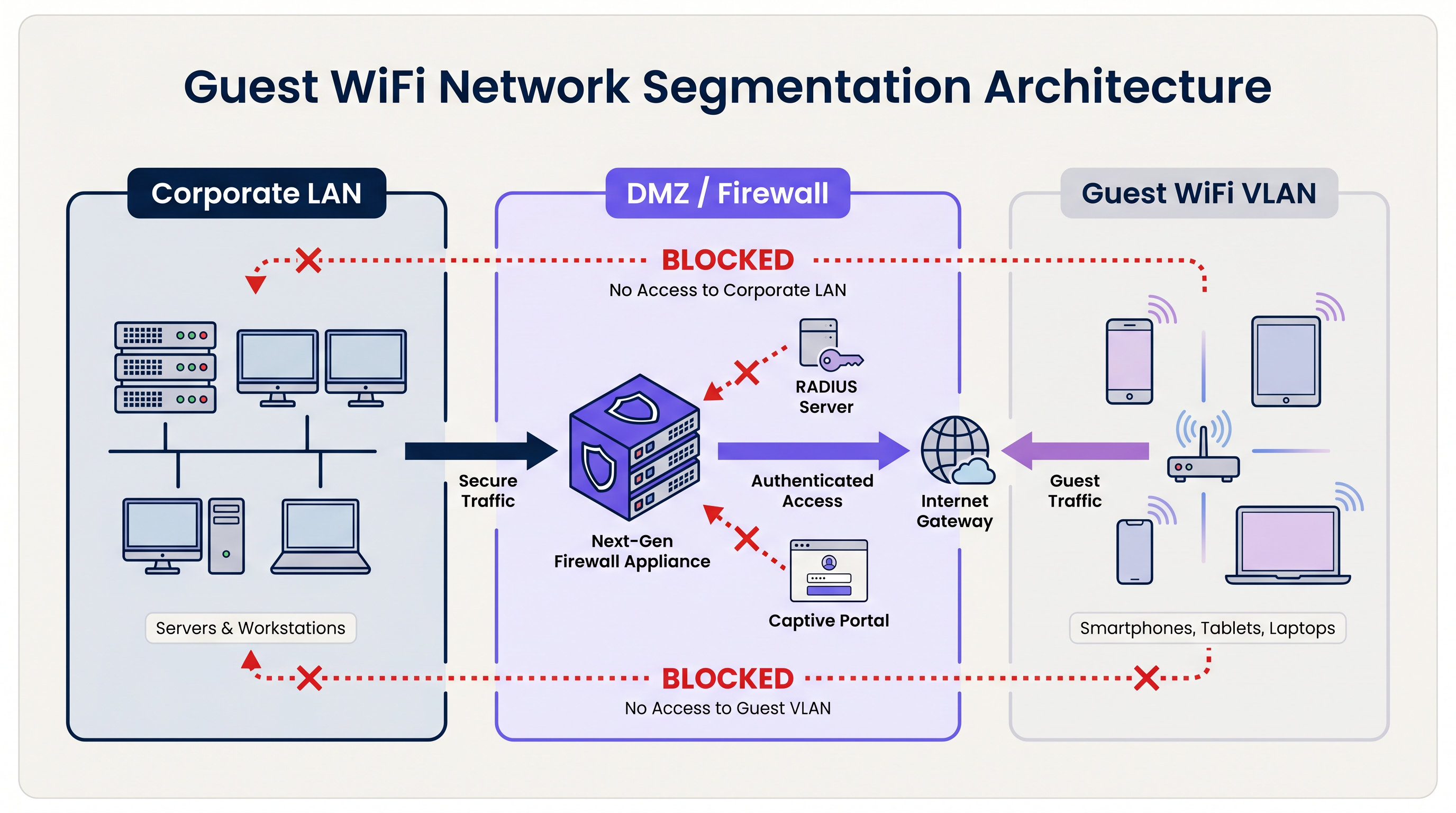
A arquitetura padrão utiliza Redes Locais Virtuais (VLANs) dedicadas. O SSID de convidado é vinculado a uma VLAN específica, que termina em um firewall de perímetro ou DMZ. O firewall impõe uma política de negação padrão: apenas o tráfego de internet de saída (TCP 80, 443 e UDP 53 para DNS) é permitido. Todo o roteamento entre a VLAN de convidado e qualquer sub-rede interna é explicitamente bloqueado.
Para organizações sujeitas ao PCI DSS, esta segmentação é obrigatória. O Padrão de Segurança de Dados da Indústria de Cartões de Pagamento exige que o ambiente de dados do titular do cartão (CDE) seja completamente isolado de qualquer rede voltada para o público. A falha em conseguir isso resultará em uma auditoria reprovada do Avaliador de Segurança Qualificado (QSA).
Além da segmentação de VLAN, o Isolamento de Cliente da Camada 2 deve ser habilitado em cada SSID de convidado. Isso impede que dispositivos na mesma rede sem fio se comuniquem diretamente entre si, mitigando o risco de ataques laterais entre dispositivos de convidados — um controle crítico em ambientes como Hospitality onde os convidados compartilham o mesmo espaço físico.
Autenticação e Controle de Acesso
O modelo de autenticação escolhido para um sistema Guest WiFi determina tanto o nível de segurança quanto a qualidade da experiência do convidado.
Chaves Pré-Compartilhadas (PSKs): WPA2/WPA3-Personal com uma senha compartilhada é o modelo de implantação mais simples, mas oferece a postura de segurança mais fraca para ambientes corporativos. PSKs não fornecem responsabilidade individual, não podem ser revogadas por usuário e são frequentemente compartilhadas além do público-alvo.
Captive Portals: O padrão da indústria para locais públicos. Um Captive Portal intercepta a requisição HTTP inicial do convidado e o redireciona para uma página de destino personalizada. O convidado deve aceitar os Termos de Serviço (ToS) antes que o acesso seja concedido. Isso cria um registro legal de consentimento, permite a coleta de dados primários (e-mail, login social, dados de formulário) e permite que o local aplique políticas de uso aceitável. Plataformas como o Guest WiFi da Purple fornecem um Captive Portal totalmente gerenciado com fluxos de consentimento GDPR integrados e integração com CRM.
Autenticação Baseada em Perfil (Passpoint / OpenRoaming): O modelo de implantação mais avançado. Utilizando IEEE 802.1X e WPA3-Enterprise, os dispositivos autenticam usando um perfil de credencial em vez de uma senha. O usuário se registra uma vez — tipicamente via aplicativo móvel ou Captive Portal — e seu dispositivo se conecta automaticamente e de forma segura em visitas subsequentes. A Purple atua como um provedor de identidade gratuito para OpenRoaming sob a licença Connect, permitindo que os locais ofereçam conectividade contínua e segura em escala. Para uma análise técnica detalhada sobre a segurança do tráfego de autenticação RADIUS que sustenta o 802.1X, consulte nosso guia sobre RadSec: Protegendo o Tráfego de Autenticação RADIUS com TLS .
3. Padrões de Criptografia
Todas as novas implantações de Guest WiFi devem visar o WPA3. As principais melhorias em relação ao WPA2 são significativas:
| Recurso | WPA2 | WPA3 |
|---|---|---|
| Troca de Chaves | Handshake de 4 vias (vulnerável a KRACK) | Autenticação Simultânea de Iguais (SAE) |
| Criptografia de Rede Aberta | Nenhuma | Criptografia Sem Fio Oportunista (OWE) |
| Sigilo de Encaminhamento | Não | Sim |
| Resistência a Ataques de Força Bruta | Baixa | Alta (SAE limita ataques offline) |
Para redes de convidados abertas especificamente, a Criptografia Sem Fio Oportunista (OWE) do WPA3 é uma melhoria transformadora. A OWE criptografa o tráfego entre cada cliente e o AP sem exigir uma senha, protegendo os usuários de escutas passivas em um canal que, de outra forma, seria não criptografado.
4. Gerenciamento de Largura de Banda e QoS
Em ambientes de alta densidade — estádios, centros de conferências, andares de varejo — o gerenciamento de largura de banda é tão importante quanto a segurança. Sem controles, um pequeno número de usuários pode consumir a maior parte da taxa de transferência disponível, degradando a experiência para todos.
Os controles chave incluem:
- Limitação de Taxa por Usuário: Limitar usuários individuais a um deftaxa de transferência definida (por exemplo, 5 Mbps de download / 2 Mbps de upload). Isso é configurado no nível do controlador de LAN sem fio (WLC) ou da plataforma de gerenciamento em nuvem.
- Controle de Aplicações da Camada 7: Bloqueie ou despriorize aplicações de alta largura de banda, como compartilhamento de arquivos peer-to-peer, serviços de streaming de vídeo e downloads de atualização de software durante os horários de pico.
- Tempos Limites de Sessão: Configure tempos limites de inatividade (por exemplo, 30 minutos) e tempos limites de sessão absolutos (por exemplo, 4 horas) para recuperar endereços IP e tempo de uso de clientes inativos.
- Gerenciamento de Locação DHCP: Em ambientes transitórios como centros de Transporte e estádios, defina os tempos de locação DHCP para 15–30 minutos e provisione grandes sub-redes (/21 ou /20) para evitar o esgotamento do pool durante a demanda de pico.
Guia de Implementação
Fase 1: Projeto da Arquitetura
Comece com uma revisão da topologia de rede. Identifique todas as VLANs existentes e confirme que uma VLAN de convidado dedicada pode ser provisionada sem roteamento para qualquer sub-rede interna. Defina o conjunto de regras do firewall e confirme que o isolamento de cliente é suportado pelo hardware AP escolhido.
Fase 2: Configuração de Hardware e Controlador
Selecione APs de nível empresarial com suporte para WPA3, 802.11ax (Wi-Fi 6) ou 802.11be (Wi-Fi 6E) para ambientes de alta densidade, e controladores gerenciados em nuvem para aplicação centralizada de políticas. Configure o SSID de convidado, vincule-o à VLAN de convidado e habilite o isolamento de cliente. Defina limites de taxa por usuário e tempos limites de sessão.
Fase 3: Implantação do Captive Portal
Integre o WLC ou a plataforma AP em nuvem com um serviço gerenciado de Guest WiFi . Configure o portal com ativos de marca, aceitação de Termos de Serviço (ToS) e campos de captura de dados. Garanta que o mecanismo de consentimento seja compatível com GDPR: opt-in explícito para comunicações de marketing, um aviso de privacidade claro e uma política de retenção de dados documentada. Para ambientes de Varejo e Saúde , garanta que os Termos de Serviço do portal incluam cláusulas de uso aceitável apropriadas para o tipo de local.
Fase 4: Monitoramento e Análise
Uma vez implantada, conecte a plataforma a um painel de WiFi Analytics . Configure alertas para detecção de APs não autorizados, limites de utilização do pool DHCP e padrões de tráfego incomuns. Revise regularmente os dados de fluxo de pessoas e tempo de permanência para embasar decisões operacionais.
Melhores Práticas
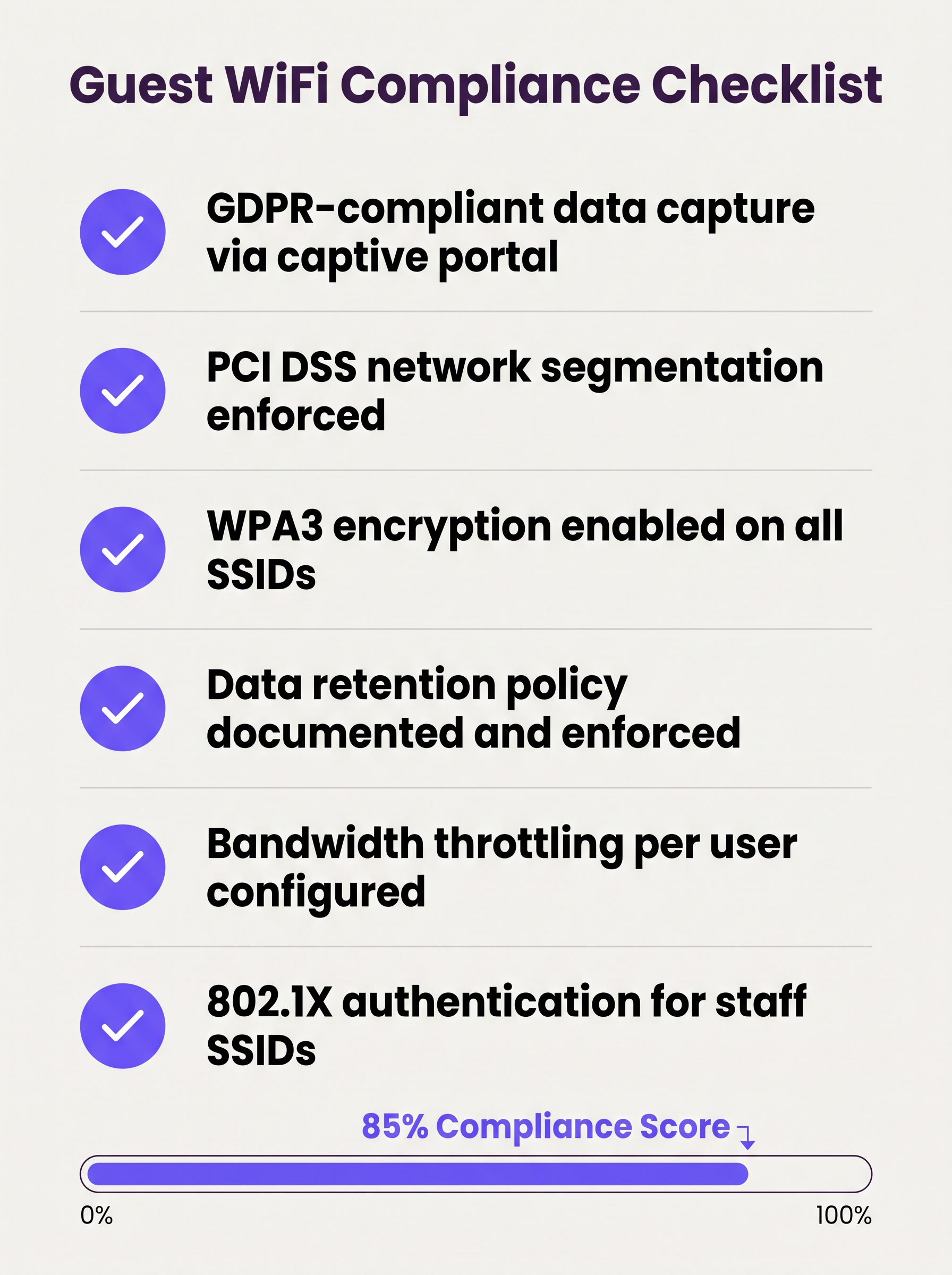
A lista de verificação a seguir representa a postura mínima viável de segurança e conformidade para qualquer implantação de guest wifi empresarial:
- Segmentação de VLAN aplicada com regras de firewall de negação padrão entre redes de convidados e corporativas.
- Isolamento de Cliente da Camada 2 habilitado em todos os SSIDs de convidado.
- Criptografia WPA3 configurada em todos os novos SSIDs; WPA2 mantido apenas onde dispositivos legados o exigem.
- Captive portal com consentimento compatível com GDPR implantado e testado.
- Limites de largura de banda por usuário configurados no nível do controlador.
- Tempos de locação DHCP ajustados ao tempo de permanência esperado do local.
- Política de retenção de dados documentada, com purga automatizada de registros de convidados além da janela de retenção.
- Sistema de Prevenção de Intrusão Sem Fio (WIPS) ativo para detectar APs não autorizados.
- Testes de penetração regulares do perímetro da rede de convidados, no mínimo anualmente.
- 802.1X / RADIUS implantado para SSIDs de funcionários, com RadSec protegendo o tráfego de autenticação em trânsito.
Solução de Problemas e Mitigação de Riscos
Pontos de Acesso Maliciosos (Rogue APs)
Um AP malicioso (rogue AP) que falsifica o SSID de convidado é um risco significativo em grandes locais. Atacantes configuram um dispositivo que transmite o mesmo nome de SSID, capturando credenciais e dados de sessão de usuários desavisados. A mitigação requer um WIPS ativo que monitore o ambiente de RF e possa conter automaticamente dispositivos maliciosos. Este é um controle obrigatório sob o PCI DSS 11.2.
Randomização de Endereço MAC
Sistemas operacionais móveis modernos (iOS 14+, Android 10+) implementam a randomização de endereço MAC por padrão. Isso quebra a lógica de bypass de Captive Portal baseada em MAC (onde usuários recorrentes são reconhecidos pelo MAC de seu dispositivo e pulam a reautenticação). As plataformas de Guest WiFi devem lidar com MACs randomizados de forma elegante, tipicamente emitindo tokens de sessão ou usando autenticação baseada em perfil.
Esgotamento do Pool DHCP
Em locais com alto fluxo de pessoas transitório, o esgotamento do pool DHCP é uma falha comum e facilmente evitável. A solução é uma combinação de tempos de locação curtos e sub-redes de tamanho adequado. Monitore a utilização do pool DHCP via SNMP ou a plataforma de gerenciamento em nuvem e defina alertas em 80% de utilização.
Erros de Certificado do Captive Portal
Se o Captive Portal usar um certificado autoassinado, os usuários receberão avisos de segurança do navegador que prejudicam a confiança e reduzem as taxas de registro. Sempre use um certificado de uma Autoridade Certificadora (CA) confiável para o domínio do portal.
ROI e Impacto nos Negócios
Um sistema de guest wifi bem implantado gera retornos mensuráveis em múltiplas dimensões de negócios:
| Métrica | Método de Medição | Resultado Típico |
|---|---|---|
| Captura de Dados Primários | Registros no portal por mês | 15–40% dos visitantes únicos |
| Alcance de Marketing | Taxa de crescimento da lista de e-mails | Crescimento composto de 20–50% ao ano |
| Visão Operacional | Análise de fluxo de pessoas e tempo de permanência | Orienta a equipe, layout e promoções |
| Redução de Risco de Conformidade | Descobertas de auditoria | Zero descobertas PCI DSS relacionadas à segmentação de rede |
| Custos de TI | Gerenciamento centralizado vs. configuração no local | Redução de 30–50% na frequência de visitas ao local |
Para organizações que operam propriedades distribuídas — múltiplas filiais de varejo, propriedades hoteleiras ou centros de transporte — a arquitetura WAN subjacente também desempenha um papel na garantia de conectividade confiável às plataformas de gerenciamento de guest WiFi hospedadas em nuvem. Consulte Os Principais Benefícios do SD WAN para Empresas Modernas para orientação sobre como otimizar a conectividade WAN para infraestruturas de rede gerenciadas na nuvem.
O valor estratégico do WiFi para convidados vai muito além da TI. Ao tratar a rede como um ativo de dados, organizações em Varejo , Hotelaria , Saúde e Transporte podem construir perfis de clientes primários verificados, impulsionar programas de fidelidade e gerar receita de mídia de varejo — transformando um gasto de utilidade em um ativo comercial mensurável.
Definições principais
VLAN (Virtual Local Area Network)
A logical grouping of network devices that behave as if they are on an independent network segment, regardless of their physical location on the infrastructure.
The primary mechanism for separating guest traffic from corporate traffic on shared physical hardware. Mandatory for PCI DSS compliance.
Client Isolation
A wireless network security feature, configured at the access point level, that prevents devices connected to the same SSID from communicating directly with each other at Layer 2.
Essential for any public-facing SSID. Prevents a compromised guest device from scanning or attacking other guests on the same network.
Captive Portal
A web page that intercepts a user's initial HTTP/HTTPS request and redirects them to an authentication or registration page before granting internet access.
The standard onboarding mechanism for guest WiFi. Used to enforce Terms of Service, collect first-party data, and create a legal record of consent.
IEEE 802.1X
An IEEE standard for port-based network access control that provides an authentication framework for devices connecting to a LAN or WLAN, using a RADIUS server as the authentication backend.
The foundation of enterprise WiFi security. Used for staff SSIDs and advanced guest deployments using Passpoint or OpenRoaming.
WPA3
The third generation of the Wi-Fi Protected Access security protocol, introducing Simultaneous Authentication of Equals (SAE) for stronger key exchange and Opportunistic Wireless Encryption (OWE) for open networks.
The current encryption standard for all new WiFi deployments. Mandatory for any network handling sensitive data or subject to compliance frameworks.
OWE (Opportunistic Wireless Encryption)
A WPA3 feature that provides encryption on open (passwordless) WiFi networks by performing an anonymous Diffie-Hellman key exchange between the client and the access point.
Allows venues to offer open guest WiFi without exposing user traffic to passive eavesdropping. A significant security uplift over legacy open networks.
DHCP Lease Time
The duration for which a DHCP server assigns an IP address to a client device before the address must be renewed or released back to the pool.
Critical to manage in high-density, transient environments. Excessively long lease times cause IP pool exhaustion, preventing new devices from connecting.
Passpoint / Hotspot 2.0
A Wi-Fi Alliance certification programme based on the IEEE 802.11u standard that enables automatic, secure network discovery and authentication without requiring user interaction.
The technical foundation for seamless roaming experiences. Devices connect automatically using a provisioned credential profile, eliminating the captive portal for returning users.
WIPS (Wireless Intrusion Prevention System)
A security system that continuously monitors the radio frequency (RF) spectrum for unauthorized access points and client devices, and can automatically contain or block detected threats.
Required by PCI DSS 11.2. Detects rogue APs spoofing the guest SSID and alerts the security team to potential man-in-the-middle attacks.
PCI DSS
The Payment Card Industry Data Security Standard — a set of security standards designed to ensure that all companies that accept, process, store, or transmit credit card information maintain a secure environment.
Directly relevant to any venue that processes card payments. Network segmentation between the guest WiFi and the cardholder data environment is a mandatory control.
Exemplos práticos
A 200-room hotel currently operates a single flat network shared between guests, the property management system (PMS), and back-office workstations. The IT director has been told they need to achieve PCI DSS compliance before the next audit. Where do they start?
The immediate priority is network segmentation. The IT director should provision three VLANs: VLAN 10 (Corporate) for the PMS, back-office workstations, and staff devices; VLAN 20 (Guest) for visitor WiFi; and VLAN 30 (IoT) for smart TVs, thermostats, and door lock controllers. The firewall must be configured to block all inter-VLAN routing between VLAN 20 and VLAN 10, and between VLAN 30 and VLAN 10. The guest SSID should be configured with WPA3-Personal (or OWE for an open SSID), client isolation enabled, and a captive portal integrated with the hotel's loyalty CRM. Bandwidth should be capped at 10 Mbps per user, with a premium tier (25 Mbps) available for loyalty programme members. A WIPS should be activated to monitor for rogue APs. The data retention policy for portal registrations should be set to 24 months, with automated purging thereafter.
A large retail chain with 150 stores is experiencing poor guest WiFi performance during peak trading hours (12pm–2pm and 5pm–7pm). Captive portal registration rates have dropped by 35% compared to six months ago, and the IT team is receiving complaints from store managers. The internet backhaul at each site is 500 Mbps — well above what should be needed.
The issue is almost certainly not backhaul capacity but a combination of DHCP pool exhaustion, airtime contention, and the absence of per-user rate limiting. The remediation steps are: (1) Reduce DHCP lease times from the default 24 hours to 20 minutes to ensure IP addresses are recycled quickly as customers move through the store. (2) Expand the DHCP scope from a /24 (254 addresses) to a /22 (1022 addresses) to accommodate peak concurrent connections. (3) Implement per-user rate limiting at 3 Mbps to prevent any single device from monopolising airtime. (4) Enable Layer 7 application control to block video streaming services during peak hours. (5) Review AP channel utilisation and enable band steering to push capable devices to the 5 GHz or 6 GHz band, reducing congestion on 2.4 GHz. (6) Ensure the captive portal redirect is using HTTPS with a valid certificate to eliminate browser security warnings that deter registrations.
Questões práticas
Q1. A hospital IT director is planning to offer free WiFi to patients and visitors across a 500-bed facility. They are concerned about HIPAA compliance and the risk of malware spreading from guest devices to networked medical equipment. What architecture and controls should they implement?
Dica: Consider how network traffic is separated across three distinct user groups: patients/visitors, clinical staff, and medical devices. Think about what happens if a guest device is infected.
Ver resposta modelo
The IT director must implement a minimum of three VLANs: Guest (patients and visitors), Clinical Staff, and Medical IoT. The guest VLAN must terminate at a firewall with default-deny rules blocking all routing to the clinical and IoT VLANs. Layer 2 Client Isolation must be enabled on the guest SSID to prevent guest devices from communicating with each other or with any medical device. A captive portal with ToS acceptance should be deployed. The medical IoT VLAN should be on a separate physical or logically isolated network segment with strict access controls. Regular WIPS scanning should be active to detect rogue APs. This architecture ensures that even a fully compromised guest device has no path to clinical systems or medical equipment.
Q2. A stadium CTO reports that during halftime at a sold-out event (60,000 attendees), the guest WiFi becomes completely unusable. Users cannot connect at all — they receive 'unable to obtain IP address' errors. The internet backhaul is a 10 Gbps dedicated fibre connection. What is the most likely cause and how should it be resolved?
Dica: The backhaul is not the bottleneck. Think about what happens at the IP address allocation layer when 60,000 devices connect simultaneously after being in an area with no WiFi coverage for 45 minutes.
Ver resposta modelo
The root cause is DHCP pool exhaustion. With 60,000 devices attempting to connect simultaneously, the DHCP server is running out of available IP addresses to assign. The resolution requires two changes: (1) Reduce the DHCP lease time to 15–20 minutes, ensuring that IP addresses from devices that have left the coverage area are recycled quickly. (2) Expand the DHCP scope to a /19 or /18 subnet to provide sufficient addresses for the peak concurrent connection count. Additionally, the CTO should review AP density and channel planning to ensure adequate airtime capacity, and consider deploying 802.11ax (Wi-Fi 6) APs which handle high client density significantly more efficiently than previous generations.
Q3. A retail chain wants to capture customer email addresses via a captive portal to build a marketing database, but their marketing team reports that repeat customers are complaining about having to re-register every visit. The IT team wants to fix this without removing the portal entirely. What is the recommended approach?
Dica: How can the system recognise a returning device without requiring the user to fill in a form again? Consider what identifier is available at the network layer.
Ver resposta modelo
The recommended approach is MAC address caching combined with a session token. On the first visit, the user completes the portal registration and their device MAC address is stored against their profile in the guest WiFi platform. On subsequent visits, the captive portal system checks the connecting device's MAC address against the stored database. If a match is found, the user is authenticated silently in the background and redirected directly to the internet, bypassing the registration form. The visit is still logged for analytics purposes. It is important to note that MAC address randomisation on modern iOS and Android devices may interfere with this approach — in those cases, the platform should fall back to a session cookie or prompt for a one-click email re-confirmation rather than the full registration form.
Q4. A conference centre IT manager is preparing for a major three-day industry event with 5,000 attendees. The event organiser wants to offer tiered WiFi: free basic access for all attendees and a premium paid tier for exhibitors requiring high-bandwidth video conferencing. How should this be architected?
Dica: Think about how to enforce different bandwidth policies for different user groups on the same physical infrastructure, and how to authenticate each tier.
Ver resposta modelo
The architecture requires two separate SSIDs mapped to two separate VLANs: a 'Conference-Guest' SSID for free basic access (rate limited to 2 Mbps per user, with video streaming blocked via Layer 7 filtering) and a 'Conference-Premium' SSID for paid exhibitor access (rate limited to 25 Mbps per user, with video conferencing applications prioritised via QoS). The premium SSID should use a voucher-based or 802.1X authentication mechanism to restrict access to paying exhibitors. Both VLANs must be isolated from the venue's corporate network. The premium VLAN should be allocated a dedicated internet circuit or MPLS path to guarantee throughput, independent of the general attendee traffic.
Continue a ler esta série
Como reduzir o número de SSIDs de WiFi usando PSK por dispositivo (iPSK, DPSK, MPSK)
Este guia de referência técnica definitivo explica como as equipes de TI podem eliminar a degradação de desempenho do WiFi causada pelo overhead de beacons de SSID, colapsando múltiplas redes dedicadas em um único SSID usando PSK por dispositivo (xPSK). Ele abrange o ecossistema de fornecedores, incluindo Cisco iPSK, HPE Aruba MPSK, Ruckus DPSK, Juniper Mist PPSK e Ubiquiti UniFi PPSK, com orientações práticas de implementação sobre atribuição dinâmica de VLAN, integração de IoT e conformidade com o PCI DSS. Operadores de locais em hotelaria, varejo, estádios e organizações do setor público encontrarão orientações de arquitetura acionáveis e exemplos práticos do mundo real.
O que é uma Solicitação de Sondagem (Probe Request)? Entendendo Como os Dispositivos Descobrem Redes
Este guia de referência técnica oferece uma análise aprofundada das solicitações de sondagem IEEE 802.11, varredura ativa versus passiva e o impacto da randomização de MAC na análise de locais. Ele fornece estratégias de implementação acionáveis para arquitetos de rede otimizarem implantações de alta densidade, mitigarem tempestades de sondagem e garantirem a coleta de dados precisa e em conformidade com o GDPR usando camadas de identidade autenticadas.
Como Corrigir WiFi Lento Sem Fazer Upgrade do Seu Plano de Internet
Um guia de referência técnica abrangente para gerentes de TI e arquitetos de rede sobre como otimizar o desempenho de WiFi empresarial sem aumentar a largura de banda do ISP. Abrange ajuste de RF, gerenciamento de densidade de clientes, implementação de QoS e como aproveitar a análise de WiFi para diagnosticar e resolver gargalos.