
Cómo escanear la interferencia de WiFi y encontrar el mejor canal
Esta guía técnica exhaustiva proporciona a los líderes de TI empresariales metodologías accionables para identificar la interferencia de RF y seleccionar los canales óptimos de 5GHz. Cubre el análisis de espectro, las consideraciones de DFS y las estrategias prácticas de implementación para maximizar el rendimiento y reducir la latencia sin requerir nuevas inversiones en hardware.
Escucha esta guía
Ver transcripción del podcast
Resumen Ejecutivo
Para los directores de TI empresariales que gestionan recintos de alta densidad, identificar el mejor canal para implementaciones de 5GHz es un mandato operativo crítico. Una mala selección de canal provoca picos de latencia, fallos de roaming y un rendimiento degradado, lo que impacta directamente en la experiencia del usuario y las operaciones del recinto.
Esta guía de referencia técnica describe una metodología estructurada para identificar la interferencia de RF, ejecutar análisis de espectro y seleccionar canales óptimos en la banda de 5GHz. Al pasar de la resolución de problemas reactiva a la gestión proactiva de RF, los equipos de TI pueden maximizar el rendimiento, mitigar la contención de co-canal y soportar mayores densidades de dispositivos sin el gasto de capital de adquirir nuevos puntos de acceso.
Ya sea que esté implementando Guest WiFi en una propiedad minorista o asegurando la tecnología operativa de back-of-house, comprender la utilización del canal es la base de una arquitectura inalámbrica robusta.
Análisis Técnico Detallado: El Espectro de 5GHz y los Vectores de Interferencia
Comprendiendo el Panorama de 5GHz
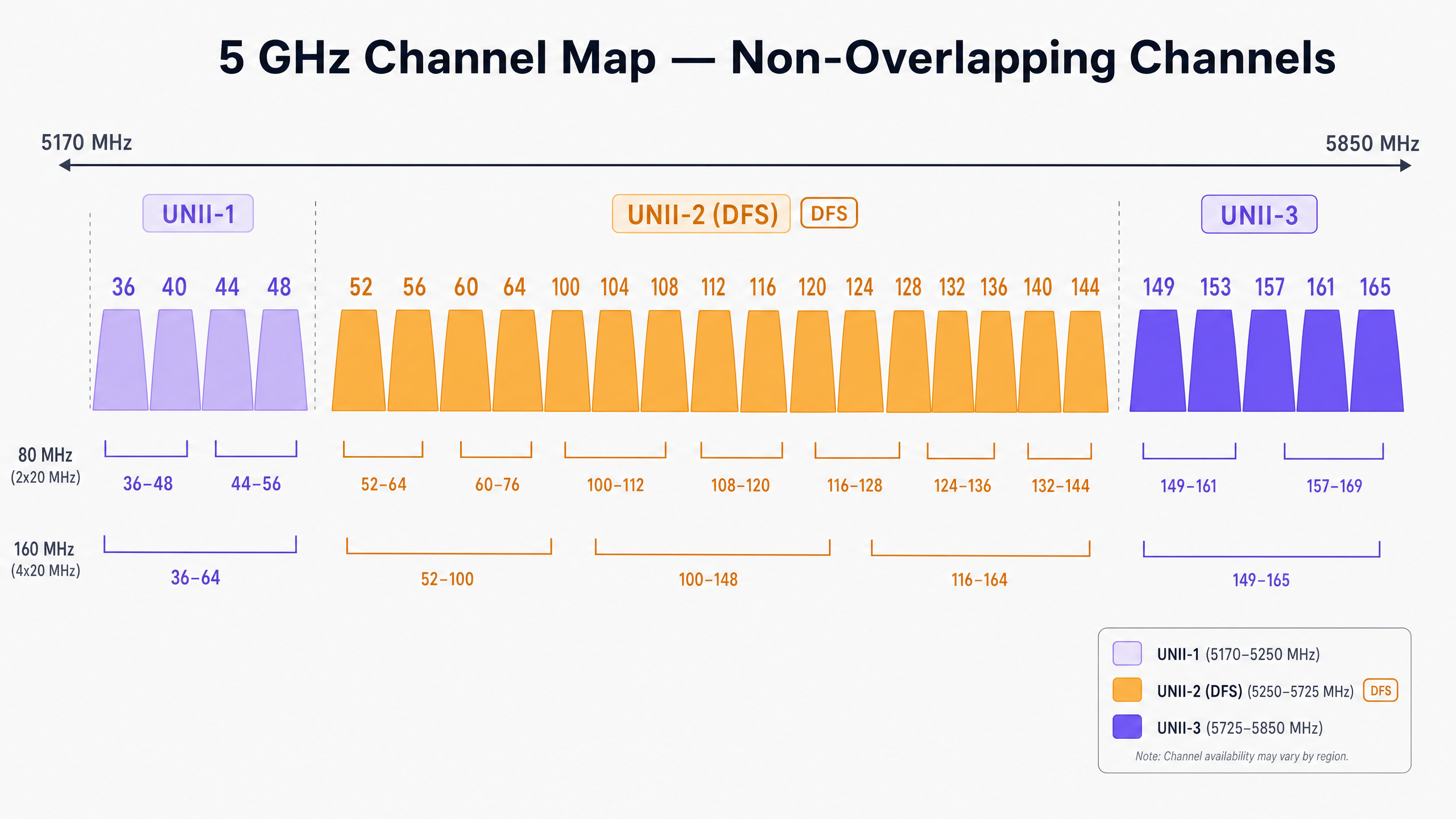
A diferencia de la banda restringida de 2.4GHz, que ofrece solo tres canales no superpuestos, el espectro de 5GHz proporciona hasta 25 canales de 20MHz no superpuestos (dependiendo del dominio regulatorio). Sin embargo, no todos los canales de 5GHz son iguales. Se dividen en bandas específicas de Infraestructura Nacional de Información No Licenciada (UNII), cada una con reglas operativas distintas.
UNII-1 y UNII-3: Los Puertos Seguros
Los canales en las bandas UNII-1 (36, 40, 44, 48) y UNII-3 (149, 153, 157, 161, 165) generalmente están libres de restricciones de interferencia de radar en la mayoría de las regiones. Para implementaciones de alta densidad en Retail o Hospitality , estos canales representan el punto de partida de menor riesgo para su plan de canales. Debido a que UNII-3 opera a una frecuencia ligeramente más alta, experimenta una atenuación marginalmente mayor a través de las paredes, lo que en realidad puede ser ventajoso para limitar la interferencia de co-canal entre habitaciones o pisos adyacentes.
UNII-2 y DFS (Selección Dinámica de Frecuencia)
Las bandas UNII-2 (canales 52–144) comparten espectro con sistemas de radar militares y meteorológicos existentes. Para usar estos canales, los puntos de acceso deben soportar DFS. Si un AP detecta un pulso de radar, debe desocupar inmediatamente el canal y no puede regresar durante 30 minutos.
En entornos cercanos a aeropuertos, puertos o estaciones meteorológicas, los eventos de DFS pueden causar desconexiones repentinas e inexplicables de clientes. Si su recinto experimenta interrupciones intermitentes, revisar los registros del controlador en busca de eventos de DFS es un primer paso obligatorio.
Tipos de Interferencia
La interferencia en las redes inalámbricas empresariales generalmente se divide en dos categorías:
- Interferencia de Co-Canal (CCI): Esto ocurre cuando múltiples APs (suyos o de un vecino) operan en el mismo canal. Debido a que WiFi es un medio semidúplex gobernado por Carrier Sense Multiple Access with Collision Avoidance (CSMA/CA), todos los dispositivos en el mismo canal deben esperar su turno para transmitir. Un CCI alto conduce a una mayor contención del tiempo de aire y una latencia elevada.
- Interferencia No-WiFi: Dispositivos que emiten energía de RF en la banda de 5GHz sin adherirse a los protocolos 802.11. Los culpables comunes incluyen teléfonos inalámbricos, transmisores AV inalámbricos y sensores IoT propietarios. A diferencia del CCI, la interferencia no-WiFi eleva el nivel de ruido, corrompiendo las tramas de WiFi y provocando retransmisiones.
Guía de Implementación: Escaneo y Selección de Canales
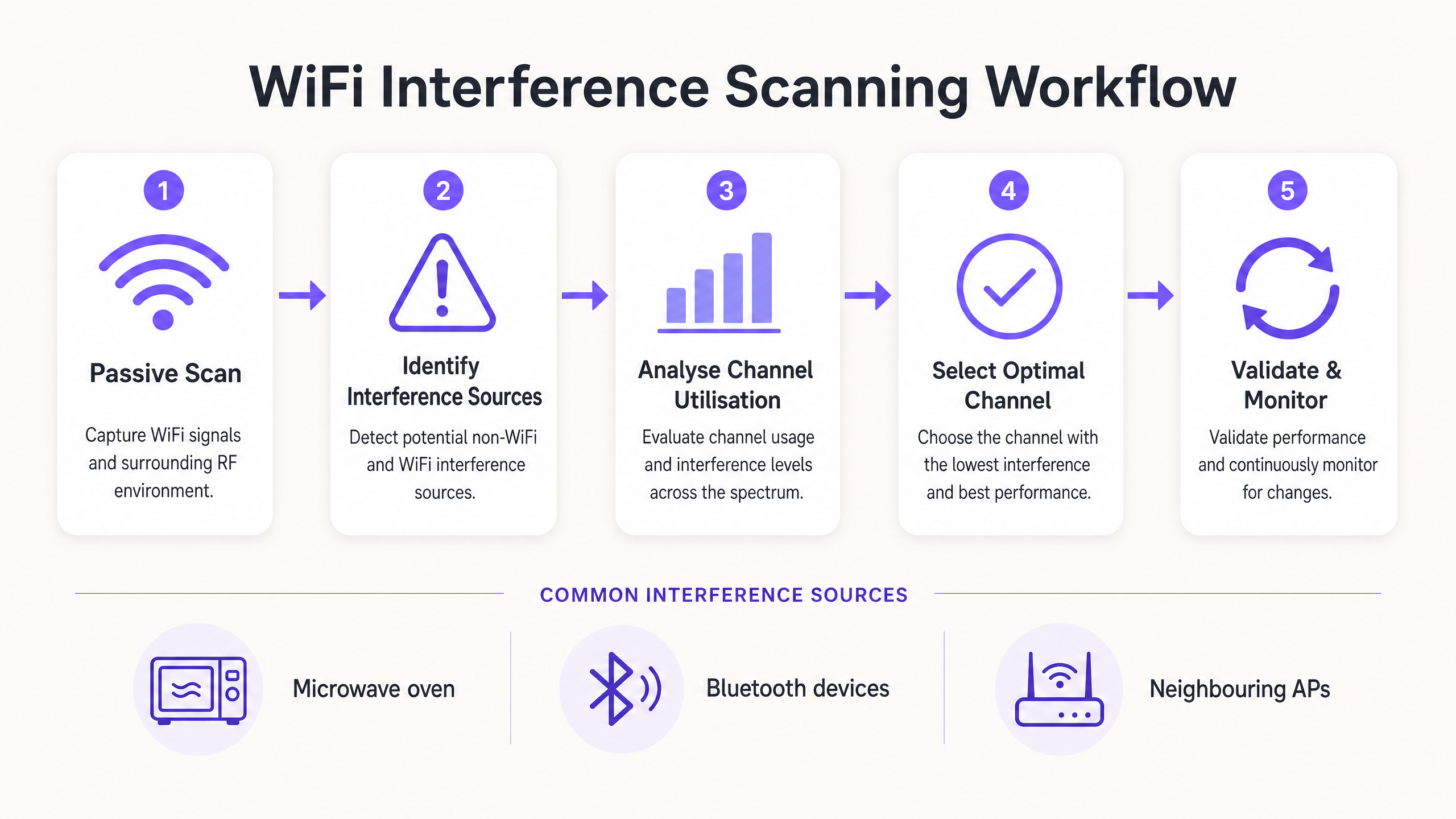
Para determinar el mejor canal para 5GHz, debe ir más allá de la configuración predeterminada de "Auto-RF" e implementar una metodología de escaneo estructurada.
Paso 1: Establecer la Línea Base del Entorno
Antes de realizar cambios, establezca una línea base. Utilice las herramientas de monitoreo integradas de su controlador o integre con una plataforma de WiFi Analytics para capturar:
- Porcentajes de utilización de canal promedio y pico.
- Tasas de asociación de clientes y métricas de éxito de roaming.
- Rendimiento de línea base durante las horas pico de operación.
> Regla Crucial: Nunca realice su escaneo inicial de RF en un recinto vacío. Un escaneo a las 2:00 AM de un domingo no revelará la interferencia generada por 5,000 asistentes en una conferencia.
Paso 2: Ejecutar Análisis de Espectro
Confiar únicamente en el escaneo estándar de AP solo detecta otras redes 802.11. Para identificar la interferencia no-WiFi, necesita un análisis de espectro de hardware.
- Nivel 1 (Básico): Monitores de espectro de AP basados en controlador. Muchos APs empresariales cuentan con una radio de escaneo dedicada que puede identificar firmas no-WiFi.
- Nivel 2 (Avanzado): Hardware dedicado como Ekahau Sidekick o MetaGeek Chanalyzer. Estas herramientas capturan energía de RF cruda a través del espectro, permitiendo a los ingenieros identificar las firmas específicas de dispositivos Bluetooth, transmisores AV o hardware defectuoso.
Paso 3: Analizar la Utilización del Canal
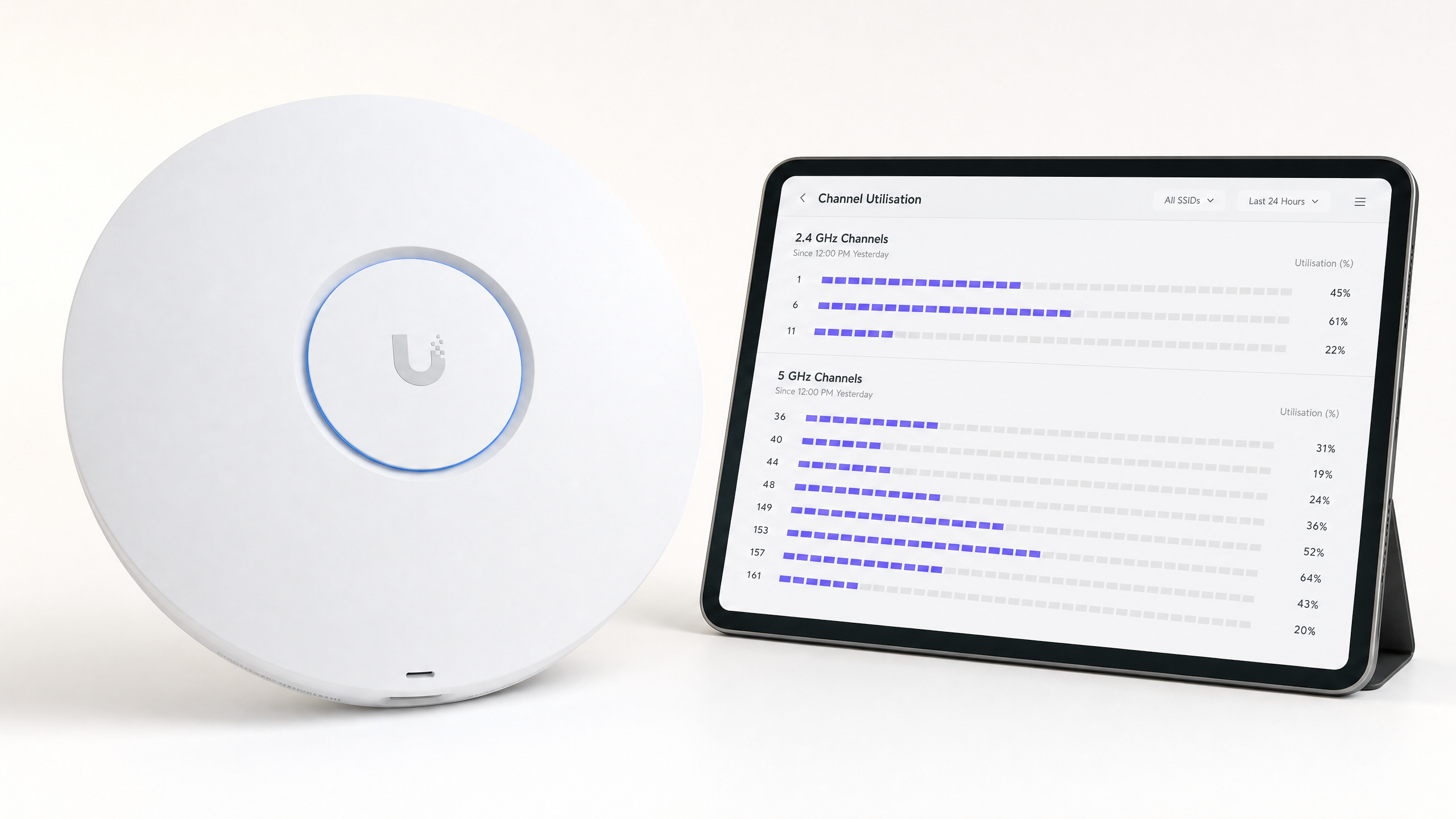
La utilización del canal es la métrica más crítica para el rendimiento. Representa el porcentaje de tiempo que el canal está ocupado (ya sea transmitiendo datos o bloqueado por interferencia).
- < 20%: Excelente. Mucha capacidad para aplicaciones de alto rendimiento.
- 20% - 50%: Normal para entornos empresariales activos.
- > 70%: Umbral crítico. Con un 70% de utilización, la latencia aumenta exponencialmente y la experiencia del cliente se degrada rápidamente.
Si un AP reporta >70% de utilización en su canal de 5GHz, se requiere una remediación inmediata.
Paso 4: Seleccione el Canal Óptimo
Al seleccionar el mejor canal para 5GHz, siga esta matriz de decisión:
- Identifique canales con < 20% de utilización durante las horas pico.
- Priorice los canales UNII-1 y UNII-3 para evitar desconexiones relacionadas con DFS, especialmente en zonas críticas como departamentos de emergencia de hospitales ( Atención Médica ) o centros de tránsito de alto tráfico ( Transporte ).
- Si UNII-1/3 están saturados, habilite selectivamente los canales DFS (UNII-2), pero monitoree los registros agresivamente para detectar eventos de radar durante los próximos 14 días.
- Estandarice anchos de canal de 20MHz en entornos de ultra alta densidad (como estadios). Solo use canales enlazados de 40MHz u 80MHz en áreas de baja densidad donde se requiera un rendimiento individual máximo.
Mejores Prácticas y Solución de Problemas
Deshabilitar el Canal Automático en Zonas de Alta Densidad
Si bien los algoritmos de Radio Resource Management (RRM) y de canal automático son adecuados para entornos de oficina estándar, con frecuencia fallan en lugares complejos. Los cambios de canal incontrolados durante un evento en vivo pueden causar desconexiones masivas de clientes. En estadios o grandes centros de conferencias, un diseño de canal estático y meticulosamente planificado es obligatorio.
Reducir el Tamaño de la Celda
Si todos los canales de 5GHz muestran una alta utilización, cambiar el canal no resolverá el problema. En su lugar, debe reducir la interferencia de co-canal (Co-Channel Interference) disminuyendo la huella de RF de sus APs. Reduzca la potencia de transmisión (Tx) de los APs y aumente la tasa de datos mínima obligatoria (por ejemplo, deshabilite tasas por debajo de 12 Mbps o 24 Mbps). Esto obliga a los clientes a moverse más pronto y evita que los clientes distantes consuman un tiempo de aire excesivo.
Lectura Relacionada
Para obtener más estrategias sobre la optimización de la infraestructura, lea nuestra guía sobre Cómo mejorar la velocidad del WiFi sin comprar nuevos puntos de acceso (o la versión en alemán: Wie man die WiFi-Geschwindigkeit verbessert, ohne neue Access Points zu kaufen ). Para obtener información sobre el acceso moderno, consulte Cómo un wi fi assistant habilita el acceso sin contraseña en 2026 y nuestro reciente lanzamiento del modo de mapas sin conexión . Además, lea sobre nuestra dirección estratégica en el Anuncio de Iain Fox .
ROI e Impacto Comercial
La optimización de la asignación de canales de 5GHz ofrece un valor comercial medible sin inversión de CapEx:
| Métrica | Pre-Optimización (Típica) | Objetivo Post-Optimización | Impacto Comercial |
|---|---|---|---|
| Utilización del Canal | > 75% | < 40% | Elimina los picos de latencia durante las horas pico. |
| Fallas de Roaming | 10-15% | < 2% | Llamadas de voz/video fluidas para el personal en movimiento. |
| Tickets de Soporte | Alto volumen (Interrupciones) | Mínimo | Reduce el gasto operativo de TI (OpEx). |
| Evitación de CapEx | N/A | Alto | Retrasa la necesidad de costosas actualizaciones de hardware. |
Al tratar el espectro de RF como un activo gestionado en lugar de una utilidad invisible, los líderes de TI pueden asegurar que su infraestructura inalámbrica soporte las crecientes demandas de las operaciones empresariales modernas.
Definiciones clave
Co-Channel Interference (CCI)
Interference caused when multiple access points operate on the exact same channel, forcing them to share airtime.
CCI is the primary cause of slow WiFi in dense deployments. IT teams must manage CCI by carefully planning channel reuse and managing AP transmit power.
Dynamic Frequency Selection (DFS)
A regulatory requirement for devices operating in the UNII-2 bands to detect radar systems and automatically vacate the channel.
While DFS channels offer valuable extra spectrum, radar detection events can cause sudden client disconnections, making them risky near airports or weather stations.
Channel Utilisation
The percentage of time a specific RF channel is busy transmitting or receiving data, or blocked by interference.
This is the most critical metric for WiFi health. High utilisation (>70%) directly correlates with poor user experience and high latency.
UNII Bands
Unlicensed National Information Infrastructure radio bands. The 5GHz spectrum is divided into UNII-1, UNII-2 (DFS), and UNII-3.
Understanding UNII band rules is essential for channel planning, as different bands have different transmit power limits and radar avoidance requirements.
CSMA/CA
Carrier Sense Multiple Access with Collision Avoidance. The protocol WiFi uses to ensure only one device transmits on a channel at a time.
Because WiFi is half-duplex and uses CSMA/CA, it is highly sensitive to interference. If the channel is noisy, devices will wait indefinitely to transmit.
Spectrum Analysis
The process of measuring raw RF energy across a frequency band, rather than just decoding WiFi frames.
Essential for finding non-WiFi interference sources like microwaves, Bluetooth devices, or faulty AV equipment that standard AP scans cannot see.
RSSI
Received Signal Strength Indicator. A measurement of how well a device can hear a signal from an access point.
While strong RSSI is necessary, it is not sufficient for good performance if channel utilisation is high or interference is present.
Bonded Channels
Combining multiple 20MHz channels into a wider channel (e.g., 40MHz, 80MHz) to increase maximum theoretical throughput.
Bonding channels reduces the total number of non-overlapping channels available, making it a poor choice for high-density enterprise deployments.
Ejemplos resueltos
A 400-room hotel in a dense urban centre is experiencing severe guest complaints regarding WiFi dropouts during the evening peak (7 PM - 10 PM). The controller shows APs are randomly changing channels, and channel utilisation on the 5GHz band frequently exceeds 85%.
- Disable the controller's Auto-RF/RRM feature to stop unpredictable channel changes during peak hours. 2. Perform a passive RF scan specifically between 7 PM and 10 PM to capture the true interference baseline. 3. Identify that neighbouring residential routers are saturating UNII-1 channels. 4. Manually reassign the hotel's corridor APs to DFS channels (UNII-2), as the venue is not near an airport. 5. Reduce AP transmit power by 3dBm to shrink cell sizes and reduce co-channel interference between adjacent rooms.
A retail distribution centre relies on handheld scanners for inventory management. The scanners frequently disconnect when moving between aisles, despite strong signal strength (-60 dBm). The APs are configured to use 80MHz channel widths on the 5GHz band.
- Reconfigure the entire 5GHz channel plan to use 20MHz channel widths instead of 80MHz. 2. Increase the minimum mandatory data rate to 24 Mbps to prune slow clients and clear airtime faster. 3. Audit the environment for non-WiFi interference using a spectrum analyser, as industrial environments often have legacy RF equipment.
Preguntas de práctica
Q1. You are deploying WiFi in a hospital located 2 miles from a major international airport. The IT director wants to use all available 5GHz channels to maximise capacity. Do you recommend using UNII-2 (DFS) channels?
Sugerencia: Consider the impact of weather and aviation radar systems on UNII-2 channels.
Ver respuesta modelo
No, it is highly discouraged. Proximity to a major airport means frequent radar detection events are highly likely. When an AP detects radar, it must immediately drop all clients and vacate the channel. In a hospital environment where critical medical telemetry may rely on WiFi, these sudden disconnections pose an unacceptable operational risk. Stick to UNII-1 and UNII-3 channels.
Q2. A stadium deployment is suffering from massive Co-Channel Interference (CCI) during matches. The APs are currently set to 80MHz channel widths on the 5GHz band to 'maximise speed'. What architectural change should you implement?
Sugerencia: Think about the relationship between channel width and the number of available non-overlapping channels.
Ver respuesta modelo
Reduce the channel width from 80MHz to 20MHz across the entire deployment. Using 80MHz channels consumes four standard 20MHz channels per AP, drastically reducing the number of non-overlapping channels available. In a stadium, capacity (handling thousands of devices) is far more important than peak throughput for a single device. Reverting to 20MHz channels provides up to 25 non-overlapping channels, massively reducing CCI.
Q3. A retail store reports that their wireless point-of-sale (POS) terminals frequently drop offline, but only between 12:00 PM and 2:00 PM. Standard AP logs show strong signal strength. What is the next troubleshooting step?
Sugerencia: What happens in a retail or office environment between noon and 2 PM?
Ver respuesta modelo
Perform a hardware spectrum analysis (using a tool like Ekahau Sidekick) during the 12:00 PM - 2:00 PM window. The specific timing strongly suggests non-WiFi interference, likely from a microwave oven in a staff breakroom. Standard AP scans only decode WiFi frames and will not 'see' the raw RF energy from a microwave, which operates in the 2.4GHz band and can completely corrupt WiFi transmissions.