
Cómo configurar WPA2-Enterprise en plataformas de puntos de acceso comunes (Cisco, Aruba, Ubiquiti)
Esta guía de referencia técnica proporciona a profesionales de TI sénior y arquitectos de red una guía definitiva y específica del proveedor para implementar WPA2-Enterprise en plataformas Cisco, Aruba y Ubiquiti. Detalla la arquitectura, la integración RADIUS, los requisitos de cumplimiento y los escenarios de implementación en entornos empresariales y de recintos.
Escucha esta guía
Ver transcripción del podcast
Resumen Ejecutivo
Implementar WPA2-Enterprise ya no es una mejora de seguridad opcional; es la base fundamental para cualquier red inalámbrica empresarial. Para los gerentes de TI y arquitectos de red que operan en entornos de hotelería, comercio minorista y sector público, el cambio de claves precompartidas a autenticación 802.1X está impulsado por estrictos mandatos de cumplimiento, incluidos PCI DSS y GDPR. Esta guía de referencia técnica proporciona pasos de configuración prácticos y específicos de la plataforma para los tres proveedores de puntos de acceso dominantes: Cisco, Aruba y Ubiquiti.
Al hacer la transición a WPA2-Enterprise, las organizaciones eliminan los riesgos asociados con las credenciales compartidas, obtienen registros de auditoría granulares por sesión y habilitan la segmentación dinámica de la red. Cuando se implementa correctamente, esta arquitectura no solo asegura el perímetro corporativo, sino que también se integra sin problemas junto con las redes de visitantes administradas por una plataforma integral de Guest WiFi . Las siguientes secciones detallan la arquitectura técnica, los pasos de implementación y las estrategias de mitigación de riesgos necesarias para un despliegue exitoso.
Análisis Técnico Detallado
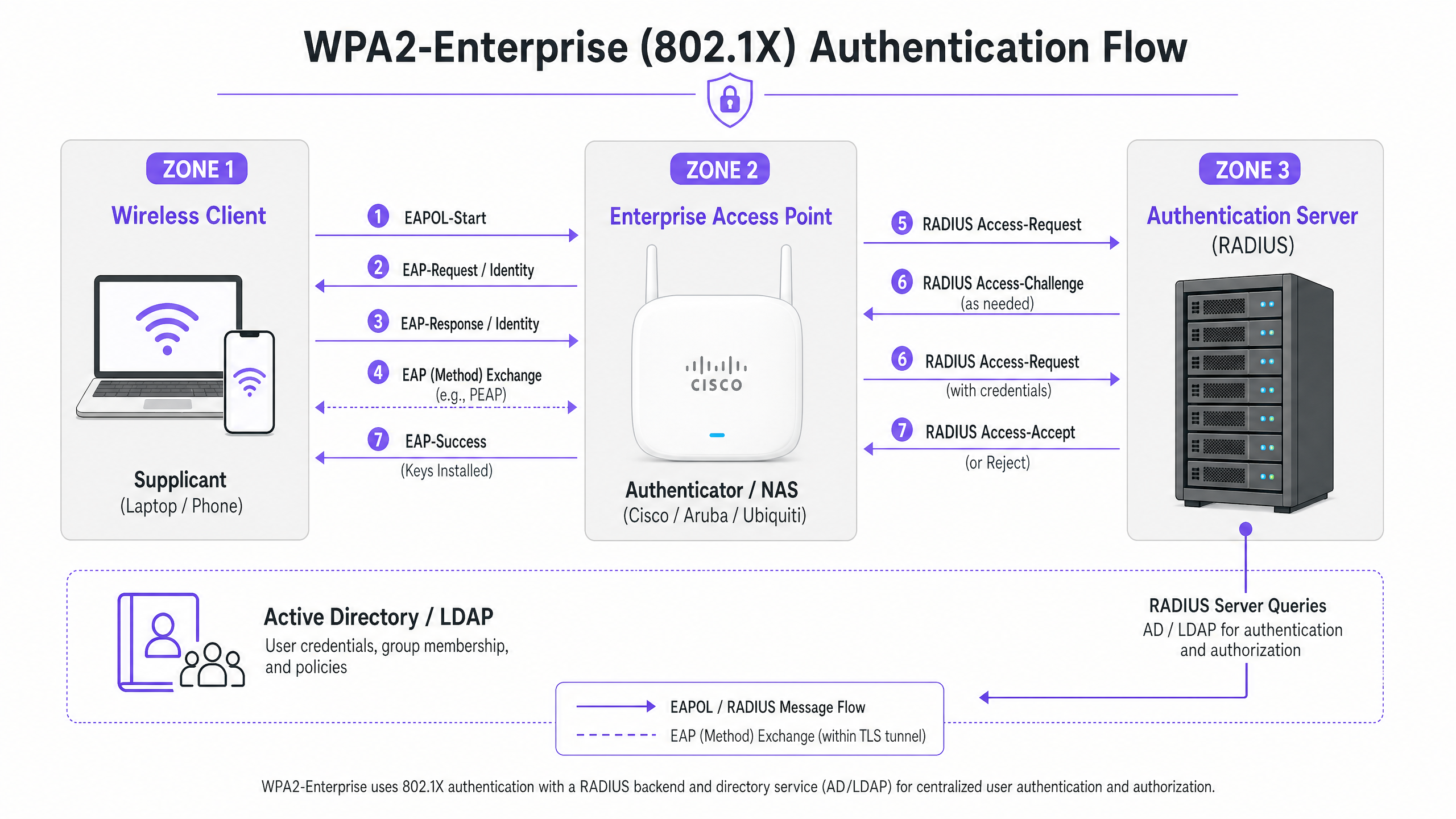
WPA2-Enterprise se basa en el estándar IEEE 802.1X para ofrecer control de acceso a la red basado en puertos. A diferencia de WPA2-Personal, que utiliza una clave precompartida estática (PSK), WPA2-Enterprise requiere que cada suplicante (dispositivo cliente) se autentique individualmente contra un servidor de autenticación externo (típicamente un servidor RADIUS) antes de que se le conceda acceso a la red.
La arquitectura consta de tres componentes principales:
- El Suplicante: El dispositivo cliente que intenta conectarse a la red.
- El Autenticador: El punto de acceso empresarial o controlador de LAN inalámbrica (por ejemplo, Cisco WLC, Aruba Mobility Controller) que facilita el proceso de autenticación.
- El Servidor de Autenticación: El servidor RADIUS de backend (por ejemplo, Cisco ISE, Aruba ClearPass, Windows NPS) que valida las credenciales contra un servicio de directorio como Active Directory o LDAP.
El Proceso de Intercambio EAP
El proceso de autenticación utiliza el Protocolo de Autenticación Extensible (EAP) encapsulado sobre LAN (EAPOL). El autenticador actúa puramente como un proxy de paso durante la fase inicial. Una vez que el servidor RADIUS valida las credenciales, devuelve un mensaje Access-Accept al autenticador, que luego deriva las claves de cifrado necesarias para asegurar la sesión inalámbrica.
La elección del método EAP es crítica. PEAP-MSCHAPv2 es el método más ampliamente implementado, ya que admite la autenticación de contraseña de Active Directory heredada mientras asegura el intercambio dentro de un túnel TLS establecido por el certificado del servidor. Sin embargo, para una seguridad máxima, se recomienda EAP-TLS. EAP-TLS requiere autenticación mutua de certificados —tanto el servidor como el cliente deben presentar certificados válidos— lo que mitiga el robo de credenciales, pero requiere una infraestructura de clave pública (PKI) robusta o una solución de gestión de dispositivos móviles (MDM) para la distribución de certificados.
Guía de Implementación
Los principios fundamentales para configurar WPA2-Enterprise son consistentes entre los proveedores, pero la ejecución varía según la interfaz de gestión y el ecosistema.
Cisco (Catalyst y Meraki)
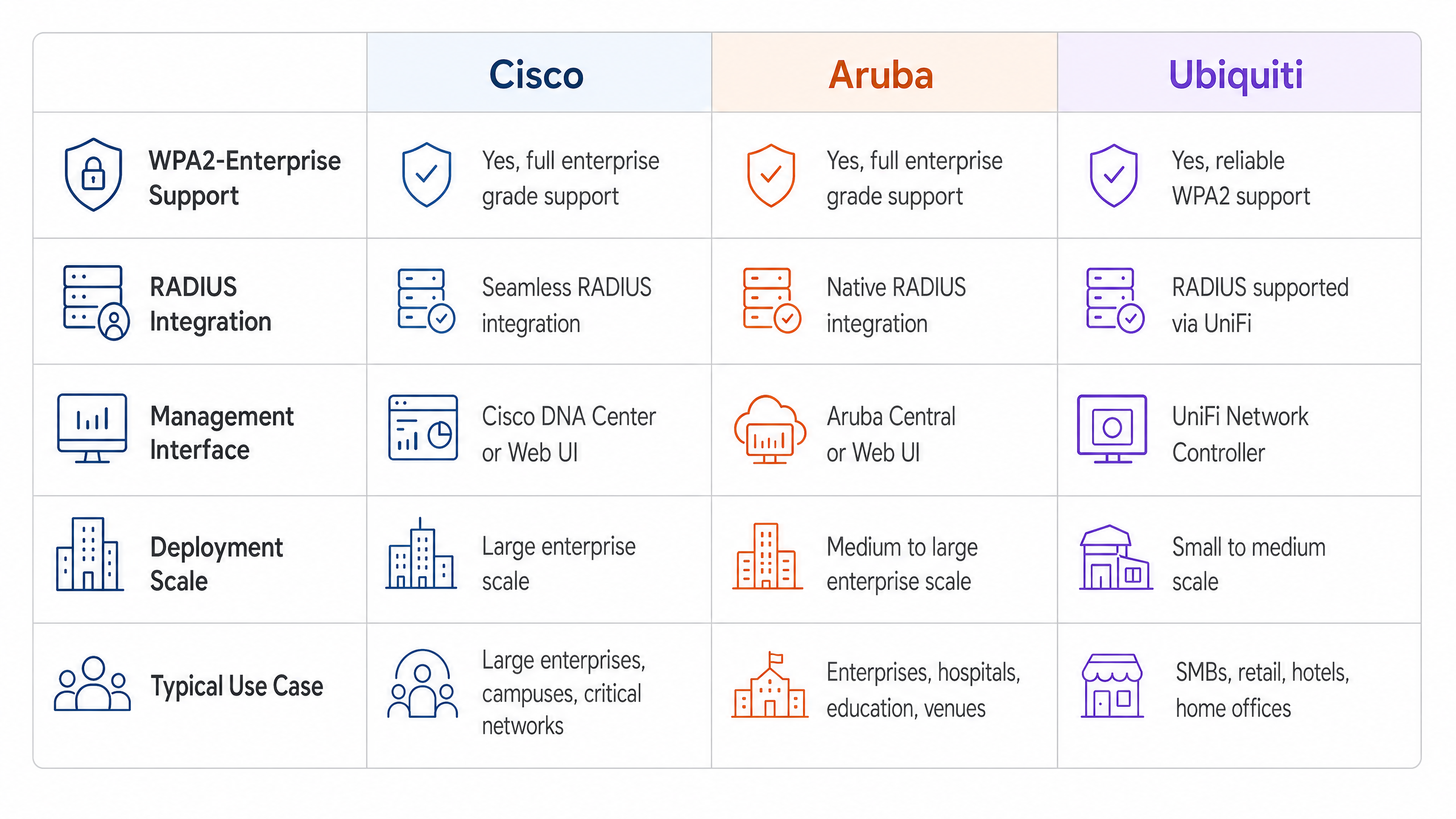
Los entornos Cisco suelen escalar desde implementaciones en campus hasta redes empresariales distribuidas.
Cisco Catalyst (WLC/DNA Center):
- Definir Servidores RADIUS: Navegue a la pestaña Seguridad, seleccione AAA y configure los servidores RADIUS de autenticación y contabilidad primarios y secundarios. Asegúrese de que el secreto compartido coincida con la configuración del servidor RADIUS.
- Crear Perfil WLAN: En la pestaña WLANs, cree un nuevo perfil.
- Configurar Políticas de Seguridad: Establezca la Seguridad de Capa 2 en WPA+WPA2 y habilite 802.1X como método de Gestión de Claves de Autenticación (AKM).
- Vincular Servidores AAA: Asigne los servidores RADIUS previamente definidos al perfil WLAN. Habilite 'AAA Override' si se requiere asignación dinámica de VLAN.
Cisco Meraki:
- Configuración de SSID: En el Panel de Meraki, navegue a Wireless > SSIDs y seleccione la red de destino.
- Control de Acceso: Establezca el requisito de asociación en 'WPA2-Enterprise con mi servidor RADIUS'.
- Configuración RADIUS: Ingrese las direcciones IP, el puerto de autenticación (típicamente 1812), el puerto de contabilidad (1813) y los secretos compartidos para su infraestructura RADIUS. El panel de Meraki incluye una herramienta de prueba incorporada para verificar la conectividad RADIUS antes de la implementación.
Redes Aruba
Aruba es la plataforma dominante en Hospitality y educación superior, aprovechando en gran medida su ClearPass Policy Manager para un control de acceso avanzado.
- Definir Perfil AAA: En Aruba Central o la interfaz de usuario del Mobility Controller, cree un nuevo perfil AAA. Este perfil dicta cómo se maneja la autenticación.
- Configurar Grupo de Servidores RADIUS: Agregue sus servidores RADIUS a un grupo de servidores, especificando reglas de conmutación por error y valores de tiempo de espera. Asocie este grupo al perfil AAA.
- Configuración de AP Virtual: Cree o modifique un perfil de AP Virtual (SSID). Establezca el tipo de seguridad en WPA2-Enterprise.
- Asociar Perfiles: Vincule el perfil AAA al perfil de AP Virtual. Si utiliza ClearPass, asegúrese de que el puerto RADIUS CoA (Cambio de Autorización) (3799) esté permitido a través de cualquier firewall intermedio para permitir la aplicación dinámica de políticas.
Ubiquiti (UniFi)
Ubiquiti ofrece una solución rentable para entornos de Retail y SMB a través del UniFi Network Controller.
- **Perfil RADIUS 1. Creación: Navegue a Ajustes > Perfiles > RADIUS. Cree un nuevo perfil con la dirección IP, los puertos (1812/1813) y el secreto compartido de su servidor RADIUS externo.
- Configuración de SSID: Vaya a Ajustes > WiFi y cree una nueva red inalámbrica.
- Configuración de Seguridad: Seleccione 'WPA2 Enterprise' como protocolo de seguridad y adjunte el perfil RADIUS recién creado.
- Nota sobre la infraestructura RADIUS: A diferencia de los controladores empresariales que pueden ofrecer RADIUS localizable y resistente, UniFi depende en gran medida de servidores externos (por ejemplo, FreeRADIUS, Windows NPS). Asegure una conectividad fiable entre los AP de UniFi y el backend RADIUS.
Mejores Prácticas
Para garantizar una implementación resiliente y segura, los arquitectos de red deben adherirse a varias mejores prácticas críticas:
- Aplicar la Validación de Certificados: Los dispositivos cliente deben configurarse explícitamente para validar el certificado del servidor RADIUS contra una Autoridad de Certificación (CA) de confianza. No hacerlo expone la red a ataques de 'Evil Twin' donde los puntos de acceso no autorizados recolectan credenciales de usuario.
- Implementar Redundancia RADIUS: El servidor RADIUS se encuentra en la ruta crítica para el acceso a la red. Siempre configure servidores RADIUS primarios y secundarios. En entornos distribuidos, considere soluciones RADIUS alojadas en la nube para alta disponibilidad.
- Aprovechar la Asignación Dinámica de VLAN: Utilice atributos RADIUS (por ejemplo,
Tunnel-Pvt-Group-ID) para asignar dinámicamente usuarios a VLAN específicas basándose en su membresía de grupo de Active Directory. Esto impone la segmentación de la red sin transmitir múltiples SSIDs. - Habilitar la Contabilidad RADIUS: No configure solo la autenticación. La contabilidad RADIUS (Puerto 1813) es obligatoria para generar los registros de auditoría requeridos por los marcos de cumplimiento.
- Proteger el Borde de la Red: Lea más sobre cómo proteger su infraestructura en nuestra guía sobre cómo Proteger su Red con DNS y Seguridad Robustos .
Solución de Problemas y Mitigación de Riesgos
Incluso con una planificación cuidadosa, las implementaciones pueden encontrar problemas. Los modos de falla comunes incluyen:
- Desajustes de Secreto Compartido: Un simple error tipográfico en el secreto compartido de RADIUS resultará en fallas de autenticación silenciosas. Verifique los secretos tanto en el autenticador como en el servidor RADIUS.
- Errores de Sincronización de Tiempo: La validación de certificados requiere una sincronización horaria precisa. Asegúrese de que todos los AP, controladores y servidores RADIUS estén sincronizados a través de una fuente NTP fiable.
- Firewall Bloqueando el Tráfico RADIUS: Asegúrese de que los puertos UDP 1812 (Autenticación) y 1813 (Contabilidad) estén abiertos entre los AP/Controladores y el servidor RADIUS. Si usa CoA, asegúrese de que el UDP 3799 esté abierto.
- Configuración Incorrecta del Solicitante Cliente: El problema más común es que el dispositivo cliente no está configurado para confiar en la CA que emitió el certificado del servidor RADIUS. Utilice MDM o Directiva de Grupo para enviar los perfiles inalámbricos correctos a los dispositivos corporativos.
Para una comprensión más amplia de los protocolos de autenticación, revise Cómo Configurar la Autenticación WiFi 802.1X: Una Guía Paso a Paso .
ROI e Impacto Empresarial
La transición a WPA2-Enterprise ofrece un valor empresarial significativo más allá de las mejoras de seguridad básicas.
- Mitigación de Riesgos: Eliminar las contraseñas compartidas reduce drásticamente la superficie de ataque y el riesgo de una violación de datos, lo que puede acarrear graves sanciones financieras y de reputación.
- Eficiencia Operativa: La integración de la autenticación WiFi con proveedores de identidad existentes (como Active Directory) automatiza la incorporación y desvinculación de empleados. Cuando un empleado se va, deshabilitar su cuenta de AD revoca instantáneamente su acceso WiFi.
- Habilitación del Cumplimiento: Los registros de auditoría granulares y la autenticación por usuario son requisitos previos para el cumplimiento de PCI DSS e ISO 27001.
- Infraestructura Unificada: Al utilizar la asignación dinámica de VLAN, los recintos pueden ejecutar tráfico corporativo, de back-of-house e IoT de forma segura sobre el mismo hardware físico utilizado para el acceso de invitados. La red de invitados puede luego monetizarse y analizarse utilizando una solución dedicada de WiFi Analytics , maximizando el retorno de la inversión en hardware. Asegúrese de tener el ancho de banda necesario comprendiendo ¿Qué es una Línea Dedicada? Internet Empresarial Exclusivo .
Definiciones clave
WPA2-Enterprise
A security protocol for wireless networks that uses IEEE 802.1X to provide per-user authentication via an external server, rather than a single shared password.
The mandatory standard for securing corporate and operational WiFi networks in enterprise environments.
802.1X
An IEEE standard for port-based network access control that provides an authentication mechanism to devices wishing to attach to a LAN or WLAN.
The underlying framework that makes WPA2-Enterprise work.
RADIUS
Remote Authentication Dial-In User Service; a networking protocol that provides centralized Authentication, Authorization, and Accounting (AAA) management.
The server component that validates user credentials against a database like Active Directory.
Supplicant
The software client on a device (laptop, smartphone) that communicates with the authenticator to request network access.
The endpoint that must be configured with the correct EAP settings and certificate trust.
Authenticator
The network device (Access Point or Switch) that facilitates the authentication process by passing messages between the supplicant and the authentication server.
The Cisco, Aruba, or Ubiquiti hardware managed by the IT team.
EAP (Extensible Authentication Protocol)
An authentication framework frequently used in wireless networks and point-to-point connections, supporting multiple authentication methods.
The protocol used to encapsulate the credential exchange.
PEAP-MSCHAPv2
An EAP method that encapsulates the MSCHAPv2 password exchange within a secure TLS tunnel established by the server's certificate.
The most common deployment method as it balances security with the convenience of using standard AD passwords.
Dynamic VLAN Assignment
The process where a RADIUS server instructs the access point to place an authenticated user onto a specific VLAN based on their identity or group membership.
Crucial for network segmentation, allowing different user types to share the same physical APs securely.
Ejemplos resueltos
A 200-room hotel needs to deploy secure WiFi for its back-of-house staff (housekeeping, management) using existing Aruba access points, while keeping the staff traffic strictly separated from the guest network.
The IT team configures a single 'Hotel_Staff' SSID using WPA2-Enterprise. They integrate Aruba ClearPass with the hotel's Active Directory. In ClearPass, they configure enforcement policies: if a user is in the 'Management' AD group, ClearPass returns a RADIUS attribute assigning them to VLAN 10 (Management Network). If the user is in the 'Housekeeping' group, they are assigned to VLAN 20 (Operations Network). The APs are configured to enforce these dynamic VLAN assignments.
A national retail chain with 50 locations uses Cisco Meraki. They need to secure their point-of-sale (POS) terminals over WiFi to meet PCI DSS compliance, replacing their old WPA2-Personal setup.
The network architect deploys a cloud-hosted RADIUS service to avoid deploying local servers at each store. In the Meraki dashboard, they configure the 'Retail_POS' SSID for WPA2-Enterprise and point it to the cloud RADIUS IPs. They generate unique client certificates for each POS terminal via their MDM platform and configure the RADIUS server to require EAP-TLS. The Meraki APs are configured to send both RADIUS Authentication and Accounting data to the cloud service.
Preguntas de práctica
Q1. Your organisation is deploying WPA2-Enterprise using Ubiquiti UniFi access points. During testing, clients can connect successfully, but the compliance team notes that there are no logs of user session durations or data usage in the central logging system. What is the most likely configuration omission?
Sugerencia: Authentication grants access, but another process tracks usage.
Ver respuesta modelo
The RADIUS Accounting port (1813) has not been configured or is being blocked by a firewall. While Authentication (port 1812) is working, Accounting must be explicitly enabled to generate session audit trails.
Q2. A user reports they cannot connect to the corporate WPA2-Enterprise network. You check the Cisco WLC logs and see the AP is passing the EAP-Request, but the RADIUS server logs show an 'Access-Reject' due to 'Unknown CA'. What needs to be fixed?
Sugerencia: Think about the trust relationship established during the TLS tunnel setup.
Ver respuesta modelo
The client device's supplicant is not configured to trust the Certificate Authority (CA) that issued the RADIUS server's certificate. The client is terminating the connection to prevent a potential Evil Twin attack. The CA certificate must be pushed to the client device.
Q3. You are designing a network for a stadium. You need to support corporate staff, ticketing terminals, and guest WiFi. How should you architect the SSIDs to minimize RF interference while maintaining security?
Sugerencia: Avoid broadcasting an SSID for every single use case.
Ver respuesta modelo
Deploy a maximum of two SSIDs. One SSID for Guests using a captive portal (like Purple). A second SSID for all corporate operations using WPA2-Enterprise. Use Dynamic VLAN Assignment via the RADIUS server to segment the corporate staff onto one VLAN and the ticketing terminals onto another based on their authentication credentials.
Continúe leyendo esta serie
PSK por dispositivo por proveedor: comparación de iPSK, DPSK, MPSK y PPSK (y soporte de WPA3)
Una comparación exhaustiva de las implementaciones de PSK por dispositivo en Cisco Meraki, HPE Aruba, Ruckus, Juniper Mist, Extreme, Fortinet y Ubiquiti UniFi. Conozca cómo WPA3-SAE afecta las estrategias de claves por dispositivo y cuándo implementar modos de transición en lugar de migrar a 802.1X.
¿Qué es la autenticación por dirección MAC? Cuándo usarla y cuándo evitarla
Esta guía técnica de referencia autorizada cubre la autenticación por dirección MAC en entornos WiFi empresariales: cómo funciona la autenticación MAC basada en RADIUS en la Capa 2, sus vulnerabilidades de seguridad inherentes (incluyendo la suplantación de MAC y el impacto de la aleatorización de MAC a nivel de sistema operativo), y los contextos operativos precisos donde sigue siendo una herramienta válida para gestionar dispositivos IoT y sin interfaz. Proporciona una guía de implementación práctica para gerentes de TI y arquitectos de red en hostelería, comercio minorista, atención médica y recintos del sector público, con ejemplos prácticos del mundo real, marcos de decisión y contexto de integración para la plataforma de WiFi para invitados y análisis de Purple.
Cómo Configurar WiFi Empresarial en iOS y macOS con 802.1X
Esta guía autorizada proporciona a los líderes de TI senior pasos prácticos para implementar WiFi empresarial 802.1X en dispositivos iOS y macOS. Cubre la autenticación basada en certificados (EAP-TLS), perfiles de configuración MDM y la integración de arquitectura para asegurar las redes corporativas mientras se apoyan las iniciativas BYOD.