

Cómo Construir una Red WiFi para Campus: Una Guía de TI Universitaria
Esta guía técnica proporciona un plan integral para diseñar e implementar redes WiFi de campus de alta densidad, cubriendo desde estudios de sitio activos y ubicación de puntos de acceso hasta arquitectura de controladores, roaming sin interrupciones y onboarding seguro de invitados. Está escrita para gerentes de TI, arquitectos de red y CTOs de universidades y grandes recintos que necesitan orientación práctica para planificar y ejecutar una implementación inalámbrica este trimestre. La guía también relaciona la plataforma de Guest WiFi y análisis de Purple con puntos de integración reales dentro del ciclo de vida de la implementación.
Listen to this guide
View podcast transcript
Resumen Ejecutivo
Para los equipos de TI universitarios y operadores de recintos, una red WiFi de campus ya no es una comodidad, es infraestructura crítica. Los entornos modernos de educación superior exigen redes inalámbricas de alta densidad y alto rendimiento capaces de soportar múltiples dispositivos por usuario, aplicaciones que consumen mucho ancho de banda y movilidad sin interrupciones a través de vastas extensiones físicas. Esta guía describe la arquitectura técnica, las estrategias de implementación y las mejores prácticas operativas necesarias para construir una red inalámbrica de campus resiliente. Nos centramos en la implementación práctica —desde la planificación de RF y la selección de puntos de acceso (AP) hasta la arquitectura del controlador y el onboarding seguro— asegurando que su implementación ofrezca ROI, cumplimiento y una experiencia de usuario sin fricciones. Ya sea que esté implementando en un solo edificio o en una propiedad de múltiples sitios, los principios aquí se aplican igualmente a entornos de Hostelería , Comercio Minorista , Salud y Transporte .
Análisis Técnico Detallado: Arquitectura y Estándares
Construir una red inalámbrica de campus requiere un enfoque estructurado de la topología y la adhesión a los estándares inalámbricos modernos. Las decisiones tomadas en la etapa de arquitectura determinan la escalabilidad, seguridad y rendimiento de todo lo que sigue.
La Arquitectura de Tres Niveles
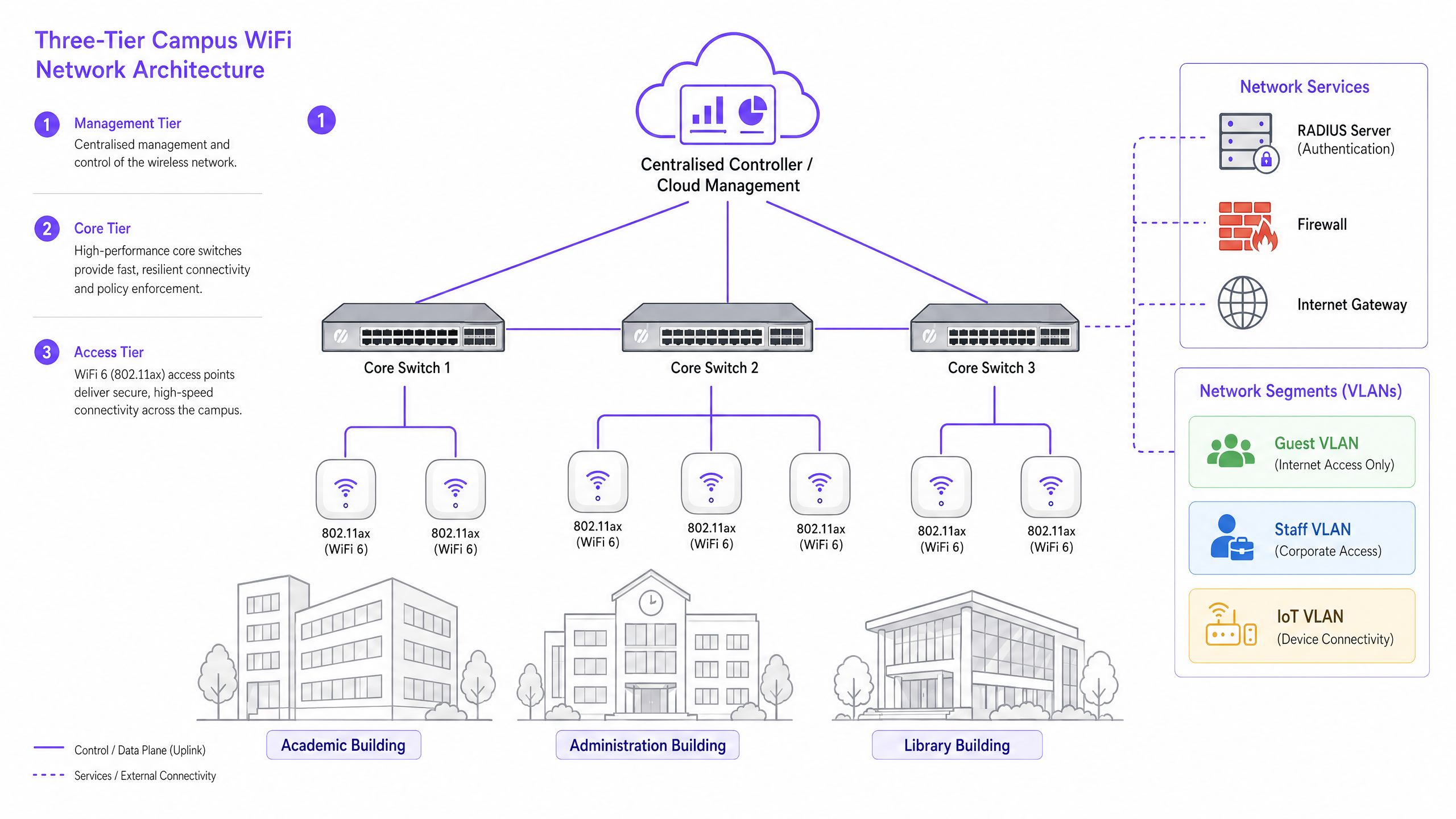
Las redes de campus empresariales emplean una arquitectura jerárquica de tres niveles para garantizar la escalabilidad, resiliencia y rendimiento. Los tres niveles son los siguientes:
Nivel de Gestión/Núcleo: El sistema nervioso central de la red. Esto incluye switches de enrutamiento de núcleo de alta capacidad y el controlador WLAN central — ya sea local o gestionado en la nube. El controlador maneja la gestión de RF, las transferencias de roaming, la aplicación de políticas globales y la gestión de firmware en todos los puntos de acceso. Los controladores gestionados en la nube se han convertido en la opción dominante para nuevas implementaciones, simplificando la gestión de múltiples sitios y reduciendo los costos de hardware local.
Nivel de Distribución: Agrega el tráfico del nivel de acceso, aplicando políticas de enrutamiento y asegurando la redundancia antes de pasar los datos al núcleo. En campus más pequeños, este nivel a menudo se fusiona con el núcleo.
Nivel de Acceso: El borde de la red, que comprende switches de borde Power over Ethernet Plus (PoE+) y los propios Access Points (APs) inalámbricos. Para nuevas implementaciones, PoE+ es el estándar mínimo, ya que los puntos de acceso WiFi 6 consumen significativamente más energía que sus predecesores.
Estándares y Frecuencias Inalámbricas
Las implementaciones modernas deben estandarizarse en 802.11ax (WiFi 6) o WiFi 6E. WiFi 6 introduce características críticas de alta densidad, incluyendo Acceso Múltiple por División de Frecuencia Ortogonal (OFDMA), que permite que un solo AP sirva a múltiples clientes simultáneamente en subcanales, y Tiempo de Activación Objetivo (TWT), que reduce el consumo de batería en dispositivos IoT. WiFi 6E extiende estas capacidades a la banda de 6GHz, ofreciendo un espectro contiguo masivo libre de interferencias de dispositivos heredados — una ventaja significativa en entornos de alta densidad como salas de conferencias y auditorios.
| Standard | Frequency Bands | Max Throughput | Key Feature | Best Use Case |
|---|---|---|---|---|
| 802.11n (WiFi 4) | 2.4GHz / 5GHz | 600 Mbps | MIMO | Solo soporte heredado |
| 802.11ac (WiFi 5) | 5GHz | 3.5 Gbps | MU-MIMO | Implementaciones existentes |
| 802.11ax (WiFi 6) | 2.4GHz / 5GHz | 9.6 Gbps | OFDMA, TWT | Nuevas implementaciones de campus |
| 802.11ax (WiFi 6E) | 2.4 / 5 / 6GHz | 9.6 Gbps | Espectro de 6GHz | Alta densidad, a prueba de futuro |
Seguridad y Autenticación
La seguridad debe ser multicapa. Para el personal y los estudiantes matriculados, la autenticación 802.1X/EAP vinculada al proveedor de identidad de la universidad (Active Directory, LDAP o un servicio de identidad en la nube) es obligatoria. Esto proporciona acceso cifrado basado en credenciales que cumple con los requisitos de estándares como ISO 27001 y Cyber Essentials. Para usuarios transitorios —académicos visitantes, delegados de conferencias y miembros del público— se requiere un Captive Portal seguro. La integración de una solución robusta de Guest WiFi garantiza un onboarding compatible con GDPR, páginas de bienvenida personalizables y la capacidad de recopilar información útil a través de WiFi Analytics . Todo el tráfico inalámbrico debe cifrarse utilizando WPA3, el estándar actual, que proporciona protecciones más sólidas contra ataques de fuerza bruta que su predecesor WPA2. Para una revisión exhaustiva de la postura de seguridad de los puntos de acceso, consulte nuestra Seguridad de Puntos de Acceso: Su Guía Empresarial 2026 .
Guía de Implementación: Del Estudio a la Implementación
Implementar una red de campus es un proceso por fases que requiere una planificación meticulosa antes de tender un solo cable o montar un AP.
Fase 1: El Estudio de Sitio Activo
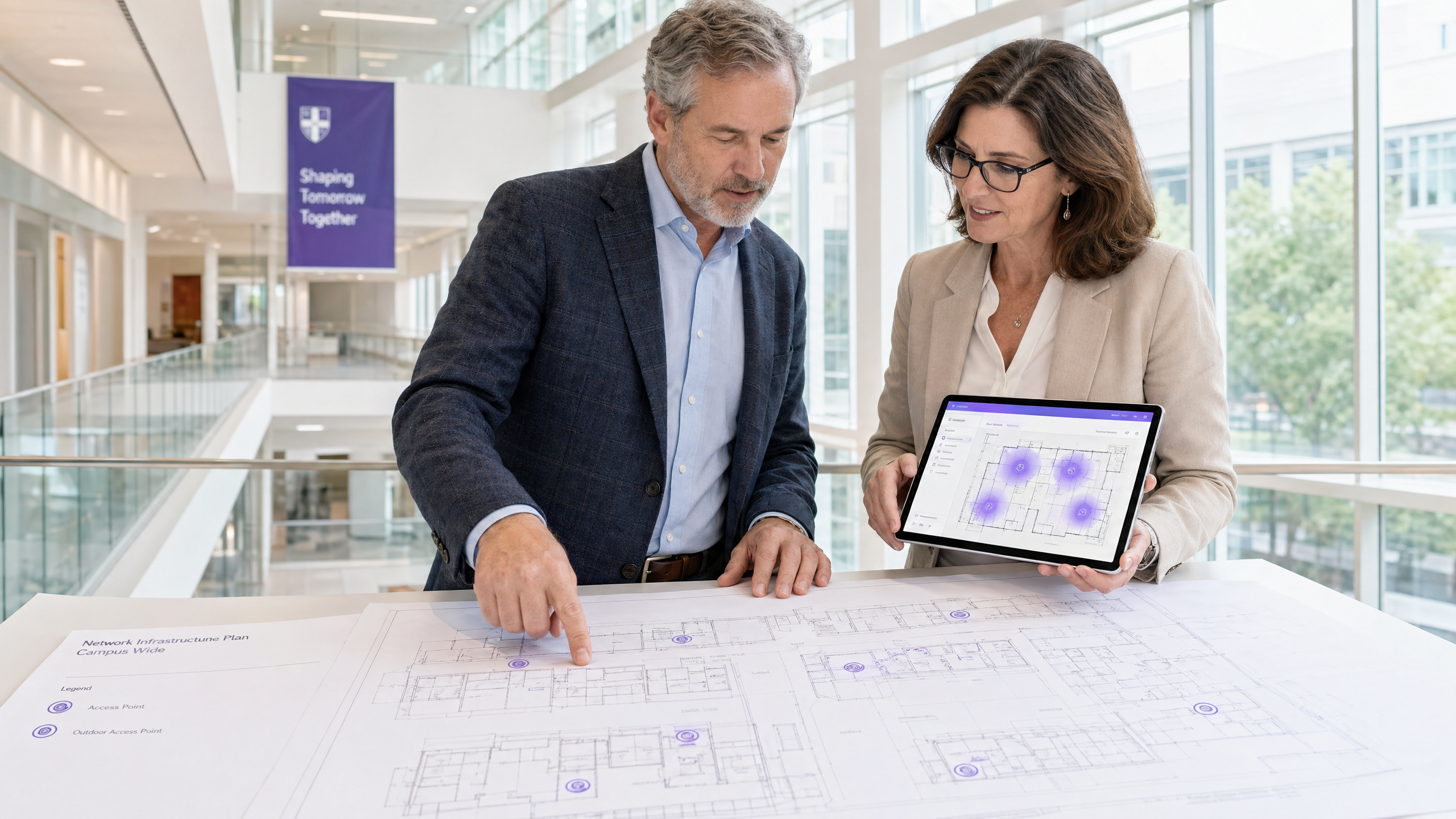
Un estudio predictivo utilizando planos de planta es insuficiente para entornos de campus complejos. Debe realizar estudios de RF activos y en el sitio. Los materiales de construcción en universidades antiguas —mampostería gruesa, listones metálicos, hormigón armado— atenúan las señales de manera impredecible. El estudio identifica puntos ciegos de RF y ayuda a determinar la ubicación óptima de los AP para garantizar tanto la cobertura como la capacidad. El resultado debe ser un mapa de calor validado que muestre la intensidad de la señal, la utilización del canal y los niveles de interferencia en cada piso.
Fase 2: Planificación de Capacidad
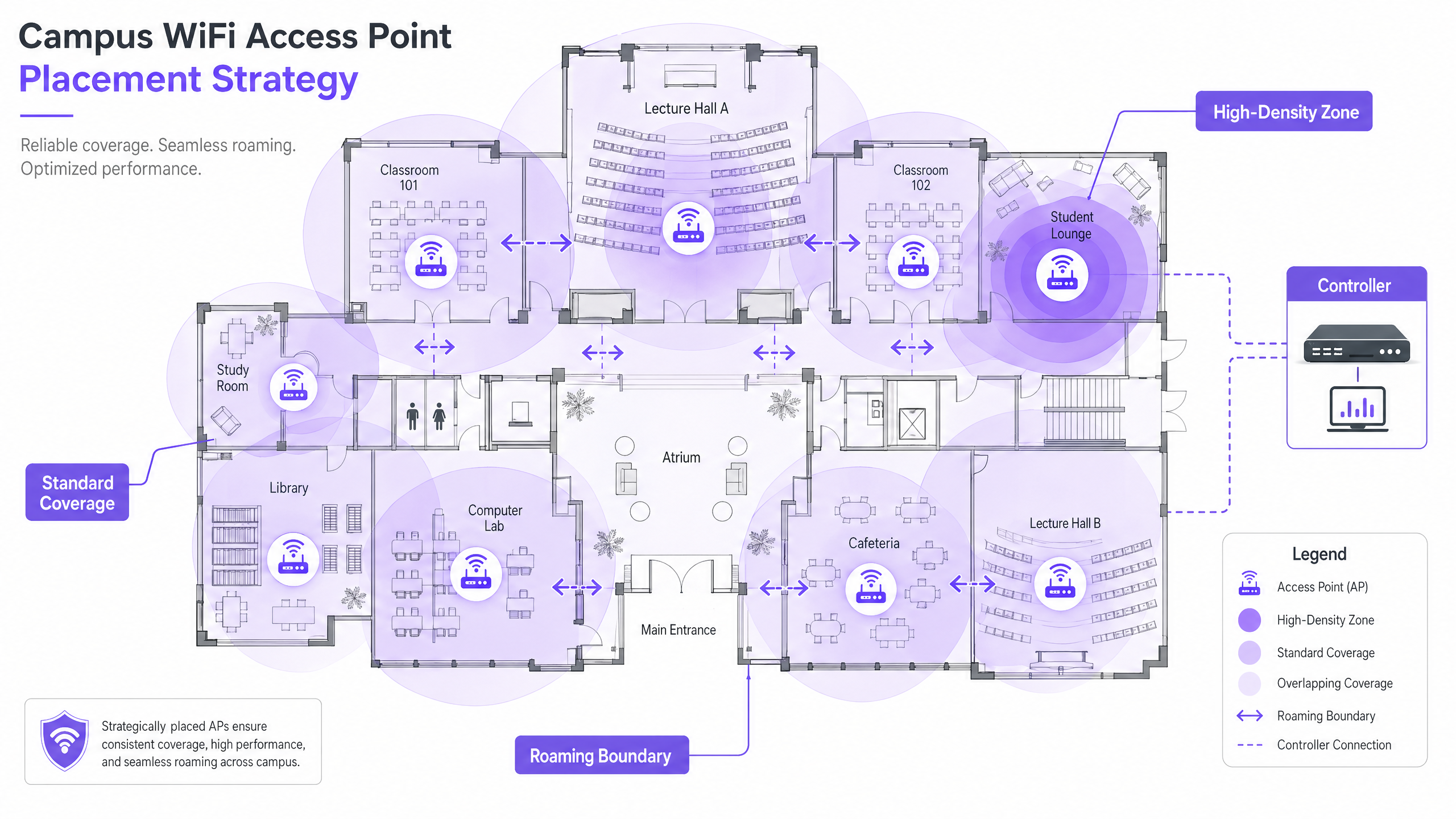
Históricamente, las redes se diseñaban para la cobertura —asegurando que una señal llegara a cada rincón. Hoy, el diseño es para la capacidad. En un aula magna de 300 asientos, asuma tres dispositivos por estudiante: laptop, smartphone y tablet. Esto requiere implementar APs de alta densidad con antenas direccionales para sectorizar la sala, en lugar de depender de un solo AP omnidireccional que se saturará rápidamente. La regla general para implementaciones de alta densidad es un AP por cada 25-30 usuarios concurrentes en un entorno de conferencias.
Fase 3: Ubicación de los AP y Planificación de Canales
Una planificación cuidadosa de los canales es esencial para minimizar la Interferencia Co-Canal (CCI). Utilice canales no superpuestos (1, 6, 11 en 2.4GHz; asignación dinámica en 5GHz y 6GHz). Asegúrese de que los AP estén colocados estratégicamente; evite montarlos encima de techos falsos o detrás de conductos de HVAC, lo que degrada el rendimiento. Para entornos con techos altos, utilice AP con antenas direccionales orientadas hacia abajo.
Fase 4: Configuración de Roaming Sin Interrupciones
A medida que los usuarios se mueven entre edificios, su conexión debe transferirse sin problemas entre los AP. Implemente la trifecta de roaming rápido: 802.11k (informes de vecinos), 802.11v (gestión de transición BSS) y 802.11r (transición BSS rápida). Juntos, estos estándares permiten que los dispositivos cliente tomen decisiones de roaming inteligentes y completen las transferencias de autenticación en milisegundos en lugar de segundos, lo cual es fundamental para VoIP y aplicaciones en tiempo real.
Ajustar la potencia de transmisión es igualmente importante. Si la potencia de Tx es demasiado alta, los dispositivos cliente se aferrarán a un AP distante ('clientes pegajosos') en lugar de conectarse a uno más cercano. Reduzca la potencia de Tx para crear celdas de cobertura superpuestas pero de tamaño adecuado, y desactive las velocidades de datos heredadas (1, 2, 5.5 Mbps) para forzar a los dispositivos a abandonar las conexiones débiles y realizar el roaming.
Fase 5: Segmentación de VLAN y Aplicación de Políticas
Cree VLAN dedicadas para cada clase de usuario: Personal, Estudiantes, Invitados y dispositivos IoT. Los dispositivos IoT —sistemas de gestión de edificios, cámaras de seguridad, señalización digital— nunca deben compartir un segmento de red con los dispositivos de los usuarios. Aplique reglas estrictas de firewall entre las VLAN, permitiendo solo la comunicación mínima necesaria. Para seguridad a nivel de DNS y protección contra dominios maliciosos, consulte nuestra guía sobre cómo Proteger su Red con DNS y Seguridad Robustos .
Mejores Prácticas para Entornos Universitarios
Las siguientes recomendaciones neutrales respecto al proveedor representan la práctica estándar de la industria para implementaciones de redes inalámbricas a gran escala.
Band Steering: Dirija los dispositivos cliente compatibles a las bandas de 5GHz o 6GHz menos congestionadas, reservando la banda de 2.4GHz para dispositivos heredados y sensores IoT de largo alcance. La mayoría de los controladores modernos admiten el band steering automático.
Umbrales Mínimos de RSSI: Configure el controlador para rechazar conexiones de clientes cuya fuerza de señal caiga por debajo de un umbral definido (típicamente -75 dBm). Esto evita que los clientes con señal débil degraden la experiencia de todos los demás usuarios en el AP.
Prevención de Intrusiones Inalámbricas (WIPS): Habilite WIPS en el controlador para detectar y suprimir APs no autorizados —routers personales conectados por estudiantes o personal que causan interferencia e introducen vulnerabilidades de seguridad.
Cobertura Exterior: Extienda la red a patios y áreas de asientos al aire libre utilizando APs robustos y resistentes a la intemperie con antenas direccionales. Los APs exteriores deben soportar temperaturas extremas, humedad y resistencia al vandalismo.
Gestión de Arrendamiento DHCP: En áreas de alta rotación (cafeterías, bibliotecas), reduzca los tiempos de arrendamiento DHCP para las redes de invitados a una o dos horas para evitar el agotamiento de direcciones IP.
Purple's higher education focus is growing rapidly — read about our VP de Educación, Tim Peers, al equipo y lo que significa para la estrategia de red del campus.
Solución de Problemas y Mitigación de Riesgos
Incluso las redes bien diseñadas encuentran problemas operativos. Los siguientes son los modos de falla más comunes y sus mitigaciones.
| Modo de Falla | Síntomas | Causa Raíz | Mitigación |
|---|---|---|---|
| Clientes Pegajosos | Rendimiento deficiente a pesar de la señal fuerte | Potencia de Tx demasiado alta; tasas heredadas habilitadas | Reducir la potencia de Tx; deshabilitar tasas por debajo de 11 Mbps |
| Agotamiento de DHCP | Usuarios incapaces de conectarse | Tiempos de arrendamiento demasiado largos; subred demasiado pequeña | Reducir los tiempos de arrendamiento; expandir subredes |
| Interferencia Co-Canal | Rendimiento lento en todo el piso | Mala planificación de canales | Implementar asignación dinámica de canales |
| APs No Autorizados | Interferencia; alertas de seguridad | Routers personales no autorizados | Habilitar WIPS; realizar auditorías de RF regulares |
| Fallos de Autenticación | Usuarios incapaces de iniciar sesión | Sobrecarga o mala configuración del servidor RADIUS | Implementar RADIUS redundante; monitorear registros de autenticación |
ROI e Impacto Comercial
Para los líderes universitarios y directores de operaciones de recintos, el ROI de una red de alto rendimiento se extiende mucho más allá de la conectividad básica. Una red inalámbrica robusta en el campus soporta directamente herramientas pedagógicas modernas, iniciativas de campus digital y programas de eficiencia operativa.
Aprovechar WiFi Analytics proporciona inteligencia procesable sobre el flujo de personas, los tiempos de permanencia y la utilización del espacio. Estos datos pueden informar decisiones inmobiliarias —identificando edificios subutilizados o espacios de máxima demanda— y optimizar el uso de HVAC basándose en datos de ocupación reales, generando ahorros de energía medibles. Estas son las mismas estrategias de análisis implementadas por operadores en entornos de Retail y Hospitality , ahora cada vez más aplicadas a entornos universitarios.
Para organizaciones que implementan guest WiFi como parte de una estrategia de engagement digital más amplia, una plataforma de Guest WiFi bien configurada también puede soportar la automatización de marketing, el engagement de exalumnos y programas de experiencia del visitante. Para ubicaciones de campus más pequeñas o satélites, nuestra guía sobre Cómo Configurar un Hotspot WiFi para su Negocio proporciona un punto de partida práctico.
Escuche el Informe
Key Definitions
802.11ax (WiFi 6)
The current IEEE standard for wireless networking, designed specifically to improve efficiency and performance in high-density environments through OFDMA, MU-MIMO, and TWT.
Essential for modern campus deployments to support a high volume of concurrent devices without performance degradation.
Co-Channel Interference (CCI)
Interference that occurs when multiple access points in the same area operate on the same channel, causing devices to wait for clear airtime before transmitting.
Poor channel planning leads to high CCI, which severely degrades network throughput even when signal strength is strong.
VLAN (Virtual Local Area Network)
A logical subnetwork that groups a collection of devices, isolating their traffic from other devices on the same physical network infrastructure.
Crucial for security and performance; separating guest, staff, student, and IoT traffic prevents lateral movement and reduces congestion.
802.1X
An IEEE standard for port-based Network Access Control, providing a credential-based authentication mechanism for devices connecting to a LAN or WLAN via a RADIUS server.
The mandatory standard for secure, enterprise-grade authentication for staff and enrolled students on campus networks.
Captive Portal
A web page that a user of a public-access network must interact with before network access is granted, typically used for terms of service acceptance, authentication, and data capture.
Used for guest onboarding on campus networks; must be GDPR-compliant and integrated with an analytics platform for operational value.
OFDMA (Orthogonal Frequency-Division Multiple Access)
A multi-user version of OFDM that allows a single access point to simultaneously serve multiple clients on different sub-channels within the same transmission.
A key WiFi 6 feature that dramatically improves efficiency in high-density environments like lecture halls.
Sticky Client
A wireless device that remains connected to a distant AP with a weak signal, even when a closer AP with a stronger signal is available, due to the client's reluctance to initiate a roam.
Causes poor performance for the affected user and unnecessary load on the distant AP; mitigated by proper RF tuning and disabling legacy data rates.
RSSI (Received Signal Strength Indicator)
A measurement of the power level of a received radio signal, typically expressed in dBm (decibels relative to one milliwatt), where values closer to zero indicate a stronger signal.
Used during site surveys to determine coverage boundaries and during controller configuration to set minimum connection thresholds.
PoE+ (Power over Ethernet Plus)
An IEEE 802.3at standard that delivers up to 30 watts of power over standard Ethernet cabling, sufficient to power WiFi 6 access points without a separate power supply.
The minimum PoE standard required for new campus deployments using WiFi 6 APs.
Worked Examples
A Russell Group university is upgrading a Grade II listed, 19th-century library to support 500 concurrent student connections. The building features thick stone walls, high ceilings, and ornate internal partitions. How should the IT team approach the wireless deployment?
Step 1: Commission an active, on-site RF survey — predictive modelling will be highly inaccurate due to the stone walls and irregular floor plan. Use professional wifi survey software to generate validated heat maps. Step 2: Deploy high-density WiFi 6 APs with directional patch antennas focused downward into reading areas, avoiding signal bounce off high ceilings. Target one AP per 25 concurrent users. Step 3: Implement a dedicated VLAN for student access via 802.1X linked to the university's Active Directory, and a separate guest VLAN with a captive portal for visiting researchers and public users. Step 4: Tune AP transmit power to create appropriately sized coverage cells, preventing sticky clients as students move between reading rooms. Step 5: Disable legacy data rates (1, 2, 5.5 Mbps) to enforce roaming. Step 6: Deploy a cloud-managed controller for centralised visibility and RF optimisation.
A Premier League football stadium needs to provide WiFi coverage for 40,000 concurrent connections on match days, with a secondary requirement for event-day analytics on fan movement and dwell times.
Step 1: Deploy under-seat APs with highly directional antennas to create micro-cells for specific seating sections — this is the only viable approach at this density. Step 2: Disable 2.4GHz radios on the majority of APs to eliminate Co-Channel Interference in the dense RF environment; force all traffic to 5GHz and 6GHz. Step 3: Enable 802.11k/v/r to facilitate rapid roaming as fans move through concourses during half-time. Step 4: Implement a captive portal via Purple's Guest WiFi platform for secure, high-throughput onboarding, capturing opt-in analytics data on fan movement and dwell times. Step 5: Segment the network with separate VLANs for fans, operations staff, broadcast equipment, and point-of-sale systems. Step 6: Ensure PCI DSS compliance on the payment network segment.
Practice Questions
Q1. You are deploying APs in a new university dormitory block. The building has long central corridors with student rooms on either side, separated by solid concrete walls. Should you place APs in the central corridors or inside the individual dorm rooms?
Hint: Consider the attenuation caused by concrete walls and fire doors, and the capacity required per room.
View model answer
Deploy APs inside the dorm rooms, using wall-plate APs that mount flush to the wall and connect via the in-room Ethernet port. Corridor deployments result in poor signal penetration into rooms due to concrete walls and heavy fire doors, and fail to provide the per-room capacity needed for multiple devices per student. Wall-plate APs provide a dedicated, high-quality connection for each room and are the industry-standard approach for student accommodation.
Q2. Users in the university cafeteria are reporting slow WiFi speeds during the lunch period, despite their devices showing full signal strength bars. What are the two most likely causes, and how would you investigate each?
Hint: Signal strength does not equal capacity. Consider both the RF environment and the number of concurrent users.
View model answer
The two most likely causes are: (1) AP capacity overload — the APs are overwhelmed by the sheer number of concurrent devices during the lunch rush. Investigate by checking the controller dashboard for client counts per AP and throughput utilisation. If APs are serving 80+ clients, additional APs or a high-density AP upgrade is required. (2) Co-Channel Interference — multiple APs in the cafeteria are operating on the same channel, causing devices to wait for clear airtime. Investigate using a spectrum analyser or the controller's RF health dashboard. Resolve by enabling dynamic channel assignment and ensuring non-overlapping channel allocation.
Q3. Your university is hosting a major international conference with 800 delegates, all of whom will need WiFi access for three days. The conference is held in a building that normally serves 200 staff. How do you approach the temporary network uplift?
Hint: Consider both the temporary capacity increase and the security separation between conference delegates and permanent staff.
View model answer
Deploy temporary high-density APs in the main conference hall and breakout rooms, connected to the existing switching infrastructure via temporary PoE+ switches if port capacity is insufficient. Create a dedicated conference VLAN, completely isolated from the staff network, with its own DHCP scope and internet breakout. Deploy a branded captive portal via a guest WiFi platform for delegate onboarding, capturing opt-in data for post-event analytics. Reduce DHCP lease times to two hours to manage IP address churn across the three-day event. After the conference, remove temporary APs and decommission the conference VLAN.