
Cómo funciona la asignación dinámica de VLAN en edificios multi-inquilino
Esta guía de referencia técnica detalla la arquitectura y la implementación de la asignación dinámica de VLAN mediante 802.1X y RADIUS en entornos multi-inquilino. Proporciona orientación práctica para que los directores de TI y los arquitectos de redes reduzcan la sobrecarga de SSID, apliquen el aislamiento de Capa 2 y garanticen una conectividad segura y escalable en edificios compartidos.
Video overview
Escucha esta guía
Ver transcripción del podcast
Parte de nuestra serie principal: Guía de WiFi multi-inquilino →
Resumen Ejecutivo
Para los directores de TI y arquitectos de red que supervisan edificios multi-inquilino - como oficinas comerciales, complejos minoristas o grandes espacios de hospitalidad - la gestión de la segmentación de la red es un desafío crítico. Históricamente, aislar el tráfico de los inquilinos significaba desplegar una infraestructura física independiente o transmitir un SSID único para cada inquilino. Ambos enfoques son fundamentalmente defectuosos. La separación física tiene un costo prohibitivo y es inflexible, mientras que la transmisión de múltiples SSIDs degrada gravemente el rendimiento de RF debido a la sobrecarga excesiva de las tramas de gestión.
La asignación dinámica de VLAN resuelve esto al consolidar el entorno inalámbrico en un único SSID seguro. Aprovechando la autenticación IEEE 802.1X y RADIUS, la red asigna dinámicamente a los usuarios a su Red de Área Local Virtual (VLAN) dedicada en función de su identidad, no de la red que elijan. Esta guía proporciona un análisis técnico profundo y exhaustivo para diseñar, implementar y solucionar problemas de asignación dinámica de VLAN, garantizando un aislamiento seguro de Capa 2, el cumplimiento de estándares como PCI-DSS y GDPR, y un ROI sólido para los operadores de los establecimientos.
Análisis Técnico Profundo
El problema de tener múltiples SSIDs
En un edificio compartido, es común ver docenas de SSIDs transmitiéndose (por ejemplo, "TenantA_Corp", "TenantB_Secure", "Building_Guest"). Cada SSID transmitido por un Punto de Acceso (AP) debe transmitir tramas de baliza (beacons) a la velocidad de datos obligatoria más baja (normalmente 1 Mbps o 6 Mbps). A medida que aumenta el número de SSIDs, la proporción de tiempo de aire consumida por la sobrecarga de gestión crece exponencialmente, dejando menos tiempo de aire para la transmisión real de datos. Esto da como resultado una alta latencia, un bajo rendimiento y una mala experiencia de usuario, independientemente de la velocidad de la conexión a internet subyacente.
La arquitectura 802.1X y RADIUS
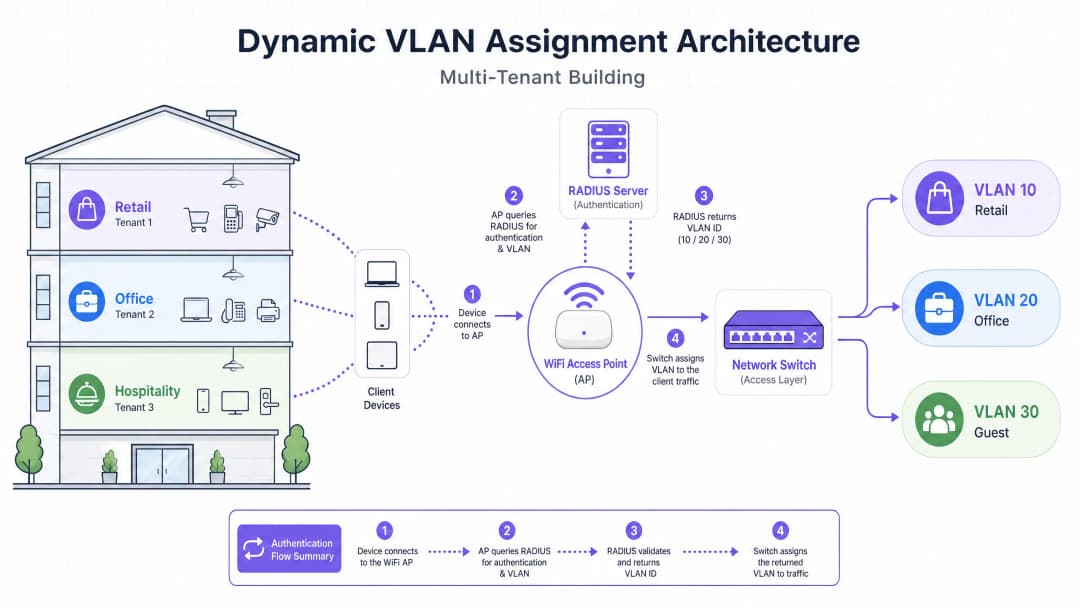
La asignación dinámica de VLAN traslada la lógica de segmentación de la capa de RF a la capa de autenticación. Se basa en el estándar IEEE 802.1X para el control de acceso a la red basado en puertos, integrado con un servidor RADIUS (Servicio de Usuario de Acceso Telefónico de Autenticación Remota).
La arquitectura consta de tres componentes principales:
- Suplicante: El dispositivo cliente (laptop, smartphone) que solicita acceso a la red.
- Autenticador: El dispositivo de acceso a la red, normalmente el Punto de Acceso WiFi o el controlador inalámbrico, que bloquea el tráfico hasta que la autenticación es exitosa.
- Servidor de Autenticación: El servidor RADIUS que valida las credenciales contra un almacén de identidades (por ejemplo, Active Directory, LDAP) y dicta las políticas de red.
El flujo de autenticación
Cuando un suplicante intenta conectarse al SSID unificado, se produce el siguiente flujo:
- Inicialización de EAPOL: El suplicante se conecta al AP. El AP bloquea todo el tráfico excepto los paquetes de Protocolo de Autenticación Extensible sobre LAN (EAPOL).
- RADIUS Access-Request: El AP encapsula los datos EAP y los reenvía al servidor RADIUS como un
Access-Request. - Validación de credenciales: El servidor RADIUS verifica las credenciales del usuario (a través de EAP-TLS, PEAP, etc.).
- RADIUS Access-Accept: Tras una validación exitosa, el servidor RADIUS responde con un mensaje
Access-Accept. Crucialmente, este mensaje incluye atributos RADIUS estándar de la IETF específicos que indican al AP a qué VLAN asignar al usuario.
Los atributos RADIUS críticos requeridos para la asignación dinámica de VLAN son:
Tunnel-Type(64): Configurado enVLAN(Valor 13)Tunnel-Medium-Type(65): Configurado en802(Valor 6)Tunnel-Private-Group-ID(81): Configurado con el ID de VLAN específico (por ejemplo, "20" para el Inquilino A, "30" para el Inquilino B)
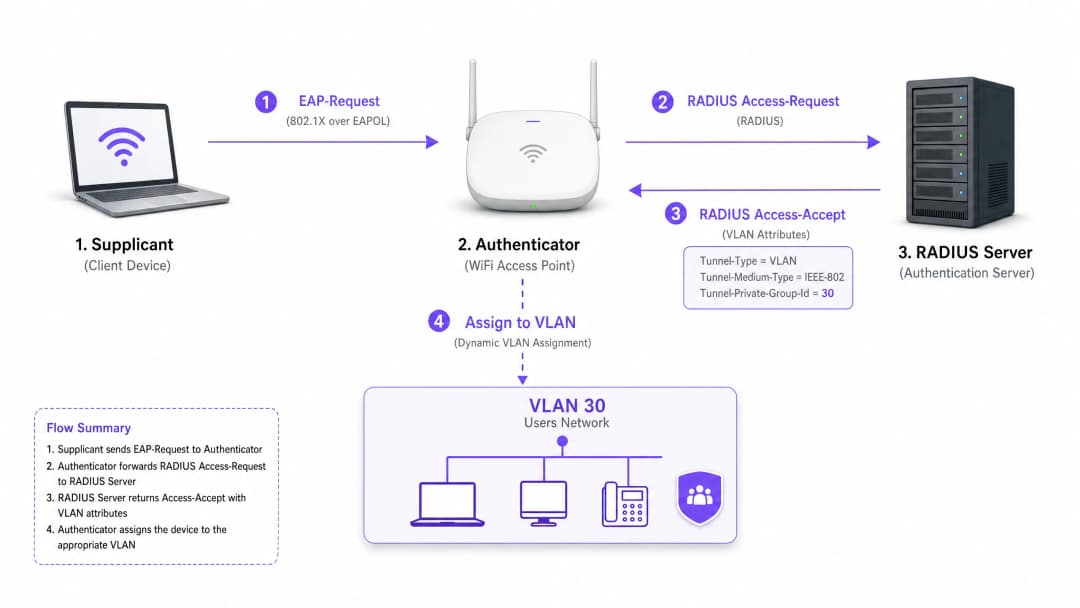
Una vez que el AP recibe estos atributos, coloca el tráfico del usuario directamente en la VLAN especificada. Los switches de red ascendentes manejan entonces el tráfico como si el usuario estuviera conectado físicamente a un puerto dedicado para ese inquilino, garantizando un aislamiento completo de Capa 2.
¿Tiene preguntas sobre su configuración específica?
Nuestro equipo trabaja con gestores de espacios, responsables de TI e ingenieros de redes en 80 000 establecimientos. Reserve una llamada de 20 minutos y le mostraremos cómo lo resolvieron otros profesionales como usted.
Guía de implementación
La implementación de la asignación dinámica de VLAN requiere una coordinación cuidadosa entre la infraestructura inalámbrica, los switches perimetrales y el proveedor de identidad. Siga esta secuencia de implementación neutral respecto al proveedor.
Fase 1: Preparación de la infraestructura de red
- Aprovisionamiento de VLAN: Defina y cree las VLAN necesarias en su infraestructura de enrutamiento principal y servidores DHCP. Asegúrese de que cada VLAN de inquilino tenga su propia subred distinta y las políticas de enrutamiento adecuadas (por ejemplo, enrutar a internet, pero descartar el tráfico inter-VLAN).
- Trunking de switches: Este es un paso crítico. Los puertos de switch que se conectan a sus puntos de acceso deben configurarse como puertos troncales 802.1Q. Debe etiquetar todas las posibles VLAN de inquilinos que el AP deba asignar. Si el servidor RADIUS asigna la VLAN 40, pero la VLAN 40 no está etiquetada en el puerto de switch, el cliente se autenticará pero no podrá recibir una dirección IP.
- Configuración de AP: Configure los AP para transmitir un único SSID habilitado para 802.1X (por ejemplo, WPA3-Enterprise). Habilite la configuración específica en su controlador inalámbrico o AP que les permita aceptar atributos de anulación de RADIUS (a menudo etiquetados como "AAA Override" o "Dynamic VLAN").
Fase 2: Integración de RADIUS e identidad
- Integración del almacén de identidades: Conecte su servidor RADIUS al servicio de directorio que contiene las identidades de usuario y sus asociaciones de inquilino.
- Creación de políticas de red: Cree políticas dentro del servidor RADIUS que mapeen grupos de usuarios a IDs de VLAN. Por ejemplo, una política que establezca: Si el usuario pertenece al grupo 'Retail_Staff', devolver Tunnel-Private-Group-ID = 10.3. Gestión de certificados: si utiliza EAP-TLS (recomendado para dispositivos corporativos), implemente certificados de cliente. Si utiliza PEAP-MSCHAPv2 (común para BYOD), asegúrese de que haya un certificado de servidor válido y de confianza instalado en el servidor RADIUS.
Fase 3: Pruebas y despliegue gradual
- Pruebas piloto: realice pruebas con un grupo pequeño de dispositivos en diferentes inquilinos. Verifique que, al conectarse, el dispositivo reciba una dirección IP de la subred correcta y no pueda hacer ping a dispositivos en las VLAN de otros inquilinos.
- Dispositivos IoT y sin pantalla: para los dispositivos que no admiten 802.1X (impresoras, pantallas inteligentes), implemente la omisión de autenticación MAC (MAB). El servidor RADIUS autentica el dispositivo según su dirección MAC y asigna la VLAN correspondiente. Nota: coloque estos dispositivos en VLAN estrictamente aisladas, ya que las direcciones MAC se pueden suplantar.
Mejores prácticas
- Consolidar SSIDs: procure tener un máximo absoluto de tres SSIDs: un SSID 802.1X para todos los inquilinos, uno para dispositivos IoT heredados (usando PSK o MAB) y uno para Guest WiFi (usando un Captive Portal).
- Forzar aislamiento de clientes: dentro de la red de invitados y las redes de inquilinos no confiables, habilite el aislamiento de clientes de capa 2 a nivel de AP para evitar que los dispositivos se comuniquen entre sí, mitigando los riesgos de movimiento lateral.
- Aprovechar la analítica avanzada: integre su flujo de autenticación con una plataforma sólida de WiFi Analytics para obtener visibilidad sobre la utilización del sitio, los tiempos de permanencia y el rendimiento de la red de los inquilinos.
- Estandarizar en WPA3: siempre que el soporte del cliente lo permita, exija WPA3-Enterprise para el SSID 802.1X para garantizar el nivel más alto de cifrado y protección contra ataques de diccionario.
- Contexto de la industria: adapte el despliegue al sector vertical. En entornos de Retail, asegúrese de que los sistemas POS estén en una VLAN estrictamente aislada para mantener el cumplimiento de PCI-DSS. En Hospitality, asegúrese de que las VLAN de invitados estén completamente separadas de las operaciones internas.
Solución de problemas y mitigación de riesgos
Modos de falla comunes
El escenario "Autenticado pero sin IP":
- Síntoma: el cliente se conecta, la autenticación es exitosa, pero el dispositivo se autoasigna una dirección APIPA (169.254.x.x).
- Causa raíz: el servidor RADIUS asignó una VLAN, pero esa VLAN no está creada en el servidor DHCP o, lo que es más común, la VLAN no está etiquetada en el puerto troncal que conecta el switch al AP.
- Solución: verifique las configuraciones de troncales 802.1Q en el switch de borde.
Tiempo de espera de RADIUS / No disponible:
- Síntoma: los clientes se quedan trabados en "Conectando..." o se les piden las credenciales repetidamente.
- Causa raíz: el AP no puede comunicarse con el servidor RADIUS, o el secreto compartido de RADIUS no coincide entre el AP y el servidor.
- Solución: verifique la conectividad de red entre la IP de administración del AP y el servidor RADIUS. Compruebe minuciosamente el secreto compartido.
Vencimiento de certificados:
- Síntoma: Fallas repentinas y generalizadas de autenticación para todos los usuarios en PEAP o EAP-TLS.
- Causa raíz: El certificado del servidor RADIUS ha expirado, lo que provoca que los clientes rechacen la conexión.
- Solución: Implementar un monitoreo y alertas proactivas para los certificados RADIUS. Renovar los certificados al menos 30 días antes de su vencimiento.
Estrategias de mitigación de riesgos
- Falla de apertura (Fail-Open) vs. Falla de cierre (Fail-Closed): Defina una política clara para cuando el servidor RADIUS no esté disponible. Para las redes corporativas de los inquilinos, la falla de cierre (denegar el acceso) es necesaria por motivos de seguridad. Para el acceso de invitados, puede configurar una política de falla de apertura que dirija a los usuarios a una VLAN de "cuarentena" altamente restringida, solo con acceso a Internet.
- Redundancia: Implemente siempre los servidores RADIUS en un par de alta disponibilidad (HA), preferiblemente distribuidos geográficamente si brindan soporte a múltiples sitios.
ROI e impacto empresarial
La implementación de la asignación dinámica de VLAN ofrece resultados empresariales significativos y medibles para los operadores de los establecimientos:
- Reducción de OpEx: La gestión centralizada de un único SSID reduce drásticamente los gastos operativos de TI asociados con el aprovisionamiento, la actualización y la resolución de problemas de las redes de inquilinos individuales.
- Espectro de RF optimizado: Eliminar la saturación de SSID recupera valioso tiempo de transmisión. Para obtener una guía sobre la gestión del espectro, consulte nuestro artículo sobre Frecuencias de WiFi: Una guía de frecuencias de WiFi en 2026. Esto se traduce en un mayor rendimiento y en una menor cantidad de reportes de soporte relacionados con un "WiFi lento".
- Seguridad y cumplimiento mejorados: El aislamiento estricto de Capa 2 garantiza que la vulnerabilidad en la red de un inquilino no se propague a otras. Esto es fundamental para cumplir con los requisitos regulatorios como PCI-DSS y GDPR.
- Escalabilidad: Incorporar a un nuevo inquilino no requiere cambios en la infraestructura física ni en la configuración inalámbrica; es simplemente cuestión de crear una nueva política en el servidor RADIUS.
Para conocer estrategias más completas sobre el diseño de redes para espacios compartidos, revise nuestra guía sobre Diseño de una arquitectura de WiFi multiinquilino para MDU.
Definiciones clave
802.1X
Un estándar IEEE para el control de acceso a redes basado en puertos que proporciona un mecanismo de autenticación a los dispositivos que desean conectarse a una LAN o WLAN.
El protocolo fundamental que permite a la red exigir una identidad antes de conceder el acceso, lo que habilita políticas dinámicas.
RADIUS (Remote Authentication Dial-In User Service)
Un protocolo de red que proporciona una gestión centralizada de autenticación, autorización y contabilidad (AAA) para los usuarios que se conectan y utilizan un servicio de red.
El motor de decisiones que valida las credenciales e indica a la red qué VLAN asignar a un usuario.
Suplicante
El dispositivo cliente (por ejemplo, laptop, smartphone) o software que solicita acceso a la red y proporciona credenciales.
El punto final que debe configurarse para admitir 802.1X (por ejemplo, al seleccionar PEAP o EAP-TLS en la configuración de WiFi).
Autenticador
El dispositivo de red (por ejemplo, un punto de acceso WiFi o un switch) que facilita el proceso de autenticación al transmitir mensajes entre el suplicante y el servidor de autenticación.
El guardián que bloquea el tráfico hasta que RADIUS da luz verde, y luego aplica la VLAN asignada.
EAP (Extensible Authentication Protocol)
Un marco de autenticación utilizado con frecuencia en redes inalámbricas y conexiones punto a punto, que admite múltiples métodos de autenticación (por ejemplo, EAP-TLS, PEAP).
El lenguaje que se habla entre el suplicante y el servidor RADIUS para intercambiar credenciales de forma segura.
MAB (MAC Authentication Bypass)
Una técnica utilizada para autenticar dispositivos que no soportan 802.1X utilizando su dirección MAC como credencial.
Se utiliza para incorporar dispositivos IoT heredados, impresoras o Smart TVs en un entorno multi-inquilino.
Tunnel-Private-Group-ID
El atributo RADIUS específico (Atributo 81) utilizado para transmitir el VLAN ID desde el servidor RADIUS hasta el autenticador.
El dato crítico que determina el segmento de red específico en el que se ubicará al usuario.
Layer 2 Isolation
Una medida de seguridad que impide que los dispositivos ubicados en el mismo segmento de red o VLAN se comuniquen directamente entre sí.
Esencial para redes de invitados y redes de inquilinos no confiables con el fin de evitar el movimiento lateral de malware o el acceso no autorizado.
Ejemplos resueltos
Un gran centro de conferencias alberga tres eventos simultáneos. El Evento A requiere acceso corporativo seguro, el Evento B requiere acceso abierto para los asistentes y el Evento C requiere acceso a servidores de presentación internos específicos. ¿Cómo debería implementar esto el arquitecto de redes utilizando VLAN dinámicas?
El arquitecto configura un único SSID de 802.1X para el personal y los asistentes seguros, y un SSID abierto independiente con un Captive Portal para los invitados generales.
Para el SSID de 802.1X, el servidor RADIUS se configura con tres políticas:
- Si el Grupo de Usuarios = "Event_A_Staff", se asigna la VLAN 100 (acceso a Internet + VPN corporativa).
- Si el Grupo de Usuarios = "Event_C_Presenters", se asigna la VLAN 102 (acceso a Internet + Servidor de presentaciones).
Para el Evento B, los asistentes utilizan el SSID de invitados abierto, que los ubica en la VLAN 101 (solo Internet, con el aislamiento de clientes habilitado).
Una cadena de tiendas minoristas opera en un edificio compartido con una cafetería, una tienda de ropa y una farmacia. La farmacia debe cumplir con HIPAA y la tienda de ropa requiere la conformidad con PCI-DSS para sus terminales de punto de venta inalámbricos. ¿Cómo se garantiza el aislamiento?
El equipo de TI implementa un único SSID de WPA3-Enterprise.
- El personal de la farmacia se autentica mediante 802.1X y RADIUS los asigna a la VLAN 50, que cuenta con reglas de firewall estrictas que impiden el acceso a cualquier otra subred interna.
- Los terminales de punto de venta de la tienda de ropa se autentican mediante EAP-TLS (basado en certificados) y se asignan a la VLAN 60. La VLAN 60 se enruta directamente a la pasarela del procesador de pagos y se aísla de todo el demás tráfico.
- La cafetería utiliza un SSID de invitados independiente para los clientes, que termina en la VLAN 70 con aislamiento de clientes.
Preguntas de práctica
Q1. Un inquilino reporta que puede autenticarse con éxito en el SSID 802.1X, pero su dispositivo se asigna una dirección IP propia (169.254.x.x) y no puede acceder a internet. ¿Cuál es el error de configuración más probable?
Sugerencia: Piense en la ruta entre el punto de acceso y los servicios de red principales.
Ver respuesta modelo
La causa más probable es que la VLAN asignada por el servidor RADIUS no esté etiquetada en el puerto troncal 802.1Q que conecta el switch de borde con el punto de acceso. El AP intenta enviar el tráfico a la VLAN correcta, pero el switch descarta las tramas porque no está configurado para aceptarlas en ese puerto.
Q2. Está diseñando una red multi-inquilino para un espacio de oficinas compartidas. El cliente desea transmitir un SSID único para cada uno de los 15 inquilinos para "facilitarles la búsqueda de su red". ¿Qué le aconseja al cliente?
Sugerencia: Considere el impacto de la sobrecarga de las tramas de gestión en el rendimiento de radiofrecuencia.
Ver respuesta modelo
Aconseje firmemente al cliente que no utilice este enfoque. Transmitir 15 SSID consumirá una cantidad masiva de tiempo de aire con tramas beacon, lo que degradará severamente el rendimiento de la red, aumentará la latencia y reducirá la velocidad de transferencia para todos los usuarios. Recomiende implementar un solo SSID 802.1X y utilizar la asignación dinámica de VLAN mediante RADIUS para segmentar de forma segura a los inquilinos en el backend.
Q3. Un edificio multi-inquilino requiere acceso de red para varios dispositivos IoT sin interfaz de usuario (como termostatos inteligentes o señalización digital) que no soportan suplicantes 802.1X. ¿Cómo se pueden incorporar estos dispositivos de manera segura a las VLAN correctas de los inquilinos?
Sugerencia: Considere métodos de autenticación alternativos soportados por RADIUS.
Ver respuesta modelo
Implemente MAC Authentication Bypass (MAB). El punto de acceso enviará la dirección MAC del dispositivo al servidor RADIUS como nombre de usuario y contraseña. El servidor RADIUS se puede configurar para reconocer estas direcciones MAC específicas y devolver el VLAN ID correspondiente. Dado que las direcciones MAC se pueden suplantar, estos dispositivos deben colocarse en VLAN de aislamiento estricto con acceso de red limitado.
Continúe leyendo esta serie
Administración del ancho de banda en redes de alojamiento estudiantil
Esta guía proporciona a los gerentes de TI, arquitectos de redes y directores de operaciones inmobiliarias una referencia técnica independiente del proveedor para administrar el ancho de banda de WiFi en entornos de alojamiento estudiantil de alta densidad. Cubre la segmentación de VLAN, el diseño de políticas de Calidad de Servicio (QoS), el modelado de tráfico basado en la identidad y la visibilidad de la capa de aplicación, los cuatro pilares de una red escalable y de acceso justo. Con escenarios de implementación del mundo real, resultados medibles y marcos de decisión, este es el manual operativo para cualquier equipo responsable de la infraestructura de redes residenciales a gran escala.
WPA2-Enterprise vs Personal para departamentos y co-working
Esta guía de referencia técnica autorizada evalúa WPA2-Enterprise frente a WPA2-Personal para entornos multiinquilino como departamentos y espacios de co-working. Proporciona a los arquitectos de red y gerentes de TI información práctica sobre la autenticación 802.1X, la asignación dinámica de VLAN y el cumplimiento de la seguridad, demostrando por qué las contraseñas compartidas introducen un riesgo inaceptable en los lugares compartidos modernos. Los operadores de estos espacios encontrarán pautas de implementación concretas, casos de estudio del mundo real y análisis de ROI para respaldar una decisión de migración este trimestre.
Prácticas recomendadas de microsegmentación para redes WiFi compartidas
Esta guía de referencia técnica proporciona estrategias prácticas para implementar la microsegmentación en una infraestructura WiFi compartida. Detalla cómo los administradores de TI y los arquitectos de red pueden aislar de forma segura el tráfico de invitados, IoT y del personal para mitigar riesgos, garantizar el cumplimiento y optimizar el rendimiento de la red.
¿Tiene preguntas sobre su configuración específica?
Nuestro equipo trabaja con gestores de espacios, responsables de TI e ingenieros de redes en 80 000 establecimientos. Reserve una llamada de 20 minutos y le mostraremos cómo lo resolvieron otros profesionales como usted.