
Como Funciona a Atribuição Dinâmica de VLAN em Edifícios Multi-Tenant
Este guia de referência técnica detalha a arquitetura e a implementação da Atribuição Dinâmica de VLAN usando 802.1X e RADIUS em ambientes multi-tenant. Ele fornece orientações práticas para gerentes de TI e arquitetos de rede para reduzir a sobrecarga de SSID, aplicar isolamento de Camada 2 e garantir conectividade segura e escalável em edifícios compartilhados.
Video overview
Ouça este guia
Ver transcrição do podcast
Parte da nossa série principal: Guia de WiFi Multi-Tenant →
Resumo Executivo
Para gerentes de TI e arquitetos de rede que supervisionam edifícios de múltiplos inquilinos - como escritórios comerciais, complexos de varejo ou amplos espaços de hospitalidade - gerenciar a segmentação de rede é um desafio crítico. Historicamente, isolar o tráfego de inquilinos significava implantar uma infraestrutura física separada ou transmitir um SSID exclusivo para cada inquilino. Ambas as abordagens são fundamentalmente falhas. A separação física tem custo proibitivo e é inflexível, enquanto a transmissão de múltiplos SSIDs degrada severamente o desempenho de RF devido ao excesso de sobrecarga de frames de gerenciamento.
O Dynamic VLAN Assignment resolve isso consolidando o ambiente sem fio em um único SSID seguro. Aproveitando a autenticação IEEE 802.1X e RADIUS, a rede atribui dinamicamente os usuários à sua Virtual Local Area Network (VLAN) dedicada com base em sua identidade, não na rede que escolhem. Este guia fornece um aprofundamento técnico abrangente sobre a arquitetura, implantação e solução de problemas de atribuição dinâmica de VLAN, garantindo isolamento seguro de Camada 2, conformidade com padrões como PCI-DSS e GDPR, e um ROI robusto para operadoras de locais.
Aprofundamento Técnico
O Problema com Múltiplos SSIDs
Em um edifício compartilhado, é comum ver dezenas de SSIDs transmitidos (por exemplo, "TenantA_Corp", "TenantB_Secure", "Building_Guest"). Cada SSID transmitido por um Access Point (AP) deve transmitir frames de beacon na menor taxa de dados obrigatória (normalmente 1 Mbps ou 6 Mbps). À medida que o número de SSIDs aumenta, a proporção de tempo de transmissão consumida pela sobrecarga de gerenciamento cresce exponencialmente, deixando menos tempo de transmissão para a transmissão real de dados. Isso resulta em alta latência, baixo rendimento e uma experiência de usuário ruim, independentemente da velocidade da conexão de internet subjacente.
A Arquitetura 802.1X e RADIUS
O Dynamic VLAN Assignment muda a lógica de segmentação da camada de RF para la camada de autenticação. Ele se baseia no padrão IEEE 802.1X para controle de acesso à rede baseado em porta, integrado a um servidor RADIUS (Remote Authentication Dial-In User Service).
A arquitetura consiste em três componentes primários:
- Suplicante: O dispositivo cliente (laptop, smartphone) que solicita acesso à rede.
- Autenticador: O dispositivo de acesso à rede, normalmente o Access Point WiFi ou controladora sem fio, que bloqueia o tráfego até que a autenticação seja bem-sucedida.
- Servidor de Autenticação: O servidor RADIUS que valida as credenciais em um repositório de identidades (por exemplo, Active Directory, LDAP) e dita as políticas de rede.
O Fluxo de Autenticação
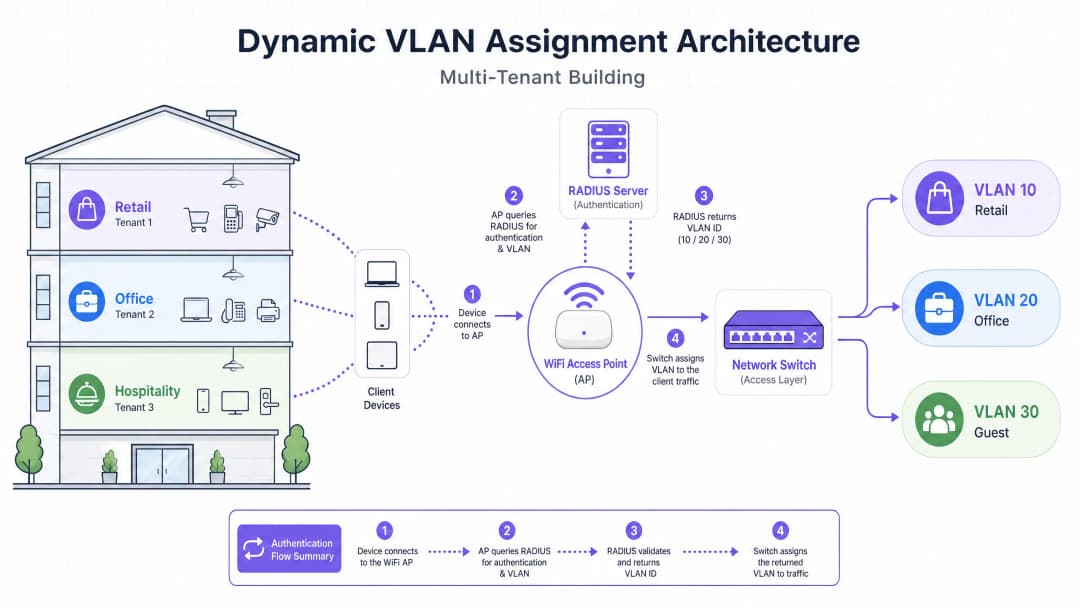
Quando um suplicante tenta se conectar ao SSID unificado, ocorre o seguinte fluxo:
- Inicialização EAPOL: O suplicante conecta-se ao AP. O AP bloqueia todo o tráfego, exceto os pacotes Extensible Authentication Protocol over LAN (EAPOL).
- RADIUS Access-Request: O AP encapsula os dados EAP e os encaminha para o servidor RADIUS como um
Access-Request. - Validação de Credenciais: O servidor RADIUS verifica as credenciais do usuário (via EAP-TLS, PEAP, etc.).
- RADIUS Access-Accept: Após a validação bem-sucedida, o servidor RADIUS responde com uma mensagem
Access-Accept. Fundamentalmente, esta mensagem inclui atributos RADIUS específicos do padrão IETF que instruem o AP sobre qual VLAN atribuir ao usuário.
Os atributos RADIUS críticos necessários para a atribuição dinâmica de VLAN são:
Tunnel-Type(64): Definido comoVLAN(Valor 13)Tunnel-Medium-Type(65): Definido como802(Valor 6)Tunnel-Private-Group-ID(81): Definido para o VLAN ID específico (por exemplo, "20" para Tenant A, "30" para Tenant B)
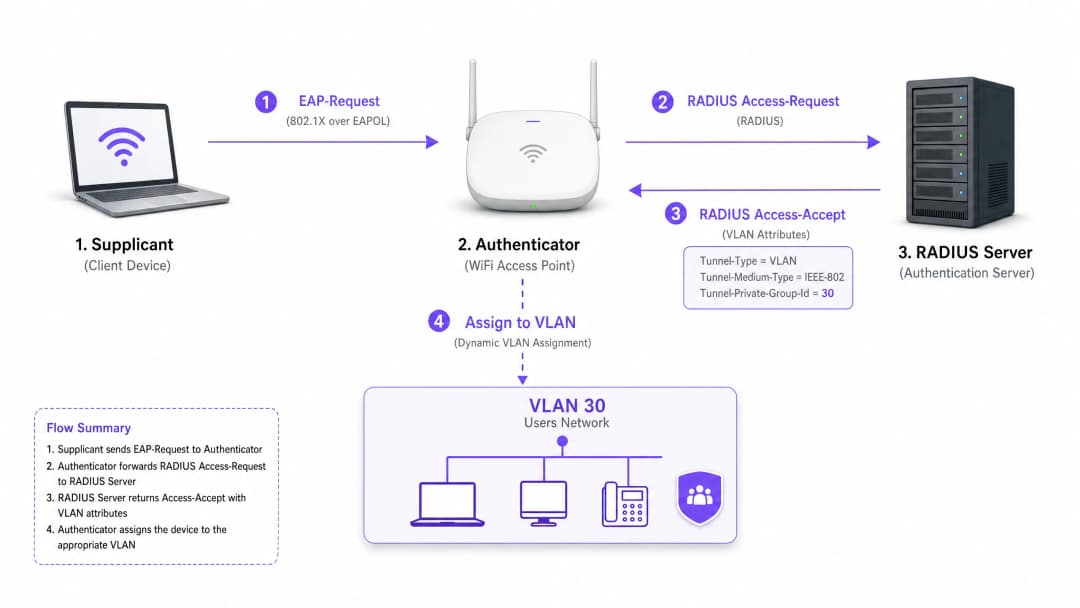
Assim que o AP recebe esses atributos, ele direciona o tráfego do usuário diretamente para a VLAN especificada. Os switches de rede upstream então tratam o tráfego como se o usuário estivesse fisicamente conectado a uma porta dedicada para aquele tenant, garantindo isolamento total de Camada 2.
Tem dúvidas sobre a sua configuração específica?
A nossa equipa trabalha com operadores de espaços, gestores de TI e engenheiros de rede em 80.000 locais. Agende uma chamada de 20 minutos e mostraremos como outros profissionais na sua situação o resolveram.
Guia de Implementação
A implantação da atribuição dinâmica de VLAN exige uma coordenação cuidadosa entre a infraestrutura sem fio, os switches de borda e o provedor de identidade. Siga esta sequência de implementação neutra de fornecedor.
Fase 1: Preparação da Infraestrutura de Rede
- Provisionamento de VLAN: Defina e crie as VLANs necessárias em sua infraestrutura de roteamento principal e servidores DHCP. Certifique-se de que cada VLAN de tenant tenha sua própria sub-rede distinta e políticas de roteamento apropriadas (por exemplo, roteamento para a internet, mas bloqueando o tráfego inter-VLAN).
- Trunking de Switch: Esta é uma etapa crítica. As portas do switch que se conectam aos seus Access Points devem ser configuradas como portas de tronco 802.1Q. Você deve marcar todas as VLANs de tenants potenciais que o AP possa precisar atribuir. Se o servidor RADIUS atribuir a VLAN 40, mas a VLAN 40 não estiver marcada na porta do switch, o cliente se autenticará, mas não conseguirá obter um endereço IP.
- Configuração de AP: Configure os APs para transmitir um único SSID habilitado para 802.1X (por exemplo, WPA3-Enterprise). Ative a configuração específica em seu controlador sem fio ou APs que permite que eles aceitem atributos de substituição do RADIUS (geralmente rotulados como "AAA Override" ou "Dynamic VLAN").
Fase 2: Integração de RADIUS e Identidade
- Integração do Repositório de Identidades: Conecte seu servidor RADIUS ao serviço de diretório que contém as identidades dos usuários e suas associações de tenant.
- Criação de Políticas de Rede: Crie políticas no servidor RADIUS que mapeiam grupos de usuários para IDs de VLAN. Por exemplo, uma política que declare: Se o Usuário pertencer ao Grupo 'Retail_Staff', retorne Tunnel-Private-Group-ID = 10.3. Gerenciamento de Certificados: Se estiver usando EAP-TLS (recomendado para dispositivos corporativos), implante certificados de cliente. Se estiver usando PEAP-MSCHAPv2 (comum para BYOD), garanta que um certificado de servidor válido e confiável esteja instalado no servidor RADIUS.
Fase 3: Testes e Implantação Faseada
- Testes Piloto: Teste com um pequeno grupo de dispositivos em diferentes tenants. Verifique se, ao se conectar, o dispositivo recebe um endereço IP da sub-rede correta e não consegue pingar dispositivos em VLANs de outros tenants.
- IoT e Dispositivos Headless: Para dispositivos que não oferecem suporte a 802.1X (impressoras, smart TVs), implemente o MAC Authentication Bypass (MAB). O servidor RADIUS autentica o dispositivo com base em seu endereço MAC e atribui a VLAN apropriada. Observação: Coloque esses dispositivos em VLANs estritamente isoladas, pois os endereços MAC podem ser falsificados.
Melhores Práticas
- Consolide SSIDs: Tenha como meta um máximo absoluto de três SSIDs: um SSID 802.1X para todos os tenants, um para dispositivos IoT herdados (usando PSK ou MAB) e um para Guest WiFi (usando um captive portal).
- Imponha o Isolamento de Clientes: Dentro da rede de convidados e de redes de tenants não confiáveis, habilite o isolamento de clientes de Camada 2 no nível do AP para evitar que os dispositivos se comuniquem entre si, mitigando os riscos de movimentação lateral.
- Aproveite a Análise Avançada: Integre seu fluxo de autenticação com uma plataforma robusta de WiFi Analytics para obter visibilidade sobre a utilização do local, tempos de permanência e desempenho da rede dos tenants.
- Padronize no WPA3: Onde o suporte do cliente permitir, exija WPA3-Enterprise para o SSID 802.1X para garantir o mais alto nível de criptografia e proteção contra ataques de dicionário.
- Contexto da Indústria: Adapte a implantação ao setor. Em ambientes de Varejo, garanta que os sistemas de PDV estejam em uma VLAN estritamente isolada para manter a conformidade com o PCI-DSS. Na Hotelaria, garanta que as VLANs de convidados estejam completamente separadas das operações de back-of-house.
Solução de Problemas e Mitigação de Riscos
Modos de Falha Comuns
O Cenário "Autenticado, mas Sem IP":
- Sintoma: O cliente se conecta, a autenticação é bem-sucedida, mas o dispositivo autodeclara um endereço APIPA (169.254.x.x).
- Causa Raiz: O servidor RADIUS atribuiu uma VLAN, mas essa VLAN não foi criada no servidor DHCP ou, mais comumente, a VLAN não está marcada (tagged) na porta de tronco que conecta o switch ao AP.
- Correção: Verifique as configurações de tronco 802.1Q no switch de borda.
Timeout do RADIUS / Inalcançável:
- Sintoma: Os clientes ficam travados em "Conectando..." ou são solicitados repetidamente a inserir credenciais.
- Causa Raiz: O AP não consegue alcançar o servidor RADIUS, ou o segredo compartilhado do RADIUS está incompatível entre o AP e o servidor.
- Correção: Verifique a conectividade de rede entre o IP de gerenciamento do AP e o servidor RADIUS. Verifique novamente o segredo compartilhado.
Expiração de Certificado:
- Sintoma: Falhas repentinas e generalizadas de autenticação para todos os usuários em PEAP ou EAP-TLS.
- Causa Raiz: O certificado do servidor RADIUS expirou, fazendo com que os clientes rejeitem a conexão.
- Solução: Implemente monitoramento ativo e alertas para certificados RADIUS. Renove os certificados pelo menos 30 dias antes da expiração.
Estratégias de Mitigação de Riscos
- Fail-Open vs. Fail-Closed: Defina uma política clara para quando o servidor RADIUS estiver inacessível. Para redes corporativas de locatários, o fail-closed (negar acesso) é necessário para a segurança. Para acesso de convidados, você pode configurar uma política de fail-open que direciona os usuários para uma VLAN de "quarentena" altamente restrita, apenas com acesso à internet.
- Redundância: Sempre implante servidores RADIUS em um par de alta disponibilidade (HA), preferencialmente distribuído geograficamente se houver suporte para múltiplos locais.
ROI e Impacto nos Negócios
A implementação da atribuição dinâmica de VLAN oferece resultados de negócios significativos e mensuráveis para os operadores dos locais:
- Redução de OpEx: O gerenciamento centralizado de um único SSID reduz drasticamente a sobrecarga de TI associada ao provisionamento, atualização e solução de problemas de redes de locatários individuais.
- Espectro de RF Otimizado: A eliminação do excesso de SSIDs recupera um tempo de transmissão valioso. Para um guia sobre o gerenciamento de espectro, consulte nosso artigo sobre Wi Fi Frequencies: A Guide to Wi-Fi Frequencies in 2026. Isso resulta em maior taxa de transferência e menos chamados de suporte relacionados a "WiFi lento."
- Segurança e Conformidade Aprimoradas: O isolamento estrito de Camada 2 garante que uma violação na rede de um locatário não se espalhe para as outras. Isso é essencial para atender a requisitos regulatórios como PCI-DSS e GDPR.
- Escalabilidade: A integração de um novo locatário exige zero alterações na infraestrutura física ou na configuração sem fio; trata-se simplesmente de criar uma nova política no servidor RADIUS.
Para estratégias mais abrangentes sobre o design de redes para espaços compartilhados, consulte nosso guia sobre Designing a Multi-Tenant WiFi Architecture for MDU.
Definições principais
802.1X
Um padrão IEEE para controle de acesso à rede baseado em porta que fornece um mecanismo de autenticação para dispositivos que desejam se conectar a uma LAN ou WLAN.
O protocolo fundamental que permite à rede exigir identidade antes de conceder acesso, habilitando políticas dinâmicas.
RADIUS (Remote Authentication Dial-In User Service)
Um protocolo de rede que fornece gerenciamento centralizado de Autenticação, Autorização e Contabilidade (AAA) para usuários que se conectam e usam um serviço de rede.
O mecanismo de decisão que valida as credenciais e informa à rede qual VLAN atribuir a um usuário.
Supplicant
O dispositivo cliente (por exemplo, laptop, smartphone) ou software que solicita acesso à rede e fornece credenciais.
O endpoint que deve ser configurado para suportar o 802.1X (por exemplo, selecionando PEAP ou EAP-TLS nas configurações de WiFi).
Authenticator
O dispositivo de rede (por exemplo, Ponto de Acesso WiFi ou switch) que facilita o processo de autenticação retransmitindo mensagens entre o supplicant e o servidor de autenticação.
O guardião que bloqueia o tráfego até que o RADIUS dê o sinal verde e, em seguida, aplica a VLAN atribuída.
EAP (Extensible Authentication Protocol)
Uma estrutura de autenticação frequentemente utilizada em redes sem fio e conexões ponto a ponto, que suporta múltiplos métodos de autenticação (por exemplo, EAP-TLS, PEAP).
A linguagem falada entre o supplicant e o servidor RADIUS para trocar credenciais de forma segura.
MAB (MAC Authentication Bypass)
Uma técnica usada para autenticar dispositivos que não suportam 802.1X usando seu endereço MAC como credencial.
Usado para integração de dispositivos IoT legados, impressoras ou smart TVs em um ambiente multi-tenant.
Tunnel-Private-Group-ID
O atributo RADIUS específico (Atributo 81) usado para transmitir o VLAN ID do servidor RADIUS para o autenticador.
O dado crítico que realmente determina em qual segmento de rede o usuário será inserido.
Layer 2 Isolation
Uma medida de segurança que impede que dispositivos no mesmo segmento de rede ou VLAN se comuniquem diretamente entre si.
Essencial para redes de convidados e redes de inquilinos não confiáveis para evitar a movimentação lateral de malware ou acesso não autorizado.
Exemplos práticos
Um grande centro de conferências sedia três eventos simultâneos. O Evento A exige acesso corporativo seguro, o Evento B exige acesso aberto para os participantes e o Evento C exige acesso a servidores de apresentação internos específicos. Como o arquiteto de rede deve implantar isso usando VLANs dinâmicas?
O arquiteto configura um único SSID 802.1X para a equipe e participantes seguros, e um SSID aberto separado com um Captive Portal para convidados em geral.
Para o SSID 802.1X, o servidor RADIUS é configurado com três políticas:
- Se Grupo de Usuários = 'Event_A_Staff', atribuir VLAN 100 (Internet + acesso VPN Corporativa).
- Se Grupo de Usuários = 'Event_C_Presenters', atribuir VLAN 102 (Internet + acesso ao Servidor de Apresentação).
Para o Evento B, os participantes usam o SSID Guest aberto, que os coloca na VLAN 101 (apenas Internet, com isolamento de cliente ativado).
Uma rede de varejo opera em um edifício compartilhado com uma cafeteria, uma loja de roupas e uma farmácia. A farmácia deve cumprir com a HIPAA e a loja de roupas exige conformidade com o PCI DSS para seus terminais de PDV sem fio. Como o isolamento é garantido?
A equipe de TI implanta um único SSID WPA3-Enterprise.
- A equipe da farmácia se autentica via 802.1X, e o RADIUS os atribui à VLAN 50, que possui regras rígidas de firewall impedindo o acesso a quaisquer outras sub-redes internas.
- Os terminais de PDV da loja de roupas se autenticam usando EAP-TLS (baseado em certificado) e são atribuídos à VLAN 60. A VLAN 60 é roteada diretamente para o gateway do processador de pagamentos e isolada de todo o outro tráfego.
- A cafeteria usa um SSID Guest separado para os clientes, terminando na VLAN 70 com isolamento de cliente.
Questões práticas
Q1. Um inquilino relata que consegue se autenticar com sucesso no SSID 802.1X, mas seu dispositivo atribui a si mesmo um endereço IP (169.254.x.x) e não consegue acessar a internet. Qual é o erro de configuração mais provável?
Dica: Pense no caminho entre o Access Point e os serviços principais de rede.
Ver resposta modelo
A causa mais provável é que a VLAN atribuída pelo servidor RADIUS não está marcada (tagged) na porta de tronco 802.1Q que conecta o switch de borda ao Access Point. O AP tenta direcionar o tráfego para a VLAN correta, mas o switch descarta os frames porque não está configurado para aceitá-los nessa porta.
Q2. Você está projetando uma rede multi-tenant para um espaço de escritório compartilhado. O cliente deseja transmitir um SSID exclusivo para cada um dos 15 inquilinos para "facilitar a localização de suas redes". Como você aconselha o cliente?
Dica: Considere o impacto do overhead de frames de gerenciamento no desempenho de RF.
Ver resposta modelo
Aconselhe fortemente o cliente contra essa abordagem. Transmitir 15 SSIDs consumirá uma quantidade massiva de tempo de transmissão com frames de beacon, degradando severamente o desempenho da rede, aumentando a latência e reduzindo a capacidade de transmissão para todos os usuários. Recomende a implantação de um único SSID 802.1X e o uso de atribuição dinâmica de VLAN via RADIUS para segmentar com segurança os inquilinos no backend.
Q3. Um edifício multi-tenant requer acesso à rede para vários dispositivos IoT headless (por exemplo, termostatos inteligentes, sinalização digital) que não suportam solicitantes 802.1X. Como esses dispositivos podem ser integrados com segurança nas VLANs corretas dos inquilinos?
Dica: Considere métodos alternativos de autenticação suportados pelo RADIUS.
Ver resposta modelo
Implemente o bypass de autenticação MAC (MAB). O Access Point enviará o endereço MAC do dispositivo ao servidor RADIUS como nome de usuário e senha. O servidor RADIUS pode ser configurado para reconhecer esses endereços MAC específicos e retornar o VLAN ID apropriado. Como os endereços MAC podem ser clonados, esses dispositivos devem ser colocados em VLANs estritamente isoladas com acesso limitado à rede.
Continue a ler esta série
Gerenciando a Largura de Banda em Redes de Acomodações Estudantis
Este guia fornece aos gerentes de TI, arquitetos de rede e diretores de operações de propriedades uma referência técnica independente de fornecedor para gerenciar a largura de banda WiFi em ambientes de acomodação estudantil de alta densidade. Ele abrange segmentação de VLAN, design de políticas de Quality of Service (QoS), modelagem de tráfego baseada em identidade e visibilidade na camada de aplicação - os quatro pilares de uma rede escalável e de acesso justo. Com cenários de implantação do mundo real, resultados mensuráveis e frameworks de decisão, este é o manual operacional para qualquer equipe responsável pela infraestrutura de rede residencial em escala.
WPA2-Enterprise vs Personal para Apartamentos e Co-Working
Este guia de referência técnica definitivo avalia o WPA2-Enterprise em relação ao WPA2-Personal para ambientes multi-inquilino, como apartamentos e espaços de co-working. Ele fornece aos arquitetos de rede e gerentes de TI insights práticos sobre autenticação 802.1X, atribuição dinâmica de VLAN e conformidade de segurança, demonstrando por que senhas compartilhadas introduzem riscos inaceitáveis em locais compartilhados modernos. Os operadores de locais encontrarão orientações de implementação concretas, estudos de caso do mundo real e análises de ROI para apoiar a decisão de migração neste trimestre.
Melhores Práticas de Micro-Segmentação para Redes WiFi Compartilhadas
Este guia de referência técnica fornece estratégias práticas para a implementação de micro-segmentação em infraestruturas de WiFi compartilhadas. Ele detalha como gerentes de TI e arquitetos de rede podem isolar de forma segura o tráfego de convidados, IoT e funcionários para mitigar riscos, garantir conformidade e otimizar o desempenho da rede.
Tem dúvidas sobre a sua configuração específica?
A nossa equipa trabalha com operadores de espaços, gestores de TI e engenheiros de rede em 80.000 locais. Agende uma chamada de 20 minutos e mostraremos como outros profissionais na sua situação o resolveram.