跳至主要内容

动态VLAN分配如何在多租户建筑中运作

本技术参考指南详细介绍了在多租户环境中使用802.1X和RADIUS进行动态VLAN分配的架构和实施。它为IT经理和网络架构师提供了可操作的指导,以减少SSID开销、强制二层隔离,并确保跨共享建筑的安全、可扩展连接。

📖 6 分钟阅读📝 1,475 🔧 2 应用实例3 练习题📚 8 关键定义

收听本指南

查看播客转录
[Intro Music - 专业、积极的企业科技主题] 主持人:欢迎收听Purple技术简报。我是主持人,今天我们讨论的是任何多租户环境中的关键架构决策:动态VLAN分配。如果您管理着混合用途商业建筑、零售综合体或大型酒店场所的网络基础设施,本期内容就是为您准备的。我们将详细解析如何摆脱广播数十个SSID的方式,转而使用802.1X和RADIUS在单一、干净的无线网络上动态分段流量。 [Transition sound] 主持人:让我们先了解背景。传统上,如果一栋建筑有三名租户——比如一楼的咖啡店、二楼的律师事务所和三楼的科技初创公司——您要么运行独立的物理网络,这在线缆和干扰方面绝对是场噩梦,要么为每个租户广播唯一的SSID。 但是广播多个SSID会降低性能。每个SSID都以最低基本速率发送信标帧。如果您有十个租户和十个SSID,在传输一个字节的实际数据之前,您就已经消耗了大量通话时间仅仅在喊“我在这里!”。 这就是动态VLAN分配改变游戏规则的地方。 您不是广播十个SSID,而是广播一个安全的企业级SSID。我们称之为“Building_Secure”。当用户连接时,网络不仅要求预共享密钥。它要求用户的个体身份。 以下是此流程的技术深入解析。 第一步:请求方。即用户的设备——笔记本电脑或智能手机。它与接入点关联,但尚未进入网络。端口实际上被阻止除EAPOL(局域网上可扩展认证协议)以外的所有流量。 第二步:认证方。即您的接入点或无线控制器。它从设备获取EAPOL流量,并将其封装到一个RADIUS访问请求数据包中,然后转发给认证服务器。 第三步:认证服务器。即您的RADIUS服务器,可能与Active Directory、Google Workspace或Purple的身份管理系统集成。RADIUS服务器检查凭据。如果匹配,它不仅说“允许进入”。它回复一个RADIUS访问接受消息,其中包含特定的供应商中立属性。 具体来说,它发送: Tunnel-Type等于VLAN(值为13) Tunnel-Medium-Type等于IEEE-802(值为6) 关键的是,Tunnel-Private-Group-ID。这是实际的VLAN编号。对于律师事务所,可能返回VLAN 20。对于科技初创公司,VLAN 30。 第四步:接入点接收此访问接受消息,读取VLAN ID,并动态地将用户流量直接放入该特定VLAN。 结果是什么?律师事务所员工和科技初创公司员工连接到完全相同的接入点,使用完全相同的SSID,但他们的流量在二层完全隔离。交换机将他们视为插入了完全不同的物理网络。 [Transition sound] 主持人:现在,我们来谈谈实施建议和需要避免的陷阱。 首先,证书管理。802.1X严重依赖证书。如果您使用的是EAP-TLS(安全性的黄金标准),每个设备都需要客户端证书。这非常安全但操作负担重。对于BYOD环境,PEAP-MSCHAPv2更常见,它依赖于服务器端证书和用户凭据。但请注意:如果服务器证书过期,整栋大楼将断网。对RADIUS证书设置积极的监控。 其次,交换机配置。边缘交换机必须在通往接入点的上行端口上标记所有潜在的租户VLAN。如果RADIUS告诉AP将用户放入VLAN 40,但VLAN 40未在连接AP的交换机端口上标记,流量将进入黑洞。用户认证成功但无法通过DHCP获取IP地址。这是我们最常见的技术支持工单。 第三,回退机制。如果RADIUS服务器不可达该怎么办?您需要定义“故障开放”或“故障关闭”策略。在多租户办公室中,出于安全考虑通常故障关闭。但对于访客网络,您可能故障开放到一个被高度限制的仅互联网VLAN。 [Transition sound] 主持人:让我们基于网络架构师的常见问题进行快速问答。 问题1:可以将MAC认证旁路(MAB)与802.1X混合使用吗? 回答:可以。对于不支持802.1X的物联网设备,如智能电视或打印机,您可以配置RADIUS服务器根据MAC地址认证并分配给相应的VLAN。但是,MAC地址可能被欺骗,因此将这些设备放在严格隔离的VLAN中。 问题2:这支持漫游吗? 回答:绝对支持。当用户从一楼的AP漫游到二楼的AP时,可以使用802.11r(快速BSS转换)或OKC(机会性密钥缓存)等协议缓存认证,使他们无缝保持在分配的VLAN上,无需完全重新认证延迟。 问题3:Purple如何融入其中? 回答:Purple可以作为身份提供者和策略引擎,简化RADIUS集成,并在原始连接之上提供分析层,确保您了解多租户空间的使用情况。 [Transition sound] 主持人:总结一下:动态VLAN分配允许您将射频环境整合到一个SSID中,大幅减少同频干扰和管理开销。它使用802.1X和RADIUS对用户进行认证,并安全地将他们放入专用的二层网段。 您的下一步?审计当前的SSID数量。如果您在单个无线空间中广播超过三到四个SSID,那么是时候设计动态VLAN解决方案了。确保交换机正确配置中继,并让RADIUS服务器返回关键的Tunnel-Private-Group-ID属性。 感谢您收听本期技术简报。继续构建安全、可扩展的网络。 [Outro Music fades out]

header_image.png

Executive Summary

For IT managers and network architects overseeing multi-tenant buildings—such as commercial offices, retail complexes, or expansive hospitality venues—managing network segmentation is a critical challenge. Historically, isolating tenant traffic meant deploying separate physical infrastructure or broadcasting a unique SSID for every tenant. Both approaches are fundamentally flawed. Physical separation is cost-prohibitive and inflexible, while broadcasting multiple SSIDs severely degrades RF performance due to excessive management frame overhead.

Dynamic VLAN Assignment solves this by consolidating the wireless environment into a single, secure SSID. Leveraging IEEE 802.1X authentication and RADIUS, the network dynamically assigns users to their dedicated Virtual Local Area Network (VLAN) based on their identity, not the network they choose. This guide provides a comprehensive technical deep-dive into architecting, deploying, and troubleshooting dynamic VLAN assignment, ensuring secure Layer 2 isolation, compliance with standards like PCI DSS and GDPR, and a robust ROI for venue operators.

Technical Deep-Dive

The Problem with Multiple SSIDs

In a shared building, it is common to see dozens of SSIDs broadcasted (e.g., "TenantA_Corp", "TenantB_Secure", "Building_Guest"). Every SSID broadcasted by an Access Point (AP) must transmit beacon frames at the lowest mandatory data rate (typically 1 Mbps or 6 Mbps). As the number of SSIDs increases, the proportion of airtime consumed by management overhead grows exponentially, leaving less airtime for actual data transmission. This results in high latency, low throughput, and a poor user experience, regardless of the underlying internet connection speed.

The 802.1X and RADIUS Architecture

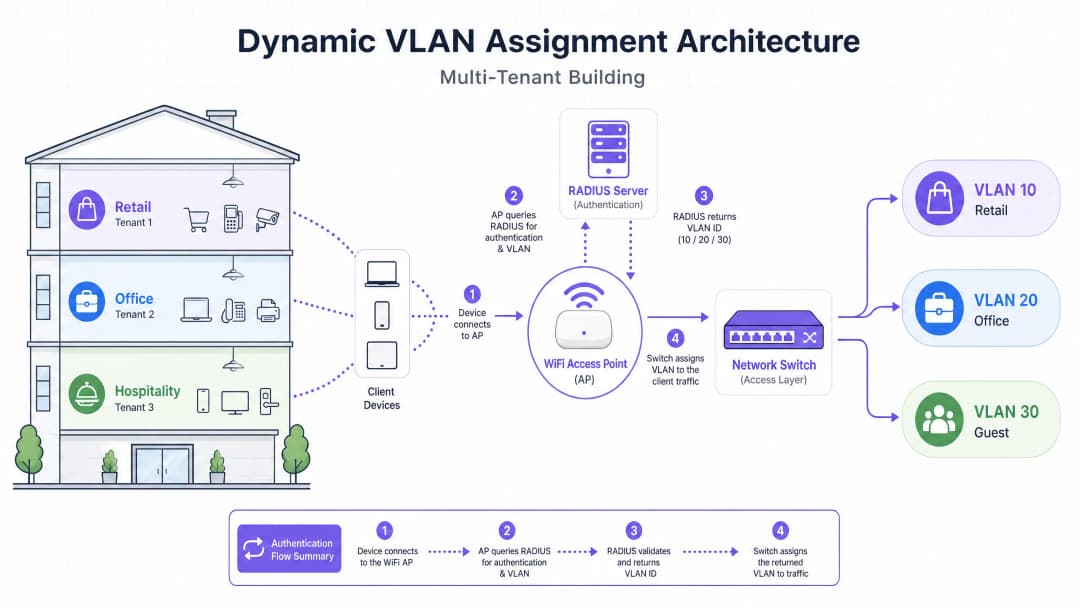
Dynamic VLAN Assignment shifts the segmentation logic from the RF layer to the authentication layer. It relies on the IEEE 802.1X standard for port-based network access control, integrated with a RADIUS (Remote Authentication Dial-In User Service) server.

The architecture consists of three primary components:

  1. Supplicant: The client device (laptop, smartphone) requesting network access.
  2. Authenticator: The network access device, typically the WiFi Access Point or wireless controller, which blocks traffic until authentication is successful.
  3. Authentication Server: The RADIUS server that validates credentials against an identity store (e.g., Active Directory, LDAP) and dictates network policies.

vlan_architecture_overview.png

The Authentication Flow

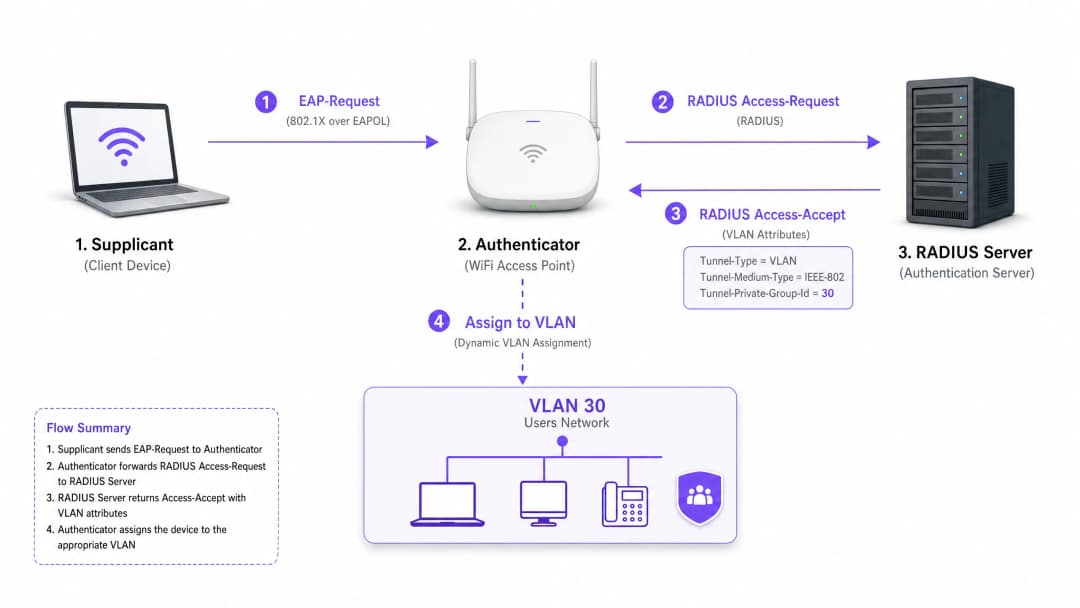
When a supplicant attempts to connect to the unified SSID, the following flow occurs:

  1. EAPOL Initialization: The supplicant connects to the AP. The AP blocks all traffic except Extensible Authentication Protocol over LAN (EAPOL) packets.
  2. RADIUS Access-Request: The AP encapsulates the EAP data and forwards it to the RADIUS server as an Access-Request.
  3. Credential Validation: The RADIUS server verifies the user's credentials (via EAP-TLS, PEAP, etc.).
  4. RADIUS Access-Accept: Upon successful validation, the RADIUS server responds with an Access-Accept message. Crucially, this message includes specific IETF standard RADIUS attributes that instruct the AP on which VLAN to assign the user.

The critical RADIUS attributes required for dynamic VLAN assignment are:

  • Tunnel-Type (64): Set to VLAN (Value 13)
  • Tunnel-Medium-Type (65): Set to 802 (Value 6)
  • Tunnel-Private-Group-ID (81): Set to the specific VLAN ID (e.g., "20" for Tenant A, "30" for Tenant B)

radius_auth_flow.png

Once the AP receives these attributes, it drops the user's traffic directly into the specified VLAN. The upstream network switches then handle the traffic as if the user were physically plugged into a dedicated port for that tenant, ensuring complete Layer 2 isolation.

Implementation Guide

Deploying dynamic VLAN assignment requires careful coordination between the wireless infrastructure, edge switches, and the identity provider. Follow this vendor-neutral implementation sequence.

Phase 1: Network Infrastructure Preparation

  1. VLAN Provisioning: Define and create the necessary VLANs on your core routing infrastructure and DHCP servers. Ensure each tenant VLAN has its own distinct subnet and appropriate routing policies (e.g., routing to the internet, but dropping inter-VLAN traffic).
  2. Switch Trunking: This is a critical step. The switch ports connecting to your Access Points must be configured as 802.1Q trunk ports. You must tag all potential tenant VLANs that the AP might need to assign. If the RADIUS server assigns VLAN 40, but VLAN 40 is not tagged on the switch port, the client will authenticate but fail to receive an IP address.
  3. AP Configuration: Configure the APs to broadcast a single 802.1X-enabled SSID (e.g., WPA3-Enterprise). Enable the specific setting on your wireless controller or APs that allows them to accept RADIUS override attributes (often labelled "AAA Override" or "Dynamic VLAN").

Phase 2: RADIUS and Identity Integration

  1. Identity Store Integration: Connect your RADIUS server to the directory service containing user identities and their tenant associations.
  2. Network Policy Creation: Create policies within the RADIUS server that map user groups to VLAN IDs. For example, a policy stating: If User belongs to Group 'Retail_Staff', return Tunnel-Private-Group-ID = 10.
  3. Certificate Management: If using EAP-TLS (recommended for corporate devices), deploy client certificates. If using PEAP-MSCHAPv2 (common for BYOD), ensure a valid, trusted server certificate is installed on the RADIUS server.

Phase 3: Testing and Phased Rollout

  1. Pilot Testing: Test with a small group of devices across different tenants. Verify that upon connection, the device receives an IP address from the correct subnet and cannot ping devices in other tenant VLANs.
  2. IoT and Headless Devices: For devices that do not support 802.1X (printers, smart TVs), implement MAC Authentication Bypass (MAB). The RADIUS server authenticates the device based on its MAC address and assigns the appropriate VLAN. Note: Place these devices in strictly isolated VLANs as MAC addresses can be spoofed.

Best Practices

  • Consolidate SSIDs: Aim for an absolute maximum of three SSIDs: one 802.1X SSID for all tenants, one for legacy IoT devices (using PSK or MAB), and one for Guest WiFi (using a captive portal).
  • Enforce Client Isolation: Within the guest network and untrusted tenant networks, enable Layer 2 client isolation at the AP level to prevent devices from communicating with each other, mitigating lateral movement risks.
  • Leverage Advanced Analytics: Integrate your authentication flow with a robust WiFi Analytics platform to gain visibility into venue utilisation, dwell times, and tenant network performance.
  • Standardise on WPA3: Where client support allows, mandate WPA3-Enterprise for the 802.1X SSID to ensure the highest level of encryption and protection against dictionary attacks.
  • Industry Context: Tailor the deployment to the vertical. In Retail environments, ensure POS systems are on a strictly isolated VLAN to maintain PCI DSS compliance. In Hospitality , ensure guest VLANs are completely separated from back-of-house operations.

Troubleshooting & Risk Mitigation

Common Failure Modes

  1. The "Authenticated but No IP" Scenario:

    • Symptom: The client connects, authentication succeeds, but the device self-assigns an APIPA address (169.254.x.x).
    • Root Cause: The RADIUS server assigned a VLAN, but that VLAN is either not created on the DHCP server, or more commonly, the VLAN is not tagged on the trunk port connecting the switch to the AP.
    • Fix: Verify 802.1Q trunk configurations on the edge switch.
  2. RADIUS Timeout / Unreachable:

    • Symptom: Clients are stuck on "Connecting..." or are repeatedly prompted for credentials.
    • Root Cause: The AP cannot reach the RADIUS server, or the RADIUS shared secret is mismatched between the AP and the server.
    • Fix: Verify network connectivity between the AP management IP and the RADIUS server. Double-check the shared secret.
  3. Certificate Expiration:

    • Symptom: Widespread sudden authentication failures for all users on PEAP or EAP-TLS.
    • Root Cause: The RADIUS server certificate has expired, causing clients to reject the connection.
    • Fix: Implement aggressive monitoring and alerting for RADIUS certificates. Renew certificates at least 30 days before expiration.

Risk Mitigation Strategies

  • Fail-Open vs. Fail-Closed: Define a clear policy for when the RADIUS server is unreachable. For tenant corporate networks, fail-closed (deny access) is necessary for security. For guest access, you might configure a fail-open policy that drops users into a highly restricted, internet-only "quarantine" VLAN.
  • Redundancy: Always deploy RADIUS servers in a highly available (HA) pair, preferably geographically distributed if supporting multiple sites.

ROI & Business Impact

Implementing dynamic VLAN assignment delivers significant, measurable business outcomes for venue operators:

  1. Reduced OpEx: Centralised management of a single SSID drastically reduces the IT overhead associated with provisioning, updating, and troubleshooting individual tenant networks.
  2. Optimised RF Spectrum: Eliminating SSID bloat reclaims valuable airtime. For a guide on managing spectrum, see our article on Wi Fi Frequencies: A Guide to Wi-Fi Frequencies in 2026 . This leads to higher throughput and fewer support tickets regarding "slow WiFi."
  3. Enhanced Security and Compliance: Strict Layer 2 isolation ensures that a compromise in one tenant's network does not spread to others. This is critical for meeting regulatory requirements like PCI DSS and GDPR.
  4. Scalability: Onboarding a new tenant requires zero changes to the physical infrastructure or wireless configuration; it is simply a matter of creating a new policy in the RADIUS server.

For more comprehensive strategies on designing networks for shared spaces, review our guide on Designing a Multi-Tenant WiFi Architecture for MDU .

关键定义

802.1X

IEEE标准,用于基于端口的网络访问控制,为希望连接到LAN或WLAN的设备提供认证机制。

允许网络在授权访问前要求身份认证的基础协议,支持动态策略。

RADIUS(远程认证拨入用户服务)

一种网络协议,为连接和使用网络服务的用户提供集中化的认证、授权和记账(AAA)管理。

验证凭据并指示网络将用户分配到哪个VLAN的决策引擎。

请求方

请求访问网络并提供凭据的客户端设备(如笔记本电脑、智能手机)或软件。

必须配置为支持802.1X的端点(例如,在WiFi设置中选择PEAP或EAP-TLS)。

认证方

通过在中继请求方和认证服务器之间传递消息来促进认证过程的网络设备(如WiFi接入点或交换机)。

在RADIUS给予许可前阻止流量,然后应用分配的VLAN的守门人。

EAP(可扩展认证协议)

常用于无线网络和点对点连接的认证框架,支持多种认证方法(如EAP-TLS、PEAP)。

请求方和RADIUS服务器之间安全交换凭据的语言。

MAB(MAC认证旁路)

一种用于认证不支持802.1X的设备的技术,使用其MAC地址作为凭据。

用于在多租户环境中加入传统物联网设备、打印机或智能电视。

Tunnel-Private-Group-ID

用于将VLAN ID从RADIUS服务器传输到认证方的特定RADIUS属性(属性81)。

实际决定用户被放入哪个网段的关键数据。

二层隔离

一种安全措施,防止同一网段或VLAN上的设备直接相互通信。

对于访客网络和不受信任的租户网络至关重要,可防止恶意软件横向移动或未授权访问。

应用实例

一个大型会议中心同时举办三场活动。活动A需要安全的企业访问,活动B需要对参会者的开放接入,活动C需要访问特定的内部演示服务器。网络架构师应如何使用动态VLAN进行部署?

架构师为员工和安全参会者配置一个802.1X SSID,并为普通来宾配置一个单独的开放SSID及强制门户。

对于802.1X SSID,RADIUS服务器配置了三条策略:

  1. 如果用户组 = 'Event_A_Staff',分配VLAN 100(互联网+企业VPN访问)。
  2. 如果用户组 = 'Event_C_Presenters',分配VLAN 102(互联网+演示服务器访问)。

对于活动B,参会者使用开放的访客SSID,该SSID将他们放入VLAN 101(仅限互联网,启用客户端隔离)。

考官评语: 这种方法在最小化SSID开销的同时保持了严格的安全边界。通过利用与用户组关联的RADIUS策略,网络能够动态适应每个活动的特定需求,无需手动重新配置AP。

一家零售连锁店经营着一座共享建筑,内有一家咖啡店、一家服装店和一家药房。药房必须遵守HIPAA,服装店的无线POS终端要求符合PCI DSS。如何保证隔离?

IT团队部署了一个单一的WPA3-企业版SSID。

  1. 药房员工通过802.1X认证,RADIUS将其分配到VLAN 50,该VLAN具有严格的防火墙规则,阻止访问任何其他内部子网。
  2. 服装店的POS终端使用EAP-TLS(基于证书)认证,并分配到VLAN 60。VLAN 60直接路由到支付处理网关,并与所有其他流量隔离。
  3. 咖啡店为顾客使用单独的访客SSID,终端位于VLAN 70并启用客户端隔离。
考官评语: 此架构成功地在共享物理基础设施上将高度受监管的流量(HIPAA、PCI DSS)与一般企业和访客流量分段。对POS终端使用EAP-TLS消除了对密码的依赖,显著增强了安全性。

练习题

Q1. 一位租户报告他们能够成功认证到802.1X SSID,但设备自动分配了一个IP地址(169.254.x.x)且无法访问互联网。最可能的配置错误是什么?

提示:考虑从接入点到核心网络服务的路径。

查看标准答案

最可能的原因是RADIUS服务器分配的VLAN未在连接边缘交换机到接入点的802.1Q中继端口上标记。AP试图将流量放入正确的VLAN,但交换机因为端口未配置接受这些帧而将其丢弃。

Q2. 您正在设计一个共享办公空间的多租户网络。客户希望为15个租户分别广播唯一的SSID,“以便他们轻松找到自己的网络”。您如何建议客户?

提示:考虑管理帧开销对射频性能的影响。

查看标准答案

强烈建议客户不要采用这种方法。广播15个SSID将消耗大量通话时间用于信标帧,严重降低网络性能,增加延迟,并减少所有用户的吞吐量。建议部署一个单一的802.1X SSID,并通过RADIUS使用动态VLAN分配在后端安全地分段租户。

Q3. 一个多租户建筑需要为几个不支持802.1X请求方的无头物联网设备(如智能恒温器、数字标牌)提供网络接入。如何将这些设备安全地接入正确的租户VLAN?

提示:考虑RADIUS支持的替代认证方法。

查看标准答案

实施MAC认证旁路(MAB)。接入点将设备的MAC地址作为用户名和密码发送给RADIUS服务器。RADIUS服务器可以配置为识别这些特定的MAC地址,并返回适当的VLAN ID。由于MAC地址可能被欺骗,这些设备应放置在具有有限网络访问权限的严格隔离VLAN中。