
Cómo usar datos de primera parte en campañas de marketing
Esta guía autorizada detalla cómo los equipos de TI y marketing empresariales pueden transformar su infraestructura de WiFi para invitados en un potente motor de datos de primera parte. Cubre la arquitectura técnica para la captura de datos, la gestión de consentimiento compatible con GDPR, estrategias de segmentación y activación en el mundo real a través de correo electrónico, SMS, publicidad en redes sociales y display programático. Los operadores de recintos y los equipos de TI encontrarán orientación de implementación concreta, ejemplos prácticos de hostelería y comercio minorista, y marcos de ROI medibles.
Escucha esta guía
Ver transcripción del podcast
Resumen Ejecutivo
Para recintos empresariales —hoteles, cadenas minoristas, estadios y centros de conferencias— la red WiFi para invitados ya no es solo un centro de costos o una comodidad básica. A medida que las cookies de terceros se deprecian y las regulaciones de privacidad se endurecen, los recintos físicos poseen una ventaja única y subutilizada: la capacidad de capturar datos de primera parte altamente precisos y con consentimiento directamente de los visitantes en el punto de conexión.
Esta guía describe cómo los gerentes de TI y los CTO pueden diseñar su infraestructura inalámbrica para que sirva como un motor de adquisición de datos compatible para los equipos de marketing. Al implementar un robusto Captive Portal integrado con plataformas de CRM y automatización de marketing, los recintos pueden recopilar sin problemas datos demográficos y de comportamiento a escala. Exploraremos la implementación técnica de mecanismos de captura de datos, la integración de analíticas de Guest WiFi y la ejecución de campañas de marketing dirigidas a través de correo electrónico, SMS y publicidad en redes sociales, impulsando en última instancia un ROI medible y experiencias de cliente mejoradas. La plataforma de Purple actualmente presta servicio a más de 80,000 recintos y casi dos millones de usuarios diarios, proporcionando la capa de integración que conecta la infraestructura de red con la activación de marketing.
Análisis Técnico Detallado: La Arquitectura de Adquisición de Datos
La base de la recopilación de datos de primera parte en un recinto físico se basa en la interacción entre el dispositivo móvil del usuario, el punto de acceso inalámbrico (AP) y la infraestructura del Captive Portal. Comprender esta arquitectura es esencial antes de que pueda tener lugar cualquier activación de marketing.
El Captive Portal y la Autenticación
Cuando un usuario se conecta a un SSID abierto, el controlador de red redirige su solicitud HTTP inicial a un Captive Portal. Esta página de bienvenida es el punto crítico de intercambio de valor: el recinto proporciona acceso a internet de alta velocidad, y el usuario proporciona sus datos y consentimiento. Para maximizar la calidad de los datos y la experiencia del usuario, el proceso de autenticación debe ser tanto sin fricciones como técnicamente robusto.
Las implementaciones modernas aprovechan tres métodos de autenticación principales. Social OAuth permite a los usuarios autenticarse a través de Facebook, Google o Apple, proporcionando datos demográficos ricos al instante y reduciendo el abandono de formularios. La autenticación basada en formularios solicita campos específicos como dirección de correo electrónico, número de teléfono y código postal, dando al recinto control directo sobre los datos capturados. La autenticación sin interrupciones a través de Passpoint (Hotspot 2.0), utilizando el estándar IEEE 802.11u, permite conexiones automáticas y seguras para usuarios recurrentes, omitiendo el Captive Portal por completo después de la configuración inicial, una capacidad crítica para entornos de alto rendimiento como centros de transporte y estadios, como se explora en Wi Fi in Auto: The Complete 2026 Enterprise Guide .
Superando la Aleatorización de MAC
Históricamente, los recintos rastreaban a los usuarios a través de la dirección MAC (Media Access Control) de su dispositivo. Sin embargo, los sistemas operativos modernos —iOS 14 y superiores, Android 10 y superiores— implementan la aleatorización de MAC, generando una dirección MAC única y temporal para cada SSID. Esto rompe fundamentalmente el seguimiento centrado en el dispositivo y es una de las causas más comunes de degradación de la calidad de los datos en implementaciones heredadas.
Para construir un perfil de usuario persistente, la arquitectura debe basarse en la sesión autenticada en lugar del identificador de hardware. Una vez que un usuario se autentica a través del Captive Portal, sus datos de sesión —incluida la MAC aleatorizada— se vinculan a su perfil de CRM dentro de la plataforma de WiFi Analytics . Las visitas posteriores utilizando el mismo método de autenticación se vincularán al perfil unificado, preservando los datos de comportamiento longitudinales.
Flujo de Datos y Arquitectura de Integración
Los datos capturados deben fluir sin problemas desde el borde de la red hasta el stack de marketing. Esto se logra a través de REST APIs o Webhooks seguros, lo que permite la sincronización de datos en tiempo real en lugar de exportaciones por lotes.
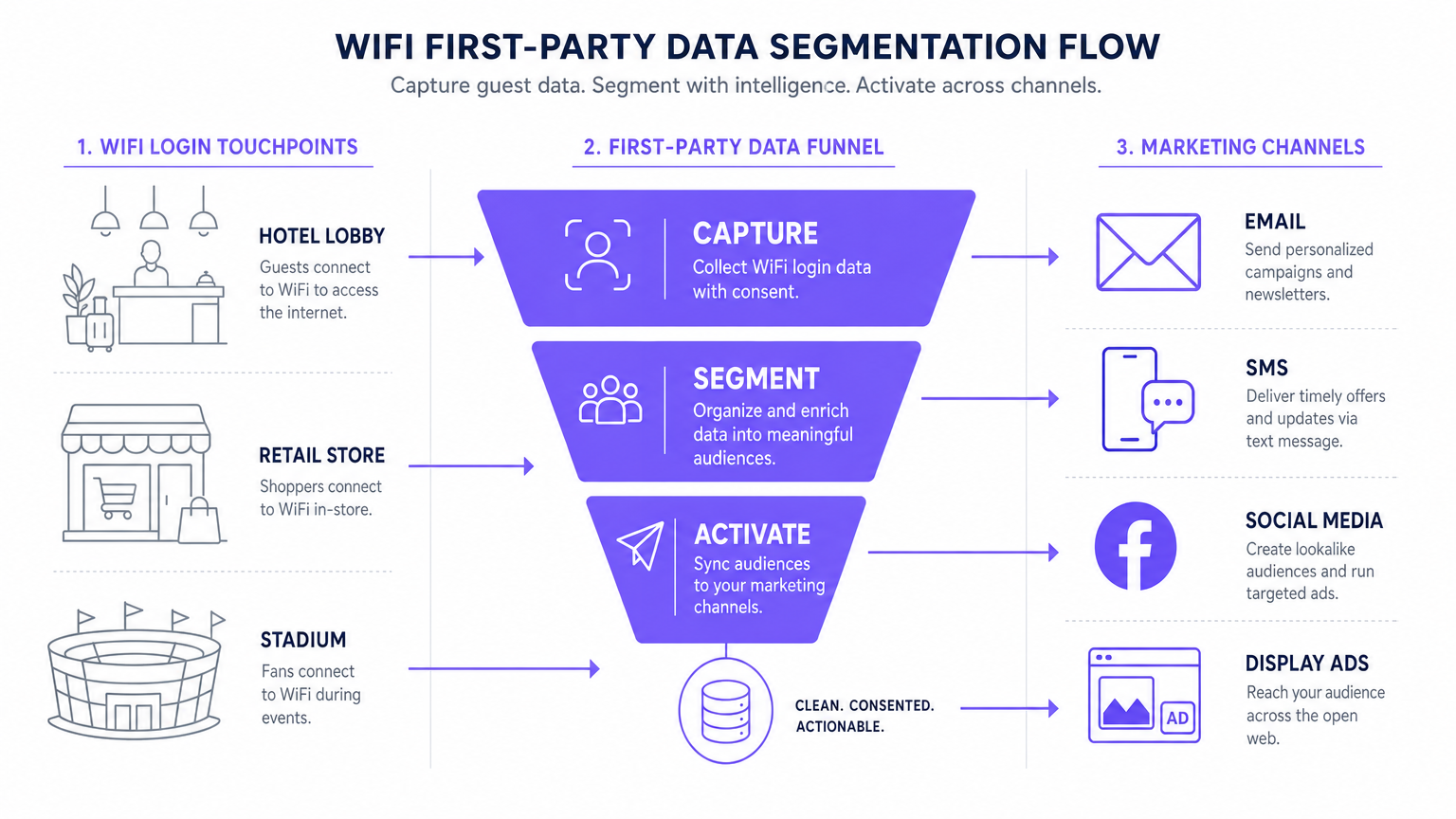
El flujo de datos estándar sigue cinco etapas: Captura (datos recopilados en el Captive Portal), Normalización (la plataforma de analíticas deduplica y fusiona perfiles), Sincronización (los Webhooks envían actualizaciones en tiempo real al CRM), Segmentación (los equipos de marketing definen cohortes de audiencia basadas en criterios de comportamiento y demográficos), y Activación (las campañas se activan a través de correo electrónico, SMS y canales programáticos).
Guía de Implementación: Activando los Datos
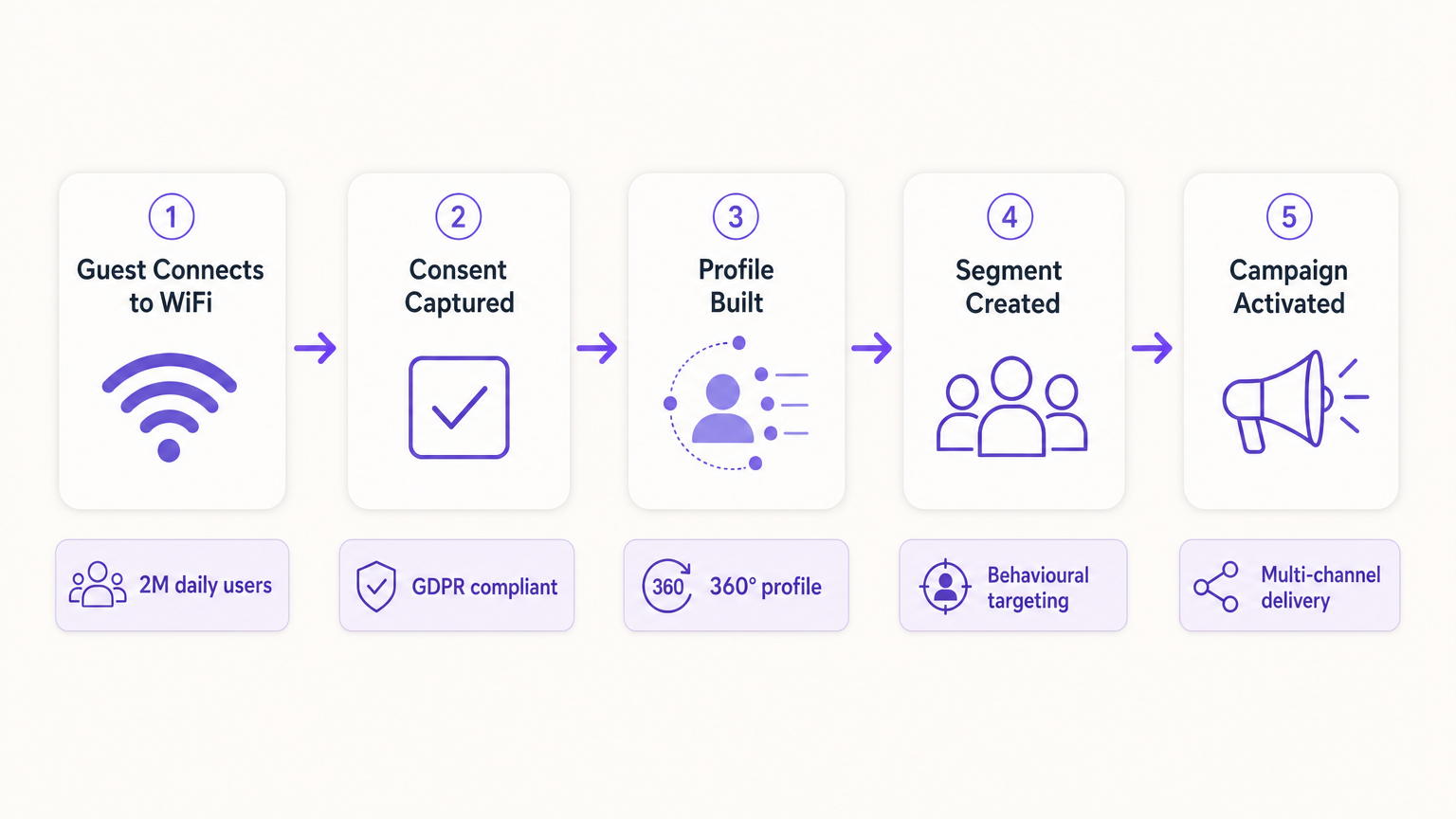
Recopilar los datos es solo el primer paso. El verdadero valor comercial reside en la activación. La siguiente sección detalla cómo implementar datos WiFi de primera parte en los cuatro canales de marketing principales.
1. Marketing por Correo Electrónico y Campañas de Goteo
El correo electrónico sigue siendo un canal altamente efectivo tanto para entornos de hostelería como de retail . Los correos electrónicos de bienvenida activados, configurados a través de Webhook para enviarse inmediatamente después del primer inicio de sesión de un usuario, son ideales para entregar incentivos prometidos como códigos de descuento o puntos de lealtad. Los correos electrónicos de encuestas post-visita, automatizados 24 horas después de que un usuario se desconecta de la red, impulsan la generación de reseñas y la medición de NPS. Las campañas de re-engagement dirigidas a usuarios que no se han conectado en más de 90 días son efectivas para impulsar visitas repetidas, particularmente en hospitalidad contextos donde las promociones estacionales son relevantes.
2. SMS y activadores basados en la ubicación
Para un engagement inmediato y de alta intención, el SMS es inigualable. Este canal requiere capturar el consentimiento explícito para el marketing por SMS durante el proceso de autenticación —una casilla de verificación separada y sin marcar del consentimiento de marketing por correo electrónico—. Utilizando análisis de ubicación —como los descritos en Sistema de Posicionamiento en Interiores: Guía UWB, BLE y WiFi — la plataforma puede activar un SMS cuando un usuario permanece en una zona específica durante un período definido, creando marketing de micro-momentos contextualmente relevante.
3. Publicidad en redes sociales y audiencias personalizadas
Los datos de primera parte son invaluables para la publicidad programática de display y en redes sociales, especialmente a medida que disminuye el seguimiento de terceros. Las Audiencias Similares (Lookalike Audiences) se crean exportando segmentos de usuarios de WiFi altamente comprometidos —por ejemplo, usuarios que visitan el lugar más de dos veces al mes— a Facebook Ads Manager o Google Ads como una Audiencia Personalizada (Custom Audience) inicial. La plataforma luego identifica nuevos usuarios con perfiles demográficos y de comportamiento similares. El Retargeting (resegmentación) sirve anuncios de display dirigidos a usuarios que han visitado recientemente el lugar, reforzando el conocimiento de la marca en toda la web abierta.
4. Publicidad programática de display
Al sincronizar segmentos de audiencia de primera parte con una Plataforma del Lado de la Demanda (DSP), los lugares pueden servir anuncios de display dirigidos a visitantes conocidos a través de inventario de editores premium. Esto es particularmente efectivo para lugares de transporte y atención médica donde la frecuencia de visitas y las señales de intención son fuertes.
Para estrategias fundamentales de recolección de datos, consulte Cómo Recopilar Datos de Primera Parte a Través de WiFi .
Mejores prácticas para el cumplimiento y la experiencia del usuario
Privacidad y Consentimiento (GDPR y CCPA)
El cumplimiento es innegociable y debe ser diseñado en la implementación desde el primer día, no adaptado posteriormente. El Captive Portal debe adherirse a estrictas regulaciones de protección de datos. El consentimiento desagregado es obligatorio: la casilla de verificación para las comunicaciones de marketing debe estar completamente separada de la aceptación de los Términos y Condiciones. Las opciones de suscripción granulares deben ofrecer casillas de verificación separadas para el marketing por correo electrónico y SMS. Un enlace a una política de privacidad clara debe mostrarse de manera prominente, detallando exactamente cómo se utilizarán, almacenarán y compartirán los datos. Los datos deben cifrarse en tránsito utilizando TLS 1.2 o superior, y en reposo utilizando cifrado AES-256, cumpliendo con PCI DSS cuando haya transacciones involucradas.
Optimización del Captive Portal para la conversión
La página de bienvenida debe cargarse en menos de tres segundos. Si tarda más, las tasas de abandono aumentan significativamente, lo que resulta en oportunidades de adquisición de datos perdidas. El portal debe ser totalmente adaptable a dispositivos móviles y diseñado con una propuesta de valor clara y convincente. El perfilado progresivo es el enfoque recomendado: solicitar solo la dirección de correo electrónico en la primera visita y enriquecer el perfil con campos adicionales —fecha de nacimiento, código postal, preferencias— en visitas posteriores. Este enfoque produce consistentemente tasas de suscripción del 60 al 80 por ciento en implementaciones bien configuradas.
Solución de problemas y mitigación de riesgos
| Modo de Falla | Síntoma | Estrategia de Mitigación |
|---|---|---|
| El Captive Portal no se muestra | Los usuarios se conectan al SSID pero no son redirigidos al portal. | Verifique la configuración de DNS y los ajustes de Walled Garden. Asegúrese de que la IP y la URL del portal sean accesibles antes de que se complete la autenticación. |
| Bajas tasas de suscripción | Alto volumen de conexiones pero baja captura de consentimiento de marketing. | Revise la claridad de la propuesta de valor. Simplifique el formulario. Asegúrese de que la opción de suscripción de marketing sea prominente pero no engañosa. Pruebe el tiempo de carga del portal. |
| Fallos en la sincronización de datos | Perfiles actualizados en Purple pero no reflejados en el CRM. | Monitoree los registros de entrega de Webhook. Verifique las API keys y los límites de tasa en la plataforma de destino. Implemente lógica de reintento para entregas fallidas. |
| La aleatorización de MAC degrada los datos | Aumento de visitantes 'nuevos'; las métricas de visitantes recurrentes colapsan. | Cambie a un seguimiento centrado en la identidad. Implemente Passpoint para una reautenticación sin interrupciones. Fomente la autenticación basada en aplicaciones para una identidad persistente. |
| Configuración incorrecta de Walled Garden | El inicio de sesión social OAuth falla; los usuarios no pueden completar la autenticación. | Incluya en la lista blanca todos los puntos finales de autenticación requeridos (por ejemplo, accounts.google.com, graph.facebook.com) en la configuración de Walled Garden en el controlador de LAN inalámbrica. |
ROI e impacto empresarial
La implementación de una estrategia de datos de primera parte a través de WiFi transforma la red de un gasto de TI en un activo de marketing medible con retornos cuantificables.
Costo por Adquisición (CPA): El costo de adquirir un nuevo suscriptor de correo electrónico con consentimiento a través de un Captive Portal es típicamente una fracción del costo equivalente a través de publicidad social pagada o de búsqueda. La infraestructura ya está implementada; el costo incremental es la licencia de la plataforma y la configuración del portal.
Atribución de Campañas: Al rastrear cuándo un usuario recibe una oferta por correo electrónico y posteriormente inicia sesión en el WiFi del lugar, los equipos de marketing pueden probar definitivamente la atribución offline para campañas digitales, una capacidad que es cada vez más valiosa a medida que los modelos de atribución digital se vuelven menos confiables.
Mayor Valor de Vida del Cliente (CLV): El engagement personalizado impulsado por datos precisos de primera parte se correlaciona directamente con una mayor frecuencia de visitas y un mayor gasto por visita. Un hotel que puede identificar a un huésped corporativo recurrente y ofrecer proactivamente una mejora relevante está brindando una experiencia materialmente mejor que uno que trata a cada huésped como anónimo.
Para consideraciones complejas de IoT y arquitectura de datos, consulte Arquitectura del Internet de las Cosas: Una Guía Completa .
Definiciones clave
Captive Portal
A web page that a user of a public-access network is obliged to view and interact with before internet access is granted. It serves as the primary interface for data capture and consent collection.
This is the critical point of value exchange between the venue and the guest. Its design, load speed, and form structure directly determine the quality and volume of first-party data captured.
MAC Randomisation
A privacy feature in modern operating systems (iOS 14+, Android 10+) that generates a temporary, unique MAC address for each wireless network the device connects to, preventing persistent device-level tracking.
This is the most common cause of data quality degradation in legacy WiFi analytics deployments. It necessitates a shift from device-centric to identity-centric tracking architectures.
First-Party Data
Information that an organisation collects directly from its own customers or users, with their explicit consent, through its own channels and touchpoints.
This is the most valuable and compliant data source for marketing, particularly as third-party cookies are phased out across major browsers and advertising platforms.
Webhook
An HTTP-based callback mechanism that sends a structured data payload to a pre-configured endpoint when a specific event occurs in the source system.
Used to push real-time data from the WiFi analytics platform to a CRM or marketing automation tool immediately after a user authenticates, enabling real-time campaign triggers.
Walled Garden
A network configuration that restricts unauthenticated users to a limited set of pre-approved domains and IP addresses, preventing full internet access until authentication is complete.
Correct Walled Garden configuration is essential for allowing the captive portal to load and for enabling social OAuth logins (e.g., whitelisting Facebook and Google authentication endpoints) before the user has completed the login process.
Passpoint (Hotspot 2.0)
An industry standard based on IEEE 802.11u that enables automatic, secure WiFi connections without requiring manual portal interaction after the initial device provisioning.
Improves user experience for returning visitors and ensures consistent, persistent identity-based connections, facilitating seamless data capture and profile enrichment across multiple visits.
Lookalike Audience
A targeting segment created by advertising platforms (such as Facebook Ads or Google Ads) that identifies new users who share similar characteristics with an existing Custom Audience seed list.
Allows venues to leverage their high-quality offline visitor data — captured via WiFi — to find new, highly qualified prospects online, bridging the gap between physical and digital marketing.
Progressive Profiling
A data collection strategy that gathers customer information incrementally across multiple interactions, rather than requesting all data fields in a single form submission.
Increases captive portal conversion rates by reducing friction on the initial login, while still building a comprehensive, enriched customer profile over subsequent visits.
Dwell Time
The duration for which a device remains associated with a WiFi access point or within a defined location zone, used as a proxy for physical presence and engagement.
A critical signal for location-based marketing triggers. A user dwelling in a specific retail zone for more than ten minutes is a high-intent prospect for a contextually relevant offer.
Ejemplos resueltos
A 200-room luxury hotel wants to increase bookings for its on-site spa. They currently offer free WiFi but do not capture any guest data beyond the room booking system. How should the IT and Marketing teams collaborate to deploy a first-party data solution?
Phase 1 — IT Deployment: The IT team configures the wireless LAN controller to redirect all unauthenticated guest traffic on the 'Hotel_Guest_WiFi' SSID to the Purple captive portal. The Walled Garden is configured to allow access to the portal's CDN and the OAuth endpoints for social login providers.
Phase 2 — Portal Design: Marketing designs a branded splash page with a clear value proposition: 'Complimentary high-speed WiFi — connect in seconds.' The authentication form requests Name and Email, with a separate, unticked checkbox for marketing consent. A link to the privacy policy is displayed prominently.
Phase 3 — Integration: IT configures a secure Webhook to push new authenticated profiles to the hotel's CRM (e.g., Salesforce). A custom field 'WiFi_Opt_In' is mapped to the marketing consent flag.
Phase 4 — Campaign Execution: Marketing configures an automated trigger in the CRM. If a guest authenticates and their profile indicates they have not previously visited the spa (cross-referenced with the booking system), an automated email is sent two hours after check-in offering a 15% discount on spa treatments, valid for the duration of their stay.
Phase 5 — Measurement: Track the email open rate, click-through rate, and spa booking conversion rate. Compare spa revenue per guest for WiFi-opted-in guests versus non-opted-in guests to quantify ROI.
A national retail chain with 50 locations wants to build a Lookalike Audience for Facebook Ads based on their most frequent in-store shoppers, without relying on third-party pixel data.
Step 1 — Baseline Capture: Confirm that the captive portal at all 50 locations is capturing email addresses and marketing consent. Ensure the portal is configured consistently across all sites using a centralised management platform.
Step 2 — Segment Definition: Within the Purple analytics platform, create a segment defined as 'Users who have authenticated at any location more than three times in the last 60 days.' This cohort represents the brand's most loyal physical shoppers.
Step 3 — Secure Export: Export this segment as a hashed (SHA-256) email list. Hashing ensures the raw email addresses are never transmitted to the advertising platform, maintaining GDPR compliance.
Step 4 — Custom Audience Upload: Upload the hashed list to Facebook Ads Manager as a Custom Audience. Facebook matches the hashes against its own user database.
Step 5 — Lookalike Generation: Generate a 1% Lookalike Audience based on this Custom Audience. This targets new Facebook users who share similar characteristics — demographics, interests, and online behaviours — with the brand's most loyal physical shoppers.
Step 6 — Campaign Deployment: Run a prospecting campaign targeting the Lookalike Audience with a new customer acquisition offer.
Preguntas de práctica
Q1. Your venue is experiencing a 40% drop-off rate at the captive portal. Users are connecting to the SSID but not completing the authentication process. What are the two most likely technical causes and how would you diagnose and resolve each?
Sugerencia: Consider both the network configuration layer and the user experience layer independently.
Ver respuesta modelo
Cause 1 — Slow Portal Load Time: The splash page is taking too long to render on mobile devices. Diagnosis: Use browser developer tools to measure Time to First Byte (TTFB) and total page load time from a mobile device on the guest network. Resolution: Compress all images, remove non-essential JavaScript, and serve the portal from a CDN. Target sub-3-second load time.
Cause 2 — Walled Garden Misconfiguration: The portal is loading but social OAuth authentication is failing because the authentication provider endpoints are not whitelisted in the Walled Garden. Diagnosis: Attempt a social login and inspect the network requests in developer tools for blocked connections. Resolution: Add the required OAuth endpoints (e.g., accounts.google.com, graph.facebook.com, appleid.apple.com) to the Walled Garden whitelist on the wireless LAN controller.
Q2. A marketing director wants to send an SMS offer to users exactly 15 minutes after they enter the flagship retail store. How would you architect this solution using the existing WiFi infrastructure, and what compliance considerations apply?
Sugerencia: Think about how presence is detected, how the event is communicated to the marketing platform, and what consent is required.
Ver respuesta modelo
Architecture: 1) Ensure the captive portal explicitly captures mobile phone numbers with a separate, unticked SMS marketing opt-in checkbox. 2) Configure the WiFi analytics platform to track dwell time based on device association with the store's access points. 3) Set up a Webhook triggered by the event 'Dwell Time > 15 minutes AND SMS_Opt_In = True.' 4) The Webhook payload — containing the user's phone number and the store identifier — is sent to the SMS platform (e.g., Twilio), which dispatches the pre-configured offer.
Compliance: The SMS opt-in must be explicit and separate from the WiFi terms of service. The message must include a clear opt-out mechanism (e.g., 'Reply STOP to unsubscribe'). Under GDPR, the user must have been informed at the point of consent that their location within the store would be used to trigger marketing messages.
Q3. Following an iOS update rollout across your user base, your analytics platform shows a 60% spike in 'new' visitors while 'returning' visitor metrics have collapsed. Physical footfall counters show no change in actual visitor numbers. What has happened, and what is the long-term architectural response?
Sugerencia: Consider recent privacy features introduced by mobile operating systems and their impact on device-level tracking.
Ver respuesta modelo
Diagnosis: This is caused by MAC randomisation. The iOS update has enabled per-network MAC randomisation, meaning each device presents a new, temporary MAC address on each visit. The analytics platform is interpreting each new MAC as a new visitor, breaking device-centric tracking.
Immediate Response: Communicate to the marketing team that historical 'returning visitor' metrics are temporarily unreliable and should not be used for campaign decisions until the identity-centric architecture is in place.
Long-Term Architecture: 1) Ensure all returning users are prompted to re-authenticate via the captive portal. When they log in with their existing email or social account, the new randomised MAC is linked to their existing CRM profile, restoring longitudinal data. 2) Deploy Passpoint profiles to authenticated users' devices. Passpoint uses certificate-based authentication that is not affected by MAC randomisation, ensuring seamless, persistent identity on future visits. 3) Encourage users to download the venue's app, which provides a persistent, app-level identity that is also immune to MAC randomisation.
Continúe leyendo esta serie
Marketing WiFi para Restaurantes: Cómo Convertir el WiFi Gratuito en Clientes Recurrentes
Esta guía de referencia técnica autorizada explora la arquitectura e implementación del marketing WiFi para restaurantes — la práctica de usar el acceso a la red de invitados como un canal estructurado de adquisición de datos y automatización de marketing. Proporciona a gerentes de TI, arquitectos de red y directores de operaciones de locales un plan táctico para implementar captive portals, integrarse con plataformas CRM y activar campañas automatizadas que impulsen negocios recurrentes medibles. Desde la captura de datos compatible con GDPR hasta los flujos de trabajo de correo electrónico basados en eventos, esta guía cubre el ciclo de vida completo de la implementación con métricas de ROI concretas.
Cómo Conectar con Clientes: Estrategias Digitales para Negocios Físicos
Esta guía técnica de referencia autorizada detalla cómo los negocios con ubicación física —hoteles, cadenas minoristas, estadios y recintos del sector público— pueden implementar infraestructura WiFi empresarial como un motor de captura de datos de primera parte y de interacción con el cliente. Cubre la arquitectura completa, desde el diseño del Captive Portal y la autenticación sin interrupciones (IEEE 802.11u/Passpoint) hasta la integración con CRM, el cumplimiento de GDPR y un ROI medible. Los líderes de TI y los operadores de recintos encontrarán orientación de implementación práctica, estudios de caso reales y un marco de mitigación de riesgos que prioriza el cumplimiento.
¿Por qué usar WiFi Marketing? El caso de negocio con datos reales
Esta guía de referencia técnica describe el caso de negocio basado en evidencia para el marketing WiFi. Proporciona a los líderes de TI y operadores de recintos datos accionables sobre el ROI, el tiempo de permanencia y las métricas de visitas repetidas, derivados de implementaciones en el mundo real.