
Marketing WiFi para Restaurantes: Cómo Convertir el WiFi Gratuito en Clientes Recurrentes
Esta guía de referencia técnica autorizada explora la arquitectura e implementación del marketing WiFi para restaurantes — la práctica de usar el acceso a la red de invitados como un canal estructurado de adquisición de datos y automatización de marketing. Proporciona a gerentes de TI, arquitectos de red y directores de operaciones de locales un plan táctico para implementar captive portals, integrarse con plataformas CRM y activar campañas automatizadas que impulsen negocios recurrentes medibles. Desde la captura de datos compatible con GDPR hasta los flujos de trabajo de correo electrónico basados en eventos, esta guía cubre el ciclo de vida completo de la implementación con métricas de ROI concretas.
Escucha esta guía
Ver transcripción del podcast
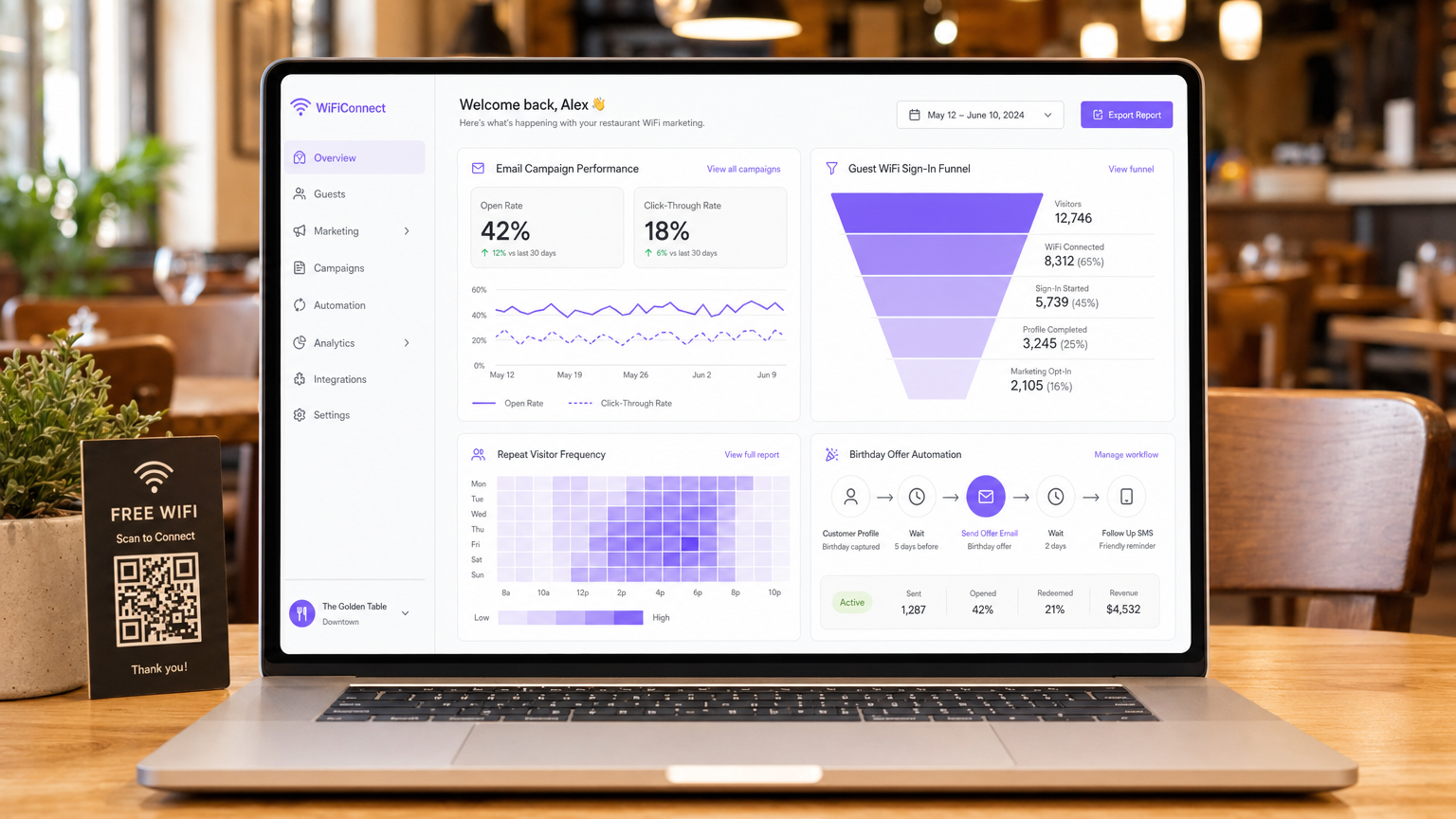
Resumen Ejecutivo
Para gerentes de TI, arquitectos de red y CTO que operan en entornos de hospitalidad, comercio minorista y sector público, proporcionar acceso a la red de invitados ha evolucionado de una utilidad básica a un canal crítico de adquisición de datos. Comprender qué es el marketing WiFi para restaurantes es fundamental para extraer el ROI de las inversiones en infraestructura de red. Esta guía describe la arquitectura técnica, las estrategias de implementación y los protocolos de mitigación de riesgos necesarios para convertir un centro de costos — el WiFi gratuito para invitados — en un impulsor medible de negocios recurrentes y lealtad del cliente.
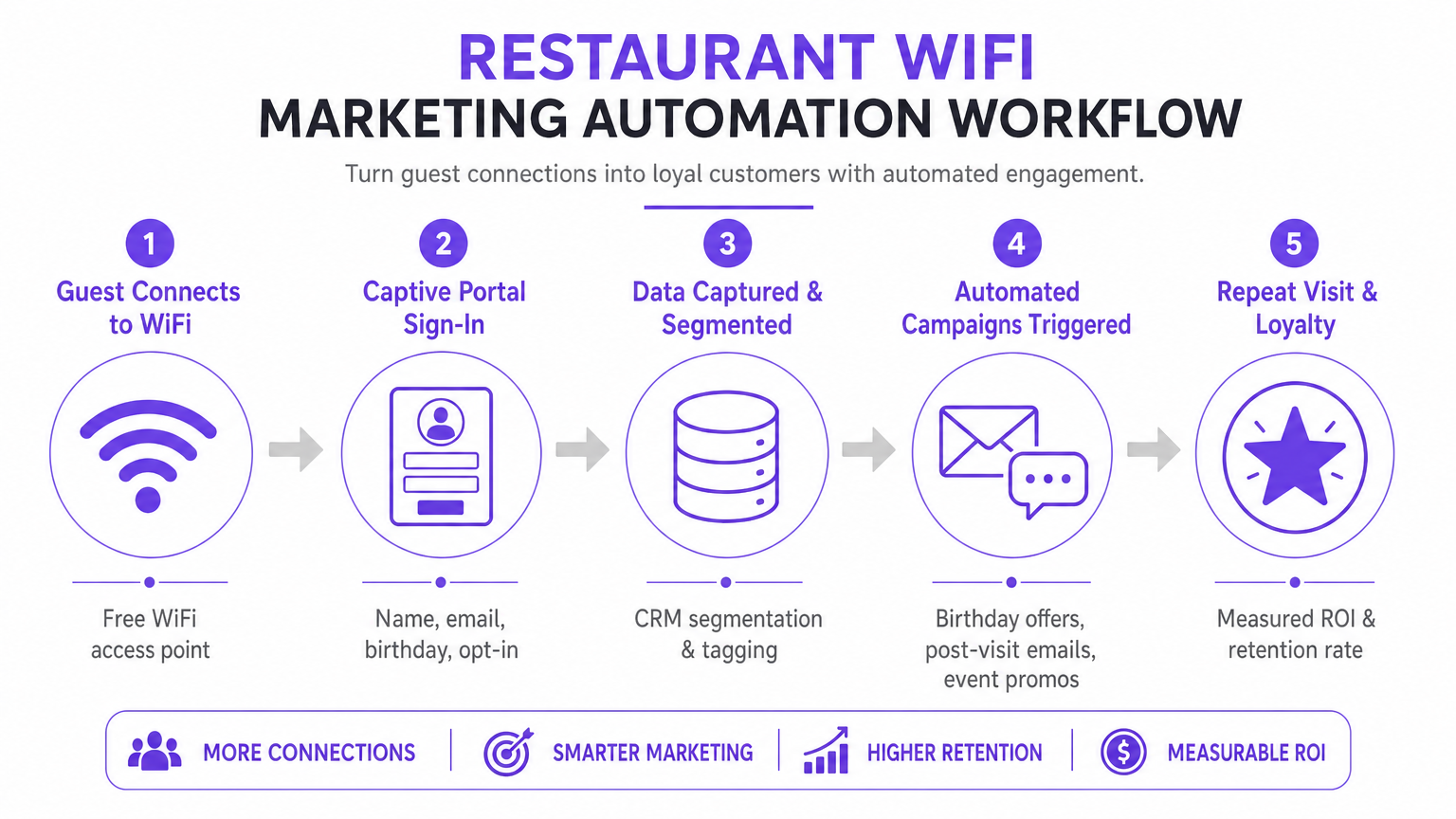
Implementar una solución de Guest WiFi de nivel empresarial requiere más que simplemente transmitir un SSID. Demanda una arquitectura robusta que se integre sin problemas con plataformas CRM, herramientas de automatización de marketing y motores de análisis, todo mientras se adhiere a estrictos estándares de cumplimiento, incluyendo GDPR y PCI DSS. Al implementar la captura estructurada de datos a través de captive portals, los locales pueden segmentar usuarios, activar campañas de marketing automatizadas (correos electrónicos post-visita, ofertas de cumpleaños y promociones de eventos) y generar reseñas valiosas. Esta guía proporciona un plan táctico para configurar y optimizar los flujos de trabajo de marketing WiFi para maximizar el rendimiento, garantizar la seguridad e impulsar un impacto comercial medible.
Análisis Técnico Detallado: Arquitectura y Estándares
La base de un marketing WiFi para invitados efectivo reside en una arquitectura de red escalable y segura. En su núcleo, el sistema se basa en un mecanismo de captive portal que intercepta las solicitudes HTTP/HTTPS de dispositivos no autenticados, redirigiéndolos a una página de autenticación alojada. Este proceso típicamente utiliza RADIUS (Remote Authentication Dial-In User Service) para la Autenticación, Autorización y Contabilidad (AAA) centralizadas.
Flujos de Trabajo de Autenticación y Captura de Datos
Cuando un dispositivo se conecta al SSID de invitados, el Wireless LAN Controller (WLC) o punto de acceso restringe el acceso a la red, colocando el dispositivo en un entorno controlado. Al usuario se le presenta un captive portal, que sirve como interfaz principal de adquisición de datos. Para optimizar las tasas de conversión, el portal debe admitir múltiples métodos de autenticación:
| Método de Autenticación | Nivel de Fricción | Calidad de Datos | Complejidad de Implementación |
|---|---|---|---|
| Social Login (OAuth 2.0) | Bajo | Alto (rico en datos demográficos) | Medio |
| Basado en Formulario (Correo Electrónico + Opt-In) | Medio | Controlado | Bajo |
| Verificación por SMS | Medio-Alto | Alto (móvil verificado) | Medio |
| Passpoint / Hotspot 2.0 | Muy Bajo | Medio | Alto |
Las integraciones de Social Login (OAuth 2.0) con Google o Facebook proporcionan acceso de baja fricción mientras capturan datos demográficos ricos. Este método se basa en el intercambio seguro de tokens, eliminando la necesidad de que los usuarios creen nuevas credenciales. La Autenticación Basada en Formulario permite a los usuarios proporcionar su nombre, dirección de correo electrónico y, opcionalmente, fecha de nacimiento o número de teléfono. Estos datos se validan y se transmiten de forma segura a la base de datos centralizada. La Reautenticación sin Interrupciones (MAC Caching) almacena en caché la dirección MAC de un dispositivo por una duración configurable (por ejemplo, 30 días), lo que permite un acceso sin fricciones y un seguimiento preciso de la frecuencia en visitas posteriores.
Protocolos de Seguridad y Cumplimiento
Implementar WiFi para marketing requiere una estricta adhesión a los estándares de seguridad y privacidad. La arquitectura debe segregar el tráfico de invitados de las redes corporativas utilizando VLAN para prevenir el movimiento lateral. La implementación debe cumplir con:
- GDPR / CCPA: Se deben integrar mecanismos de consentimiento explícito y desagregado en el captive portal. Los usuarios deben optar activamente por recibir comunicaciones de marketing, y la plataforma debe proporcionar sólidas capacidades de solicitud de acceso de interesados (DSAR). El consentimiento de marketing no puede agruparse con los términos de servicio de acceso a la red.
- PCI DSS: Si el local procesa pagos en la misma infraestructura física, la segmentación de red y las reglas de firewall deben aislar el Entorno de Datos del Titular de la Tarjeta (CDE) de la red de invitados.
- WPA3-Enhanced Open (OWE): La transición a protocolos de incorporación seguros proporciona cifrado oportunista para el tráfico no autenticado, mitigando los riesgos de escucha en redes abiertas sin requerir credenciales de usuario.
Guía de Implementación: Estrategias de Despliegue
Una implementación exitosa requiere un enfoque por fases, centrándose en la integración y la automatización. El objetivo es establecer un flujo de datos sin interrupciones desde el punto de acceso hasta la plataforma de automatización de marketing.
Paso 1: Evaluación y Dimensionamiento de la Infraestructura
Antes de implementar un captive portal, asegúrese de que la infraestructura de RF subyacente pueda manejar la densidad de clientes prevista. Realice un estudio de sitio predictivo y activo para identificar brechas de cobertura y optimizar la ubicación de los AP. Considere la utilización del canal, la interferencia cocanal y el rendimiento requerido por dispositivo. Para implementaciones empresariales, aprovechar una conexión a internet empresarial dedicada — como una línea dedicada — garantiza un ancho de banda y velocidades simétricas, evitando que el tráfico de invitados afecte los sistemas operativos críticos.
Paso 2: Configuración del Captive Portal
Diseñe el captive portal con un enfoque en la optimización de la conversión. La interfaz de usuario debe ser responsiva y cargarse rápidamente en dispositivos móviles, ya que la mayoría de las conexiones se originarán desde smartphones. Implemente el perfilado progresivo: solicite información básica (dirección de correo electrónico, opt-in) durante la visita inicial, y pida datos suplementarios (cumpleaños, número de teléfono) en conexiones posteriores. Esto minimiza la fricción mientras enriquece el perfil del cliente con el tiempo.
Paso 3: CRM yd Integración de Automatización
El verdadero valor de una plataforma WiFi Analytics se materializa a través de la integración. Configure webhooks de API o conectores nativos para sincronizar los datos capturados con el CRM del establecimiento (por ejemplo, Salesforce, HubSpot) y las herramientas de automatización de marketing. Establezca reglas claras de mapeo de datos para asegurar que campos como Last Visit Date y Total Visits se actualicen en tiempo real con cada evento de autenticación.
Paso 4: Configuración de la Automatización de Campañas
Configure flujos de trabajo automatizados activados por eventos de red específicos. Las tres campañas principales que toda implementación debe incluir son:
- La Campaña de Bienvenida: Se activa inmediatamente después de la primera autenticación exitosa. Entrega un mensaje de bienvenida y una oferta de bajo umbral para incentivar una visita de regreso dentro de un período definido.
- La Campaña Te Extrañamos: Se activa cuando un dispositivo no ha sido visto en la red durante una duración específica (por ejemplo, 45 días). Ofrece un descuento dirigido para volver a atraer a clientes inactivos en el momento preciso.
- La Campaña de Generación de Reseñas: Se activa 2 horas después de que un usuario se desconecta de la red, aprovechando los eventos RADIUS Accounting-Stop o los webhooks de la API de ubicación. Solicita comentarios a través de TripAdvisor o Google My Business mientras la experiencia aún está fresca.
Mejores Prácticas para Establecimientos Empresariales
Para maximizar la eficacia de cómo mejorar la experiencia del cliente en un restaurante a través del marketing WiFi, se aplican las siguientes mejores prácticas neutrales al proveedor en entornos de Hostelería , Comercio Minorista y Transporte .
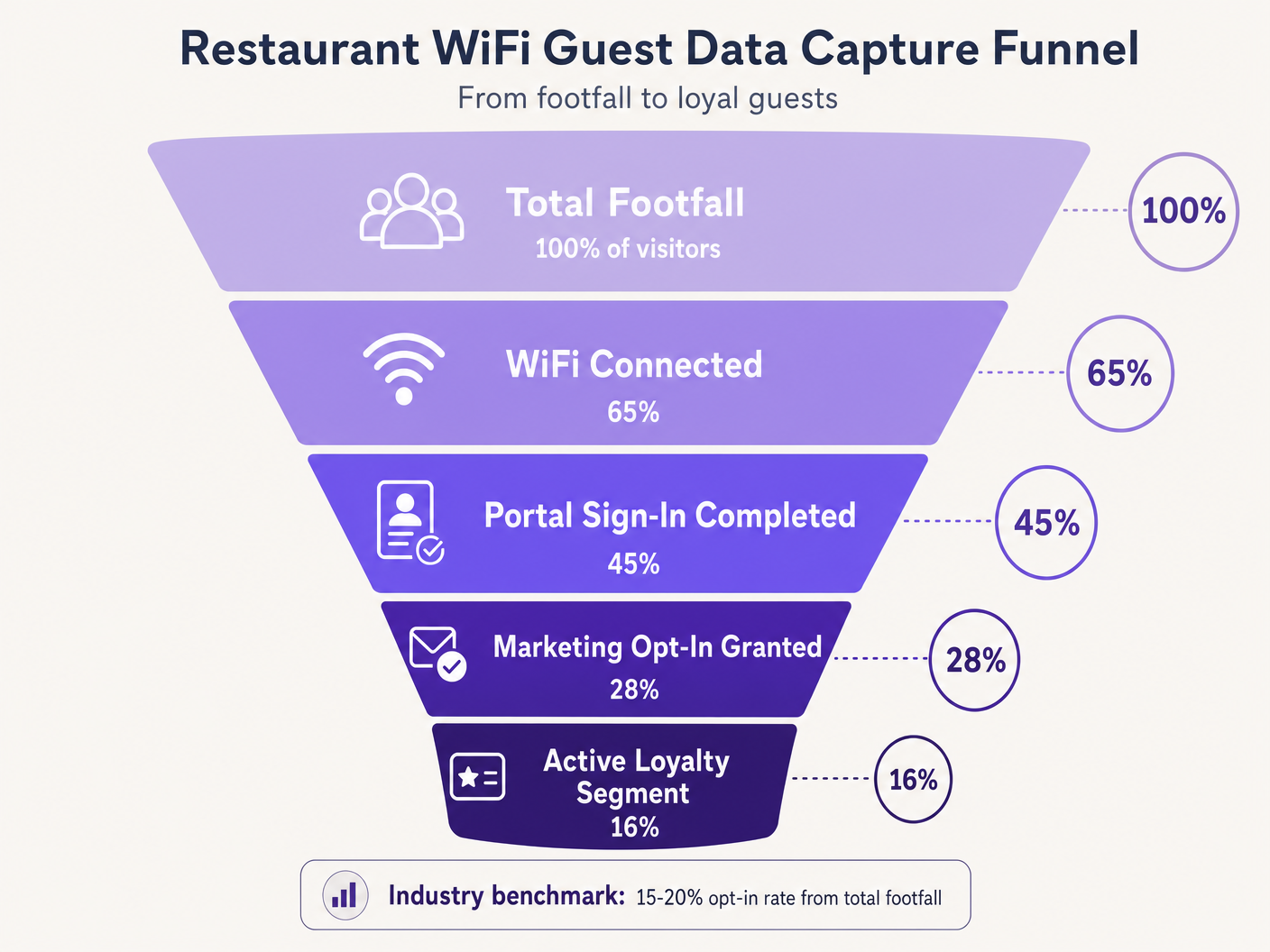
Priorice la Suscripción. El objetivo principal del Captive Portal es obtener el consentimiento de marketing. Asegúrese de que la propuesta de valor — por ejemplo, 'Únete a nuestro WiFi para ofertas exclusivas y un regalo de cumpleaños' — se muestre de manera prominente. Los puntos de referencia de la industria sugieren que una tasa de suscripción del 15-20% del total de visitantes es alcanzable con portales optimizados. Los establecimientos con portales mal diseñados a menudo ven tasas inferiores al 5%.
Aproveche el Análisis de Ubicación. Utilice los servicios de ubicación de la infraestructura inalámbrica (triangulación RSSI) para comprender los tiempos de permanencia y los patrones de movimiento. Estos datos informan las decisiones operativas — niveles de personal, optimización del diseño, gestión de horas pico — mucho más allá de las aplicaciones de marketing puro. La plataforma WiFi Analytics proporciona los paneles y la capa de informes para esta inteligencia.
Implemente la Limitación de Ancho de Banda. Evite que un pequeño número de usuarios monopolice los recursos de la red implementando límites de ancho de banda por dispositivo y tiempos de espera de sesión. Esto asegura una Calidad de Experiencia (QoE) consistente para todos los invitados y protege los sistemas operativos de la saturación del ancho de banda.
Aplicación Transversal. Los principios del marketing WiFi se extienden directamente a sectores adyacentes. Para los operadores que gestionan locales con licencia, la Guía Completa de Configuración y Marketing de WiFi para Bares y Pubs proporciona una referencia táctica paralela. Para implementaciones en el sector de la salud y el sector público, los requisitos de cumplimiento son más estrictos, pero la arquitectura de captura de datos sigue siendo fundamentalmente similar.
Solución de Problemas y Mitigación de Riesgos
La implementación de WiFi para invitados introduce riesgos específicos que deben gestionarse proactivamente antes de la puesta en marcha.
Modos de Falla Comunes y Resoluciones
| Modo de Falla | Causa Raíz | Resolución |
|---|---|---|
| El Captive Portal no aparece | Mala configuración del walled garden, error de certificado SSL | Auditar dominios en lista blanca; implementar certificado SSL válido en el portal |
| El inicio de sesión social falla silenciosamente | Dominios del proveedor OAuth no están en la lista blanca | Añadir dominios de autenticación del proveedor al walled garden |
| Se solicita a los invitados recurrentes que se vuelvan a autenticar | Aleatorización de MAC (iOS 14+, Android 10+) | Implementar perfiles Passpoint o aplicación del establecimiento |
| Retrasos en la sincronización de datos del CRM | Límites de tasa de API o fallas de webhook | Implementar retroceso exponencial, colas de mensajes fallidos |
| Baja tasa de suscripción | Campos de formulario excesivos, propuesta de valor deficiente | Reducir a correo electrónico + suscripción; mejorar el texto del portal |
La Aleatorización de Direcciones MAC merece una atención particular. Los sistemas operativos móviles modernos generan direcciones MAC aleatorias para mejorar la privacidad, interrumpiendo directamente el almacenamiento en caché de MAC y el seguimiento de frecuencia. Los invitados recurrentes pueden ser tratados como nuevos visitantes, sesgando los análisis y activando secuencias de campaña incorrectas. La mitigación a largo plazo es la transición a Passpoint (Hotspot 2.0), que utiliza perfiles de dispositivo persistentes independientes de la dirección MAC. Como demuestra la estrategia de plataforma en expansión de Purple — incluyendo desarrollos discutidos en el contexto de Purple Signals Higher Education Ambitions with Appointment of VP Education Tim Peers — adaptarse a los estándares de privacidad en evolución es fundamental para una estrategia de datos sostenible en todos los verticales.
ROI e Impacto Comercial
El objetivo final de implementar una solución de marketing WiFi es generar un retorno de la inversión medible. El éxito debe cuantificarse utilizando un conjunto definido de KPIs rastreados desde el primer día.
| KPI | Definición | Referencia de la Industria |
|---|---|---|
| Tasa de Captura de Datos | % del total de visitantes que se autentican | 40–65% |
| Tasa de Suscripción de Marketing | % de usuarios autenticados que otorgan consentimiento | 15–28% |
| Tasa de Apertura de Campaña | % de correos electrónicos de campaña abiertos | 35–45% |
| Tasa de Conversión de Campaña | % de destinatarios que canjean una oferta | 8–15% |
| Aumento de Visitas Repetidas | Incremento en visitas de regreso vs. grupo de control | 12–22% |
Al capturar datos sistemáticamente, segmentar audiencias y automatizar campañas dirigidas, los equipos de TI y marketing pueden transformar su infraestructura inalámbrica de un gasto necesario en un activo estratégico. Para obtener información sobre las tendencias de conectividad más amplias que impactan las operaciones de los establecimientos en 2026, inclincluyendo la convergencia de estrategias WiFi en vehículos y en locales, consulte Wi Fi en Automóviles: La Guía Empresarial Completa 2026 .
Sesión Informativa de Audio: Una sesión informativa de 10 minutos con un consultor sobre cómo diseñar WiFi para el ROI de marketing — cubriendo arquitectura, integración, mitigación de riesgos y preguntas y respuestas rápidas.
Definiciones clave
Captive Portal
A web page that a user of a public-access network is obliged to view and interact with before full internet access is granted. It serves as the primary data acquisition and consent interface in a guest WiFi deployment.
The captive portal is the single most important component in a WiFi marketing architecture. Its design directly determines data capture rates and marketing opt-in rates.
MAC Caching
The process of storing a device's Media Access Control (MAC) address in a database after initial authentication, allowing for automatic network access on subsequent visits without re-presenting the captive portal.
Essential for reducing friction for repeat customers and accurately tracking visit frequency. Increasingly challenged by MAC address randomization in modern mobile operating systems.
Walled Garden
A restricted network environment that controls which IP addresses or domains a device can access before completing authentication. In guest WiFi, it defines the resources accessible prior to captive portal sign-in.
Critical configuration required to allow devices to reach the captive portal, social login providers, and necessary backend services before full internet access is granted. Misconfiguration is the leading cause of portal non-appearance.
Progressive Profiling
The technique of gradually gathering customer information across multiple interactions or visits, rather than requesting all details at once during the initial interaction.
Used to maximise initial opt-in rates by keeping the first captive portal interaction brief (email + opt-in only), while building richer customer profiles over subsequent visits.
RADIUS (Remote Authentication Dial-In User Service)
A networking protocol providing centralised Authentication, Authorization, and Accounting (AAA) management for users connecting to a network service.
The underlying protocol used by most enterprise WLC infrastructure to communicate with the central database managing guest access. RADIUS Accounting-Stop messages are used to detect guest departures for event-driven campaign triggers.
OAuth 2.0
An industry-standard authorisation protocol allowing third-party applications to grant limited access to an HTTP service via secure token exchange, without sharing user passwords.
The protocol underlying Social Login options (Log in with Google, Log in with Facebook). Provides low-friction authentication for captive portals while capturing verified demographic data from the identity provider.
Passpoint (Hotspot 2.0)
A Wi-Fi Alliance standard enabling automatic, secure network discovery and connection using WPA2/WPA3 enterprise-grade encryption, without requiring manual captive portal interaction.
The strategic long-term alternative to open captive portals, providing persistent device identification that is not affected by MAC address randomization. Higher implementation complexity but superior user experience and data accuracy.
MAC Address Randomization
A privacy feature in modern mobile operating systems (iOS 14+, Android 10+) that generates a unique, randomized MAC address for each network connection, or rotates it periodically.
Directly disrupts MAC caching and frequency tracking in WiFi marketing deployments. Returning guests may be treated as new visitors, skewing analytics and triggering incorrect campaign sequences. Requires Passpoint or app-based identification as a mitigation strategy.
Ejemplos resueltos
A national restaurant chain with 150 locations is experiencing low data capture rates — under 5% of total footfall — on their existing guest WiFi network. The current setup requires users to fill out a lengthy 6-field form before granting access. The IT team has been asked to improve this to at least 20% capture rate without replacing the underlying WLC infrastructure. How should the architecture be reconfigured?
The implementation requires a shift to progressive profiling and low-friction authentication, achievable without replacing WLC hardware. Step 1: Reconfigure the captive portal application layer to present OAuth 2.0 social login buttons (Google, Facebook) as the primary authentication option. This requires adding the OAuth provider authentication domains to the walled garden whitelist on the WLC. Step 2: For users who prefer form-based authentication, reduce the initial form to two fields only: Email Address and a clearly labelled Marketing Opt-In checkbox. Remove all other fields from the initial interaction. Step 3: Implement MAC caching with a 30-day expiry on the portal backend. Authenticated MAC addresses are stored in the portal database; the WLC checks this list before presenting the portal. Step 4: Configure the portal to present a secondary data capture prompt (birthday, phone number) on the second or third visit, after trust has been established. Step 5: Integrate the portal database with the central CRM via REST API webhooks, ensuring the 'Visit Count' field is incremented on each authentication event to drive the progressive profiling logic.
A large conference centre hosting 200+ events per year wants to implement an automated Review Generation campaign. They need the system to send an email to delegates exactly 2 hours after they leave the venue, with the email content personalised to the specific event they attended. What technical components and configurations are required?
This requires integration between the WLC, the Location Analytics engine, the event management system, and the Marketing Automation platform. Step 1: Configure the WLC to generate RADIUS Accounting-Stop messages when a client device disassociates. Alternatively, configure the location analytics engine to trigger a 'departure' event when a device's RSSI drops below the venue's geofence threshold for a sustained period (e.g., 5 minutes). Step 2: Configure a webhook in the WiFi Analytics platform that fires upon receiving the departure event. The webhook payload must include the user's email address, the venue zone ID, and the timestamp. Step 3: In the event management system, maintain a lookup table mapping venue zone IDs and time windows to specific event names. The marketing automation platform queries this table to enrich the webhook payload with the event name. Step 4: In the Marketing Automation platform, create a workflow that receives the enriched webhook, initiates a 2-hour delay timer, and then dispatches a personalised review request email using the event name as a dynamic content variable. Step 5: Configure suppression lists to prevent the email from sending if the delegate has already submitted a review or if they are flagged as a VIP requiring a personal follow-up.
Preguntas de práctica
Q1. A venue reports that iOS users are repeatedly asked to sign in every time they visit, despite MAC caching being enabled with a 30-day expiry. Android users are not experiencing this issue to the same extent. The WLC logs show new MAC addresses for each iOS connection from the same physical device. What is the root cause and what are the available mitigation strategies?
Sugerencia: Consider privacy features introduced in iOS 14 and later regarding hardware identifiers on a per-network basis.
Ver respuesta modelo
The root cause is MAC Address Randomization (Private Wi-Fi Address feature in iOS 14+). iOS devices generate a unique, randomized MAC address for each SSID, and may rotate it periodically. Because the cached MAC address no longer matches the device's current randomized address, the WLC treats each connection as a new device and presents the captive portal. Short-term mitigation: instruct users to disable Private Wi-Fi Address for the venue's specific SSID in their iOS network settings. Long-term mitigation: deploy Passpoint (Hotspot 2.0) profiles that provide persistent, certificate-based device identification independent of the MAC address, or develop a venue-specific mobile app that maintains a persistent user session identifier.
Q2. You are designing the walled garden configuration for a new captive portal deployment that utilises Facebook and Google for social login, and hosts the portal UI on a CDN. The portal also uses an external font library. What specific categories of resources must be whitelisted to ensure the authentication process completes successfully?
Sugerencia: Map out the complete sequence of HTTP requests a client device makes from the moment it connects to the SSID to the moment it receives the OAuth callback token.
Ver respuesta modelo
The walled garden must whitelist the following resource categories: 1. The captive portal server's own IP range or domain. 2. The CDN domains hosting the portal's HTML, CSS, and JavaScript assets. 3. The external font library domain (e.g., fonts.googleapis.com). 4. The OAuth authentication domains for Facebook (e.g., graph.facebook.com, www.facebook.com ) and Google (e.g., accounts.google.com, oauth2.googleapis.com). 5. Any image or asset CDNs used by the OAuth providers' login buttons. 6. Certificate Revocation List (CRL) or OCSP endpoints to allow the client device to validate the portal's SSL certificate. Missing any of these categories will cause the authentication flow to fail silently or present a broken UI.
Q3. A marketing team wants to trigger an SMS campaign to guests exactly when they walk past a specific dessert counter inside the restaurant. The current infrastructure uses standard 802.11ac access points with RSSI-based location analytics. Is this feasible with the required accuracy and latency? What infrastructure changes, if any, would be required?
Sugerencia: Evaluate the spatial resolution and update latency of standard RSSI-based triangulation versus the precision required for a counter-level trigger.
Ver respuesta modelo
No, this is not feasible with standard RSSI-based location analytics. RSSI triangulation typically provides a positional accuracy of 5–10 metres, which is insufficient for distinguishing a specific counter within a restaurant. Furthermore, the polling interval for RSSI updates introduces latency of several seconds, meaning the guest may have already moved past the target area before the trigger fires. To achieve counter-level accuracy with low latency, the infrastructure would need to be augmented with BLE (Bluetooth Low Energy) beacons placed at the dessert counter, or Ultra-Wideband (UWB) technology. The venue app or a BLE-capable device would detect the beacon's proximity signal and trigger the SMS via the marketing automation platform. This requires a venue-specific mobile application and a BLE beacon management system, representing a significant increase in deployment complexity and cost.
Continúe leyendo esta serie
Cómo Conectar con Clientes: Estrategias Digitales para Negocios Físicos
Esta guía técnica de referencia autorizada detalla cómo los negocios con ubicación física —hoteles, cadenas minoristas, estadios y recintos del sector público— pueden implementar infraestructura WiFi empresarial como un motor de captura de datos de primera parte y de interacción con el cliente. Cubre la arquitectura completa, desde el diseño del Captive Portal y la autenticación sin interrupciones (IEEE 802.11u/Passpoint) hasta la integración con CRM, el cumplimiento de GDPR y un ROI medible. Los líderes de TI y los operadores de recintos encontrarán orientación de implementación práctica, estudios de caso reales y un marco de mitigación de riesgos que prioriza el cumplimiento.
Cómo usar datos de primera parte en campañas de marketing
Esta guía autorizada detalla cómo los equipos de TI y marketing empresariales pueden transformar su infraestructura de WiFi para invitados en un potente motor de datos de primera parte. Cubre la arquitectura técnica para la captura de datos, la gestión de consentimiento compatible con GDPR, estrategias de segmentación y activación en el mundo real a través de correo electrónico, SMS, publicidad en redes sociales y display programático. Los operadores de recintos y los equipos de TI encontrarán orientación de implementación concreta, ejemplos prácticos de hostelería y comercio minorista, y marcos de ROI medibles.
¿Por qué usar WiFi Marketing? El caso de negocio con datos reales
Esta guía de referencia técnica describe el caso de negocio basado en evidencia para el marketing WiFi. Proporciona a los líderes de TI y operadores de recintos datos accionables sobre el ROI, el tiempo de permanencia y las métricas de visitas repetidas, derivados de implementaciones en el mundo real.