
NHS Staff WiFi: Cómo implementar redes inalámbricas seguras en el sector de la salud
Esta guía de referencia técnica detalla la arquitectura, los protocolos de seguridad y las estrategias de implementación para NHS Staff WiFi, cubriendo la autenticación 802.1X, la segmentación VLAN, las políticas BYOD y el cumplimiento del DSP Toolkit. Ofrece orientación práctica para los líderes de TI sobre cómo implementar redes inalámbricas de nivel empresarial que sirvan a usuarios clínicos, administrativos y visitantes en una infraestructura física compartida sin comprometer la seguridad. Ya sea que esté planificando una nueva implementación o reforzando una infraestructura existente, esta guía proporciona los marcos de decisión y los pasos de implementación necesarios para actuar este trimestre.
Escucha esta guía
Ver transcripción del podcast
Resumen Ejecutivo
Implementar una red WiFi segura y confiable en todas las instalaciones del NHS ya no es una comodidad opcional, es una infraestructura clínica crítica. El cambio hacia la atención al paciente centrada en dispositivos móviles, los expedientes médicos electrónicos (EHR) y los dispositivos médicos conectados exige una arquitectura inalámbrica que equilibre el roaming sin interrupciones con estrictos controles de seguridad.
Para los gerentes de TI, arquitectos de red y CTOs, el desafío principal es acomodar a diversos grupos de usuarios —personal clínico, personal administrativo, pacientes y visitantes— en una infraestructura física compartida sin comprometer los requisitos del NHS Data Security and Protection (DSP) Toolkit. Esta guía detalla los requisitos técnicos para NHS Staff WiFi, centrándose en marcos de autenticación robustos como IEEE 802.1X, la segmentación lógica de la red a través de VLANs y la incorporación segura de dispositivos Bring Your Own Device (BYOD).
Al alejarse de las claves precompartidas (PSK) heredadas y adoptar políticas de acceso basadas en la identidad, las organizaciones de atención médica pueden mitigar el riesgo de brechas, reducir la fricción operativa y proporcionar la base inalámbrica para los programas de transformación digital. El caso comercial es igualmente sólido: reducción de la sobrecarga del servicio de asistencia, cumplimiento demostrable del DSP Toolkit y una red capaz de soportar futuras innovaciones clínicas sin requerir una reconstrucción completa de la infraestructura.
Análisis Técnico Detallado
Autenticación y Control de Acceso
La base de una red inalámbrica segura en el sector de la salud es el control de acceso basado en la identidad. Las redes WPA2-Personal heredadas que utilizan claves precompartidas son fundamentalmente inadecuadas para entornos clínicos. No ofrecen responsabilidad individual, complican el proceso de desvinculación cuando el personal se va y presentan un único punto de falla si la credencial se ve comprometida o se comparte más allá del grupo previsto.
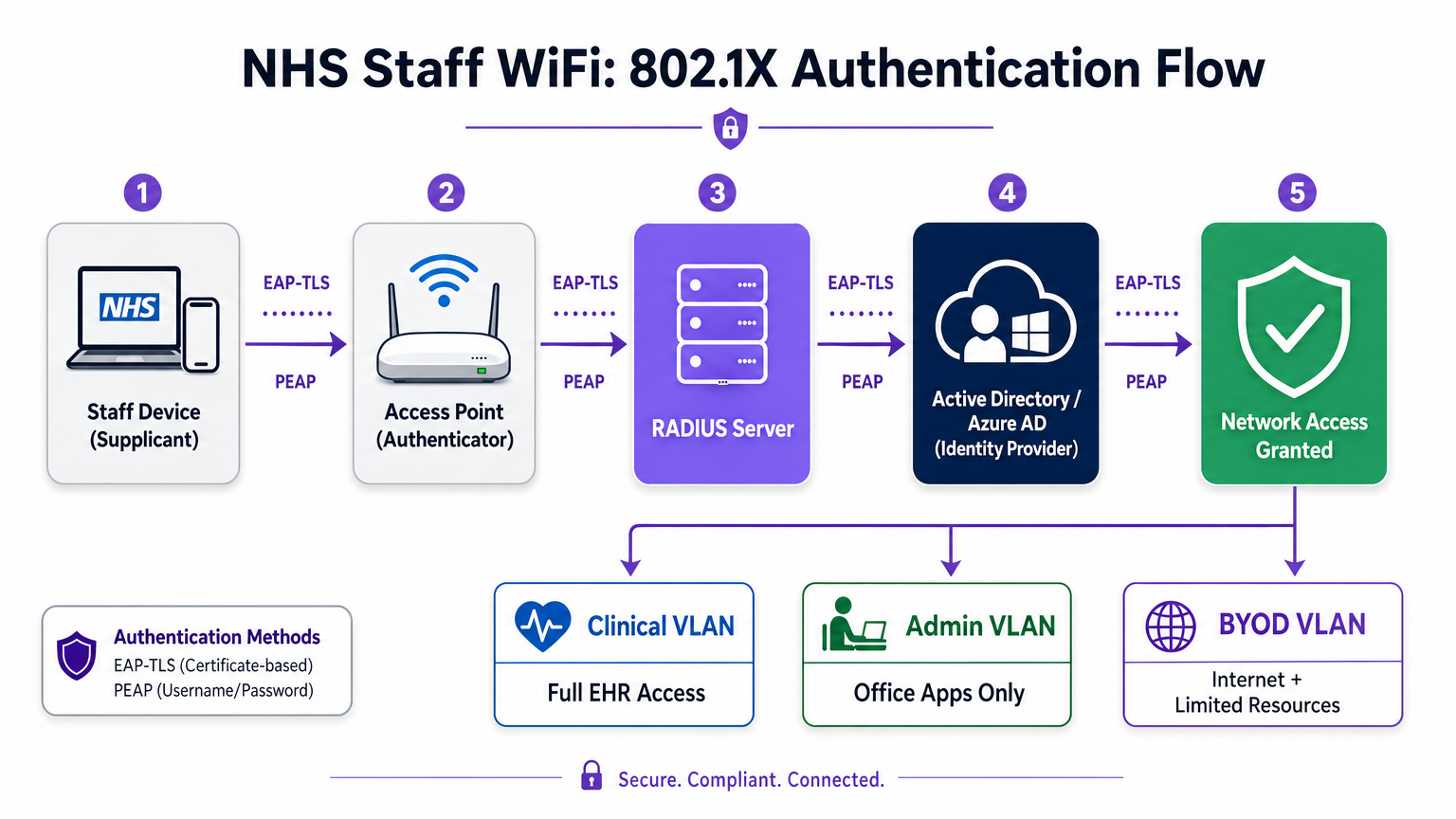
Las implementaciones modernas del NHS deben exigir WPA3-Enterprise (o WPA2-Enterprise como estado de transición mínimo) utilizando la autenticación IEEE 802.1X. Este marco requiere que cada usuario o dispositivo presente credenciales únicas antes de que se conceda el acceso a la red, y el resultado de esa autenticación determina en qué segmento de red lógico se coloca el dispositivo.
Dos métodos EAP dominan las implementaciones en el sector de la salud:
| Método EAP | Mecanismo de Autenticación | Más Adecuado Para | Nivel de Seguridad |
|---|---|---|---|
| EAP-TLS | Certificado digital del cliente | Dispositivos clínicos gestionados por la empresa | Más alto — sin contraseña para phishing |
| PEAP-MSCHAPv2 | Nombre de usuario/contraseña en túnel cifrado | BYOD, personal administrativo, dispositivos heredados | Alto — credenciales protegidas por TLS |
EAP-TLS es el estándar de oro para dispositivos corporativos. Los certificados se distribuyen a través de plataformas de Mobile Device Management (MDM), lo que permite la autenticación sin intervención —el dispositivo se autentica silenciosamente en segundo plano. PEAP-MSCHAPv2 tuneliza de forma segura las credenciales de Active Directory o Azure AD dentro de una sesión TLS cifrada, lo que lo hace adecuado para escenarios BYOD donde la gestión de certificados es poco práctica.
La integración de la infraestructura inalámbrica con el proveedor de identidad central (IdP) de la organización garantiza que el acceso se revoque automáticamente cuando se deshabilita la cuenta AD de un miembro del personal, satisfaciendo directamente los requisitos del DSP Toolkit para la gestión del ciclo de vida del acceso.
Segmentación de Red y Zonas de Confianza
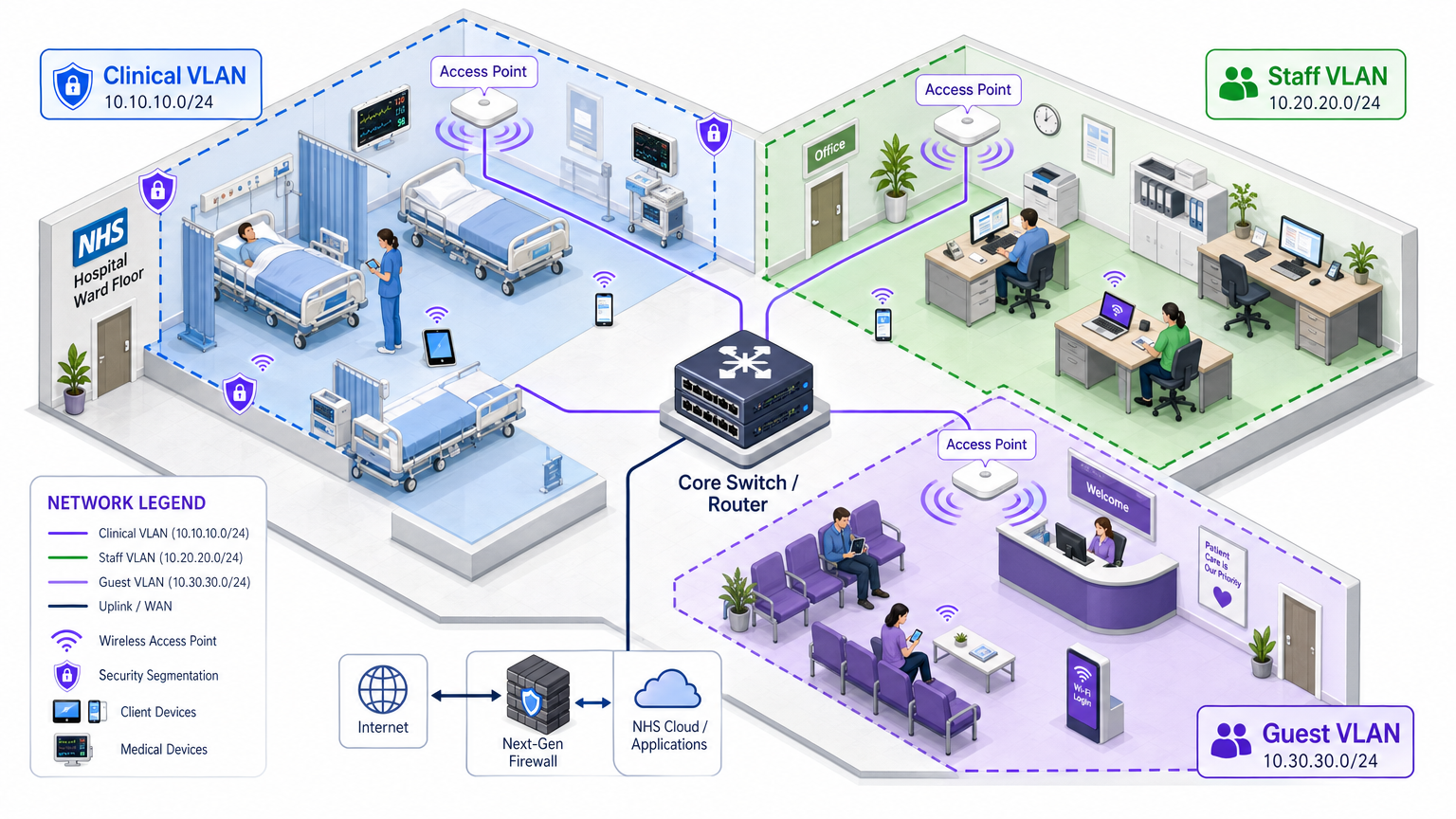
Los puntos de acceso físicos transmiten en todo el piso del hospital, pero la segmentación lógica garantiza que el tráfico permanezca aislado según el principio de privilegio mínimo. Una arquitectura de red plana en un entorno de atención médica es una vulnerabilidad de seguridad grave, que permite que un dispositivo de invitado comprometido o un sensor IoT vulnerable pueda potencialmente acceder a sistemas clínicos.
Las mejores prácticas dictan la creación de Redes de Área Local Virtuales (VLANs) distintas mapeadas a SSIDs específicos, con reglas de firewall que aplican límites de tráfico entre ellas:
| Zona | SSID | Autenticación | Acceso | Prioridad QoS |
|---|---|---|---|---|
| Clínica | NHS-Clinical | EAP-TLS (certificado) | EHR, PACS, mensajería clínica | Más alta |
| Administrativa | NHS-Staff | PEAP (credenciales AD) | Aplicaciones de oficina, internet | Media |
| IoT Médico | Oculto/MAB | MAC Authentication Bypass | Solo controlador de dispositivo | Alta |
| Invitado / Paciente | NHS-Guest | Captive portal | Solo internet | Baja |
| BYOD | NHS-BYOD | PEAP (credenciales AD) | Internet, VDI limitado | Baja |
La VLAN de IoT Médico merece una atención particular. Muchos dispositivos médicos conectados —bombas de infusión, monitores de pacientes, sistemas de llamada inalámbricos— no pueden soportar 802.1X. MAC Authentication Bypass (MAB) es la alternativa, pero debe combinarse con estrictas Listas de Control de Acceso (ACLs) de firewall que restrinjan a estos dispositivos a comunicarse únicamente con sus servidores de gestión designados.
El Desafío BYOD
Las políticas de Bring Your Own Device son cada vez más comunes para el personal administrativo y los médicos visitantes. Sin embargo, los dispositivos personales no gestionados representan un riesgo significativo si se les permite acceder a segmentos de red confiables.
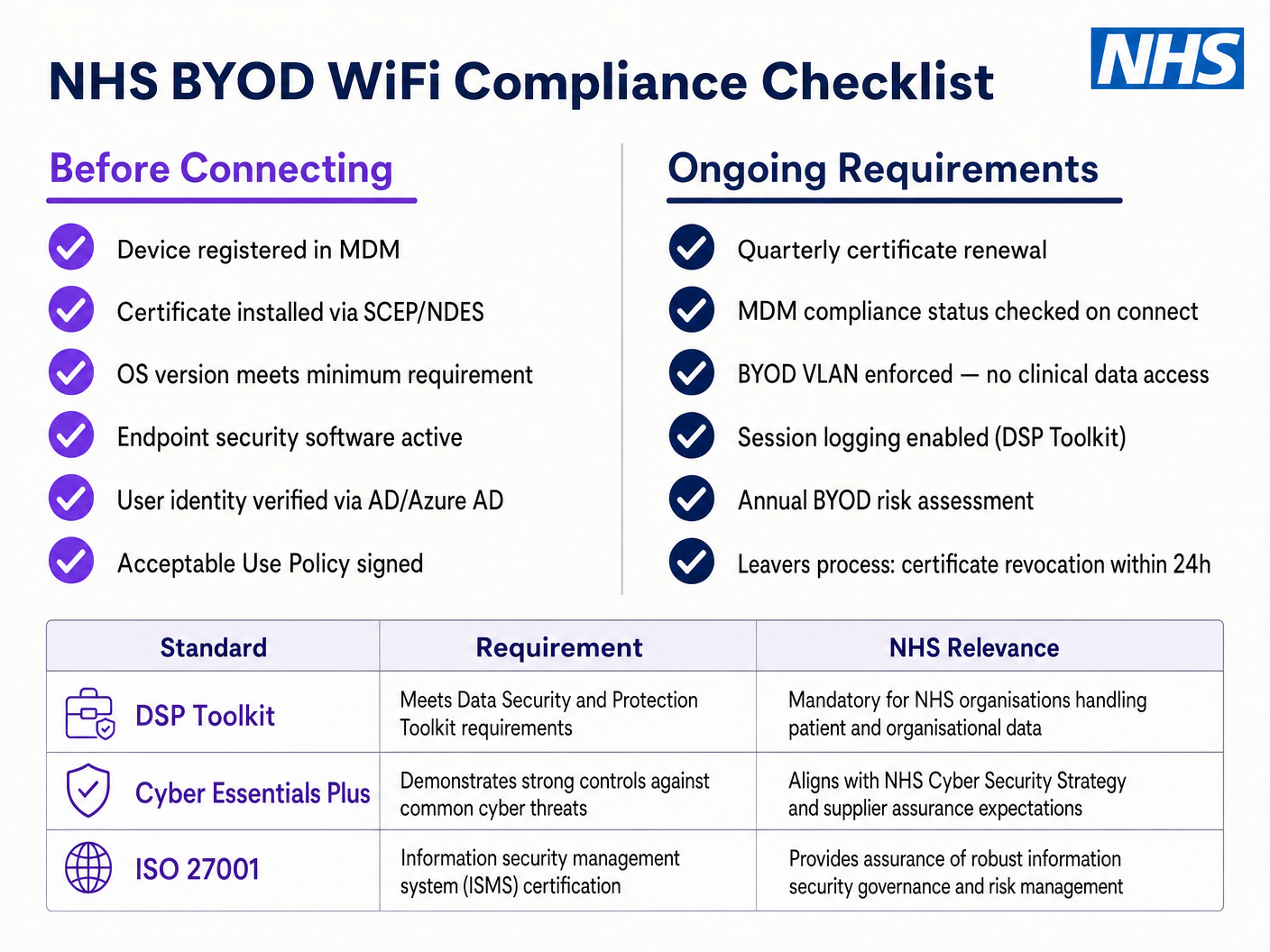
Una implementación BYOD segura implica la incorporación de estos dispositivos a una VLAN BYOD dedicada. Esta zona proporciona acceso a internet y quizás acceso limitado a recursos internos específicos y no sensibles a través de una puerta de enlace segura o una infraestructura de escritorio virtual (VDI). Absolutamente no debe tener enrutamiento directo a sistemas clínicos o almacenes de datos de pacientes.
Guía de Implementación
La implementación de una arquitectura segura de WiFi para el personal del NHS requiere un enfoque por fases para minimizar la interrupción de las operaciones clínicas en curso.
Fase 1: Evaluación y Diseño
Comience con un estudio exhaustivo del sitio inalámbrico. Los entornos sanitarios son notoriamente difíciles para la propagación de RF debido a las paredes revestidas de plomo, la maquinaria pesada y la alta ocupación. El diseño debe tener en cuenta la capacidad, no solo la cobertura, asegurando una densidad suficiente de puntos de acceso en áreas de alto tráfico como departamentos de emergencia y clínicas ambulatorias.
Defina los SSIDs requeridos y asígnelos a las VLANs y políticas de seguridad correspondientes. Mantenga el número de SSIDs de difusión al mínimo — idealmente no más de cuatro — para reducir la sobrecarga de gestión y minimizar la congestión de tramas de baliza, lo que degrada el rendimiento general de la red.
Fase 2: Configuración de la Infraestructura
Configure la infraestructura central de conmutación y enrutamiento para soportar las VLANs definidas. Implemente reglas de firewall en los límites entre segmentos para aplicar el principio de mínimo privilegio. Configure el servidor RADIUS (por ejemplo, Cisco ISE, Aruba ClearPass o un RADIUS-as-a-Service basado en la nube) e intégrelo con el proveedor de identidad central. Para entornos donde la plataforma de Purple está implementada, la integración de WiFi Analytics en esta etapa proporciona visibilidad sobre la utilización de la red, los patrones de roaming y los puntos críticos de capacidad.
Fase 3: Aplicación de Políticas y Onboarding
Implemente las políticas de autenticación. Para dispositivos corporativos, utilice la solución MDM para enviar los perfiles inalámbricos y certificados de cliente necesarios (para EAP-TLS). Esto asegura que los dispositivos gestionados se conecten de forma automática y segura sin intervención del usuario.
Para BYOD, establezca un flujo de trabajo de onboarding claro — típicamente un portal de onboarding que guía al usuario a través de la autenticación con sus credenciales corporativas, la aceptación de una Política de Uso Aceptable y el traslado del dispositivo a la VLAN segura de BYOD. La plataforma Guest WiFi de Purple puede implementarse como la capa de Captive Portal para el SSID de pacientes e invitados, gestionando la captura de datos compatible con GDPR y la aceptación de términos a escala.
Fase 4: Pruebas y Validación
Antes de la puesta en marcha, realice pruebas de extremo a extremo de cada ruta de autenticación, asignación de VLAN y regla de firewall. Valide específicamente el comportamiento de roaming caminando por el área clínica con un dispositivo de prueba mientras monitorea los eventos de reautenticación. Confirme que los protocolos de roaming rápido (802.11r y 802.11k) funcionan correctamente y que las sesiones de las aplicaciones sobreviven a las transiciones de AP.
Mejores Prácticas
Elimine las Claves Pre-Compartidas. Transicione todas las redes de personal y clínicas a la autenticación 802.1X para asegurar la responsabilidad individual y el control de acceso centralizado. Este es un requisito no negociable para el cumplimiento del DSP Toolkit.
Aplique una Segmentación Estricta. Nunca permita tráfico de invitados, BYOD o IoT en el mismo segmento lógico que los datos clínicos. Utilice firewalls con estado para controlar el enrutamiento entre VLANs, con reglas de denegación explícitas como política predeterminada.
Priorice el Tráfico Clínico. Implemente políticas de QoS en los controladores inalámbricos y switches para priorizar las aplicaciones clínicas — voz sobre WLAN, acceso a EHR — sobre el tráfico de invitados o administrativo, especialmente durante períodos de alta congestión.
Habilite el Roaming Rápido. Implemente 802.11r (Fast BSS Transition) y 802.11k (Radio Resource Measurement) para asegurar que el personal clínico pueda moverse por las instalaciones sin experimentar tiempos de espera de aplicaciones o conexiones caídas.
Monitoreo Continuo. Utilice plataformas de análisis para monitorear la salud de la red, identificar puntos de acceso no autorizados y rastrear el comportamiento de roaming del usuario. Comprender el flujo de personas y los patrones de uso — una técnica probada en entornos de Retail y Hospitality — es igualmente valioso en un entorno hospitalario para la planificación de capacidad y la resolución de problemas.
Auditorías Regulares. Realice evaluaciones anuales de riesgos inalámbricos para asegurar el cumplimiento continuo con el DSP Toolkit, Cyber Essentials Plus e ISO 27001 cuando sea aplicable.
Resolución de Problemas y Mitigación de Riesgos
Tiempos de Espera de Autenticación
En entornos con alta densidad de clientes, los servidores RADIUS pueden saturarse, lo que lleva a tiempos de espera de autenticación y conexiones caídas. Asegure que la infraestructura RADIUS esté adecuadamente escalada y sea altamente disponible. Implemente el balanceo de carga entre múltiples servidores de autenticación y monitoree los tiempos de respuesta de RADIUS como una métrica operativa clave.
Problemas de Roaming
El personal clínico que se mueve rápidamente entre salas puede experimentar conexiones caídas si la infraestructura inalámbrica no soporta protocolos de roaming rápido. Habilite 802.11r y 802.11k en los controladores inalámbricos y asegure que los dispositivos cliente soporten estos estándares. Realice encuestas de roaming post-implementación para identificar y resolver brechas de cobertura o problemas de 'cliente pegajoso', donde un dispositivo se aferra a un AP distante y más débil en lugar de hacer roaming a uno más cercano.
Incompatibilidad con Dispositivos Heredados
Los dispositivos médicos más antiguos pueden no soportar protocolos de seguridad modernos como WPA3 o 802.1X. Aísle estos dispositivos en una VLAN IoT dedicada utilizando MAB. Implemente reglas estrictas de firewall para restringir su comunicación solo a los servidores de gestión necesarios. Considere actualizaciones de hardware o puentes inalámbricos para dispositivos críticos que no pueden ser asegurados de forma nativa.
Caducidad de Certificados
Las implementaciones de EAP-TLS dependen de certificados con períodos de caducidad definidos. Si los certificados caducan sin renovación, los dispositivos no podrán autenticarse, causando una interrupción clínica generalizada. Implemente la renovación automática de certificados a través de SCEP (Simple Certificate Enrolment Protocol) mediante la plataforma MDM, y monitoree las fechas de caducidad de los certificados de forma proactiva.
ROI e Impacto Empresarial
Invertir en una arquitectura inalámbrica segura de nivel empresarial ofrece retornos medibles en los ámbitos clínico, operativo y de TI.
Eficiencia Clínica. Fiabilla conectividad garantiza que los médicos tengan acceso inmediato a los registros de los pacientes en el punto de atención, reduciendo el tiempo dedicado a buscar información o a lidiar con conexiones caídas. Esto impacta directamente en el flujo de pacientes y la calidad de la atención médica.
Reducción de la sobrecarga de TI. Pasar de contraseñas compartidas y la incorporación manual a una autenticación automatizada basada en certificados reduce significativamente los tickets de soporte técnico relacionados con restablecimientos de contraseñas y problemas de conectividad. Un NHS Trust informó una reducción del 40% en las llamadas al soporte técnico relacionadas con la red inalámbrica después de una migración a 802.1X.
Mitigación de riesgos. La segmentación estricta y la autenticación robusta son fundamentales para cumplir con los requisitos del DSP Toolkit, mitigando los riesgos financieros y de reputación asociados con las filtraciones de datos o los fallos de cumplimiento. El costo de una filtración de datos supera con creces la inversión en una infraestructura inalámbrica correctamente diseñada.
Preparación para el futuro. Una red inalámbrica bien diseñada proporciona la base para futuras iniciativas de salud digital — servicios basados en la ubicación, seguimiento de activos en tiempo real, aplicaciones avanzadas de telesalud — alineándose con objetivos estratégicos más amplios en Healthcare y sectores relacionados como Transport donde la conectividad móvil sustenta la eficiencia operativa.
Para las organizaciones que buscan comprender cómo la plataforma de Purple se alinea con la capa de WiFi para invitados y pacientes de esta arquitectura, la página de la industria de Healthcare ofrece una descripción detallada de las capacidades de Captive Portal compatible con el NHS, análisis y manejo de datos compatible con GDPR. Los mismos principios de análisis que impulsan la participación del cliente en Retail se traducen directamente en inteligencia operativa para los equipos de gestión de instalaciones hospitalarias.
Definiciones clave
IEEE 802.1X
An IEEE standard for port-based Network Access Control (PNAC). It provides an authentication mechanism to devices wishing to attach to a LAN or WLAN, requiring each device to present credentials before being granted access.
This is the mandatory standard for replacing insecure shared passwords with individual, identity-based logins for staff and clinical devices. It is the cornerstone of a DSP Toolkit-compliant wireless architecture.
VLAN (Virtual Local Area Network)
A logical subnetwork that groups a collection of devices from different physical network segments. VLANs allow network administrators to partition a single switched network to match the functional and security requirements of different user groups.
VLANs are essential for segmenting clinical traffic from guest and administrative traffic, limiting the blast radius of a potential security breach and enforcing the principle of least privilege.
RADIUS (Remote Authentication Dial-In User Service)
A networking protocol that provides centralised Authentication, Authorisation, and Accounting (AAA) management for users who connect and use a network service.
The RADIUS server acts as the decision engine between the wireless access points and the central identity database (Active Directory), deciding who gets access and to which VLAN they are assigned.
EAP-TLS (Extensible Authentication Protocol - Transport Layer Security)
An EAP method that relies on client and server certificates to establish a secure, mutually authenticated connection. Neither party trusts the other without a valid certificate.
The most secure method for authenticating hospital-owned devices. Certificates distributed via MDM ensure that only managed, trusted endpoints can access the clinical network, with no password to phish or share.
MAB (MAC Authentication Bypass)
A method of authenticating devices based on their hardware MAC address, used as a fallback for devices that do not support 802.1X.
Necessary for legacy medical IoT devices that need network access but cannot handle complex authentication protocols. Must always be paired with strict firewall ACLs to contain the device to its permitted communication paths.
DSP Toolkit (Data Security and Protection Toolkit)
An online self-assessment tool mandated by NHS England that all organisations must complete if they have access to NHS patient data and systems. It maps to the National Data Guardian's ten data security standards.
Compliance with the DSP Toolkit is mandatory for NHS organisations and their suppliers. Robust wireless security — including 802.1X, segmentation, and access lifecycle management — is a critical component of demonstrating compliance.
SSID (Service Set Identifier)
The primary name associated with an 802.11 wireless local area network, broadcast by access points to allow client devices to identify and connect to the network.
Hospitals should minimise the number of broadcast SSIDs (e.g., NHS-Clinical, NHS-Guest) to reduce management overhead and RF overhead. Each SSID should map to a specific security policy and VLAN.
QoS (Quality of Service)
Technologies that manage data traffic to reduce packet loss, latency, and jitter on a network by prioritising certain types of traffic over others.
Crucial in healthcare to ensure that life-critical clinical applications and voice communications are always prioritised over less important traffic such as guest video streaming or software updates.
802.11r (Fast BSS Transition)
An IEEE amendment that enables fast roaming between access points by pre-authenticating the client to the target AP before the physical transition occurs, dramatically reducing roaming latency.
Essential for clinical environments where staff are constantly moving. Without 802.11r, devices must perform a full RADIUS re-authentication on every AP transition, which can cause application sessions to time out.
Ejemplos resueltos
An NHS Trust is deploying new mobile workstations (Workstations on Wheels) across multiple wards. The IT team needs to ensure these devices maintain connectivity as nurses move between access points, while also guaranteeing that only authorised devices can access the clinical VLAN containing the Electronic Health Record system.
The Trust should implement an 802.1X authentication framework using EAP-TLS. The IT team will use their MDM solution to push a unique client certificate and the corresponding wireless profile to each workstation. The wireless controllers will be configured to authenticate these devices against a RADIUS server, which verifies the certificate against the internal PKI. Upon successful authentication, the RADIUS server dynamically assigns the workstation to the dedicated Clinical VLAN via a RADIUS attribute (e.g., Tunnel-Private-Group-ID). To address the roaming requirement, 802.11r (Fast BSS Transition) and 802.11k (Radio Resource Measurement) must be enabled on the wireless infrastructure to allow the workstations to transition seamlessly between access points without performing a full re-authentication cycle against the RADIUS server each time.
A hospital needs to provide internet access for visiting locum doctors using their personal laptops (BYOD). These doctors need to access cloud-based medical reference tools but must be strictly prohibited from accessing the hospital's internal patient databases.
The hospital should deploy a dedicated BYOD SSID mapped to an isolated BYOD VLAN. Authentication should be handled via 802.1X using PEAP-MSCHAPv2, allowing the locums to log in using temporary Active Directory credentials provided by HR upon arrival. The core firewall must be configured with an ACL that explicitly denies any routing from the BYOD VLAN to the Clinical or Administrative VLANs, permitting only outbound traffic to the internet. Additionally, a captive portal can be utilised upon initial connection to enforce an Acceptable Use Policy before granting full internet access. When the locum's temporary AD account is disabled at the end of their engagement, their wireless access is automatically revoked.
Preguntas de práctica
Q1. A new wing is being added to the hospital, and the facilities team wants to deploy wireless temperature sensors in the medication storage fridges. These sensors only support WPA2-Personal (Pre-Shared Key) and cannot use 802.1X. How should the network architect integrate these securely?
Sugerencia: Consider the principle of least privilege and how to isolate non-compliant devices from clinical systems.
Ver respuesta modelo
The architect should create a dedicated, hidden SSID mapped to a specific 'Facilities IoT' VLAN. The sensors will connect using the PSK. Crucially, strict firewall ACLs must be applied to this VLAN, allowing the sensors to communicate only with their specific central management server and denying all other traffic — particularly routing to the Clinical VLAN or the internet. MAC Authentication Bypass (MAB) should also be configured to ensure only the specific MAC addresses of the purchased sensors are permitted on that VLAN, preventing rogue devices from joining using the same PSK.
Q2. During a busy morning shift, nurses report that their tablets are frequently dropping connection to the EHR system as they walk the length of the ward, requiring them to log in again. The wireless coverage survey shows strong signal strength throughout the ward. What is the likely cause and solution?
Sugerencia: Strong signal does not guarantee seamless transitions between access points. Consider the authentication overhead on each AP transition.
Ver respuesta modelo
The likely cause is a lack of fast roaming protocols. As the tablet moves out of range of one AP and connects to the next, it is being forced to perform a full 802.1X re-authentication against the RADIUS server, which introduces enough latency to cause the EHR application session to time out. The solution is to enable 802.11r (Fast BSS Transition) on the wireless controllers, which allows the client to securely roam between APs without the latency of a full re-authentication cycle. 802.11k should also be enabled to help the device identify the optimal target AP before the transition occurs.
Q3. An NHS Trust is preparing for its annual DSP Toolkit assessment. The auditor notes that the administrative staff use a shared password to access the Staff WiFi network. What is the primary risk identified here, and what is the recommended remediation?
Sugerencia: Focus on individual accountability and the access lifecycle when staff leave the organisation.
Ver respuesta modelo
The primary risk is a lack of individual accountability and poor access lifecycle management. If an administrative staff member leaves the Trust, the shared password remains valid, potentially allowing unauthorised access. Furthermore, it is impossible to audit which specific user performed an action on the network. The remediation is to deprecate the shared password (PSK) network and migrate administrative staff to an 802.1X authenticated network using PEAP-MSCHAPv2 with their Active Directory credentials. This ensures individual accountability and automatic access revocation when their AD account is disabled upon leaving, directly addressing the DSP Toolkit's requirements for access control and audit logging.
Continúe leyendo esta serie
El Futuro de la Seguridad Wi-Fi: NAC Impulsado por IA y Detección de Amenazas
Esta guía autorizada explora la evolución de la seguridad Wi-Fi empresarial, desde el WPA2 heredado hasta el Control de Acceso a la Red (NAC) impulsado por IA y la detección de amenazas. Diseñada para líderes de TI, proporciona estrategias de implementación prácticas para asegurar entornos de alta densidad como comercios minoristas, hostelería y estadios utilizando las redes basadas en identidad de Purple.
Gestión de la seguridad de dispositivos IoT con NAC y MPSK
Esta guía técnica detalla cómo las empresas pueden proteger dispositivos IoT sin interfaz de usuario utilizando la arquitectura de Clave Precompartida Múltiple (MPSK) y el Control de Acceso a la Red (NAC). Proporciona pasos de implementación prácticos para lograr la microsegmentación, contener los radios de impacto de seguridad y mantener el cumplimiento sin sacrificar la escalabilidad.
RadSec: Cómo RADIUS sobre TLS mejora la seguridad de la autenticación WiFi
Esta referencia técnica autorizada explica cómo RadSec (RFC 6614) asegura la autenticación WiFi empresarial al encapsular el tráfico RADIUS tradicional en cifrado TLS. Diseñada para gerentes de TI y arquitectos de red, cubre la arquitectura, las estrategias de implementación y los pasos prácticos para mitigar los riesgos del tráfico RADIUS UDP sin cifrar en redes corporativas y de invitados.