
¿Qué es la autenticación por dirección MAC? Cuándo usarla y cuándo evitarla
Esta guía de referencia técnica autorizada cubre la autenticación por dirección MAC en entornos de WiFi empresarial: cómo funciona la autenticación MAC basada en RADIUS en la Capa 2, sus vulnerabilidades de seguridad inherentes (incluyendo la suplantación de MAC y el impacto de la aleatorización de MAC a nivel de sistema operativo) y los contextos operativos precisos donde sigue siendo una herramienta válida para gestionar IoT y dispositivos sin pantalla. Proporciona orientación de implementación práctica para administradores de TI y arquitectos de redes en sectores como hotelería, comercio minorista, atención médica y espacios públicos, con ejemplos prácticos del mundo real, marcos de toma de decisiones y el contexto de integración para la plataforma de WiFi para invitados y analítica de Purple.
Escucha esta guía
Ver transcripción del podcast
Parte de nuestra serie principal: Enterprise WiFi Security Guide →
Resumen Ejecutivo
Para los líderes de TI empresariales que gestionan entornos complejos - desde extensas propiedades hoteleras y cadenas de retail hasta estadios e instalaciones del sector público - garantizar el acceso seguro a la red para una proliferación de dispositivos no gestionados es un desafío operativo crítico. Aunque la autenticación por dirección MAC tiene limitaciones fundamentales como protocolo de seguridad independiente, sigue siendo un mecanismo de incorporación indispensable para dispositivos IoT, hardware heredado y sistemas sin interfaz de usuario (headless) que no admiten 802.1X o portales cautivos.
Esta guía analiza detalladamente la arquitectura de la autenticación MAC basada en RADIUS, evaluando su utilidad operativa frente a sus vulnerabilidades de seguridad inherentes. Detallamos cuándo implementar la autenticación MAC para agilizar las operaciones, cuándo evitarla para reducir riesgos y cómo las plataformas modernas de WiFi empresarial integran estos controles para mantener una seguridad sólida sin sacrificar la conectividad. El principio fundamental: la autenticación MAC es un mecanismo de control de acceso a la red, no un protocolo de seguridad. Impleméntela bajo este criterio.
Análisis Técnico Detallado
Cómo Funciona la Autenticación por Dirección MAC
La autenticación por dirección MAC (Media Access Control) opera en la Capa 2 del modelo OSI. A diferencia de IEEE 802.1X - que requiere un suplicante en el dispositivo cliente para negociar credenciales utilizando métodos EAP como PEAP-MSCHAPv2 o EAP-TLS - la autenticación MAC se basa completamente en la dirección de hardware del dispositivo, la cual sirve tanto de identificador como de credencial.
El flujo de autenticación funciona de la siguiente manera: cuando un dispositivo intenta asociarse con un punto de acceso (AP) inalámbrico, el AP intercepta la solicitud de asociación y extrae la dirección MAC del cliente (el identificador único de 48 bits asignado a la tarjeta de interfaz de red (NIC) por el fabricante). El AP, actuando como cliente RADIUS, reenvía un mensaje Access-Request al servidor RADIUS. En una implementación típica, la dirección MAC se envía tanto como nombre de usuario como contraseña, generalmente formateada sin delimitadores (por ejemplo, A4CF12388E7F), aunque las implementaciones de los proveedores varían. El servidor RADIUS consulta su base de datos - que suele ser un directorio LDAP, Active Directory o un almacén de identidad dedicado - para verificar si la dirección MAC existe en la lista de permitidos. Si la coincidencia es exitosa, se devuelve un mensaje Access-Accept, el AP concede el acceso a la red y, opcionalmente, se puede asignar una VLAN específica. Si la coincidencia falla, se devuelve un Access-Reject y se rechaza la asociación del dispositivo o se le ubica en una VLAN de cuarentena restringida.

Limitaciones de Seguridad y Vulnerabilidades
El defecto fundamental de la autenticación por MAC es que las direcciones MAC se transmiten en texto no cifrado dentro de las tramas de gestión IEEE 802.11. Cualquier atacante con una herramienta básica de análisis de paquetes - Wireshark, Kismet o similar - puede capturar de forma pasiva direcciones MAC legítimas que se comunican en la red sin ninguna intrusión activa. Una vez que se ha identificado una dirección MAC legítima, el atacante puede utilizar herramientas como macchanger (Linux) o utilidades integradas del sistema operativo para falsificar su propia tarjeta de red y que coincida con la dirección capturada.
Debido a que el servidor RADIUS no realiza ningún desafío - respuesta criptográfico - simplemente verifica si la cadena coincide con una entrada de la base de datos -, al dispositivo falsificado se le otorgan exactamente los mismos privilegios de red que al legítimo. Este no es un ataque teórico; no requiere conocimientos especializados y toma menos de dos minutos ejecutarlo.
Además, la autenticación por MAC no proporciona ningún cifrado de la carga útil de los datos. A menos que el SSID esté protegido con WPA2-PSK, WPA3-SAE o Opportunistic Wireless Encryption (OWE), todo el tráfico sigue siendo vulnerable a la interceptación. Por lo tanto, la autenticación por MAC siempre debe entenderse como una forma de control de acceso a la red (NAC), no como un límite de seguridad.
Una complicación operativa adicional ha surgido con la adopción generalizada de la aleatorización de direcciones MAC. Apple introdujo direcciones MAC aleatorias por red en iOS 14 (2020), y Android lo siguió en Android 10. Windows 11 habilita la aleatorización de forma predeterminada. Cuando un dispositivo de consumo se conecta a una red, presenta una dirección MAC aleatoria y efímera en lugar de su dirección grabada en el hardware. Esto interrumpe directamente cualquier sistema que dependa de la dirección MAC para identificar o autenticar a los usuarios que regresan - incluido el almacenamiento en caché de MAC que se utiliza para omitir los Captive Portals en las redes de Guest WiFi.
¿Tiene preguntas sobre su configuración específica?
Nuestro equipo trabaja con gestores de espacios, responsables de TI e ingenieros de redes en 80 000 establecimientos. Reserve una llamada de 20 minutos y le mostraremos cómo lo resolvieron otros profesionales como usted.
Guía de implementación
Cuándo utilizar la autenticación por MAC
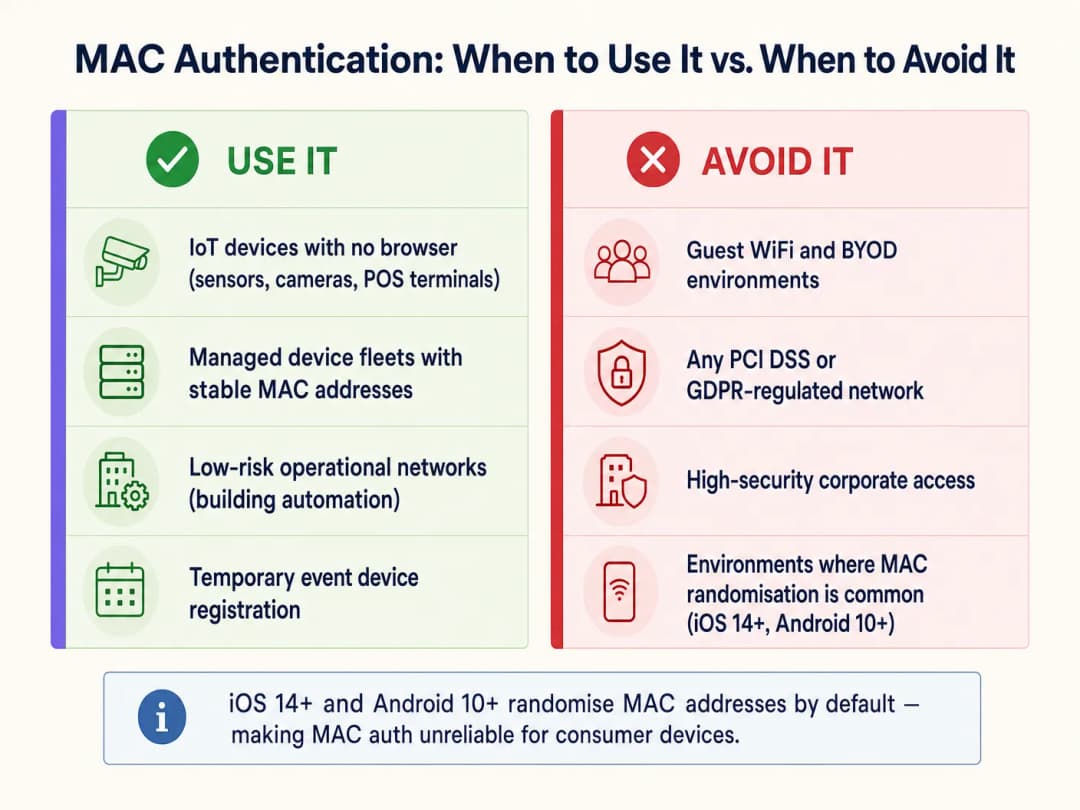
La autenticación por MAC es adecuada únicamente para clases de dispositivos que carecen de la capacidad de autenticarse mediante métodos más sólidos. Los casos de uso principales son:
| Clase de dispositivo | Ejemplos | Justificación |
|---|---|---|
| Dispositivos IoT sin interfaz | Smart TVs, cámaras de CCTV, sensores ambientales | Sin capacidad de navegador o suplicante |
| Tecnología operativa (OT) | Controladores de HVAC, BMS, paneles de control de acceso a puertas | Protocolos heredados sin soporte 802.1X |
| Terminales POS heredadas | Terminales de pago minoristas más antiguas | Solo WPA2-PSK; el filtrado MAC agrega una capa secundaria débil |
| Flotas de dispositivos gestionados | Impresoras, teléfonos VoIP, escáneres de códigos de barras | Direcciones MAC estables y conocidas; administradas de forma centralizada |
| Equipamiento temporal para eventos | Equipamiento de AV, tablets para eventos | Implementación controlada a corto plazo |
Cuándo evitar la autenticación MAC
Los arquitectos de TI deben evitar activamente la autenticación MAC en varios contextos críticos:
Redes de WiFi para invitados y BYOD. Este es el problema operativo más importante que enfrentan los operadores de recintos hoy en día. Los sistemas operativos móviles modernos aleatorizan las direcciones MAC de forma predeterminada. Si una implementación de Guest WiFi depende del almacenamiento en caché de MAC para brindar una reautenticación fluida a los visitantes que regresan, fallará para la mayoría de los dispositivos modernos. El dispositivo del visitante presenta una nueva MAC aleatoria en cada visita, la red lo trata como un nuevo usuario y se ve obligado a pasar por el captive portal cada vez. Esto degrada la experiencia del usuario y corrompe los datos de los visitantes recurrentes en las plataformas de WiFi Analytics. La solución es utilizar Passpoint (Hotspot 2.0) o un captive portal seguro con tokens de sesión persistentes.
Redes corporativas de alta seguridad. Cualquier segmento de red que maneje datos corporativos sensibles debe utilizar, como mínimo, 802.1X con EAP-TLS (basado en certificados) o PEAP-MSCHAPv2. Para obtener una guía de implementación detallada, consulte Cómo configurar WiFi empresarial en iOS y macOS con 802.1X. La autenticación MAC no proporciona ninguna protección significativa contra amenazas internas o ataques dirigidos a la infraestructura corporativa.
Entornos regulados por PCI-DSS. El requisito 8 de PCI-DSS v4.0 exige controles de autenticación sólidos para todos los sistemas dentro del entorno de datos de titulares de tarjetas (CDE). La autenticación MAC no cumple con la definición de autenticación sólida y no puede servir como el control de acceso principal para ningún sistema que maneje datos de pago. La segmentación por VLAN puede aislar los dispositivos autenticados por MAC del CDE, pero la propia red de pago debe utilizar 802.1X o una autenticación equivalente.
Entornos de datos regulados por el GDPR. El almacenamiento de direcciones MAC como identificadores de datos personales (lo cual pueden ser bajo el Artículo 4 del GDPR) requiere una base legal y medidas de seguridad adecuadas. El uso de direcciones MAC como credenciales de autenticación en redes que procesan datos personales crea riesgos tanto de seguridad como de cumplimiento.
Mejores prácticas de implementación
Al implementar la autenticación MAC para las clases de dispositivos que la requieren, las siguientes prácticas independientes del proveedor son indispensables: Segmentación de VLAN. Nunca coloque dispositivos autenticados por MAC en la misma VLAN que los usuarios corporativos, servidores o sistemas de pago. Asígnelos a una VLAN dedicada para IoT con ACL de firewall estrictas que limiten el acceso únicamente a los servicios específicos que requieren. Este es el control de compensación más importante de todos. Para obtener más orientación sobre la arquitectura de seguridad a nivel de red, consulte Access Point Security: Your 2026 Enterprise Guide y Protect Your Network with Strong DNS and Security.
Combine con cifrado WPA2/WPA3. Configure siempre el SSID con WPA2-PSK o WPA3-SAE para cifrar la carga útil inalámbrica. La autenticación MAC controla quién puede unirse a la red; el cifrado protege lo que transmiten.
Perfilado de dispositivos y detección de anomalías. Implemente soluciones NAC que incorporen el perfilado de dispositivos. Si un dispositivo se autentica con la dirección MAC de una smart TV registrada pero muestra patrones de tráfico de una estación de trabajo Windows (consultas DNS, tráfico SMB, navegación HTTP), el sistema debe ponerlo en cuarentena dinámicamente en espera de una investigación.
Gestión del ciclo de vida de la lista de permitidos. Mantenga un ciclo de vida estricto para la lista de permitidos de MAC. Los dispositivos retirados del servicio deben eliminarse de inmediato. Las entradas obsoletas son un vector de ataque directo para la suplantación de identidad. Automatice el proceso de auditoría siempre que sea posible, marcando las entradas MAC que no se hayan visto en la red durante más de 90 días.
SSID independientes por clase de dispositivo. Evite mezclar dispositivos IoT y dispositivos de usuario en el mismo SSID. Utilice SSID dedicados para IoT, tráfico corporativo y de invitados, cada uno mapeado a su propia VLAN con las políticas de seguridad adecuadas.
Mejores prácticas
La siguiente tabla resume el método de autenticación recomendado por clase de dispositivo y contexto de cumplimiento:
| Escenario | Método de autenticación recomendado | Rol de la autenticación MAC |
|---|---|---|
| Laptops y smartphones corporativos | 802.1X (EAP-TLS o PEAP) | Ninguno |
| Smartphones y tablets de invitados | Captive Portal / Passpoint | Ninguno (la aleatorización de MAC la hace poco confiable) |
| IoT sin interfaz (cámaras, sensores) | Autenticación MAC + WPA2/3-PSK | Principal (única opción viable) |
| Terminales POS heredadas | Autenticación MAC + WPA2-PSK + aislamiento de VLAN | Secundario (control de compensación) |
| Dispositivos médicos (HIPAA) | 802.1X donde sea posible; autenticación MAC + VLAN estricta si no | Último recurso con segmentación máxima |
| Dispositivos de eventos/temporales | Autenticación MAC con acceso a VLAN con límite de tiempo | Adecuado para implementaciones controladas a corto plazo |
Para las organizaciones que operan en múltiples sectores, incluidos los centros de Transporte y las instalaciones del sector público, el principio sigue siendo el mismo: autenticar la clase de dispositivo con el método más sólido que admita y compensar los métodos más débiles con controles a nivel de red.
Resolución de problemas y mitigación de riesgos
Síntoma: Los dispositivos autenticados por MAC fallan intermitentemente al conectarse.
Causa raíz: El firmware de la tarjeta de red (NIC) del dispositivo puede estar generando direcciones MAC aleatorias o administradas localmente. Confirme que el dispositivo esté configurado para usar su MAC de hardware grabada de fábrica. Revise los registros del servidor RADIUS en busca de mensajes Access-Reject y compárelos con el formato de la lista de permitidos (algunos servidores RADIUS esperan un formato delimitado por dos puntos AA:BB:CC:DD:EE:FF; otros no esperan delimitadores).
Síntoma: Las métricas de visitantes recurrentes están disminuyendo a pesar de un flujo de personas estable. Causa raíz: Aleatorización de MAC en dispositivos iOS 14+/Android 10+. Los mecanismos de almacenamiento en caché de MAC ya no son confiables para los dispositivos de consumo modernos. Realice la transición a la autenticación basada en tokens de sesión o Passpoint para restaurar datos precisos de WiFi Analytics.
Síntoma: Dispositivos inesperados aparecen en la VLAN de IoT. Causa raíz: Suplantación de MAC (spoofing) o una lista de permitidos que no se ha auditado recientemente. Implemente el perfilado de dispositivos para detectar discrepancias entre el comportamiento esperado del dispositivo y los patrones de tráfico reales. Revise los registros de contabilidad de RADIUS para identificar duraciones de sesión o volúmenes de datos anómalos.
Síntoma: Degradación del rendimiento del servidor RADIUS durante las horas pico. Causa raíz: Altos volúmenes de mensajes Access-Request provenientes de grandes flotas de IoT. Implemente el almacenamiento en caché de proxy RADIUS o una instancia RADIUS dedicada para la autenticación MAC para liberar de carga a los servidores de autenticación principales que manejan 802.1X.
ROI e Impacto Comercial
Desplegar la autenticación MAC de manera estratégica - en lugar de generalizada - tiene un impacto directo en la eficiencia operativa y la postura de seguridad. Para un gran complejo hotelero que gestiona más de 2,000 dispositivos de IoT en las habitaciones, la incorporación automatizada de Smart TVs, termostatos y teléfonos IP mediante una lista de permitidos de MAC preconfigurada elimina la necesidad de una configuración manual por dispositivo, lo que reduce el tiempo de implementación en un estimado del 60 - 70% en comparación con el ingreso manual de credenciales. Los tickets de soporte relacionados con la conectividad de IoT suelen disminuir entre un 35 - 45% cuando los dispositivos se asignan de manera consistente a la VLAN correcta a través de atributos RADIUS.
Por el contrario, intentar utilizar la autenticación MAC para redes de invitados genera resultados notablemente negativos. Los establecimientos que dependen del almacenamiento en caché de MAC para omitir el Captive Portal informan que las tasas de identificación de visitantes recurrentes caen del 70 - 80% a menos del 20% en redes donde la mayoría de los usuarios tienen dispositivos iOS o Android modernos. Esto perjudica directamente el ROI de una Guest WiFi Marketing & Analytics Platform, donde los datos de visitantes recurrentes impulsan campañas de marketing personalizadas y programas de fidelización.
El caso de negocio es claro: invierta en el mecanismo de autenticación correcto para cada clase de dispositivo. La autenticación MAC para dispositivos de IoT reduce los gastos operativos. Los portales cautivos seguros y Passpoint para dispositivos de invitados protegen la integridad de los análisis y el cumplimiento normativo. Ambos nunca deben confundirse.
Definiciones clave
Dirección MAC (dirección de control de acceso al medio)
Un identificador de hardware único de 48 bits asignado a un controlador de interfaz de red (NIC) por el fabricante, representado normalmente como seis pares de dígitos hexadecimales (por ejemplo, A4:CF:12:38:8E:7F).
Se utiliza en la autenticación MAC como el nombre de usuario y la contraseña enviados al servidor RADIUS. Su transmisión en texto sin formato en las tramas de administración 802.11 hace que sea muy fácil de capturar.
RADIUS (Remote Authentication Dial-In User Service)
Un protocolo de red que proporciona administración centralizada de autenticación, autorización y contabilidad (AAA) para usuarios y dispositivos que se conectan a un servicio de red.
El componente del lado del servidor de la autenticación MAC. Recibe mensajes Access-Request del punto de acceso, consulta la lista de permitidos de MAC y devuelve respuestas Access-Accept o Access-Reject.
Suplantación de MAC
El acto de alterar la dirección MAC asignada de fábrica de una interfaz de red para suplantar a otro dispositivo en la red.
El principal vector de ataque contra la autenticación MAC. No requiere herramientas ni conocimientos especializados - las utilidades estándar del sistema operativo o el software disponible de forma gratuita (por ejemplo, macchanger en Linux) pueden lograrlo en menos de dos minutos.
Aleatorización de Direcciones MAC
Una función de privacidad en los sistemas operativos modernos (iOS 14+, Android 10+, Windows 11) que genera una dirección MAC aleatoria temporal por red al conectarse a WiFi, en lugar de utilizar la dirección grabada en el hardware del dispositivo.
La razón por la que la autenticación MAC y el almacenamiento en caché de MAC fallan para los dispositivos de consumo modernos en las redes de invitados. Afecta directamente a las métricas de visitantes recurrentes y a los flujos de trabajo de reautenticación fluida.
Dispositivo Headless
Un dispositivo informático que funciona sin monitor, interfaz gráfica de usuario, teclado u otros periféricos de entrada.
El principal caso de uso legítimo para la autenticación MAC. Los dispositivos headless (Smart TVs, cámaras IP, sensores) no pueden interactuar con portales cautivos ni ingresar credenciales 802.1X, lo que convierte a la autenticación MAC en el único mecanismo de incorporación viable.
Segmentación de VLAN
La práctica de dividir lógicamente una red física en múltiples redes virtuales aisladas (VLANs), cada una con sus propias políticas de tráfico y reglas de firewall.
El control de compensación crítico para los despliegues de autenticación MAC. Al confinar los dispositivos autenticados por MAC a una VLAN restringida, se contiene el radio de impacto de un ataque de suplantación de MAC exitoso.
IEEE 802.1X
Un estándar IEEE para el control de acceso a redes basado en puertos que proporciona autenticación criptográfica utilizando el Protocolo de Autenticación Extensible (EAP), requiriendo un suplicante en el dispositivo cliente, un autenticador (el AP) y un servidor de autenticación (RADIUS).
La alternativa segura a la autenticación MAC para todos los dispositivos compatibles. Debería ser el método de autenticación predeterminado para dispositivos corporativos, endpoints gestionados y cualquier dispositivo que maneje datos sensibles.
Passpoint (Hotspot 2.0)
Un programa de certificación de WiFi Alliance (basado en IEEE 802.11u) que permite la autenticación automática y segura en redes WiFi mediante certificados digitales o credenciales SIM, sin requerir la interacción con un Captive Portal.
El reemplazo estratégico para el almacenamiento en caché de MAC en redes de invitados. Proporciona una reautenticación fluida para los usuarios recurrentes sin depender de las direcciones MAC, resolviendo el problema de la aleatorización de MAC.
Control de Acceso a la Red (NAC)
Un enfoque de seguridad que aplica políticas en los dispositivos que buscan acceder a los recursos de la red, incluyendo comprobaciones previas al ingreso (salud del dispositivo, autenticación) y supervisión posterior al ingreso (comportamiento del tráfico, detección de anomalías).
La categoría más amplia a la que pertenece la autenticación MAC. La autenticación MAC es una forma básica de NAC; las implementaciones empresariales deben complementarla con perfiles de dispositivos y detección de anomalías para obtener un valor de seguridad significativo.
WPA3-SAE (Simultaneous Authentication of Equals)
El saludo de autenticación utilizado en el modo WPA3 Personal, que sustituye al saludo de cuatro vías de WPA2 por un intercambio de claves Dragonfly más seguro y resistente a los ataques de diccionario fuera de línea.
El estándar de cifrado recomendado para emparejar con la autenticación MAC en SSIDs de IoT, garantizando que incluso si se suplanta la MAC de un dispositivo, el atacante aún necesite la PSK correcta para descifrar el tráfico.
Ejemplos resueltos
Una cadena minorista nacional está implementando 500 nuevas pantallas de señalización digital en sus tiendas. Las pantallas ejecutan un sistema operativo Linux simplificado que no es compatible con suplicantes 802.1X ni con interacciones de Captive Portal. El arquitecto de red necesita conectarlas de forma segura sin interrumpir las redes corporativas o de invitados.
Implemente un SSID dedicado exclusivamente para la flotilla de señalización digital, protegido con WPA3-SAE (o WPA2-PSK si el hardware de la pantalla no es compatible con WPA3). Habilite la autenticación por dirección MAC en este SSID. Registre previamente las 500 direcciones MAC en la lista de permitidos del servidor RADIUS central, obtenidas del manifiesto de adquisición de dispositivos. Configure el servidor RADIUS para asignar todas las pantallas autenticadas a una VLAN de IoT dedicada (por ejemplo, VLAN 50). Aplique ACL de firewall estrictas en la VLAN 50 que permitan únicamente el tráfico HTTPS saliente hacia el endpoint en la nube del CMS específico y el servidor NTP. Bloquee todas las conexiones entrantes y todo el tráfico lateral hacia otras VLAN. Programe una auditoría trimestral de la lista de permitidos de RADIUS para eliminar las entradas de pantallas dadas de baja.
Un hotel de 400 habitaciones informa que los huéspedes que regresan se ven obligados a pasar por el Captive Portal en cada visita, a pesar de que el portal está configurado para recordar los dispositivos durante 90 días mediante el almacenamiento en caché de direcciones MAC. La red de WiFi para invitados ha funcionado de esta manera durante tres años sin problemas, pero las quejas han aumentado drásticamente en los últimos 18 meses.
La causa raíz es la aleatorización de direcciones MAC, introducida como comportamiento predeterminado en iOS 14 (septiembre de 2020) y Android 10. El período de 18 meses coincide con la adopción masiva de estas versiones de sistema operativo por parte de los huéspedes. El mecanismo de almacenamiento en caché de MAC ya no es confiable para los dispositivos de consumo modernos. La solución inmediata es eliminar el almacenamiento en caché de MAC como mecanismo de reautenticación y reemplazarlo con un token de sesión persistente almacenado en el backend del Captive Portal, vinculado al correo electrónico del usuario o a su cuenta de fidelidad en lugar de a su dirección MAC. La solución a mediano plazo es implementar credenciales Passpoint (Hotspot 2.0), que utilizan certificados criptográficos para identificar a los usuarios que regresan independientemente de su dirección MAC, proporcionando una reautenticación fluida sin necesidad de interactuar con un Captive Portal.
Preguntas de práctica
Q1. El director de operaciones de un estadio quiere implementar 200 terminales de punto de venta (POS) inalámbricas para los proveedores de concesiones. Las terminales solo son compatibles con WPA2-PSK y autenticación MAC. El director sugiere colocarlas en el SSID corporativo principal para simplificar la gestión de la red. ¿Cuál es su recomendación y cuáles son las implicaciones de cumplimiento?
Sugerencia: Considere el Requisito 8 de PCI-DSS (autenticación sólida) y los requisitos de segmentación de red para entornos de datos de titulares de tarjetas.
Ver respuesta modelo
Rechazar la propuesta de inmediato. Colocar las terminales POS en el SSID corporativo infringe los requisitos de segmentación de red de PCI-DSS y crea una ruta directa desde un dispositivo vulnerable a la suplantación de MAC hacia la red corporativa. La arquitectura correcta es: crear un SSID dedicado para las terminales POS, protegido con WPA2-PSK y autenticación MAC, mapeado a una VLAN de POS dedicada. Aplicar reglas de firewall que permitan únicamente el tráfico saliente hacia el procesador de la pasarela de pago a través de HTTPS (puerto 443). Bloquear todo el enrutamiento inter-VLAN entre la VLAN de POS y las VLAN corporativas o de invitados. Documentar esta segmentación para la auditoría QSA de PCI-DSS. La autenticación MAC proporciona una capa de control de acceso básica; la VLAN y las reglas de firewall proporcionan el límite de seguridad real.
Q2. Su panel de WiFi Analytics muestra que las tasas de identificación de visitantes recurrentes han caído del 74% al 18% en los últimos 12 meses, a pesar de que el tráfico de personas en sus puntos de venta minorista se mantiene estable. La red utiliza el almacenamiento en caché de direcciones MAC para omitir el Captive Portal en el caso de los visitantes recurrentes. ¿Cuál es la causa raíz y cuál es la vía de solución?
Sugerencia: Considere la cronología de las actualizaciones principales de los OS móviles y sus funciones de privacidad.
Ver respuesta modelo
La causa raíz es la aleatorización de direcciones MAC. iOS 14 (septiembre de 2020) y Android 10 introdujeron direcciones MAC aleatorias por red como una función de privacidad predeterminada. A medida que la base de dispositivos de los invitados se ha actualizado a estas versiones de OS, el mecanismo de almacenamiento en caché de MAC ha ido fallando progresivamente, lo que provoca que la plataforma de análisis trate a los visitantes recurrentes como usuarios nuevos. Solución inmediata: sustituir el almacenamiento en caché de MAC por un sistema de token de sesión persistente, en el que el Captive Portal almacena una cookie o token de larga duración asociado a la dirección de correo electrónico o a la cuenta de fidelidad del usuario, lo que permite al portal reconocer a los usuarios recurrentes sin depender de las direcciones MAC. Solución estratégica: implementar Passpoint (Hotspot 2.0) para proporcionar una reautenticación fluida basada en certificados que es totalmente independiente de las direcciones MAC.
Q3. El gerente de TI de un hospital necesita conectar 50 bombas de infusión heredadas a la red WiFi clínica. Las bombas no pueden manejar Captive Portals ni suplicantes 802.1X. El gerente planea implementar un SSID abierto con autenticación MAC como único control de acceso. ¿Cuál es la falla de seguridad crítica y cómo debe corregirse la arquitectura?
Sugerencia: La autenticación MAC controla el acceso; no protege los datos en tránsito. Considere los requisitos de la norma de seguridad de HIPAA para el cifrado de datos.
Ver respuesta modelo
La falla crítica es la ausencia de cifrado inalámbrico. Un SSID abierto transmite todos los datos en texto sin formato por el aire. Cualquier atacante dentro del alcance de la señal de radio puede capturar todo el tráfico de las bombas de infusión, incluidos los datos de los pacientes, los comandos de dosificación y la telemetría de los dispositivos, utilizando un analizador de paquetes estándar. Esto constituye una infracción directa de la norma de seguridad de HIPAA (45 CFR § 164.312(e)(2)(ii) - cifrado de ePHI en tránsito). La arquitectura corregida debe utilizar WPA2-PSK (o WPA3-SAE) en el SSID además de la autenticación MAC, garantizando que la carga útil inalámbrica esté cifrada. Las bombas deben colocarse en una VLAN de dispositivos clínicos dedicada con reglas de firewall que restrinjan el tráfico al sistema de información clínica específico con el que se comunican. La PSK debe ser compleja, almacenarse en el sistema de gestión de red y rotarse según un calendario definido.
Q4. Un equipo de TI de un centro de convenciones planea implementar la autenticación MAC en todos los SSID - incluyendo la red de invitados, la red de expositores y la red de equipos de AV - para simplificar la gestión con un único enfoque de autenticación. Evalúa esta propuesta.
Sugerencia: Considera las diferentes clases de dispositivos y tipos de usuarios en cada red, así como el impacto de la aleatorización de MAC en la red de invitados.
Ver respuesta modelo
La propuesta es inapropiada para dos de las tres redes. Para la red de equipos de AV (dispositivos sin interfaz de usuario, direcciones MAC estables), la autenticación MAC es un enfoque válido y práctico - emparéjala con WPA2/WPA3 y una VLAN dedicada. Para la red de expositores (laptops corporativas, tablets), la autenticación MAC es insuficiente; los dispositivos de los expositores soportan 802.1X y deben incorporarse mediante un método seguro basado en credenciales o certificados. Para la red de invitados (smartphones y tablets de consumo), la autenticación MAC es activamente contraproducente debido a la aleatorización de MAC - fallará para la mayoría de los dispositivos modernos y degradará la experiencia del invitado. La arquitectura correcta utiliza tres métodos de autenticación distintos: autenticación MAC para equipos de AV, 802.1X o un portal seguro para expositores, y un Captive Portal con reautenticación basada en tokens de sesión para invitados.
Continúe leyendo esta serie
Una guía para administradores de red sobre la configuración de autenticación RADIUS para WiFi de invitados
Una referencia técnica completa para administradores de red sobre la implementación de la autenticación RADIUS para WiFi de invitados. Cubre la arquitectura, los pasos de configuración independientes del proveedor, las mejores prácticas de seguridad y la solución de problemas de fallas comunes en la implementación.
Implementación de SCEP para WiFi 802.1X y BYOD Seguro en la Educación Superior
Esta guía técnica detalla cómo los equipos de TI de educación superior pueden automatizar el registro de certificados 802.1X para miles de dispositivos BYOD usando SCEP. Cubre la arquitectura, los beneficios de seguridad y los pasos prácticos de implementación para reemplazar el onboarding manual con un modelo de acceso a la red seguro y sin intervención.
Configuring RADIUS Authentication for Guest and Staff WiFi Networks
Esta guía de referencia técnica describe la arquitectura, configuración e implementación de la autenticación RADIUS para redes WiFi empresariales de invitados y empleados. Proporciona a los arquitectos de red y gerentes de TI los protocolos exactos, los estándares de seguridad y las metodologías de solución de problemas requeridas para crear sistemas de control de acceso inalámbrico seguros y escalables.
¿Tiene preguntas sobre su configuración específica?
Nuestro equipo trabaja con gestores de espacios, responsables de TI e ingenieros de redes en 80 000 establecimientos. Reserve una llamada de 20 minutos y le mostraremos cómo lo resolvieron otros profesionales como usted.