
Retail WiFi: Cómo el WiFi en Tienda Impulsa Ventas, Lealtad y Tráfico Peatonal
Esta guía técnica de referencia autorizada detalla cómo los equipos de TI y operaciones empresariales pueden implementar Retail WiFi como un activo comercial estratégico. Cubre la transición de la conectividad básica a una infraestructura generadora de ingresos mediante la captura de datos de primera parte, análisis de tráfico peatonal y una arquitectura de red segura y de alta densidad.
Escucha esta guía
Ver transcripción del podcast
Resumen Ejecutivo
Para los operadores de locales modernos y las empresas minoristas, proporcionar WiFi en la tienda ya no es simplemente una utilidad o una pequeña comodidad para el cliente; es una capa de infraestructura comercial crítica. Cuando los arquitectos de TI y los líderes de marketing se alinean en la implementación, el WiFi de la tienda minorista se transforma en un potente motor para la captura de datos de primera parte, el análisis de tráfico peatonal y la interacción personalizada con el cliente.
Esta guía proporciona a gerentes de TI sénior, CTOs y arquitectos de red un marco estratégico para implementar WiFi de alta densidad en tiendas minoristas. Va más allá del aprovisionamiento básico de acceso a internet para explorar cómo la capa de acceso a la red, los Captive Portals y las integraciones de análisis se combinan para ofrecer un Retorno de la Inversión (ROI) medible. Examinaremos la arquitectura técnica necesaria para soportar cientos de conexiones simultáneas de forma segura, los mandatos de cumplimiento que rigen la recopilación de datos y la integración de plataformas como el Guest WiFi de Purple para impulsar la lealtad y las ventas. Ya sea que esté actualizando una única ubicación insignia o estandarizando la infraestructura en una cadena minorista global, esta referencia describe las mejores prácticas neutrales al proveedor y las decisiones arquitectónicas necesarias para construir una red que sirva tanto al usuario como al negocio.
Análisis Técnico Detallado: Arquitectura y Estándares
Una implementación robusta de Retail WiFi requiere una arquitectura estructurada y de múltiples niveles para garantizar la fiabilidad, la seguridad y las capacidades de extracción de datos. La infraestructura debe soportar una alta densidad de clientes manteniendo un aislamiento estricto entre el tráfico de invitados y los sistemas corporativos o de Punto de Venta (POS).
La Capa de Acceso por Radio
La base de cualquier implementación minorista moderna es la capa de acceso por radio, que debe construirse sobre el estándar IEEE 802.11ax, conocido comercialmente como Wi-Fi 6. Para cualquier nueva implementación en tiendas minoristas con WiFi, Wi-Fi 6 es la línea base obligatoria. Su principal ventaja en entornos minoristas no es meramente el rendimiento máximo, sino su capacidad para manejar eficientemente una alta densidad de clientes a través de Acceso Múltiple por División de Frecuencia Ortogonal (OFDMA) y la Coloración de Conjunto de Servicio Básico (BSS Colouring).
OFDMA permite que un único canal inalámbrico se divida en subcanales más pequeños, lo que permite que un punto de acceso se comunique con múltiples dispositivos cliente simultáneamente. En un entorno minorista concurrido, como una tienda departamental durante un período de ventas pico, esto evita la degradación de la red que afectaba a las implementaciones anteriores de Wi-Fi 5. BSS Colouring mitiga la interferencia de co-canal, lo cual es particularmente crítico en parques minoristas de múltiples inquilinos donde las redes adyacentes a menudo se superponen.
Infraestructura de Red y Conmutación
Los puntos de acceso deben conectarse a una infraestructura cableada resiliente. Los switches de núcleo y de borde deben proporcionar suficiente Power over Ethernet (PoE+) para soportar puntos de acceso modernos, junto con una capacidad de enlace ascendente suficiente. Una tienda minorista de tamaño mediano estándar requiere al menos un enlace ascendente de 1 Gigabit de borde a núcleo, mientras que los entornos de alta densidad o las tiendas insignia deben agregar a velocidades de 10 Gigabit.
El circuito de internet externo es frecuentemente un cuello de botella descuidado. Los operadores de locales deben priorizar las conexiones dedicadas y simétricas. Como se detalla en nuestra guía sobre ¿Qué es una Línea Dedicada? Internet Empresarial Dedicado , un circuito dedicado proporciona los Acuerdos de Nivel de Servicio (SLAs) necesarios para garantizar el tiempo de actividad tanto para los servicios de invitados como para las operaciones minoristas críticas.
Autenticación y el Captive Portal
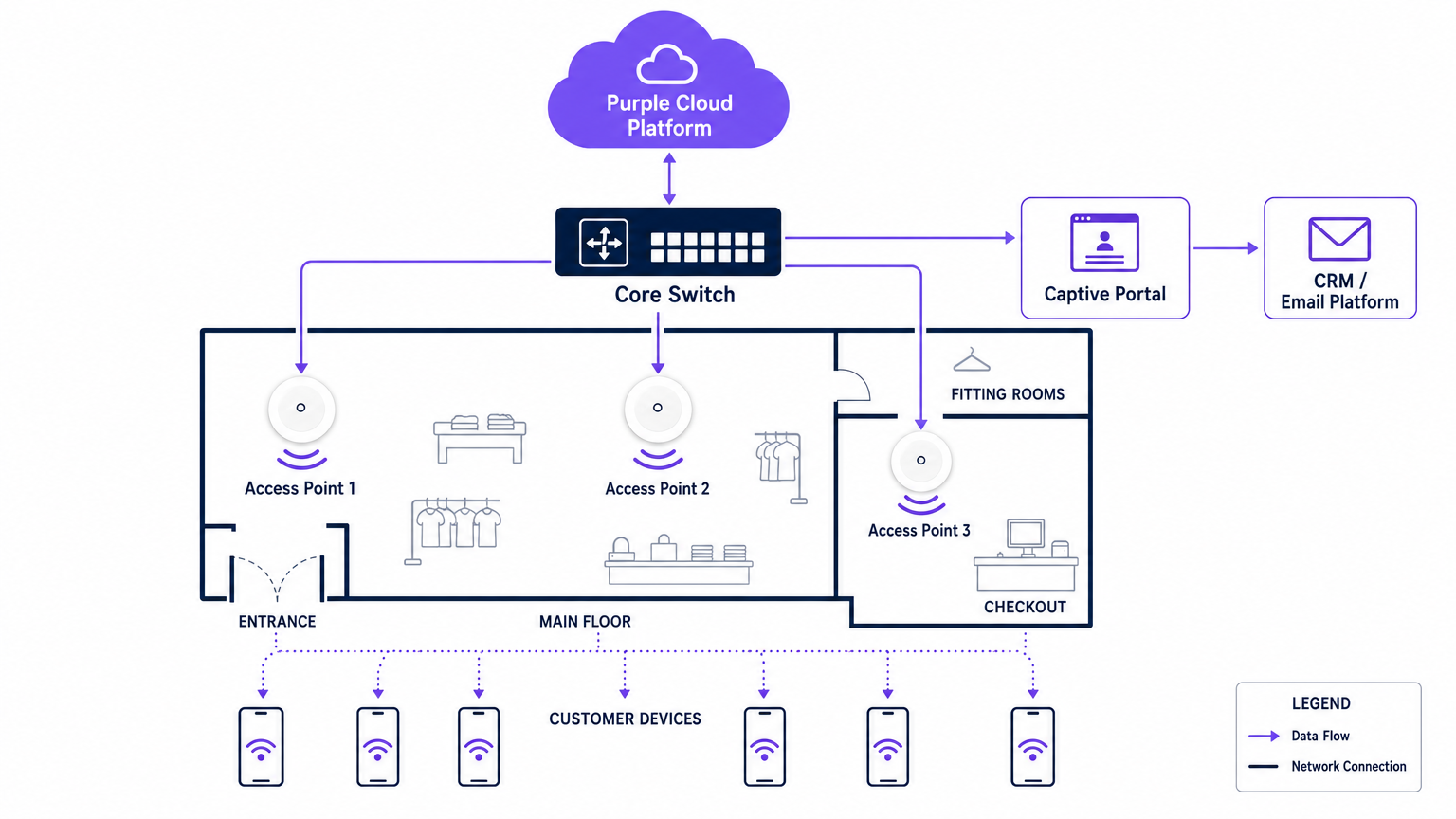
El Captive Portal es la interfaz crítica donde la infraestructura técnica se encuentra con la estrategia comercial. Cuando un usuario se conecta a la red de invitados, es interceptado y redirigido a un portal de marca que requiere autenticación. Este es el mecanismo para la captura de datos de primera parte.
Los métodos de autenticación suelen incluir correo electrónico, SMS o inicio de sesión social, aunque el correo electrónico sigue siendo el más robusto para la integración a largo plazo con el CRM. El portal debe operar sobre HTTPS para asegurar las credenciales del usuario en tránsito. Además, el proceso de autenticación debe integrarse sin problemas con un backend de WiFi Analytics para correlacionar la dirección MAC del dispositivo con el perfil de usuario autenticado, lo que permite el seguimiento de comportamiento posterior.
Seguridad y Cumplimiento
La seguridad en un entorno de Retail WiFi es doble: proteger la red corporativa y proteger al invitado.
- Segmentación de Red: El tráfico de invitados debe aislarse lógicamente del tráfico corporativo y de POS utilizando Redes de Área Local Virtuales (VLANs). Este es un requisito obligatorio para el cumplimiento del Estándar de Seguridad de Datos para la Industria de Tarjetas de Pago (PCI DSS). Mezclar el tráfico de invitados y de pagos en la misma subred resultará en una falla inmediata de auditoría.
- Estándares de Cifrado: Si bien las redes abiertas con Captive Portals siguen siendo comunes, la industria se está moviendo hacia el cifrado WPA3. WPA3-SAE (Autenticación Simultánea de Iguales) proporciona secreto hacia adelante, protegiendo sesiones pasadas incluso si una contraseña es comprometida. Para dispositivos empresariales, la autenticación 802.1X debe aplicarse estrictamente.
- Privacidad de Datos (GDPR): La recopilación de datos de primera parte a través del Captive Portal debe cumplir con las regulaciones de privacidad regionales, como el GDPR en Europa. El consentimiento debe ser explícito, específico y desvinculado de los términos y condiciones generales. El proveedor de la plataforma WiFi debe actuar como un procesador de datos conforme.
Guía de Implementación
La implementación de una red WiFi de grado comercial requiere un enfoque sistemático para garantizar tanto el rendimiento técnico como la alineación con el negocio.
Paso 1: Recopilación de Requisitos y Alineación de Interesados
TI debe nono operan de forma aislada. Antes de seleccionar el hardware, los arquitectos de TI deben alinearse con los directores de marketing y operaciones para definir los objetivos comerciales. Determine los campos de captura de datos necesarios para el Captive Portal, los puntos de integración con los sistemas CRM existentes y los análisis específicos requeridos (por ejemplo, tiempo de permanencia, flujo de zona).
Paso 2: Estudio de sitio de RF y modelado predictivo
Un estudio de sitio de Radiofrecuencia (RF) profesional es innegociable. Confiar en los planos para estimar la ubicación de los puntos de acceso a menudo resulta en brechas de cobertura en áreas críticas como probadores o filas de cajas.
Los ingenieros deben utilizar software de modelado predictivo, seguido de un estudio activo en el sitio, para tener en cuenta la atenuación causada por estanterías, inventario y características arquitectónicas. Una regla general es un punto de acceso por cada 150-200 metros cuadrados, pero las zonas de alta densidad requieren una planificación de capacidad específica en lugar de solo una planificación de cobertura.
Paso 3: Implementación y configuración de la infraestructura
Durante la instalación física, asegúrese de que todo el cableado cumpla con los estándares Cat6a para soportar futuros puntos de acceso multigigabit. Configure los controladores de red para aplicar el aislamiento de clientes en la VLAN de invitados, evitando la comunicación peer-to-peer entre dispositivos conectados. Implemente políticas de Calidad de Servicio (QoS) para limitar el ancho de banda de los invitados, asegurando que las operaciones minoristas críticas (como escáneres de inventario y terminales POS) reciban prioridad.
Paso 4: Captive Portal e integración con CRM
Diseñe el Captive Portal para reflejar la identidad de la marca minimizando la fricción. Mantenga los campos de captura de datos al mínimo —típicamente nombre y dirección de correo electrónico— para maximizar las tasas de conversión. Integre el portal con el CRM o la plataforma de automatización de marketing de la marca a través de API. Esto asegura que cuando un cliente se autentica, su perfil se actualiza o crea inmediatamente en la base de datos central, activando flujos de trabajo de bienvenida automatizados o integraciones de programas de lealtad.
Paso 5: Calibración y revisión de análisis
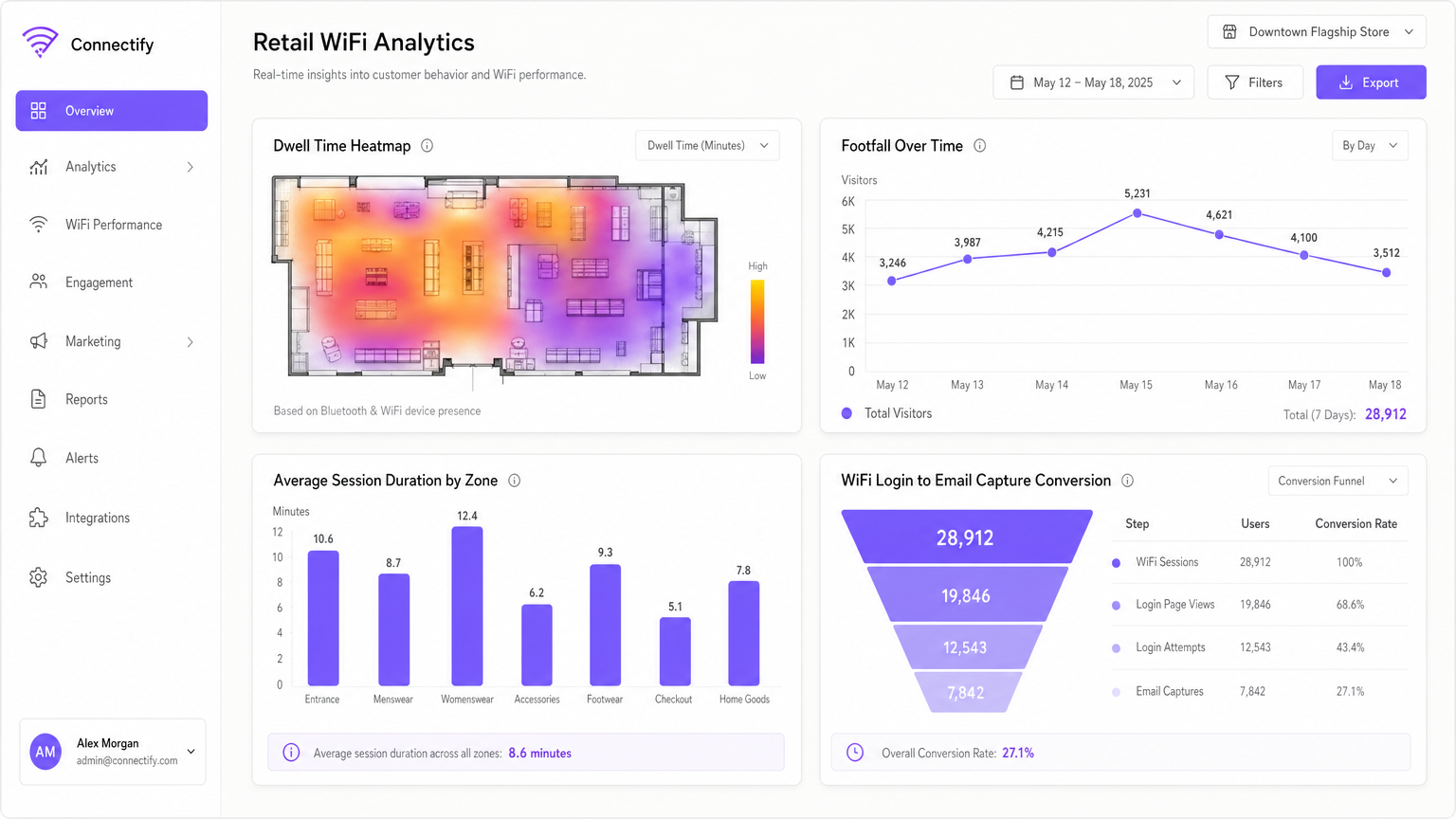
Una vez que la red esté activa, calibre la plataforma de análisis para definir zonas físicas específicas dentro de la tienda (por ejemplo, 'Ropa de Hombre', 'Entrada', 'Cajas'). Establezca una cadencia de revisión mensual donde los equipos de TI y marketing analicen las tendencias de afluencia, los tiempos de permanencia y las métricas de rendimiento de la red para refinar tanto la configuración de la red como el diseño de la tienda.
Mejores prácticas
Para maximizar el ROI del WiFi minorista, siga las siguientes mejores prácticas de la industria:
- Priorice los datos de primera parte: Con la eliminación gradual de las cookies de terceros, el WiFi en la tienda es una de las fuentes más fiables de datos de primera parte. Asegúrese de que su estrategia de Captive Portal esté optimizada para la captura de datos basada en el consentimiento.
- Implemente la autenticación basada en perfiles: Avanzar hacia métodos de autenticación seguros y sin interrupciones, como Passpoint (Hotspot 2.0), permite a los usuarios conectarse automáticamente en diferentes ubicaciones sin tener que navegar repetidamente por los Captive Portals, mejorando significativamente la experiencia del usuario y la continuidad de los datos.
- Aproveche el análisis de ubicación: Utilice los datos de presencia generados por los dispositivos conectados para comprender el flujo de clientes. Como se observa en entornos minoristas , analizar qué pasillos reciben más tráfico puede informar las decisiones de comercialización y dotación de personal.
- Asegure la neutralidad del proveedor: Elija una superposición de análisis y Captive Portal, como Purple, que sea independiente del hardware. Esto evita la dependencia de un proveedor en la capa de infraestructura y permite análisis estandarizados en un entorno de hardware mixto.
Solución de problemas y mitigación de riesgos
Incluso las redes bien diseñadas encuentran problemas. Comprender los modos de falla comunes es esencial para mantener la continuidad del servicio.
| Modo de falla | Síntoma | Causa raíz y mitigación |
|---|---|---|
| Falla del Captive Portal | Los usuarios se conectan al SSID pero no tienen acceso a internet y no reciben la solicitud de inicio de sesión. | Causa: Falla de redirección de DNS o errores de certificado SSL en el controlador del portal. Mitigación: Asegúrese de que la configuración de Walled Garden permita la resolución de DNS y el acceso a la IP/nombre de host del portal antes de la autenticación. Verifique que los certificados SSL sean válidos y de confianza. |
| Degradación por alta densidad | Rendimiento lento y desconexiones frecuentes durante las horas pico de comercio. | Causa: Interferencia de co-canal o capacidad insuficiente del AP (demasiados clientes por radio). Mitigación: Implemente la asignación dinámica de canales. Actualice a puntos de acceso Wi-Fi 6. Reduzca la potencia de transmisión para disminuir el tamaño de las celdas y fomentar el roaming a APs menos congestionados. |
| Puntos de acceso no autorizados | Redes no autorizadas que aparecen con SSIDs similares (ataques Evil Twin). | Causa: Actores maliciosos que intentan interceptar las credenciales de los invitados. Mitigación: Habilite los Sistemas de Prevención de Intrusiones Inalámbricas (WIPS) en el controlador de red para detectar y suprimir automáticamente los APs no autorizados. |
| Fuga de VLAN | Los dispositivos de invitados pueden hacer ping a direcciones IP corporativas. | Causa: Puertos de switch mal configurados o Listas de Control de Acceso (ACLs) faltantes en el router central. Mitigación: Realice pruebas de penetración regulares. Aplique estrictamente el aislamiento de clientes y verifique que las ACLs bloqueen todo el espacio de direcciones privadas RFC 1918 de la VLAN de invitados. |
ROI e impacto comercial
La medida definitiva de una implementación de WiFi minorista es su impacto en los resultados finales. Los líderes de TI deben articular este valor al negocio en general.
- Mayor tiempo de permanencia: Un WiFi fiable anima a los clientes a pasar más tiempo en la tienda, lo que se correlaciona directamente con un aumento en el tamaño de la cesta de compra.
- Atribución de marketing: Al rastrear las direcciones MAC de los dispositivos, los minoristas pueden medir el impacto offline de las campañas online. Si un cliente recibe un correo electrónico promocional y visita la tienda tres días después, la red WiFi proporciona los datos de atribución.
- Adquisición de lealtad: El Captivel portal es un canal de adquisición de alta conversión para programas de lealtad. Ofrecer acceso de alta velocidad a cambio del registro de lealtad escala rápidamente la base de usuarios del programa.
- Eficiencia Operativa: El análisis de afluencia permite modelos de personal dinámicos, asegurando una cobertura adecuada durante los períodos pico y reduciendo los costos salariales durante los tiempos de menor actividad.
Al tratar el WiFi en la tienda como un activo estratégico en lugar de un costo hundido, las empresas minoristas pueden construir una red que no solo conecta dispositivos, sino que impulsa fundamentalmente las ventas, la lealtad y la inteligencia operativa.
Definiciones clave
Captive Portal
A web page that a user of a public access network is obliged to view and interact with before access is granted. It is the primary mechanism for authentication, terms of service acceptance, and data capture.
IT teams deploy captive portals to secure the network and ensure legal compliance, while marketing teams use them to acquire customer data and drive loyalty program sign-ups.
MAC Address (Media Access Control)
A unique identifier assigned to a network interface controller (NIC) for use as a network address in communications within a network segment.
In retail WiFi analytics, the MAC address is used to anonymously track device movement across the store, providing data on dwell times and repeat visits, even if the user hasn't authenticated.
Wi-Fi 6 (802.11ax)
The sixth generation of the Wi-Fi standard, designed specifically to improve performance in high-density environments through technologies like OFDMA and BSS Colouring.
When upgrading retail infrastructure, IT managers specify Wi-Fi 6 to ensure the network can handle hundreds of simultaneous shoppers without degrading performance.
VLAN (Virtual Local Area Network)
A logical subnetwork that groups a collection of devices from different physical LANs. It allows network administrators to partition a single switched network to match the functional and security requirements of their systems.
VLANs are critical in retail to separate the untrusted guest WiFi traffic from the highly sensitive Point-of-Sale (POS) traffic, ensuring PCI DSS compliance.
First-Party Data
Information a company collects directly from its customers and owns entirely, such as email addresses, purchase history, and WiFi session data.
With the decline of third-party tracking cookies, retail marketers rely heavily on the guest WiFi network to capture first-party data for targeted campaigns.
Walled Garden
A network configuration that allows unauthenticated users access to a limited set of specific websites or IP addresses, while blocking all other internet access.
IT teams configure walled gardens so users can access the captive portal login page and necessary authentication services (like social media APIs) before they are fully authorised on the network.
Dwell Time
The length of time a customer spends in a specific area of a store, measured by tracking their device's connection or probe requests to the WiFi access points.
Operations directors use dwell time analytics to evaluate the effectiveness of store layouts, window displays, and promotional endcaps.
PCI DSS (Payment Card Industry Data Security Standard)
An information security standard for organizations that handle branded credit cards from the major card schemes.
IT architects must design the retail network to ensure guest WiFi access does not compromise the security of the payment infrastructure, avoiding severe financial penalties.
Ejemplos resueltos
A national retail chain with 50 locations is experiencing low marketing opt-in rates (under 5%) on their current guest WiFi network, which uses a generic, unbranded splash page. The CTO needs to increase data capture to support a new omnichannel loyalty initiative.
The IT team deploys a centralised, hardware-agnostic captive portal solution across all 50 locations. They replace the generic splash page with a branded, responsive portal that clearly articulates the value exchange: 'Log in for free high-speed WiFi and an immediate 10% discount code'. The portal is configured to capture only Name and Email, reducing friction. Crucially, the platform is integrated via API with the retailer's CRM. When a user authenticates, their details are pushed to the CRM, triggering an automated email containing the discount code. The network is also configured to remember the device's MAC address, allowing seamless authentication on subsequent visits to any of the 50 locations.
A large department store is suffering from severe network congestion on weekends. Customers complain that the guest WiFi is unusable, and the store manager reports that POS terminals (which share the physical network infrastructure) are occasionally dropping connections.
The network architect conducts an RF spectrum analysis and identifies severe co-channel interference and AP saturation. The remediation plan involves three steps: 1) Upgrading the highest-density zones (food court, main entrance) to Wi-Fi 6 access points to leverage OFDMA. 2) Implementing strict QoS policies on the core router, guaranteeing bandwidth for the POS VLAN and throttling guest VLAN traffic to 5 Mbps per client. 3) Enabling dynamic channel assignment and reducing the transmit power of the access points to shrink the cell sizes, encouraging client devices to roam more efficiently and reducing overlap.
Preguntas de práctica
Q1. Your retail client wants to implement a guest WiFi network to capture customer emails. They plan to use their existing flat network architecture, connecting the new guest access points directly to the same switch that handles the POS terminals, without VLAN segmentation. What is the primary risk of this approach?
Sugerencia: Consider the security standards required for processing payments.
Ver respuesta modelo
The primary risk is a severe violation of PCI DSS compliance. A flat network allows untrusted guest devices to potentially communicate with or intercept traffic from the POS terminals. The network must be segmented using VLANs to isolate the cardholder data environment from the guest network.
Q2. A venue operator notices that while footfall in the store is high, the capture rate on the captive portal is below 2%. The portal currently asks for First Name, Last Name, Email, Phone Number, Date of Birth, and Postcode. How should the IT and Marketing teams resolve this?
Sugerencia: Consider the friction involved in the authentication process.
Ver respuesta modelo
The low capture rate is due to excessive friction in the authentication process. The teams should redesign the captive portal to request only the minimum necessary information—typically just Name and Email, or offer a social login option. Progressive profiling can be used later to gather more details once the initial relationship is established.
Q3. A newly deployed Wi-Fi 6 network in a busy shopping centre is experiencing poor performance. The IT manager notes that all access points are transmitting at maximum power on the 2.4GHz band. What configuration change is required?
Sugerencia: Think about how RF signals interact in dense environments.
Ver respuesta modelo
The access points are likely causing severe co-channel interference because their cell sizes are too large and overlapping. The IT manager should reduce the transmit power on the access points, particularly on the 2.4GHz band, to shrink the cell sizes. They should also ensure dynamic channel assignment is enabled and encourage clients to steer towards the 5GHz band where possible.
Continúe leyendo esta serie
Gestión de ancho de banda para WiFi de personal: modelado, QoS y reducción de tráfico
Esta guía detalla métodos prácticos para gestionar el ancho de banda para el WiFi de personal en entornos corporativos. Cubre el modelado de tráfico, la implementación de QoS y cómo el despliegue de Purple Shield reduce la carga de la red sin requerir actualizaciones de infraestructura.
¿Qué es una Solicitud de Sondeo? Entendiendo Cómo los Dispositivos Descubren Redes
Esta guía de referencia técnica ofrece un análisis profundo de las solicitudes de sondeo IEEE 802.11, el escaneo activo versus pasivo, y el impacto de la aleatorización de MAC en el análisis de ubicaciones. Proporciona estrategias de implementación prácticas para que los arquitectos de red optimicen despliegues de alta densidad, mitiguen las tormentas de sondeo y aseguren una recopilación de datos precisa y compatible con GDPR utilizando capas de identidad autenticadas.
Cómo solucionar el WiFi lento sin actualizar tu plan de internet
Una guía de referencia técnica completa para gerentes de TI y arquitectos de red sobre cómo optimizar el rendimiento del WiFi empresarial sin aumentar el ancho de banda del ISP. Cubre la sintonización de RF, la gestión de la densidad de clientes, la implementación de QoS y cómo aprovechar el análisis de WiFi para diagnosticar y resolver cuellos de botella.