
WiFi en tiendas minoristas: creación de perfiles de clientes a partir de datos de afluencia
Esta guía autorizada detalla cómo los equipos de TI de empresas minoristas pueden transformar la infraestructura de WiFi existente en un sólido motor de recopilación de datos de primera mano. Cubre la arquitectura técnica, las normas de cumplimiento y las estrategias de implementación prácticas para crear perfiles de clientes a partir del análisis de afluencia.
Video overview
Escucha esta guía
Ver transcripción del podcast
Parte de nuestra serie principal: Guía de WiFi Analytics →

Resumen Ejecutivo
Para las operaciones de retail modernas, el entorno de la tienda física sigue siendo un punto de contacto fundamental, aunque a menudo carece de las analíticas detalladas del comercio electrónico. Esta guía proporciona un marco técnico integral para transformar la infraestructura inalámbrica estándar en un motor de analíticas de nivel empresarial. Al aprovechar las conexiones de guest WiFi autenticadas, los líderes de TI y los directores de operaciones de los establecimientos pueden recopilar de forma pasiva datos de primera mano de alta precisión - incluyendo la frecuencia de visitas, el tiempo de permanencia y el análisis de rutas.
La implementación de WiFi analytics transforma la red de un centro de costos puro en un activo comercial estratégico. Este documento detalla la arquitectura técnica esencial, la transición de la detección pasiva de MAC a las sesiones autenticadas y los estándares de cumplimiento críticos (GDPR, PCI-DSS, WPA3) requeridos para una implementación segura en entornos de retail y hospitality.
Análisis Técnico Detallado
Metodología de Recopilación de Datos
Cuando el dispositivo de un cliente ingresa a un espacio de retail, transmite solicitudes de sondeo (probe requests) que contienen su dirección de control de acceso a medios (MAC). Históricamente, esto permitía el seguimiento pasivo. Sin embargo, los sistemas operativos modernos implementan la aleatorización de direcciones MAC para proteger la privacidad del usuario. Para superar esta limitación y garantizar una alta precisión de los datos, las implementaciones empresariales deben basarse en conexiones autenticadas.
Cuando un usuario se conecta a través de un Captive Portal, el sistema registra una identidad verificada y consentida. Esta identidad se vincula a un identificador de dispositivo persistente, lo que constituye la base para una sólida creación de perfiles de clientes.
Flujos de Datos Clave
- Frecuencia de Visitas: Al rastrear los eventos de reconexión, el sistema crea un perfil a largo plazo de la lealtad del cliente.
- Tiempo de Permanencia: Medir la duración de las sesiones activas ofrece información sobre la interacción del cliente y se correlaciona fuertemente con la probabilidad de conversión.
- Análisis de Rutas: El mapeo del trayecto físico del cliente a través de la tienda se habilita mediante la trilateración en múltiples puntos de acceso (APs).
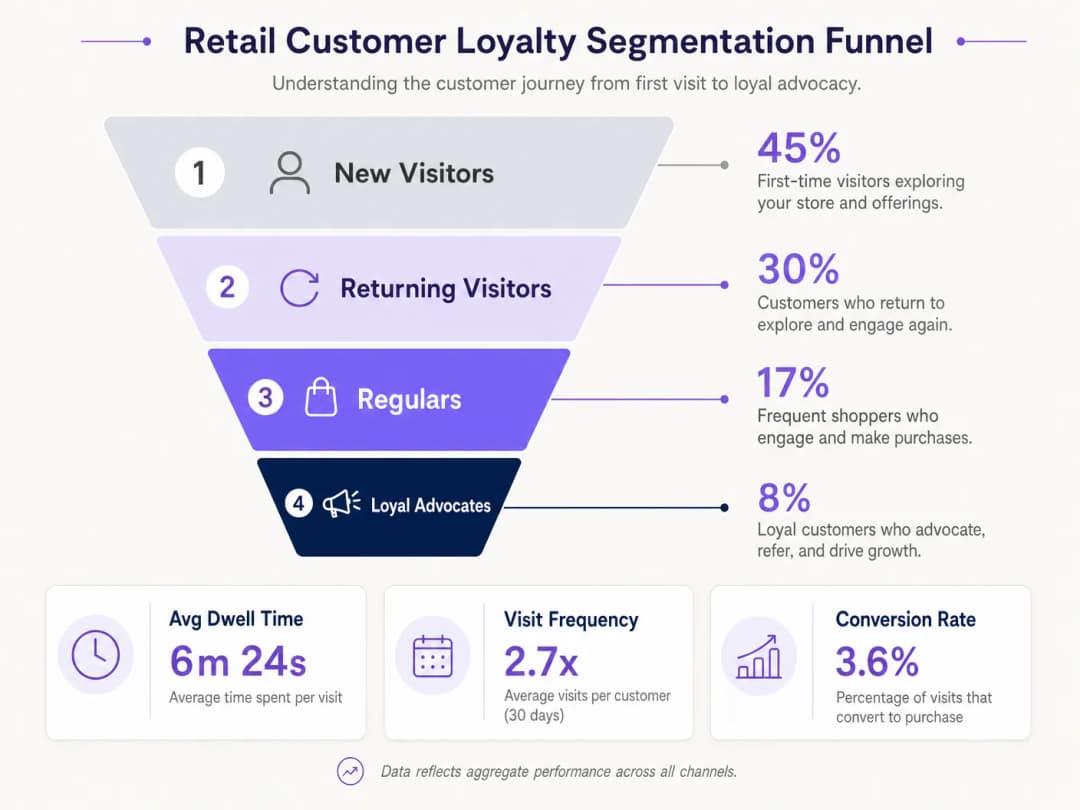
- Segmentación de Lealtad: La agregación de la frecuencia y el tiempo de permanencia permite una segmentación automatizada (por ejemplo, visitantes nuevos versus defensores leales).
Arquitectura Empresarial
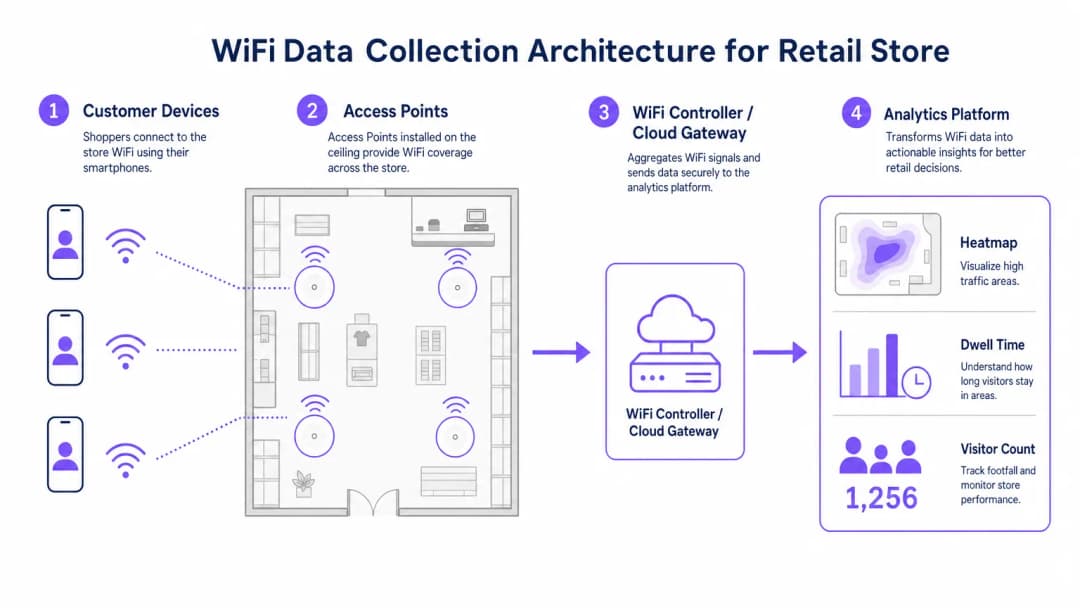
Una implementación sólida de WiFi analytics para retail consta de cuatro capas principales:
- Infraestructura de Radiofrecuencia: Las implementaciones de alta densidad requieren puntos de acceso 802.11ac Wave 2 o 802.11ax (WiFi 6). La recomendación estándar es un AP por cada 1,500 a 2,000 pies cuadrados, ajustado para zonas de alto tráfico.
- Controlador/Plano de gestión en la nube: Agrupa la telemetría de la capa de RF y gestiona el roaming de los clientes.
- Plataforma de analytics: Ingiere telemetría de red sin procesar (eventos de asociación, intensidad de la señal) y la transforma en inteligencia accionable.
- Capa de engagement: Se integra con sistemas CRM a través de APIs o webhooks para activar flujos de trabajo de marketing automatizados basados en datos espaciales en tiempo real.
Escuche nuestro informe técnico completo sobre el despliegue de estas arquitecturas:
¿Tiene preguntas sobre su configuración específica?
Nuestro equipo trabaja con gestores de espacios, responsables de TI e ingenieros de redes en 80 000 establecimientos. Reserve una llamada de 20 minutos y le mostraremos cómo lo resolvieron otros profesionales como usted.
Guía de implementación
Un despliegue exitoso requiere la alineación entre la ingeniería de red y las operaciones comerciales.
- Optimizar el flujo de autenticación: Implemente un Captive Portal fluido. Minimice los campos de entrada para maximizar las tasas de participación, garantizando al mismo tiempo que existan mecanismos claros de consentimiento. Considere la integración de credenciales de programas de lealtad existentes.
- Diseñar para la triangulación: Los diseños de cobertura estándar son insuficientes para el análisis de trayectorias. Para permitir una trilateración precisa, asegúrese de que al menos tres puntos de acceso ofrezcan una cobertura superpuesta en las zonas clave de seguimiento.
- Definir indicadores clave de rendimiento (KPI): Establezca métricas de referencia antes del lanzamiento. Los KPI comunes incluyen el tiempo de permanencia promedio por zona, la proporción de visitantes nuevos frente a los recurrentes y las horas pico de afluencia.
Mejores prácticas
- Estandarizar el hardware: Para simplificar la normalización de datos en la capa de análisis, asegure un hardware de AP consistente en todos los sitios para mantener una telemetría de señal uniforme.
- Segregar redes: Segregue estrictamente el tráfico de invitados de las redes corporativas y de punto de venta (POS) utilizando VLANs y SSIDs dedicados para mantener el cumplimiento de PCI DSS.
- Automatizar la retención de datos: Configure la plataforma de análisis para eliminar automáticamente los datos de sesión sin procesar después de un periodo definido (por ejemplo, 12 meses) para mitigar el riesgo de cumplimiento bajo GDPR.
Para obtener un contexto de implementación integral en diferentes sectores, consulte nuestras guías sobre Soluciones de WiFi para hotelería: qué buscar en un proveedor y WiFi en el sector automotriz: la guía empresarial completa para 2026.
Solución de problemas y mitigación de riesgos
| Tipo de falla | Síntomas | Estrategia de mitigación |
|---|---|---|
| Baja precisión de triangulación | Los datos de ubicación saltan erráticamente en el plano de distribución. | Realice un estudio predictivo de sitio de RF; aumente la densidad de AP en zonas críticas; asegúrese de que los AP estén montados a una altura uniforme. |
| Bajas tasas de autenticación | Alta afluencia pasiva pero bajo recuento de usuarios registrados. | Simplifique la interfaz de usuario del Captive Portal; proporcione opciones de inicio de sesión social; asegúrese de que la página de bienvenida sea totalmente adaptable. |
| Silos de datos | Los datos analíticos no llegan al CRM. | Verifique la conectividad del punto de conexión de la API; revise los registros de entrega de webhooks; asegúrese de que los formatos de carga de datos coincidan con los requisitos del esquema del CRM. |
ROI e impacto comercial
La transición a un despliegue de WiFi impulsado por la analítica genera resultados comerciales medibles. Los minoristas reportan de manera constante:
- Mayores tasas de conversión: Correlacionadas directamente con estrategias de interacción dirigidas basadas en el tiempo de permanencia.
- Diseños de tienda optimizados: Decisiones basadas en datos sobre la ubicación de productos derivadas del análisis de trayectorias.
- Retención de clientes mejorada: Campañas de reactivación automatizadas activadas por umbrales de visitantes perdidos. Al cerrar la brecha entre las operaciones físicas y la inteligencia digital, el análisis de WiFi para empresas ofrece una ventaja competitiva definitiva en el panorama minorista moderno.
Definiciones clave
Aleatorización de direcciones MAC
Una función de privacidad en los sistemas operativos modernos que transmite una dirección MAC falsa durante el sondeo de la red, lo que evita el seguimiento pasivo.
Obliga a los equipos de TI a depender de conexiones autenticadas en lugar de la escucha pasiva para obtener análisis de afluencia precisos.
Trilateración
El proceso de determinar la ubicación absoluta o relativa de puntos mediante la medición de distancias, utilizando la geometría de círculos, esferas o triángulos.
Utilizada por la plataforma de análisis para calcular la ubicación física de un dispositivo en función de la intensidad de la señal recibida por múltiples AP.
Captive Portal
Una página web que el usuario de una red de acceso público está obligado a ver e interactuar con ella antes de que se le conceda el acceso.
El mecanismo principal para capturar el consentimiento y la identidad del usuario con el fin de crear perfiles con datos de primera mano.
Tiempo de permanencia
La duración total que el dispositivo de un cliente permanece asociado de forma continua a la red WiFi durante una sola visita.
Una métrica fundamental para que los equipos de marketing evalúen el interés y la intención de los clientes.
802.11ax (WiFi 6)
El estándar más reciente para redes inalámbricas, que ofrece un mayor rendimiento, un mejor funcionamiento en entornos densos y una mayor eficiencia energética.
El estándar de hardware recomendado para entornos de TI de empresas minoristas que requieren análisis de alta densidad.
PCI-DSS
Estándar de Seguridad de Datos para la Industria de Tarjetas de Pago; un conjunto de normas de seguridad diseñadas para garantizar que todas las empresas que aceptan, procesan, almacenan o transmiten información de tarjetas de crédito mantengan un entorno seguro.
Exige una estricta segregación de red entre la red WiFi de invitados y los sistemas de punto de venta.
VLAN (Red de área local virtual)
Una subred lógica que agrupa una colección de dispositivos de diferentes redes LAN físicas.
Se utiliza para aislar de forma segura el tráfico de la red WiFi de invitados de las redes corporativas internas.
Datos de primera mano
Información que una empresa recopila directamente de sus clientes y que le pertenece por completo.
El resultado final de una implementación exitosa de WiFi Analytics en el sector minorista, sumamente valioso para el marketing dirigido.
Ejemplos resueltos
Una cadena de tiendas minoristas con 50 sucursales necesita implementar el seguimiento de afluencia para optimizar la asignación de personal, pero su red actual solo proporciona detección pasiva de MAC, lo que genera datos sumamente imprecisos debido a la aleatorización de direcciones MAC.
Implementar un sistema de autenticación de Captive Portal integrado con los controladores de WiFi existentes. Configurar el portal para solicitar un registro sencillo por correo electrónico o redes sociales a cambio de acceso gratuito a WiFi. Vincular la identidad autenticada al identificador persistente del dispositivo para evitar el problema de la dirección MAC aleatoria. Integrar este flujo de datos a través de una API en el sistema central de gestión de personal para alinear la cantidad de colaboradores con las horas pico de afluencia verificadas.
Un gran centro de convenciones desea rastrear el flujo de asistentes entre los diferentes pabellones de exhibición para justificar tarifas premium en ciertos stands de proveedores.
Rediseñar el diseño de RF específicamente para el análisis de ubicación en lugar de limitarse a la cobertura. Implementar puntos de acceso 802.11ax adicionales para garantizar que al menos tres AP se superpongan en los pasillos de transición clave, lo que permitirá una trilateración precisa. Enviar la telemetría de la intensidad de la señal a la plataforma de análisis para generar mapas de calor y reportes de análisis de rutas en tiempo real para el equipo de eventos.
Preguntas de práctica
Q1. Su equipo de marketing desea implementar un análisis de trayectoria para rastrear el movimiento de los clientes alrededor de una nueva exhibición de productos. Actualmente, la tienda cuenta con dos puntos de acceso que proporcionan una cobertura de señal adecuada para la conectividad. ¿Cuál es la recomendación técnica necesaria?
Sugerencia: Considere los requisitos para el cálculo espacial.
Ver respuesta modelo
Debe informar al equipo de marketing que el análisis de trayectoria requiere trilateración. Por lo tanto, es necesario implementar al menos un punto de acceso adicional para garantizar que el área objetivo esté cubierta por señales superpuestas de un mínimo de tres AP.
Q2. Durante una auditoría de seguridad, se descubre que la red WiFi de invitados y las terminales de punto de venta (POS) están operando en el mismo switch físico sin separación lógica. ¿Cuál es el riesgo de cumplimiento inmediato y la solución?
Sugerencia: Piense en los estándares de seguridad para pagos.
Ver respuesta modelo
Esta configuración infringe los requisitos de PCI-DSS. La solución inmediata consiste en configurar VLAN independientes en el switch para aislar lógicamente el tráfico de invitados de la red de punto de venta (POS), garantizando que no sea posible ningún movimiento lateral.
Q3. El director de operaciones señala que, mientras el sistema reporta 1,000 visitantes al día basados en la detección pasiva de MAC, el conteo de usuarios autenticados es de sólo 150. ¿Cómo explica esta discrepancia?
Sugerencia: Considere las funciones modernas de los sistemas operativos móviles.
Ver respuesta modelo
Explique que los smartphones modernos utilizan la aleatorización de direcciones MAC cuando buscan redes, lo que infla de forma artificial los conteos pasivos, ya que un mismo dispositivo puede transmitir múltiples MAC falsas. El conteo autenticado de 150 representa los datos reales y de alta fidelidad de los usuarios que interactuaron activamente con el Captive Portal.
Continúe leyendo esta serie
Medición del ROI empresarial de Guest WiFi y Location Analytics
Esta referencia técnica muestra a los equipos de TI y de recintos cómo medir el ROI de Guest WiFi con una cadena defendible desde la salud de la red y los datos consentidos hasta los resultados operativos o comerciales validados. Separa la evidencia medible de las suposiciones, mapea Purple Connect, Capture y Engage con la capa de medición correcta y ofrece escenarios de planificación para hoteles, propiedades de retail y recintos de eventos.
Privacy by Design: Anonimización de datos de WiFi para el cumplimiento de GDPR
Esta guía fidedigna detalla la arquitectura técnica y las estrategias de implementación para anonimizar datos de WiFi para garantizar el cumplimiento de GDPR. Proporciona a los líderes de TI y arquitectos de redes marcos de trabajo prácticos para equilibrar los análisis robustos de los recintos con los estrictos requisitos de privacidad de datos.
Heatmapping frente a Analítica de Presencia: Diferencias Técnicas
Esta guía técnica autorizada detalla las diferencias arquitectónicas y operativas críticas entre el heatmapping de WiFi y la analítica de presencia para operadores de recintos empresariales. Proporciona a los líderes de TI, arquitectos de red y directores de operaciones marcos de implementación accionables, escenarios de implementación del mundo real y mejores prácticas neutrales con respecto al proveedor para extraer el máximo ROI de su infraestructura inalámbrica existente.
¿Tiene preguntas sobre su configuración específica?
Nuestro equipo trabaja con gestores de espacios, responsables de TI e ingenieros de redes en 80 000 establecimientos. Reserve una llamada de 20 minutos y le mostraremos cómo lo resolvieron otros profesionales como usted.