
WiFi Guest Portal: Qué es y cómo optimizarlo
Esta guía autorizada detalla la arquitectura, implementación y optimización de los portales de invitados WiFi. Ofrece estrategias prácticas para que los líderes de TI aumenten las tasas de finalización de inicio de sesión, garanticen el cumplimiento del GDPR y capturen datos de primera mano de alta calidad.
Escucha esta guía
Ver transcripción del podcast
📚 Part of our core series: The Ultimate Guide to Captive Portals →
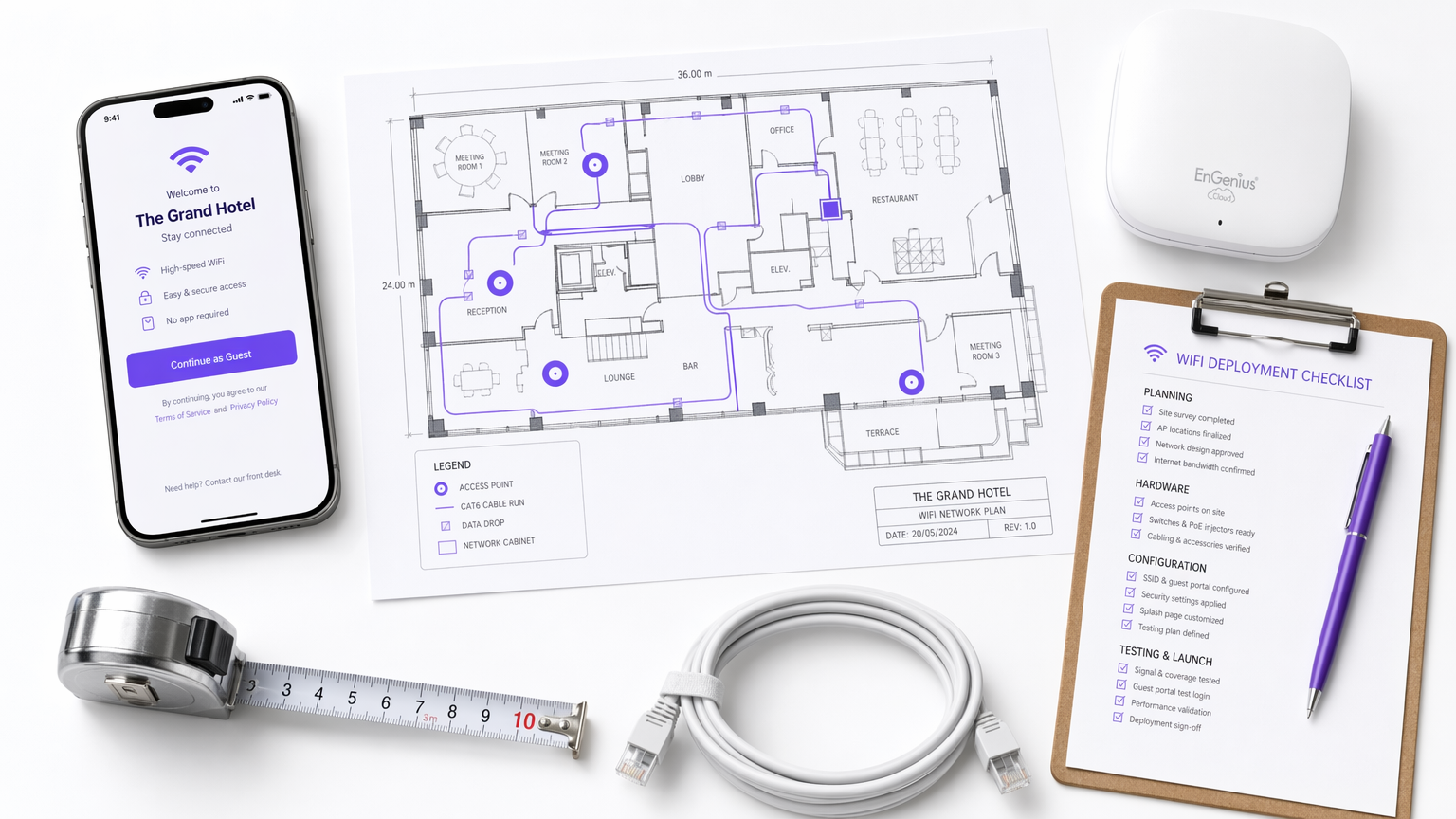
Resumen Ejecutivo
El portal de invitados WiFi —frecuentemente denominado Captive Portal o página de bienvenida— es la intersección crítica entre el control de acceso a la red, la experiencia del usuario y la estrategia de datos empresariales. Para los gerentes de TI, arquitectos de red y directores de operaciones de recintos, implementar un portal de invitados ya no se trata simplemente de proporcionar acceso a internet. Se trata de diseñar una puerta de enlace segura y compatible que capture datos de primera mano de alta calidad, minimizando la fricción del usuario.
Esta guía proporciona una referencia técnica completa sobre qué es un portal de invitados, cómo funcionan los protocolos de autenticación subyacentes y las palancas precisas disponibles para optimizar el proceso de inicio de sesión. Ya sea que esté implementando en una cadena minorista, un estadio o una marca de hospitalidad global, los principios siguen siendo consistentes: asegurar la red, reducir la fatiga de los formularios e integrar los datos capturados en los sistemas empresariales posteriores. Al ir más allá del acceso básico de un solo clic, las organizaciones pueden transformar su infraestructura de WiFi para Invitados de un centro de costos en un motor medible de compromiso del cliente e ingresos.
Análisis Técnico Detallado
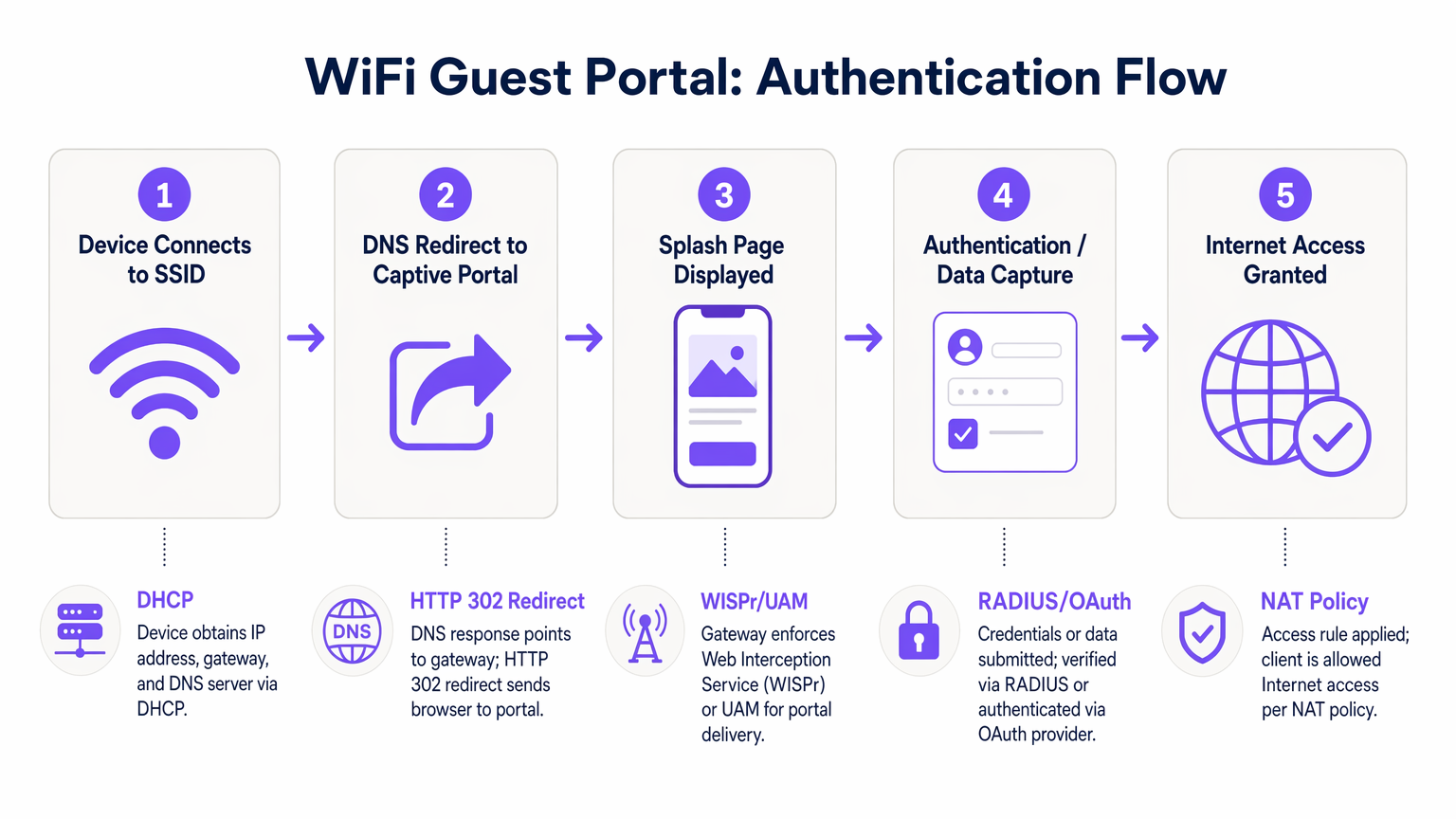
Comprender la mecánica de un portal WiFi para invitados requiere examinar la secuencia de eventos que ocurren desde el momento en que un dispositivo se asocia con un SSID hasta el punto en que se concede acceso completo a internet. Este proceso se basa en una combinación de protocolos de red y mecanismos de redirección web.
Cuando un dispositivo cliente se conecta a la red de invitados, primero negocia una dirección IP, máscara de subred y puerta de enlace predeterminada a través de DHCP. En esta etapa, el dispositivo es colocado en un estado de "jardín amurallado" por el controlador de acceso. El jardín amurallado es un entorno de red restringido donde todo el tráfico HTTP y HTTPS saliente es interceptado. El controlador permite el acceso solo a dominios explícitamente incluidos en la lista blanca, como los servidores de alojamiento del portal, los proveedores de autenticación y los recursos CDN necesarios.
Cuando el usuario abre un navegador o el Asistente de Red Cautiva (CNA) nativo del dispositivo detecta el jardín amurallado, el controlador emite una redirección HTTP 302. Esta redirección dirige al cliente a la URL de la página de bienvenida. Esta interceptación se rige por el protocolo WISPr (Wireless Internet Service Provider roaming) o el Método de Acceso Universal (UAM).
La autenticación se realiza entonces en la página de bienvenida. Los métodos principales incluyen:
- Click-Through: El usuario acepta los términos y condiciones sin proporcionar datos personales.
- Registro Basado en Formulario: El usuario envía detalles como nombre y correo electrónico.
- Inicio de Sesión Social: Autenticación a través de OAuth 2.0 utilizando proveedores como Google, Facebook o Apple.
- Verificación por SMS: El usuario recibe una Contraseña de Un Solo Uso (OTP) vía SMS para verificar su identidad.
Una vez que el usuario se autentica con éxito, el portal se comunica con el controlador de acceso, típicamente a través de RADIUS (Remote Authentication Dial-In User Service) o una API propietaria. El controlador actualiza entonces sus políticas NAT o reglas de firewall, haciendo la transición de la dirección MAC del cliente del jardín amurallado a un estado autorizado, concediendo acceso completo a internet.
Guía de Implementación
Implementar un portal de invitados robusto requiere un enfoque sistemático que priorice la seguridad, la experiencia del usuario y la integración de datos. Los siguientes pasos describen una metodología de implementación neutral respecto al proveedor.
Primero, establezca la segmentación de la red. El SSID de invitados debe estar aislado de la red corporativa utilizando VLANs dedicadas. Esto evita que los dispositivos de invitados accedan a recursos internos, sistemas de punto de venta o interfaces de gestión. Implemente el aislamiento de clientes dentro de la VLAN de invitados para evitar que los dispositivos se comuniquen entre sí, mitigando el riesgo de movimiento lateral por parte de actores maliciosos.
Segundo, configure el jardín amurallado con precisión. La causa más común de fallo del portal es una lista blanca incompleta del jardín amurallado. Asegúrese de que todos los recursos necesarios para renderizar la página de bienvenida —incluidos archivos CSS, fuentes y puntos finales de proveedores de autenticación (p. ej., accounts.google.com)— sean accesibles antes de la autenticación. No hacerlo resultará en una renderización de página defectuosa o inicios de sesión sociales fallidos.
Tercero, diseñe el modelo de datos y el flujo de autenticación. Determine los datos mínimos viables requeridos del usuario. Para la mayoría de las implementaciones comerciales, una dirección de correo electrónico y un consentimiento de marketing explícito son suficientes para el inicio de sesión inicial. Implemente opciones de inicio de sesión social para reducir la fricción y mejorar la precisión de los datos. Al integrar con plataformas de Análisis WiFi , asegúrese de que el modelo de datos se alinee con el esquema de su CRM.
Cuarto, integre sistemas posteriores. El valor de un portal de invitados se realiza plenamente cuando los datos capturados fluyen sin problemas a plataformas de automatización de marketing o sistemas CRM. Configure webhooks o integraciones de API para transferir datos de perfil en tiempo real, permitiendo el compromiso automatizado después del inicio de sesión, como correos electrónicos de bienvenida o invitaciones a programas de lealtad.
Mejores Prácticas
Optimizar la experiencia del portal de invitados es un proceso continuo. Las mejores prácticas estándar de la industria dictan un enfoque en la velocidad, la capacidad de respuesta móvil y el perfilado progresivo.
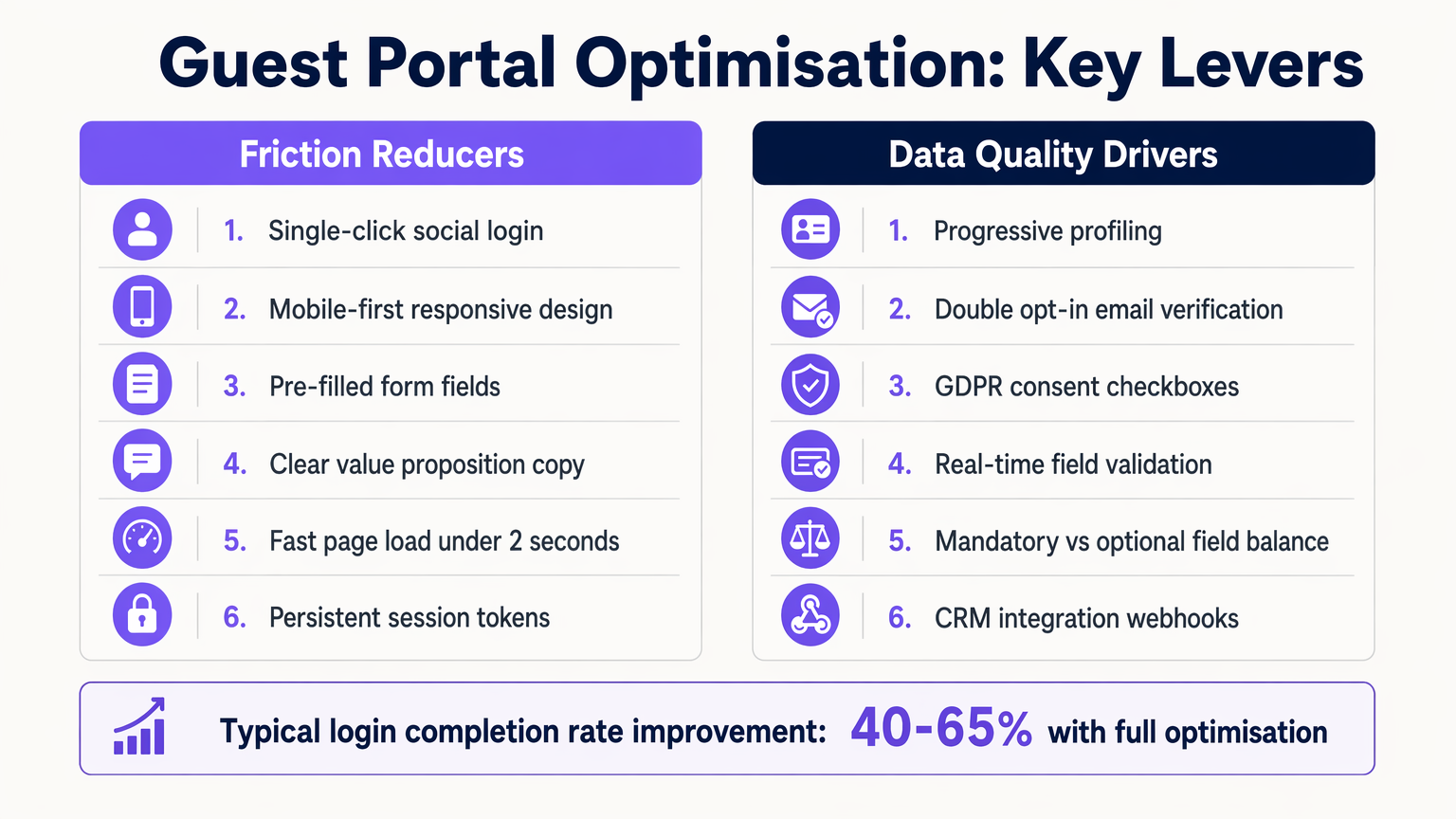
1. Diseño Mobile-First La gran mayoría de las interacciones con el portal de invitados ocurren en dispositivos móviles. Asegúrese de que la página de bienvenida sea totalmente responsiva, con objetivos táctiles de tamaño apropiado (mínimo 44x44 píxeles) y campos de formulario que activen el teclado virtual correcto (p. ej., el teclado de correo electrónico para campos de correo electrónico).
2. Perfilado Progresivo Evite la fatiga de los formularios recopilando solo los datos esenciales durante la primera conexión. En visitas posteriores, utilice el reconocimiento de dirección MAC o tokens de sesión persistentes para identificar a los usuarios recurrentes y solicitarles información adicional, como fecha de nacimiento o preferencias. Este enfoque aumenta significativamente la tasa de finalización general.
3. Intercambio de Valor Claro El texto de la página de inicio debe articular claramente el beneficio para el usuario. Reemplace frases genéricas como "Regístrese para acceder a la red" con propuestas de valor atractivas como "Disfrute de WiFi de alta velocidad: conéctese en segundos."
Solución de Problemas y Mitigación de Riesgos
Incluso las implementaciones bien diseñadas pueden encontrar problemas. Comprender los modos de falla comunes es esencial para mantener el tiempo de actividad y la satisfacción del usuario.
Fallas del Asistente de Red Cautiva (CNA)
Los sistemas operativos modernos utilizan CNAs para detectar Captive Portals automáticamente. Si el controlador de acceso no responde correctamente a la sonda inicial del sistema operativo (por ejemplo, captive.apple.com de Apple), el CNA puede fallar al iniciarse, dejando al usuario confundido. Asegúrese de que el firmware del controlador esté actualizado y maneje correctamente estas sondas.
Configuración Incorrecta del Tiempo de Espera de Sesión Establecer un tiempo de espera de sesión demasiado corto obliga a los usuarios a volver a autenticarse con frecuencia, degradando la experiencia. Por el contrario, establecerlo demasiado largo puede inflar las métricas de usuarios concurrentes y agotar los grupos de direcciones IP. Un lugar comercial típico debe configurar un tiempo de espera de sesión de 8 a 24 horas, con usuarios recurrentes autenticados sin problemas a través del almacenamiento en caché de MAC.
Riesgos de Cumplimiento Bajo GDPR y marcos similares, se requiere consentimiento explícito para las comunicaciones de marketing. Las casillas premarcadas o el consentimiento agrupado (por ejemplo, combinar los Términos de Servicio con la opción de marketing) no cumplen con la normativa. Asegúrese de que el portal mantenga un registro de auditoría inmutable de los registros de consentimiento, incluyendo marcas de tiempo y la versión específica de la política de privacidad aceptada.
ROI e Impacto Comercial
La medida definitiva del éxito de un portal de invitados es su contribución a los objetivos comerciales. Al pasar de un simple mecanismo de acceso a una plataforma inteligente de captura de datos, las organizaciones pueden impulsar un ROI medible.
En entornos de Retail , la captura de direcciones de correo electrónico permite campañas de remarketing dirigidas, impulsando el tráfico peatonal y aumentando el valor de vida del cliente. En Hospitality , la integración del portal con los sistemas de gestión de propiedades permite experiencias personalizadas para los huéspedes y solicitudes automáticas de reseñas de TripAdvisor.
El impacto se cuantifica a través de métricas como la Tasa de Finalización de Inicio de Sesión (el porcentaje de usuarios que ven el portal y se autentican con éxito), la Tasa de Aceptación (el porcentaje de usuarios que otorgan consentimiento de marketing) y la Puntuación de Calidad de Datos (el porcentaje de direcciones de correo electrónico válidas y entregables). Plataformas como Purple proporcionan los análisis necesarios para rastrear estos KPIs, demostrando el valor tangible de la infraestructura WiFi.
Definiciones clave
Captive Portal
A web page that the user of a public-access network is obliged to view and interact with before access is granted.
The fundamental mechanism for controlling guest access and capturing data.
Walled Garden
A restricted network environment that allows access only to explicitly permitted IP addresses or domains prior to authentication.
Critical for allowing the splash page and authentication providers to load before the user has full internet access.
WISPr
Wireless Internet Service Provider roaming. A protocol that allows users to roam between different wireless providers.
The underlying standard that enables the HTTP redirect to the captive portal.
RADIUS
Remote Authentication Dial-In User Service. A networking protocol that provides centralized Authentication, Authorization, and Accounting (AAA) management.
The backend system that verifies credentials and tells the controller to grant access.
MAC Caching
The process of storing a device's Media Access Control address after initial authentication to automatically recognize and authorize it on subsequent visits.
Essential for providing a seamless experience for returning visitors without requiring re-login.
Progressive Profiling
A method of gradually gathering information about a user across multiple interactions rather than asking for all data upfront.
Used to balance the need for detailed marketing data with the necessity of high login completion rates.
Captive Network Assistant (CNA)
A feature in modern operating systems (like iOS and Android) that automatically detects a captive portal and opens a pseudo-browser for login.
IT teams must ensure their controllers respond correctly to CNA probes to trigger the automatic popup.
VLAN Segmentation
The practice of dividing a physical network into multiple logical networks. Guest traffic is placed on a separate VLAN from corporate traffic.
A non-negotiable security requirement to protect internal enterprise systems from guest devices.
Ejemplos resueltos
A 200-room hotel is experiencing a 60% drop-off rate on their guest WiFi portal. The current portal requires guests to input their First Name, Last Name, Room Number, Email Address, and Date of Birth on a single screen before granting access. How should the IT Director redesign this flow to improve completion rates?
The IT Director should implement a progressive profiling strategy. The initial login screen should be reduced to two options: 'Connect with Google/Apple' (Social Login) or a simple form requiring only 'Email Address' and an unchecked GDPR consent box. The Room Number requirement should be removed unless PMS integration is actively used for tiered bandwidth billing. The Date of Birth field should be moved to a post-login email campaign ('Tell us your birthday for a free drink at the bar'). Finally, MAC address caching should be enabled so returning guests bypass the form entirely for the duration of their stay.
A large stadium IT team is deploying a new guest portal for 50,000 concurrent users. During testing, users report that the splash page takes over 8 seconds to load, and many abandon the process. The portal features a 3MB high-resolution background image and loads three external tracking scripts. What immediate technical remediations are required?
The IT team must immediately optimize the portal payload. First, the 3MB background image must be compressed and resized, ideally replaced with a CSS-based gradient or an optimized WebP image under 200KB. Second, all non-essential third-party tracking scripts must be removed from the critical rendering path; only essential scripts should load asynchronously. Third, the team must verify the Walled Garden configuration on the access controllers to ensure the CDN hosting the portal assets is explicitly whitelisted, preventing the controller from throttling or blocking the asset delivery.
Preguntas de práctica
Q1. You are designing the portal for a busy transport hub. The marketing team wants to collect Name, Email, Phone Number, and Destination. The network team is concerned about throughput and user complaints. What is the optimal approach?
Sugerencia: Consider the impact of form length on completion rates and the principle of progressive profiling.
Ver respuesta modelo
Push back on the marketing team's request for all four fields upfront. Implement a portal requiring only Email Address and marketing consent, or offer Social Login. Use post-login email automation to ask for the Destination data once the user is connected and settled. This satisfies marketing's need for data over time while addressing the network team's concern about immediate throughput and user friction.
Q2. After deploying a new guest portal, users report that the splash page appears, but when they click 'Login with Facebook', the page times out and fails to authenticate. What is the most likely technical cause?
Sugerencia: Think about the network state the device is in before authentication is complete.
Ver respuesta modelo
The Walled Garden whitelist is incomplete. The access controller is blocking the device from reaching Facebook's OAuth servers (e.g., graph.facebook.com) because the device is not yet authenticated. The IT team must add the necessary Facebook domains to the Walled Garden whitelist so the authentication handshake can complete.
Q3. Your organisation is updating its guest WiFi to comply with GDPR. The current portal has a single checkbox that says 'I agree to the Terms of Service and to receive marketing emails'. Why is this problematic, and how must it be fixed?
Sugerencia: Review the requirements for lawful consent under GDPR regarding 'bundling'.
Ver respuesta modelo
This is non-compliant because it relies on 'bundled consent'. Under GDPR, consent for marketing must be freely given, specific, informed, and unambiguous. You cannot make access to the service (WiFi) conditional on accepting marketing. The fix is to separate this into two actions: a mandatory acceptance of the Terms of Service, and an optional, unticked checkbox for marketing consent.
Continúe leyendo esta serie
Captive Portal personalizado: Guía de HTML y CSS
Esta guía de referencia técnica autorizada describe los estándares de desarrollo, la arquitectura CSS y las restricciones a nivel de red requeridas para diseñar y programar una página de inicio de Captive Portal personalizada. Proporciona a los desarrolladores frontend y arquitectos de red estrategias prácticas para navegar por los entornos de Apple CNA y webview de Android, garantizando experiencias de WiFi para invitados impecables, conformes y de alto rendimiento.
Cómo Configurar un Hotspot WiFi para Su Negocio
Esta guía autorizada proporciona a líderes de TI, arquitectos de red y directores de operaciones de recintos un plan práctico y neutral en cuanto a proveedores para implementar hotspots WiFi para invitados seguros, conformes y que mejoran el negocio. Cubre decisiones arquitectónicas críticas —desde la segmentación de VLAN y la configuración de Captive Portal hasta el cumplimiento de GDPR y la gestión de tráfico— y demuestra cómo transformar la infraestructura de red de un centro de costos en una plataforma de análisis que genera ingresos utilizando las capacidades de Guest WiFi y análisis de Purple.
Purple vs. Cisco Spaces (DNA Spaces): Cuándo Elegir Cada Uno
Esta guía de referencia técnica ofrece una comparación exhaustiva de Purple y Cisco Spaces (anteriormente DNA Spaces) para implementaciones de Captive Portal empresarial y WiFi para invitados. Evalúa las diferencias arquitectónicas, la profundidad de la automatización de marketing y la cuestión crítica de la dependencia del proveedor de hardware para ayudar a los líderes de TI a tomar decisiones informadas sobre la infraestructura.