
WiFi para Bares y Pubs: Guía Completa de Configuración y Marketing
Esta guía técnica exhaustiva detalla la arquitectura, implementación y monetización de WiFi para invitados de nivel empresarial para bares y pubs. Proporciona planos de acción para que los líderes de TI implementen redes seguras y de alto rendimiento que impulsen el cumplimiento, capturen datos de clientes de primera mano y potencien campañas de marketing dirigidas para aumentar el ROI.
Escucha esta guía
Ver transcripción del podcast
Resumen Ejecutivo
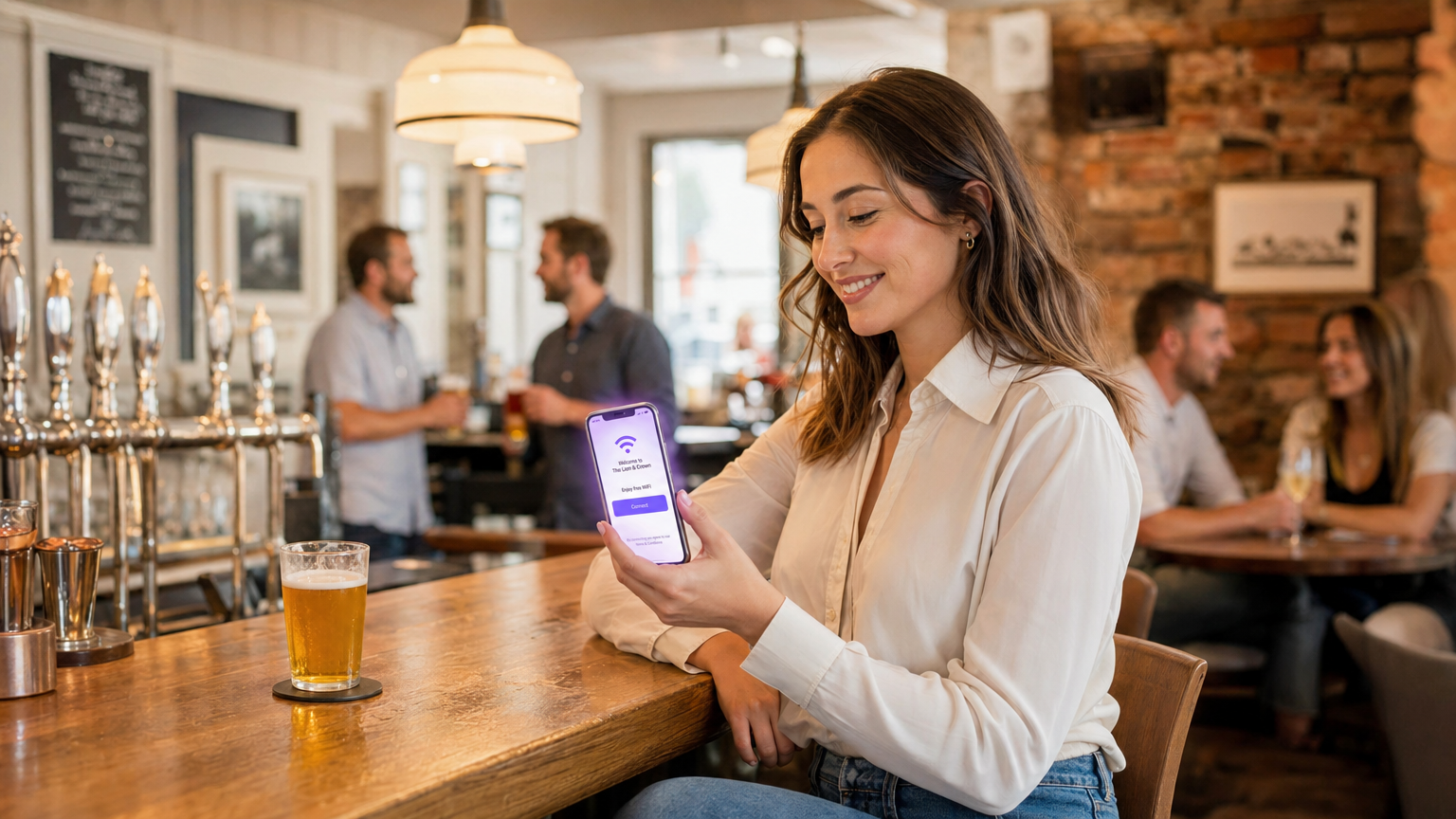
Implementar un WiFi robusto para bares y pubs ya no es simplemente un gasto operativo; es un requisito fundamental para atraer clientes, aumentar la retención y desbloquear nuevas fuentes de ingresos. Para los gerentes de TI, CTOs y directores de operaciones de locales en todo el sector de la hostelería, el desafío radica en la transición de conexiones a internet heredadas y no gestionadas a redes de nivel empresarial, seguras y ricas en datos. Esta guía proporciona un plan integral para la arquitectura, implementación y monetización de WiFi para invitados en restaurantes, bares y pubs.
Al integrar un sofisticado Captive Portal con análisis robustos, los locales pueden recopilar sin problemas datos de clientes de primera mano, manteniendo al mismo tiempo el pleno cumplimiento de los estándares GDPR y PCI DSS. Esta infraestructura no solo garantiza una experiencia de conectividad de alto rendimiento para los clientes, sino que también impulsa campañas de marketing dirigidas que convierten a los visitantes ocasionales en defensores leales. Ya sea que gestione una única ubicación premium o una extensa propiedad, la implementación de estas mejores prácticas neutrales al proveedor transformará su WiFi de un centro de costos en un impulsor medible del ROI.
Análisis Técnico Detallado
Arquitectura de Red y Selección de Hardware
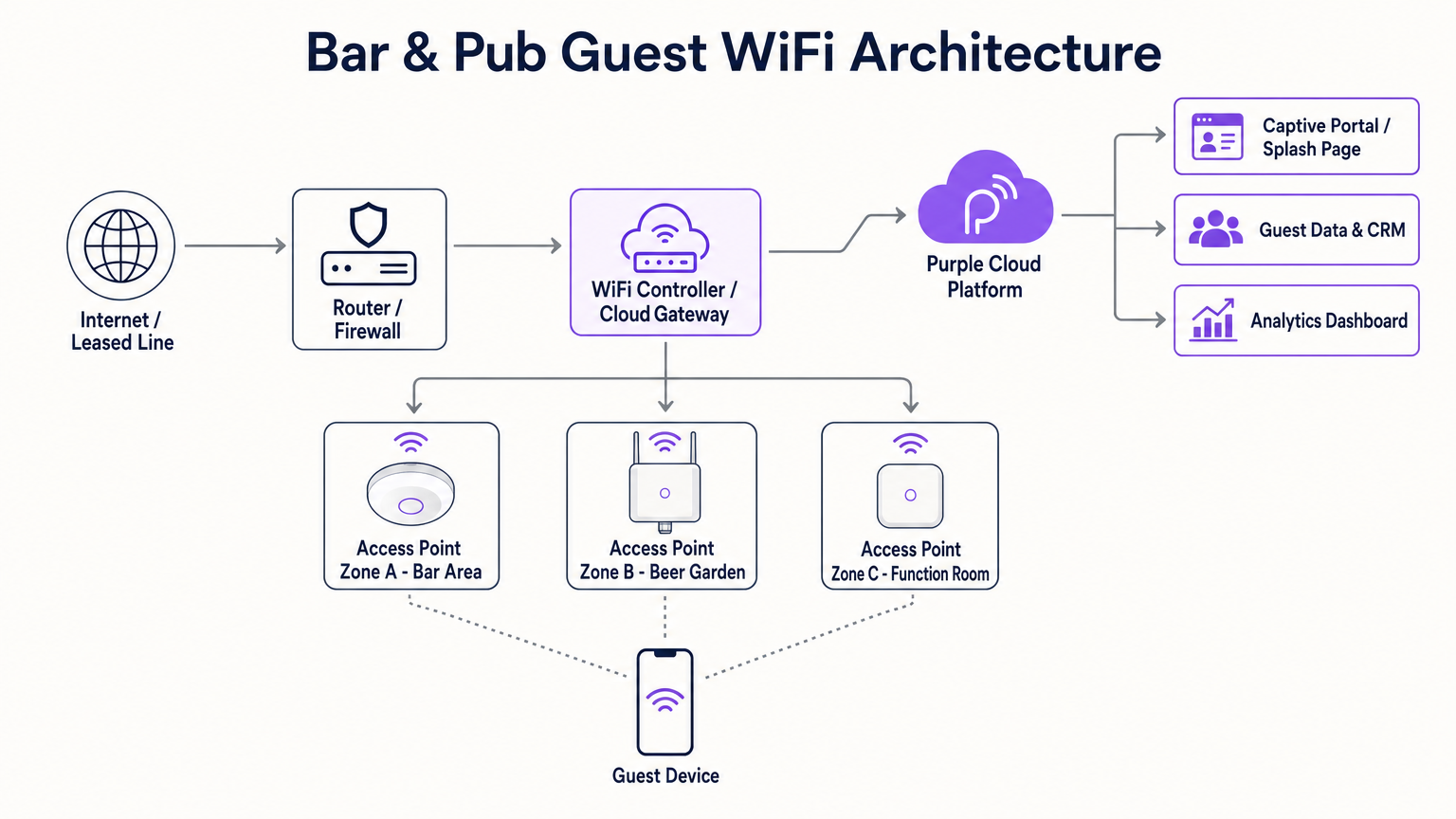
La base de cualquier implementación de WiFi de alto rendimiento en hostelería es una arquitectura de red resiliente y escalable. Los routers de consumo son completamente insuficientes para las demandas de densidad y rendimiento de un bar o pub moderno. En su lugar, los locales requieren puntos de acceso (APs) de nivel empresarial gestionados a través de un controlador LAN inalámbrico centralizado o una puerta de enlace basada en la nube. Esto permite un roaming sin interrupciones, una aplicación de políticas unificada y una monitorización proactiva en toda la propiedad.
Al seleccionar hardware, los APs de doble banda que soportan 802.11ac (Wi-Fi 5) o, preferiblemente, 802.11ax (Wi-Fi 6) son esenciales. Wi-Fi 6 ofrece ventajas significativas en entornos de alta densidad, utilizando Acceso Múltiple por División de Frecuencia Ortogonal (OFDMA) y Entrada Múltiple Salida Múltiple de Múltiples Usuarios (MU-MIMO) para manejar eficientemente conexiones concurrentes. Para la planificación de cobertura, una regla general es un AP por cada 1,500 a 2,000 pies cuadrados de espacio interior, aunque esto debe validarse mediante un estudio de sitio predictivo y activo profesional para tener en cuenta la atenuación de paredes de ladrillo, accesorios metálicos y alta densidad de clientes.
Las áreas exteriores, como jardines de cerveza y terrazas, requieren APs especializados con clasificación IP67 para soportar factores ambientales. Además, la conectividad de backhaul es crítica. Si bien una conexión FTTC estándar puede ser suficiente para un pub pequeño, los locales más grandes o aquellos que dependen en gran medida de sistemas de Punto de Venta (POS) basados en la nube deberían invertir en una línea dedicada. Como se detalla en nuestra guía sobre ¿Qué es una Línea Dedicada? Internet Empresarial Exclusivo , esto proporciona una conexión simétrica y sin contención, asegurando que el tráfico de invitados no estrangule las operaciones comerciales críticas.
Segmentación y Seguridad de la Red
La seguridad y el cumplimiento son primordiales. La red WiFi para invitados debe estar estrictamente segregada de la red corporativa, particularmente de la infraestructura de POS y procesamiento de pagos. Esto se logra típicamente a través de Redes de Área Local Virtual (VLANs) y reglas de firewall robustas. No segmentar la red constituye una grave violación del cumplimiento de PCI DSS, exponiendo al local a un riesgo financiero y reputacional significativo.
Además, la implementación de un Captive Portal no es meramente una herramienta de marketing; es un control de seguridad crítico. El portal autentica a los usuarios y exige la aceptación de una Política de Uso Aceptable (AUP), mitigando la responsabilidad del local por actividades ilegales realizadas a través de la red. También se debe implementar un filtrado de contenido a nivel de DNS o firewall para bloquear dominios maliciosos y contenido inapropiado, asegurando un entorno de navegación seguro.
Guía de Implementación
Paso 1: Estudio de Sitio y Planificación de Capacidad
Antes de adquirir hardware, realice un estudio de sitio exhaustivo. Identifique zonas de alta densidad (por ejemplo, la barra principal, salones de eventos) y posibles fuentes de interferencia. Calcule el número esperado de dispositivos concurrentes, teniendo en cuenta que la mayoría de los clientes llevan al menos uno, y a menudo dos, dispositivos conectados. Estos datos dictarán la densidad de APs requerida, el presupuesto PoE del switch y la capacidad de backhaul de internet.
Paso 2: Adquisición e Instalación de Hardware
Seleccione equipos de red de nivel empresarial de proveedores reputados. Asegúrese de que los switches proporcionen suficiente Power over Ethernet (PoE+) para alimentar todos los APs. Al montar los APs, la colocación en el techo suele ser óptima para una propagación sin obstáculos. Asegúrese de que los tendidos de cableado estén debidamente certificados y de que los APs exteriores estén correctamente conectados a tierra y sellados contra la intemperie.
Paso 3: Configuración y Segmentación de la Red
Configure el router central y los switches para establecer VLANs aisladas para el tráfico corporativo, sistemas POS, dispositivos IoT (por ejemplo, iluminación inteligente, HVAC) y WiFi para invitados. Implemente políticas de modelado de ancho de banda y Calidad de Servicio (QoS) en la VLAN de invitados para evitar que usuarios individuales monopolicen la conexión, garantizando un nivel de servicio básico para todos los clientes. Para obtener más información sobre la planificación del ancho de banda, consulte nuestra guía completa: Velocidad de WiFi en Hoteles: Qué Esperan los Huéspedes y Cómo Ofrecerla . (Los hablantes de alemán también pueden consultar Hotel WiFi-Geschwindigkeit: Was Gäste erwarten und wie man es liefert ).
Paso 4: Configuración del Captive Portal y Autenticación
Integre una solución robusta de Captive Portal, como la plataforma WiFi para Invitados de Purple. Diseñe la página de bienvenida para que se alinee con la marca del lugar, manteniendo el proceso de autenticación lo más sencillo posible. Los métodos de autenticación comunes incluyen el registro por correo electrónico, la verificación por SMS o el inicio de sesión social. Fundamentalmente, asegúrese de que el proceso de captura de datos incluya casillas de verificación de consentimiento explícitas y granulares para las comunicaciones de marketing, acompañadas de un enlace claro a la política de privacidad para mantener el cumplimiento de GDPR.
Paso 5: Análisis e integración con CRM
Conecte la plataforma WiFi a su CRM o software de email marketing existente. Esto permite la transferencia fluida de datos de perfil capturados y métricas de comportamiento (por ejemplo, frecuencia de visitas, tiempo de permanencia). Configure flujos de trabajo automatizados, como el envío de un correo electrónico de bienvenida a los visitantes por primera vez o una oferta de reenganche a los clientes que no han visitado en los últimos 30 días.
Mejores prácticas
- Priorice la incorporación sin fricciones: El Captive Portal debe ser intuitivo y optimizado para dispositivos móviles. Evite solicitar información personal excesiva de antemano; una dirección de correo electrónico o un número de teléfono son suficientes para la elaboración del perfil inicial.
- Aproveche la autenticación basada en perfiles: Como se discutió en nuestro análisis sobre el futuro del WiFi seguro y sin interrupciones, la autenticación basada en perfiles (como OpenRoaming) permite a los huéspedes recurrentes conectarse automáticamente sin necesidad de volver a autenticarse, mejorando significativamente la experiencia del usuario mientras se siguen registrando datos analíticos valiosos. Purple actúa como un proveedor de identidad gratuito para servicios como OpenRoaming bajo la licencia Connect.
- Asegure el cumplimiento de GDPR desde el diseño: Nunca utilice casillas premarcadas para el consentimiento de marketing. Separe claramente la aceptación de los términos de servicio de las suscripciones de marketing.
- Monitoree y optimice continuamente: Revise regularmente el panel de control de WiFi Analytics para identificar puntos muertos de cobertura, monitorear los tiempos de uso pico y evaluar las tasas de conversión de sus campañas de marketing.
Solución de problemas y mitigación de riesgos
Incluso las redes más meticulosamente diseñadas encuentran problemas. Aquí se presentan los modos de fallo comunes y las estrategias de mitigación:
- Modo de fallo: Agotamiento de DHCP. En entornos de alta rotación como bares concurridos, el servidor DHCP puede quedarse sin direcciones IP para asignar, impidiendo que nuevos dispositivos se conecten.
- Mitigación: Reduzca el tiempo de concesión de DHCP en la VLAN de invitados a 1 o 2 horas, asegurando que las direcciones IP se devuelvan rápidamente al grupo cuando los clientes se vayan. Expanda el alcance de la subred DHCP (por ejemplo, de una /24 a una /22 o /21) para acomodar más dispositivos concurrentes.
- Modo de fallo: Interferencia de co-canal. Si múltiples APs operan en el mismo canal de frecuencia, sus señales interfieren, degradando severamente el rendimiento.
- Mitigación: Implemente la asignación dinámica de canales a través del controlador inalámbrico. Asegúrese de que las radios de 2.4 GHz solo utilicen canales no superpuestos (1, 6 y 11) y minimice el uso de canales anchos (por ejemplo, 40 MHz u 80 MHz) en implementaciones densas, a menos que opere exclusivamente en las bandas de 5 GHz o 6 GHz.
- Modo de fallo: Problemas de omisión del Captive Portal. Los sistemas operativos móviles modernos emplean la aleatorización de MAC y estrictas comprobaciones de seguridad que a veces pueden interferir con la redirección del Captive Portal.
- Mitigación: Asegúrese de que la red utilice un certificado SSL de confianza para el Captive Portal. Incluya en la lista blanca los dominios esenciales (por ejemplo, las URL de detección de Captive Portal de Apple y Google) en la configuración de "jardín amurallado" del firewall para garantizar que el sistema operativo pueda activar de forma fiable la solicitud de inicio de sesión.
ROI e impacto empresarial
El verdadero valor del WiFi para bares reside en su capacidad para generar inteligencia empresarial accionable. Al transformar el tráfico peatonal anónimo en una base de datos de clientes estructurada, los establecimientos pueden ejecutar iniciativas de marketing altamente dirigidas.
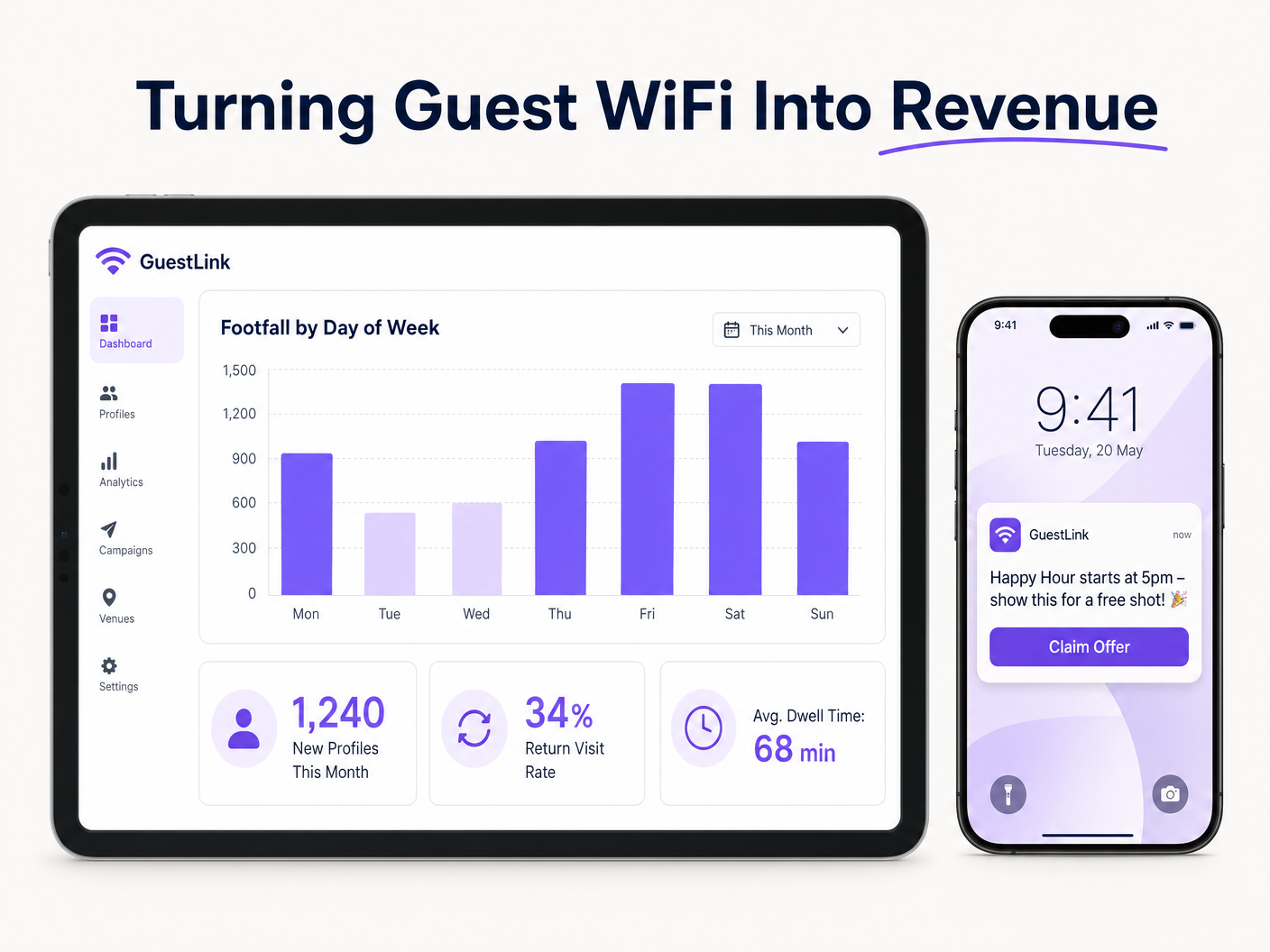
Considere un escenario en el que los análisis revelan una caída significativa en la afluencia de público los martes por la noche. Utilizando los datos capturados a través del WiFi de invitados, el equipo de marketing puede segmentar la base de datos para identificar a los clientes que visitan con frecuencia los fines de semana pero rara vez los días laborables. Se puede enviar una campaña de correo electrónico automatizada y personalizada que ofrezca una promoción solo para los martes a este grupo específico. Este enfoque dirigido produce tasas de conversión muy superiores en comparación con el marketing de difusión genérico.
El ROI se mide no solo en el volumen de datos recopilados, sino en los ingresos incrementales generados por estas campañas dirigidas, la reducción de la rotación de clientes y la eficiencia operativa mejorada obtenida a través de la información sobre las horas pico de actividad y los tiempos de permanencia. Este enfoque basado en datos es cada vez más crítico en todos los sectores, desde Hostelería y Comercio minorista hasta Salud y Transporte . Además, a medida que la industria evoluciona, los líderes están reconociendo el impacto más amplio de la infraestructura conectada, una tendencia destacada por desarrollos como Purple Signals Higher Education Ambitions with Appointment of VP Education Tim Peers y la creciente importancia de la conectividad sin interrupciones en entornos móviles, como se detalla en Wi Fi in Auto: The Complete 2026 Enterprise Guide .
Definiciones clave
Captive Portal
A web page that a user of a public-access network is obliged to view and interact with before access is granted.
Crucial for authenticating users, presenting Acceptable Use Policies, and capturing first-party data for marketing.
VLAN (Virtual Local Area Network)
A logical subnetwork that groups a collection of devices from different physical LANs.
Used to isolate guest WiFi traffic from sensitive corporate and POS traffic, ensuring security and compliance.
Leased Line
A dedicated, fixed-bandwidth, symmetric data connection connecting a business directly to the internet.
Necessary for high-capacity venues to ensure consistent throughput that isn't shared with neighboring premises.
Wi-Fi 6 (802.11ax)
The latest generation of the Wi-Fi standard, designed to improve efficiency and performance in dense environments.
Essential for venues with high concurrent device counts, utilizing technologies like OFDMA to handle multiple users simultaneously.
DHCP Exhaustion
A state where the DHCP server has allocated all available IP addresses in its pool, preventing new devices from connecting.
A common issue in high-turnover hospitality environments; mitigated by reducing DHCP lease times and expanding subnet sizes.
PCI DSS (Payment Card Industry Data Security Standard)
An information security standard for organizations that handle branded credit cards.
Mandates strict network segmentation to ensure guest WiFi users cannot access payment processing infrastructure.
Profile-Based Authentication
A method where returning users are automatically authenticated based on their device profile without needing to interact with the captive portal again.
Improves user experience and encourages seamless connectivity, facilitating ongoing analytics tracking.
Co-Channel Interference
Performance degradation caused when multiple access points operate on the same frequency channel, causing them to compete for airtime.
Addressed through careful RF planning, dynamic channel assignment, and utilizing non-overlapping channels.
Ejemplos resueltos
A busy city-centre pub with a capacity of 300 patrons and a large outdoor beer garden is experiencing severe WiFi performance degradation on Friday nights. The current setup consists of two consumer-grade ISP routers. The venue wants to upgrade the network to ensure reliable connectivity and begin capturing customer data for marketing.
- Replace the consumer routers with a dedicated enterprise firewall/router and a PoE+ managed switch. 2. Provision a dedicated leased line (e.g., 100Mbps symmetrical) to handle the backhaul traffic. 3. Deploy three indoor Wi-Fi 6 access points (ceiling-mounted) in the main bar area and two IP67-rated outdoor APs in the beer garden. 4. Configure the switch to create isolated VLANs for the corporate network, POS terminals, and guest WiFi. 5. Integrate the Purple Guest WiFi platform, configuring a branded captive portal with email authentication and explicit GDPR-compliant marketing opt-ins. 6. Reduce the DHCP lease time on the guest VLAN to 2 hours to prevent IP exhaustion.
A regional chain of 15 sports bars wants to standardize their guest WiFi to build a centralized CRM database. Currently, each venue manages its own standalone network with varying SSIDs and no data capture mechanisms.
- Standardize the hardware stack across all venues using cloud-managed APs and switches from a single vendor. 2. Deploy a centralized cloud controller to manage configurations and firmware updates across the entire estate. 3. Implement a unified SSID (e.g., 'Free_SportsBar_WiFi') across all 15 locations. 4. Deploy the Purple analytics platform centrally, configuring a consistent captive portal experience. 5. Enable profile-based authentication so a guest registering at Venue A automatically connects when visiting Venue B. 6. Integrate the centralized WiFi database via API with the chain's primary CRM system to trigger automated loyalty campaigns.
Preguntas de práctica
Q1. A historic pub with thick stone walls is planning a WiFi upgrade. The manager wants to place a single high-powered AP in the centre of the venue to save on cabling costs. As the IT architect, what is your recommendation?
Sugerencia: Consider how building materials affect RF propagation and the limitations of client device transmit power.
Ver respuesta modelo
Advise against a single AP deployment. Thick stone walls severely attenuate RF signals, particularly in the 5 GHz band. Even if a high-powered AP can transmit a signal to the edges of the venue, mobile devices (which have weak transmitters) will struggle to send data back, resulting in a poor user experience. Recommend a professional site survey and a multi-AP deployment using lower transmit power to ensure adequate coverage and capacity throughout the venue.
Q2. During an audit, you discover that the guest WiFi network is operating on the same VLAN as the venue's cloud-based EPOS system. The venue owner argues that because the EPOS is cloud-based, local segmentation is unnecessary. How do you respond?
Sugerencia: Focus on compliance standards and the risks of lateral movement within a flat network.
Ver respuesta modelo
Explain that this configuration is a critical security vulnerability and a direct violation of PCI DSS compliance. Even if the EPOS communicates with the cloud, placing guest devices on the same local subnet allows malicious actors to attempt lateral movement, sniff local traffic, or launch attacks against the EPOS hardware. Immediate remediation is required to implement VLAN segregation and strict firewall rules isolating the guest network.
Q3. A venue's marketing team complains that they are capturing thousands of email addresses via the captive portal, but their email marketing campaigns have an extremely high bounce rate and low engagement. What technical or configuration issue might be causing this?
Sugerencia: Consider the user experience during onboarding and how users might bypass data entry requirements.
Ver respuesta modelo
The high bounce rate is likely due to users entering fake or disposable email addresses to bypass the captive portal quickly. To mitigate this, implement email verification (requiring the user to click a link in an email to gain full internet access) or SMS authentication. Additionally, review the captive portal design to ensure it is not overly demanding, which incentivizes users to provide false information.
Continúe leyendo esta serie
Gestión de ancho de banda para WiFi de personal: modelado, QoS y reducción de tráfico
Esta guía detalla métodos prácticos para gestionar el ancho de banda para el WiFi de personal en entornos corporativos. Cubre el modelado de tráfico, la implementación de QoS y cómo el despliegue de Purple Shield reduce la carga de la red sin requerir actualizaciones de infraestructura.
¿Qué es una Solicitud de Sondeo? Entendiendo Cómo los Dispositivos Descubren Redes
Esta guía de referencia técnica ofrece un análisis profundo de las solicitudes de sondeo IEEE 802.11, el escaneo activo versus pasivo, y el impacto de la aleatorización de MAC en el análisis de ubicaciones. Proporciona estrategias de implementación prácticas para que los arquitectos de red optimicen despliegues de alta densidad, mitiguen las tormentas de sondeo y aseguren una recopilación de datos precisa y compatible con GDPR utilizando capas de identidad autenticadas.
Cómo solucionar el WiFi lento sin actualizar tu plan de internet
Una guía de referencia técnica completa para gerentes de TI y arquitectos de red sobre cómo optimizar el rendimiento del WiFi empresarial sin aumentar el ancho de banda del ISP. Cubre la sintonización de RF, la gestión de la densidad de clientes, la implementación de QoS y cómo aprovechar el análisis de WiFi para diagnosticar y resolver cuellos de botella.