
WiFi para Pacientes: Una Guía Completa para Fideicomisos del NHS y Operadores Hospitalarios
Una guía técnica y comercial definitiva para Fideicomisos del NHS y operadores hospitalarios sobre cómo implementar, asegurar y monetizar el WiFi para pacientes. Cubre la segmentación de red, el cumplimiento de DSPT, el filtrado de contenido y el aprovechamiento de análisis para mejorar los resultados de los pacientes.
Escucha esta guía
Ver transcripción del podcast
Resumen Ejecutivo
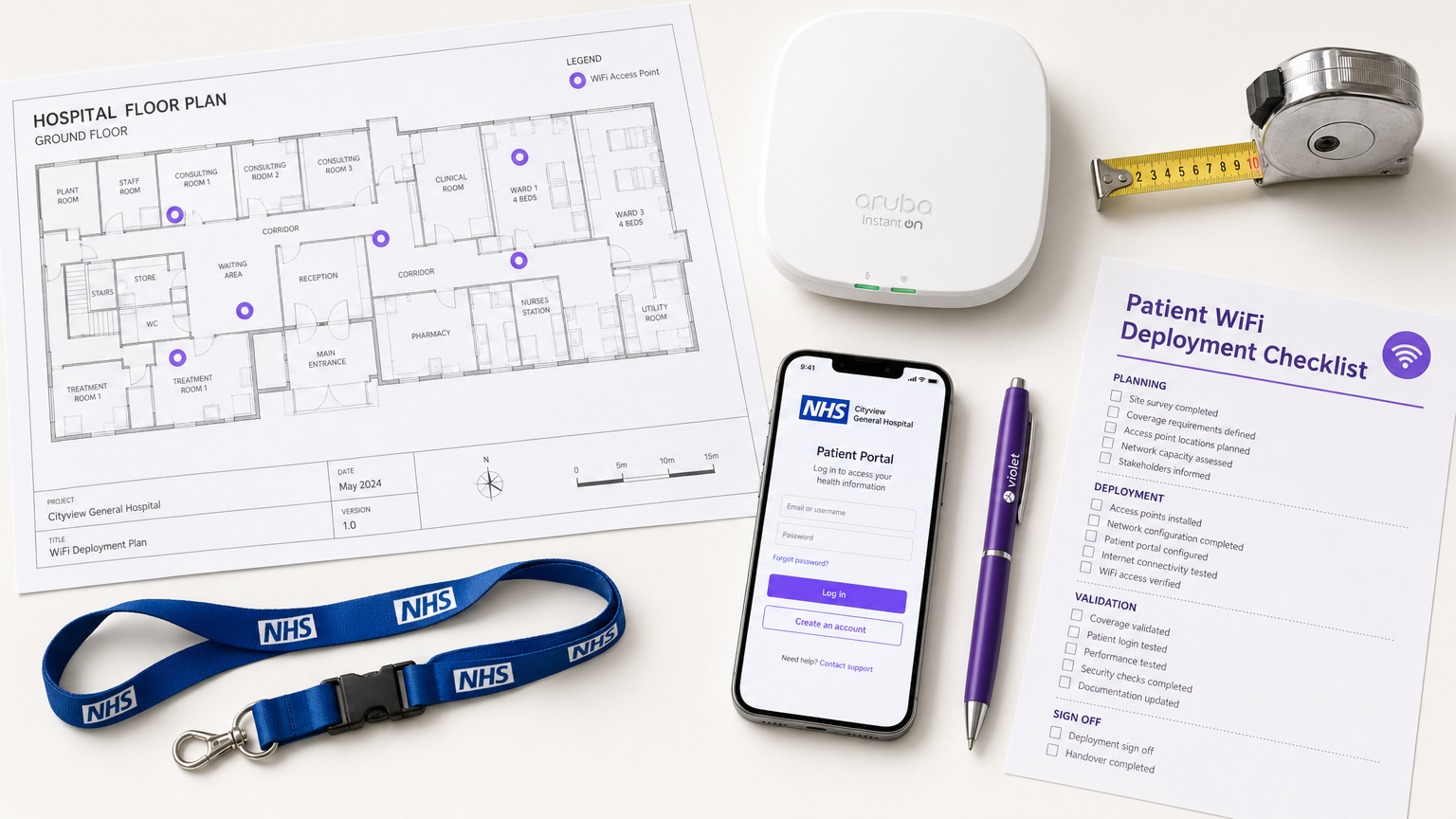
Proporcionar WiFi para pacientes robusto, seguro y conforme ya no es una comodidad "deseable" para los Fideicomisos del NHS y los operadores de hospitales privados, es un requisito crítico de infraestructura. Los pacientes esperan conectividad para gestionar sus vidas, comunicarse con la familia y acceder a servicios de salud digitales durante su estancia.
Sin embargo, ofrecer esta conectividad en un entorno clínico introduce importantes desafíos técnicos y de gobernanza.
Esta guía proporciona un marco integral para gerentes de TI, arquitectos de red y CTOs para diseñar, implementar y gestionar redes WiFi para pacientes. Exploramos la necesidad de una segmentación de red estricta, las complejidades del cumplimiento del Kit de Herramientas de Seguridad y Protección de Datos (DSPT), la implementación de un filtrado de contenido riguroso y los modelos comerciales que sustentan estas implementaciones. Al tratar el WiFi para pacientes como un servicio de nivel empresarial en lugar de una superposición de banda ancha para consumidores, los Fideicomisos pueden mitigar riesgos, asegurar la integridad de los sistemas clínicos y aprovechar plataformas como Guest WiFi para capturar información procesable y mejorar la satisfacción del paciente.
Análisis Técnico Detallado: Arquitectura y Estándares
La base de cualquier implementación de WiFi hospitalario es la segregación absoluta entre el tráfico de pacientes y los sistemas clínicos. Un hospital es un entorno de RF de alta densidad y alta interferencia donde los dispositivos críticos para la vida operan muy cerca de los teléfonos inteligentes de los consumidores.
Segmentación de Red y Diseño de VLAN
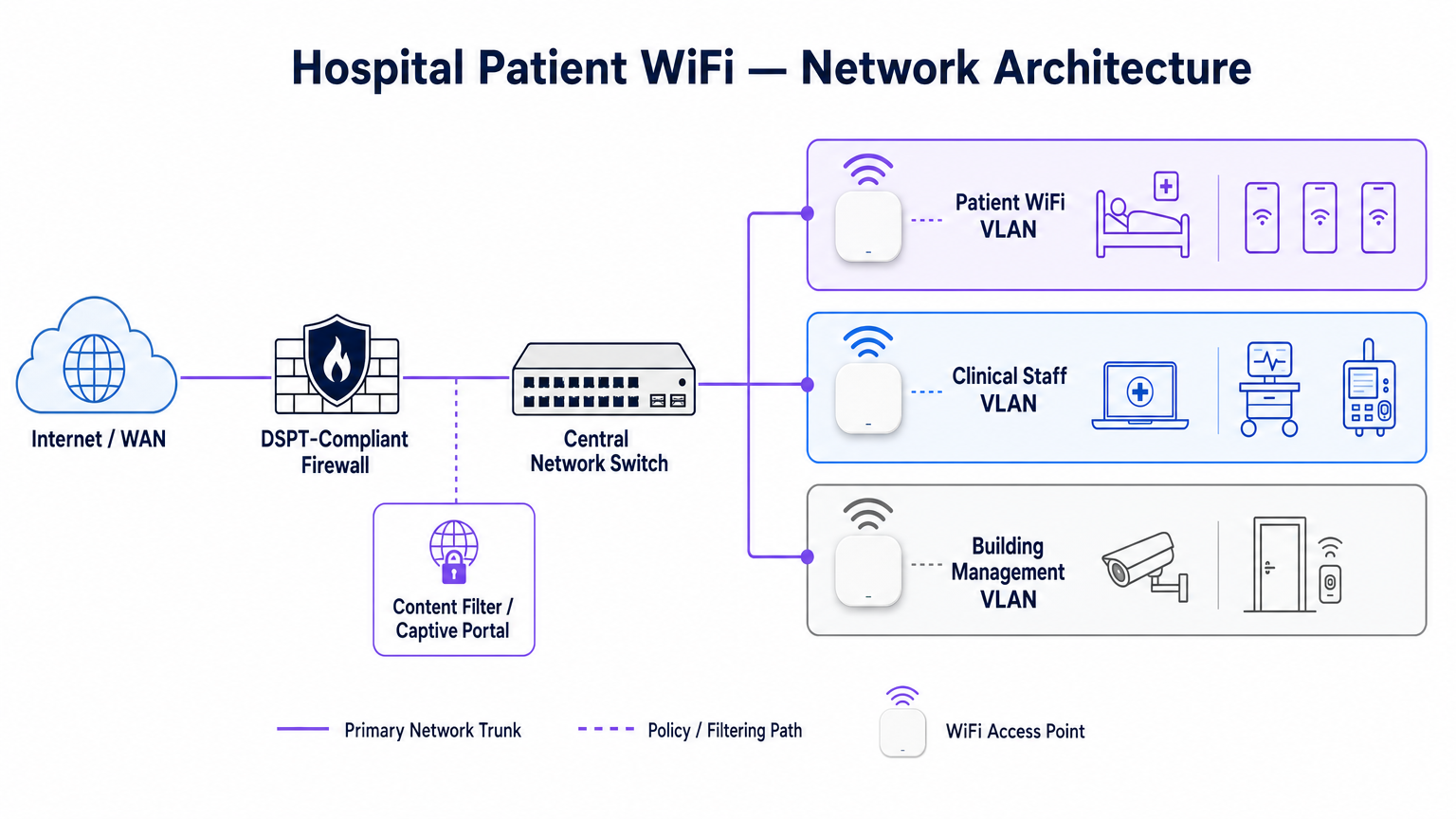
Para proteger la integridad clínica, el WiFi para pacientes debe operar en una Red de Área Local Virtual (VLAN) dedicada. La arquitectura empresarial estándar dicta un mínimo de tres segmentos distintos:
- VLAN de Pacientes/Invitados: Enruta a través de un captive portal, aplica un filtrado de contenido estricto y proporciona acceso solo a internet.
- VLAN Clínica: Dedicada a dispositivos del personal y equipos médicos (p. ej., bombas de infusión, estaciones de trabajo móviles). Evita el captive portal y enruta a través de una ruta segura y monitoreada.
- VLAN de Gestión de Edificios: Soporta dispositivos IoT, CCTV y controles ambientales.
El tráfico en la VLAN de Pacientes debe aislarse a nivel de switch y restringirse mediante reglas de firewall que nieguen explícitamente el enrutamiento a subredes internas.
Densidad de Puntos de Acceso y Planificación de RF
Implementar WiFi en un hospital requiere superar importantes barreras físicas: paredes revestidas de plomo, maquinaria pesada y concreto denso. Confiar en la "cobertura de pasillo" es un modo de fallo común. Un estudio de RF predictivo, seguido de una validación activa posterior a la instalación, es obligatorio.
Para nuevas implementaciones, IEEE 802.11ax (Wi-Fi 6) es el estándar de referencia. Su implementación de Acceso Múltiple por División de Frecuencia Ortogonal (OFDMA) y BSS Colouring es crucial para manejar la alta densidad de dispositivos típica de las salas hospitalarias modernas, reduciendo la latencia y mitigando la interferencia de los sistemas de telemetría médica que operan en la banda de 2.4 GHz.
Requisitos de Backhaul y Rendimiento
Un error común es aprovisionar puntos de acceso de nivel empresarial pero privarlos de un backhaul insuficiente. Un hospital de 500 camas puede generar fácilmente 1 Gbps de demanda concurrente durante las horas pico de la tarde. Los operadores deben aprovisionar líneas arrendadas dedicadas y sin contención en lugar de circuitos de banda ancha compartidos para garantizar el rendimiento y evitar cuellos de botella en la red central. Para más contexto sobre conectividad dedicada, consulte ¿Qué es una Línea Arrendada? Internet Empresarial Dedicado .
Guía de Implementación: Cumplimiento y Filtrado
Implementar la infraestructura física es solo la mitad del desafío; la superposición de gobernanza y cumplimiento es igualmente crítica.
Cumplimiento de DSPT
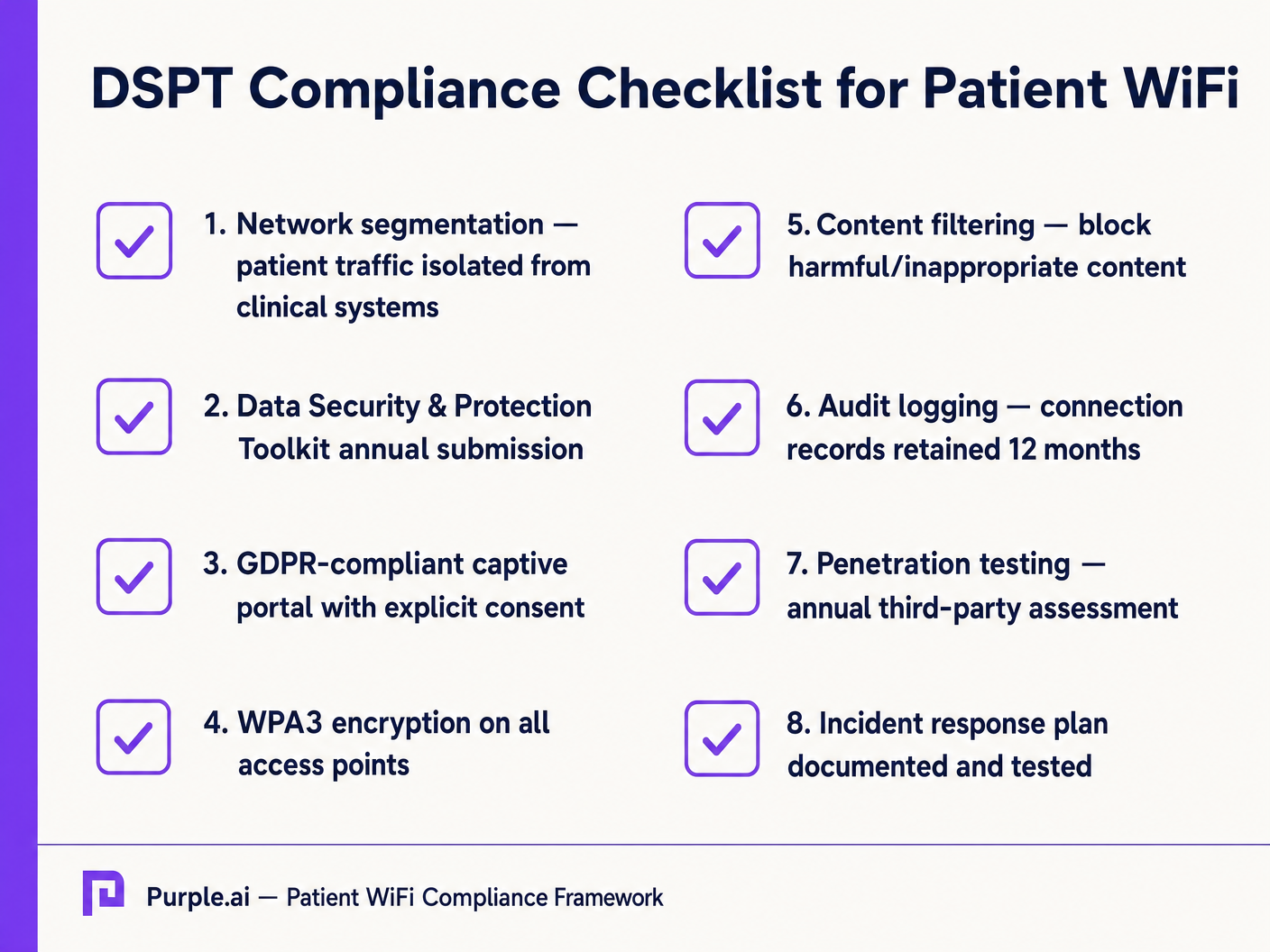
Para los Fideicomisos del NHS, la adhesión al Kit de Herramientas de Seguridad y Protección de Datos (DSPT) no es negociable. Las implementaciones de WiFi para pacientes deben evidenciar:
- Segmentación de red estricta.
- Controles de acceso robustos y registro de auditoría (registros de conexión conservados por un mínimo de 12 meses).
- Pruebas de penetración anuales por terceros.
Filtrado de Contenido
La guía del NHS exige que el WiFi para pacientes debe bloquear el acceso a contenido inapropiado o dañino, incluyendo material para adultos, sitios extremistas y plataformas de juegos de azar. Esto se logra típicamente mediante filtrado basado en DNS o en proxy aplicado directamente a la VLAN de Pacientes. La solución de filtrado debe ingerir fuentes de inteligencia de amenazas en tiempo real para bloquear dinámicamente los dominios maliciosos recién identificados.
Captive Portals y GDPR
El captive portal es la puerta de entrada a la red y el mecanismo principal para capturar el consentimiento del usuario. Bajo GDPR, los Fideicomisos deben obtener un consentimiento explícito e informado antes de procesar datos personales (como direcciones MAC o direcciones de correo electrónico). El portal debe presentar una política de privacidad clara y opciones de suscripción explícitas. La utilización de una plataforma robusta garantiza el cumplimiento al tiempo que permite la recopilación de valiosos datos demográficos.
ROI e Impacto Comercial: Modelos Gratuitos vs. de Pago
La estrategia comercial detrás del WiFi para pacientes define su sostenibilidad a largo plazo.
El Modelo de WiFi Gratuito
La gran mayoría de los Fideicomisos del NHS ofrecen WiFi para pacientes de forma gratuita en el punto de uso. Este modelo se financia típicamente a través de gastos de capital o presupuestos operativos. El ROI se mide en la satisfacción del paciente (a menudo reflejada en Friends y puntuaciones de las pruebas familiares) y la reducción de la carga administrativa para el personal clínico, que ya no necesita atender quejas de conectividad.
El Modelo de Concesionario
Algunos Fideicomisos más grandes emplean un modelo de concesionario, donde un proveedor de servicios gestionados (MSP) externo financia la infraestructura a cambio de derechos de monetización. Esto puede implicar mostrar publicidad dirigida a través del Captive Portal u ofrecer un servicio por niveles (navegación básica gratuita, streaming premium de pago). Si adoptan este modelo, los Fideicomisos deben asegurarse de que el contenido publicitario sea estrictamente examinado para alinearse con los valores del NHS y de que las prácticas de monetización de datos cumplan con GDPR.
Al integrar WiFi Analytics , los Fideicomisos pueden monitorear la utilización de la red, rastrear los tiempos de permanencia de los pacientes y activar encuestas de retroalimentación automatizadas después de la conexión, transformando un centro de costos en un activo estratégico para la mejora operativa. Este enfoque basado en datos refleja implementaciones exitosas en otros sectores, como Salud y Minorista .
Definiciones clave
VLAN (Virtual Local Area Network)
A logical subnetwork that groups a collection of devices from different physical LANs. Essential for isolating patient traffic from clinical systems.
Used by network architects to ensure that a compromised patient device cannot access sensitive medical equipment or electronic health records.
DSPT (Data Security and Protection Toolkit)
An online self-assessment tool that allows NHS organisations to measure their performance against the National Data Guardian's 10 data security standards.
Mandatory for all NHS Trusts; failure to properly segment patient WiFi or log access can result in a failed DSPT submission.
Captive Portal
A web page that a user of a public-access network is obliged to view and interact with before access is granted.
The primary interface for capturing user consent, presenting terms of use, and applying brand identity to the WiFi experience.
802.11ax (Wi-Fi 6)
The sixth generation of the Wi-Fi standard, designed specifically to improve performance in high-density environments.
Crucial for hospital wards where dozens of patients, visitors, and staff devices are competing for airtime simultaneously.
OFDMA (Orthogonal Frequency-Division Multiple Access)
A feature of Wi-Fi 6 that allows a single transmission to deliver data to multiple devices simultaneously.
Reduces latency and improves efficiency in crowded hospital environments, preventing the network from grinding to a halt during peak hours.
Content Filtering
The use of software or hardware to restrict the content that a reader is authorised to access over the network.
Required by NHS guidance to prevent access to illegal, extremist, or adult content on patient networks.
Leased Line
A dedicated, fixed-bandwidth, symmetric data connection connecting a business directly to the internet exchange.
Necessary for hospital WiFi backhaul to ensure guaranteed throughput, avoiding the contention issues of shared broadband.
MAC Address
A unique identifier assigned to a network interface controller (NIC) for use as a network address in communications.
Considered personal data under GDPR; its collection and storage by the WiFi analytics platform requires explicit user consent.
Ejemplos resueltos
A 400-bed NHS Trust is experiencing severe network congestion on its legacy patient WiFi during the hours of 6 PM to 9 PM, leading to patient complaints and staff distraction. The current setup uses a shared 500 Mbps broadband connection and Wi-Fi 4 (802.11n) access points in the corridors.
- Upgrade backhaul to a dedicated 1 Gbps symmetrical leased line to guarantee peak-hour throughput. 2. Replace corridor-based Wi-Fi 4 APs with in-room Wi-Fi 6 (802.11ax) APs to improve RF penetration and handle high device density via OFDMA. 3. Implement traffic shaping on the firewall to cap individual user bandwidth at 5 Mbps, preventing single users from monopolising the connection with 4K streaming.
A private hospital group wants to deploy a new patient WiFi network but is concerned about the DSPT compliance implications of capturing patient data on the captive portal.
Deploy a GDPR-compliant captive portal solution (like Purple) that separates authentication data from clinical data. Configure the portal to require explicit opt-in for any data processing beyond the minimum required for network access. Ensure the Patient VLAN is strictly isolated from the Clinical VLAN via the core firewall. Implement DNS-based content filtering to block malicious and inappropriate categories.
Preguntas de práctica
Q1. An NHS Trust wants to implement a single SSID for both staff and patients to 'simplify the user experience'. They plan to use a captive portal to differentiate user types. Is this approach recommended?
Sugerencia: Consider the DSPT requirements for network segmentation and the risk of a compromised patient device.
Ver respuesta modelo
No, this approach is highly discouraged and introduces significant security risks. Patient and clinical staff traffic must be segregated at the VLAN level with separate SSIDs. Relying solely on a captive portal for differentiation does not provide adequate Layer 2 isolation, putting clinical systems at risk from malware or lateral movement originating from untrusted patient devices.
Q2. A hospital is planning to upgrade its patient WiFi and wants to ensure adequate coverage. The IT manager suggests placing access points in the main corridors to cover the adjacent patient rooms and save on hardware costs. What is the flaw in this plan?
Sugerencia: Think about the physical construction of hospital environments and RF attenuation.
Ver respuesta modelo
Corridor placement is a flawed strategy in hospitals. Hospital walls often contain lead lining (for X-ray rooms), heavy concrete, and dense infrastructure that severely attenuates RF signals. This results in poor in-room coverage, high latency, and dropped connections. Access points should be deployed inside patient rooms or wards based on a professional predictive RF survey.
Q3. A Trust has deployed patient WiFi but is receiving complaints about slow speeds during the evening. The APs are Wi-Fi 6, and the core switches are 10G capable. The internet connection is a 1 Gbps shared broadband line. What is the likely bottleneck?
Sugerencia: Differentiate between local network capacity and WAN backhaul.
Ver respuesta modelo
The bottleneck is the shared broadband internet connection. Even with high-capacity local infrastructure (Wi-Fi 6 and 10G switches), a shared broadband line suffers from contention ratios, meaning the bandwidth is shared with other premises in the area. During evening peak hours, this contention severely degrades throughput. The Trust should upgrade to a dedicated, uncontended leased line.
Continúe leyendo esta serie
Gestión de ancho de banda para WiFi de personal: modelado, QoS y reducción de tráfico
Esta guía detalla métodos prácticos para gestionar el ancho de banda para el WiFi de personal en entornos corporativos. Cubre el modelado de tráfico, la implementación de QoS y cómo el despliegue de Purple Shield reduce la carga de la red sin requerir actualizaciones de infraestructura.
¿Qué es una Solicitud de Sondeo? Entendiendo Cómo los Dispositivos Descubren Redes
Esta guía de referencia técnica ofrece un análisis profundo de las solicitudes de sondeo IEEE 802.11, el escaneo activo versus pasivo, y el impacto de la aleatorización de MAC en el análisis de ubicaciones. Proporciona estrategias de implementación prácticas para que los arquitectos de red optimicen despliegues de alta densidad, mitiguen las tormentas de sondeo y aseguren una recopilación de datos precisa y compatible con GDPR utilizando capas de identidad autenticadas.
Cómo solucionar el WiFi lento sin actualizar tu plan de internet
Una guía de referencia técnica completa para gerentes de TI y arquitectos de red sobre cómo optimizar el rendimiento del WiFi empresarial sin aumentar el ancho de banda del ISP. Cubre la sintonización de RF, la gestión de la densidad de clientes, la implementación de QoS y cómo aprovechar el análisis de WiFi para diagnosticar y resolver cuellos de botella.