
WPA, WPA2 y WPA3: ¿Cuál es la diferencia y cuál debería usar?
Esta guía de referencia técnica autorizada explora las diferencias arquitectónicas entre los protocolos de seguridad WPA, WPA2 y WPA3. Ofrece recomendaciones de implementación prácticas para gerentes de TI y arquitectos de red, con el fin de asegurar entornos WiFi empresariales y de invitados, garantizando el cumplimiento y un rendimiento óptimo.
Escucha esta guía
Ver transcripción del podcast
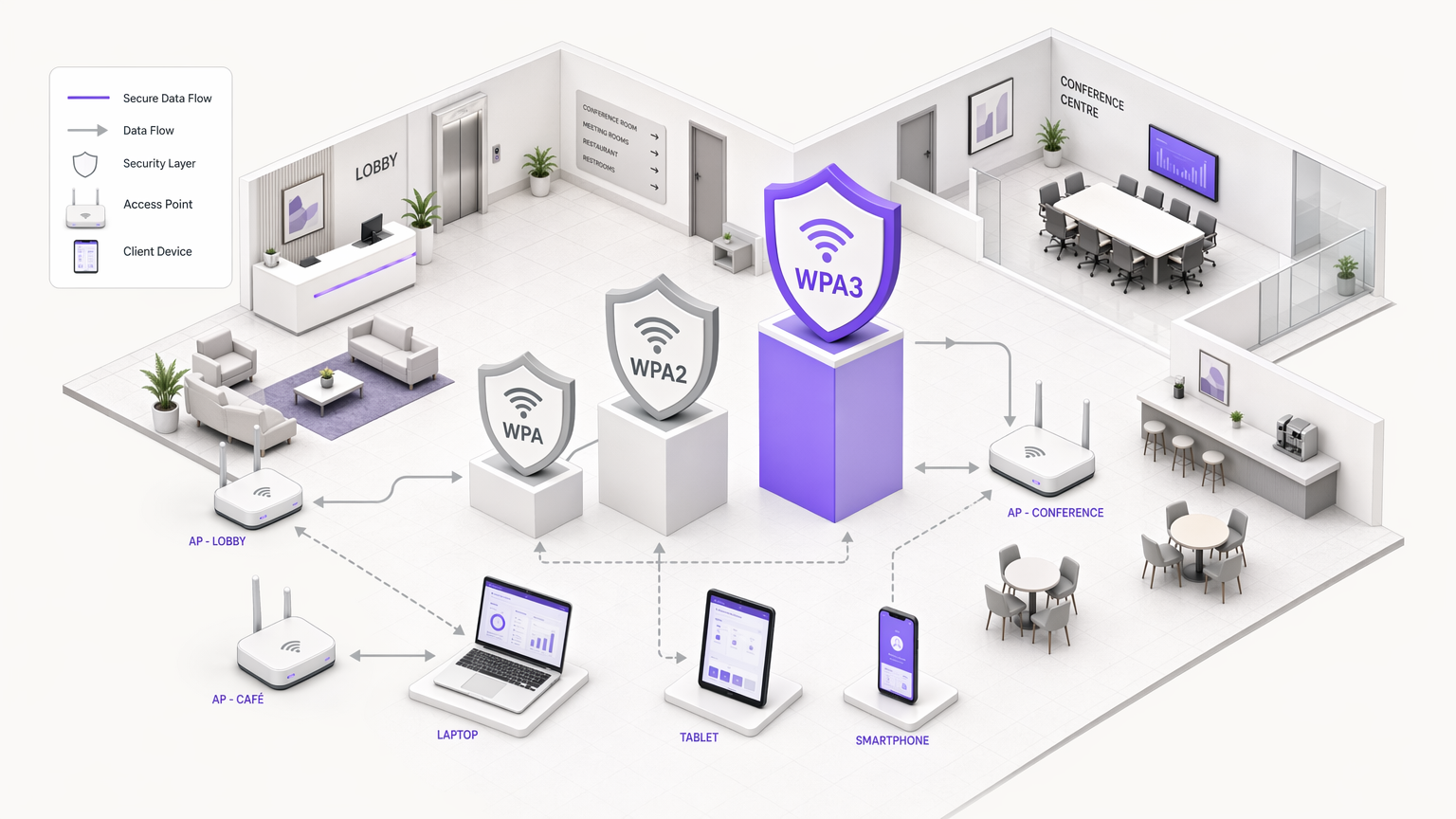
Resumen Ejecutivo
Para los gerentes de TI, arquitectos de red y CTOs que operan en entornos empresariales, la elección del protocolo de seguridad WiFi es una decisión crítica en la gestión de riesgos. A medida que los establecimientos en Hospitalidad , Comercio Minorista , Salud y Transporte expanden su huella inalámbrica, la dependencia de estándares de seguridad obsoletos introduce vulnerabilidades significativas. Esta guía de referencia técnica ofrece una comparación definitiva de las arquitecturas WPA, WPA2 y WPA3, detallando sus fundamentos criptográficos e implicaciones operativas.
Aunque WPA2 ha servido como el estándar de la industria durante casi dos décadas, sus vulnerabilidades estructurales —específicamente los ataques de diccionario fuera de línea contra el "four-way handshake"— han hecho necesaria la transición a WPA3. WPA3 introduce la Autenticación Simultánea de Iguales (SAE) para eliminar estos riesgos, junto con Enhanced Open (OWE) para asegurar redes de invitados no autenticadas. Para los operadores empresariales, el mandato es claro: WPA debe ser erradicado del entorno, WPA2-Enterprise sigue siendo una base viable para el acceso corporativo, y WPA3 debe implementarse gradualmente para asegurar el cumplimiento a largo plazo con los mandatos de PCI DSS y GDPR. Esta guía describe los mecanismos técnicos detrás de estos protocolos y proporciona una estrategia de implementación neutral respecto al proveedor para modernizar su infraestructura inalámbrica.
Análisis Técnico Detallado: Evolución Arquitectónica
La evolución de WiFi Protected Access (WPA) refleja la carrera armamentista continua entre la seguridad criptográfica y la potencia computacional. Comprender la mecánica subyacente de cada protocolo es esencial para diseñar arquitecturas de red resilientes.
WPA: El Parche de Emergencia
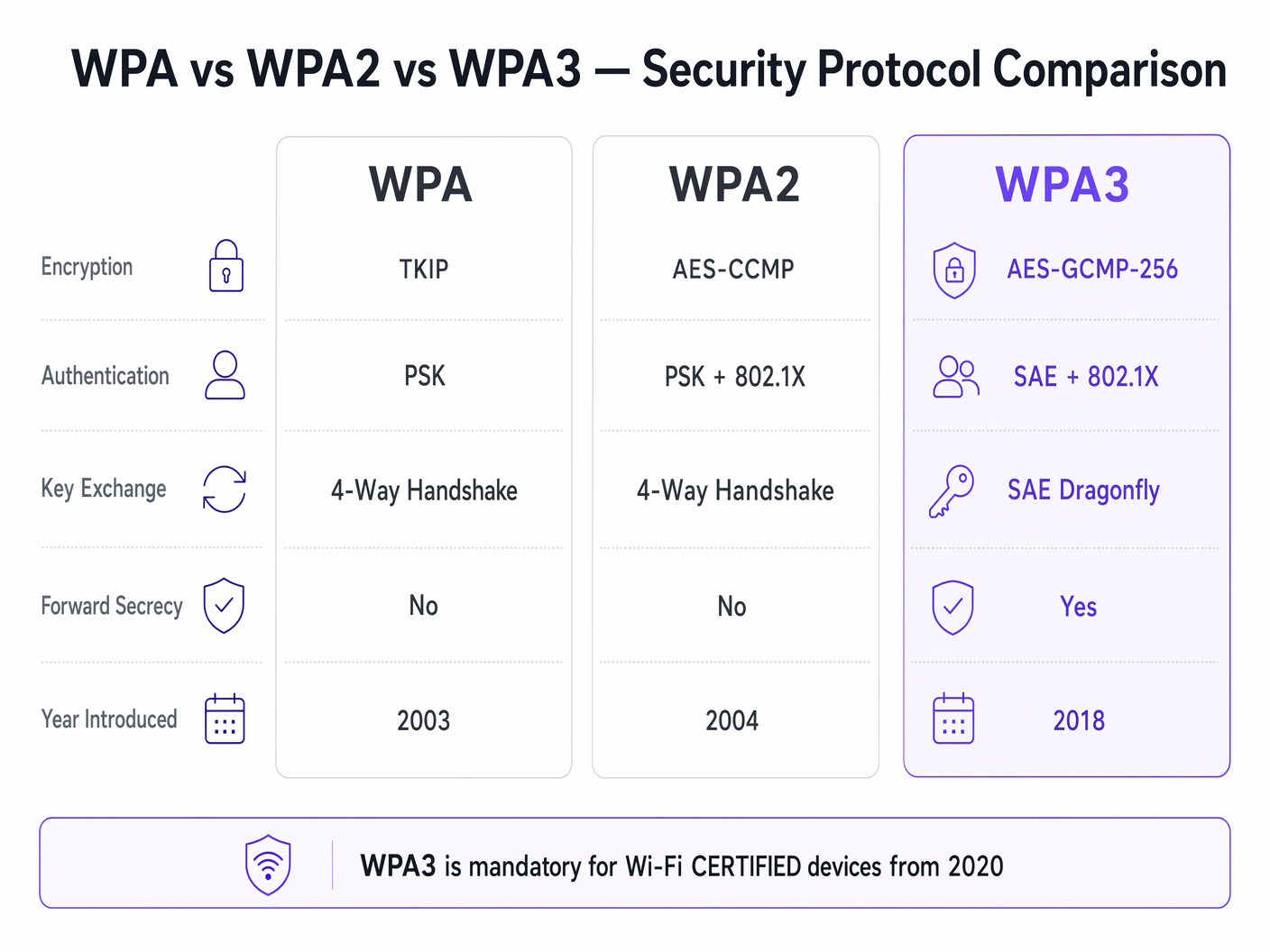
Introducido en 2003, WPA fue diseñado como una respuesta rápida al fallo catastrófico de Wired Equivalent Privacy (WEP). La innovación principal de WPA fue el Protocolo de Integridad de Clave Temporal (TKIP), que generaba dinámicamente una nueva clave de cifrado de 128 bits para cada paquete. Esto abordó la vulnerabilidad de reutilización de clave estática de WEP. Sin embargo, debido a que WPA tenía que ejecutarse en hardware WEP heredado, TKIP se construyó sobre el mismo cifrado de flujo RC4. Para 2009, la investigación criptográfica había demostrado ataques prácticos contra TKIP, haciendo que WPA fuera fundamentalmente inseguro. En entornos empresariales modernos, WPA representa una responsabilidad de seguridad crítica y debe ser activamente desaprobado.
WPA2: La Base Empresarial
Ratificado en 2004, WPA2 introdujo un cambio estructural al reemplazar TKIP con el Estándar de Cifrado Avanzado (AES) operando en Modo Contador con Protocolo de Código de Autenticación de Mensajes de Encadenamiento de Bloques de Cifrado (CCMP). AES es un cifrado de bloque robusto, y CCMP proporciona cifrado simultáneo y validación de integridad de datos. Esta arquitectura estableció WPA2 como el estándar dominante para redes empresariales.
Sin embargo, WPA2 se bifurca en dos modos operativos distintos:
WPA2-Personal (PSK): Este modo se basa en una Clave Precompartida (PSK). Cada dispositivo en el Service Set Identifier (SSID) utiliza la misma frase de contraseña para derivar claves de sesión durante el "four-way handshake". La vulnerabilidad crítica aquí es que el "four-way handshake" puede ser capturado pasivamente. Los atacantes pueden entonces someter el "handshake" capturado a ataques de diccionario fuera de línea utilizando clústeres de GPU de alto rendimiento. En consecuencia, WPA2-Personal proporciona una seguridad mínima contra ataques dirigidos si la frase de contraseña carece de suficiente entropía.
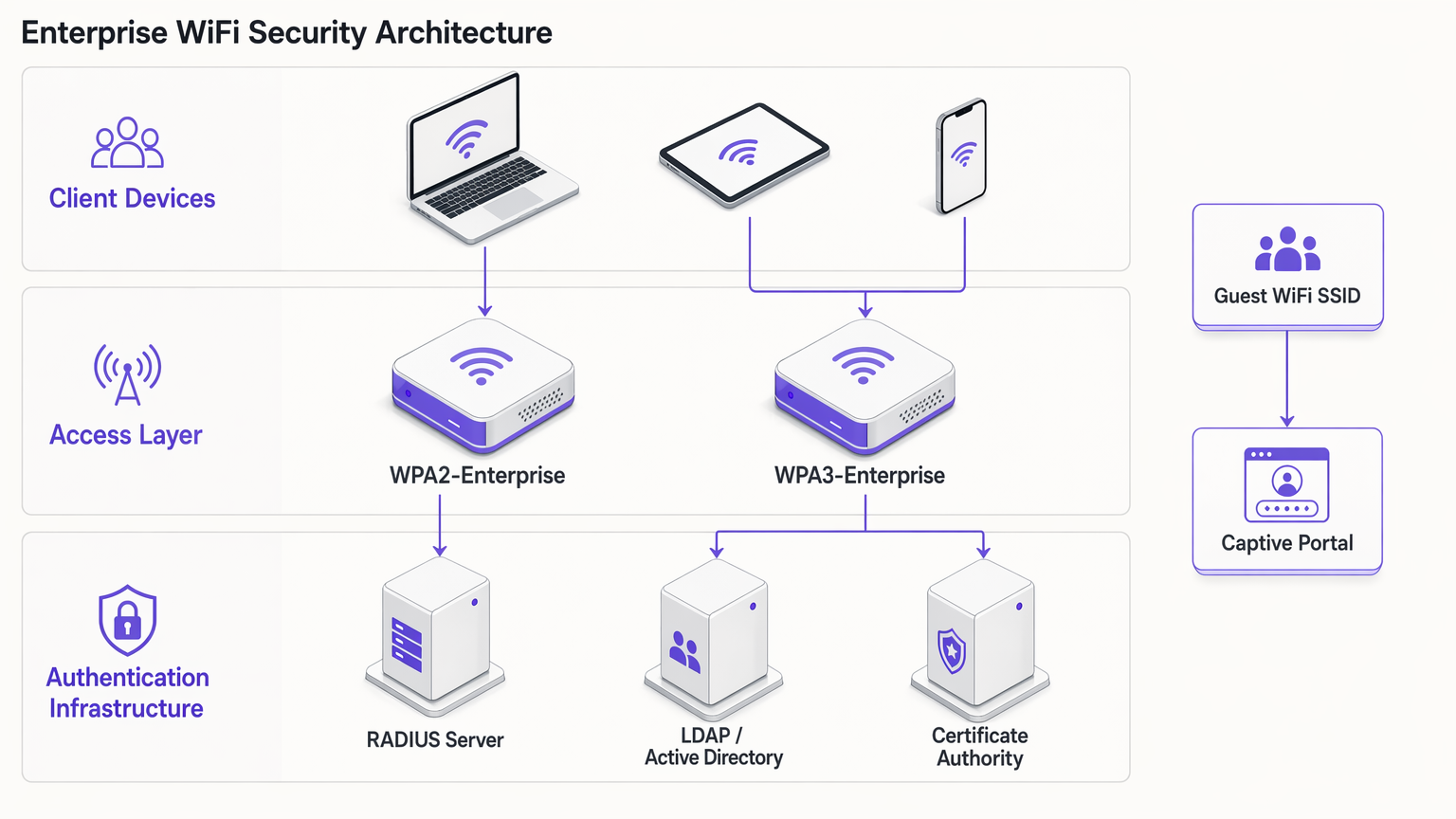
WPA2-Enterprise (802.1X): En contraste, WPA2-Enterprise aprovecha IEEE 802.1X para el control de acceso a la red basado en puertos. Los dispositivos no comparten una frase de contraseña común; en su lugar, se autentican individualmente utilizando el Protocolo de Autenticación Extensible (EAP). La autenticación es intermediada por un servidor RADIUS que se comunica con un servicio de directorio (por ejemplo, Active Directory o LDAP). Cada sesión autenticada recibe material de clave criptográfica único. Esta arquitectura mitiga los riesgos asociados con las frases de contraseña compartidas y sigue siendo el estándar base para el acceso a la red corporativa.
WPA3: El Estándar Moderno
Obligatorio para dispositivos Wi-Fi CERTIFIED desde julio de 2020, WPA3 aborda las vulnerabilidades criptográficas expuestas en WPA2 a lo largo de su vida útil.
WPA3-Personal (SAE): La característica definitoria de WPA3-Personal es el reemplazo del vulnerable "four-way handshake" por la Autenticación Simultánea de Iguales (SAE), también conocida como "Dragonfly handshake". SAE es un protocolo de prueba de conocimiento cero. Requiere interacción activa con el punto de acceso para cada intento de autenticación, haciendo que los ataques de diccionario fuera de línea sean computacionalmente inviables. Esto neutraliza eficazmente la clase de vulnerabilidad KRACK (Key Reinstallation Attacks).
WPA3-Enterprise: WPA3-Enterprise mejora la seguridad corporativa al introducir una suite de seguridad opcional de 192 bits. Este modo utiliza AES-GCMP-256 para el cifrado y HMAC-SHA-384 para la integridad del mensaje, alineándose con la suite Commercial National Security Algorithm (CNSA) requerida para implementaciones gubernamentales y financieras de alta seguridad.
Secreto Hacia Adelante: WPA3 implementa el secreto hacia adelante generando claves de sesión efímeras a través del "SAE handshake". Si un atacante registra tráfico cifrado y luego compromete la credencial de red, no puede descifrar retroactivamente el tráfico histórico. Este es un mecanismo crucial de reducción de riesgos para establecimientos que procesan datos sensibles.
Enhanced Open (OWE): Para redes de invitados, WPA3 introduce el Cifrado Inalámbrico Oportunista (OWE). OWE proporciona cifrado no autenticado: los dispositivos se conectan sin contraseña, pero el tráfico entre el dispositivo y el punto de acceso se cifra individualmente. Esto elimina la escucha pasiva en redes de invitados abiertas sin "introduciendo fricción en la conexión.
Guía de Implementación: Asegurando el Entorno Empresarial
La implementación de seguridad WiFi moderna requiere un enfoque segmentado, equilibrando los requisitos estrictos de acceso corporativo con las realidades operativas de las redes de invitados y los dispositivos IoT heredados.
Redes Corporativas y de Personal
Para las redes internas, el objetivo es una validación de identidad sólida y un cifrado robusto.
- Exigir Autenticación 802.1X: Implemente WPA2-Enterprise o WPA3-Enterprise. Nunca utilice WPA2-Personal para redes de personal.
- Implementar Métodos EAP Fuertes: Utilice EAP-TLS (Transport Layer Security) siempre que sea posible, ya que requiere certificados tanto del cliente como del servidor, proporcionando el más alto nivel de seguridad. Si la implementación de certificados no es práctica, se puede usar PEAP-MSCHAPv2, siempre que el certificado del servidor RADIUS sea estrictamente validado por los clientes.
- Habilitar el Modo de Transición WPA3: Si sus puntos de acceso son compatibles con WPA3, habilite el modo de transición. Esto permite que los clientes compatibles con WPA3 se beneficien de SAE y el secreto de reenvío, manteniendo la conectividad para los clientes WPA2 heredados. Monitoree los registros RADIUS para rastrear la tasa de migración de los dispositivos cliente.
WiFi para Invitados y Acceso Público
Las redes de invitados presentan un desafío único: equilibrar seguridad, cumplimiento y experiencia del usuario. El enfoque tradicional de transmitir una contraseña WPA2-Personal compartida es inseguro y no cumple con las regulaciones de privacidad de datos, ya que no proporciona visibilidad de la identidad del usuario.
- Implementar Captive Portals: Implemente un SSID abierto o un SSID WPA2/WPA3-Personal integrado con un captive portal. Esto asegura que los usuarios deben autenticarse y aceptar los términos y condiciones antes de obtener acceso a la red.
- Aprovechar los Proveedores de Identidad: Utilice plataformas como Purple para gestionar la autenticación de invitados. Purple puede actuar como un proveedor de identidad gratuito para servicios como OpenRoaming bajo la licencia Connect, agilizando el acceso mientras captura datos de primera parte consentidos para WiFi Analytics .
- Habilitar OWE: Si su infraestructura lo admite, habilite Opportunistic Wireless Encryption (OWE) en el SSID de invitados abierto. Esto cifra el tráfico de invitados contra el rastreo pasivo sin requerir que los usuarios ingresen una contraseña, mejorando significativamente la postura de seguridad del entorno Guest WiFi .
Segmentación de Dispositivos IoT y Heredados
Muchos dispositivos IoT, como terminales de punto de venta heredados, sistemas de gestión de edificios y cámaras IP, carecen de soporte para WPA3 o autenticación 802.1X.
- Aislar Dispositivos Heredados: No degrade la seguridad de sus redes principales para acomodar dispositivos heredados. En su lugar, cree VLANs y SSIDs dedicados específicamente para hardware IoT.
- Implementar MPSK/PPSK: Cuando su proveedor lo admita, utilice Multi Pre-Shared Key (MPSK) o Private Pre-Shared Key (PPSK) para redes IoT. Esto asigna una frase de contraseña WPA2 única a cada dispositivo IoT individual, limitando el radio de impacto si un solo dispositivo se ve comprometido.
- Restringir el Movimiento Lateral: Aplique reglas estrictas de firewall a las VLANs de IoT, permitiendo solo la comunicación saliente necesaria y bloqueando el movimiento lateral a las subredes corporativas.
Mejores Prácticas y Cumplimiento
Mantener un entorno inalámbrico seguro requiere una disciplina operativa continua.
- Gestión del Ciclo de Vida de los Certificados: En implementaciones WPA2/WPA3-Enterprise, los certificados RADIUS caducados son una causa principal de interrupciones de la red. Implemente la renovación automática de certificados y monitoree rigurosamente las fechas de vencimiento.
- Detección de AP Maliciosos: Utilice las capacidades del Sistema de Prevención de Intrusiones Inalámbricas (WIPS) de sus puntos de acceso para detectar y neutralizar puntos de acceso maliciosos que transmiten sus SSIDs corporativos.
- Cumplimiento PCI DSS 4.0: Para entornos que procesan datos de tarjetas de pago, WPA2-Personal es generalmente insuficiente. PCI DSS exige criptografía fuerte y control de acceso. Se requiere WPA2-Enterprise o WPA3-Enterprise con métodos EAP robustos para mantener el cumplimiento.
- Auditorías Regulares: Realice auditorías trimestrales de su infraestructura inalámbrica, verificando las versiones de firmware, las configuraciones criptográficas y la segmentación de los dispositivos IoT.
Solución de Problemas y Mitigación de Riesgos
Al hacer la transición a WPA3 o gestionar entornos mixtos, surgen comúnmente modos de falla específicos:
- Problemas de Compatibilidad del Cliente: Algunos clientes heredados pueden no conectarse a un SSID que opera en Modo de Transición WPA3 debido a una implementación deficiente del controlador. Si esto ocurre, es posible que deba mantener un SSID WPA2-only separado para dispositivos heredados hasta que puedan ser dados de baja.
- Errores de Tiempo de Espera 802.1X: Los tiempos de espera de autenticación en WPA2/WPA3-Enterprise a menudo son causados por la latencia entre el servidor RADIUS y el servicio de directorio, o por suplicantes de cliente mal configurados que no validan el certificado del servidor. Asegúrese de que los servidores RADIUS estén geográficamente próximos a los puntos de acceso y que los almacenes de confianza del cliente estén configurados correctamente.
- Incompatibilidad de PMF: Las tramas de gestión protegidas (PMF) son obligatorias en WPA3 y altamente recomendadas en WPA2 para prevenir ataques de desautenticación. Sin embargo, algunos clientes WPA2 más antiguos no son compatibles con PMF y no se asociarán si PMF se establece en 'Required'. Establezca PMF en 'Optional' durante la fase de transición.
ROI e Impacto Empresarial
Actualizar los protocolos de seguridad inalámbrica no es meramente un ejercicio técnico; ofrece un valor empresarial tangible:
- Mitigación de Riesgos: La transición a WPA3 y WPA2-Enterprise reduce significativamente la probabilidad de una brecha inalámbrica exitosa, mitigando el daño financiero y reputacional asociado con la exfiltración de datos.
- Garantía de Cumplimiento: La alineación con los estándares criptográficos modernos garantiza el cumplimiento de PCI DSS, GDPR y las regulaciones específicas de la industria, evitando multas regulatorias y simpsimplificando los procesos de auditoría.
- Eficiencia Operativa: La implementación de la gestión automatizada de certificados y la autenticación 802.1X reduce la sobrecarga operativa asociada con la gestión de contraseñas compartidas y la resolución de problemas de conectividad.
- Experiencia Mejorada para Huéspedes: La implementación de OWE y la autenticación fluida de Captive Portal a través de plataformas como Purple mejora la experiencia del huésped al proporcionar conectividad segura y sin fricciones, impulsando mayores tasas de adopción y una captura de datos más rica para iniciativas de marketing. Consulte Los 10 mejores ejemplos de páginas de inicio de sesión WiFi (y qué los hace funcionar) para obtener información sobre cómo optimizar el flujo de autenticación.
Escuche nuestro informe completo sobre WPA, WPA2 y WPA3 para obtener más información:
Definiciones clave
802.1X
An IEEE standard for port-based network access control that provides an authentication mechanism to devices wishing to attach to a LAN or WLAN.
The foundation of WPA2/WPA3-Enterprise, requiring a RADIUS server to validate individual user or device credentials before granting network access.
AES-CCMP
Advanced Encryption Standard with Counter Mode CBC-MAC Protocol. A robust encryption protocol introduced in WPA2.
The standard encryption mechanism that replaced the vulnerable TKIP, providing both data confidentiality and integrity.
EAP-TLS
Extensible Authentication Protocol - Transport Layer Security. An authentication method that requires both client and server certificates.
Considered the gold standard for enterprise WiFi authentication, as it eliminates reliance on passwords and prevents credential theft.
Four-Way Handshake
The process used in WPA2-Personal to derive encryption keys from the Pre-Shared Key (PSK) and establish a secure session.
The primary vulnerability point in WPA2-Personal, as it can be captured and subjected to offline dictionary attacks.
Opportunistic Wireless Encryption (OWE)
A WPA3 feature that provides unauthenticated encryption for open WiFi networks.
Crucial for securing guest WiFi environments, preventing passive eavesdropping without requiring users to enter a password.
RADIUS
Remote Authentication Dial-In User Service. A networking protocol that provides centralised Authentication, Authorization, and Accounting (AAA) management.
The core infrastructure component required to deploy WPA2-Enterprise or WPA3-Enterprise, brokering authentication between the access point and the directory service.
Simultaneous Authentication of Equals (SAE)
A secure key establishment protocol used in WPA3-Personal, replacing the four-way handshake.
Prevents offline dictionary attacks by requiring active interaction for every authentication attempt, securing networks even with weak passwords.
TKIP
Temporal Key Integrity Protocol. An older encryption protocol introduced with WPA to replace WEP.
Now considered highly vulnerable and deprecated. Its presence on a network indicates a severe security risk.
Ejemplos resueltos
A 200-room hotel needs to upgrade its wireless infrastructure. The current setup uses a single WPA2-Personal SSID for both guests and hotel staff (housekeeping tablets, maintenance devices). Guests are given a password printed on their keycard sleeve. How should the IT manager redesign this architecture for security and compliance?
The IT manager must segment the network into distinct SSIDs mapped to separate VLANs.
- Staff Network: Create a hidden SSID for staff devices using WPA2-Enterprise or WPA3-Enterprise (802.1X). Housekeeping tablets and maintenance devices should authenticate using client certificates (EAP-TLS) managed via a Mobile Device Management (MDM) solution. This eliminates shared passwords and allows individual device revocation.
- Guest Network: Create an open SSID utilising WPA3 Enhanced Open (OWE) if hardware permits, ensuring encrypted transit without a password. Integrate this with a captive portal via a platform like Purple to handle terms of service acceptance and capture consented identity data for marketing analytics.
- IoT Network: Create a dedicated SSID for legacy hotel systems (e.g., smart thermostats) using WPA2-Personal with Multi Pre-Shared Key (MPSK), assigning a unique password to each device type, and restricting this VLAN from accessing the internet or corporate subnets.
A large retail chain is deploying new point-of-sale (POS) terminals across 50 locations. The network architect must ensure the wireless deployment complies with PCI DSS 4.0 requirements. The existing network uses WPA2-Personal with a complex, frequently rotated passphrase. Is this sufficient?
No, relying on WPA2-Personal is insufficient for PCI DSS compliance in a modern retail environment, regardless of password complexity or rotation frequency. The network architect must deploy WPA2-Enterprise or WPA3-Enterprise for the POS network.
- Authentication: Implement 802.1X authentication using a RADIUS server. Each POS terminal must be provisioned with a unique client certificate (EAP-TLS) to authenticate to the network.
- Encryption: Ensure the network is configured to use AES-CCMP (WPA2) or AES-GCMP (WPA3). TKIP must be explicitly disabled on the wireless controller.
- Segmentation: The POS SSID must be mapped to a highly restricted VLAN that only permits traffic to the payment processing gateways. It must be completely isolated from the store's corporate and guest networks.
Preguntas de práctica
Q1. Your organisation is migrating from WPA2-Personal to WPA3-Enterprise for the corporate network. During the rollout, several older laptops running outdated wireless drivers are unable to connect to the new SSID, even when configured with the correct certificates. What is the most secure interim solution?
Sugerencia: Consider the impact of downgrading the primary corporate network versus isolating the problem devices.
Ver respuesta modelo
Create a temporary, hidden WPA2-Enterprise SSID specifically for the legacy laptops, mapped to the same corporate VLAN. Do not downgrade the primary SSID to WPA2-Personal or disable WPA3. Prioritise updating the wireless drivers or replacing the network cards on the legacy laptops to fully decommission the temporary WPA2-Enterprise SSID as quickly as possible.
Q2. A hospital IT director wants to secure the public guest WiFi network. They propose implementing WPA2-Personal with a password displayed on digital signage in the waiting areas to prevent drive-by eavesdropping. Why is this approach flawed, and what is the recommended alternative?
Sugerencia: Evaluate the security value of a publicly broadcast password and the compliance requirements for guest identity.
Ver respuesta modelo
Broadcasting a WPA2-Personal password provides negligible security, as anyone in range can capture the four-way handshake and decrypt traffic if they know the password (which is publicly displayed). Furthermore, it provides no visibility into user identity, complicating incident response and compliance. The recommended alternative is to deploy an open SSID with WPA3 Enhanced Open (OWE) to encrypt transit traffic without a password, integrated with a captive portal to authenticate users, accept terms of service, and capture identity data.
Q3. You are auditing a retail environment and discover that the wireless barcode scanners in the warehouse are connecting via WPA (TKIP) because their firmware cannot be updated to support WPA2. The warehouse manager refuses to replace the scanners due to budget constraints. How do you mitigate this risk?
Sugerencia: Focus on network segmentation and access control when dealing with insecure legacy hardware.
Ver respuesta modelo
The risk must be contained through strict network segmentation. Move the barcode scanners to a dedicated, isolated VLAN with its own hidden SSID. Implement stringent firewall rules on the router/firewall that only permit the scanners to communicate with the specific inventory management server on the required ports. Block all internet access and all lateral movement to other corporate subnets from the scanner VLAN.
Continúe leyendo esta serie
Wi-Fi 7 (802.11be) Explicado: Qué Cambios para el WiFi Empresarial
Esta guía proporciona una referencia técnica definitiva sobre Wi-Fi 7 (IEEE 802.11be) para gerentes de TI, arquitectos de red y CTOs que planifican actualizaciones de infraestructura en 2026–2027. Cubre los cuatro avances arquitectónicos principales — Multi-Link Operation (MLO), canales de 320 MHz, modulación 4K-QAM y Multi-RU — con una comparación clara frente a Wi-Fi 6E, escenarios de implementación reales en hostelería y comercio minorista, y una evaluación honesta de las actualizaciones de hardware y conmutación requeridas. Purple es independiente del hardware y es compatible con cualquier implementación de Wi-Fi 7, lo que convierte a esta guía en un punto de entrada natural para los equipos que evalúan su WiFi para invitados y su pila de análisis junto con una actualización de AP.
Wi-Fi 6E vs Wi-Fi 7: ¿Debería omitir el 6E e ir directamente al 7?
Una guía de decisión integral para directores de TI y arquitectos de redes que evalúan una actualización de hardware inalámbrico en 2026. Ofrece una comparación técnica de Wi-Fi 6E y Wi-Fi 7, una matriz de precios de proveedores actual y recomendaciones de implementación prácticas para lugares de alta densidad en los sectores de hostelería, comercio minorista y público — ayudando a los equipos a determinar si el costo adicional de Wi-Fi 7 se justifica para sus requisitos operativos específicos.
Wi-Fi 7 para recintos de alta densidad: estadios, centros de conferencias y terminales
This technical reference guide provides IT leaders and network architects with actionable strategies for deploying Wi-Fi 7 in high-density venues like stadiums and transit terminals. It explores how Multi-Link Operation (MLO), 4K-QAM, and under-seat AP design drastically improve capacity, reduce hardware requirements, and deliver measurable ROI.