
पब्लिक WiFi पर बैंडविड्थ की अत्यधिक खपत को कैसे रोकें
यह गाइड IT लीडर्स के लिए पब्लिक WiFi नेटवर्कों पर इंटेलिजेंट DNS filtering को लागू करने के लिए एक तकनीकी ब्लूप्रिंट प्रदान करती है। एज पर ad networks और telemetry को ब्लॉक करके, स्थल 40% तक बर्बाद बैंडविड्थ को पुनः प्राप्त कर सकते हैं और कठोर rate-limiting पर निर्भर किए बिना मेहमानों के अनुभव को बेहतर बना सकते हैं।

कार्यकारी सारांश
पब्लिक WiFi नेटवर्क अभूतपूर्व दबाव में हैं। जैसे-जैसे डिवाइस घनत्व बढ़ता है और एप्लिकेशन अधिक bandwidth-intensive होते जाते हैं, IT टीमें स्थिरता बनाए रखने के लिए अक्सर rate-limiting का सहारा लेती हैं। हालांकि, enterprise deployments में traffic analysis से पता चलता है कि 40% तक outbound guest bandwidth वैध user activity के बजाय background telemetry, ad network CDNs और tracking pixels द्वारा खपत की जाती है।
यह गाइड एक अधिक इंटेलिजेंट दृष्टिकोण की पड़ताल करती है: कनेक्शन स्थापित होने से पहले high-bandwidth, गैर-उपयोगकर्ता-उन्मुख traffic को ब्लॉक करने के लिए network edge पर DNS filtering को तैनात करना। कठोर rate-limiting के विपरीत, यह रणनीति user experience को बेहतर बनाती है जबकि WAN uplink saturation को काफी कम करती है। हम विरासत traffic shaping से इंटेलिजेंट, policy-driven DNS control में संक्रमण के लिए technical architecture, implementation phasing और business case का विवरण देते हैं। हॉस्पिटैलिटी , रिटेल और ट्रांसपोर्ट में ऑपरेटरों के लिए, यह 2026 के लिए एक महत्वपूर्ण अनुकूलन रणनीति का प्रतिनिधित्व करता है।
तकनीकी गहन-विश्लेषण
Rate-Limiting की सीमाएँ
पारंपरिक network optimization traffic shaping और प्रति-client rate limits पर बहुत अधिक निर्भर करता है। जबकि एक ही user को uplink को संतृप्त करने से रोकने में प्रभावी है, rate-limiting स्वयं traffic की संरचना को संबोधित करने में विफल रहता है। जब एक client को 5 Mbps तक throttled किया जाता है, तो network एक background telemetry अपलोड को VoIP call के समान प्राथमिकता देता है। इसका परिणाम वैध एप्लिकेशन के लिए degraded performance होता है, जिससे user experience scores खराब होते हैं।
इंटेलिजेंट DNS Filtering आर्किटेक्चर
एक अधिक प्रभावी दृष्टिकोण DNS layer पर traffic को रोकता है। एक डिवाइस ad network या tracking pixel से TCP connection शुरू करने से पहले, उसे domain name को हल करना होगा। सभी guest DNS queries को एक इंटेलिजेंट filtering resolver के माध्यम से रूट करके, IT टीमें ऐसी policies लागू कर सकती हैं जो वर्गीकृत domains के लिए एक null response (NXDOMAIN या एक block page IP) लौटाती हैं।
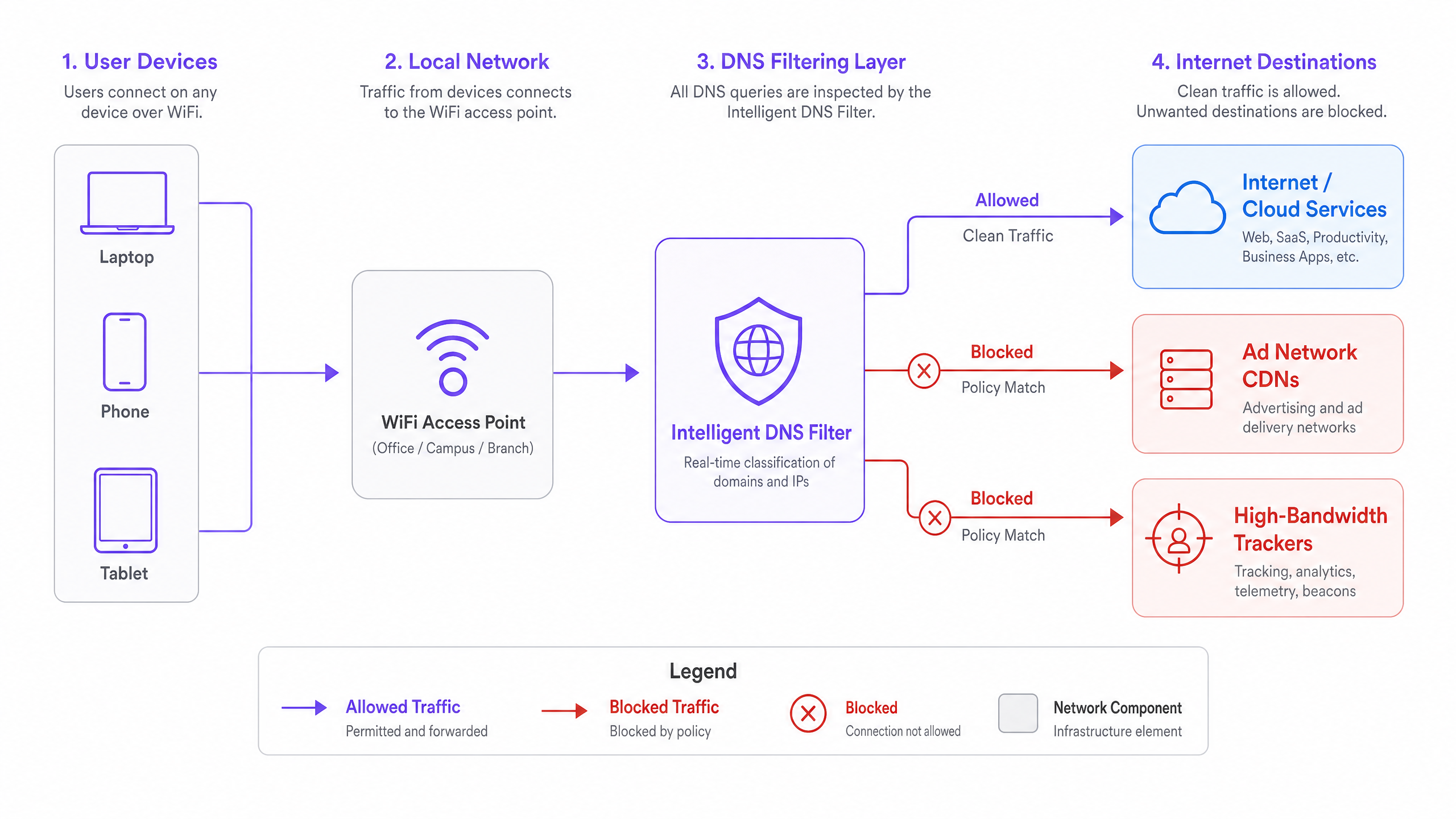
यह आर्किटेक्चर कई विशिष्ट लाभ प्रदान करता है:
- शून्य Payload Transfer: क्योंकि कनेक्शन कभी स्थापित नहीं होता है, ब्लॉक की गई सेवा द्वारा शून्य bandwidth की खपत होती है।
- कम AP विवाद: कम कनेक्शन का मतलब high-density environments में कम airtime utilization और कम collision rates है।
- बेहतर पेज लोड समय: दर्जनों थर्ड-पार्टी tracking scripts को लोड करने के ओवरहेड के बिना, वैध web content client device पर तेज़ी से रेंडर होता है।
मानकों का संरेखण और अनुपालन
DNS filtering को लागू करना enterprise security और compliance frameworks के साथ दृढ़ता से संरेखित होता है। GDPR के दृष्टिकोण से, Guest WiFi पर थर्ड-पार्टी tracking domains को ब्लॉक करना एक सक्रिय डेटा न्यूनीकरण नियंत्रण के रूप में कार्य करता है। PCI DSS environments के लिए, यह guest devices को ज्ञात malicious या compromised infrastructure तक पहुँचने से रोककर network segmentation को मजबूत करता है।
इसके अलावा, जैसे-जैसे नेटवर्क उन्नत encryption के लिए WPA3 में माइग्रेट होते हैं, DNS filtering यह सुनिश्चित करता है कि control plane दृश्यमान और प्रबंधनीय रहे, भले ही अंतर्निहित payload TLS 1.3 के माध्यम से encrypted हो। सुरक्षा अनुपालन पर अधिक जानकारी के लिए, 2026 में IT सुरक्षा के लिए ऑडिट ट्रेल क्या है, इसकी व्याख्या करें पर हमारी गाइड देखें।
DNS over HTTPS (DoH) बाईपास को कम करना
आधुनिक deployments में एक महत्वपूर्ण तकनीकी चुनौती DNS over HTTPS (DoH) का प्रसार है। आधुनिक operating systems और browsers तेजी से स्थानीय DHCP-assigned resolvers को बाईपास करने का प्रयास करते हैं, DNS queries को port 443 पर public resolvers (जैसे, 8.8.8.8, 1.1.1.1) तक टनल करके। policy enforcement बनाए रखने के लिए, network architects को Layer 4 firewall rules लागू करने चाहिए जो guest VLAN पर ज्ञात DoH provider IPs पर outbound traffic को ब्लॉक करते हैं, जिससे clients को स्थानीय filtering resolver पर वापस आने के लिए मजबूर किया जाता है।
कार्यान्वयन गाइड
एक distributed enterprise में DNS filtering को तैनात करने के लिए false positives को कम करने और मौजूदा infrastructure के साथ सहज एकीकरण सुनिश्चित करने के लिए एक चरणबद्ध, व्यवस्थित दृष्टिकोण की आवश्यकता होती है।
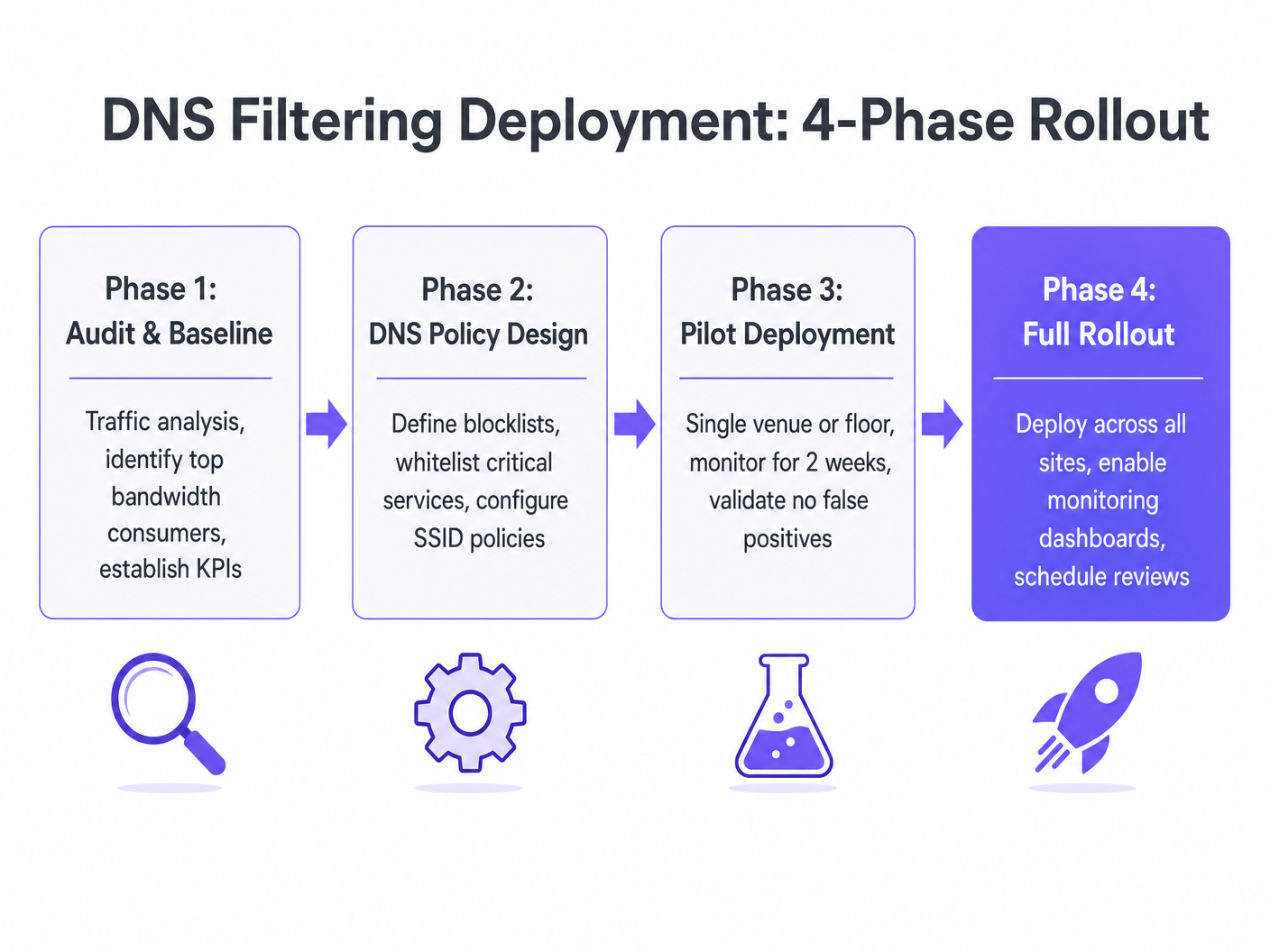
चरण 1: ऑडिट और बेसलाइन
किसी भी blocking policies को लागू करने से पहले, मौजूदा environment की 14 दिनों तक monitor करने के लिए एक traffic analysis tool तैनात करें। शीर्ष bandwidth-consuming domains की पहचान करें और उन्हें वर्गीकृत करें। यह baseline deployment के ROI को मापने और आपके venues के विशिष्ट traffic profile को समझने के लिए आवश्यक है।
चरण 2: नीति डिज़ाइन
audit data के आधार पर, blocking categories को परिभाषित करें। मुख्य सिफारिशों में शामिल हैं:
- Advertising Networks और CDNs
- Tracking और Telemetry Infrastructure
- ज्ञात Malware और Phishing Domains
सुनिश्चित करें कि captive portal authentication domains और payment gateways जैसी critical services को स्पष्ट रूप से whitelisted किया गया है। उन्नत analytics का उपयोग करने वाले venues के लिए, सुनिश्चित करें कि WiFi Analytics जैसे प्लेटफॉर्म की अनुमति है।
चरण 3: पायलट परिनियोजन
एक प्रतिनिधि pilot site का चयन करें—जैसे एक एकल hotel property या एक high-traffic retail location। guest SSID पर policy लागू करें और 14 दिनों तक monitor करें। ट्रैक करने के लिए प्रमुख metrics में शामिल हैं:
- कुल outbound bandwidth में कमी
- False positive reports (वैध सेवाओं का टूटना)
- WiFi performance से संबंधित Helpdesk ticket volume
चरण 4: पूर्ण रोलआउट और जीवनचक्र प्रबंधन
सफल pilot validation पर, policy को globally तैनात करें। महत्वपूर्ण रूप से, custom whitelists को अपडेट करने और rev के लिए एक त्रैमासिक समीक्षा चक्र स्थापित करें।iew श्रेणी परिभाषाएँ, क्योंकि विज्ञापन-तकनीकी परिदृश्य तेजी से विकसित हो रहा है।
सर्वोत्तम अभ्यास
- परिवर्तन को संप्रेषित करें: जबकि अतिथि संचार शायद ही कभी आवश्यक होता है, यह सुनिश्चित करें कि स्थल संचालन और IT हेल्पडेस्क टीमें समस्या निवारण में सहायता के लिए नई फ़िल्टरिंग नीतियों से अवगत हों।
- रूढ़िवादी शुरुआत करें: केवल सबसे खराब बैंडविड्थ हॉग्स (जैसे, वीडियो विज्ञापन नेटवर्क) को ब्लॉक करके शुरुआत करें। जैसे-जैसे श्वेतसूची में विश्वास बढ़ता है, नीति का धीरे-धीरे विस्तार करें।
- विक्रेता इंटेलिजेंस का लाभ उठाएं: ब्लॉकलिस्ट को मैन्युअल रूप से बनाए रखने का प्रयास न करें। एक DNS फ़िल्टरिंग प्रदाता का उपयोग करें जो गतिशील, वास्तविक समय डोमेन वर्गीकरण प्रदान करता है।
- एज की निगरानी करें: एज ऑप्टिमाइज़ेशन पर अधिक जानकारी के लिए, देखें एज पर विज्ञापन नेटवर्क को ब्लॉक करके WiFi गति में सुधार ।
समस्या निवारण और जोखिम न्यूनीकरण
DNS फ़िल्टरिंग से जुड़ा प्राथमिक जोखिम गलत सकारात्मक है—एक ऐसे डोमेन को ब्लॉक करना जो किसी वैध एप्लिकेशन के कार्य करने के लिए आवश्यक है। यह अक्सर साझा CDNs के साथ होता है जो विज्ञापन संपत्तियों और मुख्य एप्लिकेशन स्क्रिप्ट दोनों को होस्ट करते हैं।
विफलता मोड: एक अतिथि शिकायत करता है कि एक विशिष्ट एयरलाइन बुकिंग ऐप होटल WiFi पर लोड होने में विफल हो रहा है। न्यूनीकरण: IT टीम के पास ऐप से जुड़े अवरुद्ध डोमेन की पहचान करने के लिए वास्तविक समय DNS क्वेरी लॉग तक पहुंच होनी चाहिए। एक बार पहचान हो जाने पर, डोमेन को वैश्विक श्वेतसूची में जोड़ा जाता है, और नीति को मिनटों के भीतर सभी एज रिजॉल्वर पर धकेल दिया जाता है।
विफलता मोड: तकनीक-प्रेमी उपयोगकर्ता DoH या कस्टम DNS सेटिंग्स का उपयोग करके फ़िल्टर को बायपास करते हैं। न्यूनीकरण: अतिथि VLAN पर सख्त एग्रेस फ़ायरवॉल नियम लागू करें, केवल अनुमोदित फ़िल्टरिंग रिजॉल्वर को आउटबाउंड DNS (पोर्ट 53) की अनुमति दें और ज्ञात DoH एंडपॉइंट्स को ब्लॉक करें।
ROI और व्यावसायिक प्रभाव
बुद्धिमान DNS फ़िल्टरिंग के लिए व्यावसायिक मामला सम्मोहक और अत्यधिक मापने योग्य है। स्थल संचालक आमतौर पर अतिथि नेटवर्क पर कुल आउटबाउंड बैंडविड्थ खपत में 25% से 40% की कमी देखते हैं।
यह कमी कई मूर्त लाभों में बदल जाती है:
- स्थगित CapEx: बर्बाद बैंडविड्थ को पुनः प्राप्त करके, संगठन महंगी WAN सर्किट अपग्रेड को स्थगित कर सकते हैं।
- बेहतर उपयोगकर्ता अनुभव: कम AP विवाद और तेज़ पेज लोड समय सीधे उच्च अतिथि संतुष्टि स्कोर से संबंधित हैं।
- बेहतर सुरक्षा स्थिति: दुर्भावनापूर्ण डोमेन को सक्रिय रूप से ब्लॉक करने से अतिथि नेटवर्क पर मैलवेयर प्रसार का जोखिम कम होता है।
अपने बुनियादी ढांचे को अनुकूलित करने की तलाश में सार्वजनिक-क्षेत्र के संगठनों के लिए, यह दृष्टिकोण व्यापक डिजिटल समावेशन लक्ष्यों के साथ संरेखित होता है, जैसा कि हमारी हालिया घोषणा में चर्चा की गई है: Purple ने डिजिटल समावेशन और स्मार्ट सिटी इनोवेशन को बढ़ावा देने के लिए इयान फॉक्स को VP ग्रोथ – पब्लिक सेक्टर नियुक्त किया ।
इस विषय पर हमारी पूरी ब्रीफिंग नीचे सुनें: {{asset:how_to_stop_bandwidth_hogging_on_public_wifi_podcast.wav}}
मुख्य परिभाषाएं
DNS Filtering
The practice of using the Domain Name System to block malicious or inappropriate websites by returning a null IP address for categorized domains.
Used by IT teams to proactively manage traffic composition and security at the network edge.
Rate-Limiting
A network control mechanism that restricts the maximum bandwidth available to a specific client or application.
A legacy approach to bandwidth management that often degrades user experience by throttling legitimate and wasteful traffic equally.
DNS over HTTPS (DoH)
A protocol for performing remote DNS resolution via the HTTPS protocol, encrypting the data between the DoH client and the DoH-based DNS resolver.
A significant challenge for network administrators as it bypasses local, unencrypted DNS filtering controls.
False Positive (DNS)
When a legitimate, required domain is incorrectly categorized and blocked by the DNS filtering policy.
The primary operational risk when deploying DNS filtering; mitigated through careful auditing and whitelisting.
Telemetry Data
Automated communications process by which measurements and other data are collected at remote or inaccessible points and transmitted to receiving equipment for monitoring.
In the context of public WiFi, background app telemetry consumes significant bandwidth without providing immediate value to the user.
NXDOMAIN
A DNS message indicating that the requested domain name does not exist.
The standard response returned by a DNS filter when a client attempts to resolve a blocked domain.
Network Segmentation
The practice of splitting a computer network into subnetworks, each being a network segment.
A core PCI DSS requirement; DNS filtering aids segmentation by preventing guest devices from reaching untrusted external infrastructure.
Content Delivery Network (CDN)
A geographically distributed network of proxy servers and their data centers.
Ad networks use CDNs to serve high-bandwidth media. Blocking these specific CDNs reclaims significant WAN capacity.
हल किए गए उदाहरण
A 300-room hotel is experiencing severe WAN link saturation during peak evening hours (7 PM - 10 PM). The IT team currently enforces a 5 Mbps rate limit per device, but guest complaints regarding video streaming buffering persist. How should the network architect address this?
- Deploy a traffic analysis tool to baseline the current traffic profile. 2. Implement a cloud-based DNS filtering resolver and configure the guest DHCP scope to distribute its IP. 3. Apply a policy blocking 'Advertising' and 'Tracking' categories. 4. Implement Layer 4 firewall rules on the guest VLAN to block outbound port 53 to any IP other than the approved resolver, and block known DoH provider IPs.
A retail chain wants to deploy DNS filtering across 50 locations but is concerned about breaking their own branded mobile app, which relies on several third-party analytics SDKs for crash reporting.
- Conduct a controlled audit of the mobile app's DNS queries in a lab environment. 2. Identify all domains required for the app's core functionality and crash reporting. 3. Create a custom whitelist policy that explicitly permits these specific domains. 4. Deploy the filtering policy to a single pilot store for 14 days, monitoring the app's performance and crash reporting dashboard before rolling out to the remaining 49 locations.
अभ्यास प्रश्न
Q1. A stadium IT director notices that during halftime, the guest WiFi uplink is completely saturated. Rate-limiting is already set to 2 Mbps per client. What is the most effective next step to improve performance for users trying to access the stadium's ordering app?
संकेत: Consider what type of traffic is likely consuming the bandwidth despite the rate limit.
मॉडल उत्तर देखें
Implement DNS filtering to block high-bandwidth ad networks and background telemetry. Because rate-limiting only throttles traffic, a large volume of background requests can still saturate the uplink. DNS filtering prevents these connections from initiating, freeing up capacity for the legitimate stadium ordering app.
Q2. After deploying a DNS filtering solution, the helpdesk receives reports that a popular social media application is failing to load images on the guest network. How should the network engineer troubleshoot this?
संकेत: Think about how CDNs are utilized by large applications.
मॉडल उत्तर देखें
The engineer should review the DNS query logs for the affected client devices. It is likely that the social media app uses a CDN domain that has been incorrectly categorized as an 'Advertising Network' by the filter. Once the specific CDN domain is identified, it should be added to the global whitelist.
Q3. A new corporate policy mandates the use of DNS filtering on all guest networks. However, traffic analysis shows that 15% of guest devices are still successfully reaching known ad networks. What is the most likely cause of this bypass, and how can it be prevented?
संकेत: Consider modern browser features that encrypt DNS queries.
मॉडल उत्तर देखें
The devices are likely using DNS over HTTPS (DoH) to bypass the local DHCP-assigned resolver and query public resolvers directly. To prevent this, the IT team must implement Layer 4 egress firewall rules on the guest VLAN to block outbound traffic to known DoH provider IP addresses, forcing clients to fall back to the local filtering resolver.