
उच्च-घनत्व वाले स्थानों के लिए सर्वोत्तम WiFi चैनल
स्टेडियम, एरेना और बड़े सार्वजनिक स्थानों जैसे उच्च-घनत्व वाले वातावरण में WiFi चैनलों के चयन और अनुकूलन के लिए एक निश्चित तकनीकी संदर्भ। इसमें RF भौतिकी, 5 GHz और 6 GHz बैंड में चैनल पुन: उपयोग रणनीतियाँ, और IT लीडर्स के लिए कार्रवाई योग्य परिनियोजन मार्गदर्शन शामिल है।
इस गाइड को सुनें
पॉडकास्ट ट्रांसक्रिप्ट देखें
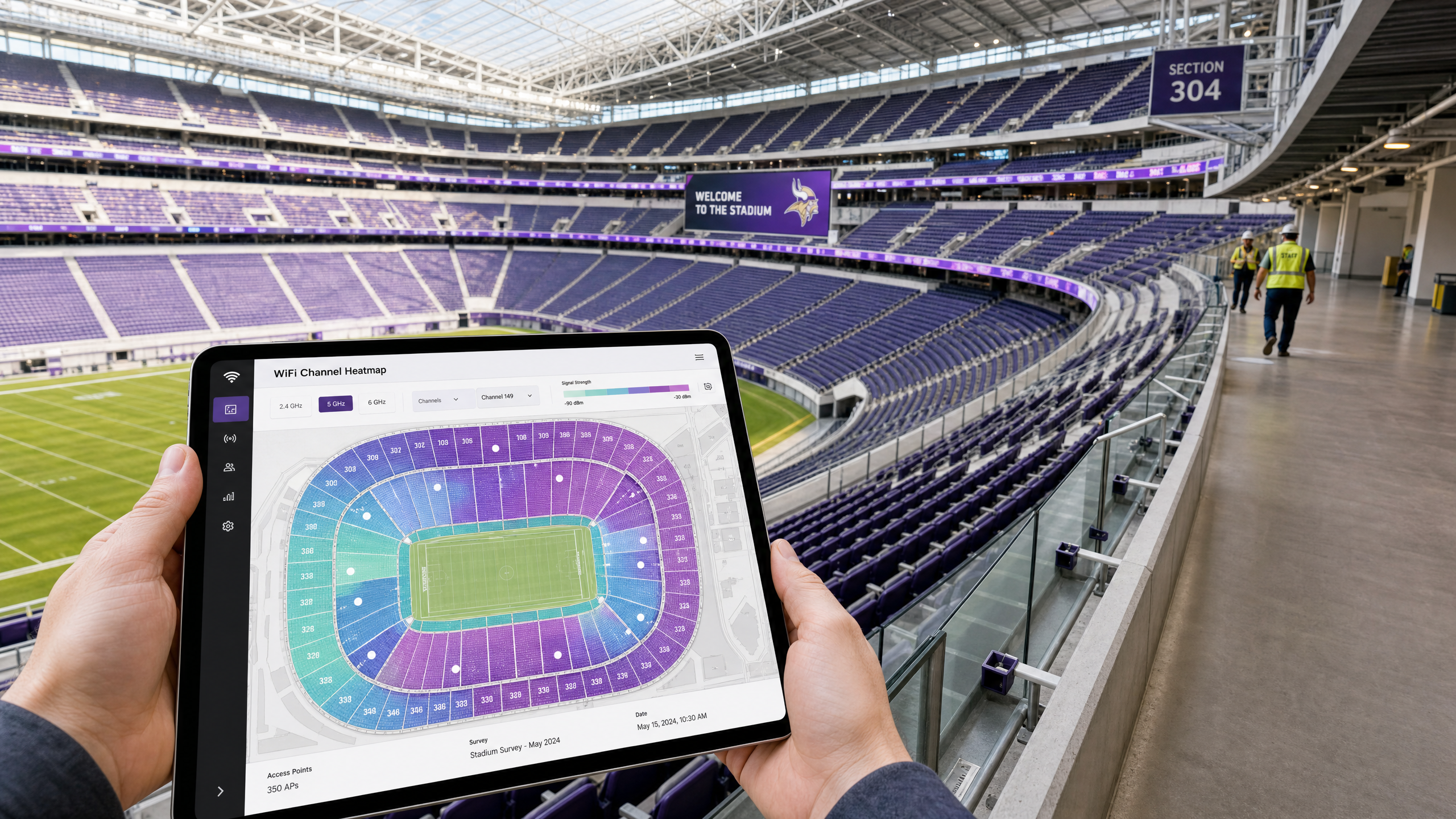
कार्यकारी सारांश
CTO और IT निदेशकों के लिए जो उच्च-घनत्व वाले वातावरण—स्टेडियम, एरेना, बड़े खुदरा परिसर और सम्मेलन केंद्र—का प्रबंधन करते हैं, पारंपरिक WiFi डिज़ाइन सिद्धांत अब पर्याप्त नहीं हैं। उच्च-घनत्व वाले परिनियोजन में, क्षमता प्राथमिक बाधा है, कवरेज नहीं। 802.11ax (WiFi 6) और 6 GHz बैंड (WiFi 6E) में 1200 MHz स्पेक्ट्रम की शुरुआत ने मौलिक रूप से बदल दिया है कि नेटवर्क आर्किटेक्ट चैनल नियोजन के लिए कैसे दृष्टिकोण करते हैं।
यह मार्गदर्शिका अत्यधिक घनत्व वाले परिदृश्यों में WiFi चैनलों को अनुकूलित करने के लिए कार्रवाई योग्य, विक्रेता-तटस्थ रणनीतियाँ प्रदान करती है। यह बताता है कि 5 GHz परिनियोजन के लिए 20 MHz चैनल सोने का मानक क्यों बने हुए हैं, स्थानिक पुन: उपयोग के लिए BSS Coloring और OFDMA का लाभ कैसे उठाया जाए, और पारंपरिक बैंड की भीड़ को कम करने के लिए 6 GHz का रणनीतिक कार्यान्वयन कैसे किया जाए। चाहे आप Retail एनालिटिक्स के लिए एक ओवरले तैनात कर रहे हों या 60,000 सीटों वाले स्टेडियम को अपग्रेड कर रहे हों, चैनल पुन: उपयोग में महारत हासिल करना एक विश्वसनीय Guest WiFi अनुभव प्रदान करने और सटीक WiFi Analytics कैप्चर करने के लिए महत्वपूर्ण है।
तकनीकी गहन-विश्लेषण: उच्च घनत्व का भौतिकी
मानक एंटरप्राइज़ परिनियोजन में, लक्ष्य अक्सर प्रति उपयोगकर्ता थ्रूपुट को अधिकतम करना होता है, जिससे व्यापक चैनलों (40 MHz या 80 MHz) का उपयोग होता है। हालांकि, उच्च-घनत्व वाले वातावरण में, RF प्रतिमान पलट जाता है।
5 GHz रणनीति: 20 MHz अनिवार्य है
एक स्टेडियम के बैठने के क्षेत्र या भीड़भाड़ वाले सम्मेलन हॉल में, सह-चैनल हस्तक्षेप (CCI) नेटवर्क प्रदर्शन का प्राथमिक दुश्मन है।
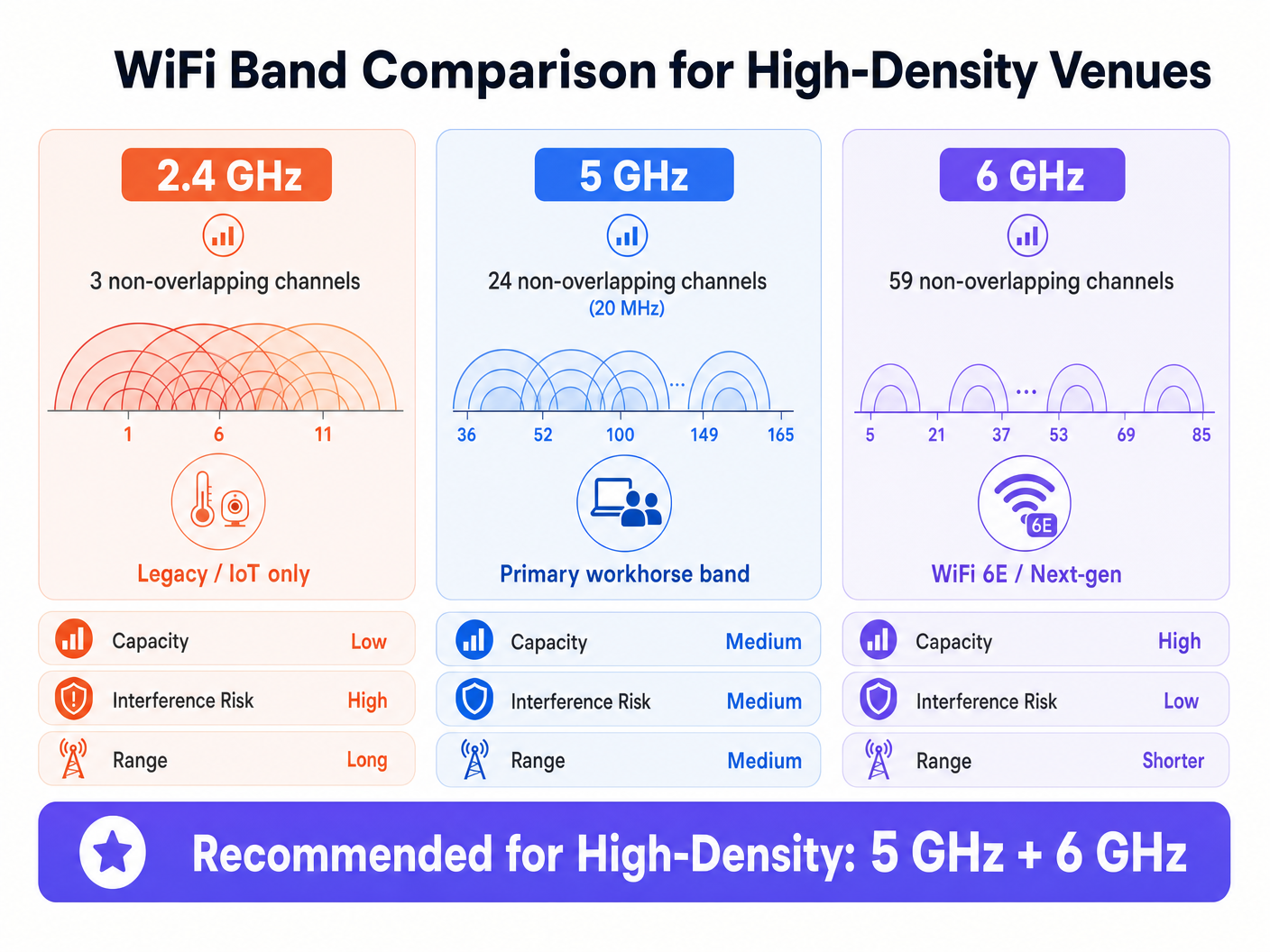
- गणित: 5 GHz बैंड 24 गैर-अतिव्यापी 20 MHz चैनल प्रदान करता है (यह मानते हुए कि DFS चैनल उपलब्ध और उपयोग योग्य हैं)। यदि आप चैनलों को 40 MHz तक जोड़ते हैं, तो आपके उपलब्ध गैर-अतिव्यापी चैनल आधे होकर 12 हो जाते हैं।
- वास्तविकता: सैकड़ों एक्सेस पॉइंट (APs) के साथ घने परिनियोजन में, आपको अधिकतम चैनल पुन: उपयोग की आवश्यकता होती है। 20 MHz चैनलों का उपयोग आपको एक दिए गए भौतिक स्थान में अधिक APs पैक करने की अनुमति देता है, बिना उनके एक-दूसरे के साथ हस्तक्षेप किए।
उद्योग परिनियोजन में उल्लेख किया गया है, एक 20 MHz 5 GHz चैनल से आपको मिलने वाला सर्वोत्तम थ्रूपुट लगभग 150 Mbps होता है, लेकिन उच्च घनत्व में, प्रबंधन ओवरहेड और क्लाइंट घनत्व के कारण यह 70-80 Mbps होने की अधिक संभावना है। यह स्ट्रीमिंग रीप्ले और सोशल मीडिया अपलोड सहित अधिकांश स्थल अनुप्रयोगों के लिए पूरी तरह से पर्याप्त है।
802.11ax (WiFi 6) और स्थानिक पुन: उपयोग
WiFi 6 ने विशेष रूप से उच्च-घनत्व वाले वातावरण के लिए डिज़ाइन किए गए तंत्र पेश किए, जिससे ध्यान अधिकतम सैद्धांतिक गति से हटकर समग्र नेटवर्क दक्षता पर केंद्रित हो गया।
- OFDMA (Orthogonal Frequency-Division Multiple Access): एक ट्रांसमिशन के लिए पूरे चैनल का उपभोग करने वाले एक क्लाइंट के बजाय, OFDMA चैनल को छोटे उप-कैरियर (रिसोर्स यूनिट या RUs) में विभाजित करता है। यह एक एकल AP को एक साथ कई क्लाइंट्स के साथ संवाद करने की अनुमति देता है, जिससे घनी भीड़ में विलंबता में भारी कमी आती है।
- BSS Coloring (स्थानिक पुन: उपयोग): ऐतिहासिक रूप से, यदि एक AP ने उसी चैनल पर (भले ही कमजोर रूप से) प्रसारित होने वाले दूसरे AP को सुना, तो वह ट्रांसमिशन (CSMA/CA) को स्थगित कर देगा। BSS Coloring PHY हेडर में एक "रंग" पहचानकर्ता जोड़ता है। यदि एक AP अपने चैनल पर एक ट्रांसमिशन सुनता है लेकिन एक अलग रंग के साथ (जिसका अर्थ है कि यह एक पड़ोसी AP से है, न कि उसके अपने BSS से), तो यह सिग्नल की शक्ति का मूल्यांकन कर सकता है। यदि सिग्नल एक निश्चित सीमा (OBSS-PD) से नीचे है, तो यह एक साथ प्रसारित हो सकता है, जिससे कुल क्षमता बढ़ जाती है।
6 GHz क्रांति (WiFi 6E)
6 GHz बैंड 1200 MHz का स्वच्छ स्पेक्ट्रम प्रदान करता है, जिससे 59 गैर-अतिव्यापी 20 MHz चैनल (या 29 गैर-अतिव्यापी 40 MHz चैनल) मिलते हैं।
- 6 GHz में चैनल चौड़ाई: उपलब्ध स्पेक्ट्रम में भारी वृद्धि के कारण, नेटवर्क आर्किटेक्ट उच्च-घनत्व वाले वातावरण में भी 6 GHz में 40 MHz चैनलों को सुरक्षित रूप से तैनात कर सकते हैं, जिससे CCI का कारण बने बिना प्रति-क्लाइंट थ्रूपुट दोगुना हो जाता है।
- क्लाइंट अपनाना: जैसे-जैसे मोबाइल डिवाइस तेजी से 6 GHz का समर्थन करते हैं, इन सक्षम क्लाइंट्स को स्वच्छ 6 GHz बैंड पर निर्देशित करने से पारंपरिक उपकरणों के लिए 5 GHz बैंड पर मूल्यवान एयरटाइम खाली हो जाता है।
कार्यान्वयन मार्गदर्शिका: बैठने के क्षेत्र के लिए डिज़ाइन करना
एक स्टेडियम में APs तैनात करने के लिए सटीक इंजीनियरिंग की आवश्यकता होती है। क्लाइंट्स से दूरी और APs के बीच भौतिक क्षीणन की कमी के कारण बैठने के क्षेत्र के लिए ओवरहेड AP प्लेसमेंट शायद ही कभी प्रभावी होता है।
सीट के नीचे परिनियोजन रणनीति
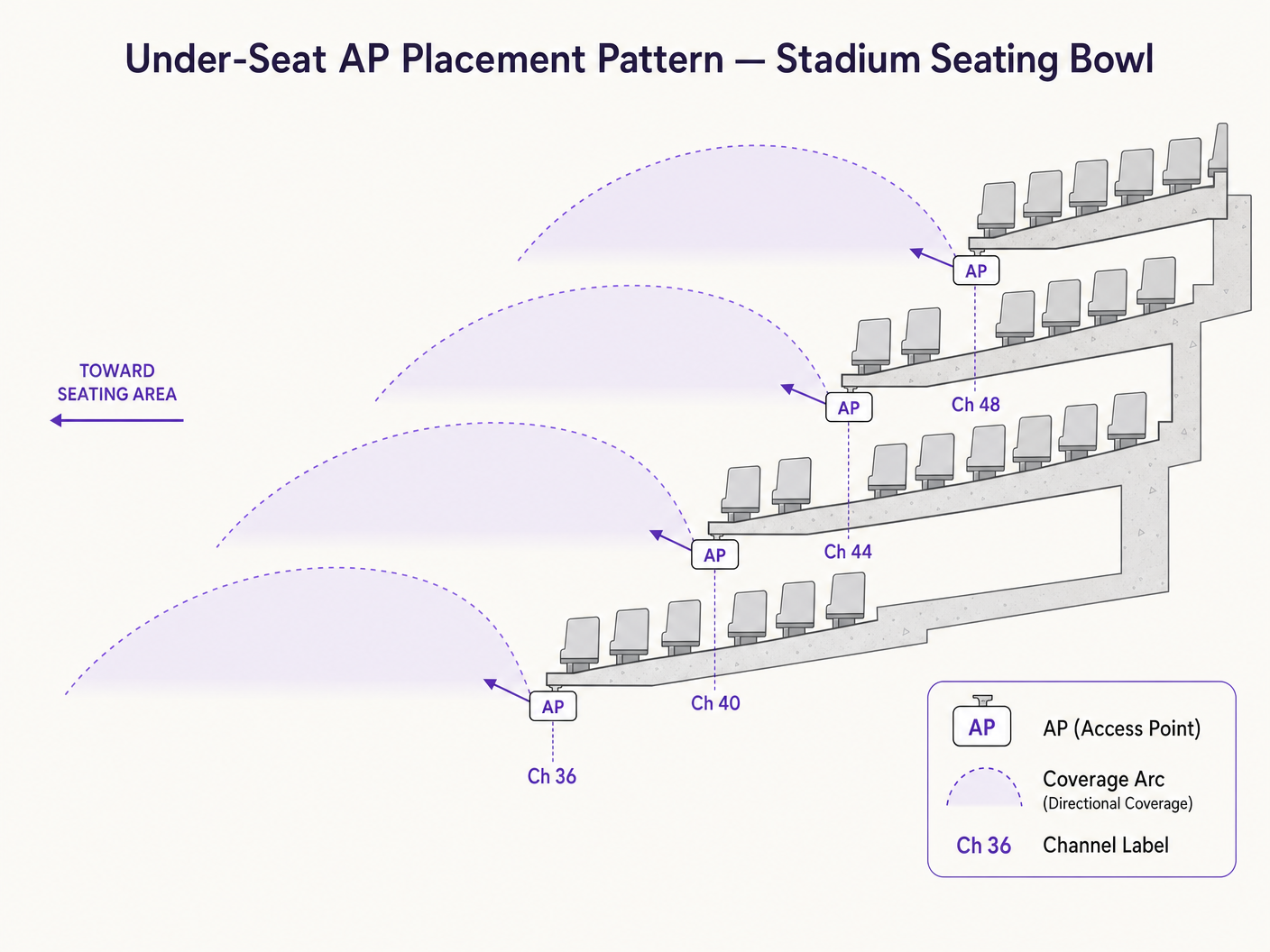
स्टेडियम में बैठने के लिए उद्योग मानक दिशात्मक एंटेना का उपयोग करके सीट के नीचे AP प्लेसमेंट है।
- क्षीणन आपका मित्र है: मानव शरीर उत्कृष्ट RF क्षीणक होते हैं (मुख्य रूप से पानी से बने होते हैं)। APs को सीटों के नीचे रखकर, भीड़ स्वयं RF संकेतों को बहुत दूर जाने से रोकने में मदद करती है, जिससे स्वाभाविक रूप से CCI कम होता है।
- पिको-सेल डिज़ाइन: माइक्रो-कवरेज ज़ोन बनाएं। एक विशिष्ट डिज़ाइन में एक AP 50-70 सीटों के "वेज़" की सेवा कर सकता है।
- दिशात्मक एंटेना: विशिष्ट बैठने के वेज़ की ओर इंगित करने वाले अत्यधिक दिशात्मक पैच एंटेना का उपयोग करें, जिससे आसन्न अनुभागों में RF रिसाव सीमित हो।
चैनल नियोजन चेकलिस्ट
- बाउल में 2.4 GHz अक्षम करें: 2.4 GHz बैंड में केवल 3 गैर-अतिव्यापी चैनल होते हैं। विनाशकारी हस्तक्षेप के बिना स्टेडियम के बाउल में 2.4 GHz तैनात करना गणितीय रूप से असंभव है। इसे अक्षम छोड़ दें, या इसे सख्ती से बैक-ऑफ-हाउस IoT उपकरणों या विशिष्ट कॉनकोर्स क्षेत्रों तक सीमित रखें।
- DFS चैनलों का लाभ उठाएं: 5 GHz में, आपको पूरे 24 चैनल प्राप्त करने के लिए डायनामिक फ़्रीक्वेंसी सिलेक्शन (DFS) चैनलों का उपयोग करना होगा। सुनिश्चित करें कि आप किसी भी रडार गतिविधि की पहचान करने के लिए एक गहन स्पेक्ट्रम विश्लेषण करें जो DFS को ट्रिगर कर सकती हैवेंट्स।
- सख्त पावर नियंत्रण: AP ट्रांसमिट पावर को काफी कम किया जाना चाहिए। यदि कोई AP जोर से प्रसारित कर रहा है, तो यह CCI का कारण बनता है। लक्ष्य एक फुसफुसाहट है जिसे केवल तत्काल क्लाइंट ही सुन सकें।
- कम डेटा दरों को अक्षम करें: लेगेसी डेटा दरों (जैसे, 1, 2, 5.5, 11 Mbps, और यहां तक कि 12 या 24 Mbps तक) को अक्षम करें। यह क्लाइंट्स को उच्च, अधिक कुशल मॉड्यूलेशन दरों पर कनेक्ट होने के लिए मजबूर करता है, जिससे प्रबंधन फ़्रेमों के लिए आवश्यक एयरटाइम कम हो जाता है।
सर्वोत्तम अभ्यास और उद्योग मानक
- कवरेज से अधिक क्षमता: हमेशा क्षमता के लिए डिज़ाइन करें। यदि आप क्षमता के लिए डिज़ाइन करते हैं, तो कवरेज की गारंटी है।
- क्लाइंट स्टीयरिंग: क्लाइंट्स को आक्रामक रूप से 5 GHz और 6 GHz बैंड की ओर निर्देशित करें। Purple का प्लेटफॉर्म प्रमुख इंफ्रास्ट्रक्चर वेंडरों के साथ सहजता से एकीकृत होता है ताकि यह सुनिश्चित हो सके कि बैंड की परवाह किए बिना प्रमाणीकरण सुचारू रूप से प्रवाहित हो।
- प्रमाणीकरण और सुरक्षा: घने सार्वजनिक स्थलों में, पारंपरिक Captive Portal 50,000 एक साथ कनेक्शन के भार के तहत संघर्ष कर सकते हैं। प्रोफ़ाइल-आधारित प्रमाणीकरण, जैसे Passpoint/OpenRoaming का लाभ उठाना, एक सहज, सुरक्षित (WPA3/802.1X) कनेक्शन प्रदान करता है। हमारे हालिया अपडेट, How a wi fi assistant Enables Passwordless Access in 2026 में विस्तार से बताया गया है, यह स्थल कनेक्टिविटी का भविष्य है।
- उपकरण: भविष्य कहनेवाला मॉडलिंग और परिनियोजन के बाद के सत्यापन के लिए पेशेवर सर्वेक्षण उपकरणों (जैसे, Ekahau) पर भरोसा करें। विशिष्ट सिफारिशों के लिए The Best WiFi Analyzer Tools for Troubleshooting Channel Overlap पर हमारी मार्गदर्शिका देखें।
समस्या निवारण और जोखिम न्यूनीकरण
सामान्य विफलता मोड
- स्टिकि क्लाइंट्स: ऐसे डिवाइस जो बेहतर AP के करीब होने पर भी एक AP से चिपके रहते हैं।
- शमन: सख्त रोमिंग थ्रेशोल्ड (जैसे, न्यूनतम RSSI आवश्यकताएँ) लागू करें और क्लाइंट रोमिंग निर्णयों में सहायता के लिए 802.11k/v/r का उपयोग करें।
- DFS रडार हिट्स: एक पास का मौसम या सैन्य रडार APs को चैनल बदलने के लिए मजबूर करता है, जिससे अस्थायी नेटवर्क ड्रॉप होते हैं।
- शमन: निरंतर स्पेक्ट्रम निगरानी। यदि आपके क्षेत्र में विशिष्ट DFS चैनल हिट होने की संभावना रखते हैं, तो उन्हें चैनल योजना से हटा दें।
- प्रबंधन फ़्रेम ओवरहेड: घने वातावरण में, बीकन फ़्रेम और प्रोब प्रतिक्रियाएँ उपलब्ध एयरटाइम का 40% तक उपभोग कर सकती हैं।
- शमन: SSID की संख्या को अधिकतम 3 तक सीमित करें (जैसे, Guest, Corporate, IoT)। प्रत्येक अतिरिक्त SSID प्रबंधन ओवरहेड को गुणा करता है।
ROI और व्यावसायिक प्रभाव
एक उच्च-प्रदर्शन वाला WiFi नेटवर्क अब लागत केंद्र नहीं है; यह एक राजस्व-सक्षम मंच है।
- रिटेल मीडिया मुद्रीकरण: बड़े खुदरा या स्टेडियम वातावरण में, Captive Portal और उसके बाद की डिजिटल सहभागिता प्रमुख रियल एस्टेट का प्रतिनिधित्व करती है। विश्वसनीय कनेक्टिविटी उच्च ऑप्ट-इन दरों को सुनिश्चित करती है, जिससे स्थलों को लक्षित विज्ञापन के माध्यम से मुद्रीकरण करने की अनुमति मिलती है।
- परिचालन दक्षता: एक मजबूत 6 GHz ओवरले महत्वपूर्ण स्थल संचालन (मोबाइल पॉइंट-ऑफ-सेल, टिकटिंग स्कैनर, स्टाफ संचार) को अतिथि नेटवर्क से पूरी तरह से अलग समर्थन दे सकता है।
- डेटा अधिग्रहण: Purple जैसे प्लेटफॉर्म द्वारा संचालित उच्च-घनत्व वाले नेटवर्क बड़े पैमाने पर फर्स्ट-पार्टी डेटा कैप्चर करते हैं। यह डेटा CRM एकीकरण, लॉयल्टी कार्यक्रमों और सटीक फुटफॉल एनालिटिक्स को संचालित करता है, जो स्थल संचालन और विपणन टीमों के लिए कार्रवाई योग्य अंतर्दृष्टि प्रदान करता है। सार्वजनिक क्षेत्र के अनुप्रयोगों के लिए, देखें कि कैसे Purple Appoints Iain Fox as VP Growth – Public Sector to Drive Digital Inclusion and Smart City Innovation ।
- वेफ़ाइंडिंग: विश्वसनीय कनेक्टिविटी ब्लू-डॉट नेविगेशन के लिए एक पूर्व शर्त है। उन वातावरणों के लिए जहाँ कनेक्टिविटी ड्रॉप हो सकती है, Purple Launches Offline Maps Mode for Seamless, Secure Navigation to WiFi Hotspots सेवा की निरंतरता सुनिश्चित करता है।
मुख्य परिभाषाएं
Co-Channel Interference (CCI)
When two or more APs operate on the same channel and can hear each other, forcing them to take turns transmitting.
CCI is the primary cause of poor performance in stadiums. It turns a high-speed network into a single, congested collision domain.
BSS Coloring
An 802.11ax feature that adds an identifier to transmissions, allowing APs on the same channel to ignore distant APs and transmit simultaneously if the signal is weak enough.
Crucial for spatial reuse in dense deployments, allowing more efficient use of the limited 5 GHz spectrum.
OFDMA (Orthogonal Frequency-Division Multiple Access)
A technology that subdivides a WiFi channel into smaller resource units, allowing an AP to talk to multiple clients at the exact same time.
Reduces latency in crowded environments by preventing single clients from monopolizing the entire channel for small data payloads.
Dynamic Frequency Selection (DFS)
A mandate requiring WiFi equipment to detect radar systems on certain 5 GHz channels and automatically switch channels to avoid interference.
Venue operators must use DFS channels to get enough spectrum for a stadium, but must carefully monitor for radar hits that can cause network instability.
OBSS-PD (Overlapping Basic Service Set Preamble Detection)
The specific threshold mechanism used in BSS Coloring to determine if an AP can transmit over a distant, same-channel transmission.
This is the technical mechanism that actually executes the 'spatial reuse' promised by WiFi 6.
Management Frame Overhead
The airtime consumed by APs broadcasting their presence (beacons) and responding to client probes, rather than transmitting actual user data.
In dense environments, this overhead can cripple a network if too many SSIDs are broadcast or low data rates are enabled.
Pico-Cell Architecture
A network design strategy using highly directional antennas and low transmit power to create very small, tightly controlled coverage zones.
The standard approach for under-seat stadium WiFi, ensuring one AP only serves a specific section of 50-70 seats.
Passpoint / OpenRoaming
Profile-based authentication standards that allow devices to automatically and securely connect to enterprise WiFi without captive portals.
Essential for seamless onboarding of tens of thousands of fans simultaneously, avoiding the bottleneck of web-based splash pages.
हल किए गए उदाहरण
A 40,000-seat stadium is upgrading its legacy 802.11ac network to WiFi 6E. The IT Director wants to use 40 MHz channels on 5 GHz to maximize speed tests for VIPs in the lower bowl. What is the architectural recommendation?
The recommendation is to strictly enforce 20 MHz channels on the 5 GHz band across the entire seating bowl, and utilize 40 MHz channels exclusively on the new 6 GHz band.
A large conference centre is experiencing severe network latency during keynote speeches when 5,000 attendees are in a single hall. The dashboard shows 5 GHz channel utilization at 85%. They are currently broadcasting 6 SSIDs.
- Reduce the number of SSIDs from 6 to a maximum of 3 (e.g., Guest, Exhibitor, Staff). 2. Disable lower data rates (1-11 Mbps). 3. Ensure BSS Coloring is enabled if using WiFi 6 infrastructure.
अभ्यास प्रश्न
Q1. You are auditing a newly installed network in a 15,000-seat arena. The vendor has deployed omni-directional APs in the ceiling catwalk (80 feet high) using 40 MHz channels on the 5 GHz band. What are the immediate architectural concerns?
संकेत: Consider both the physical distance to the clients and the mathematical reality of channel reuse in 5 GHz.
मॉडल उत्तर देखें
There are two major failures here. First, overhead omni-directional APs at 80 feet will hear each other clearly, causing massive Co-Channel Interference (CCI), and the signal reaching the clients will be weak. Second, using 40 MHz channels reduces the available non-overlapping channels to 12. In an arena, 12 channels is insufficient to prevent CCI. The design should be changed to under-seat directional APs using 20 MHz channels.
Q2. A retail complex IT team wants to leave 2.4 GHz enabled across their high-density food court to support legacy devices, but they are experiencing severe latency. How should they reconfigure the 2.4 GHz band?
संकेत: How many non-overlapping channels exist in 2.4 GHz?
मॉडल उत्तर देखें
The 2.4 GHz band only has 3 non-overlapping channels (1, 6, 11). In a high-density area like a food court, this will inevitably lead to severe interference. They should disable 2.4 GHz entirely in the high-density zones, forcing clients to the 5 GHz or 6 GHz bands. If 2.4 GHz is strictly required for IoT devices (like POS terminals), it should be broadcast on a separate, hidden SSID with AP transmit power turned down to the absolute minimum.
Q3. During a post-deployment survey of a stadium, you notice that APs are frequently changing channels during a match, causing clients to drop connections. The logs indicate DFS events. What is the remediation strategy?
संकेत: What triggers a DFS event and how do you handle it in a static environment?
मॉडल उत्तर देखें
DFS (Dynamic Frequency Selection) events are triggered when an AP detects radar activity (weather, military, airport) on its operating channel. The remediation is to review the controller logs to identify exactly which DFS channels are taking hits. Once identified, those specific channels must be permanently removed from the dynamic channel assignment pool for the venue.