
Meilleurs canaux 5GHz pour les réseaux d'entreprise à haute densité
Ce guide fournit une référence technique définitive pour sélectionner les canaux 5GHz optimaux dans les environnements d'entreprise à haute densité, couvrant l'architecture des bandes UNII, la gestion des risques liés aux canaux DFS et la méthodologie d'analyse du spectre. Il est rédigé à l'intention des architectes réseau et des décideurs informatiques déployant du WiFi d'entreprise dans les hôtels, les parcs de commerces de détail, les stades, les centres de conférence et les campus du secteur public. Des conseils pratiques de mise en œuvre, des études de cas réels et des cadres de calcul du ROI sont inclus pour soutenir les décisions de déploiement ce trimestre.
Écouter ce guide
Voir la transcription du podcast
Fait partie de notre série principale : Guest WiFi Guide →
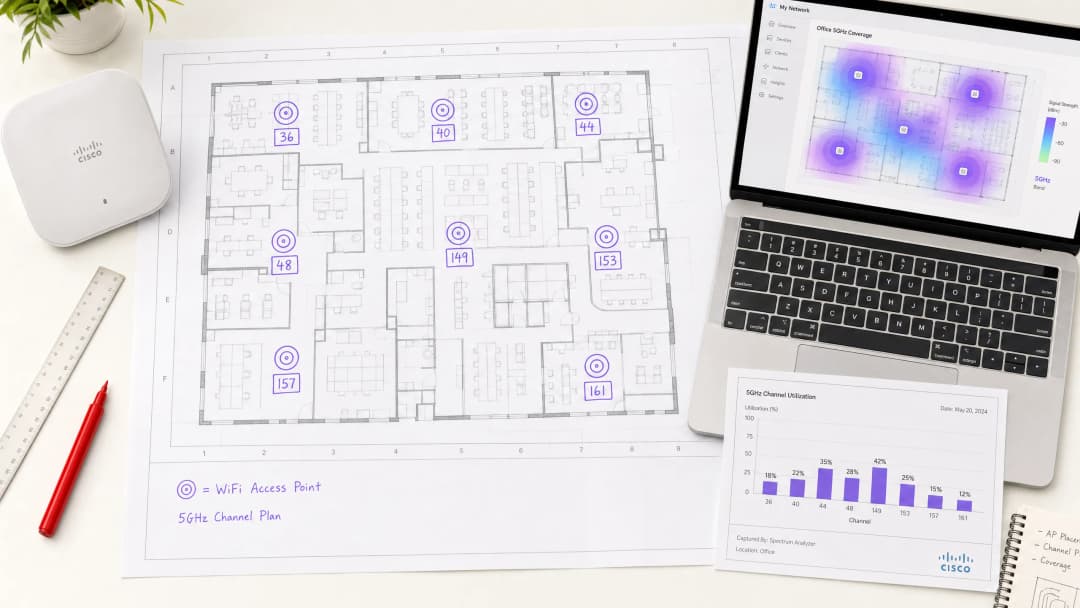
Executive Summary
Channel selection in the 5GHz band is not a configuration detail — it is a foundational architectural decision that directly determines throughput, reliability, and client capacity in any high-density deployment. For enterprise environments supporting hundreds of concurrent devices per floor, the difference between a well-planned channel strategy and a default auto-channel configuration can mean the difference between sub-50ms latency and a network that fails under load.
The 5GHz spectrum offers up to 25 non-overlapping 20MHz channels across the UNII-1, UNII-2, and UNII-3 bands. However, not all channels are equal. UNII-1 (channels 36–48) and UNII-3 (channels 149–165) are non-DFS and should form the backbone of any enterprise channel plan. UNII-2 channels (52–144) introduce Dynamic Frequency Selection obligations that create operational risk in radar-proximate environments.
This guide walks through the technical architecture of the 5GHz spectrum, provides a structured channel planning methodology, and presents real-world case studies from hospitality, healthcare, and large-venue deployments. For teams already operating Guest WiFi infrastructure at scale, the channel strategy outlined here integrates directly with analytics-driven capacity planning via WiFi Analytics.
Technical Deep-Dive
The 5GHz Spectrum Architecture

The 5GHz band is segmented into Unlicensed National Information Infrastructure (UNII) sub-bands, each with distinct regulatory characteristics. Understanding these distinctions is non-negotiable for enterprise architects.
| Band | Channels | Frequency Range | DFS Required | Max EIRP (EU) | Recommended Use |
|---|---|---|---|---|---|
| UNII-1 | 36, 40, 44, 48 | 5.180–5.240 GHz | No | 200 mW | Mission-critical SSIDs |
| UNII-2A | 52, 56, 60, 64 | 5.260–5.320 GHz | Yes | 200 mW | Supplementary capacity |
| UNII-2C | 100–144 | 5.500–5.720 GHz | Yes | 1000 mW | High-power backhaul only |
| UNII-3 | 149, 153, 157, 161, 165 | 5.745–5.825 GHz | No (most regions) | 200 mW | Mission-critical SSIDs |
Note: UNII-3 DFS requirements vary by jurisdiction. In the UK and EU, channels 149–165 are non-DFS. Verify local OFCOM or national regulator requirements before deployment.
Why Channel Width Is the Most Misunderstood Variable
The instinct to configure 80MHz or 160MHz channel widths to maximise theoretical throughput is understandable but counterproductive in dense deployments. A single 80MHz channel consumes four 20MHz channels worth of spectrum. In a venue with 40 access points, this dramatically reduces the available channel pool, forcing co-channel interference that degrades aggregate network performance far more than the per-client throughput gain justifies.
For high-density environments, 20MHz channels are the correct default. The aggregate throughput across the entire venue is maximised by enabling more simultaneous spatial reuse, not by giving each client a wider pipe. 40MHz channels may be appropriate in medium-density zones such as executive boardrooms or private offices. 80MHz and 160MHz should be reserved for dedicated high-throughput applications such as wireless backhaul or AV distribution in isolated, low-client-count areas.
DFS: The Operational Risk That Vendors Understate
Dynamic Frequency Selection (DFS) is an IEEE 802.11h mechanism that requires access points to monitor for radar signals and vacate any channel on which radar is detected within 60 seconds. The mandatory Channel Availability Check (CAC) period — up to 60 seconds on some channels — means an AP cannot transmit on a DFS channel until it has confirmed the channel is radar-free. In a failover or reboot scenario, this introduces a service gap.
The practical implications for enterprise deployments are significant. Airports, ports, military installations, and weather monitoring stations all operate radar systems that can trigger DFS events. Even in urban environments, unexpected DFS events occur. A network that relies heavily on UNII-2 channels without a fallback plan will experience periodic, unpredictable client disconnections that are difficult to diagnose and frustrating for end users.
For hospitality deployments in particular, where guest satisfaction is directly tied to network reliability, DFS-triggered disruptions during peak check-in periods or conference sessions are commercially damaging. The same principle applies to retail environments where point-of-sale systems and inventory management tools depend on uninterrupted connectivity.
For a broader treatment of frequency band characteristics, see Wi-Fi Frequencies: A Guide to Wi-Fi Frequencies in 2026.
The Best 5GHz Channels: A Definitive Ranking
For enterprise deployments, the recommended channel priority is as follows:
Tier 1 — Always Use (Non-DFS, Universal Compatibility)
- Channels 36, 40, 44, 48 (UNII-1)
- Channels 149, 153, 157, 161 (UNII-3)
These eight channels form the foundation of any enterprise channel plan. They are non-DFS, universally supported by client devices, and available in all major regulatory domains. For a deployment with up to eight APs per floor, a clean one-channel-per-AP assignment is achievable using only Tier 1 channels.
Tier 2 — Use With Monitoring (DFS, Lower Radar Risk)
- Channels 52, 56, 60, 64 (UNII-2A)
These channels carry DFS obligations but are in the lower UNII-2 range, which typically sees less radar interference than UNII-2C. They are appropriate for supplementary capacity in environments where Tier 1 channels are exhausted and radar proximity has been assessed as low.
Tier 3 — Use With Caution (DFS, Higher Radar Risk, High Power)
- Channels 100–144 (UNII-2C)
While UNII-2C channels offer higher permitted transmit power in some regions, they carry the highest radar interference risk. Reserve these for dedicated backhaul links or environments where a thorough spectrum survey has confirmed minimal radar activity.
Transmit Power and Cell Sizing
Channel planning cannot be separated from transmit power management. Over-powered access points create large cells that increase co-channel interference. In high-density deployments, the target cell size should be small and consistent. Transmit power should be set to the minimum level that provides adequate coverage for the intended zone, typically between 8–14 dBm for client-serving radios in dense indoor environments.
Automatic power control mechanisms such as Cisco's TPC or Aruba's ARM can be effective when constrained to a defined power range. Allowing these systems to operate without bounds often results in high-power configurations that undermine the channel reuse plan.
Vous avez des questions sur votre configuration spécifique ?
Notre équipe collabore avec des exploitants de sites, des responsables informatiques et des ingénieurs réseau au sein de 80 000 sites. Réservez un appel de 20 minutes et nous vous montrerons comment d'autres professionnels comme vous ont résolu ce problème.
Implementation Guide
Step 1: Pre-Deployment Spectrum Survey
Before placing a single access point, conduct a passive spectrum survey of the entire venue. The objective is to identify existing RF sources — neighbouring networks, legacy equipment, microwave interference, and any radar activity. Tools such as Ekahau Sidekick, AirMagnet Survey Pro, or the built-in spectrum analysis capabilities of enterprise controllers (Cisco CleanAir, Aruba AirMatch) provide the necessary visibility.
Document the survey findings in a channel utilisation map. Identify which channels are already congested from adjacent deployments and which are clean. This data directly informs your channel assignment plan.
Step 2: Define Your Channel Plan
Based on the spectrum survey, assign channels to access points following these principles:
- Adjacent APs must not share the same channel.
- APs on the same channel should be separated by at least two cell diameters to minimise co-channel interference.
- Use the full set of Tier 1 channels before introducing Tier 2 or Tier 3 channels.
- For multi-floor deployments, account for vertical co-channel interference. APs directly above or below each other should be on different channels.
For a 10,000 sq ft floor with eight APs, a clean assignment using channels 36, 40, 44, 48, 149, 153, 157, 161 is achievable with no channel reuse on the same floor. For larger floors requiring more than eight APs, introduce Tier 2 channels after confirming low radar risk.
Step 3: Configure Channel Width
Set all client-serving radios to 20MHz channel width as the default. If specific high-throughput zones (e.g., a boardroom with video conferencing requirements) justify 40MHz, configure these as exceptions with explicit justification documented in the network design record.
Step 4: Disable Auto-Channel on Critical Infrastructure
For APs serving mission-critical applications — POS systems, VoIP, medical devices — disable automatic channel selection and assign channels statically. Auto-channel algorithms, while useful for general deployments, can make suboptimal decisions in complex RF environments and introduce unexpected channel changes during business hours.
Step 5: Configure Band Steering and Client Load Balancing
Ensure band steering is enabled to push capable clients to 5GHz. In Wi-Fi 6 (802.11ax) deployments, OFDMA and BSS Colouring provide additional mechanisms to reduce co-channel interference, but these are supplements to — not replacements for — a sound channel plan.
For guidance on segmenting traffic across multiple SSIDs in shared environments, see Micro-Segmentation Best Practices for Shared WiFi Networks.
Step 6: Post-Deployment Validation
After deployment, run an active survey to validate coverage, signal strength, and channel utilisation. Key metrics to confirm:
- RSSI at client devices: target -65 dBm or better at the cell edge.
- Co-channel interference (CCI): target below -85 dBm from co-channel neighbours.
- Channel utilisation: target below 50% on any single channel during peak load.
- Roaming performance: validate 802.11r (Fast BSS Transition) and 802.11k (Neighbour Reports) are functioning correctly.
Best Practices
The following recommendations represent vendor-neutral best practices aligned with IEEE 802.11 standards and WLAN industry guidance from bodies including the Wi-Fi Alliance and CWNP.
Standardise on 20MHz channels for all high-density deployments. The aggregate capacity benefit of channel reuse consistently outperforms the per-client throughput gain from wider channels in environments with more than 20 concurrent clients per AP.
Maintain a channel plan document. Every AP should have a documented channel assignment, power level, and justification. This is essential for troubleshooting and for maintaining consistency across firmware upgrades or hardware replacements.
Implement WPA3-Enterprise with 802.1X authentication for corporate SSIDs. In environments handling payment card data, PCI DSS 4.0 requires strong authentication and encryption. WPA3 with CNSA-suite cryptography satisfies these requirements and provides forward secrecy that WPA2 cannot guarantee.
Monitor DFS events continuously. Any AP operating on a DFS channel should have its DFS event log reviewed weekly during the first month of operation. Channels with more than two DFS events per week should be blacklisted from the auto-channel pool.
Align with GDPR requirements for guest networks. In hospitality and retail environments, guest WiFi data collection must comply with GDPR. Purple's Guest WiFi platform provides built-in consent management and data governance tooling that integrates with the network infrastructure described in this guide.
For office-specific WiFi optimisation considerations, see Office Wi-Fi: Optimize Your Modern Office Wi-Fi Network.
Troubleshooting & Risk Mitigation
Co-Channel Interference (CCI)
CCI is the most common performance degrader in enterprise WiFi deployments. Symptoms include high retry rates, reduced throughput, and poor roaming performance. Diagnosis requires a spectrum analyser or controller-based RF analysis. Resolution involves adjusting channel assignments to increase separation between co-channel APs and reducing transmit power to shrink cell sizes.
DFS-Triggered Channel Changes
If clients are experiencing periodic disconnections lasting 30–60 seconds, DFS events are the likely cause. Check the AP event log for DFS radar detection entries. Resolution: blacklist the affected channel from the auto-channel pool and assign an alternative Tier 1 channel. In environments where DFS events are frequent, consider a full migration to non-DFS channels.
Hidden Node Problem
In large open-plan environments such as warehouses or exhibition halls, the hidden node problem — where two clients cannot hear each other but both attempt to transmit to the same AP — causes collision rates to increase. Mitigation involves enabling RTS/CTS thresholds and ensuring AP placement provides adequate coverage overlap.
Legacy Client Compatibility
Legacy 802.11a devices operate only on UNII-1 channels. If your environment includes legacy devices, ensure UNII-1 channels remain available and that the SSID serving legacy clients has lower mandatory data rates enabled. Avoid mixing legacy clients with modern 802.11ac or Wi-Fi 6 clients on the same SSID, as legacy management frames reduce overall network efficiency.
For environments integrating Bluetooth Low Energy alongside WiFi — common in retail and healthcare deployments — see BLE Low Energy Explained for Enterprise for coexistence guidance.
Rogue AP Detection
In high-density environments, rogue access points operating on the same channels as your infrastructure create unmanaged interference. Implement WIDS/WIPS (Wireless Intrusion Detection/Prevention) to detect and contain rogue APs. Most enterprise controllers include this capability natively.
ROI & Business Impact
Quantifying the Cost of Poor Channel Planning
The business impact of suboptimal channel configuration is measurable. In a 200-room hotel, a network experiencing 15% packet retry rates due to co-channel interference will deliver average throughput of approximately 40–50 Mbps per AP under load, compared to 150+ Mbps achievable with a properly planned channel strategy. For guests relying on the network for video streaming, video conferencing, and cloud-based work, this difference is immediately perceptible and directly affects satisfaction scores.
In retail environments, network instability affecting POS systems creates direct revenue impact. A single POS terminal unable to process transactions for 10 minutes during peak trading costs a typical high-street retailer £200–£500 in lost sales, depending on throughput. Across a multi-site estate, the aggregate cost of poor WiFi reliability is significant.
Measuring Success
Key performance indicators for a well-executed channel plan include:
| KPI | Baseline (Poor Config) | Target (Optimised) |
|---|---|---|
| Average client throughput | 20–40 Mbps | 100–200 Mbps |
| Packet retry rate | 15–25% | < 5% |
| Roaming latency | 200–500 ms | < 50 ms (with 802.11r) |
| DFS events per week | 5–20 | 0 (non-DFS channels) |
| Client association failures | 3–8% | < 1% |
Integration with Analytics-Driven Capacity Planning
Channel planning is not a one-time exercise. As device density, usage patterns, and neighbouring RF environments evolve, the channel plan must be reviewed and updated. Purple's WiFi Analytics platform provides real-time visibility into client density, dwell time, and network utilisation by zone — data that directly informs ongoing channel plan optimisation.
For transport hubs and healthcare campuses where device density fluctuates significantly by time of day, analytics-driven dynamic channel management provides the operational intelligence needed to maintain consistent performance without manual intervention.
This guide is maintained by the Purple technical content team. For implementation support or to discuss your specific deployment requirements, contact Purple at purple.ai.
Définitions clés
Bande UNII
Unlicensed National Information Infrastructure - le cadre réglementaire qui divise le spectre 5GHz en sous-bandes (UNII-1, UNII-2A, UNII-2C, UNII-3), chacune ayant des limites de puissance et des exigences DFS distinctes. La désignation UNII détermine quels canaux sont disponibles sans obligations de coexistence avec les radars.
Les équipes informatiques y sont confrontées lors de l'examen de la conformité réglementaire pour les déploiements 5GHz, en particulier lors d'opérations dans plusieurs pays ayant des réglementations de spectre différentes.
DFS (Dynamic Frequency Selection)
Un mécanisme IEEE 802.11h qui exige que les points d'accès surveillent les signaux radar sur les canaux UNII-2 et libèrent tout canal sur lequel un radar est détecté. La période obligatoire de vérification de disponibilité du canal (CAC) peut aller jusqu'à 60 secondes, durant laquelle le point d'accès ne peut pas transmettre.
Crucial pour tout déploiement utilisant les canaux 52 à 144. Les événements DFS provoquent des déconnexions de clients et sont une cause fréquente de pannes WiFi intermittentes dans les environnements proches d'aéroports, de ports ou de stations météo.
Interférence co-canal (CCI)
Interférence qui se produit lorsque deux points d'accès ou plus fonctionnent sur le même canal à portée l'un de l'autre. Contrairement aux interférences de canaux adjacents, la CCI oblige les points d'accès à différer la transmission (CSMA/CA), ce qui réduit directement le débit global et augmente la latence.
Le principal facteur de dégradation des performances dans les déploiements WiFi à haute densité. Diagnostiqué via une analyse de spectre ou des rapports RF de contrôleur montrant des taux de retransmission élevés et une faible efficacité d'utilisation des canaux.
Réutilisation des canaux
La pratique consistant à attribuer le même canal à plusieurs points d'accès suffisamment éloignés pour éviter les interférences co-canal. Une réutilisation efficace des canaux maximisera la capacité globale du réseau en permettant des transmissions simultanées sur la même fréquence dans des zones de couverture non superposées.
Le principe fondamental de la conception WiFi à haute densité. Maximiser la réutilisation des canaux - en utilisant des canaux de 20MHz et en contrôlant la taille des cellules - offre systématiquement de meilleures performances globales que la maximisation du débit par client.
Coloration BSS
Une fonctionnalité IEEE 802.11ax (WiFi 6) qui attribue un identifiant de couleur à chaque Basic Service Set, permettant aux points d'accès de distinguer les transmissions de leur propre BSS de celles des BSS superposés. Cela réduit les reports de transmission inutiles dans les environnements à haute densité où plusieurs BSS se superposent.
Disponible sur le matériel WiFi 6 et WiFi 6E. Réduit l'impact des interférences co-canal dans les déploiements denses mais n'élimine pas la nécessité d'un plan de canaux solide.
OFDMA (Orthogonal Frequency Division Multiple Access)
Une technologie d'accès multi-utilisateur introduite dans la norme IEEE 802.11ax qui divise un canal en unités de ressources (RU) plus petites, permettant à un point d'accès de desservir plusieurs clients simultanément au cours d'une seule opportunité de transmission. Améliore considérablement l'efficacité dans les environnements à haute densité avec de nombreux clients à petits paquets.
Pertinent pour les déploiements WiFi 6 dans des environnements à forte densité de clients et types de trafic mixtes (IoT, mobiles, ordinateurs portables). L'OFDMA complète mais ne remplace pas la planification des canaux.
TPC (Transmit Power Control)
Un mécanisme IEEE 802.11h qui permet aux points d'accès d'ajuster dynamiquement la puissance de transmission en fonction de l'environnement RF. Dans les déploiements d'entreprise, le TPC est utilisé pour réduire la taille des cellules et minimiser les interférences co-canal, ce qui est particulièrement important dans les configurations à haute densité.
Doit être configuré avec des limites de puissance minimale et maximale explicites dans les déploiements d'entreprise. Un TPC non restreint peut entraîner des configurations à haute puissance qui compromettent le plan de réutilisation des canaux.
802.11r (Fast BSS Transition)
Un amendement IEEE qui réduit la latence d'itinérance en pré-authentifiant les clients auprès des points d'accès voisins avant que le client n'initie un déplacement. Réduit le temps d'itinérance de 200–500 ms (norme 802.11 standard) à moins de 50 ms, ce qui est critique pour les applications voix et vidéo.
Essentiel pour tout déploiement prenant en charge la VoIP, la visioconférence ou les applications en temps réel où les clients se déplacent entre les points d'accès. Doit être activé aux côtés de 802.11k (Neighbour Reports) et 802.11v (BSS Transition Management) pour des performances d'itinérance optimales.
Analyse de spectre
Le processus de mesure de l'environnement RF sur différentes bandes de fréquences pour identifier les sources de signaux, les interférences et l'utilisation des canaux. L'analyse de spectre passive (réception uniquement) est effectuée avant le déploiement ; l'analyse active est effectuée après le déploiement pour valider les performances.
Une étape obligatoire dans tout déploiement WiFi d'entreprise. Sans étude de spectre, les attributions de canaux reposent sur des hypothèses qui peuvent ne pas refléter l'environnement RF réel, entraînant des problèmes d'interférence difficiles à diagnostiquer après le déploiement.
Exemples concrets
Un hôtel de centre-ville de 350 chambres déploie des points d'accès WiFi 6 sur 12 étages, avec environ 30 AP par étage. L'hôtel accueille fréquemment des événements d'entreprise dans une salle de bal d'une capacité de 1 200 personnes. Le directeur informatique a signalé que le réseau précédent souffrait de problèmes de connectivité persistants lors des grands événements, les clients se plaignant de lenteurs et de déconnexions fréquentes. Comment le plan de canaux doit-il être structuré ?
Commencez par une étude de spectre passive complète sur les 12 étages et la salle de bal, en accordant une attention particulière aux réseaux WiFi des hôtels et immeubles de bureaux voisins visibles depuis le périmètre du bâtiment. Compte tenu de l'emplacement urbain, supposez une congestion RF importante provenant des déploiements adjacents.
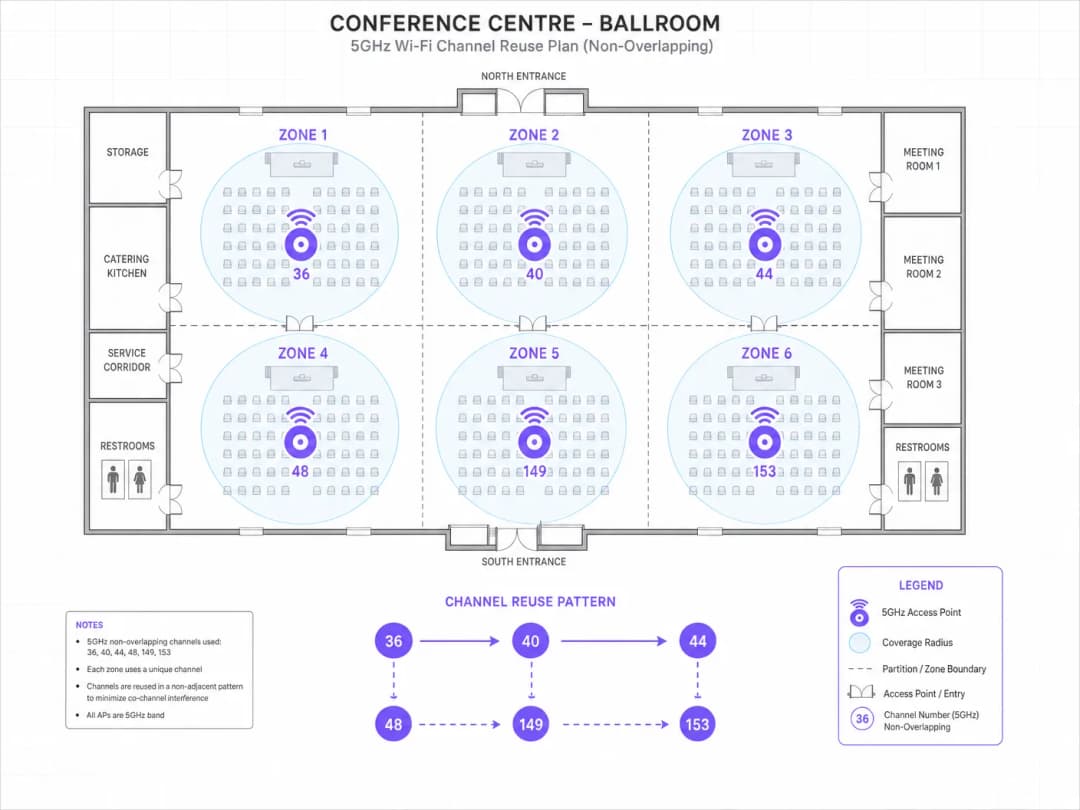
Pour les étages des chambres d'hôtes : avec 30 AP par étage, les huit canaux non-DFS de niveau 1 (36, 40, 44, 48, 149, 153, 157, 161) devront être réutilisés. Attribuez les canaux selon un schéma qui maximise la séparation physique entre les AP co-canal - généralement un schéma de réutilisation en diagonale. Réglez toutes les radios sur une largeur de canal de 20MHz. Configurez la puissance de transmission à 10–12 dBm pour créer de petites cellules confinées qui minimisent les interférences co-canal provenant des étages supérieur et inférieur.
Pour la salle de bal : déployez des AP haute densité (par exemple, Cisco Catalyst 9130AXE ou Aruba AP-575) montés au plafond avec des antennes directives orientées vers le bas. Attribuez des canaux uniques à chaque AP - pas de réutilisation de canal dans la salle de bal. Désactivez la bande 2.4GHz sur les AP de la salle de bal pour éliminer les interférences en 2.4GHz. Configurez un SSID d'événement dédié avec isolation des clients et limitation de la bande passante par client pour garantir une distribution équitable. Activez le 802.11r pour un itinérance rapide entre les AP.
Pour le SSID d'entreprise : configurez le WPA3-Enterprise avec authentification 802.1X. Attribuez des canaux statiques aux AP desservant le centre d'affaires et les salles de réunion. Désactivez complètement les canaux DFS compte tenu de l'emplacement urbain et de l'environnement radar imprévisible.
Post-déploiement : validez par une étude active lors d'un événement test avec plus de 200 appareils connectés. Visez un taux de retransmission inférieur à 5 % et un débit moyen par client supérieur à 80 Mbps.
Une chaîne de vente au détail nationale comptant 180 magasins subit des pannes intermittentes du système POS dans environ 15 % des points de vente. Les pannes ne sont pas corrélées à l'heure de la journée ni au volume des transactions. Les journaux réseau indiquent des redémarrages périodiques des AP et des changements de canaux. La chaîne utilise un mélange d'AP Aruba et Cisco déployés il y a 3 à 5 ans, avec le canal automatique activé sur tous les sites. Comment diagnostiquez-vous et résolvez-vous ce problème ?
Le profil des symptômes - pannes intermittentes sur un sous-ensemble de sites, non corrélées à la charge, accompagnées de changements de canaux - est une signature classique d'événement DFS. La première étape consiste à extraire les journaux d'événements DFS des sites concernés. Dans les environnements Aruba, cela est disponible via AirWave ou Central. Dans les environnements Cisco, via Prime Infrastructure ou DNA Center.
Pour chaque site concerné, identifiez les canaux qui subissent des événements DFS et la fréquence de ces événements. Croisez l'emplacement des sites avec la proximité des aéroports, des ports et des installations de radars météorologiques à l'aide de la base de données Sitefinder d'Ofcom ou d'un registre national équivalent.
Pour les sites avec des événements DFS confirmés : inscrivez immédiatement sur liste noire les canaux concernés du pool de canaux automatiques. Limitez le canal automatique aux seuls canaux UNII-1 et UNII-3 (36, 40, 44, 48, 149, 153, 157, 161). Pour les AP desservant spécifiquement les POS, désactivez complètement le canal automatique et attribuez des canaux statiques de niveau 1.
Pour les 85 % de sites restants sans événement DFS : limitez préventivement le canal automatique aux canaux de niveau 1 par mesure de sécurité. Le gain de capacité marginal des canaux DFS ne justifie pas le risque opérationnel pour l'infrastructure POS.
Déployez le changement de configuration via la plateforme de gestion centralisée des contrôleurs de manière progressive : pilote sur 20 sites, validation sur deux semaines, puis déploiement sur l'ensemble du parc. Documentez le plan de canaux pour chaque site dans le système de gestion de réseau.
Questions d'entraînement
Q1. Vous êtes l'architecte réseau d'une arène sportive couverte d'une capacité de 15 000 places. Le site accueille 80 événements par an, avec un pic de connexions WiFi simultanées d'environ 8 000 appareils. Le site est situé à 4 km d'un aéroport régional. Un budget pour 120 points d'accès vous a été alloué. Concevez le plan de canaux pour la configuration radio 5 GHz.
Conseil : Prenez en compte la proximité de l'aéroport et ses implications sur la disponibilité des canaux DFS. Réfléchissez à l'impact de 120 AP répartis dans un seul grand espace sur les exigences de réutilisation des canaux. Quelle largeur de canal maximise la capacité globale pour 8 000 clients simultanés ?
Voir la réponse type
Compte tenu de la proximité de 4 km avec un aéroport régional, les canaux DFS présentent un risque opérationnel inacceptable - les événements de détection radar provoqueraient des changements de canaux des AP pendant les événements en direct, créant des interruptions de connectivité visibles pour des milliers d'utilisateurs simultanément. Le plan de canaux doit être limité aux canaux non-DFS de niveau 1 uniquement : 36, 40, 44, 48, 149, 153, 157, 161.
Avec 120 AP et huit canaux disponibles, le facteur moyen de réutilisation des canaux est de 15 (chaque canal étant utilisé par environ 15 AP). Pour minimiser les interférences co-canal à ce facteur de réutilisation, toutes les radios doivent être configurées sur une largeur de canal de 20 MHz et la puissance de transmission doit être étroitement contrôlée - ciblez 8 à 10 dBm pour les AP des tribunes afin de créer de petites cellules confinées.
Le positionnement des AP doit suivre un modèle de grille dans les tribunes, avec des AP montés sous les rangées de sièges (déploiement d'AP sous les sièges) ou sur des poteaux à des intervalles de 3 à 4 rangées, orientés vers le bas. Cela minimise le rayon de couverture et réduit le nombre d'AP co-canal à portée d'un client donné.
Pour les zones de passage à plus faible densité, les canaux de 40 MHz sur UNII-1 sont acceptables. Déployez un SSID distinct pour le personnel/les opérations avec des attributions de canaux statiques sur les canaux UNII-3.
Après le déploiement, effectuez une étude active complète avec plus de 200 appareils de test pour valider les taux de retransmission et le débit avant le premier événement en direct.
Q2. Un groupement hospitalier déploie un nouveau réseau WiFi dans un hôpital de 400 lits. Le réseau doit prendre en charge des applications cliniques, notamment les dossiers patients informatisés (DPI), les combinés VoIP, la télémétrie des pompes à perfusion et les systèmes d'appel d'urgence. L'équipe de sécurité de l'information du groupement a imposé la conformité PCI DSS pour les bornes de paiement et la conformité GDPR pour les données des patients. Quelles sont les décisions clés en matière de planification des canaux et de configuration de la sécurité ?
Conseil : Prenez en compte le mélange d'applications cliniques critiques (tolérance zéro pour les déconnexions) et les exigences de segmentation de la sécurité. Comment la présence de dispositifs médicaux affecte-t-elle vos décisions concernant la largeur de canal et le DFS ?
Voir la réponse type
Les environnements cliniques ont une tolérance zéro pour les interruptions de réseau - un combiné VoIP qui perd un appel ou une pompe à perfusion qui perd sa connectivité de télémétrie a des implications directes sur la sécurité des patients. Le plan de canaux doit donner la priorité à la fiabilité plutôt qu'à la capacité.
Tous les AP cliniques doivent se voir attribuer des canaux statiques de niveau 1 (36, 40, 44, 48, 149, 153, 157, 161). Les canaux DFS doivent être complètement désactivés - le risque qu'un changement de canal déclenché par le DFS perturbe une application clinique est inacceptable. La sélection automatique des canaux doit être désactivée sur tous les AP desservant les zones cliniques.
Pour les combinés VoIP : activez 802.11r (Fast BSS Transition), 802.11k (Neighbour Reports) et 802.11v (BSS Transition Management) sur le SSID voix. Ciblez une latence d'itinérance inférieure à 50 ms. Attribuez un SSID dédié à la voix avec une QoS WMM configurée pour donner la priorité au trafic vocal (file d'attente AC_VO).
Pour la segmentation de la sécurité : déployez des SSID distincts pour le personnel clinique (WPA3-Enterprise, 802.1X avec authentification par certificat), les dispositifs médicaux (WPA2-Enterprise ou WPA3-Enterprise selon la compatibilité des appareils), les visiteurs/patients (WPA3-Personal ou ouvert avec Captive Portal), et les bornes de paiement (WPA3-Enterprise, VLAN isolé pour la conformité PCI DSS).
Pour la conformité PCI DSS 4.0 : le SSID des bornes de paiement doit utiliser le protocole WPA3-Enterprise avec la cryptographie de la suite CNSA, fonctionner sur un VLAN isolé sans mouvement latéral vers les réseaux cliniques, et faire l'objet d'évaluations trimestrielles de vulnérabilité sans fil.
Pour le GDPR : les données des patients transmises via WiFi doivent être chiffrées au niveau de la couche applicative (TLS 1.3 minimum) en plus du chiffrement de transport WPA3. Le Captive Portal du WiFi visiteur doit inclure un recueil de consentement explicite avant la capture des données.
Q3. Le centre d'opérations réseau d'une chaîne de magasins a identifié que 23 magasins sur un parc de 200 affichent systématiquement un débit client inférieur à 20 Mbps pendant les heures de pointe (12h00–14h00 et 17h00–19h00). Tous les magasins utilisent le même modèle d'AP et le même firmware. Le contrôleur indique une utilisation moyenne des canaux de 78 % sur les canaux 36 and 149 dans les magasins concernés. Quels sont le diagnostic et le plan de remédiation ?
Conseil : Une utilisation élevée des canaux sur des canaux spécifiques pendant des fenêtres temporelles prévisibles indique un schéma d'interférence spécifique. Réfléchissez à ce qui est commun aux 23 magasins concernés et à ce qui change pendant les heures de pointe.
Voir la réponse type
Une utilisation des canaux de 78 % sur les canaux 36 and 149 pendant les heures de pointe est un indicateur clair d'interférence co-canal due à une forte densité de clients, probablement aggravée par les réseaux WiFi des commerces voisins qui connaissent également des pics d'activité pendant les heures d'ouverture.
Étapes du diagnostic : (1) Récupérez les données d'analyse de spectre des magasins concernés pendant les heures de pointe. Identifiez si l'utilisation des canaux est générée par les propres clients du magasin ou par les réseaux voisins. (2) Vérifiez les paramètres de puissance de transmission des AP - si les AP fonctionnent à la puissance maximale, leurs cellules sont grandes et se chevauchent, créant de fortes interférences co-canal entre les propres AP du magasin. (3) Vérifiez l'attribution des canaux - si seuls les canaux 36 and 149 sont utilisés, tous les AP partagent deux canaux, ce qui est la cause principale.
Remédiation : (1) Élargissez le plan de canaux pour utiliser les huit canaux de niveau 1 (36, 40, 44, 48, 149, 153, 157, 161). Répartissez les AP sur les huit canaux. (2) Réduisez la puissance de transmission à 10–12 dBm pour réduire la taille des cellules et limiter les interférences co-canal. (3) Activez le band steering pour vous assurer que les clients compatibles se connectent au 5 GHz. (4) Si l'interférence des réseaux voisins est importante spécifiquement sur les canaux 36 and 149, réattribuez ces AP aux canaux 44 et 157 pour éviter les fréquences encombrées.
Résultat attendu : l'utilisation des canaux devrait chuter à 30–45 % par canal, avec un débit client moyen remontant à 80–120 Mbps pendant les heures de pointe.
Continuer la lecture de cette série
Comprendre l'RSSI et la puissance du signal pour une planification optimale des canaux
Ce guide propose une analyse technique approfondie de l'RSSI, du rapport signal sur bruit (SNR) et des principes de propagation RF pour une planification optimale des canaux. Il fournit aux responsables informatiques, architectes réseau et directeurs d'exploitation de sites des stratégies concrètes pour atténuer les interférences co-canal et de canaux adjacents, optimiser le positionnement des AP et exploiter les données analytiques pour un impact commercial mesurable dans les secteurs de l'hôtellerie, du commerce de détail et du secteur public.
WiFi 6 vs WiFi 5 : résout-il les interférences de canaux ?
Ce guide propose une analyse technique approfondie de la manière dont le WiFi 6 (802.11ax) résout les interférences de canaux dans les environnements d'entreprise à forte densité grâce à l'OFDMA et au BSS Coloring. Il fournit aux responsables informatiques, architectes réseau et CTO des stratégies de déploiement concrètes, des études de cas réels dans l'hôtellerie et la santé, ainsi qu'un cadre pour évaluer le ROI des mises à niveau d'infrastructures dans les lieux où les performances sans fil sont critiques pour l'activité.
Meilleurs canaux WiFi pour les sites à haute densité
Une référence technique incontournable pour sélectionner et optimiser les canaux WiFi dans les environnements à haute densité tels que les stades, les arènes et les grands espaces publics. Ce document traite de la physique RF, des stratégies de réutilisation des canaux sur les bandes 5 GHz et 6 GHz, ainsi que des conseils de déploiement concrets pour les responsables informatiques.
Vous avez des questions sur votre configuration spécifique ?
Notre équipe collabore avec des exploitants de sites, des responsables informatiques et des ingénieurs réseau au sein de 80 000 sites. Réservez un appel de 20 minutes et nous vous montrerons comment d'autres professionnels comme vous ont résolu ce problème.