
Beste WiFi Kanäle für hochfrequentierte Veranstaltungsorte
Eine maßgebliche technische Referenz für die Auswahl und Optimierung von WiFi Kanälen in hochfrequentierten Umgebungen wie Stadien, Arenen und großen öffentlichen Veranstaltungsorten. Sie behandelt HF-Physik, Kanalwiederverwendungsstrategien im 5 GHz und 6 GHz Band sowie direkt umsetzbare Bereitstellungsrichtlinien für IT-Leiter.
Video overview
Diesen Leitfaden anhören
Podcast-Transkript ansehen
Teil unserer Kernserie: Guest WiFi Guide →
Executive Summary
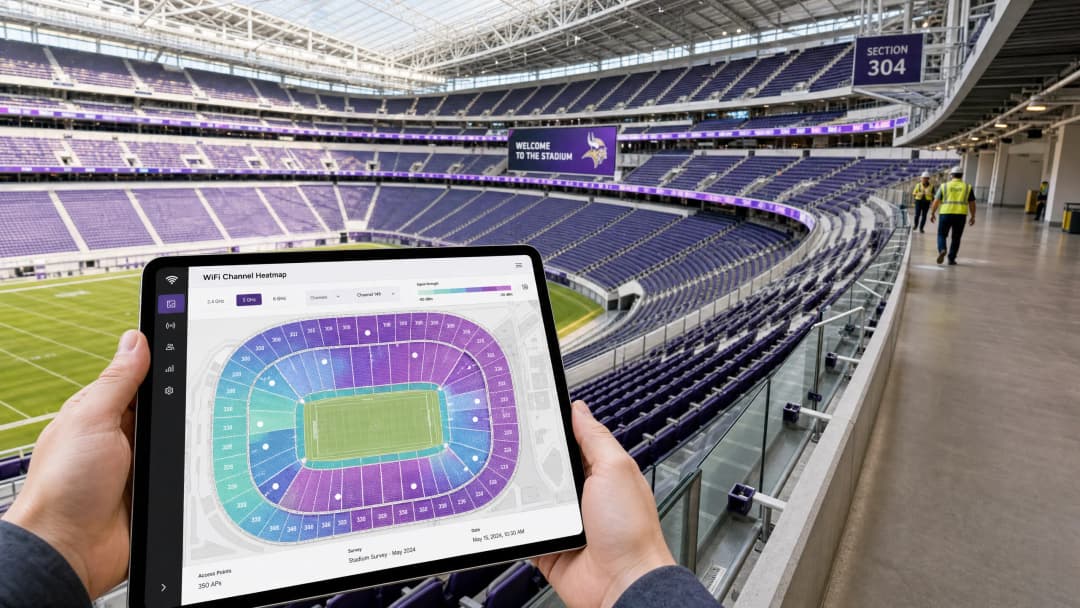
Für CTOs und IT-Leiter, die High-Density-Umgebungen verwalten (Stadien, Arenen, große Einzelhandelskomplexe und Konferenzzentren), reichen herkömmliche Prinzipien des WiFi Designs nicht mehr aus. In einem High-Density-Szenario ist die Kapazität die primäre Einschränkung, nicht die Abdeckung. Die Einführung von 802.11ax (WiFi 6) und das unberührte 1200-MHz-Spektrum im 6-GHz-Band (WiFi 6E) haben die Art und Weise, wie Netzwerkarchitekten die Kanalplanung angehen, grundlegend verändert.
Dieser Leitfaden bietet herstellerunabhängige, praxisnahe Strategien zur Optimierung von WiFi Kanälen in Szenarien mit extrem hoher Dichte. Er erklärt im Detail, warum 20-MHz-Kanäle nach wie vor der Goldstandard für 5-GHz-Bereitstellungen sind, wie BSS Coloring und OFDMA für die räumliche Wiederverwendung genutzt werden können und wie der strategische Einsatz von 6 GHz zur Entlastung älterer Bänder beiträgt. Unabhängig davon, ob Sie ein Overlay-Netzwerk für Analysen im Bereich Retail bereitstellen oder ein Stadion mit 60.000 Sitzplätzen aufrüsten - die Beherrschung der Kanalwiederverwendung ist der Schlüssel zur Bereitstellung eines zuverlässigen Guest WiFi Erlebnisses und zur Erfassung präziser WiFi Analytics Daten.
Technische Detailanalyse: Die Physik der High-Density-Szenarien
Bei Standard-Enterprise-Bereitstellungen besteht das Ziel meist darin, den Durchsatz pro Benutzer zu maximieren, was häufig zur Nutzung breiterer Kanäle (40 MHz oder 80 MHz) führt. In High-Density-Umgebungen kehrt sich dieses RF-Paradigma jedoch um.
Die 5-GHz-Strategie: 20 MHz ist Pflicht
Auf den Tribünen eines Stadions oder in einer überfüllten Kongresshalle ist die Gleichkanalinterferenz (Co-Channel Interference - CCI) der größte Feind der Netzwerkleistung.
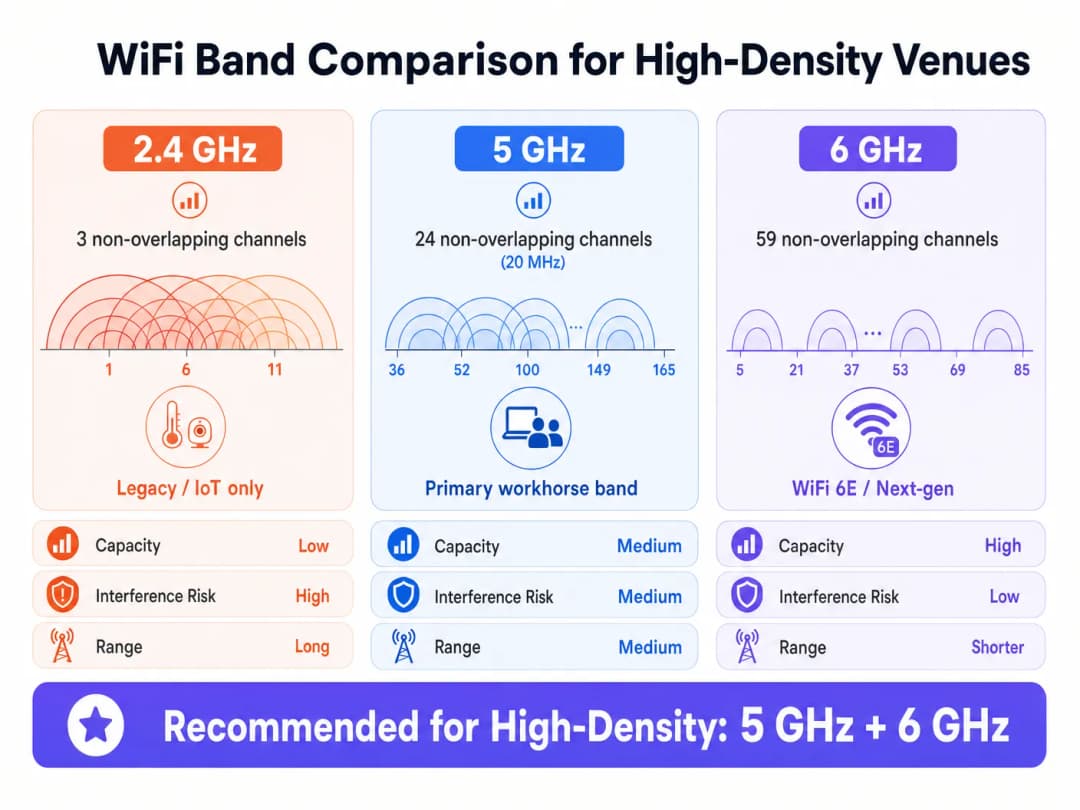
- Die Mathematik: Das 5-GHz-Band bietet 24 überschneidungsfreie 20-MHz-Kanäle (unter der Annahme, dass DFS-Kanäle verfügbar und nutzbar sind). Wenn Sie Kanäle auf 40 MHz bündeln, halbiert sich die Anzahl der verfügbaren, nicht überlappenden Kanäle auf 12.
- Die Realität: In einer dichten Umgebung mit Hunderten von Access Points (APs), die nah beieinander liegen, benötigen Sie die maximale Kanalwiederverwendung. Die Nutzung von 20-MHz-Kanälen ermöglicht es Ihnen, mehr APs auf einer bestimmten physischen Fläche zu platzieren, ohne dass diese sich gegenseitig stören.
Wie in der Praxis zu beobachten ist, liegt der beste Durchsatz, den Sie mit einem 20-MHz-Kanal im 5-GHz-Band erzielen, bei etwa 150 Mbps. Bei hoher Dichte ist es jedoch aufgrund des Management-Overheads und der Client-Dichte wahrscheinlicher, dass dieser bei 70 - 80 Mbps liegt. Dies ist für die überwiegende Mehrheit der Anwendungen in Veranstaltungsorten vollkommen ausreichend, einschließlich des Streamings von Wiederholungen und des Uploads von Social-Media-Inhalten.
802.11ax (WiFi 6) und Spatial Reuse
WiFi 6 hat Mechanismen eingeführt, die speziell für Umgebungen mit hoher Dichte entwickelt wurden und den Schwerpunkt von der theoretischen Höchstgeschwindigkeit auf die allgemeine Netzwerkeffizienz verlagern.
- OFDMA (Orthogonal Frequency-Division Multiple Access): Anstatt dass ein einzelner Client den gesamten Kanal für eine Übertragung beansprucht, teilt OFDMA den Kanal in kleinere Unterträger (Resource Units oder RUs) auf. Dadurch kann ein einzelner AP mit mehreren Clients gleichzeitig kommunizieren, was die Latenzzeit in dichten Menschenmengen drastisch reduziert.
- BSS Coloring (Spatial Reuse): Wenn ein AP früher hörte, dass ein anderer AP auf demselben Kanal übertrug (selbst wenn nur schwach), verzögerte er die Übertragung (CSMA/CA). BSS Coloring fügt dem PHY-Header eine "Farb-Kennung" hinzu. Wenn ein AP eine Übertragung auf seinem Kanal, aber mit einer anderen Farbe hört (was bedeutet, dass sie von einem benachbarten AP und nicht von seinem eigenen BSS stammt), kann er die Signalstärke bewerten. Liegt das Signal unter einem bestimmten Schwellenwert (OBSS-PD), kann er gleichzeitig übertragen, was die Gesamtkapazität erhöht.
Die 6 GHz Revolution (WiFi 6E)
Das 6 GHz Band bietet 1200 MHz sauberes Spektrum, was 59 überlappungsfreie 20 MHz Kanäle (oder 29 überlappungsfreie 40 MHz Kanäle) ergibt.
- Kanalbreite in 6 GHz: Aufgrund des massiven Anstiegs des verfügbaren Spektrums können Netzwerkarchitekten 40 MHz Kanäle im 6 GHz Band selbst in Umgebungen mit hoher Dichte sicher implementieren und so den Durchsatz pro Client verdoppeln, ohne CCI zu verursachen.
- Client-Akzeptanz: Da mobile Geräte zunehmend 6 GHz unterstützen, gibt das Steuern dieser fähigen Clients auf das saubere 6 GHz Band wertvolle Sendezeit im 5 GHz Band für ältere Geräte frei.
Haben Sie Fragen zu Ihrem spezifischen Setup?
Unser Team arbeitet mit Standortbetreibern, IT-Managern und Netzwerktechnikern an über 80.000 Standorten zusammen. Buchen Sie ein 20-minütiges Gespräch und wir zeigen Ihnen, wie andere diese Herausforderungen gelöst haben.
Implementierungshandbuch: Design für den Tribünenbereich
Die Bereitstellung von APs in einem Stadion erfordert Präzisionstechnik. Die Platzierung von APs an der Decke ist für den Tribünenbereich aufgrund der Entfernung der Clients und der fehlenden physischen Dämpfung zwischen den APs selten effektiv.
Strategie zur Platzierung unter den Sitzen
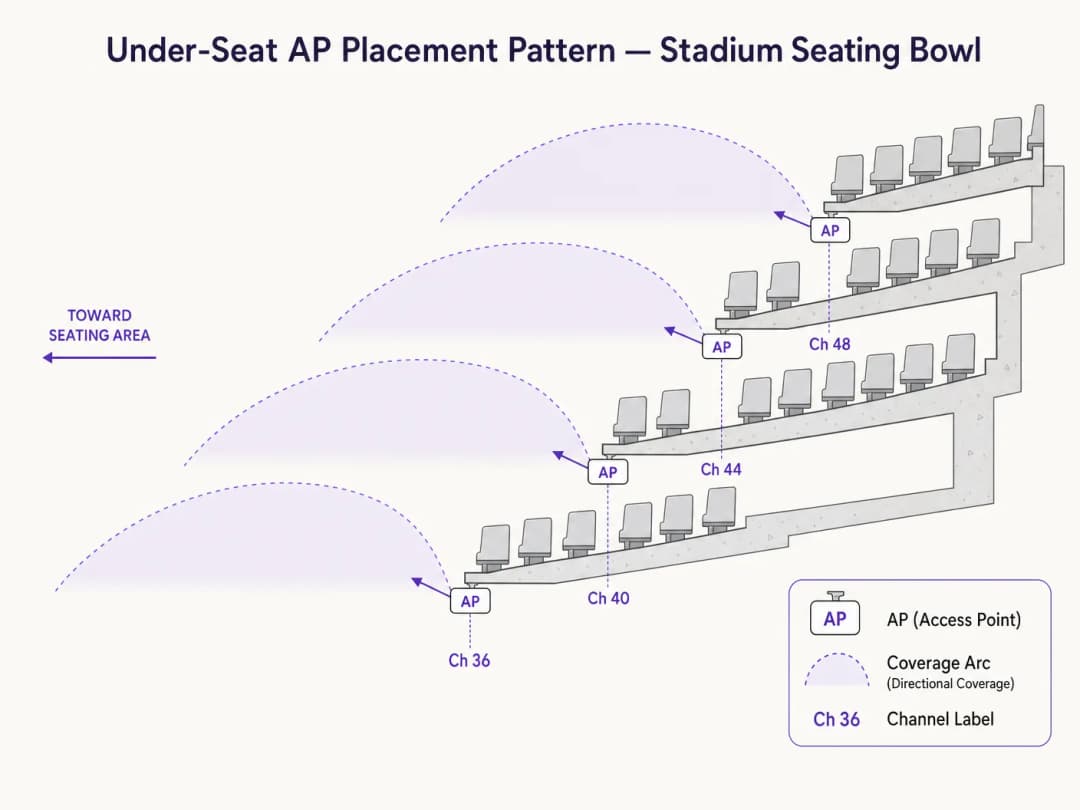
Der Industriestandard für Stadiontribünen ist die Platzierung von APs unter den Sitzen unter Verwendung von Richtantennen.
- Dämpfung ist Ihr Verbündeter: Der menschliche Körper ist ein hervorragender RF-Dämpfer (da er hauptsächlich aus Wasser besteht). Durch die Platzierung der APs unter den Sitzen hilft die Menschenmenge selbst dabei, RF-Signale daran zu hindern, sich zu weit auszubreiten, was die CCI auf natürliche Weise reduziert.
- Piko-Zellendesign: Erstellen Sie Mikro-Abdeckungszonen. Ein typisches Design sieht vor, dass ein AP ein Segment von 50 bis 70 Sitzen abdeckt.
- Direktantennen: Verwenden Sie stark gerichtete Patch-Antennen, die direkt auf den jeweiligen Sitzplatzbereich ausgerichtet sind, um die RF-Streuung in angrenzende Abschnitte zu minimieren.
Checkliste für die Kanalplanung
- 2.4 GHz auf den Tribünen deaktivieren: Das 2.4 GHz-Band verfügt nur über 3 überlappungsfreie Kanäle. Es ist mathematisch unmöglich, 2.4 GHz auf den Tribünen eines Stadions ohne katastrophale Interferenzen bereitzustellen. Deaktivieren Sie es oder beschränken Sie es streng auf interne IoT-Geräte oder bestimmte Bereiche in den Gängen.
- DFS-Kanäle nutzen: Bei 5 GHz sollten Sie DFS-Kanäle (Dynamic Frequency Selection) verwenden, um die vollen 24 Kanäle auszuschöpfen. Führen Sie eine gründliche Spektrumanalyse durch, um Radaraktivitäten zu identifizieren, die DFS-Ereignisse auslösen könnten.
- Strenge Leistungsregelung: Die Sendeleistung der APs muss erheblich reduziert werden. Wenn ein AP mit zu hoher Leistung sendet, verursacht dies CCI. Das Ziel ist ein Flüstern, das nur von Clients in unmittelbarer Nähe gehört werden kann.
- Niedrige Datenraten deaktivieren: Deaktivieren Sie veraltete Datenraten (z. B. 1, 2, 5.5, 11 Mbps und sogar bis zu 12 oder 24 Mbps). Dies zwingt Clients, sich mit höheren, effizienteren Modulationsraten zu verbinden, was die benötigte Airtime für Management-Frames reduziert.
Best Practices und Branchenstandards
- Kapazität vor Abdeckung: Planen Sie immer für Kapazität. Wenn Sie für Kapazität planen, ist die Abdeckung automatisch gewährleistet.
- Client-Steuerung: Steuern Sie Clients aggressiv auf die 5 GHz- und 6 GHz-Bänder. Die Plattform von Purple lässt sich nahtlos in führende Infrastrukturanbieter integrieren, um sicherzustellen, dass Authentifizierungs-Flows unabhängig vom Band reibungslos funktionieren.
- Authentifizierung und Sicherheit: In dichten öffentlichen Bereichen können traditionelle Captive Portals unter der Last von 50.000 gleichzeitigen Verbindungen leiden. Die Nutzung profilbasierter Authentifizierung wie Passpoint/OpenRoaming bietet eine sichere (WPA3/802.1X) und nahtlose Verbindung. Wie in unserem aktuellen Update unter How a wi fi assistant Enables Passwordless Access in 2026 beschrieben, ist dies die Zukunft der Konnektivität in großen Veranstaltungsorten.
- Tools: Verlassen Sie sich auf professionelle Vermessungs-Tools (z. B. Ekahau) für die prädiktive Modellierung und die Validierung nach der Bereitstellung. Weitere Empfehlungen finden Sie in unserem Leitfaden The Best WiFi Analyzer Tools for Troubleshooting Channel Overlap.
Fehlerbehebung und Risikominderung
Häufige Fehlermuster
- Sticky Clients: Geräte, die mit einem AP verbunden bleiben, obwohl ein besserer AP näher ist.
- Minderung: Implementieren Sie strenge Roaming-Schwellenwerte (z. B. Mindestanforderungen an den RSSI) und nutzen Sie 802.11k/v/r, um die Roaming-Entscheidungen der Clients zu unterstützen.
- DFS-Radar-Einflüsse: Ein nahegelegenes Wetter- oder Militärradar zwingt APs zum Kanalwechsel, was zu temporären Netzwerkausfällen führt.
- Minderung: Kontinuierliche Spektrumsüberwachung. Wenn bestimmte DFS-Kanäle in Ihrer Region anfällig für Störungen sind, entfernen Sie diese aus dem Kanalplan.
- Management-Frame-Overhead: In dichten Umgebungen können Beacon-Frames und Probe-Responses bis zu 40 % der verfügbaren Airtime verbrauchen.
- Minderung: Begrenzen Sie die Anzahl der SSIDs auf ein absolutes Maximum von 3 (z. B. Gäste, Unternehmen, IoT). Jede zusätzliche SSID multipliziert den Management-Overhead.
ROI und geschäftliche Auswirkungen
Ein leistungsstarkes WiFi-Netzwerk ist kein Kostenfaktor mehr - es ist eine Plattform, die Umsatz generiert.
- Monetarisierung von Retail Media: In großen Einzelhandelsumgebungen oder Stadien stellt das Captive Portal und die anschließende digitale Interaktion eine erstklassige Werbefläche dar. Eine zuverlässige Konnektivität sorgt für hohe Registrierungsraten, sodass Veranstaltungsorte durch gezielte Werbung monetarisieren können.
- Operative Effizienz: Ein robustes 6-GHz-Overlay-Netzwerk kann kritische Abläufe vor Ort (mobile Kassensysteme, Ticket-Scanner, Mitarbeiterkommunikation) völlig unabhängig vom Gästenetzwerk unterstützen.
- Datenerfassung: High-Density-Netzwerke, die von Plattformen wie Purple unterstützt werden, erfassen First-Party-Daten im großen Stil. Diese Daten ermöglichen die Integration in CRM, Treueprogramme und präzise Besucheranalysen, was den Betriebs- und Marketingteams des Veranstaltungsorts verwertbare Erkenntnisse liefert. Für Anwendungen im öffentlichen Sektor erfahren Sie mehr unter Purple Appoints Iain Fox as VP Growth – Public Sector to Drive Digital Inclusion and Smart City Innovation.
- Wayfinding: Zuverlässige Konnektivität ist eine Grundvoraussetzung für die Blue-Dot-Navigation. Für Umgebungen, in denen die Verbindung unterbrochen werden könnte, sorgt Purple Launches Offline Maps Mode for Seamless, Secure Navigation to WiFi Hotspots für die Kontinuität des Dienstes.
Schlüsseldefinitionen
Co-Channel-Interferenz (CCI)
Wenn zwei oder mehr APs auf demselben Kanal arbeiten und sich gegenseitig hören können, was sie dazu zwingt, nacheinander zu übertragen.
CCI ist die Hauptursache für schlechte Leistung in Stadien. Sie verwandelt ein Hochgeschwindigkeitsnetzwerk in eine einzige, überlastete Kollisionsdomäne.
BSS Coloring
Eine 802.11ax-Funktion, die Übertragungen mit einer Kennung versieht. Dadurch können APs auf demselben Kanal entfernte APs ignorieren und gleichzeitig übertragen, wenn das Signal schwach genug ist.
Entscheidend für die räumliche Wiederverwendung in dichten Bereitstellungen, da es eine effizientere Nutzung des begrenzten 5 GHz Spektrums ermöglicht.
OFDMA (Orthogonal Frequency-Division Multiple Access)
Eine Technologie, die einen WiFi Kanal in kleinere Ressourceneinheiten unterteilt, sodass ein AP mit mehreren Clients exakt zur gleichen Zeit kommunizieren kann.
Reduziert Latenzen in überfüllten Umgebungen, indem verhindert wird, dass einzelne Clients den gesamten Kanal für kleine Datenmengen monopolisieren.
Dynamic Frequency Selection (DFS)
Eine Vorschrift, die WiFi Geräte dazu verpflichtet, Radarsysteme auf bestimmten 5 GHz Kanälen zu erkennen und automatisch den Kanal zu wechseln, um Interferenzen zu vermeiden.
Betreiber von Veranstaltungsorten müssen DFS-Kanäle nutzen, um genügend Spektrum für ein Stadion zu erhalten, müssen jedoch Radarsignale, die zu Netzwerkinstabilität führen können, sorgfältig überwachen.
OBSS-PD (Overlapping Basic Service Set Preamble Detection)
Der spezifische Schwellenwert-Mechanismus, der bei BSS Coloring verwendet wird, um zu bestimmen, ob ein AP über eine entfernte Übertragung auf demselben Kanal hinweg senden kann.
Dies ist der technische Mechanismus, der die von WiFi 6 versprochene "räumliche Wiederverwendung" tatsächlich umsetzt.
Management-Frame-Overhead
Die Airtime, die von APs verbraucht wird, um ihre Präsenz anzukündigen (Beacons) und auf Client-Anfragen zu reagieren, anstatt tatsächliche Benutzerdaten zu übertragen.
In dichten Umgebungen kann dieser Overhead ein Netzwerk lahmlegen, wenn zu viele SSIDs ausgestrahlt werden oder niedrige Datenraten aktiviert sind.
Piko-Zellen-Architektur
Eine Netzwerk-Designstrategie, die stark gerichtete Antennen und eine geringe Sendeleistung nutzt, um sehr kleine, eng kontrollierte Abdeckungszonen zu schaffen.
Der Standardansatz für unter den Sitzen installiertes Stadion-WiFi, der sicherstellt, dass ein AP nur einen bestimmten Bereich von 50 - 70 Sitzen versorgt.
Passpoint / OpenRoaming
Profilbasierte Authentifizierungsstandards, die es Geräten ermöglichen, sich automatisch und sicher mit dem Enterprise WiFi zu verbinden, ohne Captive Portals zu nutzen.
Unerlässlich für das nahtlose Onboarding von zehntausenden Fans gleichzeitig, um den Engpass webbasierter Portalseiten zu vermeiden.
Ausgearbeitete Beispiele
Ein Stadion mit 40.000 Sitzplätzen rüstet sein altes 802.11ac-Netzwerk auf WiFi 6E auf. Der IT-Leiter möchte 40 MHz Kanäle im 5 GHz Band nutzen, um die Geschwindigkeitstests für VIPs im Unterrang zu maximieren. Wie lautet die architektonische Empfehlung?
Die Empfehlung lautet, im gesamten Tribünenbereich strikt 20 MHz Kanäle auf dem 5 GHz Band vorzuschreiben und 40 MHz Kanäle ausschließlich auf dem neuen 6 GHz Band zu nutzen.
Ein großes Konferenzzentrum verzeichnet während der Keynotes erhebliche Netzwerk-Latenzen, wenn sich 5.000 Teilnehmer in einer einzigen Halle befinden. Das Dashboard zeigt eine 5 GHz Kanalauslastung von 85 %. Aktuell werden 6 SSIDs ausgestrahlt.
- Reduzieren Sie die Anzahl der SSIDs von 6 auf maximal 3 (z. B. Guest, Aussteller, Personal). 2. Deaktivieren Sie niedrigere Datenraten (1 - 11 Mbps). 3. Stellen Sie sicher, dass BSS Coloring aktiviert ist, falls eine WiFi 6 Infrastruktur genutzt wird.
Übungsfragen
Q1. Sie prüfen ein neu installiertes Netzwerk in einer Arena mit 15.000 Sitzplätzen. Der Anbieter hat rundstrahlende APs im Deckensteg (24 Meter Höhe) mit 40 MHz Kanälen auf dem 5 GHz Band installiert. Was sind die unmittelbaren architektonischen Probleme?
Hinweis: Berücksichtigen Sie sowohl die physische Distanz zu den Clients als auch die mathematische Realität der Kanalwiederverwendung im 5 GHz Band.
Musterlösung anzeigen
Es liegen zwei schwerwiegende Fehler vor. Erstens hören sich rundstrahlende APs an der Decke in 24 Metern Höhe gegenseitig deutlich, was massive Co-Kanal-Interferenzen (CCI) verursacht, während das Signal bei den Clients nur schwach ankommt. Zweitens reduziert die Nutzung von 40 MHz Kanälen die Anzahl der verfügbaren, überschneidungsfreien Kanäle auf 12. In einer Arena reichen 12 Kanäle nicht aus, um CCI zu verhindern. Das Design sollte auf unter den Sitzen montierte, gerichtete APs mit 20 MHz Kanälen umgestellt werden.
Q2. Das IT-Team eines Einkaufszentrums möchte 2,4 GHz im hochfrequentierten Gastronomiebereich aktiviert lassen, um ältere Geräte zu unterstützen, verzeichnet jedoch schwere Latenzprobleme. Wie sollten sie das 2,4 GHz Band neu konfigurieren?
Hinweis: Wie viele überschneidungsfreie Kanäle gibt es im 2,4 GHz Band?
Musterlösung anzeigen
Das 2,4 GHz Band bietet nur 3 überschneidungsfreie Kanäle (1, 6, 11). In einem hochfrequentierten Bereich wie einem Gastronomiebereich führt dies unweigerlich zu schweren Interferenzen. Sie sollten 2,4 GHz in den hochfrequentierten Zonen komplett deaktivieren und die Clients auf das 5 GHz oder 6 GHz Band zwingen. Wenn 2,4 GHz für IoT-Geräte (wie POS-Terminals) zwingend erforderlich ist, sollte es auf einer separaten, versteckten SSID mit auf das absolute Minimum reduzierter AP-Sendeleistung ausgestrahlt werden.
Q3. Bei einer Messung nach der Inbetriebnahme eines Stadions stellen Sie fest, dass APs während eines Spiels häufig den Kanal wechseln, was zu Verbindungsabbrüchen bei den Clients führt. Die Protokolle weisen auf DFS-Ereignisse hin. Was ist die Behebungsstrategie?
Hinweis: Was löst ein DFS-Ereignis aus und wie geht man in einer statischen Umgebung damit um?
Musterlösung anzeigen
DFS-Ereignisse (Dynamic Frequency Selection) werden ausgelöst, wenn ein AP Radaraktivitäten (Wetter, Militär, Flughafen) auf seinem Betriebskanal erkennt. Die Behebung besteht darin, die Controller-Protokolle zu prüfen, um genau zu identifizieren, welche DFS-Kanäle betroffen sind. Sobald diese identifiziert sind, müssen diese spezifischen Kanäle dauerhaft aus dem Pool für die dynamische Kanalzuweisung des Veranstaltungsortes entfernt werden.
Weiterlesen in dieser Reihe
Verständnis von RSSI und Signalstärke für eine optimale Kanalplanung
Dieser Leitfaden bietet einen umfassenden technischen Einblick in RSSI, Signal-Rausch-Verhältnis (SNR) und HF-Ausbreitungsprinzipien für eine optimale Kanalplanung. Er bietet IT-Managern, Netzwerkarchitekten und Leitern des Standortbetriebs umsetzbare Strategien zur Reduzierung von Co-Kanal- und Nachbarkanal-Interferenzen, zur Optimierung der AP-Platzierung und zur Nutzung von Analysen für messbare geschäftliche Auswirkungen in den Bereichen Gastgewerbe, Einzelhandel und im öffentlichen Sektor.
WiFi 6 vs. WiFi 5: Löst es Kanalinterferenzen?
Dieser Leitfaden bietet einen technischen Deep-Dive darüber, wie WiFi 6 (802.11ax) Kanalinterferenzen in High-Density-Unternehmensumgebungen durch OFDMA und BSS Coloring bewältigt. Er stattet IT-Manager, Netzwerkarchitekten und CTOs mit praxisnahen Bereitstellungsstrategien, realen Fallstudien aus dem Gastgewerbe und dem Gesundheitswesen sowie einem Framework zur Bewertung des ROI von Infrastruktur-Upgrades an Standorten aus, an denen die Wireless-Performance geschäftskritisch ist.
Die besten WiFi Analyzer Tools zur Behebung von Kanalüberlappungen
Dieser umfassende Leitfaden bietet IT-Managern und Netzwerkarchitekten praxisnahe Strategien zur Identifizierung und Behebung von WiFi-Kanalüberlappungen in Umgebungen mit hoher Dichte. Er bewertet die besten WiFi Analyzer Tools und skizziert eine bewährte Methodik zur Optimierung der RF-Leistung, um ein nahtloses Gästeerlebnis zu gewährleisten und den ROI der Infrastruktur zu maximieren.
Haben Sie Fragen zu Ihrem spezifischen Setup?
Unser Team arbeitet mit Standortbetreibern, IT-Managern und Netzwerktechnikern an über 80.000 Standorten zusammen. Buchen Sie ein 20-minütiges Gespräch und wir zeigen Ihnen, wie andere diese Herausforderungen gelöst haben.