
Best WiFi Channels for High-Density Venues
A definitive technical reference for selecting and optimizing WiFi channels in high-density environments like stadiums, arenas, and large public venues. It covers RF physics, channel reuse strategies across 5 GHz and 6 GHz bands, and actionable deployment guidance for IT leaders.
Video overview
Listen to this guide
View podcast transcript
Part of our core series: Guest WiFi Guide →
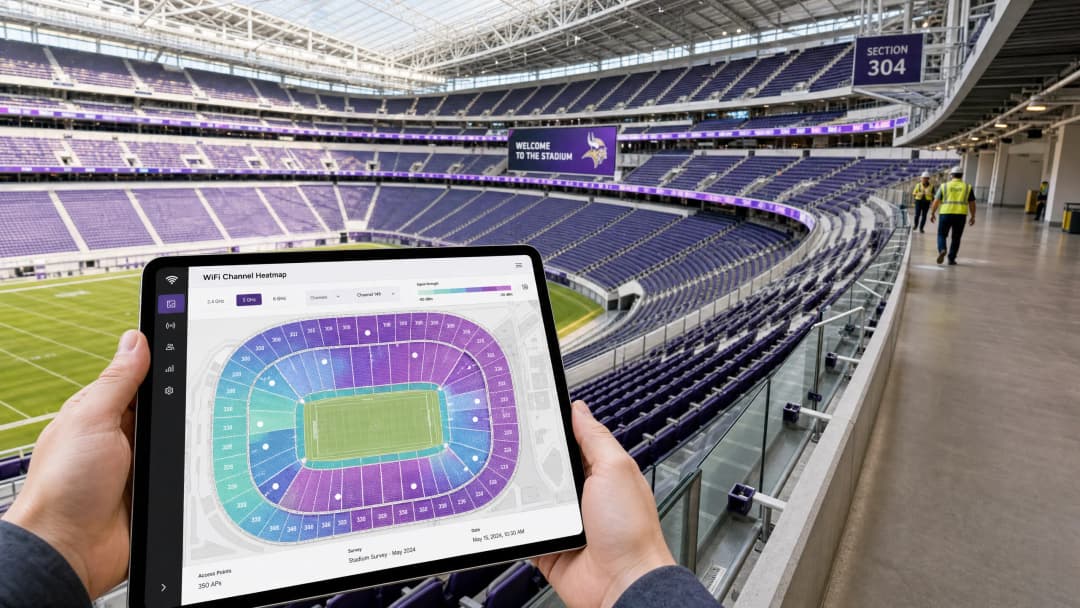
Resumen Ejecutivo
Para los CTO y Directores de TI que gestionan entornos de alta densidad (estadios, arenas, grandes complejos comerciales y centros de conferencias), los principios de diseño de WiFi heredados ya no son suficientes. En un despliegue de alta densidad, la capacidad es la principal limitación, no la cobertura. La introducción de 802.11ax (WiFi 6) y los impecables 1200 MHz de espectro en la banda de 6 GHz (WiFi 6E) han cambiado fundamentalmente la forma en que los arquitectos de red abordan la planificación de canales.
Esta guía proporciona estrategias prácticas y neutrales respecto al proveedor para optimizar los canales de WiFi en escenarios de densidad extrema. Detalla por qué los canales de 20 MHz siguen siendo el estándar de oro para los despliegues de 5 GHz, cómo aprovechar BSS Coloring y OFDMA para la reutilización espacial, y la implementación estratégica de 6 GHz para aliviar la congestión de las bandas heredadas. Ya sea que esté desplegando una red superpuesta para analíticas de Retail o actualizando un estadio de 60,000 asientos, dominar la reutilización de canales es fundamental para ofrecer una experiencia de Guest WiFi confiable y capturar datos precisos de WiFi Analytics.
Inmersión Técnica Profunda: La Física de la Alta Densidad
En los despliegues empresariales estándar, el objetivo suele ser maximizar el rendimiento por usuario, lo que lleva al uso de canales más anchos (40 MHz u 80 MHz). Sin embargo, en entornos de alta densidad, el paradigma de RF se invierte.
La Estrategia de 5 GHz: 20 MHz es Obligatorio
En las gradas de un estadio o en una sala de conferencias abarrotada, la interferencia de canal adyacente (CCI) es el principal enemigo del rendimiento de la red.
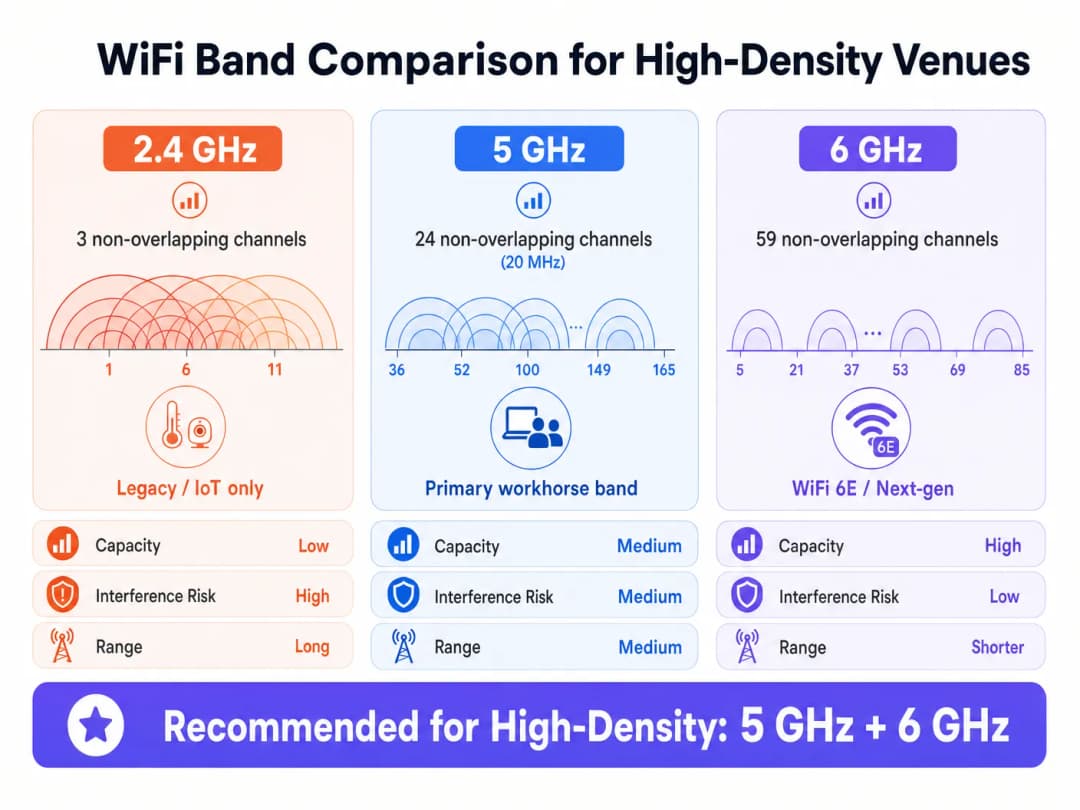
- La Matemática: La banda de 5 GHz ofrece 24 canales de 20 MHz no superpuestos (asumiendo que los canales DFS estén disponibles y utilizables). Si une canales a 40 MHz, reduce a la mitad sus canales no superpuestos disponibles a 12.
- La Realidad: En un despliegue denso con cientos de Puntos de Acceso (APs) muy cercanos entre sí, necesita la máxima reutilización de canales. El uso de canales de 20 MHz le permite concentrar más APs en un espacio físico determinado sin que interfieran entre sí.
Como se observa en los despliegues de la industria, el mejor rendimiento que obtendrá de un canal de 5 GHz de 20 MHz es de alrededor de 150 Mbps, pero en alta densidad, es más probable que sea de 70-80 Mbps debido a la sobrecarga de gestión y la densidad de clientes. Esto es completamente suficiente para la gran mayoría de las aplicaciones de los recintos, incluyendo la transmisión de repeticiones y la subida de contenido a redes sociales.
802.11ax (WiFi 6) and Spatial Reuse
WiFi 6 introduced mechanisms designed specifically for high - density environments, shifting the focus from theoretical peak speed to overall network efficiency.
- OFDMA (Orthogonal Frequency-Division Multiple Access): Instead of a single client consuming the entire channel for a transmission, OFDMA divides the channel into smaller sub-carriers (Resource Units, or RUs). This allows a single AP to communicate with multiple clients simultaneously, drastically reducing latency in dense crowds.
- BSS Coloring (Spatial Reuse): Historically, if an AP heard another AP transmitting on the same channel (even weakly), it would defer transmission (CSMA/CA). BSS Coloring adds a "color" identifier to the PHY header. If an AP hears a transmission on its channel but with a different color (meaning it comes from a neighboring AP, not its own BSS), it can evaluate the signal strength. If the signal is below a certain threshold (OBSS-PD), it can transmit simultaneously, increasing aggregate capacity.
The 6 GHz Revolution (WiFi 6E)
The 6 GHz band provides 1200 MHz of clean spectrum, resulting in 59 non-overlapping 20 MHz channels (or 29 non-overlapping 40 MHz channels).
- Channel Width in 6 GHz: Due to the massive increase in available spectrum, network architects can safely deploy 40 MHz channels in 6 GHz, even in high - density environments, doubling throughput per client without causing CCI.
- Client Adoption: As mobile devices increasingly support 6 GHz, steering these capable clients to the clean 6 GHz band frees up valuable airtime in the 5 GHz band for legacy devices.
Got questions about your specific setup?
Our team works with venue operators, IT managers, and network engineers across 80,000 venues. Book a 20-minute call and we will show you how others like you solved it.
Implementation Guide: Designing for the Bowl
Deploying APs in a stadium requires precision engineering. Overhead AP placement is rarely effective for the bowl because of the distance from clients and the lack of physical attenuation between APs.
Under-Seat Deployment Strategy
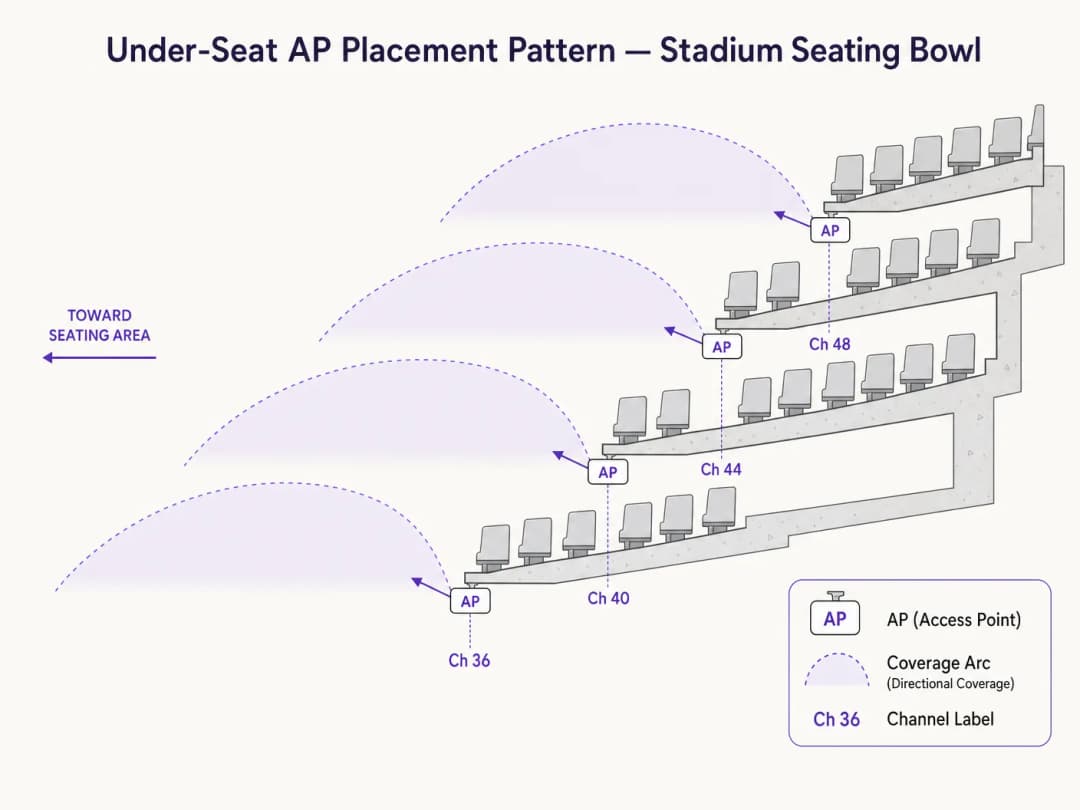
The industry standard for stadium bowls is under-seat AP placement using directional antennas.
- Attenuation is Your Friend: The human body is an excellent RF attenuator (mostly made of water). By placing APs under the seats, the crowd itself helps block RF signals from traveling too far, naturally reducing CCI.
- Pico-Cell Design: Create micro-coverage zones. A typical design might have an AP serving a "wedge" of 50 to 70 seats.
- Antenas direccionales: Utilice antenas de parche altamente direccionales apuntando hacia la cuña de asientos específica, limitando la dispersión de RF hacia las secciones adyacentes.
Lista de verificación para la planificación de canales
- Desactivar 2.4 GHz en las gradas: La banda de 2.4 GHz tiene solo 3 canales no superpuestos. Es matemáticamente imposible implementar 2.4 GHz en las gradas de un estadio sin una interferencia catastrófica. Déjela desactivada o limítela estrictamente a dispositivos IoT internos o áreas específicas de los pasillos de acceso.
- Aproveche los canales DFS: En 5 GHz, debe utilizar canales de Selección Dinámica de Frecuencia (DFS) para obtener los 24 canales completos. Asegúrese de realizar un análisis de espectro exhaustivo para identificar cualquier actividad de radar que pueda activar eventos DFS.
- Control estricto de potencia: La potencia de transmisión del AP debe reducirse significativamente. Si un AP está transmitiendo con demasiada potencia, causa CCI. El objetivo es un susurro que solo los clientes inmediatos puedan escuchar.
- Desactive tasas de datos bajas: Desactive las tasas de datos heredadas (por ejemplo, 1, 2, 5.5, 11 Mbps, e incluso hasta 12 o 24 Mbps). Esto obliga a los clientes a conectarse a tasas de modulación más altas y eficientes, reduciendo el tiempo de aire requerido para las tramas de gestión.
Mejores prácticas y estándares de la industria
- Capacidad sobre cobertura: Diseñe siempre para la capacidad. Si diseña para la capacidad, la cobertura está garantizada.
- Direccionamiento de clientes: Dirija de manera agresiva a los clientes a las bandas de 5 GHz y 6 GHz. La plataforma de Purple se integra a la perfección con los principales proveedores de infraestructura para garantizar que los flujos de autenticación funcionen sin problemas independientemente de la banda.
- Autenticación y seguridad: En lugares públicos densos, los Captive Portals tradicionales pueden tener dificultades bajo la carga de 50,000 conexiones simultáneas. Aprovechar la autenticación basada en perfiles, como Passpoint/OpenRoaming, proporciona una conexión segura (WPA3/802.1X) y sin interrupciones. Como se detalla en nuestra actualización reciente, How a wi fi assistant Enables Passwordless Access in 2026, este es el futuro de la conectividad en grandes recintos.
- Herramientas: Confíe en herramientas de estudio profesionales (por ejemplo, Ekahau) para el modelado predictivo y la validación posterior al despliegue. Consulte nuestra guía sobre The Best WiFi Analyzer Tools for Troubleshooting Channel Overlap para obtener recomendaciones específicas.
Troubleshooting and Risk Mitigation
Common Failure Modes
- Sticky Clients: Devices that remain connected to an AP even when a better one is closer.
- Mitigation: Implement strict roaming thresholds (for example, minimum RSSI requirements) and use 802.11k/v/r to assist in client roaming decisions.
- DFS Radar Impacts: Nearby weather or military radar forces APs to change channels, causing temporary network drops.
- Mitigation: Continuous spectrum monitoring. If specific DFS channels are prone to impacts in your area, remove them from the channel plan.
- Management Frame Overhead: In dense environments, beacon frames and probe responses can consume up to 40% of available airtime.
- Mitigation: Limit the number of SSIDs to an absolute maximum of 3 (for example, Guest, Corporate, IoT). Each additional SSID multiplies management overhead.
ROI and Business Impact
A high-performance WiFi network is no longer a cost center; it is a revenue-generating platform.
- Retail Media Monetization: In large-scale retail or stadium environments, the Captive Portal and subsequent digital engagement represent prime advertising space. Reliable connectivity ensures high registration rates, allowing venues to monetize through targeted advertising.
- Operational Efficiency: A robust 6 GHz overlay network can support critical venue operations (mobile POS, ticket scanners, staff communications) completely separate from the guest network.
- Data Acquisition: High-density networks powered by platforms like Purple capture first-party data at scale. This data drives integrations with CRM, loyalty programs, and precise foot-traffic analytics, providing actionable insights for venue operations and marketing teams. For public sector applications, learn how Purple Appoints Iain Fox as VP Growth - Public Sector to Drive Digital Inclusion and Smart City Innovation.
- Wayfinding: Reliable connectivity is a prerequisite for blue-dot navigation. For environments where connectivity might be lost, Purple Launches Offline Maps Mode for Seamless, Secure Navigation to WiFi Hotspots ensures continuity of service.
Key Definitions
Co-Channel Interference (CCI)
When two or more APs operate on the same channel and can hear each other, forcing them to take turns transmitting.
CCI is the primary cause of poor performance in stadiums. It turns a high-speed network into a single, congested collision domain.
BSS Coloring
An 802.11ax feature that adds an identifier to transmissions, allowing APs on the same channel to ignore distant APs and transmit simultaneously if the signal is weak enough.
Crucial for spatial reuse in dense deployments, allowing more efficient use of the limited 5 GHz spectrum.
OFDMA (Orthogonal Frequency-Division Multiple Access)
A technology that subdivides a WiFi channel into smaller resource units, allowing an AP to talk to multiple clients at the exact same time.
Reduces latency in crowded environments by preventing single clients from monopolizing the entire channel for small data payloads.
Dynamic Frequency Selection (DFS)
A mandate requiring WiFi equipment to detect radar systems on certain 5 GHz channels and automatically switch channels to avoid interference.
Venue operators must use DFS channels to get enough spectrum for a stadium, but must carefully monitor for radar hits that can cause network instability.
OBSS-PD (Overlapping Basic Service Set Preamble Detection)
The specific threshold mechanism used in BSS Coloring to determine if an AP can transmit over a distant, same-channel transmission.
This is the technical mechanism that actually executes the 'spatial reuse' promised by WiFi 6.
Management Frame Overhead
The airtime consumed by APs broadcasting their presence (beacons) and responding to client probes, rather than transmitting actual user data.
In dense environments, this overhead can cripple a network if too many SSIDs are broadcast or low data rates are enabled.
Pico-Cell Architecture
A network design strategy using highly directional antennas and low transmit power to create very small, tightly controlled coverage zones.
The standard approach for under-seat stadium WiFi, ensuring one AP only serves a specific section of 50 - 70 seats.
Passpoint / OpenRoaming
Profile-based authentication standards that allow devices to automatically and securely connect to enterprise WiFi without Captive Portals.
Essential for seamless onboarding of tens of thousands of fans simultaneously, avoiding the bottleneck of web-based splash pages.
Worked Examples
A 40,000-seat stadium is upgrading its legacy 802.11ac network to WiFi 6E. The IT Director wants to use 40 MHz channels on 5 GHz to maximize speed tests for VIPs in the lower bowl. What is the architectural recommendation?
The recommendation is to strictly enforce 20 MHz channels on the 5 GHz band across the entire seating bowl, and utilize 40 MHz channels exclusively on the new 6 GHz band.
A large conference center is experiencing severe network latency during keynote speeches when 5,000 attendees are in a single hall. The dashboard shows 5 GHz channel utilization at 85%. They are currently broadcasting 6 SSIDs.
- Reduce the number of SSIDs from 6 to a maximum of 3 (e.g., Guest, Exhibitor, Staff). 2. Disable lower data rates (1 - 11 Mbps). 3. Ensure BSS Coloring is enabled if using WiFi 6 infrastructure.
Practice Questions
Q1. You are auditing a newly installed network in a 15,000-seat arena. The vendor has deployed omnidirectional APs in the ceiling catwalk (80 feet high) using 40 MHz channels on the 5 GHz band. What are the immediate architectural concerns?
Hint: Consider both the physical distance to the clients and the mathematical reality of channel reuse in 5 GHz.
View model answer
There are two major failures here. First, overhead omnidirectional APs at 80 feet will hear each other clearly, causing massive Co-Channel Interference (CCI), and the signal reaching the clients will be weak. Second, using 40 MHz channels reduces the available non-overlapping channels to 12. In an arena, 12 channels is insufficient to prevent CCI. The design should be changed to under-seat directional APs using 20 MHz channels.
Q2. A retail complex IT team wants to leave 2.4 GHz enabled across their high-density food court to support legacy devices, but they are experiencing severe latency. How should they reconfigure the 2.4 GHz band?
Hint: How many non-overlapping channels exist in 2.4 GHz?
View model answer
The 2.4 GHz band only has 3 non-overlapping channels (1, 6, 11). In a high-density area like a food court, this will inevitably lead to severe interference. They should disable 2.4 GHz entirely in the high-density zones, forcing clients to the 5 GHz or 6 GHz bands. If 2.4 GHz is strictly required for IoT devices (like POS terminals), it should be broadcast on a separate, hidden SSID with AP transmit power turned down to the absolute minimum.
Q3. During a post-deployment survey of a stadium, you notice that APs are frequently changing channels during a match, causing clients to drop connections. The logs indicate DFS events. What is the remediation strategy?
Hint: What triggers a DFS event and how do you handle it in a static environment?
View model answer
DFS (Dynamic Frequency Selection) events are triggered when an AP detects radar activity (weather, military, airport) on its operating channel. The remediation is to review the controller logs to identify exactly which DFS channels are taking hits. Once identified, those specific channels must be permanently removed from the dynamic channel assignment pool for the venue.
Continue reading in this series
Understanding RSSI and Signal Strength for Optimal Channel Planning
This guide provides a comprehensive technical deep-dive into RSSI, Signal-to-Noise Ratio (SNR), and RF propagation principles for optimal channel planning. It equips IT managers, network architects, and venue operations directors with actionable strategies to mitigate Co-Channel and Adjacent Channel Interference, optimize AP placement, and leverage analytics for measurable business impact across hospitality, retail, and public sector environments.
WiFi 6 vs WiFi 5: Does it Solve Channel Interference?
This guide provides a technical deep dive into how WiFi 6 (802.11ax) addresses channel interference in high-density enterprise environments through OFDMA and BSS Coloring. It equips IT managers, network architects, and CTOs with actionable deployment strategies, real-world case studies from hospitality and healthcare, and a framework for evaluating the ROI of infrastructure upgrades in venues where wireless performance is business-critical.
The Best WiFi Analyzer Tools for Troubleshooting Channel Overlap
This comprehensive guide provides IT managers and network architects with actionable strategies for identifying and resolving WiFi channel overlap in high-density environments. It evaluates the best WiFi analyzer tools and outlines a proven methodology for optimizing RF performance to ensure a seamless guest experience and maximize infrastructure ROI.
Got questions about your specific setup?
Our team works with venue operators, IT managers, and network engineers across 80,000 venues. Book a 20-minute call and we will show you how others like you solved it.