
आपका स्टेडियम WiFi क्यों रुक जाता है (और इसे कैसे ठीक करें)
यह आधिकारिक तकनीकी मार्गदर्शिका स्टेडियम WiFi भीड़ के मूल कारण की जाँच करती है — 50,000 उपकरणों द्वारा एक साथ प्रोग्रामेटिक विज्ञापन और टेलीमेट्री लोड करने की पृष्ठभूमि की हलचल — और प्राथमिक शमन रणनीति के रूप में एज DNS फ़िल्टरिंग को तैनात करने के लिए एक विस्तृत वास्तुशिल्प खाका प्रदान करती है। IT डायरेक्टर्स, CTOs और नेटवर्क आर्किटेक्ट्स के लिए डिज़ाइन किया गया, यह कार्रवाई योग्य कार्यान्वयन मार्गदर्शन, वास्तविक दुनिया के केस स्टडीज़ और मापने योग्य ROI फ्रेमवर्क प्रदान करता है ताकि स्थल संचालकों को बैंडविड्थ पुनः प्राप्त करने और बड़े पैमाने पर उच्च-प्रदर्शन कनेक्टिविटी प्रदान करने में मदद मिल सके।
इस गाइड को सुनें
पॉडकास्ट ट्रांसक्रिप्ट देखें
कार्यकारी सारांश
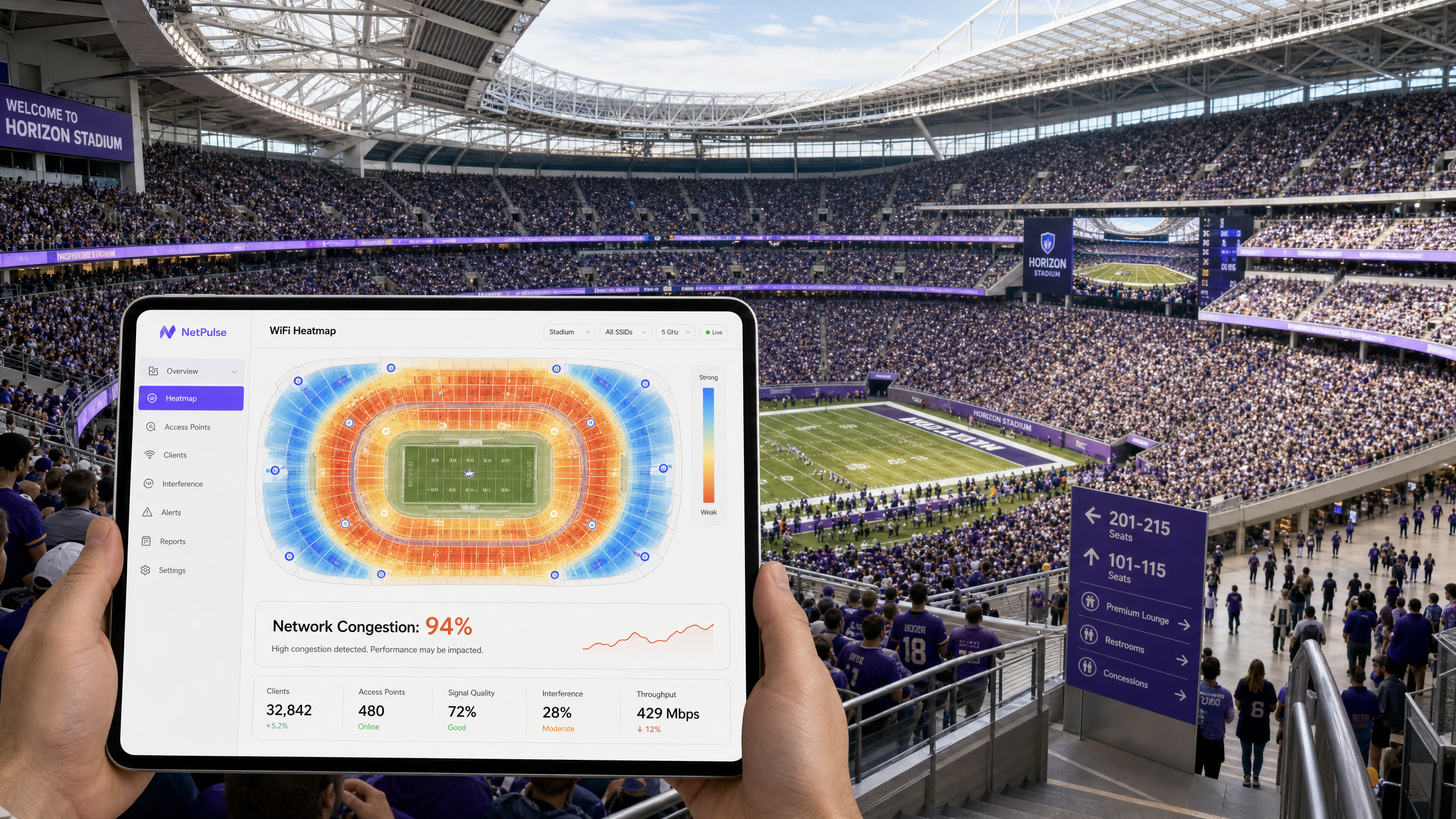
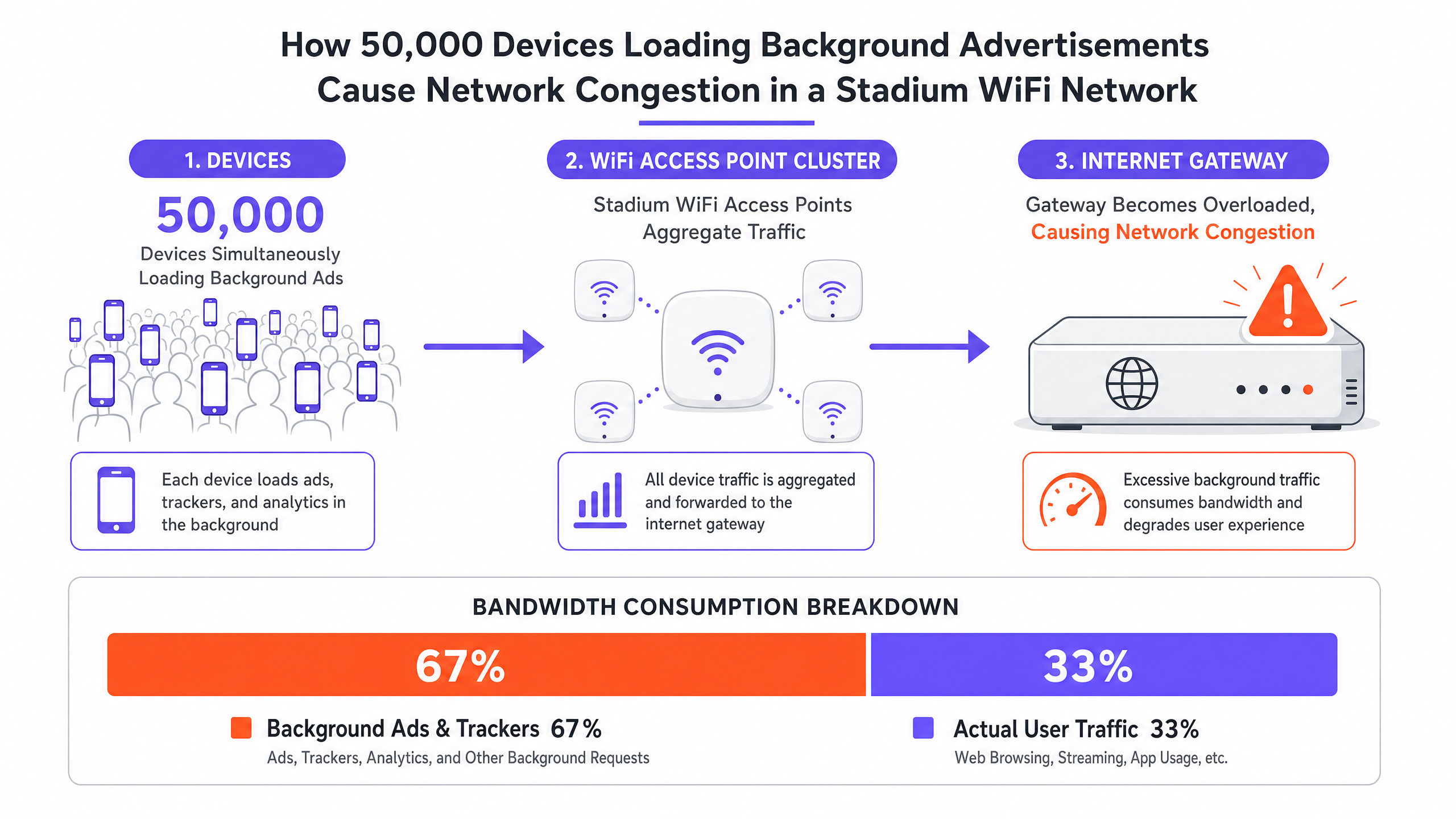
उच्च-घनत्व वाले स्थानों का प्रबंधन करने वाले CTOs और IT डायरेक्टर्स के लिए, स्टेडियम WiFi धीमा होने की घटना एक लगातार और महंगी परिचालन जोखिम है। मल्टी-गीगाबिट बैकहॉल, उच्च-घनत्व वाले एक्सेस पॉइंट और सावधानीपूर्वक RF योजना पर महत्वपूर्ण पूंजीगत व्यय के बावजूद, जब स्थल की क्षमता 80% से अधिक हो जाती है तो नेटवर्क अक्सर रुक जाते हैं। मूल कारण शायद ही कभी हार्डवेयर की सीमा होती है। यह पृष्ठभूमि ट्रैफ़िक का अदृश्य हिमस्खलन है। जब 50,000 डिवाइस एक साथ Guest WiFi नेटवर्क से जुड़ते हैं, तो वे लाखों सूक्ष्म-लेनदेन शुरू करते हैं — प्रोग्रामेटिक विज्ञापन लोड करना, टेलीमेट्री सिंक करना और पृष्ठभूमि SDK कॉल निष्पादित करना। यह "हलचल" एक भी उपयोगकर्ता के सक्रिय रूप से वेब ब्राउज़ करने से पहले उपलब्ध बैंडविड्थ का 60% तक उपभोग कर सकती है, NAT पूलों को समाप्त कर सकती है और एयरटाइम को संतृप्त कर सकती है। यह मार्गदर्शिका इस भीड़ के तकनीकी यांत्रिकी का विवरण देती है, एज DNS फ़िल्टरिंग को लागू करने के लिए एक विक्रेता-तटस्थ वास्तुशिल्प खाका प्रदान करती है, और ऐसा करने के ROI को निर्धारित करती है।
तकनीकी गहन-विश्लेषण: उच्च-घनत्व भीड़ की संरचना
पृष्ठभूमि ट्रैफ़िक का हिमस्खलन
जब कोई डिवाइस गेस्ट WiFi नेटवर्क से जुड़ता है, तो वह तुरंत पृष्ठभूमि गतिविधि की एक श्रृंखला शुरू कर देता है जिसका उपयोगकर्ता के सक्रिय रूप से करने से कोई लेना-देना नहीं होता है। आधुनिक मोबाइल एप्लिकेशन कई तृतीय-पक्ष SDKs के साथ एम्बेडेड होते हैं — एनालिटिक्स प्लेटफॉर्म, क्रैश रिपोर्टिंग सेवाओं और प्रोग्रामेटिक विज्ञापन नेटवर्क के लिए। प्रत्येक SDK स्वतंत्र रूप से संचालित होता है, अपने स्वयं के शेड्यूल पर अपने स्वयं के सर्वर को पोल करता है। एक स्टेडियम के वातावरण में, 50,000 डिवाइस एक साथ इन क्रियाओं को करते हुए एक ऐसा ट्रैफ़िक प्रोफ़ाइल बनाते हैं जो किसी भी अन्य परिनियोजन परिदृश्य से मौलिक रूप से भिन्न होता है।
यह ट्रैफ़िक उच्च मात्रा, कम-पेलोड अनुरोधों की विशेषता है: छोटे-पैकेट TCP हैंडशेक, DNS क्वेरीज़, और ट्रैकिंग पिक्सेल और विज्ञापन क्रिएटिव के लिए HTTP GET अनुरोध। जबकि प्रति डिवाइस स्थानांतरित कुल डेटा अलग-थलग पड़ने पर नगण्य लग सकता है, नेटवर्क की स्पेक्ट्रल दक्षता पर इसका कुल प्रभाव विनाशकारी होता है। IEEE 802.11 मानक यह निर्धारित करता है कि WiFi एक साझा माध्यम है; किसी भी डिवाइस द्वारा प्रेषित प्रत्येक पैकेट को एयरटाइम के लिए प्रतिस्पर्धा करनी चाहिए। लाखों पृष्ठभूमि सूक्ष्म-लेनदेन इस साझा माध्यम को संतृप्त करते हैं, जिससे वैध उपयोगकर्ता सत्रों के लिए अपर्याप्त एयरटाइम बचता है।
बड़े पैमाने पर विफलता के तीन तरीके
उच्च-घनत्व भीड़ आमतौर पर विफलता के तीन अलग-अलग तरीकों से प्रकट होती है, जो अक्सर एक साथ होते हैं:
| Failure Mode | Technical Cause | User-Perceived Symptom |
|---|---|---|
| स्टेट टेबल की कमी | फ़ायरवॉल/NAT गेटवे की कनेक्शन ट्रैकिंग मेमोरी खत्म हो जाती है | ड्रॉप किए गए पैकेट, कनेक्शन टाइमआउट, Captive Portal विफलताएँ |
| एयरटाइम संतृप्ति | साझा RF माध्यम पृष्ठभूमि सूक्ष्म-लेनदेन से अभिभूत | उच्च विलंबता, कम AP क्लाइंट गणना के बावजूद खराब थ्रूपुट |
| DNS रिज़ॉल्वर ओवरलोड | स्थानीय रिज़ॉल्वर विज्ञापन नेटवर्क और टेलीमेट्री क्वेरीज़ से अभिभूत | धीमे पेज लोड, ऐप विफलताएँ, प्रमाणीकरण में देरी |
स्टेट टेबल की कमी इनमें सबसे कपटी है। एक विशिष्ट एंटरप्राइज़ फ़ायरवॉल को 500,000 से 1,000,000 समवर्ती कनेक्शन स्टेट्स को संभालने के लिए आकार दिया जा सकता है। 50,000-डिवाइस वाले स्टेडियम में, प्रत्येक डिवाइस 20 से 30 पृष्ठभूमि कनेक्शन बनाए रखता है, सक्रिय उपयोगकर्ता ट्रैफ़िक को ध्यान में रखने से पहले सैद्धांतिक कनेक्शन स्टेट गणना दस लाख से अधिक हो जाती है। परिणामस्वरूप सभी जगह पैकेट ड्रॉप होते हैं और कनेक्शन विफल होते हैं, जिससे प्रत्येक उपयोगकर्ता प्रभावित होता है, चाहे उनका अपना व्यवहार कुछ भी हो।
एयरटाइम संतृप्ति 802.11 विवाद तंत्र (CSMA/CA) द्वारा और भी बढ़ जाती है। प्रत्येक डिवाइस को संचारित करने से पहले सुनना चाहिए, और डिवाइस घनत्व के साथ टकराव की संभावना तेजी से बढ़ती है। विज्ञापन नेटवर्क और टेलीमेट्री सेवाओं से पृष्ठभूमि ट्रैफ़िक वैध उपयोगकर्ता ट्रैफ़िक को कतार में लगने के लिए मजबूर करता है, जिससे विलंबता बढ़ती है और एक्सेस पॉइंट की सैद्धांतिक क्षमता से कहीं कम प्रभावी थ्रूपुट कम हो जाता है।
DNS रिज़ॉल्वर ओवरलोड को अक्सर अनदेखा कर दिया जाता है। एक विशिष्ट स्टेडियम परिनियोजन में, WiFi Analytics से पता चलता है कि विज्ञापन नेटवर्क डोमेन — जैसे कि प्रमुख प्रोग्रामेटिक विज्ञापन प्लेटफॉर्म द्वारा संचालित — लगातार शीर्ष पांच सबसे अधिक क्वेरी की गई DNS प्रविष्टियों में दिखाई देते हैं। प्रत्येक क्वेरी, हालांकि व्यक्तिगत रूप से छोटी होती है, स्थानीय रिज़ॉल्वर पर कुल भार में योगदान करती है और डाउनस्ट्रीम TCP कनेक्शन प्रयासों को ट्रिगर करती है जो स्टेट टेबल पर और बोझ डालते हैं।
कार्यान्वयन मार्गदर्शिका: एज DNS फ़िल्टरिंग आर्किटेक्चर
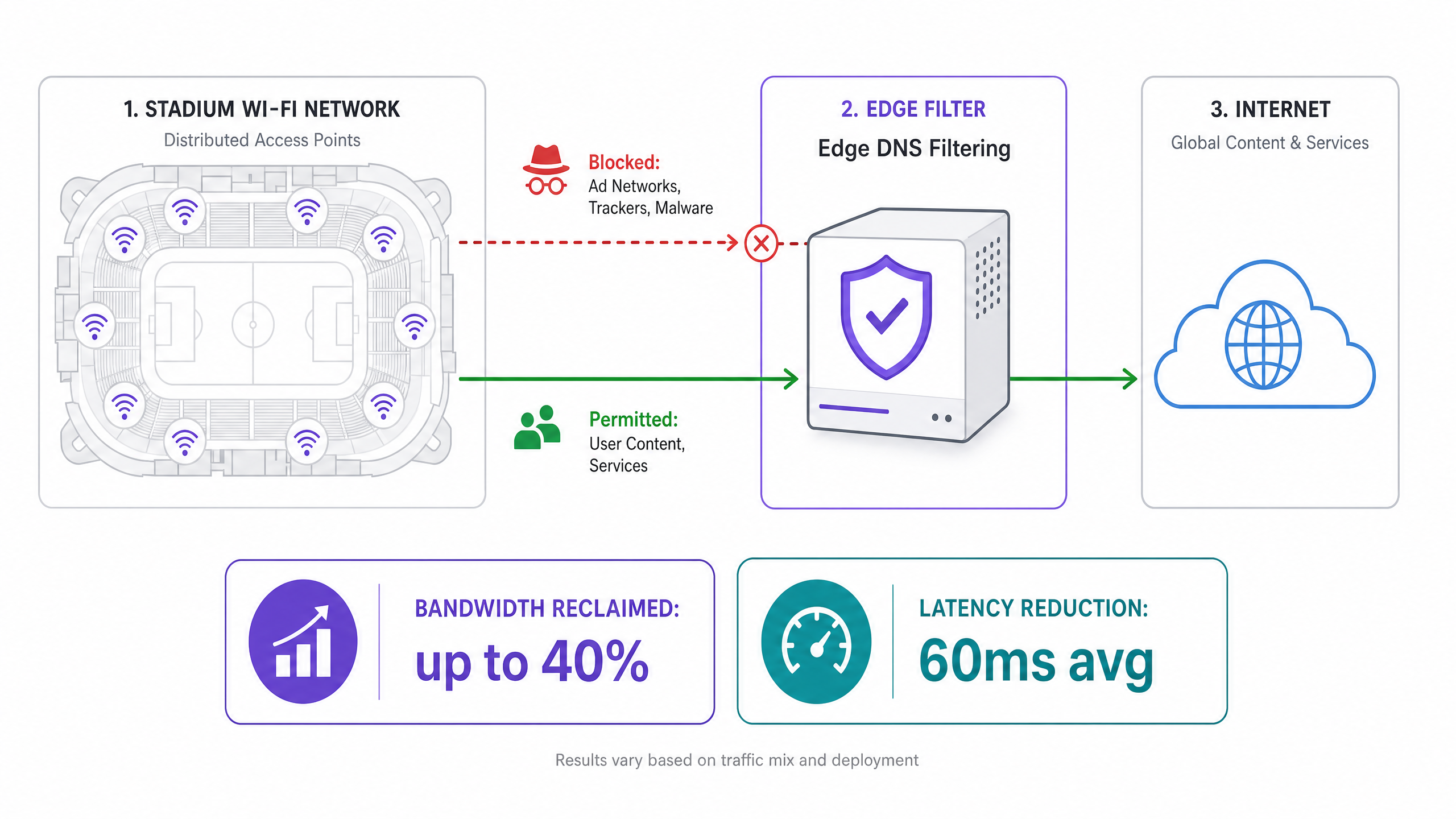
इस विफलता पैटर्न के लिए रणनीतिक प्रतिक्रिया अधिक हार्डवेयर प्रदान करना नहीं है, बल्कि शोर के स्रोत को समाप्त करना है। एज DNS फ़िल्टरिंग प्राथमिक शमन रणनीति है, और जब इसे सही ढंग से तैनात किया जाता है, तो यह WAN बैंडविड्थ का 40% तक पुनः प्राप्त कर सकता है और औसत विलंबता को 60ms या उससे अधिक कम कर सकता है।
वास्तुशिल्प खाका
एज DNS फ़िल्टरिंग नेटवर्क परिधि पर DNS क्वेरीज़ को इंटरसेप्ट करके संचालित होती है। जब कोई डिवाइस किसी ज्ञात विज्ञापन नेटवर्क, टेलीमेट्री सर्वर, या मैलवेयर डोमेन का IP पता मांगता है, तो फ़िल्टर एक नल रूट के साथ प्रतिक्रिया करता है — या तो 0.0.0.0 या NXDOMAIN प्रतिक्रिया लौटाता है। यह डिवाइस को TCP कनेक्शन स्थापित करने से रोकता है, जिससे संबंधित स्टेट-टेबल ओवरहेड, एयरटाइम खपत और WAN बैंडविड्थ उपयोग समाप्त हो जाता है।
परिनियोजन चरण
चरण 1: स्थानीय DNS रिज़ॉल्वर तैनात करें स्थल के किनारे पर अत्यधिक उपलब्ध स्थानीय DNS रिज़ॉल्वर लागू करें। इन्हें कनेक्टेड डिवाइस आबादी के पूर्ण क्वेरी लोड को संभालने में सक्षम होना चाहिए। केवल अपस्ट्रीम ISP रिज़ॉल्वर पर निर्भर न रहें, क्योंकि इससे विलंबता और रिमोटआपकी फ़िल्टर करने की क्षमता को बढ़ाता है।
चरण 2: थ्रेट इंटेलिजेंस और विज्ञापन-ब्लॉकिंग फ़ीड्स को एकीकृत करें एंटरप्राइज़-ग्रेड थ्रेट इंटेलिजेंस फ़ीड्स की सदस्यता लें जिनमें ज्ञात विज्ञापन नेटवर्क डोमेन, टेलीमेट्री सर्वर और मैलवेयर इन्फ्रास्ट्रक्चर शामिल हैं। इन फ़ीड्स को गतिशील रूप से अपडेट किया जाना चाहिए — आदर्श रूप से हर कुछ घंटों में — ताकि विज्ञापन नेटवर्क द्वारा ब्लॉकिंग से बचने के लिए उपयोग किए जाने वाले नए पंजीकृत डोमेन को पकड़ा जा सके।
चरण 3: DHCP नीति कॉन्फ़िगर करें सभी अतिथि उपकरणों को स्थानीय, फ़िल्टर किए गए रिजॉल्वर के IP पते वितरित करने के लिए DHCP सर्वर कॉन्फ़िगर करें। यह फ़िल्टर के माध्यम से क्लाइंट DNS ट्रैफ़िक को निर्देशित करने के लिए प्राथमिक प्रवर्तन तंत्र है।
चरण 4: एग्रेस फ़ायरवॉल नियम लागू करें यह कदम महत्वपूर्ण है और अक्सर इसे छोड़ दिया जाता है। अनुमोदित स्थानीय रिजॉल्वर के अलावा किसी भी गंतव्य पर सभी आउटबाउंड DNS ट्रैफ़िक (TCP/UDP पोर्ट 53) को ब्लॉक करने के लिए सख्त एग्रेस फ़ायरवॉल नियम लागू करें। यह हार्डकोडेड DNS सेटिंग्स वाले उपकरणों को फ़िल्टर को बायपास करने से रोकता है।
चरण 5: DNS over HTTPS (DoH) को संबोधित करें हमारे गाइड DNS Over HTTPS (DoH): सार्वजनिक WiFi फ़िल्टरिंग के लिए निहितार्थ में विस्तार से बताया गया है, आधुनिक ऑपरेटिंग सिस्टम और ब्राउज़र DoH का तेजी से उपयोग कर रहे हैं ताकि DNS क्वेरी को एन्क्रिप्ट किया जा सके, उन्हें बाहरी रिजॉल्वर पर रूट किया जा सके और स्थानीय फ़िल्टरिंग को पूरी तरह से बायपास किया जा सके। नेटवर्क प्रशासकों को फ़ायरवॉल स्तर पर ज्ञात DoH प्रदाताओं के IP पते को स्पष्ट रूप से ब्लॉक करना चाहिए। यह क्लाइंट को मानक, अनएन्क्रिप्टेड DNS पर वापस जाने के लिए मजबूर करता है, जिसे तब फ़िल्टर किया जा सकता है। इस मार्गदर्शन का पुर्तगाली-भाषा समकक्ष अंतर्राष्ट्रीय परिनियोजन के लिए DNS Over HTTPS (DoH): Implicações para a Filtragem de WiFi Público पर उपलब्ध है।
चरण 6: पहचान और एक्सेस प्रबंधन के साथ एकीकृत करें अधिकतम प्रभावशीलता के लिए, DNS फ़िल्टरिंग नीतियों को उपयोगकर्ता प्रमाणीकरण से लिंक करें। प्रोफ़ाइल-आधारित प्रमाणीकरण का लाभ उठाना — जैसा कि पासवर्ड रहित एक्सेस पर हमारे 2026 के गाइड में खोजा गया है — स्थानों को उपयोगकर्ता भूमिकाओं के आधार पर विभेदित फ़िल्टरिंग नीतियां लागू करने की अनुमति देता है। सामान्य प्रवेश उपयोगकर्ताओं को आक्रामक फ़िल्टरिंग प्राप्त होती है; प्रेस, कॉर्पोरेट, या VIP उपयोगकर्ताओं को अधिक अनुमेय नीतियां प्राप्त हो सकती हैं जो विशिष्ट व्यावसायिक अनुप्रयोगों की अनुमति देती हैं।
केस स्टडीज़
केस स्टडी 1: 60,000 सीटों वाला फुटबॉल स्टेडियम, यूके
एक प्रीमियर लीग फुटबॉल क्लब हाफ टाइम के दौरान गंभीर नेटवर्क गिरावट का अनुभव कर रहा था, जिसमें Captive Portal टाइम आउट हो रहा था और चरम क्षणों में सोशल मीडिया शेयरिंग विफल हो रही थी। WAN सर्किट एक 10Gbps समर्पित कनेक्शन था, जो घटना के दौरान केवल 28% उपयोग पर चल रहा था। हालांकि, फ़ायरवॉल स्टेट टेबल 97% क्षमता पर थी।
WiFi Analytics का उपयोग करके ट्रैफ़िक ऑडिट के बाद, टीम ने पाया कि विज्ञापन नेटवर्क डोमेन सभी DNS क्वेरी का 61% थे। शीर्ष पांच डोमेन सभी प्रोग्रामेटिक विज्ञापन इन्फ्रास्ट्रक्चर थे। एज DNS फ़िल्टरिंग को 1.2 मिलियन डोमेन की ब्लॉकलिस्ट के साथ तैनात किया गया था, जिसमें पोर्ट 53 और DoH प्रदाता IP को ब्लॉक करने वाले सख्त एग्रेस नियम शामिल थे।
परिणाम: चरम क्षमता पर स्टेट टेबल उपयोग 34% तक गिर गया, औसत विलंबता 280ms से 95ms तक गिर गई, और चरम पर WAN बैंडविड्थ उपयोग 28% से 17% तक गिर गया — कनेक्टेड उपकरणों की संख्या में कोई बदलाव न होने के बावजूद खपत बैंडविड्थ में 39% की कमी।
केस स्टडी 2: अंतर्राष्ट्रीय सम्मेलन केंद्र, हॉस्पिटैलिटी क्षेत्र
एक प्रमुख सम्मेलन केंद्र, जिसमें 15,000 प्रतिनिधियों का प्रौद्योगिकी शिखर सम्मेलन आयोजित किया गया था, हाल ही में अपग्रेड किए गए इन्फ्रास्ट्रक्चर के बावजूद उपस्थित लोगों से धीमी WiFi के बारे में शिकायतें प्राप्त कर रहा था। स्थान ने 400 एंटरप्राइज़-ग्रेड एक्सेस पॉइंट और एक 5Gbps WAN सर्किट तैनात किया था।
ट्रैफ़िक विश्लेषण से पता चला कि प्रतिनिधि उपकरण — मुख्य रूप से कई एंटरप्राइज़ एप्लिकेशन चलाने वाले कॉर्पोरेट लैपटॉप — प्रति डिवाइस औसतन 45 पृष्ठभूमि कनेक्शन उत्पन्न कर रहे थे। DNS रिजॉल्वर प्रति घंटे 2.3 मिलियन क्वेरी संसाधित कर रहा था, जिसमें से 68% विज्ञापन नेटवर्क और एनालिटिक्स प्लेटफॉर्म के लिए थीं।
सम्मेलन पंजीकरण प्रणाली से जुड़ी नीति एकीकरण के साथ एज DNS फ़िल्टरिंग परिनियोजन के बाद, स्थान ने DNS क्वेरी वॉल्यूम में 52% की कमी, फ़ायरवॉल स्टेट टेबल उपयोग में 41% की कमी, और औसत TCP कनेक्शन स्थापना समय में 180ms से 62ms तक मापा गया सुधार देखा। WiFi गुणवत्ता के लिए प्रतिनिधि संतुष्टि स्कोर 5 में से 3.1 से बढ़कर 4.6 हो गए।
सर्वोत्तम अभ्यास और मानक
निम्नलिखित विक्रेता-तटस्थ सर्वोत्तम अभ्यास उच्च-घनत्व WiFi परिनियोजन के लिए वर्तमान उद्योग मानकों को दर्शाते हैं:
- IEEE 802.11ax (Wi-Fi 6/6E): Wi-Fi 6 या 6E एक्सेस पॉइंट तैनात करें। OFDMA और BSS Colouring सुविधाएँ उच्च-घनत्व वाले वातावरण में एयरटाइम विवाद को काफी कम करती हैं, जो DNS फ़िल्टरिंग द्वारा प्राप्त ट्रैफ़िक कमी को पूरक करती हैं।
- WPA3-Enterprise: संवेदनशील डेटा को संभालने वाले किसी भी परिनियोजन के लिए IEEE 802.1X प्रमाणीकरण के साथ WPA3-Enterprise लागू करें। यह रिटेल वातावरण में PCI DSS अनुपालन के लिए एक आधारभूत आवश्यकता है और GDPR डेटा न्यूनीकरण सिद्धांतों के साथ संरेखित है।
- GDPR Compliance: Captive Portal सेवा की शर्तों में DNS फ़िल्टरिंग सहित नेटवर्क अनुकूलन उपकरणों के उपयोग को पारदर्शी रूप से संप्रेषित करें। उपयोगकर्ताओं को सूचित किया जाना चाहिए कि DNS क्वेरी को नेटवर्क प्रबंधन फ़ंक्शन के हिस्से के रूप में स्थानीय रूप से संसाधित किया जाता है।
- मॉनिटरिंग और एनालिटिक्स: WiFi Analytics का उपयोग करके शीर्ष अनुरोधित डोमेन की लगातार निगरानी करें और तदनुसार फ़िल्टरिंग नीतियों को समायोजित करें। विज्ञापन नेटवर्क ब्लॉकिंग से बचने के लिए नियमित रूप से नए डोमेन पंजीकृत करते हैं; स्थिर ब्लॉकलिस्ट कुछ ही दिनों में बासी हो जाती हैं।
- सार्वजनिक क्षेत्र के परिनियोजन: सार्वजनिक क्षेत्र और स्मार्ट सिटी WiFi परिनियोजन के लिए, जैसा कि Purple's public sector expansion के संदर्भ में चर्चा की गई है, DNS फ़िल्टरिंग एक सुरक्षात्मक कार्य भी करता है, स्थानीय प्राधिकरण आवश्यकताओं के अनुपालन में हानिकारक सामग्री श्रेणियों तक पहुंच को अवरुद्ध करता है।
समस्या निवारण और जोखिम न्यूनीकरण
गलत सकारात्मक
जोखिम: अत्यधिक आक्रामक फ़िल्टरिंग से वैध एप्लिकेशन कार्यक्षमता को ब्लॉक करें, जैसे टिकटिंग ऐप, स्थल नेविगेशन सेवाएं, या कॉर्पोरेट VPN एंडपॉइंट्स।
शमन: केवल-मॉनिटर बेसलाइन चरण के दौरान पहचाने गए मिशन-महत्वपूर्ण डोमेन के लिए एक सख्त अनुमत सूची (allowlist) लागू करें। उत्पादन वातावरण में सीधे प्रवर्तन मोड में कभी न जाएं। प्रवर्तन से पहले दो सप्ताह की निगरानी अवधि न्यूनतम अनुशंसित बेसलाइन है।
Captive Portal बाईपास via बैकग्राउंड ट्रैफ़िक
जोखिम: यदि उपयोगकर्ता ब्राउज़र खोलने से पहले बैकग्राउंड ट्रैफ़िक OS के Captive Portal डिटेक्शन मैकेनिज्म (जैसे Apple का captive.apple.com चेक) को संतुष्ट करता है, तो डिवाइस Captive Portal को ट्रिगर करने में विफल हो सकते हैं।
शमन: Captive Portal डिटेक्शन और प्रमाणीकरण के लिए आवश्यक विशिष्ट डोमेन को अनुमति देने के लिए वॉल्ड गार्डन को कसें। अन्य सभी ट्रैफ़िक को तब तक ब्लॉक किया जाना चाहिए जब तक उपयोगकर्ता पूरी तरह से प्रमाणित न हो जाए और फ़िल्टरिंग नीति उनके सत्र पर लागू न हो जाए।
DoH बाईपास
जोखिम: DoH का उपयोग करने वाले डिवाइस स्थानीय DNS फ़िल्टरिंग को बाईपास कर देंगे, जिससे उन क्लाइंट्स के लिए पूरी रणनीति अप्रभावी हो जाएगी।
शमन: DoH प्रदाता IP पतों की एक अद्यतन ब्लॉकलिस्ट बनाए रखें और उन्हें फ़ायरवॉल पर ब्लॉक करें। यह एक बार का कॉन्फ़िगरेशन नहीं है; नए DoH प्रदाता नियमित रूप से उभरते हैं और उन्हें ट्रैक किया जाना चाहिए।
ऑफ़लाइन मानचित्र और नेविगेशन सेवाएं
WiFi के साथ इनडोर नेविगेशन तैनात करने वाले स्थानों के लिए — जैसे कि Purple's Offline Maps Mode का उपयोग करने वाले — सुनिश्चित करें कि मानचित्र टाइल सर्वर और नेविगेशन APIs को स्पष्ट रूप से अनुमत सूची (allowlisted) में रखा गया है। ये सेवाएं उपयोगकर्ता अनुभव के लिए महत्वपूर्ण हैं और इन्हें व्यापक विज्ञापन-नेटवर्क फ़िल्टरिंग नियमों द्वारा पकड़ा नहीं जाना चाहिए।
ROI और व्यावसायिक प्रभाव
एज DNS फ़िल्टरिंग के लिए व्यावसायिक मामला कई आयामों में आकर्षक है:
| मीट्रिक | विशिष्ट परिणाम | व्यावसायिक प्रभाव |
|---|---|---|
| WAN बैंडविड्थ में कमी | 30–40% | स्थगित सर्किट अपग्रेड लागत; विस्तारित इन्फ्रास्ट्रक्चर जीवनचक्र |
| विलंबता में कमी | 40–70ms औसत | स्थल ऐप्स और डिजिटल सेवाओं के साथ उच्च उपयोगकर्ता सहभागिता |
| स्टेट टेबल उपयोग | पीक पर 50–65% कमी | स्थगित फ़ायरवॉल हार्डवेयर रीफ़्रेश; कम घटना जोखिम |
| DNS क्वेरी वॉल्यूम | 40–60% कमी | कम रिज़ॉल्वर लोड; बेहतर प्रमाणीकरण गति |
| उपयोगकर्ता संतुष्टि | मापने योग्य NPS सुधार | उच्च ठहरने का समय, बढ़ा हुआ F&B खर्च, बेहतर ब्रांड धारणा |
WAN कनेक्टिविटी पर प्रति वर्ष £80,000 खर्च करने वाले और £200,000 के हार्डवेयर रीफ़्रेश चक्र का सामना करने वाले एक स्टेडियम के लिए, 35% बैंडविड्थ की कमी से वार्षिक WAN बचत में लगभग £28,000 और हार्डवेयर रीफ़्रेश चक्र में संभावित 18 महीने का विस्तार होता है — इस पैमाने के एक स्थल के लिए आमतौर पर £15,000 से £30,000 की कार्यान्वयन लागत के मुकाबले, तीन साल की संयुक्त बचत £100,000 से अधिक है।
तकनीकी ब्रीफिंग सुनें
मुख्य परिभाषाएं
State Table Exhaustion
A condition where a firewall or NAT gateway runs out of memory allocated for tracking active network connections, causing it to drop new connection requests.
Occurs in high-density venues when tens of thousands of devices simultaneously initiate micro-connections to ad networks and telemetry servers. The primary cause of the 'stadium WiFi slow' paradox where the WAN circuit appears underutilised but the network is effectively broken.
Airtime Utilisation
The percentage of time the RF spectrum on a given WiFi channel is actively being used to transmit data or management frames.
High airtime utilisation from background chatter reduces the capacity available for active user sessions. In a high-density stadium, background traffic can drive airtime utilisation above 80%, leaving insufficient capacity for legitimate user traffic.
Edge DNS Filtering
The practice of intercepting DNS queries at the network perimeter and blocking resolution for known malicious, high-overhead, or policy-violating domains by returning a null route or NXDOMAIN response.
The primary architectural mitigation for background traffic congestion in high-density venues. Prevents devices from establishing connections to ad networks and telemetry servers, reclaiming bandwidth and reducing state table load.
DNS over HTTPS (DoH)
A protocol for performing DNS resolution via the HTTPS protocol, encrypting the DNS query and routing it to an external resolver, bypassing local DNS infrastructure.
The primary bypass mechanism for edge DNS filtering. Must be explicitly blocked at the IP level to ensure all DNS traffic passes through the local, filtered resolver.
Null Route
A network route that discards traffic destined for a specific IP address or domain, effectively dropping it without forwarding.
Used by DNS filters to respond to blocked domains — returning 0.0.0.0 or NXDOMAIN — preventing the client from initiating a TCP connection and eliminating the associated network overhead.
Walled Garden
A restricted network environment that limits device access to a predefined set of resources, typically used to enforce captive portal authentication before granting full internet access.
Must be strictly configured to prevent background traffic from satisfying OS captive portal detection mechanisms before the user authenticates, which would allow unrestricted background traffic to flow without a filtering policy being applied.
Profile-Based Authentication
An authentication method that dynamically applies specific network policies — including DNS filtering rules, bandwidth limits, and access controls — based on the authenticated user's identity or role.
Enables venues to offer differentiated network experiences, applying aggressive filtering to general admission users while providing more permissive policies to VIPs, press, or corporate guests.
OFDMA (Orthogonal Frequency Division Multiple Access)
A multi-user version of OFDM that allows a single WiFi 6 (802.11ax) transmission to be split across multiple users simultaneously, reducing contention and improving spectral efficiency.
A key feature of Wi-Fi 6 that directly addresses airtime contention in high-density deployments. Works in conjunction with DNS filtering to maximise the usable capacity of each access point.
Spectral Efficiency
The amount of useful data that can be transmitted over a given bandwidth in a specific communication system.
Reduced by background micro-transactions that consume airtime without delivering value to end users. Edge filtering and Wi-Fi 6 features like OFDMA work together to maximise spectral efficiency.
हल किए गए उदाहरण
A 50,000-seat stadium is experiencing severe network degradation during halftime. The IT team has verified that the 10Gbps WAN circuit is only at 30% utilisation, but APs are reporting high airtime utilisation and the firewall state table is at 95% capacity. Adding more APs has not improved performance.
The issue is not raw bandwidth or AP density, but connection state exhaustion caused by background application chatter. The solution requires deploying an Edge DNS Filter in a phased approach. Phase 1: Deploy local DNS resolvers and configure them in monitor-only mode for two weeks. Analyse the top 100 queried domains. Phase 2: Configure DHCP to point all guest clients to the local resolvers. Implement egress firewall rules blocking outbound TCP/UDP Port 53 to all external IPs. Phase 3: Block the IP addresses of known DoH providers (Cloudflare 1.1.1.1, Google 8.8.8.8, etc.) at the firewall. Phase 4: Activate enforcement mode on the DNS filter with a blocklist targeting the identified ad network and telemetry domains. Phase 5: Monitor state table utilisation and airtime metrics over the next three events to validate the improvement.
A major transport hub wants to implement DNS filtering across 12 terminal buildings to improve network performance for 80,000 daily passengers. They are concerned about breaking legitimate airline ticketing applications and airport operations systems.
Implement a centralised, cloud-managed DNS filtering platform with local forwarders at each terminal. Phase 1: Deploy local forwarders in all 12 terminals, pointing to a centralised management plane. Phase 2: Run in monitor-only mode for 30 days across all terminals simultaneously. Use the analytics to build a comprehensive allowlist of airline ticketing domains, airport operations APIs, and ground handling system endpoints. Phase 3: Segment the network into guest WiFi and operational technology (OT) VLANs. Apply aggressive filtering to guest WiFi; apply a strict allowlist-only policy to OT VLANs. Phase 4: Enforce filtering on guest WiFi. Phase 5: Implement automated allowlist management — when a new airline begins operations at the terminal, their domain requirements are added to the allowlist via a change management process.
अभ्यास प्रश्न
Q1. You have deployed an Edge DNS filter and configured DHCP to point all clients to the local resolver. After the first major event, you find that bandwidth utilisation has only dropped by 5%, and traffic analysis shows many devices are still successfully resolving ad network domains. What is the most likely architectural oversight, and what is the remediation?
संकेत: Consider how modern browsers and operating systems handle DNS resolution by default, and what happens when a device has a hardcoded DNS server configured.
मॉडल उत्तर देखें
There are two likely causes. First, the network is failing to block DNS over HTTPS (DoH) traffic. Modern browsers will attempt to use DoH, routing encrypted DNS queries to external resolvers like Cloudflare or Google, bypassing the local filter entirely. The remediation is to implement egress firewall rules blocking the IP addresses of known DoH providers. Second, some devices may have hardcoded DNS server addresses (e.g., 8.8.8.8) in their network configuration, bypassing DHCP-assigned resolvers. The remediation is to implement egress firewall rules blocking all outbound TCP/UDP Port 53 traffic to any destination other than the local resolvers, forcing all DNS traffic through the filter regardless of client configuration.
Q2. During a major event, the captive portal is timing out for users attempting to connect, even though the APs show relatively low client counts (only 40% of capacity). The WAN circuit is at 15% utilisation. What is the likely cause, and what architectural changes would prevent this at the next event?
संकेत: Think about what happens to device traffic in the period between WiFi association and captive portal authentication, and what network resource is most likely to be exhausted.
मॉडल उत्तर देखें
The firewall's state table is likely exhausted by background traffic from devices that have associated with the AP but not yet authenticated through the captive portal. In the unauthenticated state, if the walled garden is too permissive, background traffic flows freely, creating thousands of connection state entries per device. With 40% of 50,000 seats occupied (20,000 devices), even a brief window of unrestricted background traffic can exhaust the state table before users attempt to authenticate. The architectural remediation requires two changes: First, tighten the walled garden to permit only the minimum required traffic — DHCP (UDP 67/68), DNS to the local resolver only, and HTTP/HTTPS to the captive portal IP. Block all other traffic until authentication is complete. Second, consider deploying a dedicated stateless ACL at the AP or switch level to drop background traffic in the pre-authentication state, preventing it from even reaching the stateful firewall.
Q3. A retail chain with 500 locations wants to implement DNS filtering to improve POS system reliability and reduce WAN costs. They need uniform policy enforcement but also need to ensure that new point-of-sale software vendors can be onboarded without causing outages. What architectural approach should be taken, and what operational process should accompany it?
संकेत: Consider the tension between centralised policy management and the operational agility needed to support a dynamic retail technology stack.
मॉडल उत्तर देखें
Deploy a cloud-managed DNS filtering solution with local forwarders at each site. The centralised management plane allows for uniform policy definition and threat feed updates across all 500 locations simultaneously, while the local forwarders ensure low-latency resolution and resilience against WAN link degradation. For operational agility, implement a tiered allowlist management process: a permanent allowlist for core POS and payment processing domains (which should be treated as change-controlled infrastructure), a temporary allowlist for new vendor onboarding (with a 90-day review cycle), and a self-service request process for store managers to flag false positives. Critically, the PCI DSS requirement for network segmentation means the POS VLAN must be isolated from the guest WiFi VLAN, with separate filtering policies applied to each. The guest WiFi policy can be aggressive; the POS policy should be allowlist-only, permitting only explicitly approved payment processor and software update domains.