
Cloud RADIUS क्या है? RADIUS-as-a-Service के लिए एक व्यापक गाइड
यह व्यापक गाइड Cloud RADIUS (RADIUS-as-a-Service) का पता लगाती है, जिसमें इसके आर्किटेक्चर, EAP विधियों और कार्यान्वयन रणनीतियों का विवरण दिया गया है। यह IT लीडर्स को ऑन-प्रिमाइसेस सर्वर से एक स्केलेबल, सुरक्षित और अनुपालन वाले क्लाउड-आधारित ऑथेंटिकेशन मॉडल में माइग्रेट करने पर कार्रवाई योग्य अंतर्दृष्टि प्रदान करता है।
इस गाइड को सुनें
पॉडकास्ट ट्रांसक्रिप्ट देखें
हमारी मुख्य श्रृंखला का हिस्सा: Enterprise WiFi Security Guide →

कार्यकारी सारांश (Executive Summary)
आधुनिक एंटरप्राइज़ नेटवर्क के लिए, पारंपरिक ऑन-प्रिमाइसेस RADIUS (रिमोट ऑथेंटिकेशन डायल-इन यूजर सर्विस) आर्किटेक्चर एक महत्वपूर्ण परिचालन बाधा बनता है। भौतिक सर्वरों का प्रबंधन करना, ऑपरेटिंग सिस्टम को पैच करना, सर्टिफिकेट अथॉरिटी को संभालना और मल्टी-साइट रिडंडेंसी को डिजाइन करना मूल्यवान IT संसाधनों की खपत करता है। Cloud RADIUS (या RADIUS-as-a-Service) IEEE 802.1X ऑथेंटिकेशन लेयर को प्रबंधित, अत्यधिक उपलब्ध क्लाउड इन्फ्रास्ट्रक्चर पर स्थानांतरित करके इस समस्या का समाधान करता है। यह गाइड IT प्रबंधकों, नेटवर्क आर्किटेक्ट्स और CTOs के लिए deployment रणनीतियों का मूल्यांकन करने के लिए Cloud RADIUS का एक व्यापक तकनीकी अवलोकन प्रदान करती है। कैपेक्स-भारी, मैन्युअल रूप से बनाए रखने वाले सिस्टम से एक लचीले, विश्व स्तर पर वितरित मॉडल में स्थानांतरित होकर, रिटेल, हॉस्पिटैलिटी और ट्रांसपोर्ट क्षेत्रों के संगठन मजबूत एक्सेस नीतियों को लागू कर सकते हैं, अनुपालन (जैसे कि PCI-DSS और GDPR) प्राप्त कर सकते हैं, और Microsoft Entra ID और Google Workspace जैसे आधुनिक पहचान प्रदाताओं के साथ सहजता से एकीकृत हो सकते हैं।
तकनीकी गहन विश्लेषण (Technical Deep-Dive)
RADIUS आर्किटेक्चर का विकास
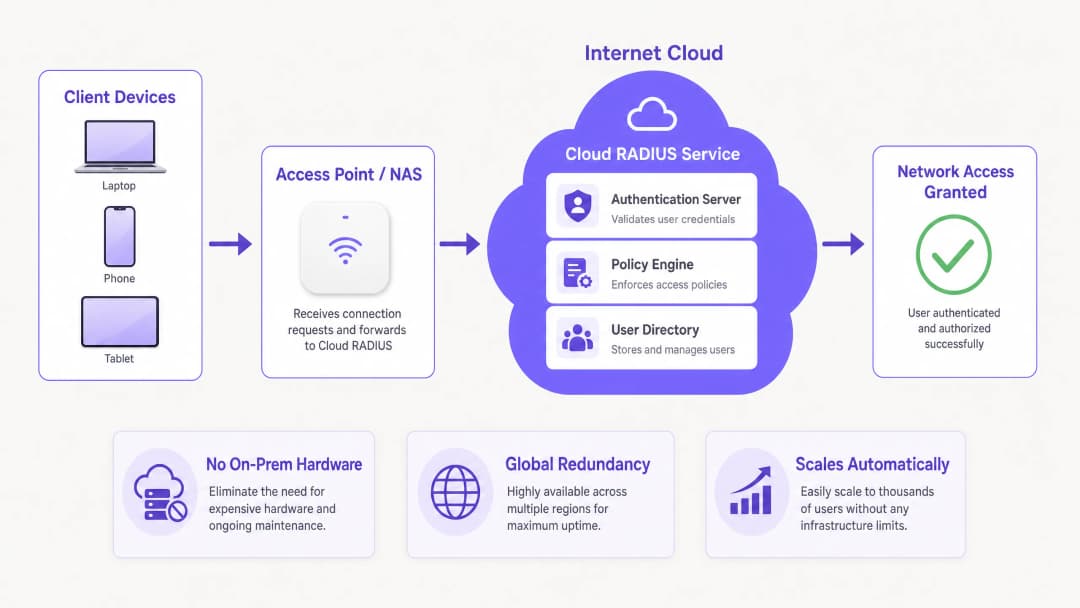
RADIUS, जिसे मूल रूप से RFC 2865 में परिभाषित किया गया है, एक क्लाइंट-सर्वर मॉडल पर काम करता है जिसमें एक नेटवर्क एक्सेस सर्वर (NAS) - जैसे कि एक WiFi एक्सेस पॉइंट या एक VPN कंसंट्रेटर - ऑथेंटिकेशन अनुरोधों को एक केंद्रीय सर्वर पर भेजता है। ऐतिहासिक रूप से, इसका मतलब समर्पित हार्डवेयर पर FreeRADIUS या Microsoft नेटवर्क पॉलिसी सर्वर (NPS) को तैनात करना था। हालांकि यह सिंगल-साइट डिप्लॉयमेंट के लिए व्यावहारिक है, लेकिन इस आर्किटेक्चर को वितरित वातावरणों में स्केल करने से महत्वपूर्ण लेटेंसी और रिडंडेंसी की चुनौतियाँ पैदा होती हैं।
Cloud RADIUS अंतर्निहित इन्फ्रास्ट्रक्चर को एब्सट्रैक्ट करता है। ऑथेंटिकेशन अनुरोधों को विश्व स्तर पर वितरित क्लाउड एंडपॉइंट्स पर रूट किया जाता है, जिससे पीक लोड के तहत भी 100 मिलीसेकंड से कम का रिस्पॉन्स टाइम सुनिश्चित होता है। यह लचीलापन स्टेडियमों या कॉन्फ्रेंस सेंटरों जैसे उच्च-घनत्व वाले वातावरण के लिए महत्वपूर्ण है।
EAP तरीके और सुरक्षा स्थिति
एक्सटेंसिबल ऑथेंटिकेशन प्रोटोकॉल (EAP) पद्धति का चयन मौलिक रूप से आपकी सुरक्षा स्थिति को निर्धारित करता है:
- PEAP (प्रोटेक्टेड EAP): एक TLS सेशन के भीतर एक MSCHAPv2 टनल स्थापित करता है। हालांकि PEAP व्यापक रूप से समर्थित है और Active Directory के साथ एकीकृत करना आसान है, लेकिन यदि क्लाइंट डिवाइसों को सर्वर सर्टिफिकेट को मान्य करने के लिए कड़ाई से कॉन्फ़िगर नहीं किया गया है, तो यह अनधिकृत एक्सेस पॉइंट्स के माध्यम से क्रेडेंशियल चोरी के प्रति संवेदनशील है।
- EAP-TLS: एंटरप्राइज़ गोल्ड स्टैंडर्ड। इसमें पारस्परिक प्रमाणपत्र प्रमाणीकरण की आवश्यकता होती है — सर्वर और क्लाइंट दोनों को वैध प्रमाणपत्र प्रस्तुत करने होंगे। यह पासवर्ड-आधारित हमलों को पूरी तरह से समाप्त कर देता है, लेकिन प्रमाणपत्र परिनियोजन के लिए एक मजबूत पब्लिक की इन्फ्रास्ट्रक्चर (PKI) और मोबाइल डिवाइस मैनेजमेंट (MDM) एकीकरण की मांग करता है।
- EAP-TTLS और EAP-FAST: उन परिदृश्यों के लिए उपयुक्त विकल्प प्रदान करते हैं जिनमें व्यापक क्लाइंट संगतता (विरासत या Linux सिस्टम सहित) की आवश्यकता होती है, या जहां प्रमाणपत्र सत्यापन निर्भरता को बायपास करने के लिए प्रोटेक्टेड एक्सेस क्रेडेंशियल्स (PACs) की आवश्यकता होती है।
WPA3 और OpenRoaming एकीकरण
आधुनिक परिनियोजन में WPA3-Enterprise को ध्यान में रखना चाहिए, जो उच्चतम सुरक्षा स्तर के लिए 192-बिट सुरक्षा मोड को अनिवार्य करता है, जिसके लिए विशिष्ट सिफर सूट की आवश्यकता होती है। इसके अतिरिक्त, क्लाउड RADIUS OpenRoaming जैसे फ़ेडरेशन फ़्रेमवर्क में भागीदारी की सुविधा प्रदान करता है। उदाहरण के लिए, Purple अपने Connect लाइसेंस के तहत OpenRoaming के लिए एक मुफ्त पहचान प्रदाता के रूप में कार्य करता है, जिससे दुनिया भर के भागीदार नेटवर्क पर निर्बाध, सुरक्षित प्रमाणीकरण की अनुमति मिलती है।
अपने विशिष्ट सेटअप को लेकर कोई सवाल हैं?
हमारी टीम 80,000 से अधिक वेन्यू में वेन्यू ऑपरेटरों, IT मैनेजरों और नेटवर्क इंजीनियरों के साथ काम करती है। 20 मिनट का कॉल बुक करें और हम आपको दिखाएंगे कि आपके जैसे अन्य लोगों ने इसे कैसे हल किया।
कार्यान्वयन मार्गदर्शिका
संक्रमण के दौरान शून्य डाउनटाइम सुनिश्चित करने के लिए क्लाउड RADIUS को तैनात करने के लिए एक व्यवस्थित दृष्टिकोण की आवश्यकता होती है।
चरण 1: पहचान प्रदाता (IdP) एकीकरण
आपके क्लाउड RADIUS इंस्टेंस को आपके आधिकारिक उपयोगकर्ता निर्देशिका के साथ सिंक्रनाइज़ होना चाहिए। Microsoft Entra ID, Google Workspace, या Okta के साथ मूल SAML या SCIM प्रावधान मैनुअल LDAP प्रॉक्सी या CSV आयात से बेहतर है। यह सुनिश्चित करता है कि जब किसी कर्मचारी को HR सिस्टम से हटा दिया जाता है, तो उनकी नेटवर्क पहुंच तुरंत रद्द कर दी जाती है।
चरण 2: प्रमाणपत्र प्रबंधन रणनीति
यदि EAP-TLS तैनात कर रहे हैं, तो अपने प्रमाणपत्र जीवनचक्र को परिभाषित करें। एक क्लाउड RADIUS प्रदाता चुनें जिसमें एक एकीकृत PKI शामिल हो या जो आपके मौजूदा प्रमाणपत्र प्राधिकरण (CA) के साथ निर्बाध रूप से एकीकृत हो। समाप्त हो चुके प्रमाणपत्रों के कारण होने वाली प्रमाणीकरण विफलताओं को रोकने के लिए अपने MDM प्लेटफ़ॉर्म (जैसे Intune या Jamf) के माध्यम से प्रमाणपत्र जारी करने और रद्द करने को स्वचालित करें।
चरण 3: नेटवर्क डिवाइस कॉन्फ़िगरेशन
प्राथमिक और माध्यमिक क्लाउड RADIUS IP पतों को इंगित करने के लिए अपने NAS उपकरणों (एक्सेस पॉइंट, स्विच) को कॉन्फ़िगर करें। सुनिश्चित करें कि साझा रहस्य क्रिप्टोग्राफ़िक रूप से जटिल हों (कम से कम 32 यादृच्छिक वर्ण)। फ़ेलओवर टाइमआउट सेटिंग्स को समायोजित करें; 3 से 5 सेकंड का टाइमआउट इष्टतम है, जो प्राथमिक नोड के अनुपलब्ध होने पर लंबे समय तक प्रमाणीकरण देरी को रोकता है।
चरण 4: नीति परिभाषा
प्रति-SSID के आधार पर नीतियां स्थापित करें। उदाहरण के लिए, कॉर्पोरेट नेटवर्क के लिए EAP-TLS, पुराने IoT उपकरणों के लिए PEAP लागू करें, और अतिथि पहुंच को अलग करें। ध्यान दें कि RADIUS ज्ञात उपयोगकर्ताओं को संभालता है; आगंतुकों के लिए, फ़र्स्ट-पार्टी डेटा कैप्चर करने के लिए एक Captive Portal के साथ एक समर्पित Guest WiFi समाधान तैनात करें, जो WiFi Analytics प्लेटफ़ॉर्म के साथ एकीकृत हो। आगंतुक जुड़ाव के बारे में अधिक जानने के लिए, How to Improve Guest Satisfaction: The Ultimate Guide देखें।
सर्वोत्तम प्रथाएं
- सख्त सर्वर सर्टिफिकेट सत्यापन लागू करें: PEAP डिप्लॉयमेंट के लिए, Group Policy या MDM प्रोफाइल को पुश करें जो क्लाइंट्स को RADIUS सर्वर सर्टिफिकेट को सत्यापित करने के लिए बाध्य करते हैं और किसी विशिष्ट रूट CA तक ट्रस्ट को सीमित करते हैं।
- अकाउंटिंग और ऑथेंटिकेशन ट्रैफ़िक को विभाजित करें: सुनिश्चित करें कि RADIUS अकाउंटिंग डेटा की सक्रिय रूप से निगरानी और उसे सुरक्षित रखा जाता है। यह ऑडिट ट्रेल अनुपालन रिपोर्टिंग (जैसे PCI-DSS और HIPAA) के लिए आवश्यक है।
- ऑथेंटिकेशन लेटेंसी की निगरानी करें: उच्च लेटेंसी अक्सर सब-ऑप्टिमल राउटिंग या IdP सिंक्रोनाइज़ेशन समस्याओं को दर्शाती है। Access-Request से Access-Accept पैकेट तक लगने वाले समय को ट्रैक करने के लिए मॉनिटरिंग टूल्स का उपयोग करें।
- सिग्नल और चैनल प्लानिंग को अनुकूलित करें: विश्वसनीय ऑथेंटिकेशन एक स्थिर फिजिकल लेयर पर निर्भर करता है। यह सुनिश्चित करने के लिए कि आपका RF वातावरण निर्बाध 802.1X रोमिंग का समर्थन करता है, Understanding RSSI and Signal Strength for Optimal Channel Planning जैसी गाइड देखें।
समस्या निवारण और जोखिम न्यूनीकरण
एक प्रबंधित सेवा के साथ भी, गलत कॉन्फ़िगरेशन के कारण एक्सेस विफल हो सकता है। सामान्य विफलता मोड में शामिल हैं:
- सर्टिफिकेट की समय सीमा समाप्त होना (एक्सपायरी): EAP-TLS विफलताओं का प्रमुख कारण। न्यूनीकरण: CA या सर्वर सर्टिफिकेट की समय सीमा समाप्त होने से 30 दिन पहले स्वचालित अलर्ट लागू करें।
- साझा सीक्रेट (Shared secret) का बेमेल होना: आम तौर पर नए एक्सेस पॉइंट्स जोड़ते समय ऐसा होता है। न्यूनीकरण: अपने नेटवर्क प्रबंधन सिस्टम में कॉन्फ़िगरेशन टेम्पलेट्स को मानकीकृत करें।
- NAT और IP अनुमति सूची (allowlisting) से जुड़ी समस्याएं: क्लाउड RADIUS प्रदाताओं को आमतौर पर NAS IP अनुमति सूची की आवश्यकता होती है। यदि आपकी ब्रांच साइटें डायनेमिक IP या जटिल NAT कॉन्फ़िगरेशन का उपयोग करती हैं, तो ऑथेंटिकेशन अनुरोध खारिज किए जा सकते हैं। न्यूनीकरण: स्टेटिक इग्रेस (egress) IP का उपयोग करें या जहां आवश्यक हो वहां एक स्थानीय RADIUS प्रॉक्सी तैनात करें।
- IdP सिंक्रोनाइज़ेशन विफलताएं: यदि क्लाउड डायरेक्टरी ऑन-प्रिमाइसेस AD के साथ सिंक्रोनाइज़ होने में विफल रहती है, तो नए उपयोगकर्ता ऑथेंटिकेट करने में असमर्थ होंगे। न्यूनीकरण: SCIM/LDAP कनेक्टर स्थिति की सक्रिय रूप से निगरानी करें।
ROI और व्यावसायिक प्रभाव
क्लाउड RADIUS पर स्विच करने से मापने योग्य व्यावसायिक मूल्य मिलता है:
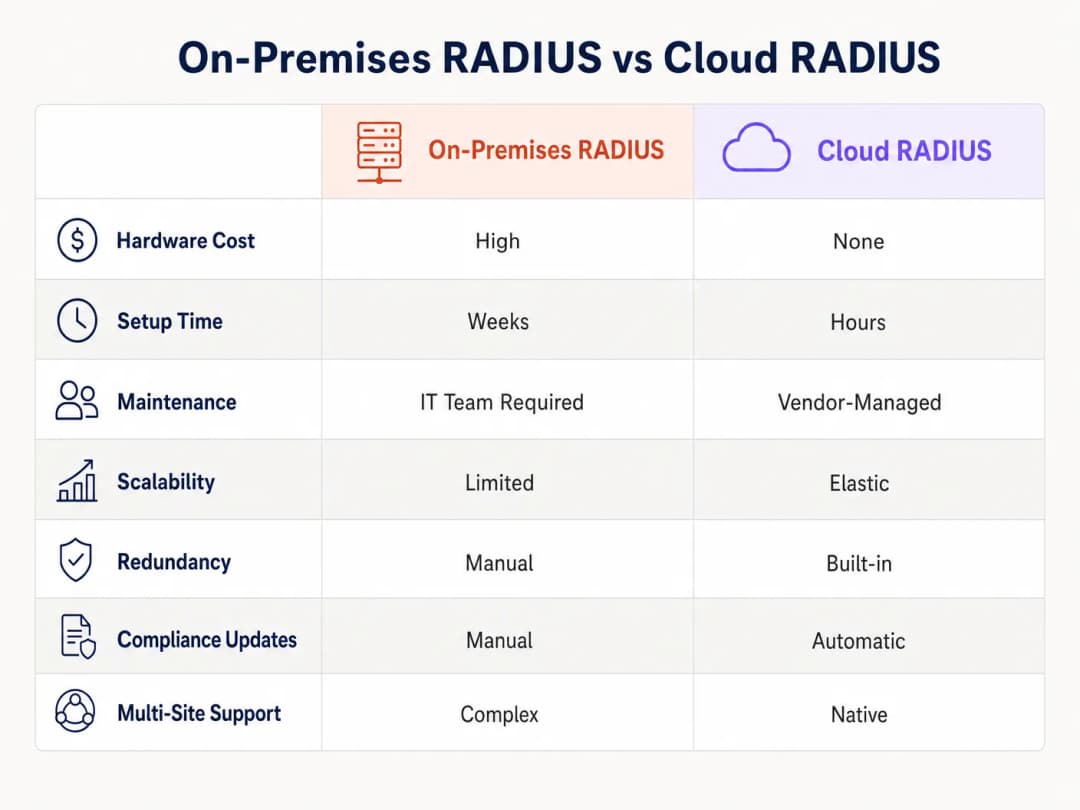
- कम बुनियादी ढांचा पूंजीगत व्यय (Capex): हर प्रमुख साइट पर फिजिकल RADIUS सर्वर खरीदने, रैक करने और बिजली देने की कोई आवश्यकता नहीं है।
- कम परिचालन ओवरहेड: IT टीमों को अब ऑपरेटिंग सिस्टम की कमजोरियों को पैच करने या सर्वर फेलओवर को मैन्युअल रूप से प्रबंधित करने में घंटों खर्च नहीं करने पड़ते हैं। विक्रेता-प्रबंधित अपडेट निरंतर अनुपालन सुनिश्चित करते हैं।
- बेहतर सुरक्षा स्थिति: क्लाउड PKI के माध्यम से EAP-TLS पर स्विच करने से क्रेडेंशियल चोरी का जोखिम कम हो जाता है, जिससे डेटा उल्लंघन की संभावित लागत सीधे तौर पर कम हो जाती है।4. चपलता और स्केलेबिलिटी: नया रिटेल स्टोर या होटल खोलते समय, नेटवर्क ऑथेंटिकेशन को हफ्तों के बजाय मिनटों में सेटअप किया जा सकता है। व्यावहारिक रोलआउट रणनीतियों के लिए, व्यवसाय के लिए WiFi सेटअप करना: एक 2026 प्लेबुक देखें।
केंद्रीकृत एक्सेस कंट्रोल के साथ, संगठन न केवल अपनी सुरक्षा को मजबूत करते हैं बल्कि पुराने बुनियादी ढांचे को बनाए रखने के बजाय सीनियर इंजीनियरिंग टीम को रणनीतिक और उच्च-प्रभाव वाले प्रोजेक्ट्स पर ध्यान केंद्रित करने के लिए भी मुक्त करते हैं।
मुख्य परिभाषाएं
Cloud RADIUS
एक प्रबंधित सेवा जो अत्यधिक उपलब्ध क्लाउड वातावरण में रिमोट ऑथेंटिकेशन डायल-इन यूजर सर्विस प्रोटोकॉल को होस्ट करती है, जिससे ऑन-प्रिमाइसेस ऑथेंटिकेशन सर्वर की आवश्यकता समाप्त हो जाती है।
सुरक्षित 802.1X नेटवर्क एक्सेस बनाए रखते हुए हार्डवेयर कैपेक्स और परिचालन ओवरहेड को कम करने की तलाश कर रही IT टीमों द्वारा मूल्यांकन किया गया।
EAP-TLS (Extensible Authentication Protocol-Transport Layer Security)
एक अत्यधिक सुरक्षित ऑथेंटिकेशन विधि जिसमें क्लाइंट और सर्वर दोनों को अपनी पहचान साबित करने के लिए डिजिटल सर्टिफिकेट प्रस्तुत करने की आवश्यकता होती है।
पासवर्ड-आधारित हमलों को रोकने के लिए एंटरप्राइज नेटवर्क के लिए अनुशंसित मानक, जिसे डिप्लॉयमेंट के लिए PKI और MDM की आवश्यकता होती है।
NAS (Network Access Server)
वह डिवाइस - जैसे कि एक WiFi एक्सेस पॉइंट, स्विच, या VPN कंसंट्रेटर - जो RADIUS क्लाइंट के रूप में कार्य करता है, उपयोगकर्ता क्रेडेंशियल्स को RADIUS सर्वर पर अग्रेषित करता है।
नेटवर्क इंजीनियरों को 802.1X ऑथेंटिकेशन सक्षम करने के लिए सही RADIUS सर्वर IPs और शेयर्ड सीक्रेट्स के साथ NAS को कॉन्फ़िगर करना होगा।
Shared Secret
केवल NAS और RADIUS सर्वर को ज्ञात एक क्रिप्टोग्राफ़िक टेक्स्ट स्ट्रिंग, जिसका उपयोग RADIUS पैकेट को एन्क्रिप्ट करने और प्रेषक की प्रामाणिकता को सत्यापित करने के लिए किया जाता है।
एक कमजोर शेयर्ड सीक्रेट एक बड़ा सुरक्षा खतरा है; एंटरप्राइज डिप्लॉयमेंट में लंबे, बेतरतीब ढंग से जेनरेट किए गए स्ट्रिंग्स का उपयोग किया जाना चाहिए।
SCIM (System for Cross-domain Identity Management)
एक ओपन स्टैंडर्ड जो IT सिस्टम या क्लाउड एप्लिकेशन के बीच उपयोगकर्ता पहचान की जानकारी के आदान-प्रदान को स्वचालित करता है।
प्राथमिक HR या IT पहचान प्रणाली में परिवर्तन होने पर Cloud RADIUS डायरेक्टरी में उपयोगकर्ताओं को स्वचालित रूप से जोड़ने और हटाने के लिए उपयोग किया जाता है।
OpenRoaming
Wireless Broadband Alliance द्वारा विकसित एक फ़ेडरेशन फ्रेमवर्क जो उपयोगकर्ताओं को विश्व स्तर पर भाग लेने वाले WiFi नेटवर्क से स्वचालित और सुरक्षित रूप से जुड़ने की अनुमति देता है।
Cloud RADIUS प्रदाता जो OpenRoaming का समर्थन करते हैं (जैसे Purple) वे परिसरों को Captive Portal के बिना आगंतुकों को निर्बाध, सुरक्षित कनेक्टिविटी प्रदान करने की अनुमति देते हैं।
Accounting Logs
RADIUS सर्वर द्वारा उत्पन्न रिकॉर्ड जो उपयोगकर्ता के कनेक्शन इवेंट का विवरण देते हैं, जिसमें प्रारंभ समय, समाप्ति समय, स्थानांतरित डेटा और असाइन किया गया IP पता शामिल है।
सुरक्षा ऑडिट, समस्या निवारण और PCI-DSS और GDPR जैसे फ्रेमवर्क के अनुपालन को प्रदर्शित करने के लिए महत्वपूर्ण।
Change of Authorization (CoA)
एक RADIUS सुविधा जो सर्वर को उपयोगकर्ता के सक्रिय सेशन को गतिशील रूप से संशोधित करने की अनुमति देती है, जैसे कि उनके VLAN को बदलना या उन्हें डिस्कनेक्ट करना, बिना दोबारा कनेक्शन की आवश्यकता के।
नेटवर्क एडमिनिस्ट्रेटर द्वारा किसी प्रभावित डिवाइस को तुरंत क्वारंटीन करने या सेशन के बीच में नए नीति प्रतिबंध लागू करने के लिए उपयोग किया जाता है।
हल किए गए उदाहरण
एक 200 कमरों वाला होटल वर्तमान में PEAP के माध्यम से स्टाफ WiFi ऑथेंटिकेशन के लिए ऑन-प्रिमाइसेस Microsoft NPS का उपयोग करता है। वे पीक चेक-इन घंटों के दौरान ऑथेंटिकेशन टाइमआउट का अनुभव कर रहे हैं और बेहतर सुरक्षा और विश्वसनीयता के लिए EAP-TLS के साथ Cloud RADIUS पर माइग्रेट करना चाहते हैं। IT निदेशक को इस माइग्रेशन को कैसे आर्किटेक्ट करना चाहिए?
- एक Cloud RADIUS टेनेंट को डिप्लॉय करें और स्वचालित उपयोगकर्ता जीवनचक्र प्रबंधन के लिए इसे SCIM के माध्यम से होटल के Microsoft Entra ID के साथ एकीकृत करें। 2. क्लाइंट सर्टिफिकेट जारी करने के लिए Cloud RADIUS एकीकृत PKI को कॉन्फ़िगर करें। 3. सभी स्टाफ डिवाइसों पर Root CA, क्लाइंट सर्टिफिकेट और EAP-TLS के लिए कॉन्फ़िगर की गई एक नई WiFi प्रोफाइल को पुश करने के लिए मौजूदा MDM (जैसे, Intune) का उपयोग करें। 4. एक नए, जटिल 32-अक्षर वाले शेयर्ड सीक्रेट का उपयोग करके, प्राथमिक और माध्यमिक Cloud RADIUS IPs को इंगित करने के लिए होटल के एक्सेस पॉइंट्स को कॉन्फ़िगर करें। 5. ऑन-प्रिमाइसेस सर्वर को बंद करने से पहले दो सप्ताह की संक्रमण अवधि के लिए अलग-अलग SSID पर पुराने NPS और नए Cloud RADIUS दोनों को समानांतर रूप से चलाएं।
500 स्थानों वाले एक राष्ट्रीय रिटेल चेन को अपने पॉइंट-ऑफ-सेल (POS) टर्मिनलों के लिए PCI DSS अनुपालन सुनिश्चित करने की आवश्यकता है, जो WiFi के माध्यम से कनेक्ट होते हैं। वे Cloud RADIUS पर जा रहे हैं। अनुपालन पूरा करने के लिए किन विशिष्ट कॉन्फ़िगरेशन की आवश्यकता है?
- सख्त नेटवर्क सेगमेंटेशन लागू करें: POS टर्मिनलों को एक अलग VLAN में मैप किए गए एक समर्पित, छिपे हुए SSID पर ऑथेंटिकेट होना चाहिए। 2. पारस्परिक ऑथेंटिकेशन सुनिश्चित करने और अनधिकृत डिवाइसों को POS नेटवर्क में शामिल होने से रोकने के लिए सभी POS डिवाइसों के लिए EAP-TLS ऑथेंटिकेशन लागू करें। 3. PCI DSS द्वारा अनिवार्य किए गए अनुसार, न्यूनतम एक वर्ष के लिए सभी अकाउंटिंग लॉग (Access-Accept, Access-Reject, कनेक्शन की अवधि) को बनाए रखने के लिए Cloud RADIUS सेवा को कॉन्फ़िगर करें। 4. सुनिश्चित करें कि ब्रांच APs और Cloud RADIUS सेवा के बीच RADIUS शेयर्ड सीक्रेट्स को एक स्वचालित स्क्रिप्ट का उपयोग करके हर 90 दिनों में घुमाया जाए।
अभ्यास प्रश्न
Q1. आपका संगठन ऑन-प्रिमाइसेस Active Directory से Google Workspace पर माइग्रेट कर रहा है। आप वर्तमान में WiFi प्रमाणीकरण के लिए PEAP-MSCHAPv2 का उपयोग करते हैं। यह एक समस्या क्यों है, और अनुशंसित समाधान क्या है?
संकेत: विचार करें कि PEAP डायरेक्टरी प्रोटोकॉल के विरुद्ध क्रेडेंशियल को कैसे मान्य करता है।
मॉडल उत्तर देखें
PEAP-MSCHAPv2 उपयोगकर्ता के पासवर्ड के NT हैश पर निर्भर करता है, जिसे Google Workspace नेटिव रूप से स्टोर या प्रदर्शित नहीं करता है। अनुशंसित समाधान एक एकीकृत PKI वाले Cloud RADIUS प्रदाता का उपयोग करके EAP-TLS पर माइग्रेट करना है। Cloud RADIUS सेवा SAML/SCIM के माध्यम से Google Workspace से उपयोगकर्ता पहचान को सिंक कर सकती है, और पासवर्ड के बजाय क्लाइंट सर्टिफिकेट का उपयोग करके डिवाइस को प्रमाणित कर सकती है।
Q2. एक शाखा कार्यालय रिपोर्ट करता है कि उपयोगकर्ताओं को WiFi नेटवर्क से कनेक्ट करते समय 30-सेकंड की देरी का सामना करना पड़ रहा है, जिसके बाद कनेक्शन सफल हो जाता है। उस क्षेत्र का प्राथमिक Cloud RADIUS IP वर्तमान में रखरखाव के अधीन है। इस देरी का कारण कौन सी कॉन्फ़िगरेशन त्रुटि है?
संकेत: NAS और RADIUS सर्वर के बीच संचार को देखें।
मॉडल उत्तर देखें
NAS (एक्सेस पॉइंट या स्विच) में RADIUS सर्वर का टाइमआउट बहुत अधिक (जैसे, 30 सेकंड) कॉन्फ़िगर किया गया है। यह सेकेंडरी सर्वर पर जाने से पहले प्राथमिक सर्वर के जवाब देने का इंतजार कर रहा है। उपयोगकर्ता अनुभव को प्रभावित किए बिना तेजी से फेलओवर सुनिश्चित करने के लिए टाइमआउट को घटाकर 3-5 सेकंड किया जाना चाहिए।
Q3. आप एक अस्पताल के लिए Cloud RADIUS तैनात कर रहे हैं। सुरक्षा टीम का निर्देश है कि केवल कॉर्पोरेट-स्वामित्व वाले डिवाइस ही आंतरिक नेटवर्क से कनेक्ट हो सकते हैं, भले ही किसी कर्मचारी को वैध उपयोगकर्ता नाम और पासवर्ड पता हो। आप इसे कैसे लागू करेंगे?
संकेत: कौन सी EAP विधि डिवाइस की पहचान की पुष्टि करती है, न कि केवल उपयोगकर्ता के ज्ञान की?
मॉडल उत्तर देखें
EAP-TLS तैनात करें। अस्पताल के MDM समाधान को केवल नामांकित, कॉर्पोरेट-स्वामित्व वाले उपकरणों पर एक अद्वितीय क्लाइंट सर्टिफिकेट भेजने के लिए कॉन्फ़िगर करें। Cloud RADIUS नीति को किसी भी ऐसे प्रमाणीकरण अनुरोध को अस्वीकार करने के लिए कॉन्फ़िगर करें जो विश्वसनीय आंतरिक PKI द्वारा हस्ताक्षरित वैध सर्टिफिकेट प्रस्तुत नहीं करता है, जिससे पासवर्ड की जानकारी होने के बावजूद BYOD या अनधिकृत उपकरणों को प्रभावी ढंग से ब्लॉक किया जा सके।
इस श्रृंखला में आगे पढ़ें
हाइब्रिड वर्कफोर्स के लिए RADIUS as a Service के सुरक्षा लाभ
यह तकनीकी संदर्भ मार्गदर्शिका बताती है कि कैसे RADIUS as a Service वितरित स्थानों पर हाइब्रिड वर्कफोर्स के लिए नेटवर्क एक्सेस को सुरक्षित करता है। इसमें ऑन-प्रिमाइसेस RADIUS इंफ्रास्ट्रक्चर को क्लाउड-प्रबंधित ऑथेंटिकेशन सेवा से बदलने के लिए आर्किटेक्चर, सुरक्षा लाभ और डिप्लॉयमेंट चरणों को शामिल किया गया है। होटलों, रिटेल चेन, स्टेडियमों और सार्वजनिक क्षेत्र के संगठनों के IT प्रबंधकों और नेटवर्क आर्किटेक्ट्स के लिए, यह मार्गदर्शिका इस तिमाही में क्लाउड RADIUS माइग्रेशन का मूल्यांकन करने और उस पर कार्रवाई करने के लिए आवश्यक प्रमाण प्रदान करती है।
Cloud Directories (Azure AD और Google Workspace) के साथ RADIUS as a Service को एकीकृत करना
यह तकनीकी संदर्भ मार्गदर्शिका विवरण देती है कि एंटरप्राइज़ WiFi ऑथेंटिकेशन के लिए क्लाउड डायरेक्टरीज़ - Microsoft Entra ID और Google Workspace - के साथ RADIUS as a Service को कैसे एकीकृत किया जाए। यह ऑन-प्रिमाइसेस NPS से क्लाउड-नेटीव RADIUS में आर्किटेक्चरल बदलाव, सर्टिफिकेट-आधारित EAP-TLS ऑथेंटिकेशन के परिनियोजन, और हॉस्पिटैलिटी, रिटेल और सार्वजनिक क्षेत्र के परिवेशों में वायरलेस एक्सेस को सुरक्षित करने के लिए परिचालन सर्वोत्तम प्रथाओं को कवर करती है। आईटी प्रबंधकों और नेटवर्क आर्किटेक्ट्स के लिए जो पहले से ही क्लाउड पहचान में निवेश कर चुके हैं, यह गाइड डायरेक्टरी प्रबंधन और भौतिक नेटवर्क सुरक्षा के बीच की खाई को पाटती है।
Cloud RADIUS के साथ 802.1X प्रमाणीकरण को कैसे लागू करें
यह तकनीकी संदर्भ मार्गदर्शिका वितरित एंटरप्राइज़ संपत्तियों में Cloud RADIUS के साथ 802.1X प्रमाणीकरण लागू करने के लिए एक व्यापक ढांचा प्रदान करती है। यह ऑन-प्रिमाइसेस इन्फ्रास्ट्रक्चर के परिचालन ओवरहेड को समाप्त करते हुए नेटवर्क एक्सेस को सुरक्षित करने के लिए आवश्यक आर्किटेक्चर, EAP विधि चयन, परिनियोजन अनुक्रमण और जोखिम न्यूनीकरण रणनीतियों का विवरण देती है।
अपने विशिष्ट सेटअप को लेकर कोई सवाल हैं?
हमारी टीम 80,000 से अधिक वेन्यू में वेन्यू ऑपरेटरों, IT मैनेजरों और नेटवर्क इंजीनियरों के साथ काम करती है। 20 मिनट का कॉल बुक करें और हम आपको दिखाएंगे कि आपके जैसे अन्य लोगों ने इसे कैसे हल किया।