
Qu'est-ce que Cloud RADIUS ? Le guide complet du RADIUS-as-a-Service
Ce guide complet explore Cloud RADIUS (RADIUS-as-a-Service), détaillant son architecture, ses méthodes EAP et ses stratégies d'implémentation. Il fournit aux responsables IT des conseils pratiques pour migrer de serveurs sur site vers un modèle d'authentification basé sur le cloud, évolutif, sécurisé et conforme.
Écouter ce guide
Voir la transcription du podcast
Fait partie de notre série principale : Enterprise WiFi Security Guide →

Synthèse
Pour les réseaux d'entreprise modernes, l'architecture RADIUS (Remote Authentication Dial-In User Service) sur site traditionnelle constitue un goulot d'étranglement opérationnel majeur. La gestion des serveurs physiques, les correctifs des systèmes d'exploitation, la gestion des autorités de certification et la conception de la redondance multi-sites consomment de précieuses ressources informatiques. Le Cloud RADIUS (ou RADIUS-as-a-Service) résout ce problème en migrant la couche d'authentification IEEE 802.1X vers une infrastructure cloud gérée et hautement disponible. Ce guide propose une vue d'ensemble technique complète du Cloud RADIUS pour les responsables informatiques, les architectes réseau et les directeurs de la technologie qui évaluent les stratégies de déploiement. En passant d'un modèle lourd en investissements et géré manuellement à un modèle élastique et distribué à l'échelle mondiale, les entreprises des secteurs du commerce de détail, de l'hôtellerie et des transports peuvent appliquer des politiques d'accès strictes, se mettre en conformité (notamment avec la norme PCI-DSS et le GDPR) et s'intégrer de manière fluide aux fournisseurs d'identité modernes tels que Microsoft Entra ID et Google Workspace.
Analyse Technique Approfondie
L'Évolution de l'Architecture RADIUS
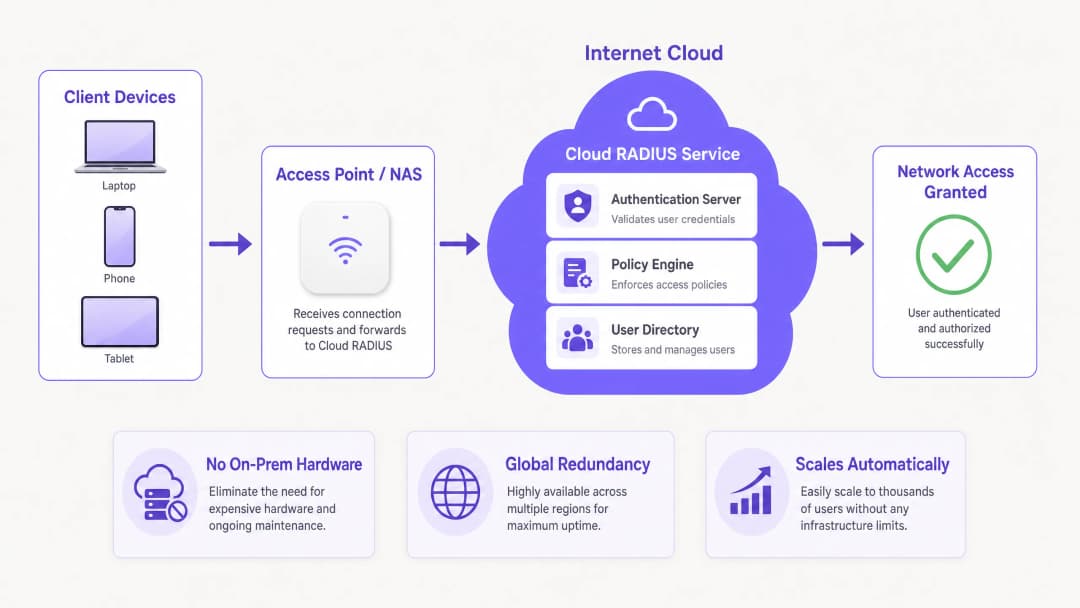
Le protocole RADIUS, défini à l'origine dans la RFC 2865, fonctionne sur un modèle client-serveur dans lequel un serveur d'accès réseau (NAS) - tel qu'un point d'accès WiFi ou un concentrateur VPN - transmet les demandes d'authentification à un serveur central. Historiquement, cela nécessitait le déploiement de FreeRADIUS ou de Microsoft Network Policy Server (NPS) sur du matériel dédié. Bien que cela soit viable pour les déploiements sur un seul site, l'extension de cette architecture à des environnements distribués introduit des défis majeurs en matière de latence et de redondance.
Le Cloud RADIUS masque l'infrastructure sous-jacente. Les demandes d'authentification sont acheminées vers des points de terminaison cloud distribués à l'échelle mondiale, garantissant des temps de réponse inférieurs à 100 millisecondes, même lors des pics de charge. Cette élasticité est essentielle pour les environnements à haute densité tels que les stades ou les centres de conférence.
Méthodes EAP et Niveau de Sécurité
Le choix de la méthode EAP (Extensible Authentication Protocol) détermine fondamentalement votre niveau de sécurité :
- PEAP (Protected EAP) : Établit un tunnel MSCHAPv2 au sein d'une session TLS. Bien que le PEAP soit largement pris en charge et facile à intégrer avec Active Directory, il reste vulnérable au vol d'identifiants via des points d'accès illicites si les appareils clients ne sont pas rigoureusement configurés pour valider le certificat du serveur.
- EAP-TLS : La référence absolue pour les entreprises. Il nécessite une authentification mutuelle par certificat - le serveur et le client doivent tous deux présenter des certificats valides. Cela élimine totalement les attaques basées sur les mots de passe, mais exige une infrastructure à clés publiques (PKI) robuste et une intégration de gestion des appareils mobiles (MDM) pour le déploiement des certificats.
- EAP-TTLS et EAP-FAST : Offrent des alternatives adaptées aux scénarios nécessitant une large compatibilité avec les clients (y compris les systèmes hérités ou Linux), ou lorsque des informations d'identification d'accès protégé (PAC) sont nécessaires pour contourner les dépendances de validation de certificat.
Intégration WPA3 et OpenRoaming
Les déploiements modernes doivent prendre en compte WPA3-Enterprise, qui impose un mode de sécurité 192 bits pour le niveau de sécurité le plus élevé, nécessitant des suites de chiffrement spécifiques. De plus, le RADIUS dans le cloud facilite la participation à des frameworks de fédération tels que OpenRoaming. Par exemple, Purple agit en tant que fournisseur d'identité gratuit pour OpenRoaming sous sa licence Connect, permettant une authentification transparente et sécurisée sur les réseaux participants du monde entier.
Vous avez des questions sur votre configuration spécifique ?
Notre équipe collabore avec des exploitants de sites, des responsables informatiques et des ingénieurs réseau au sein de 80 000 sites. Réservez un appel de 20 minutes et nous vous montrerons comment d'autres professionnels comme vous ont résolu ce problème.
Guide de mise en œuvre
Le déploiement de RADIUS dans le cloud nécessite une approche systématique pour garantir une interruption de service nulle pendant la transition.
Étape 1 : Intégration du fournisseur d'identité (IdP)
Votre instance RADIUS dans le cloud doit se synchroniser avec votre annuaire d'utilisateurs faisant foi. Le provisionnement natif SAML ou SCIM avec Microsoft Entra ID, Google Workspace ou Okta est préférable aux proxys LDAP manuels ou aux importations CSV. Cela garantit que lorsqu'un employé est retiré du système RH, son accès au réseau est immédiatement révoqué.
Étape 2 : Stratégie de gestion des certificats
Si vous déployez EAP-TLS, définissez le cycle de vie de vos certificats. Choisissez un fournisseur RADIUS dans le cloud qui inclut une PKI intégrée ou qui s'intègre de manière transparente à votre autorité de certification (CA) existante. Automatisez l'émission et la révocation des certificats via votre plateforme MDM (telle qu'Intune ou Jamf) pour éviter les échecs d'authentification causés par des certificats expirés.
Étape 3 : Configuration des équipements réseau
Configurez vos équipements NAS (points d'accès, commutateurs) pour pointer vers les adresses IP principales et secondaires du RADIUS dans le cloud. Assurez-vous que les secrets partagés sont complexes sur le plan cryptographique (un minimum de 32 caractères aléatoires). Ajustez les paramètres de délai d'attente de basculement ; un délai de 3 à 5 secondes est optimal, évitant ainsi des retards d'authentification prolongés si le nœud principal devient inaccessible.
Étape 4 : Définition des politiques
Établissez des politiques par SSID. Par exemple, imposez EAP-TLS pour le réseau d'entreprise, PEAP pour les appareils IoT existants, et isolez l'accès des invités. Notez que RADIUS gère les utilisateurs connus ; pour les visiteurs, déployez une solution de WiFi invité dédiée avec un Captive Portal pour capturer des données de première main, intégrée à une plateforme de WiFi Analytics. Pour en savoir plus sur l'engagement des visiteurs, consultez Comment améliorer la satisfaction des invités : Le guide ultime.
Bonnes pratiques
- Imposer une validation stricte des certificats de serveur : Pour les déploiements PEAP, appliquez des stratégies de groupe ou des profils MDM qui obligent les clients à valider le certificat du serveur RADIUS et limitent la confiance à une autorité de certification (CA) racine spécifique.
- Segmenter le trafic de comptabilité (accounting) et d'authentification : Assurez-vous que les données de comptabilité RADIUS sont activement surveillées et conservées. Cette piste d'audit est essentielle pour les rapports de conformité (tels que PCI-DSS et HIPAA).
- Surveiller la latence d'authentification : Une latence élevée indique souvent un routage sous-optimal ou des problèmes de synchronisation de l'IdP. Utilisez des outils de surveillance pour suivre le temps écoulé entre le paquet Access-Request et le paquet Access-Accept.
- Optimiser la planification des signaux et des canaux : Une authentification fiable dépend d'une couche physique stable. Consultez des guides tels que Comprendre l'RSSI et la force du signal pour une planification optimale des canaux pour vous assurer que votre environnement RF prend en charge un itinérance 802.1X fluide.
Dépannage et atténuation des risques
Même avec un service géré, une mauvaise configuration peut entraîner des échecs d'accès. Les modes de défaillance courants comprennent :
- Expiration de certificat : La cause principale des échecs EAP-TLS. Atténuation : Mettez en place des alertes automatisées 30 jours avant l'expiration des certificats de l'autorité de certification ou du serveur.
- Incompatibilité du secret partagé : Se produit généralement lors de l'ajout de nouveaux points d'accès. Atténuation : Standardisez les modèles de configuration dans votre système de gestion de réseau.
- Problèmes de NAT et de liste d'autorisation d'adresses IP : Les fournisseurs de Cloud RADIUS exigent généralement une liste d'autorisation des adresses IP du NAS. Si vos sites distants utilisent des adresses IP dynamiques ou des configurations NAT complexes, les demandes d'authentification peuvent être rejetées. Atténuation : Utilisez des adresses IP de sortie statiques ou déployez un proxy RADIUS local si nécessaire.
- Échecs de synchronisation de l'IdP : Si l'annuaire cloud ne parvient pas à se synchroniser avec l'AD sur site, les nouveaux utilisateurs ne pourront pas s'authentifier. Atténuation : Surveillez de manière proactive l'état du connecteur SCIM/LDAP.
ROI et impact commercial
La transition vers le Cloud RADIUS offre une valeur commerciale mesurable :
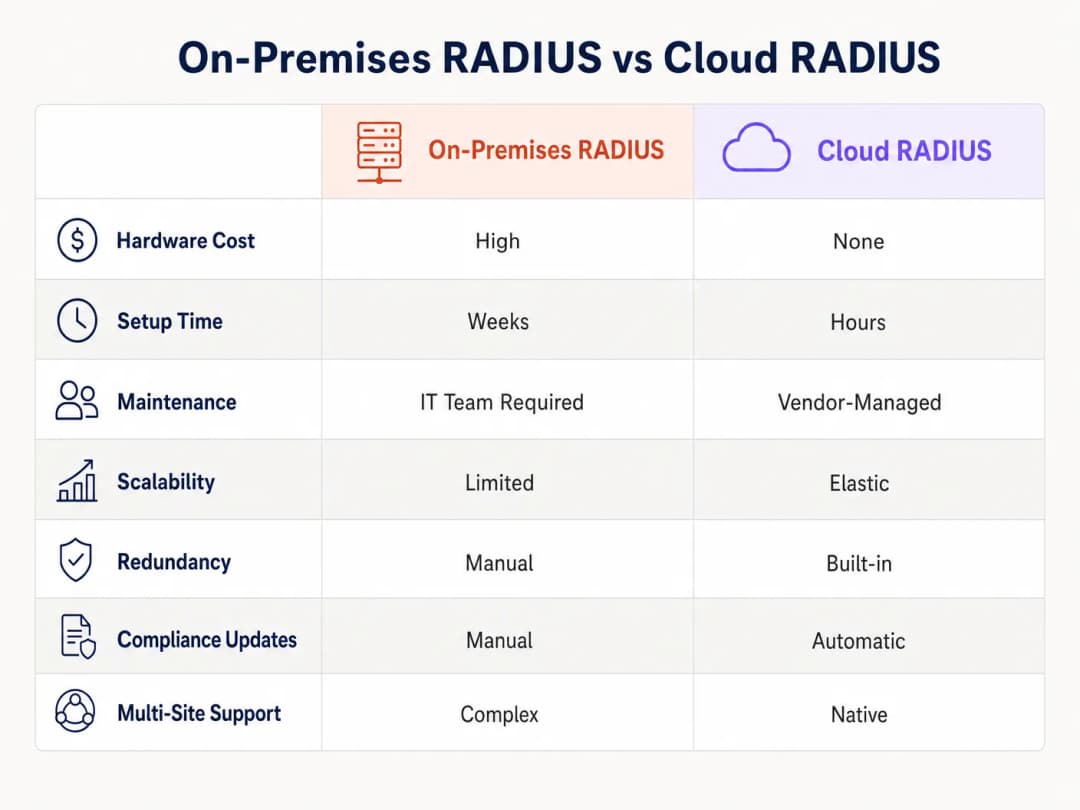
- Réduction des dépenses d'investissement d'infrastructure (Capex) : Pas besoin d'acheter, de racker et d'alimenter des serveurs RADIUS physiques sur chaque site principal.
- Diminution des coûts opérationnels : Les équipes informatiques ne passent plus des heures à corriger les vulnérabilités du système d'exploitation ou à gérer manuellement le basculement des serveurs. Les mises à jour gérées par le fournisseur garantissent une conformité continue.
- Amélioration de la posture de sécurité : La transition vers EAP-TLS via une PKI cloud réduit le risque de vol d'identifiants, diminuant ainsi directement le coût potentiel d'une violation de données.
- Agilité et évolutivité : Lors de l'ouverture d'un nouveau point de vente ou d'un hôtel, l'authentification réseau peut être provisionnée en quelques minutes plutôt qu'en plusieurs semaines. Pour des stratégies de déploiement pratiques, consultez Configuration du WiFi pour les entreprises : Guide pratique 2026.
Grâce à un contrôle d'accès centralisé, les entreprises sécurisent non seulement leur périmètre, mais libèrent également du temps pour leurs ingénieurs de haut niveau afin qu'ils se concentrent sur des projets stratégiques à fort impact plutôt que sur la maintenance d'infrastructures existantes obsolètes.
Définitions clés
Cloud RADIUS
Un service géré qui héberge le protocole Remote Authentication Dial-In User Service dans un environnement cloud hautement disponible, éliminant ainsi le besoin de serveurs d'authentification sur site.
Évalué par les équipes IT qui cherchent à réduire les dépenses d'investissement matériel et les coûts opérationnels tout en maintenant un accès réseau 802.1X sécurisé.
EAP-TLS (Extensible Authentication Protocol-Transport Layer Security)
Une méthode d'authentification hautement sécurisée exigeant que le client et le serveur présentent tous deux des certificats numériques pour prouver leur identité.
La norme recommandée pour les réseaux d'entreprise afin de prévenir les attaques basées sur les mots de passe, nécessitant une PKI et un MDM pour le déploiement.
NAS (Network Access Server)
L'appareil - tel qu'un point d'accès WiFi, un commutateur ou un concentrateur VPN - qui agit comme client RADIUS, transmettant les identifiants de l'utilisateur au serveur RADIUS.
Les ingénieurs réseau doivent configurer le NAS avec les bonnes adresses IP du serveur RADIUS et les secrets partagés pour activer l'authentification 802.1X.
Secret partagé
Une chaîne de texte cryptographique connue uniquement du NAS et du serveur RADIUS, utilisée pour chiffrer les paquets RADIUS et vérifier l'authenticité de l'expéditeur.
Un secret partagé faible constitue une vulnérabilité de sécurité majeure ; les déploiements d'entreprise doivent utiliser des chaînes longues et générées de manière aléatoire.
SCIM (System for Cross-domain Identity Management)
Un standard ouvert qui automatise l'échange d'informations d'identité d'utilisateur entre les systèmes informatiques ou les applications cloud.
Utilisé pour approvisionner et déprovisionner automatiquement les utilisateurs dans l'annuaire Cloud RADIUS lorsque des modifications sont apportées dans le système d'identité RH ou informatique principal.
OpenRoaming
Un cadre de fédération développé par la Wireless Broadband Alliance qui permet aux utilisateurs de se connecter automatiquement et en toute sécurité aux réseaux WiFi participants dans le monde entier.
Les fournisseurs de Cloud RADIUS qui prennent en charge OpenRoaming (comme Purple) permettent aux sites d'offrir une connectivité fluide et sécurisée aux visiteurs sans Captive Portal.
Journaux d'imputation (Accounting Logs)
Enregistrements générés par le serveur RADIUS détaillant les événements de connexion des utilisateurs, y compris l'heure de début, l'heure de fin, les données transférées et l'adresse IP attribuée.
Essentiels pour les audits de sécurité, le dépannage et la démonstration de la conformité avec des cadres tels que PCI DSS et GDPR.
Changement d'autorisation (CoA - Change of Authorization)
Une fonctionnalité RADIUS qui permet au serveur de modifier dynamiquement la session active d'un utilisateur, comme changer son VLAN ou le déconnecter, sans nécessiter de reconnexion.
Utilisé par les administrateurs réseau pour mettre instantanément en quarantaine un appareil compromis ou appliquer de nouvelles restrictions de politique en milieu de session.
Exemples concrets
Un hôtel de 200 chambres utilise actuellement Microsoft NPS sur site pour l'authentification WiFi du personnel via PEAP. L'établissement subit des délais d'attente d'authentification pendant les heures de pointe d'arrivée et souhaite migrer vers Cloud RADIUS avec EAP-TLS pour une meilleure sécurité et fiabilité. Comment le directeur informatique doit-il orchestrer cette migration ?
- Déployer un tenant Cloud RADIUS et l'intégrer avec le Microsoft Entra ID de l'hôtel via SCIM pour une gestion automatisée du cycle de vie des utilisateurs. 2. Configurer la PKI intégrée de Cloud RADIUS pour émettre des certificats clients. 3. Utiliser le MDM existant (par ex., Intune) pour déployer l'autorité de certification racine (Root CA), les certificats clients et un nouveau profil WiFi configuré pour EAP-TLS sur tous les appareils du personnel. 4. Configurer les points d'accès de l'hôtel pour pointer vers les IP primaire et secondaire de Cloud RADIUS, en utilisant un secret partagé complexe de 32 caractères. 5. Faire fonctionner l'ancien NPS et le nouveau Cloud RADIUS en parallèle sur des SSID différents pendant une période de transition de deux semaines avant de décommissionner les serveurs sur site.
Une chaîne nationale de vente au détail comptant 500 points de vente doit garantir la conformité PCI-DSS pour ses terminaux de point de vente (POS) qui se connectent via WiFi. Elle migre vers Cloud RADIUS. Quelles configurations spécifiques sont requises pour respecter cette conformité ?
- Mettre en œuvre une segmentation réseau stricte : les terminaux POS doivent s'authentifier sur un SSID masqué et dédié, mappé sur un VLAN isolé. 2. Imposer l'authentification EAP-TLS pour tous les terminaux POS afin de garantir une authentification mutuelle et d'empêcher les appareils non autorisés de rejoindre le réseau POS. 3. Configurer le service Cloud RADIUS pour conserver tous les journaux de comptabilité (Access-Accept, Access-Reject, durée de connexion) pendant un an au minimum, comme l'exige la norme PCI-DSS. 4. Veiller à ce que les secrets partagés RADIUS entre les points d'accès distants et le service Cloud RADIUS soient renouvelés tous les 90 jours à l'aide d'un script automatisé.
Questions d'entraînement
Q1. Votre organisation migre d'un Active Directory sur site vers Google Workspace. Vous utilisez actuellement PEAP-MSCHAPv2 pour l'authentification WiFi. Pourquoi est-ce un problème, et quelle est la solution recommandée ?
Conseil : Considérez comment PEAP valide les identifiants par rapport au protocole d'annuaire.
Voir la réponse type
PEAP-MSCHAPv2 s'appuie sur le hachage NT du mot de passe d'un utilisateur, que Google Workspace ne stocke ni n'expose nativement. La solution recommandée consiste à migrer vers EAP-TLS en utilisant un fournisseur de Cloud RADIUS disposant d'une PKI intégrée. Le service Cloud RADIUS peut synchroniser les identités des utilisateurs depuis Google Workspace via SAML/SCIM, et authentifier les appareils à l'aide de certificats clients plutôt que de mots de passe.
Q2. Une succursale signale que les utilisateurs rencontrent des retards de 30 secondes lors de la connexion au réseau WiFi, suivis d'une connexion réussie. L'IP principale du Cloud RADIUS dans cette région est actuellement en maintenance. Quelle erreur de configuration cause ce retard ?
Conseil : Examinez la communication entre le NAS et les serveurs RADIUS.
Voir la réponse type
Le NAS (point d'accès ou commutateur) a un délai d'attente (timeout) du serveur RADIUS configuré trop haut (par exemple, 30 secondes). Il attend que le serveur principal réponde avant de basculer vers le serveur secondaire. Le délai d'attente doit être réduit à 3 - 5 secondes pour garantir un basculement rapide sans impact sur l'expérience utilisateur.
Q3. Vous déployez Cloud RADIUS pour un hôpital. L'équipe de sécurité exige que seuls les appareils appartenant à l'entreprise puissent se connecter au réseau interne, même si un employé connaît un nom d'utilisateur et un mot de passe valides. Comment appliquez-vous cela ?
Conseil : Quelle méthode EAP vérifie l'identité de l'appareil, et pas seulement la connaissance de l'utilisateur ?
Voir la réponse type
Déployez EAP-TLS. Configurez la solution MDM de l'hôpital pour distribuer un certificat client unique uniquement aux appareils enregistrés appartenant à l'entreprise. Configurez la politique Cloud RADIUS pour rejeter toute demande d'authentification qui ne présente pas un certificat valide signé par la PKI interne de confiance, bloquant ainsi efficacement le BYOD ou les appareils non autorisés, quelle que soit la connaissance du mot de passe.
Continuer la lecture de cette série
Les avantages de sécurité de RADIUS-as-a-Service pour les effectifs hybrides
Ce guide de référence technique explique comment RADIUS-as-a-Service sécurise l'accès au réseau pour les effectifs hybrides au sein des sites distribués. Il couvre l'architecture, les avantages en matière de sécurité et les étapes de déploiement pour remplacer l'infrastructure RADIUS sur site par un service d'authentification géré dans le cloud. Pour les directeurs informatiques et les architectes réseau des hôtels, des chaînes de vente au détail, des stades et des organisations du secteur public, ce guide fournit les preuves nécessaires pour évaluer et mettre en œuvre une migration vers le cloud RADIUS ce trimestre.
Intégration de RADIUS-as-a-Service avec les annuaires cloud (Azure AD & Google Workspace)
Ce guide de référence technique détaille comment intégrer RADIUS-as-a-Service avec les annuaires cloud - Microsoft Entra ID et Google Workspace - pour l'authentification WiFi d'entreprise. Il couvre la transition architecturale du NPS sur site vers le RADIUS cloud-native, le déploiement de l'authentification EAP-TLS basée sur les certificats et les meilleures pratiques opérationnelles pour sécuriser l'accès sans fil dans les secteurs de l'hôtellerie, du commerce de détail et du secteur public. Pour les responsables informatiques et les architectes réseau ayant déjà investi dans l'identité cloud, ce guide comble le fossé entre la gestion des annuaires et la sécurité physique du réseau.
Comment implémenter l'authentification 802.1X avec Cloud RADIUS
Ce guide de référence technique fournit un cadre complet pour implémenter l'authentification 802.1X avec Cloud RADIUS sur des parcs d'entreprises distribués. Il détaille l'architecture, la sélection de la méthode EAP, le séquençage du déploiement et les stratégies d'atténuation des risques nécessaires pour sécuriser l'accès au réseau tout en éliminant les coûts opérationnels liés aux infrastructures sur site.
Vous avez des questions sur votre configuration spécifique ?
Notre équipe collabore avec des exploitants de sites, des responsables informatiques et des ingénieurs réseau au sein de 80 000 sites. Réservez un appel de 20 minutes et nous vous montrerons comment d'autres professionnels comme vous ont résolu ce problème.