
O que é Cloud RADIUS? Um Guia Abrangente para RADIUS como Serviço
Este guia abrangente explora o Cloud RADIUS (RADIUS as a Service), detalhando a sua arquitetura, métodos EAP e estratégias de implementação. Fornece aos líderes de TI informações acionáveis sobre a migração de servidores no local para um modelo de autenticação baseado na nuvem, escalável, seguro e em conformidade.
Ouça este guia
Ver transcrição do podcast
Resumo Executivo
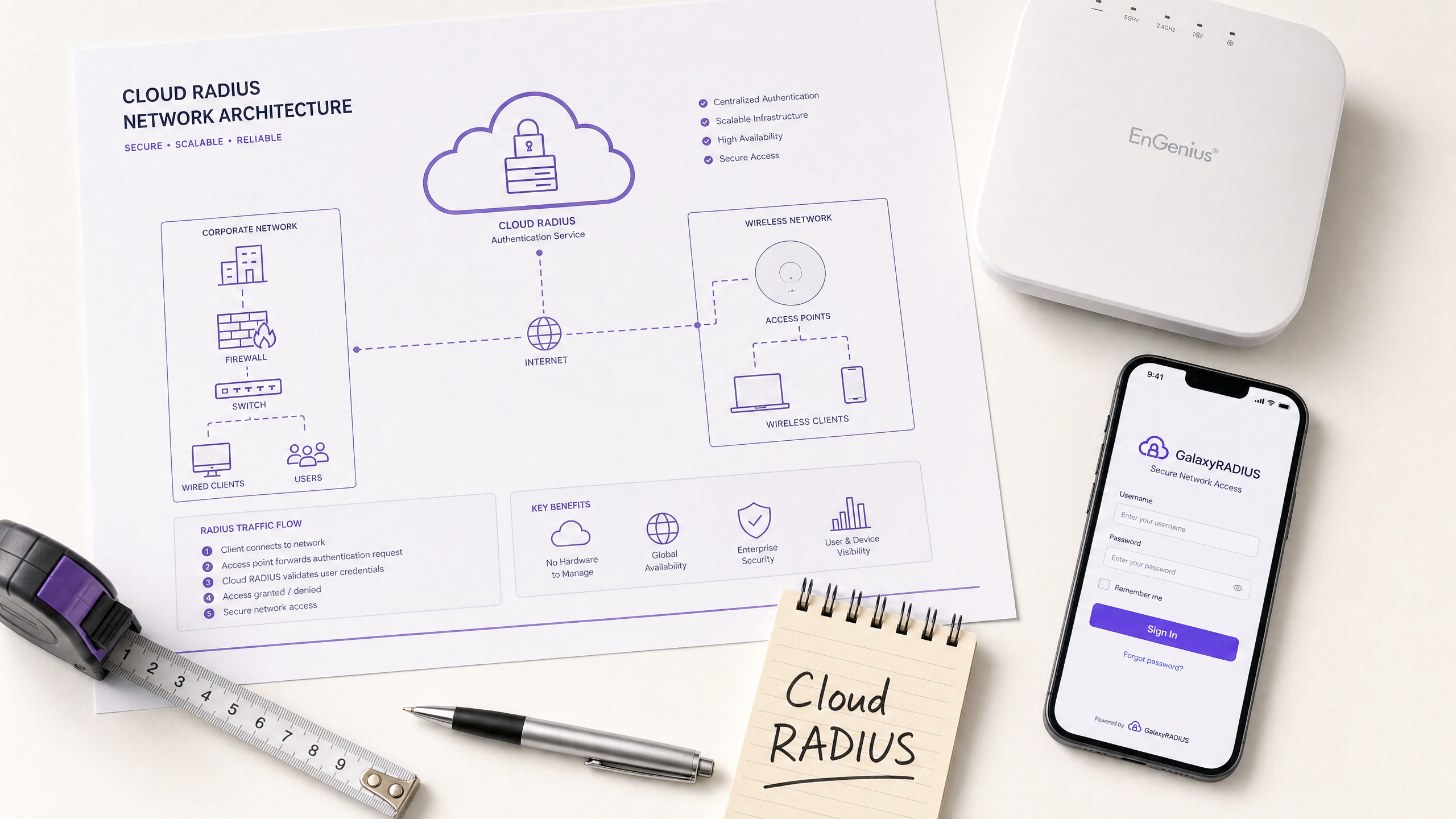
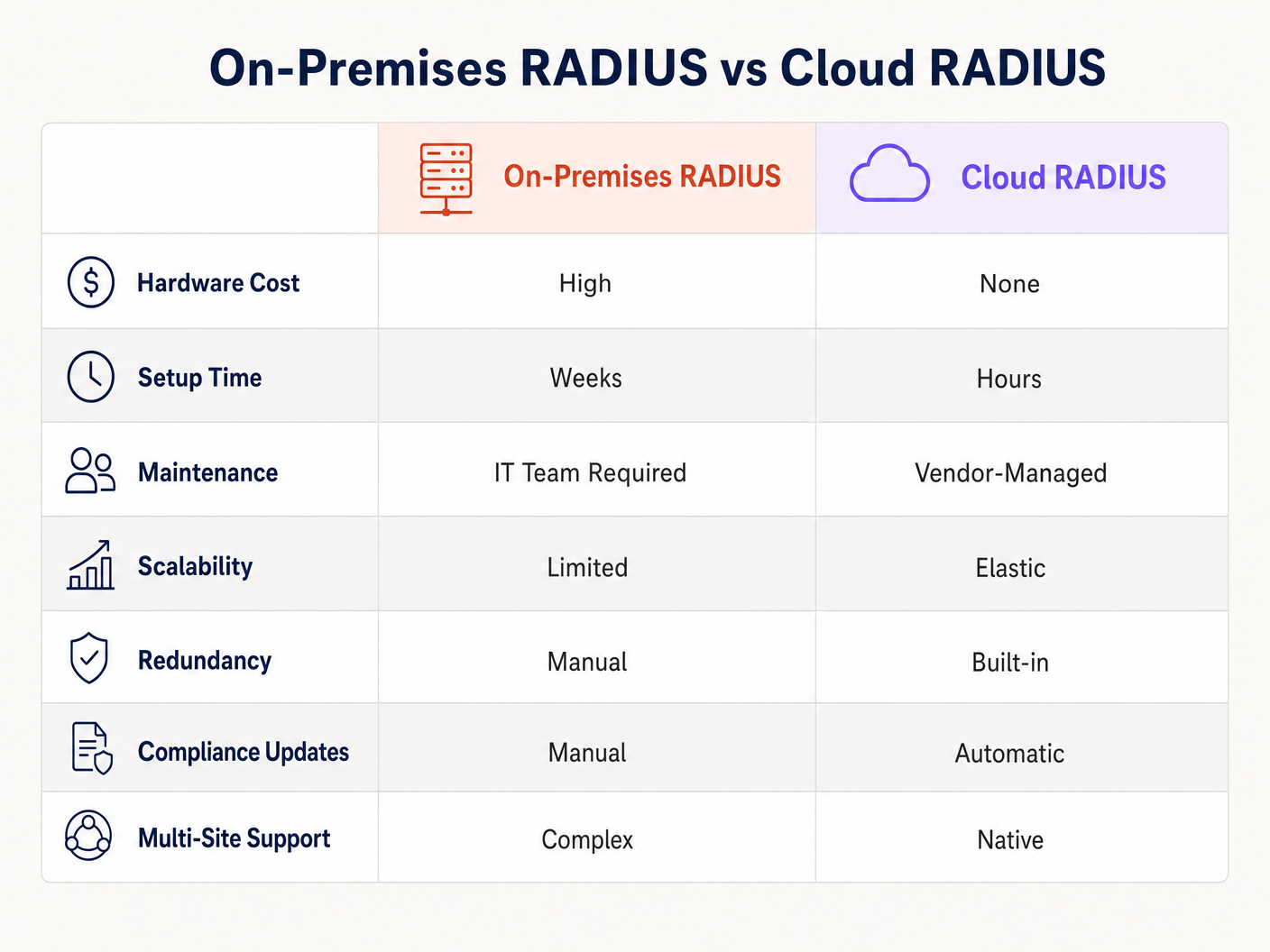
Para as redes empresariais modernas, a arquitetura tradicional de RADIUS (Remote Authentication Dial-In User Service) no local representa um significativo gargalo operacional. Gerir servidores físicos, aplicar patches a sistemas operativos, lidar com autoridades de certificação e projetar redundância multi-site consome recursos de TI valiosos. O Cloud RADIUS (ou RADIUS as a Service) aborda esta questão migrando a camada de autenticação IEEE 802.1X para uma infraestrutura de nuvem gerida e altamente disponível. Este guia fornece uma visão técnica abrangente do Cloud RADIUS para gestores de TI, arquitetos de rede e CTOs que avaliam estratégias de implementação. Ao mudar de sistemas com elevado capex e manutenção manual para um modelo elástico e globalmente distribuído, as organizações em Retalho , Hotelaria e Transportes podem aplicar políticas de acesso robustas, alcançar a conformidade (como PCI DSS e GDPR) e integrar-se perfeitamente com fornecedores de identidade modernos como Microsoft Entra ID e Google Workspace.
Análise Técnica Detalhada
A Evolução da Arquitetura RADIUS
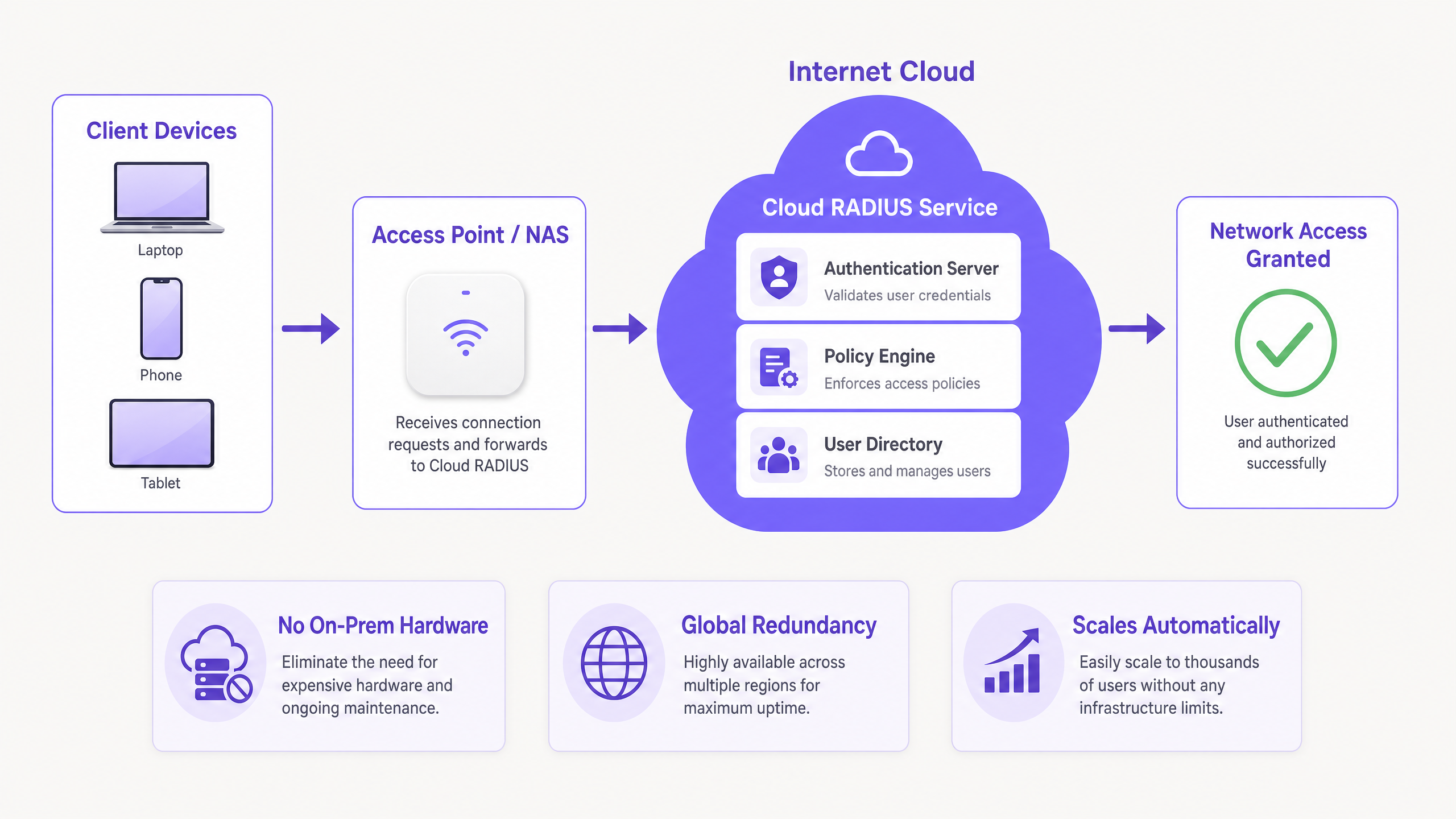
O RADIUS, definido inicialmente no RFC 2865, opera num modelo cliente-servidor onde os Network Access Servers (NAS) — como pontos de acesso WiFi ou concentradores VPN — encaminham os pedidos de autenticação para um servidor central. Historicamente, isto significava implementar o FreeRADIUS ou o Microsoft Network Policy Server (NPS) em hardware dedicado. Embora funcional para implementações de um único site, escalar esta arquitetura em ambientes distribuídos introduz desafios significativos de latência e redundância.
O Cloud RADIUS abstrai a infraestrutura subjacente. Os pedidos de autenticação são encaminhados para endpoints de nuvem distribuídos globalmente, garantindo tempos de resposta inferiores a 100ms mesmo sob cargas de pico. Esta elasticidade é crucial para ambientes de alta densidade como estádios ou centros de conferências.
Métodos EAP e Postura de Segurança
A escolha do método Extensible Authentication Protocol (EAP) dita fundamentalmente a sua postura de segurança:
- PEAP (Protected EAP): Tunela MSCHAPv2 dentro de uma sessão TLS. Embora amplamente suportado e fácil de integrar com o Active Directory, o PEAP é vulnerável à recolha de credenciais através de pontos de acesso não autorizados se os dispositivos cliente não estiverem estritamente configurados para validar o certificado do servidor.
- EAP-TLS: O padrão ouro empresarial. Requer autenticação mútua de certificados — tanto o servidor quanto o cliente devem apresentar certificados válidos. Isto elimina completamente os ataques baseados em palavra-passe, mas necessita de uma robusta Infraestrutura de Chave Pública (PKI) e integração de Gestão de Dispositivos Móveis (MDM) para a implementação de certificados.
- EAP-TTLS e EAP-FAST: Fornecem alternativas onde é necessária uma ampla compatibilidade de cliente (incluindo sistemas legados ou Linux), ou onde as dependências de validação de certificados precisam de ser contornadas usando Credenciais de Acesso Protegido (PACs).
WPA3 e Integração OpenRoaming
As implementações modernas devem ter em conta o WPA3-Enterprise, que exige o modo de segurança de 192 bits para as classificações mais elevadas, requerendo suites de cifra específicas. Além disso, o Cloud RADIUS facilita a participação em frameworks de federação como o OpenRoaming. A Purple, por exemplo, atua como um fornecedor de identidade gratuito para o OpenRoaming sob a sua licença Connect, permitindo uma autenticação segura e sem interrupções em redes globais participantes.
Guia de Implementação
A implementação do Cloud RADIUS requer uma abordagem sistemática para garantir zero tempo de inatividade durante a transição.
Passo 1: Integração do Fornecedor de Identidade (IdP)
A sua instância de Cloud RADIUS deve sincronizar com o seu diretório de utilizadores autoritativo. O aprovisionamento nativo SAML ou SCIM com Microsoft Entra ID, Google Workspace ou Okta é altamente recomendado em vez de proxies LDAP manuais ou importações CSV. Isto garante que, quando um funcionário é desvinculado no sistema de RH, o seu acesso à rede é revogado instantaneamente.
Passo 2: Estratégia de Gestão de Certificados
Se estiver a implementar EAP-TLS, defina o seu ciclo de vida de certificados. Selecione um fornecedor de Cloud RADIUS que inclua uma PKI integrada ou que se integre perfeitamente com a sua Autoridade de Certificação (CA) existente. Automatize a emissão e revogação de certificados através da sua plataforma MDM (por exemplo, Intune ou Jamf) para evitar falhas de autenticação devido a certificados expirados.
Passo 3: Configuração de Dispositivos de Rede
Configure os seus dispositivos NAS (pontos de acesso, switches) para apontar para os endereços IP primário e secundário do Cloud RADIUS. Certifique-se de que o segredo partilhado é criptograficamente complexo (mínimo de 32 caracteres aleatórios). Ajuste as configurações de tempo limite de failover; um tempo limite de 3 a 5 segundos é ideal para evitar atrasos prolongados na autenticação se o nó primário estiver inacessível.
Passo 4: Definição de Políticas
Estabeleça políticas por SSID. Por exemplo, exija EAP-TLS para a rede corporativa, PEAP para dispositivos IoT legados e isole o acesso de convidados. Note que o RADIUS lida com utilizadores conhecidos; para visitantes, implemente uma solução dedicada de Guest WiFi com um captive portal para capturar dados primários, integrando com uma plataforma de WiFi Analytics . Para mais informações sobre o envolvimento de convidados, consulte Como Melhorar a Satisfação do Convidado: O Guia Definitivo .
Melhores Práticas
- Implementar Certificados de Servidor RigorososValidação de Certificados: Para implementações PEAP, aplique políticas de grupo ou perfis MDM que forcem os clientes a validar o certificado do servidor RADIUS e restrinjam a confiança a CAs Raiz específicas.
- Segmentar Tráfego de Contabilidade e Autenticação: Garanta que os dados de contabilidade RADIUS sejam ativamente monitorizados e retidos. Este registo de auditoria é crítico para relatórios de conformidade (p.g., PCI DSS, HIPAA).
- Monitorizar Latência de Autenticação: Alta latência frequentemente indica roteamento subótimo ou problemas de sincronização IdP. Utilize ferramentas de monitorização para rastrear o tempo decorrido desde o Access-Request até ao pacote Access-Accept.
- Otimizar Planeamento de Sinal e Canal: A autenticação fiável depende de uma camada física estável. Consulte guias como Understanding RSSI and Signal Strength for Optimal Channel Planning para garantir que o seu ambiente de RF suporta roaming 802.1X contínuo.
Resolução de Problemas e Mitigação de Riscos
Mesmo com serviços geridos, configurações incorretas podem causar falhas de acesso. Os modos de falha comuns incluem:
- Expiração de Certificado: A principal causa de falhas EAP-TLS. Mitigação: Implemente alertas automatizados 30 dias antes da expiração do certificado CA ou do servidor.
- Incompatibilidade de Segredo Partilhado: Ocorre frequentemente ao adicionar novos pontos de acesso. Mitigação: Padronize os modelos de configuração no seu sistema de gestão de rede.
- Problemas de NAT e Whitelisting de IP: Os fornecedores de Cloud RADIUS geralmente exigem o whitelisting de IP do NAS. Se os seus escritórios de filial utilizam IPs dinâmicos ou configurações NAT complexas, os pedidos de autenticação podem ser descartados. Mitigação: Utilize IPs de saída estáticos ou implemente um proxy RADIUS local, se necessário.
- Falhas de Sincronização IdP: Se o diretório na cloud falhar ao sincronizar com o AD no local, novos utilizadores não conseguirão autenticar. Mitigação: Monitorize ativamente o estado do conector SCIM/LDAP.
ROI e Impacto no Negócio
A transição para Cloud RADIUS oferece valor de negócio mensurável:
- Redução do Capex de Infraestrutura: Elimina a necessidade de adquirir, instalar e alimentar servidores RADIUS físicos em cada local principal.
- Menor Sobrecarga Operacional: As equipas de TI deixam de gastar horas a aplicar patches a vulnerabilidades do SO ou a gerir manualmente o failover do servidor. As atualizações geridas pelo fornecedor garantem conformidade contínua.
- Postura de Segurança Reforçada: A transição para EAP-TLS via PKI na cloud mitiga o risco de roubo de credenciais, reduzindo diretamente o custo potencial de uma violação de dados.
- Agilidade e Escalabilidade: Ao abrir uma nova filial de retalho ou hotel, a autenticação de rede pode ser provisionada em minutos, em vez de semanas. Para estratégias de implementação práticas, consulte Setting Up WiFi for Business: A 2026 Playbook .
Ao centralizar o controlo de acesso, as organizações não só protegem os seus perímetros, mas também libertam talentos de engenharia sénior para se concentrarem em iniciativas estratégicas, em vez de manterem infraestruturas legadas.
Definições Principais
Cloud RADIUS
A managed service that hosts the Remote Authentication Dial-In User Service protocol in a highly available cloud environment, eliminating the need for on-premises authentication servers.
Evaluated by IT teams seeking to reduce hardware capex and operational overhead while maintaining secure 802.1X network access.
EAP-TLS (Extensible Authentication Protocol-Transport Layer Security)
A highly secure authentication method requiring both the client and the server to present digital certificates to prove their identity.
The recommended standard for enterprise networks to prevent password-based attacks, requiring PKI and MDM for deployment.
NAS (Network Access Server)
The device—such as a WiFi access point, switch, or VPN concentrator—that acts as the RADIUS client, forwarding user credentials to the RADIUS server.
Network engineers must configure the NAS with the correct RADIUS server IPs and shared secrets to enable 802.1X authentication.
Shared Secret
A cryptographic text string known only to the NAS and the RADIUS server, used to encrypt RADIUS packets and verify the sender's authenticity.
A weak shared secret is a major security vulnerability; enterprise deployments should use long, randomly generated strings.
SCIM (System for Cross-domain Identity Management)
An open standard that automates the exchange of user identity information between IT systems or cloud applications.
Used to automatically provision and de-provision users in the Cloud RADIUS directory when changes are made in the primary HR or IT identity system.
OpenRoaming
A federation framework developed by the Wireless Broadband Alliance that allows users to automatically and securely connect to participating WiFi networks globally.
Cloud RADIUS providers that support OpenRoaming (like Purple) allow venues to offer seamless, secure connectivity to visitors without captive portals.
Accounting Logs
Records generated by the RADIUS server detailing user connection events, including start time, end time, data transferred, and IP address assigned.
Critical for security audits, troubleshooting, and demonstrating compliance with frameworks like PCI DSS and GDPR.
Change of Authorization (CoA)
A RADIUS feature that allows the server to dynamically modify a user's active session, such as changing their VLAN or disconnecting them, without requiring a reconnection.
Used by network administrators to instantly quarantine a compromised device or apply new policy restrictions mid-session.
Exemplos Práticos
A 200-room hotel currently uses on-premises Microsoft NPS for staff WiFi authentication via PEAP. They are experiencing authentication timeouts during peak check-in hours and want to migrate to Cloud RADIUS with EAP-TLS for better security and reliability. How should the IT Director architect this migration?
- Deploy a Cloud RADIUS tenant and integrate it with the hotel's Microsoft Entra ID via SCIM for automated user lifecycle management. 2. Configure the Cloud RADIUS integrated PKI to issue client certificates. 3. Use the existing MDM (e.g., Intune) to push the Root CA, client certificates, and a new WiFi profile configured for EAP-TLS to all staff devices. 4. Configure the hotel's access points to point to the primary and secondary Cloud RADIUS IPs, using a new, complex 32-character shared secret. 5. Run both the old NPS and new Cloud RADIUS in parallel on different SSIDs for a two-week transition period before decommissioning the on-premise servers.
A national retail chain with 500 locations needs to ensure PCI DSS compliance for its point-of-sale (POS) terminals, which connect via WiFi. They are moving to Cloud RADIUS. What specific configurations are required to meet compliance?
- Implement strict network segmentation: POS terminals must authenticate to a dedicated, hidden SSID mapped to an isolated VLAN. 2. Enforce EAP-TLS authentication for all POS devices to ensure mutual authentication and prevent rogue devices from joining the POS network. 3. Configure the Cloud RADIUS service to retain all accounting logs (Access-Accept, Access-Reject, connection duration) for a minimum of one year, as mandated by PCI DSS. 4. Ensure the RADIUS shared secrets between the branch APs and the Cloud RADIUS service are rotated every 90 days using an automated script.
Perguntas de Prática
Q1. Your organisation is migrating from an on-premises Active Directory to Google Workspace. You currently use PEAP-MSCHAPv2 for WiFi authentication. Why is this a problem, and what is the recommended solution?
Dica: Consider how PEAP validates credentials against the directory protocol.
Ver resposta modelo
PEAP-MSCHAPv2 relies on the NT hash of a user's password, which Google Workspace does not store or expose natively. The recommended solution is to migrate to EAP-TLS using a Cloud RADIUS provider that features an integrated PKI. The Cloud RADIUS service can sync user identities from Google Workspace via SAML/SCIM, and authenticate devices using client certificates rather than passwords.
Q2. A branch office reports that users are experiencing 30-second delays when connecting to the WiFi network, followed by a successful connection. The primary Cloud RADIUS IP in that region is currently undergoing maintenance. What configuration error is causing this delay?
Dica: Look at the communication between the NAS and the RADIUS servers.
Ver resposta modelo
The NAS (Access Point or Switch) has the RADIUS server timeout configured too high (e.g., 30 seconds). It is waiting for the primary server to respond before failing over to the secondary server. The timeout should be reduced to 3-5 seconds to ensure rapid failover without impacting the user experience.
Q3. You are deploying Cloud RADIUS for a hospital. The security team mandates that only corporate-owned devices can connect to the internal network, even if an employee knows a valid username and password. How do you enforce this?
Dica: Which EAP method verifies the device's identity, not just the user's knowledge?
Ver resposta modelo
Deploy EAP-TLS. Configure the hospital's MDM solution to push a unique client certificate only to enrolled, corporate-owned devices. Configure the Cloud RADIUS policy to reject any authentication request that does not present a valid certificate signed by the trusted internal PKI, effectively blocking BYOD or rogue devices regardless of password knowledge.