
Wi-Fi 6 बनाम Wi-Fi 5: क्या यह चैनल इंटरफेरेंस को हल करता है?
यह गाइड एक तकनीकी डीप-डाइव प्रदान करती है कि कैसे Wi-Fi 6 (802.11ax) OFDMA और BSS कलरिंग के माध्यम से हाई-डेंसिटी एंटरप्राइज़ वातावरण में चैनल इंटरफेरेंस को संबोधित करता है। यह IT प्रबंधकों, नेटवर्क आर्किटेक्ट्स और CTOs को कार्रवाई योग्य डिप्लॉयमेंट रणनीतियों, हॉस्पिटैलिटी और हेल्थकेयर से वास्तविक दुनिया के केस स्टडीज़, और उन स्थानों में इंफ्रास्ट्रक्चर अपग्रेड के ROI का मूल्यांकन करने के लिए एक रूपरेखा से लैस करता है जहां वायरलेस परफॉरमेंस व्यवसाय के लिए महत्वपूर्ण है।
इस गाइड को सुनें
पॉडकास्ट ट्रांसक्रिप्ट देखें
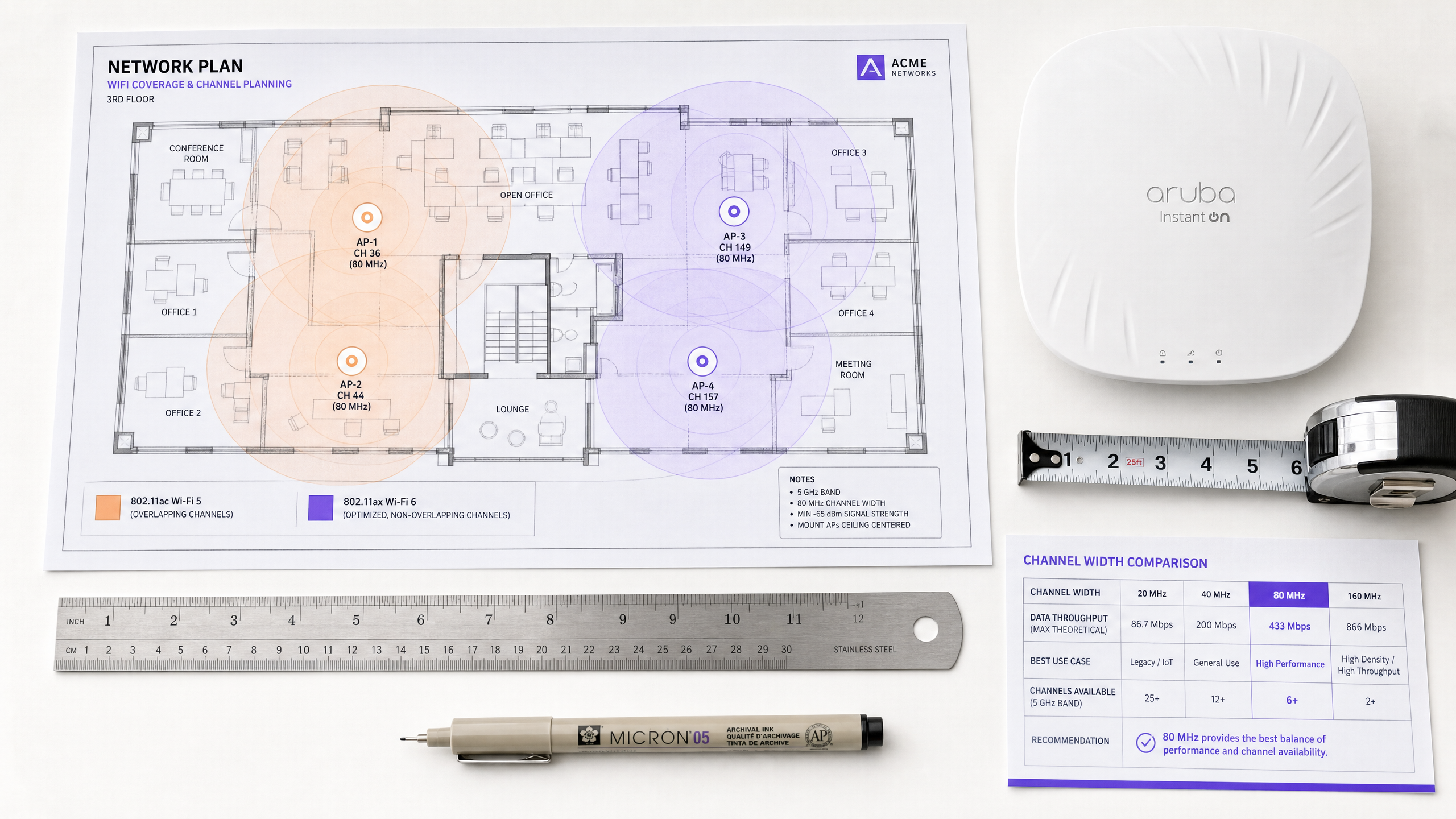
कार्यकारी सारांश (Executive Summary)
हाई-डेंसिटी (high-density) वातावरण का प्रबंधन करने वाले IT डायरेक्टर्स और नेटवर्क आर्किटेक्ट्स के लिए — चाहे वह हॉस्पिटैलिटी, रिटेल या बड़े सार्वजनिक स्थानों में हो — को-चैनल इंटरफेरेंस (co-channel interference) वायरलेस परफॉरमेंस के लिए प्राथमिक बाधा बना हुआ है। ट्रांसमिट पावर को कम करके या अल्टरनेटिंग एक्सेस पॉइंट्स पर 2.4 GHz रेडियो को डिसेबल करके इंटरफेरेंस को कम करने का पारंपरिक दृष्टिकोण अपनी तार्किक सीमा तक पहुँच गया है。
Wi-Fi 5 (802.11ac) से Wi-Fi 6 (802.11ax) में ट्रांज़िशन एक बुनियादी आर्किटेक्चरल बदलाव को दर्शाता है। केवल सैद्धांतिक थ्रूपुट (throughput) बढ़ाने के बजाय, Wi-Fi 6 को विशेष रूप से भीड़भाड़ वाले एयरस्पेस में कैपेसिटी और एफिशिएंसी को संबोधित करने के लिए इंजीनियर किया गया था। ऑर्थोगोनल फ्रीक्वेंसी-डिवीजन मल्टीपल एक्सेस (OFDMA) और बेसिक सर्विस सेट (BSS) कलरिंग की शुरुआत के माध्यम से, Wi-Fi 6 इंटरफेरेंस पर केवल प्रतिक्रिया देने के बजाय इसे प्रबंधित करने के लिए डिटरमिनिस्टिक मैकेनिज्म प्रदान करता है।
यह गाइड Wi-Fi 6 इंटरफेरेंस मिटिगेशन की तकनीकी वास्तविकताओं की पड़ताल करती है, जो एंटरप्राइज़ IT टीमों के लिए कार्रवाई योग्य डिप्लॉयमेंट रणनीतियाँ प्रदान करती है। हम जांच करते हैं कि ये मानक मिक्स्ड-क्लाइंट वातावरण में कैसे काम करते हैं और Guest WiFi एनालिटिक्स जैसे इंटेलिजेंस प्लेटफॉर्म को इंटीग्रेट करने से आपके इंफ्रास्ट्रक्चर रिफ्रेश के ROI को कैसे वैलिडेट किया जा सकता है।
तकनीकी डीप-डाइव: Wi-Fi 6 नियम कैसे बदलता है
Wi-Fi 6 इंटरफेरेंस को कैसे संबोधित करता है, यह समझने के लिए, हमें सबसे पहले इसके पूर्ववर्ती की सीमाओं की जांच करनी चाहिए।
Wi-Fi 5 कंटेंशन (Contention) की समस्या
Wi-Fi 5 ऑर्थोगोनल फ्रीक्वेंसी-डिवीजन मल्टीप्लेक्सिंग (OFDM) पर निर्भर करता है। इस सिंगल-यूज़र मॉडल में, एक एक्सेस पॉइंट (AP) को किसी दिए गए ट्रांसमिशन के लिए एक ही क्लाइंट को संपूर्ण चैनल बैंडविड्थ — चाहे 20, 40, या 80 MHz हो — आवंटित करनी चाहिए, भले ही पेलोड का आकार कुछ भी हो। यह छोटे डेटा पैकेट के लिए अत्यधिक अक्षम है, जैसे कि IoT डिवाइस या रियल-टाइम टेलीमेट्री द्वारा उत्पन्न किए गए पैकेट।
इसके अलावा, Wi-Fi 5 एक सख्त कैरियर सेंस मल्टीपल एक्सेस विथ कोलिजन अवॉइडेंस (CSMA/CA) मैकेनिज्म का उपयोग करता है। यदि कोई AP या क्लाइंट अपने चैनल पर एक विशिष्ट सीमा (आमतौर पर -82 dBm) से ऊपर RF ऊर्जा का पता लगाता है, तो वह ट्रांसमिशन को टाल देता है। घने डिप्लॉयमेंट में, ओवरलैपिंग कवरेज क्षेत्रों के परिणामस्वरूप महत्वपूर्ण को-चैनल इंटरफेरेंस (CCI) होता है, जहां डिवाइस ट्रांसमिट करने की तुलना में प्रतीक्षा करने में अधिक समय व्यतीत करते हैं। यह वह मुख्य समस्या है जिसे हल करने के लिए Wi-Fi 6 को डिज़ाइन किया गया था।
OFDMA: ग्रैनुलर स्पेक्ट्रम एलोकेशन
Wi-Fi 6 OFDMA पेश करता है, जो चैनल को छोटे, अलग सब-कैरियर्स में विभाजित करता है जिन्हें रिसोर्स यूनिट्स (RUs) कहा जाता है। एक डिवाइस को पूरा 20 MHz चैनल समर्पित करने के बजाय, एक AP उस चैनल को नौ अलग-अलग RUs तक में विभाजित कर सकता है, जो एक साथ कई क्लाइंट्स को ट्रांसमिट या रिसीव कर सकता है। यह कंटेंशन ओवरहेड और लेटेंसी को काफी कम कर देता है। हालांकि OFDMA बाहरी इंटरफेरेंस को समाप्त नहीं करता है, यह नेटवर्क को काफी अधिक कुशल बनाता है, जिससे माध्यम के व्यस्त रहने का कुल समय कम हो जाता है और इसलिए टकराव (collision) की संभावना कम हो जाती है।
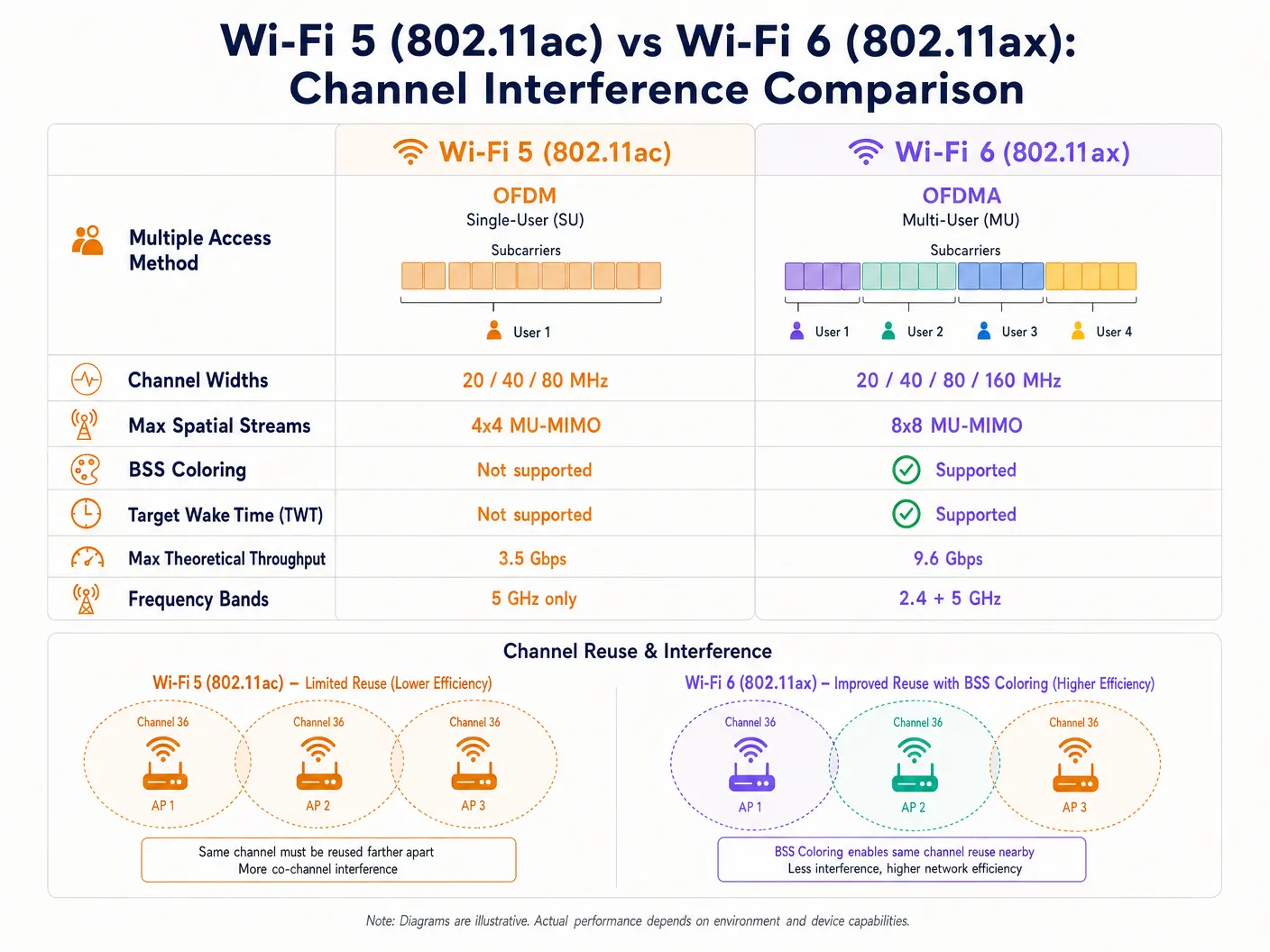
BSS कलरिंग: एक्शन में स्पैटियल रीयूज़ (Spatial Reuse)
को-चैनल इंटरफेरेंस को सबसे सीधे लक्षित करने वाला फीचर BSS कलरिंग है, जिसे औपचारिक रूप से स्पैटियल रीयूज़ के रूप में जाना जाता है। एक घने डिप्लॉयमेंट में, सीमित स्पेक्ट्रम उपलब्धता के कारण कई AP अक्सर एक ही चैनल पर काम करते हैं। Wi-Fi 5 में, एक क्लाइंट डिवाइस अपने स्वयं के AP (इसके बेसिक सर्विस सेट) के लिए लक्षित ट्रैफ़िक और उसी चैनल पर पड़ोसी AP के ट्रैफ़िक के बीच अंतर नहीं कर सकता है। यह सभी ट्रैफ़िक को इंटरफेरेंस के रूप में मानता है और ट्रांसमिशन को टाल देता है, भले ही इंटरफेयर करने वाला सिग्नल वास्तव में कितना भी कमजोर क्यों न हो।
Wi-Fi 6 फिजिकल लेयर (PHY) हेडर में एक 6-बिट आइडेंटिफायर — "कलर" — जोड़ता है। डिवाइस अब इंट्रा-BSS ट्रैफ़िक (समान रंग) और इंटर-BSS ट्रैफ़िक (अलग रंग) के बीच अंतर कर सकते हैं। यदि कोई डिवाइस एक अलग रंग के साथ ट्रांसमिशन का पता लगाता है, तो वह एक एडेप्टिव क्लियर चैनल असेसमेंट (CCA) थ्रेशोल्ड लागू करता है। यदि इंटरफेयर करने वाला सिग्नल अपेक्षाकृत कमजोर है, तो डिवाइस इसे अनदेखा कर सकता है और एक साथ ट्रांसमिट कर सकता है, जिससे स्पैटियल रीयूज़ के माध्यम से समग्र नेटवर्क क्षमता में काफी वृद्धि होती है।
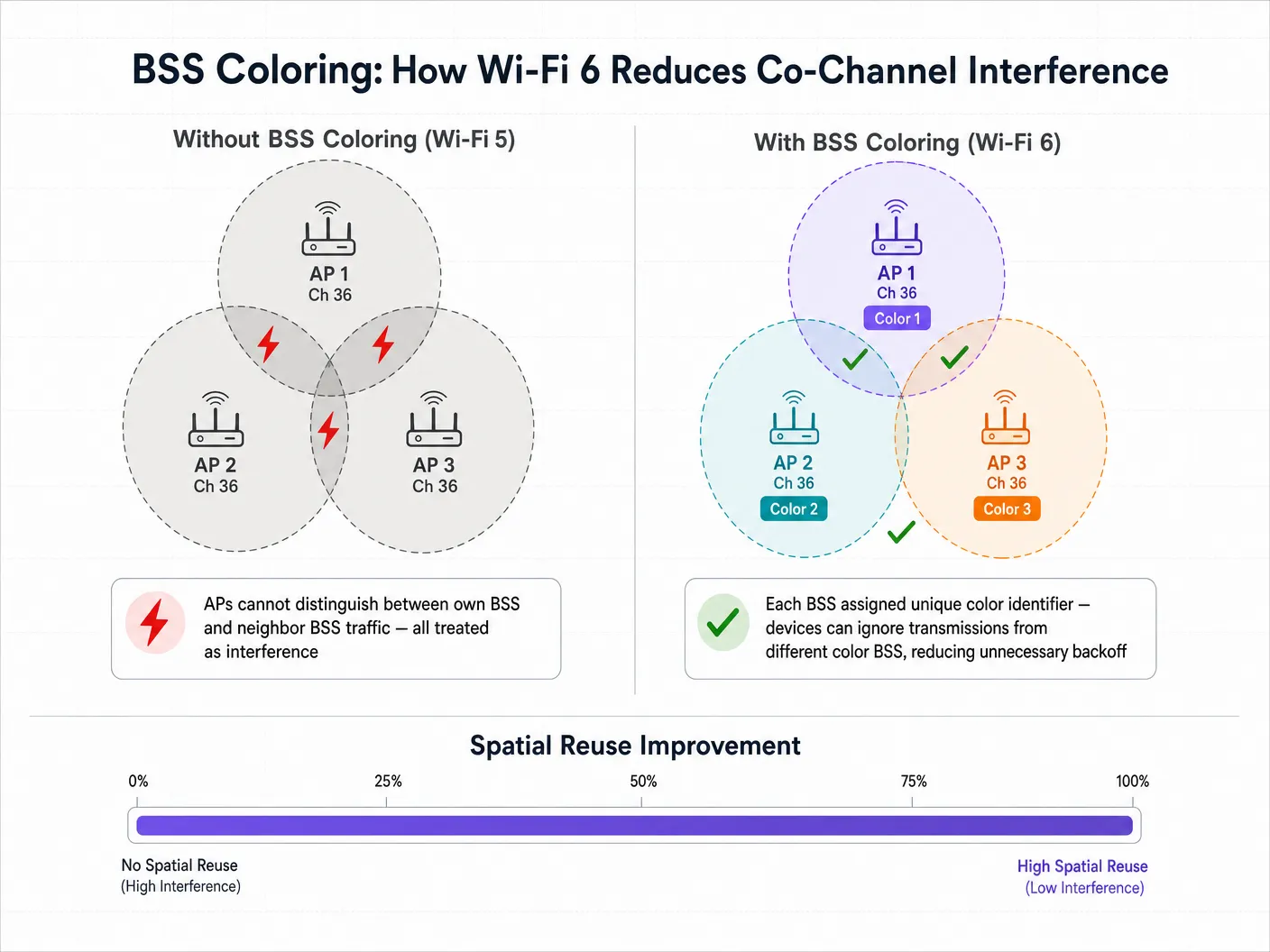
इम्प्लीमेंटेशन गाइड: हाई डेंसिटी के लिए डिप्लॉयमेंट
Wi-Fi 6 को डिप्लॉय करने के लिए कवरेज-केंद्रित डिज़ाइन से कैपेसिटी-केंद्रित आर्किटेक्चर में रणनीतिक बदलाव की आवश्यकता होती है। निम्नलिखित सिफारिशें Hospitality , Retail , और सार्वजनिक-क्षेत्र के वातावरण में लागू होती हैं।
1. चैनल विड्थ (Channel Width) रणनीति
हालांकि Wi-Fi 6 160 MHz चैनलों का समर्थन करता है, एंटरप्राइज़ वातावरण में उन्हें डिप्लॉय करने की सलाह शायद ही कभी दी जाती है। व्यापक चैनलों का मतलब है कि कम नॉन-ओवरलैपिंग चैनल उपलब्ध हैं, जिससे को-चैनल इंटरफेरेंस काफी बढ़ जाता है।
सिफारिश: स्टेडियमों और सम्मेलन केंद्रों जैसे हाई-डेंसिटी वाले वातावरण के लिए 5 GHz बैंड में 20 MHz या 40 MHz चैनलों पर मानकीकरण करें। व्यापक चैनलों के साथ इसे जबरदस्ती करने के बजाय, थ्रूपुट प्रदान करने के लिए OFDMA और उच्च मॉड्यूलेशन स्कीम (1024-QAM) पर भरोसा करें।
अपने स्पेक्ट्रम की योजना बनाते समय, DFS Channels: What They Are and When to Avoid Them का ध्यान रखें। हालांकि Wi-Fi 6 अधिक कुशल है, रडार डिटेक्शन इवेंट अभी भी चैनल परिवर्तन को बाध्य करेंगे, जिससे क्लाइंट कनेक्टिविटी बाधित होगी। इतालवी-भाषा की टीमों के लिए, यही मार्गदर्शन Canali DFS: Cosa sono e quando evitarli के रूप में उपलब्ध है।
2. मिक्स्ड-क्लाइंट वास्तविकता का प्रबंधन
OFDMA और BSS कलरिंग जैसे Wi-Fi 6 फीचर्स की प्राथमिक चेतावनी यह है कि उन्हें क्लाइंट सपोर्ट की आवश्यकता होती है। Retail या Hospitality जैसे सार्वजनिक-सामना वाले वातावरण में, आप क्लाइंट डिवाइस को नियंत्रित नहीं करते हैं। जब लिगेसी Wi-Fi 5 या Wi-Fi 4 डिवाइस कनेक्ट होते हैं, तो नेटवर्क को उन विशिष्ट ट्रांसमिशन के लिए मानक OFDM और लिगेसी कंटेंशन मैकेनिज्म पर वापस आना चाहिए। इसलिए Wi-Fi 6 के इंटरफेरेंस मिटिगेशन लाभ आपके वातावरण में Wi-Fi 6 क्लाइंट्स के प्रवेश के अनुपात में बढ़ते हैं।
3. नेटवर्क इंटेलिजेंस को इंटीग्रेट करना
Wi-Fi 6 अपग्रेड के पूंजीगत व्यय को सही ठहराने के लिए, IT लीडर्स को नेटवर्क उपयोग और क्लाइंट क्षमताओं में विज़िबिलिटी की आवश्यकता होती है। यहीं पर एक WiFi Analytics प्लेटफ़ॉर्म आवश्यक हो जाता है। Purple के एनालिटिक्स ओवरले को इंटीग्रेट करके, नेटवर्क आर्किटेक्ट्स अपने स्थानों में प्रवेश करने वाले Wi-Fi 6 सक्षम उपकरणों की एडॉप्शन दर को ट्रैक कर सकते हैं, फुटफॉल और ड्वेल टाइम डेटा के साथ नेटवर्क परफॉरमेंस मेट्रिक्स को सहसंबंधित कर सकते हैं, और उन विशिष्ट क्षेत्रों की पहचान कर सकते हैं जहां लिगेसी डिवाइस असंगत कंटेंशन पैदा कर रहे हैं।
बेस्ट प्रैक्टिस और सिक्योरिटी इंटीग्रेशन
बड़े पैमाने पर सीमलेस ऑनबोर्डिंग
जैसे-जैसे आप उच्च क्षमता को संभालने के लिए इंफ्रास्ट्रक्चर को अपग्रेड करते हैं, ऑनबोर्डिंग अनुभव को उसी के अनुसार स्केल करना चाहिए। Wi-Fi 6 WPA3 के लिए समर्थन अनिवार्य करता है, जो मजबूत एन्क्रिप्शन प्रदान करता है। सार्वजनिक Guest WiFi के लिए, उद्योग सीमलेस, सुरक्षित ऑथेंटिकेशन की ओर बढ़ रहा है। Purple कनेक्ट लाइसेंस के तहत OpenRoaming जैसी सेवाओं के लिए एक मुफ्त आइडेंटिटी प्रोवाइडर के रूप में कार्य करता है, जिससे उपयोगकर्ता एंटरप्राइज़-ग्रेड 802.1X ऑथेंटिकेशन का लाभ उठाते हुए Captive Portal के बिना स्वचालित और सुरक्षित रूप से कनेक्ट हो सकते हैं। यह विशेष रूप से प्रासंगिक है क्योंकि हम कनेक्टिविटी के भविष्य की ओर देखते हैं — How a wi fi assistant Enables Passwordless Access in 2026 पर हमारी हालिया इनसाइट्स देखें।
2.4 GHz बैंड को ऑप्टिमाइज़ करना
Wi-Fi 5 के विपरीत, जो केवल 5 GHz बैंड में संचालित होता था, Wi-Fi 6 2.4 GHz और 5 GHz दोनों पर लागू होता है। यह भीड़भाड़ वाले 2.4 GHz स्पेक्ट्रम में नई जान फूंकता है, जो Healthcare और लॉजिस्टिक्स में IoT डिप्लॉयमेंट के लिए महत्वपूर्ण है। नॉन-ओवरलैपिंग चैनलों (1, 6, और 11) की सीमित संख्या को देखते हुए, BSS कलरिंग यहाँ विशेष रूप से मूल्यवान है। टारगेट वेक टाइम (TWT) इस बैंड में काम करने वाले IoT सेंसर और मेडिकल टेलीमेट्री उपकरणों की बैटरी लाइफ को भी नाटकीय रूप से बढ़ाता है।
कंप्लायंस संबंधी विचार
विनियमित उद्योगों में डिप्लॉयमेंट के लिए, Wi-Fi 6 में सुरक्षा सुधार सीधे कंप्लायंस पोस्चर के लिए प्रासंगिक हैं। सिमल्टेनियस ऑथेंटिकेशन ऑफ इक्वल्स (SAE) के साथ WPA3 WPA2-Personal में उन कमजोरियों को दूर करता है जिनका ऑफ़लाइन डिक्शनरी हमलों के माध्यम से फायदा उठाया जा सकता था। PCI DSS (रिटेल पेमेंट प्रोसेसिंग) या GDPR (गेस्ट डेटा कैप्चर) के अधीन वातावरण के लिए, WPA3 वायरलेस नेटवर्क की एन्क्रिप्शन लेयर को मजबूत करता है, जिससे कंप्लायंस जोखिम का दायरा कम हो जाता है।
ट्रबलशूटिंग और रिस्क मिटिगेशन
सामान्य विफलता मोड (Failure Modes)
Wi-Fi 6 डिप्लॉयमेंट में सेल्फ-इंड्यूस्ड इंटरफेरेंस का सबसे आम कारण ट्रांसमिट पावर की ओवर-प्रोविज़निंग है। IT टीमें अक्सर AP ट्रांसमिट पावर को "Auto" पर छोड़ देती हैं, जिसके परिणामस्वरूप ओवरलैपिंग कवरेज सेल वाले AP एक-दूसरे के ऊपर चिल्लाते हैं। इसका शमन ट्रांसमिट पावर सीमाओं को मैन्युअल रूप से ट्यून करना है, यह सुनिश्चित करते हुए कि सेल ओवरलैप सीमलेस रोमिंग के लिए पर्याप्त है लेकिन को-चैनल इंटरफेरेंस को कम करने के लिए काफी टाइट है।
दूसरी आम विफलता यह मानकर नेटवर्क डिज़ाइन करना है कि सभी क्लाइंट Wi-Fi 6 का समर्थन करते हैं, जिससे लिगेसी डिवाइस की व्यापकता की वास्तविकता स्पष्ट होने पर कैपेसिटी बॉटलनेक पैदा होता है। इसका शमन RF डिज़ाइन को अंतिम रूप देने से पहले आपके विशिष्ट क्लाइंट मिक्स को समझने के लिए एनालिटिक्स का उपयोग करना है।
अंत में, गलत तरीके से कॉन्फ़िगर की गई BSS कलरिंग — जहां AP कलर आइडेंटिफायर्स को ठीक से असाइन या कोऑर्डिनेट नहीं कर रहे हैं — का मतलब है कि स्पैटियल रीयूज़ के लाभों को महसूस नहीं किया जा रहा है। सुनिश्चित करें कि आपका वायरलेस LAN कंट्रोलर या क्लाउड मैनेजमेंट प्लेटफ़ॉर्म नवीनतम फ़र्मवेयर चला रहा है और BSS कलरिंग स्पष्ट रूप से सक्षम है और मैनेजमेंट कंसोल के माध्यम से मॉनिटर की जा रही है।
ROI और बिज़नेस इम्पैक्ट
Wi-Fi 6 के लिए बिज़नेस केस IT मेट्रिक्स से आगे तक फैला हुआ है। बड़े स्थानों में, नेटवर्क परफॉरमेंस सीधे उपयोगकर्ता अनुभव और परिचालन दक्षता को प्रभावित करता है। उदाहरण के लिए, स्टेडियम के वातावरण में, सीमलेस कनेक्टिविटी सक्षम करने से इन-सीट ऑर्डरिंग और रियल-टाइम एंगेजमेंट की अनुमति मिलती है। Wi-Fi 6 इंफ्रास्ट्रक्चर को Purple के प्लेटफ़ॉर्म के साथ जोड़कर, स्थान स्थान-आधारित सेवाओं और इनडोर नेविगेशन का लाभ उठा सकते हैं — Purple ने हाल ही में Offline Maps Mode for Seamless, Secure Navigation to WiFi Hotspots लॉन्च किया है, जो सक्रिय इंटरनेट कनेक्शन के बिना भी इस क्षमता का विस्तार करता है।
इसके अलावा, नए क्षेत्रों में Purple का विस्तार — जिसमें हाल ही में Iain Fox as VP Growth for the Public Sector to Drive Digital Inclusion and Smart City Innovation की नियुक्ति शामिल है — नगरपालिका और Transport डिप्लॉयमेंट में मजबूत, इंटरफेरेंस-प्रतिरोधी कनेक्टिविटी की बढ़ती आवश्यकता पर प्रकाश डालता है, जहां नेटवर्क विश्वसनीयता सार्वजनिक सुरक्षा और सेवा वितरण का मामला है।
सफलता मापना: तकनीकी पक्ष पर, पीक आवर्स के दौरान चैनल उपयोग प्रतिशत में कमी और क्लाइंट रिट्राई दरों में कमी को ट्रैक करें। व्यावसायिक पक्ष पर, समवर्ती कनेक्टेड उपयोगकर्ताओं में वृद्धि, गेस्ट पोर्टल के माध्यम से उच्च डेटा कैप्चर दर और बेहतर गेस्ट संतुष्टि स्कोर को मापें। Wi-Fi 6 भौतिकी के नियमों को नहीं तोड़ता है — RF इंटरफेरेंस अभी भी मौजूद है। हालांकि, यह IT टीमों को उस इंटरफेरेंस को प्रबंधित करने के लिए परिष्कृत, डिटरमिनिस्टिक टूल प्रदान करता है, जो वायरलेस को बेस्ट-एफर्ट माध्यम से एक विश्वसनीय एंटरप्राइज़ यूटिलिटी में बदल देता है।
मुख्य परिभाषाएं
BSS कलरिंग (स्पैटियल रीयूज़)
एक Wi-Fi 6 मैकेनिज्म जो PHY हेडर में 6-बिट आइडेंटिफायर जोड़ता है, जिससे डिवाइस अपने स्वयं के नेटवर्क ट्रैफ़िक और ओवरलैपिंग पड़ोसी नेटवर्क ट्रैफ़िक के बीच अंतर कर सकते हैं, जिससे अनावश्यक ट्रांसमिशन डेफरल कम हो जाते हैं और एक ही चैनल पर एक साथ ट्रांसमिशन सक्षम हो जाते हैं।
हाई-डेंसिटी वातावरण (स्टेडियम, मल्टी-टेनेंट भवन) के लिए महत्वपूर्ण जहां को-चैनल इंटरफेरेंस पहले नेटवर्क क्षमता को पंगु बना देता था। वायरलेस LAN कंट्रोलर पर स्पष्ट रूप से सक्षम होना चाहिए।
OFDMA (ऑर्थोगोनल फ्रीक्वेंसी-डिवीजन मल्टीपल एक्सेस)
एक मल्टी-यूज़र तकनीक जो एक Wi-Fi चैनल को छोटी रिसोर्स यूनिट्स (RUs) में उप-विभाजित करती है, जिससे एक AP एक ही चैनल ऑक्यूपेंसी इवेंट के भीतर एक साथ कई क्लाइंट्स के साथ संचार कर सकता है।
Wi-Fi 5 OFDM की अक्षमता को हल करता है, विशेष रूप से उन वातावरणों के लिए जहां कई डिवाइस कम मात्रा में डेटा भेजते हैं — IoT सेंसर, रिटेल पॉइंट-ऑफ़-सेल टर्मिनल और मोबाइल मैसेजिंग एप्लिकेशन।
रिसोर्स यूनिट (RU)
OFDMA में फ्रीक्वेंसी एलोकेशन की सबसे छोटी इकाई। एक 20 MHz चैनल को 9 RUs तक में विभाजित किया जा सकता है, प्रत्येक एक साथ एक अलग क्लाइंट को सेवा प्रदान करता है।
IT आर्किटेक्ट्स को यह समझने के लिए RUs को समझने की आवश्यकता है कि Wi-Fi 6 व्यापक चैनलों या अतिरिक्त स्पेक्ट्रम की आवश्यकता के बिना अपनी क्षमता में सुधार कैसे प्राप्त करता है।
को-चैनल इंटरफेरेंस (CCI)
परफॉरमेंस में गिरावट जो तब होती है जब कई एक्सेस पॉइंट और क्लाइंट एक-दूसरे की सीमा के भीतर एक ही फ्रीक्वेंसी चैनल पर काम करते हैं, जिससे उन्हें CSMA/CA के माध्यम से स्पष्ट एयरटाइम की प्रतीक्षा करने के लिए मजबूर होना पड़ता है।
हाई-डेंसिटी Wi-Fi डिज़ाइन का प्राथमिक दुश्मन। सावधानीपूर्वक चैनल प्लानिंग, सेल साइज़ मैनेजमेंट और Wi-Fi 6 BSS कलरिंग द्वारा कम किया गया।
टारगेट वेक टाइम (TWT)
एक Wi-Fi 6 फीचर जो APs को क्लाइंट डिवाइस के साथ शेड्यूल्ड वेक विंडो पर बातचीत करने की अनुमति देता है, यह परिभाषित करता है कि वे डेटा भेजने या प्राप्त करने के लिए ठीक कब जागेंगे।
हेल्थकेयर और रिटेल लॉजिस्टिक्स में IoT डिप्लॉयमेंट के लिए महत्वपूर्ण, क्योंकि यह नाटकीय रूप से डिवाइस की बैटरी लाइफ बढ़ाता है और सभी उपकरणों को एक साथ एयरटाइम के लिए प्रतिस्पर्धा करने से रोककर समग्र माध्यम कंटेंशन को कम करता है।
क्लियर चैनल असेसमेंट (CCA)
'सुनो फिर बोलो' मैकेनिज्म जिसका उपयोग डिवाइस ट्रांसमिट करने से पहले यह निर्धारित करने के लिए करते हैं कि RF माध्यम व्यस्त है या नहीं। Wi-Fi 5 में, सभी खोजी गई ऊर्जा पर एक ही थ्रेशोल्ड लागू होता है। Wi-Fi 6 में, BSS कलरिंग पहचाने गए ट्रांसमिशन के रंग के आधार पर एडेप्टिव CCA थ्रेशोल्ड सक्षम करता है।
BSS कलरिंग CCA थ्रेशोल्ड को संशोधित करता है, जिससे डिवाइस ट्रांसमिट करने में अधिक आक्रामक हो सकते हैं जब इंटरफेयर करने वाला सिग्नल एक अलग-रंग वाले BSS से उत्पन्न होता है।
1024-QAM (क्वाड्रेचर एम्प्लिट्यूड मॉड्यूलेशन)
Wi-Fi 6 में एक उन्नत मॉड्यूलेशन स्कीम जो प्रति सिंबल 10 बिट्स डेटा एन्कोड करती है, जो Wi-Fi 5 के 256-QAM (8 बिट्स प्रति सिंबल) से 25% अधिक है।
उच्च पीक थ्रूपुट प्रदान करता है, लेकिन बहुत उच्च सिग्नल-टू-नॉइज़ रेशियो (SNR) की आवश्यकता होती है। लाभ उठाने के लिए क्लाइंट्स को AP के करीब होना चाहिए, जिससे यह शॉर्ट-रेंज, हाई-थ्रूपुट उपयोग के मामलों के लिए सबसे प्रासंगिक हो जाता है।
OpenRoaming
Passpoint (802.11u/Hotspot 2.0) पर निर्मित एक फेडरेशन मानक जो उपयोगकर्ताओं को 802.1X ऑथेंटिकेशन और आइडेंटिटी प्रोवाइडर्स के बीच रोमिंग समझौतों का उपयोग करके Captive Portal के बिना भाग लेने वाले Wi-Fi नेटवर्क से सीमलेस और सुरक्षित रूप से कनेक्ट होने की अनुमति देता है।
एंटरप्राइज़ गेस्ट एक्सेस का भविष्य। Purple कनेक्ट लाइसेंस के तहत इस सेवा के लिए एक मुफ्त आइडेंटिटी प्रोवाइडर के रूप में कार्य करता है, जो एंटरप्राइज़-ग्रेड सुरक्षा बनाए रखते हुए और GDPR-अनुपालन डेटा कैप्चर को सक्षम करते हुए उपयोगकर्ता यात्रा को सुव्यवस्थित करता है।
हल किए गए उदाहरण
एक बड़ा सम्मेलन केंद्र अपने मुख्य सभागार को Wi-Fi 5 से Wi-Fi 6 में अपग्रेड कर रहा है। वर्तमान डिप्लॉयमेंट 'गीगाबिट स्पीड' के मार्केटिंग दावों को अधिकतम करने के लिए 80 MHz चैनलों का उपयोग करता है, लेकिन 2,000 उपस्थित लोगों के साथ मुख्य भाषणों के दौरान, को-चैनल इंटरफेरेंस के कारण नेटवर्क ठप हो जाता है। नए Wi-Fi 6 आर्किटेक्चर को कैसे कॉन्फ़िगर किया जाना चाहिए?
चरण 1: चैनल विड्थ को 80 MHz से घटाकर 20 MHz करें। यह 5 GHz बैंड में उपलब्ध नॉन-ओवरलैपिंग चैनलों की संख्या को 6 से बढ़ाकर 25 कर देता है, जिससे को-चैनल इंटरफेरेंस काफी कम हो जाता है। चरण 2: उन APs के बीच स्पैटियल रीयूज़ की अनुमति देने के लिए वायरलेस कंट्रोलर पर BSS कलरिंग सक्षम करें जिन्हें एक चैनल साझा करना होगा। चरण 3: सम्मेलन के वातावरण के विशिष्ट छोटे पैकेट (सोशल मीडिया अपडेट, मैसेजिंग) की उच्च मात्रा को कुशलतापूर्वक संभालने के लिए अपलिंक और डाउनलिंक दोनों के लिए OFDMA लागू करें। चरण 4: छोटे, सघन माइक्रो-सेल बनाने के लिए AP ट्रांसमिट पावर को कम करें, जिससे प्रत्येक AP का RF फुटप्रिंट कम हो जाए। चरण 5: क्लाइंट्स को अधिक कुशल मॉड्यूलेशन का उपयोग करने और एयरटाइम को तेज़ी से साफ़ करने के लिए बाध्य करने हेतु लिगेसी डेटा दरों (12 Mbps से नीचे) को डिसेबल करें।
एक अस्पताल का IT डायरेक्टर एक वार्ड में Wi-Fi 6 IoT टेलीमेट्री मॉनिटर्स का एक नया बेड़ा डिप्लॉय कर रहा है। वार्ड में पहले से ही लिगेसी Wi-Fi 4 गेस्ट डिवाइस हैं जो 2.4 GHz बैंड पर भारी रूप से काम कर रहे हैं। Wi-Fi 6 कैसे मदद करता है, और क्या कॉन्फ़िगरेशन आवश्यक है?
चरण 1: Wi-Fi 5 के विपरीत, Wi-Fi 6 2.4 GHz बैंड में काम करता है। नए टेलीमेट्री मॉनिटर 2.4 GHz में OFDMA और टारगेट वेक टाइम (TWT) का लाभ उठा सकते हैं, जिससे बैटरी लाइफ नाटकीय रूप से बढ़ जाती है। चरण 2: एक अलग VLAN पर IoT उपकरणों के लिए एक समर्पित SSID कॉन्फ़िगर करें, यदि हार्डवेयर डुअल 5GHz या सॉफ़्टवेयर-डिफाइंड रेडियो का समर्थन करता है तो उन्हें विशिष्ट AP रेडियो पर स्टीयर करें। चरण 3: लिगेसी गेस्ट डिवाइस और पड़ोसी वार्डों से इंटरफेरेंस को कम करने के लिए 2.4 GHz बैंड पर BSS कलरिंग सक्षम करें। चरण 4: 2.4 GHz पर 20 MHz चैनल विड्थ के साथ 1, 6, 11 चैनल योजना को सख्ती से लागू करें — 40 MHz चैनलों का उपयोग न करें। चरण 5: लिगेसी गेस्ट उपकरणों के एयरटाइम उपयोग की निगरानी करने और यह सुनिश्चित करने के लिए कि वे महत्वपूर्ण IoT ट्रैफ़िक को भूखा नहीं मार रहे हैं, Purple के एनालिटिक्स को इंटीग्रेट करें।
अभ्यास प्रश्न
Q1. आप एक हाई-डेंसिटी रिटेल मॉल के लिए Wi-Fi नेटवर्क डिज़ाइन कर रहे हैं। आपने 20 MHz चैनलों पर Wi-Fi 6 APs डिप्लॉय किए हैं। हालांकि, आपका एनालिटिक्स डैशबोर्ड पीक ट्रेडिंग घंटों के दौरान उच्च लेटेंसी और चैनल उपयोग दिखाता है। आप सत्यापित करते हैं कि BSS कलरिंग सक्षम है और सही ढंग से कॉन्फ़िगर किया गया है। चल रहे इंटरफेरेंस का सबसे संभावित कारण क्या है, और आप इसकी जांच कैसे करते हैं?
संकेत: सार्वजनिक रिटेल स्थान में नेटवर्क से वास्तव में कनेक्ट होने वाले उपकरणों की क्षमताओं पर विचार करें, और लिगेसी डिवाइस Wi-Fi 6 दक्षता सुविधाओं के साथ कैसे इंटरैक्ट करते हैं।
मॉडल उत्तर देखें
सबसे संभावित कारण लिगेसी (Wi-Fi 4 या Wi-Fi 5) क्लाइंट उपकरणों का उच्च प्रतिशत है। BSS कलरिंग और OFDMA केवल तभी इंटरफेरेंस को कम करते हैं जब क्लाइंट डिवाइस भी Wi-Fi 6 का समर्थन करते हैं। एक सार्वजनिक रिटेल वातावरण में, नेटवर्क को पुराने उपकरणों के लिए लिगेसी CSMA/CA कंटेंशन मैकेनिज्म पर वापस आना चाहिए, जो कई Wi-Fi 6 दक्षता लाभों को नकार देता है। जांच करने के लिए, Wi-Fi जनरेशन द्वारा उपकरणों को विभाजित करते हुए, क्लाइंट क्षमता ब्रेकडाउन उत्पन्न करने के लिए Purple के एनालिटिक्स का उपयोग करें। यदि 60-70% से कम क्लाइंट Wi-Fi 6 सक्षम हैं, तो इंटरफेरेंस मिटिगेशन लाभ सीमित होंगे। इसका उपाय छोटे सेल बनाने के लिए AP डेंसिटी बढ़ाना, ट्रांसमिट पावर को और कम करना, और संभावित रूप से सक्षम उपकरणों को कम भीड़भाड़ वाले चैनलों पर धकेलने के लिए बैंड स्टीयरिंग लागू करना है।
Q2. एक स्टेडियम IT टीम प्रेस बॉक्स में पत्रकारों के लिए 4K वीडियो स्ट्रीमिंग का समर्थन करने के लिए 80 MHz चैनलों का उपयोग करने की योजना बना रही है। प्रेस बॉक्स में 400 वर्ग मीटर क्षेत्र में 15 APs एक-दूसरे के करीब डिप्लॉय किए गए हैं। Wi-Fi 6 के साथ भी यह एक उच्च जोखिम वाला डिज़ाइन क्यों है, और अनुशंसित विकल्प क्या है?
संकेत: गणना करें कि 5 GHz बैंड में कितने नॉन-ओवरलैपिंग 80 MHz चैनल मौजूद हैं, फिर विचार करें कि क्या होता है जब 15 APs को उन चैनलों को साझा करना होता है।
मॉडल उत्तर देखें
5 GHz बैंड में 80 MHz चैनलों का उपयोग करने से केवल 6 नॉन-ओवरलैपिंग चैनल (DFS सहित) मिलते हैं। 400 वर्ग मीटर क्षेत्र में 15 APs के साथ, प्रत्येक चैनल को निकटता में कई बार पुन: उपयोग किया जाना चाहिए। BSS कलरिंग के साथ भी, नॉइज़ फ्लोर उस बिंदु तक बढ़ जाएगा जहां एडेप्टिव CCA थ्रेशोल्ड पर्याप्त स्पैटियल रीयूज़ लाभ प्रदान नहीं कर सकता है — सिग्नल अनदेखा करने के लिए बहुत मजबूत होंगे। अनुशंसित विकल्प 20 MHz चैनलों (25 नॉन-ओवरलैपिंग चैनल उपलब्ध) का उपयोग करना है, मल्टी-स्ट्रीम वीडियो ट्रैफ़िक को कुशलतापूर्वक संभालने के लिए OFDMA पर निर्भर रहना है, और कम ट्रांसमिट पावर के साथ माइक्रो-सेल आर्किटेक्चर के लिए APs को कॉन्फ़िगर करना है। विशिष्ट 4K स्ट्रीमिंग उपयोग के मामले के लिए, समर्पित पत्रकारों की एक छोटी संख्या की सेवा करने वाले 20 MHz OFDMA चैनल का गारंटीकृत थ्रूपुट पर्याप्त से अधिक है।
Q3. आप एक अस्पताल में एक नया Wi-Fi 6 डिप्लॉयमेंट कॉन्फ़िगर कर रहे हैं। मेडिकल टेलीमेट्री डिवाइस लिगेसी 2.4 GHz केवल (802.11n / Wi-Fi 4) हैं। इंटरफेरेंस को कम करते हुए इन उपकरणों का समर्थन करने के लिए आपको नए Wi-Fi 6 APs पर 2.4 GHz रेडियो को कैसे कॉन्फ़िगर करना चाहिए? कौन से कंप्लायंस विचार लागू होते हैं?
संकेत: 2.4 GHz बैंड के लिए मौलिक RF डिज़ाइन सिद्धांतों पर ध्यान दें, जिसमें केवल 3 नॉन-ओवरलैपिंग चैनल हैं, और चिकित्सा उपकरणों के लिए विनियामक वातावरण पर विचार करें।
मॉडल उत्तर देखें
आपको 20 MHz चैनल विड्थ का उपयोग करके 1, 6, 11 चैनल योजना का सख्ती से पालन करना चाहिए — हेल्थकेयर वातावरण में 2.4 GHz में कभी भी 40 MHz चैनलों का उपयोग न करें। सेल ओवरलैप को कम करने के लिए ट्रांसमिट पावर को सावधानीपूर्वक ट्यून करें। क्लाइंट्स को अधिक कुशल मॉड्यूलेशन स्कीम का उपयोग करने के लिए बाध्य करने हेतु कम डेटा दरों (1, 2, 5.5, 11 Mbps) को डिसेबल करें, जिससे एयरटाइम तेज़ी से साफ़ हो सके। पड़ोसी वार्डों से इंटरफेरेंस को प्रबंधित करने में मदद के लिए 2.4 GHz रेडियो पर BSS कलरिंग सक्षम करें। कंप्लायंस के दृष्टिकोण से, मेडिकल डिवाइस वायरलेस डिप्लॉयमेंट को IEC 60601-1-2 (चिकित्सा विद्युत उपकरणों के लिए विद्युत चुम्बकीय संगतता) का पालन करना चाहिए। आपको डिप्लॉयमेंट से पहले और बाद में एक औपचारिक RF साइट सर्वेक्षण करना चाहिए, और डिवाइस जोखिम मूल्यांकन के हिस्से के रूप में इंटरफेरेंस वातावरण का दस्तावेजीकरण करना चाहिए। सुनिश्चित करें कि टेलीमेट्री डिवाइस QoS प्राथमिकता के साथ एक समर्पित VLAN पर हैं, और यह कि नेटवर्क आपकी हेल्थकेयर डेटा गवर्नेंस नीति के अनुसार सामान्य गेस्ट ट्रैफ़िक से अलग है।
इस श्रृंखला में आगे पढ़ें
ऑप्टिमल चैनल प्लानिंग के लिए RSSI और सिग्नल स्ट्रेंथ को समझना
यह गाइड ऑप्टिमल चैनल प्लानिंग के लिए RSSI, सिग्नल-टू-नॉइज़ रेशियो (SNR), और RF प्रोपेगेशन सिद्धांतों में एक व्यापक तकनीकी डीप-डाइव प्रदान करती है। यह IT प्रबंधकों, नेटवर्क आर्किटेक्ट्स, और वेन्यू ऑपरेशंस डायरेक्टर्स को को-चैनल और एडजसेंट चैनल इंटरफेरेंस को कम करने, AP प्लेसमेंट को ऑप्टिमाइज़ करने, और हॉस्पिटैलिटी, रिटेल और सार्वजनिक-क्षेत्र के वातावरण में मापने योग्य व्यावसायिक प्रभाव के लिए एनालिटिक्स का लाभ उठाने के लिए कार्रवाई योग्य रणनीतियों से लैस करती है।
20MHz बनाम 40MHz बनाम 80MHz: आपको किस Channel Width का उपयोग करना चाहिए?
यह मार्गदर्शिका IT प्रबंधकों, नेटवर्क आर्किटेक्ट्स और वेन्यू ऑपरेशंस निदेशकों के लिए हॉस्पिटैलिटी, रिटेल, इवेंट्स और सार्वजनिक-क्षेत्र के वातावरण में एंटरप्राइज़ डिप्लॉयमेंट में सही WiFi चैनल विड्थ — 20MHz, 40MHz, या 80MHz — का चयन करने के लिए एक निश्चित, वेंडर-न्यूट्रल तकनीकी संदर्भ प्रदान करती है। यह अंतर्निहित IEEE 802.11 यांत्रिकी, वास्तविक दुनिया की क्षमता ट्रेड-ऑफ़, और टीमों को इस तिमाही में सही निर्णय लेने में मदद करने के लिए चरण-दर-चरण डिप्लॉयमेंट मार्गदर्शन को कवर करता है। चैनल विड्थ चयन को समझना किसी भी वायरलेस LAN डिज़ाइन में सबसे उच्च-लीवरेज निर्णयों में से एक है, जो सीधे थ्रूपुट, इंटरफेरेंस, क्लाइंट घनत्व समर्थन और अतिथि-सामना करने वाली सेवाओं की विश्वसनीयता को प्रभावित करता है।
DFS चैनल: ये क्या हैं और इनसे कब बचना चाहिए
यह आधिकारिक गाइड 5 GHz बैंड में डायनेमिक फ्रीक्वेंसी सिलेक्शन (DFS) चैनलों की तकनीकी और परिचालन वास्तविकताओं का विश्लेषण करती है। स्थान संचालक और IT टीमें रडार जोखिम का आकलन करना, चैनल उपलब्धता जांच (CAC) को कॉन्फ़िगर करना और अचानक कनेक्टिविटी में गिरावट से उच्च-घनत्व वाले वायरलेस वातावरण की रक्षा के लिए मजबूत फॉलबैक योजनाओं को तैनात करना सीखेंगे।