
हॉटेल Guest WiFi आर्किटेक्चर: PMS इंटिग्रेशन, Captive Portals, आणि बँडविड्थ नियंत्रण
ही मार्गदर्शिका एंटरप्राइझ-ग्रेड हॉटेल WiFi नेटवर्कचे आर्किटेक्चर तयार करण्यासाठी एक व्यापक फ्रेमवर्क प्रदान करते. सुरक्षितता, अनुपालन आणि सर्वोत्तम कार्यक्षमता सुनिश्चित करण्यासाठी यामध्ये VLAN सेगमेंटेशन, FIAS द्वारे PMS इंटिग्रेशन, Captive Portal डिझाइन आणि प्रति-क्लायंट बँडविड्थ नियंत्रणासाठी तांत्रिक आवश्यकतांचे सविस्तर वर्णन केले आहे.
हे मार्गदर्शक ऐका
पॉडकास्ट ट्रान्सक्रिप्ट पहा
आमच्या मुख्य मालिकेचा भाग: Captive Portal Guide →
कार्यकारी सारांश
हॉटेल WiFi आर्किटेक्चर आता केवळ कव्हरेजपुरते मर्यादित राहिलेले नाही; हे सुरक्षित विभागणी (segmentation), अखंड प्रमाणीकरण (authentication) आणि उपयुक्ततेच्या खर्चाला धोरणात्मक डेटा मालमत्तेमध्ये रूपांतरित करण्याबद्दल आहे. Hospitality ठिकाणांवर पायाभूत सुविधा तैनात करणाऱ्या IT व्यवस्थापक आणि नेटवर्क आर्किटेक्ट्ससाठी, अतिथी (guest), कर्मचारी (staff) आणि इमारतीच्या प्रणालींना एकच सपाट (flat) नेटवर्क म्हणून हाताळणे ही एक गंभीर त्रुटी आहे. हे मार्गदर्शक एंटरप्राइझ-दर्जाच्या हॉटेल WiFi साठीच्या तांत्रिक आवश्यकता तपशीलवार सांगते, ज्यामध्ये तीन मुख्य स्तंभांवर लक्ष केंद्रित केले आहे: अखंड अतिथी प्रमाणीकरणासाठी FIAS द्वारे आपल्या Property Management System (PMS) सोबत Captive Portal समाकलित (integrate) करणे, PCI-DSS आवश्यकता पूर्ण करण्यासाठी मजबूत VLAN विभागणी तैनात करणे, आणि सातत्यपूर्ण कार्यप्रदर्शन सुनिश्चित करण्यासाठी प्रति-खोली बँडविड्थ नियंत्रणे लागू करणे. Cisco Meraki, HPE Aruba, किंवा Juniper Mist यांसारख्या आपल्या हार्डवेअर धोरणाला बुद्धिमान Guest WiFi प्रमाणीकरणाशी सुसंगत करून, आपण निष्ठा आणि महसूल वाढवण्यासाठी आवश्यक असलेला उच्च-गुणवत्तेचा फर्स्ट-पार्टी डेटा कॅप्चर करत असताना आपले वातावरण सुरक्षित करता.
ब्रीफिंग ऐका
तांत्रिक सखोल विश्लेषण: आर्किटेक्चर आणि विभागणी (Segmentation)
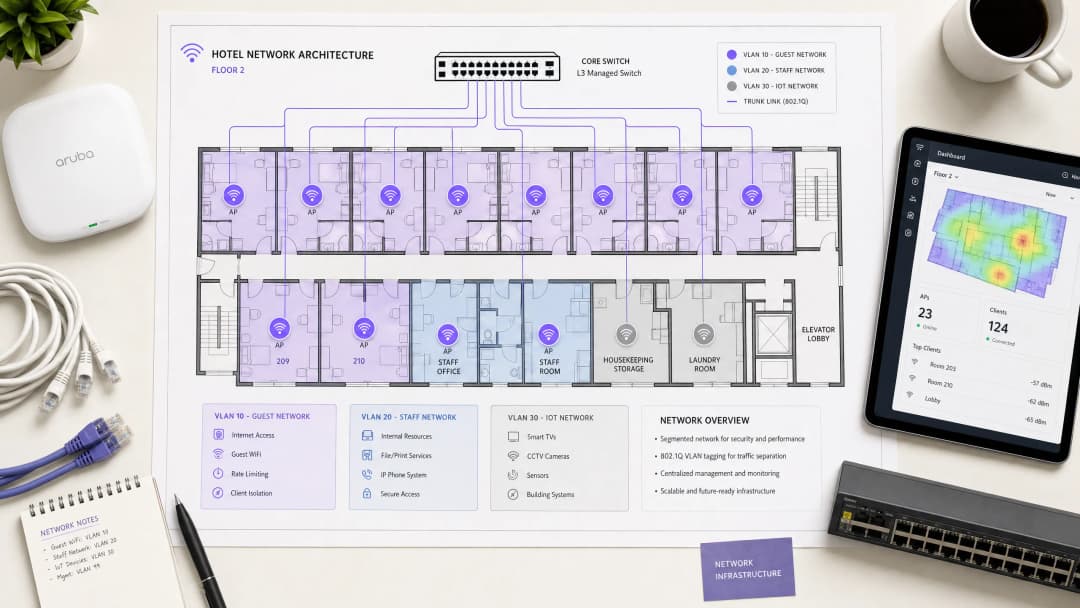
हॉस्पिटॅलिटी नेटवर्कने कोणत्याही एका गटाच्या सुरक्षिततेशी किंवा कार्यप्रदर्शनाशी तजोड न करता अतिथी, कर्मचारी आणि ऑपरेशनल तंत्रज्ञान यांना एकाच वेळी सेवा दिली पाहिजे. IEEE 802.1Q मानकांद्वारे संचलित व्हर्च्युअल लोकल एरिया नेटवर्क्स (VLANs) वापरून तार्किक वेगळेपण (logical separation) ही पायाभूत आवश्यकता आहे.
आपण स्विच स्तरावर ट्रॅफिक वेगळे केले पाहिजे. Guest WiFi ला स्वतःच्या स्वतंत्र VLAN ची आवश्यकता असते, जे अंतर्गत संसाधनांपासून पूर्णपणे फायरवॉल केलेले असते. कर्मचाऱ्यांचा प्रवेश स्वतंत्र VLAN वर चालला पाहिजे, जो RADIUS सर्व्हरच्या (Microsoft Entra ID किंवा Okta सारख्या ओळख प्रदात्यांसह समाकलित करून) विरुद्ध 802.1X प्रमाणीकरणाद्वारे सुरक्षित केलेला असावा. तिसऱ्या VLAN ने IoT उपकरणे - जसे की स्मार्ट थर्मोस्टॅट्स, दरवाजाचे लॉक आणि CCTV वेगळे केले पाहिजेत. शेवटी, PCI-DSS अनुपालन राखण्यासाठी कोणतीही पॉइंट-ऑफ-सेल (POS) प्रणाली वेगळ्या VLAN वर असणे आवश्यक आहे. हे विभाजन लॅटरल मूव्हमेंट अटॅक व्हेक्टर काढून टाकते, ज्यामुळे तडजोड केलेले अतिथी डिव्हाइस आपल्या प्रॉपर्टी मॅनेजमेंट सिस्टम्सची तपासणी करू शकत नाही.
वायरलेस स्तर आणि ॲक्सेस पॉइंट प्लेसमेंट
रेडिओ फ्रिक्वेन्सी (RF) लेयरसाठी, नवीन उपयोजनांसाठी WiFi 6 (IEEE 802.11ax) हे बेसलाइन मानक आहे. हे ऑर्थोगोनल फ्रिक्वेन्सी डिव्हिजन मल्टिपल ऍक्सेस (OFDMA) चे परिचय करून देते, जे एकाच ऍक्सेस पॉईंटला एकाच वेळी अनेक क्लायंटना सेवा देण्याची परवानगी देते. हे WiFi 5 च्या तुलनेत अंदाजे चार पट अधिक थ्रुपुट क्षमता प्रदान करते आणि हाय डेंसिटी वातावरणात लेटन्सी लक्षणीयरीत्या कमी करते.
ऍक्सेस पॉईंट्स (APs) ची भौतिक मांडणी कामगिरी ठरवते. कॉरिडॉरमध्ये APs उपयोजित करण्याचे पारंपारिक मॉडेल सिग्नल्सना पाहुण्यांपर्यंत पोहोचण्यापूर्वी जाड फायर डोअर्स आणि बाथरूमच्या प्लंबिंगमधून जाण्यास भाग पाडते. तुम्ही इन-रूम AP मॉडेल उपयोजित केले पाहिजे - प्रत्येक खोलीत एक AP, किंवा कमीत कमी दर दोन खोल्यांमध्ये एक AP. प्रत्येक AP ला PoE स्विचसाठी वायर कनेक्शन असलेले Cat 6A आवश्यक आहे; एंटरप्राइझ हॉस्पिटॅलिटी वातावरणासाठी मेश बॅकहॉल योग्य नाही.
Property Management System (PMS) इंटिग्रेशन
PMS हा हॉटेल ऑपरेशन्ससाठीचा मध्यवर्ती मुख्य स्त्रोत आहे. तुमच्या WiFi ऑथेंटिकेशन लेयरला PMS सह समाकलित केल्याने पाहुण्यांचा अनुभव बदलतो आणि डेटाची गुणवत्ता कमालीची सुधारते.
FIAS द्वारे ऑथेंटिकेशन
जेव्हा एखादा पाहुणा नेटवर्कशी जोडला जातो, तेव्हा त्यांना Captive Portal वर रिडायरेक्ट केले जाते. जेनेरिक पासवर्ड किंवा असत्यापित ईमेल फॉर्मवर अवलंबून राहण्याऐवजी, PMS इंटिग्रेशन पाहुण्यांना त्यांचे आडनाव आणि खोली क्रमांक वापरून ऑथेंटिकेट करण्याची परवानगी देते. सक्रिय आरक्षणांच्या विरोधात क्रेडेंशियल्स प्रमाणित करण्यासाठी Captive Portal प्लॅटफॉर्म रिअल टाइममध्ये PMS ला क्वेरी करतो - विशेषत: Fidelio Interface Application Specification (FIAS) प्रोटोकॉल वापरून. हे API व्हॅलिडेशन 500 मिलीसेकंदपेक्षा कमी वेळात होते.

सेशन मॅनेजमेंट आणि डेटा कॉलिटी
हे इंटिग्रेशन सेशन लाईफसायकल अधिक कार्यक्षम करते. जेव्हा एखादा पाहुणा चेक आउट करतो, तेव्हा PMS एक इव्हेंट ट्रिगर करतो ज्यामुळे WiFi ऍक्सेस त्वरित रद्द होतो. जर एखाद्या पाहुण्याने त्यांचा मुक्काम वाढवला, तर नेटवर्क सेशन आपोआप वाढते.
सर्वात महत्त्वाचे म्हणजे, PMS इंटिग्रेशन डेटा कॉलिटीची समस्या सोडवते. मानक ईमेल कॅप्चर फॉर्म्समध्ये अनेकदा 30% त्रुटी दर दिसून येतो. PMS द्वारे प्रमाणित करून, तुम्ही विशिष्ट मुक्कामाच्या डेटाशी लिंक केलेली सत्यापित अतिथी नोंद कॅप्चर करता. Purple ने 2024 मध्ये 440 दशलक्ष लॉगीन्सवर प्रक्रिया केली आहे, आणि आमचा डेटा दर्शवतो की PMS-इंटिग्रेटेड captive portals 70% ते 80% पर्यंतचे व्हॅलिडेशन दर साध्य करतात. हा सहमती असलेला, फर्स्ट-पार्टी डेटा थेट तुमच्या CRM मध्ये प्रवाहित होतो, ज्यामुळे टार्गेटेड WiFi Analytics आणि मुक्कामानंतरचे मार्केटिंग सक्षम होते.
तुमच्या विशिष्ट सेटअपबद्दल काही प्रश्न आहेत का?
आमची टीम ८०,००० हून अधिक वेन्यूजमधील वेन्यू ऑपरेटर्स, IT मॅनेजर्स आणि नेटवर्क इंजिनिअर्ससोबत काम करते. २० मिनिटांचा कॉल बुक करा आणि तुमच्यासारख्या इतरांनी ही समस्या कशी सोडवली हे आम्ही तुम्हाला दाखवू.
Captive Portal डिझाइन आणि सुरक्षा
डेटा कॅप्चर आणि कम्प्लायन्ससाठी Captive Portal ही तुमची प्राथमिक यंत्रणा आहे. हे पाहुण्यांच्या डिव्हाइसला मर्यादित IP ऍड्रेस देऊन आणि HTTP ट्रॅफिकला स्प्लॅश पेजवर रिडायरेक्ट करण्यासाठी DNS इंटरसेप्ट वापरून कार्य करते. एकदा पाहुण्याने ऑथेंटिकेट केले आणि अटी स्वीकारल्या की, RADIUS सर्व्हर MAC ऍड्रेस अधिकृत करतो आणि पूर्ण इंटरनेट ऍक्सेस मंजूर केला जातो.
GDPR आणि स्वतंत्र संमती
तुमच्या captive portal ने स्पष्ट, स्वतंत्र संमतीचे पर्याय सादर केले पाहिजेत. नेटवर्क वापरण्याची संमती ही मार्केटिंग संवादांच्या संमतीसोबत जोडली जाऊ शकत नाही. Purple चे प्लॅटफॉर्म हे मूळतः हाताळते, पडताळणीयोग्य संमती रेकॉर्ड्स वैयक्तिक वापरकर्ता प्रोफाईलशी जोडते.
एन्क्रिप्शन आणि क्लायंट आयसोलेशन
तुम्ही अतिथी SSID वर क्लायंट आयसोलेशन सक्षम केले पाहिजे. हे पीअर टू पीअर संवाद प्रतिबंधित करते, ज्यामुळे एका अतिथीचे डिव्हाइस दुसऱ्याचे स्कॅनिंग किंवा ॲक्सेस करण्यापासून रोखले जाते. एन्क्रिप्शनसाठी, WPA3 हा मानक आहे. WPA3-Enterprise कर्मचारी नेटवर्क सुरक्षित करत असताना, अतिथी नेटवर्कने जेथे सपोर्ट असेल तेथे Opportunistic Wireless Encryption (OWE) चा वापर केला पाहिजे, जो सामायिक पासवर्डशिवाय खुल्या नेटवर्कसाठी वैयक्तिकृत एन्क्रिप्शन प्रदान करतो. सुरक्षित प्रवेशाबद्दल अधिक तपशिलांसाठी, आमचे EAP Method WiFi: सुरक्षित नेटवर्क प्रवेशासाठी मार्गदर्शक हे मार्गदर्शक पहा.
बँडविड्थ नियंत्रण आणि QoS
बँडविड्थ व्यवस्थापन हा स्थिर आर्किटेक्चरचा अंतिम स्तंभ आहे. अतिथींच्या तक्रारींचे मुख्य कारण अपुरी इंटरनेट अपलिंक तरतूद हे असते.
अपलिंकची तरतूद करणे
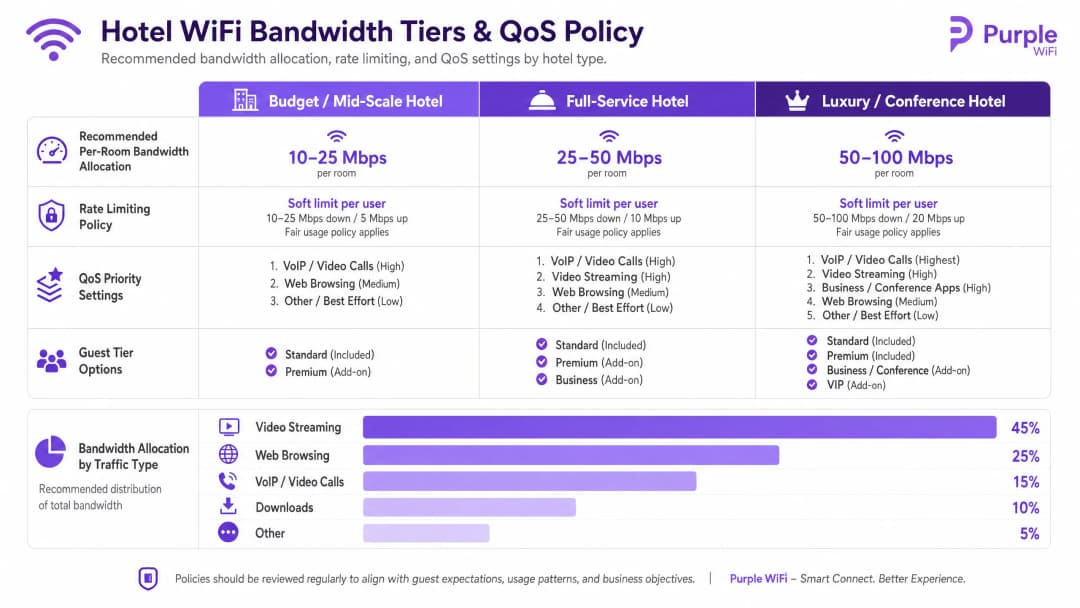
तुम्ही सरासरी वापराऐवजी कमाल समवर्ती मागणीच्या आधारे बँडविड्थची तरतूद केली पाहिजे. शिफारस केलेले वाटप खालीलप्रमाणे आहे:
- बजेट / मध्यम दर्जाचे: दर खोलीसाठी 10 - 25 Mbps
- पूर्ण-सेवा: दर खोलीसाठी 25 - 50 Mbps
- लक्झरी / कॉन्फरन्स: दर खोलीसाठी 50 - 100 Mbps
८०% व्याप्ती असलेल्या २०० खोल्यांच्या मालमत्तेसाठी, प्रति खोली २५ Mbps वाटप करण्यासाठी किमान ४ Gbps ची समर्पित अपलिंक आवश्यक आहे. एक समर्पित लीज्ड लाईन अनिवार्य आहे.
रेट लिमिटिंग आणि QoS पॉलिसी
एकाच वापरकर्त्याला अपलिंक संपवण्यापासून रोखण्यासाठी, तुम्ही कंट्रोलर स्तरावर प्रति-क्लायंट रेट लिमिटिंग लागू केले पाहिजे. तुम्ही Cisco Meraki, HPE Aruba, किंवा Ubiquiti UniFi पैकी काहीही तैनात केले असले तरीही, प्रत्येक डिव्हाइससाठी डाउनस्ट्रीम आणि अपस्ट्रीम दोन्ही ट्रॅफिकवर कडक मर्यादा सेट करा.
रेट लिमिटिंगच्या वर Quality of Service (QoS) येते. WMM (WiFi मल्टीमीडिया) मानकांचा वापर करून, तुम्ही ट्रॅफिकला चार रांगांमध्ये प्राधान्य दिले पाहिजे. VoIP आणि व्हिडिओ कॉल्ससाठी उच्च प्राधान्य आवश्यक आहे, ज्यामुळे अतिथीचा Microsoft Teams कॉल दुसऱ्या अतिथीने सर्वोत्तम-प्रयत्न रांगेत मोठी फाईल डाउनलोड केल्यामुळे खराब होणार नाही याची खात्री होते.
अंमलबजावणी मार्गदर्शक
यशस्वी तैनातीसाठी या क्रमाचे अनुसरण करा:
- RF साईट सर्व्हे करा: AP च्या नियोजनापूर्वी हस्तक्षेपाचे स्रोत ओळखण्यासाठी स्पेक्ट्रम ॲनालायझरसह मालमत्तेची पाहणी करा.
- VLAN आर्किटेक्चर डिझाइन करा: तुमचे Guest, Staff, IoT, आणि POS VLAN चे दस्तऐवजीकरण करा. त्यांच्या दरम्यान स्पष्ट डिफॉल्ट-नाकारण्याची (default-deny) फायरवॉल नियमावली सेट करा.
- अपलिंकचे आकारमान ठरवा: प्रति खोली २५ Mbps बेसलाईनवर आधारित कमाल मागणीची गणना करा आणि समर्पित लीज्ड लाईन मिळवा.
- Captive Portal तैनात करा: पोर्टलला तुमच्या PMS सोबत समाकलित करा. iOS, Android, आणि Windows डिव्हाइसेसवर प्रमाणीकरण प्रवाह, संमती रेकॉर्ड करणे आणि सेशन रद्द करण्याची चाचणी घ्या.५. मॉनिटर करा आणि ऍडजस्ट करा: डिप्लॉयमेंटनंतर, डेड झोन किंवा बँडविड्थच्या अडचणी ओळखण्यासाठी AP असोसिएशन काउंट आणि अपलिंक युटिलायझेशनचे निरीक्षण करा.
ट्रबलशूटिंग आणि जोखीम कमी करणे
हॉटेल WiFi डिप्लॉयमेंटमधील बहुतेक अपयश हे हार्डवेअर बिघाडामुळे नसून खराब नियोजनामुळे होते.
- "धीमे WiFi" ची तक्रार: ही क्वचितच RF ची समस्या असते. सर्वप्रथम, तुमचे इंटरनेट अपलिंक युटिलायझेशन तपासा. सर्किट सॅच्युरेटेड असल्यास, कितीही AP ट्युनिंग केले तरी समस्या सुटणार नाही. दुसरे म्हणजे, AP मधील क्लायंटचे वितरण तपासा; जर एका AP कडे ४० क्लायंट असतील आणि जवळच्या AP कडे ५ असतील, तर तुमच्या बँड स्टीयरिंग कॉन्फिगरेशनमध्ये सुधारणा करणे आवश्यक आहे.
- "डेटा सायलॉ" ची अडचण: डाउनस्ट्रीम इंटिग्रेशनशिवाय Captive Portal डिप्लॉय करणे म्हणजे केलेली गुंतवणूक वाया घालवणे आहे. लॉगिन करताना कॅप्चर केलेला डेटा Retail किंवा हॉस्पिटॅलिटी लॉयल्टी प्रोग्राम्स चालवण्यासाठी तुमच्या मार्केटिंग ऑटोमेशन टूल्समध्ये आपोआप प्रवाहित झाला पाहिजे.
- फ्लॅट नेटवर्कची जोखीम: वायर्ड नेटवर्कचे वर्गीकरण करण्यात अपयशी ठरल्यास वायरलेस सुरक्षा धोक्यात येते. जर एखाद्या पाहुण्याने कॉन्फरन्स रूममधील उघड्या इथरनेट पोर्टमध्ये लॅपटॉप जोडला आणि स्टाफ VLAN मध्ये प्रवेश मिळवला, तर तुमचे आर्किटेक्चर अयशस्वी ठरले आहे. सार्वजनिक क्षेत्रातील स्विच पोर्ट्स हे गेस्ट VLAN ला नियुक्त केले आहेत किंवा पूर्णपणे निष्क्रिय केले आहेत याची खात्री करा.
ROI आणि व्यावसायिक प्रभाव
Enterprise WiFi साठी मोठ्या प्रमाणात भांडवली खर्चाची आवश्यकता असते, परंतु अचूकपणे डिझाइन केल्यावर ते मोजण्यायोग्य परतावा देते. ROI खालील तीन माध्यमांद्वारे प्राप्त होतो:
१. ऑपरेशनल कार्यक्षमता: PMS इंटिग्रेशनमुळे मॅन्युअल व्हाउचर जनरेशन आणि फ्रंट-डेस्क ट्रबलशूटिंगची गरज दूर होते, ज्यामुळे दर आठवड्याला कर्मचाऱ्यांचा तासनतास वेळ वाचतो. २. फर्स्ट-पार्टी डेटा संपादन: एक ऑथेंटिकेटेड Captive Portal व्हेरिफाइड गेस्ट प्रोफाईल्सचा डेटाबेस तयार करतो. हा डेटा डायरेक्ट-बुकिंग मोहिमांना सक्षम करतो, ज्यामुळे ऑनलाइन ट्रॅव्हल एजन्सी (OTAs) आणि त्यांच्या संबंधित कमिशन शुल्कावरील अवलंबित्व कमी होते. ३. पाहुण्यांचे समाधान: विश्वासार्ह, हाय-स्पीड WiFi हा सकारात्मक पुनरावलोकनांचा मुख्य चालक आहे. वर्गीकरण केलेले, योग्यरित्या प्रोव्हिजन केलेले नेटवर्क नकारात्मक अभिप्रायाला कारणीभूत ठरणारी अडचण दूर करते, ज्यामुळे थेट प्रॉपर्टीची प्रतिष्ठा आणि सरासरी दैनिक दरावर सकारात्मक प्रभाव पडतो.
महत्वाच्या व्याख्या
VLAN (Virtual Local Area Network)
एक लॉजिकल सबनेटवर्क जे एकाच भौतिक पायाभूत सुविधांवरील उपकरणांचा समूह एकत्र करते, आणि त्यांचे ब्रॉडकास्ट ट्रॅफिक इतर VLANs पासून वेगळे करते.
पाहुण्यांच्या ट्रॅफिकला हॉटेलच्या अंतर्गत प्रणालींपासून वेगळे करण्यासाठी आणि PCI DSS अनुपालन सुनिश्चित करण्यासाठी आवश्यक आहे.
Captive Portal
एक वेब पृष्ठ जे नेटवर्क ट्रॅफिक अडवते आणि वापरकर्त्यांना पूर्ण इंटरनेट प्रवेश देण्यापूर्वी ऑथेंटिकेट करणे किंवा अटींशी सहमत होणे आवश्यक करते.
पाहुण्यांचे ऑथेंटिकेशन, GDPR संमती आणि फर्स्ट-पार्टी डेटा संकलनासाठी प्राथमिक टचपॉईंट.
FIAS (Fidelio Interface Application Specification)
थर्ड-पार्टी प्रणालींशी रिअल-टाइममध्ये संवाद साधण्यासाठी मालमत्ता व्यवस्थापन प्रणालींद्वारे (जसे की Oracle Opera) वापरला जाणारा एक सार्वत्रिक प्रोटोकॉल.
सक्रिय PMS रेकॉर्ड्सच्या तुलनेत पाहुण्यांचा खोली क्रमांक आणि आडनाव सत्यापित करण्यासाठी Captive Portal द्वारे वापरले जाते.
WPA3-Enterprise
WiFi सुरक्षिततेचा सर्वोच्च स्तर, ज्यासाठी वैयक्तिक वापरकर्त्यांना किंवा उपकरणांना RADIUS सर्व्हर (८०२.१X) द्वारे अनन्य क्रेडेंशियल्स वापरून ऑथेंटिकेट करणे आवश्यक असते.
हॉटेलमधील कर्मचाऱ्यांचे नेटवर्क आणि कॉर्पोरेट उपकरणे सुरक्षित करण्यासाठी अनिवार्य मानक.
Client Isolation
एक वायरलेस कंट्रोलर वैशिष्ट्य जे एकाच SSID शी कनेक्ट केलेल्या उपकरणांना एकमेकांशी थेट संवाद साधण्यापासून रोखते.
पीअर-टू-पीअर हल्ले रोखण्यासाठी आणि पाहुण्यांच्या गोपनीयतेचे रक्षण करण्यासाठी सर्व Guest नेटवर्क्सवर सक्षम केले पाहिजे.
Rate Limiting
वैयक्तिक क्लायंट उपकरणासाठी उपलब्ध असलेल्या कमाल बँडविड्थ (अपलोड आणि डाउनलोड गती) मर्यादित करण्याची पद्धत.
मोठ्या फायली डाउनलोड करणाऱ्या एखाद्या पाहुण्यामुळे इतरांच्या नेटवर्क अनुभवावर परिणाम होऊ नये म्हणून अत्यंत आवश्यक आहे.
QoS (Quality of Service) / WMM
नेटवर्क व्यवस्था ज्या फाईल डाउनलोड सारख्या कमी वेळ-संवेदनशील ट्रॅफिकपेक्षा विशिष्ट प्रकारच्या ट्रॅफिकला (जसे की व्हॉईस किंवा व्हिडिओ) प्राधान्य देतात.
नेटवर्कवर मोठा लोड असतानाही पाहुण्यांचे VoIP कॉल्स किंवा कर्मचाऱ्यांचे संवादाचे साधन विश्वसनीयपणे कार्य करतील याची खात्री करते.
OFDMA
Orthogonal Frequency Division Multiple Access; एक WiFi 6 वैशिष्ट्य जे ॲक्सेस पॉइंटला चॅनेल्सचे लहान सब-चॅनेल्समध्ये विभाजन करून एकाच वेळी अनेक क्लायंट्सना सेवा देण्याची परवानगी देते.
हॉटेल कॉन्फरन्स रूम्स आणि लॉबी सारख्या हाय-डेन्सिटी क्षेत्रांमध्ये लक्षणीयरित्या कामगिरी सुधारते आणि लेटन्सी कमी करते.
सोडवलेली उदाहरणे
एक १५० खोल्यांचे पूर्ण-सेवा हॉटेल आहे, जिथे संध्याकाळच्या पीक वेळेत (१९:०० - २२:००) संथ WiFi मुळे पाहुण्यांच्या वारंवार तक्रारी येत आहेत. मालमत्तेवर सध्या १ Gbps ब्रॉडबँड कनेक्शन आहे आणि सामायिक WPA2 पासवर्डसह एकच फ्लॅट नेटवर्क वापरले जाते.
१. किमान ३.७५ Gbps (१५० खोल्या * २५ Mbps) प्रदान करणाऱ्या समर्पित लीज्ड लाईनवर इंटरनेट अपलिंक अपग्रेड करा. २. VLAN सेगमेंटेशन लागू करा, पाहुण्यांना वेगळ्या VLAN 10 वर स्थानांतरित करा. ३. FIAS द्वारे हॉटेलच्या Oracle Opera PMS शी जोडलेले Captive Portal तैनात करा, ज्यामुळे पाहुण्यांना खोली क्रमांक आणि आडनावासह ऑथेंटिकेट करता येईल. ४. वैयक्तिक उपकरणांना अपलिंक संपवण्यापासून रोखण्यासाठी वायरलेस कंट्रोलरवर प्रति-क्लायंट २५ Mbps डाऊन / १० Mbps अपचे रेट लिमिटिंग लागू करा.
एका लक्झरी रिसॉर्टला हाऊसकीपिंग आणि देखभालीसाठी वापरल्या जाणाऱ्या कर्मचाऱ्यांच्या टॅब्लेटसाठी सुरक्षित WiFi तैनात करायचे आहे, तसेच पाहुण्यांची उपकरणे मालमत्ता व्यवस्थापन प्रणालीमध्ये (PMS) प्रवेश करू शकणार नाहीत याची खात्री करायची आहे.
Guest VLAN (VLAN 10) पासून वेगळे समर्पित Staff VLAN (VLAN 20) तयार करा. Staff SSID वर WPA3-Enterprise वापरण्यासाठी कॉन्फिगर करा, ८०२.१X वापरून कॉर्पोरेट RADIUS सर्व्हरद्वारे टॅब्लेट ऑथेंटिकेट करा. फायरवॉलवर कठोर इंटर-VLAN राउटिंग नियम लागू करा: VLAN 10 आणि VLAN 20 मधील सर्व ट्रॅफिक डीफॉल्टनुसार नाकारा, आणि केवळ VLAN 20 ला हाऊसकीपिंग ॲप्लिकेशनसाठी आवश्यक असलेल्या विशिष्ट IP ॲड्रेस आणि पोर्ट्सवर पोहोचण्याची परवानगी द्या.
सराव प्रश्न
Q1. हॉटेलचे ऑपरेशन्स डायरेक्टर 'गोष्टी सोप्या ठेवण्यासाठी' पाहुणे आणि अतिथी कक्षांमधील नवीन स्मार्ट टीव्ही या दोघांसाठी एकच, ओपन WiFi नेटवर्क लागू करू इच्छितात. नेटवर्क आर्किटेक्ट म्हणून, तुम्ही यावर काय प्रतिसाद द्याल?
टीप: लॅटरल मुव्हमेंट आणि ब्रॉडकास्ट डोमेन आकाराच्या परिणामांचा विचार करा.
नमुना उत्तर पहा
या पध्दतीचा अवलंब न करण्याचा सल्ला द्या. अतिथी डिव्हाइसेस आणि IoT डिव्हाइसेस (स्मार्ट टीव्ही) वेगवेगळ्या VLANs वर विभागलेले असले पाहिजेत. त्यांना एकाच ओपन नेटवर्कवर ठेवल्याने टीव्ही पाहुण्यांच्या डिव्हाइसेसकडून थेट ॲक्सेससाठी उघडे पडतात, ज्यामुळे मोठी सुरक्षा त्रुटी निर्माण होते. शिवाय, यामुळे ब्रॉडकास्ट डोमेन वाढते, ज्यामुळे एकूण नेटवर्क कामगिरी खराब होऊ शकते. टीव्ही कडक फायरवॉल नियमांसह एका वेगळ्या IoT VLAN (उदा. VLAN 30) वर असावेत.
Q2. ३०० खोल्यांच्या नवीन मालमत्तेसाठी साइट सर्वेक्षणादरम्यान, केबलिंग कंत्राटदार प्रत्येक चार खोल्यांसाठी कॉरिडॉरमध्ये एक ॲक्सेस पॉइंट ठेवून खर्च वाचवण्याचा सल्ला देतो. हे समस्याप्रधान का आहे?
टीप: हॉटेलच्या वातावरणातील RF ॲटेन्युएशन आणि भौतिक अडथळ्यांचा विचार करा.
नमुना उत्तर पहा
हॉटेलसाठी कॉरिडॉरमध्ये AP प्लेसमेंट ही एक सदोष रचना आहे. खोलीतील अतिथींच्या डिव्हाइसपर्यंत पोहोचण्यासाठी RF सिग्नलला जड फायर डोअर्स, आरसे असलेले वॉर्डरोब आणि टाईल्स असलेले बाथरुम भेदून जावे लागते, ज्यामुळे सिग्नलचे तीव्र नुकसान होते आणि कामगिरी खराब होते. थेट लाईन-ऑफ-साईट किंवा किमान अडथळा असलेले कव्हरेज निश्चित करण्यासाठी खोलीतच AP मॉडेल - प्रति खोली एक AP, किंवा किमान दोन खोल्यांमध्ये एक - ही योग्य रचना आहे.
Q3. मार्केटिंग टीमला WiFi मध्ये लॉग इन करणाऱ्या प्रत्येक पाहुण्याला हॉटेलच्या साप्ताहिक प्रमोशनल न्यूजलेटरसाठी स्वयंचलितपणे सबस्क्राइब करायचे आहे. हे हाताळण्यासाठी Captive Portal कसे कॉन्फिगर केले पाहिजे?
टीप: संमती एकत्र करण्याबाबतच्या GDPR आवश्यकतांचा विचार करा.
नमुना उत्तर पहा
Captive Portal स्पष्ट, न एकत्र केलेल्या संमती पर्यायांसह कॉन्फिगर केले पाहिजे. GDPR अंतर्गत, WiFi नेटवर्कचा ॲक्सेस मिळवण्यासाठी संमती देणे हे मार्केटिंग संवादांना संमती देण्याच्या अटीवर अवलंबून असू शकत नाही. स्प्लॅश पेजवर न्यूजलेटरसाठी स्वतंत्र, अनचेक केलेला ऑप्ट-इन बॉक्स असणे आवश्यक आहे. Purple चे प्लॅटफॉर्म या विभाजनाची अंमलबजावणी मूळतः करते, ज्यामुळे पडताळणीयोग्य संमती रेकॉर्ड्स कॅप्चर करताना नियमांचे पालन सुनिश्चित होते.
या मालिकेमध्ये पुढे वाचा
Ubiquiti UniFi guest portal redirection होत नाही: कारणे आणि उपाय
ही मार्गदर्शिका guest state, redirect, pre-authorisation route आणि controller authorisation यांचा अनुक्रमे मागोवा घेऊन UniFi guest portal redirect बिघाड वेगळा करते. हे वेन्यू IT टीम्सना guest-network विरुद्ध Hotspot गोंधळ, बाह्य portal हँड-ऑफ, सद्य UniFi OS खाते आवश्यकता आणि DNS आयसोलेशन चाचणीचे निराकरण करण्यासाठी एक विश्वसनीय पद्धत प्रदान करते.
Cisco Meraki splash page काम करत नाही: एक ट्रबलशूटिंग फ्लोचार्ट
हा व्यावहारिक मार्गदर्शक Cisco Meraki splash फ्लो नेमका कुठे अयशस्वी झाला आहे ते शोधून काढतो: client authorisation, HTTP redirect initiation, walled-garden reachability किंवा RADIUS sign-on. हा व्हेन्यू IT टीम्सना एक नियंत्रित पुरावा मार्ग देतो, जेणेकरून ते थेट कार्यरत असलेल्या नेटवर्क मालमत्तेत मोठे बदल न करता Guest WiFi पूर्ववत करू शकतील.
Enterprise Guest WiFi सेटअप मार्गदर्शक: VLAN विभागणी, सुरक्षा आणि Captive Portals
हे तांत्रिक मार्गदर्शक IT टीम्सना VLAN विभागणी, फायरवॉल पॉलिसी आणि captive portal चा वापर करून Guest WiFi एक नियंत्रित इंटरनेट - ऍक्सेस सेवा म्हणून कसे सेट करावे हे दर्शवते. हे मार्गदर्शक कर्मचारी, पेमेंट आणि ऑपरेशनल सिस्टम्सच्या सुरक्षिततेची सीमा कमकुवत न करता Purple चे नोंदणी फॉर्म्स आणि ऑनबोर्डिंग नियंत्रणे पाहुण्यांना एक सुयोग्य अनुभव कसा देतात हे देखील स्पष्ट करते.
तुमच्या विशिष्ट सेटअपबद्दल काही प्रश्न आहेत का?
आमची टीम ८०,००० हून अधिक वेन्यूजमधील वेन्यू ऑपरेटर्स, IT मॅनेजर्स आणि नेटवर्क इंजिनिअर्ससोबत काम करते. २० मिनिटांचा कॉल बुक करा आणि तुमच्यासारख्या इतरांनी ही समस्या कशी सोडवली हे आम्ही तुम्हाला दाखवू.