跳至主要内容

酒店宾客 WiFi 架构:PMS 集成、Captive Portal 与带宽控制

本指南为构建企业级酒店 WiFi 网络提供了全面的架构框架。它详细介绍了 VLAN 隔离、通过 FIAS 进行 PMS 集成、Captive Portal 设计以及单客户端带宽控制的技术要求,以确保安全性、合规性和最佳性能。

📖 6 分钟阅读📝 1,401 🔧 2 应用实例3 练习题📚 8 关键定义

收听本指南

查看播客转录
欢迎收听 Purple 技术简报。今天我们将讨论酒店宾客 WiFi 架构——特别是决定您部署成败的三大支柱:PMS 集成、Captive Portal 设计和带宽控制。 如果您是负责酒店或物业组合的 IT 经理、网络架构师或 CTO,那么本期简报非常适合您。我们将深入探讨技术细节,但会保持其实用性。每个点都与您需要做出的决策相关联。 让我们从架构本身开始。酒店 WiFi 网络不是标准的办公室部署。它必须同时服务于至少三个不同的群体:宾客、员工和建筑系统。每个群体都有完全不同的安全性、性能和合规性要求。大多数部署犯的根本性错误是将这三者视为同一个网络。 正确的方法是 VLAN 隔离——即 IEEE 802.1Q 标准中定义的虚拟局域网。您在相同的物理基础设施上创建逻辑上独立的网络。宾客 WiFi 位于 VLAN 10,与所有内部资源隔离。员工访问位于 VLAN 20,通过 802.1X 针对您的 RADIUS服务器进行身份验证。IoT 设备——智能电视、温控器、门锁——位于 VLAN 30,并带有严格的防火墙规则来限制它们可以访问的内容。如果您在物业的任何地方设有销售点终端,它们完全需要自己的 VLAN,因为 PCI DSS 要求持卡人数据环境与所有其他网络流量隔离。 这不是可选的。这是一项基线合规性要求。这也是您防御横向移动的主要手段——横向移动是指受损的宾客设备探测您内部系统的攻击模式。 现在,来看看无线层。如果您今天正在部署新的基础设施,您应该指定使用 WiFi 6 - IEEE 802.11ax。在会议室或大型活动空间等高密度环境中,WiFi 6E 增加了 6 GHz 频段,为您提供了明显更多的可用频谱。与上一代相比,关键的性能提升是 OFDMA(正交频分多址),它允许单个接入点同时而不是顺序地为多个客户端提供服务。在实际应用中,与 WiFi 5 相比,每个接入点的吞吐量容量大约是其四倍,并且在负载下延迟要低得多。 接入点的放置比大多数人意识到的更重要。直觉是将 AP 放在走廊里。这是错误的。在酒店中,您需要房内覆盖。最佳实践是每间客房一个 AP,或者最少每两间客房一个 AP,安装在天花板上或电视机后面。这消除了信号必须穿透两堵墙才能到达宾客的走廊阴影问题。对于公共空间——前厅、餐厅、会议室——在确定放置位置之前,请委托进行适当的射频现场勘测。 每个接入点都应该是采用有线连接。将 Cat 6A 连接到每个 AP,并在每层的 PoE 交换机上端接。网状 WiFi 适合家庭使用。在酒店中,您需要确定性的、低延迟的回传。 现在我们来谈谈 PMS 集成——物业管理系统。这是酒店 WiFi 架构与标准企业部署分歧最明显的地方。PMS 是每次宾客入住的记录系统。它知道谁办理了入住、他们在哪间客房、何时退房以及他们预订的房价类别。将您的 Captive Portal 与 PMS 集成,允许宾客使用他们的房号和姓氏进行身份验证——无需记住密码,无需输入凭证码。Captive Portal 向 PMS 发送实时 API 查询,根据活跃的预订验证凭据,并在 200 到 500 毫秒内授予访问权限。 支持大多数此类集成的协议是 FIAS——Fidelio 接口应用规范。FIAS 最初是为 Fidelio PMS(现为 Oracle Opera)开发的,现已成为酒店系统接口的事实标准。除了身份验证之外,PMS 集成还支持自动会话管理。当宾客退房时,PMS 会向 WiFi 平台发送退房事件,该平台会立即撤销其访问令牌。无需人工干预。 这里的数据价值非常重大。每个经过身份验证的 WiFi 会话都会创建一个经过验证的宾客记录——姓名、电子邮件、客房类型、入住时长、设备类型。在展示页面上通过明确的 GDPR 同意捕获的这些数据,将成为第一方营销资产。Purple 的平台在 2024 年处理了分布在 80,000 个场所的 4.4 亿次登录。通过与 PMS 集成的 Captive Portal 捕获的宾客数据,其验证率始终能达到 70% 到 80%,而未经验证的表单提交验证率仅为 30% 到 40%。 让我们转向 Captive Portal 设计。Captive Portal 是宾客首次连接时遇到的身份验证网关。它会拦截 HTTP 流量,并在授予互联网访问权限之前将浏览器重定向到托管页面。 技术机制是这样的。接入点或控制器为宾客设备分配一个受限的 IP 地址。所有 HTTP 请求都通过 DNS 拦截重定向到门户 URL。宾客进行身份验证。控制器从 RADIUS 服务器接收授权信号。设备的 MAC 地址被添加到允许列表中。授予正常的互联网访问权限。 Captive Portal 的 GDPR 合规性是不可妥协的。您的展示页面必须呈现清晰的隐私声明、明确的营销同意选项,以及宾客行使其数据权利的机制。至关重要的是,同意使用 WiFi 并不等同于同意接收营销电子邮件。这些必须是独立的、非捆绑的同意选项。Purple 的平台原生处理此问题,将同意记录与每个用户配置文件绑定,并提供可用于监管审查的审计追踪。 在安全性方面, WPA3 是当前的标准。WPA3-Personal 使用对等实体同时身份验证 (SAE),这消除了 WPA2-PSK 中存在的字典攻击漏洞。对于宾客网络,在带有机会性无线加密的 Captive Portal 后面的开放式 SSID 提供了加密,而无需预共享密钥。必须在所有宾客 SSID 上启用客户端隔离,以防止宾客设备之间的点对点流量。 现在,带宽控制。这是第三大支柱,也是最常被低估的一项。酒店带宽规划的经验法则是:针对高峰需求进行规划,而不是平均需求。对于中等规模的物业,每间客房预算为 10 到 25 Mbps。对于全服务酒店,每间客房为 25 到 50 Mbps。对于奢华或以会议为中心的物业,每间客房为 50 到 100 Mbps。 单客户端速率限制可防止任何单个宾客占满您的上行链路。在 Cisco Meraki 上,您可以将其设置为 SSID 上的单客户端带宽限制。在 HPE Aruba 上,它是通过控制器应用的用户角色策略。在 Juniper Mist 上,它是 WLAN 速率限制策略。不同厂商的机制有所不同,但原理是相同的:定义每个设备的下行和上行上限,并在控制器级别强制执行。 服务质量 (QoS) 位于速率限制之上。WMM(WiFi 多媒体)是 802.11e 标准,定义了四个流量队列:语音、视频、尽力而为和背景。VoIP 和视频通话应在语音和视频队列中进行优先排序。网页浏览和下载属于尽力而为。正确配置 WMM 意味着当隔壁房间的人开始大文件下载时,正在进行视频通话的宾客不会受到干扰。 现在让我为您提供实施建议和要避免的陷阱。从现场勘测开始。在您动用一根电缆之前,请携带频谱分析仪巡视物业。识别现有的干扰源——邻近网络、厨房里的微波炉、前台的 DECT 电话。这有助于制定您的信道计划和 AP 放置。 第二,在配置任何内容之前设计您的 VLAN 架构。规划出:宾客 WiFi VLAN、员工 VLAN、IoT 和建筑系统 VLAN 以及管理 VLAN。在部署前将其记录归档并获得批准。 第三,正确规划您的互联网上行链路大小。对于一家入住率为 80% 的 200 间客房的酒店,在高峰期按每间客房 25 Mbps 进行规划,可为您提供 4 Gbps 的最低保证带宽。具有可突发容量的专线是这里合适的产品——而不是标准的宽带连接。 陷阱。最常见的一个是上行链路配置不足,然后在宾客投诉时归咎于无线基础设施。十有八九,酒店 WiFi 慢是互联网带宽问题,而不是射频问题。 第二个陷阱是部署了收集数据但没有下游营销工作流的 Captive Portal。您已经构建了数据资产。现在使用它。入住前电子邮件、入住后调查、忠诚度计划注册、入住期间的定向优惠。 快速问答。我需要 WiFi 6 还是 WiFi 5 就够了?如果您今天正在部署新的基础设施,请始终选择 WiFi 6。成本差异极小,而性能空间却非常显著。我应该向宾客收取 WiFi 费用吗?不。在 2026 年,付费宾客 WiFi 会成为宾客满意度的负累。如何处理投诉 WiFi 慢的宾客?首先,检查您的互联网上行链路利用率。其次,检查 AP 关联数。第三,检查您的信道计划中是否存在流氓 AP 或干扰。 总结一下。妥善构建的酒店宾客 WiFi 架构是一项战略资产,而不是一项公用事业成本。需要记住的三件事:第一——从第一天起就对您的网络进行隔离。宾客、员工和 IoT 位于不同的 VLAN 上,它们之间设有防火墙。第二——将您的 Captive Portal 与您的 PMS 集成。房号和姓氏身份验证可为您提供经过验证的宾客数据和无缝的会话管理。第三——针对高峰需求而非平均需求规划您的互联网上行链路大小,并实施单客户端速率限制以保护网络上每位宾客的体验。感谢收听。

header_image.png

Executive Summary

Hotel WiFi architecture is no longer just about coverage; it is about secure segmentation, seamless authentication, and converting a utility cost into a strategic data asset. For IT managers and network architects deploying infrastructure across Hospitality venues, treating guest, staff, and building systems as a single flat network is a critical failure point. This guide details the technical requirements for enterprise-grade hotel WiFi, focusing on three core pillars: integrating the captive portal with your Property Management System (PMS) via FIAS for seamless guest validation, deploying robust VLAN segmentation to meet PCI DSS requirements, and enforcing per-room bandwidth controls to ensure consistent performance. By aligning your hardware strategy—whether deploying Cisco Meraki, HPE Aruba, or Juniper Mist—with intelligent Guest WiFi authentication, you secure your environment while capturing the high-quality first-party data necessary to drive loyalty and revenue.

Listen to the Briefing

Technical Deep-Dive: Architecture and Segmentation

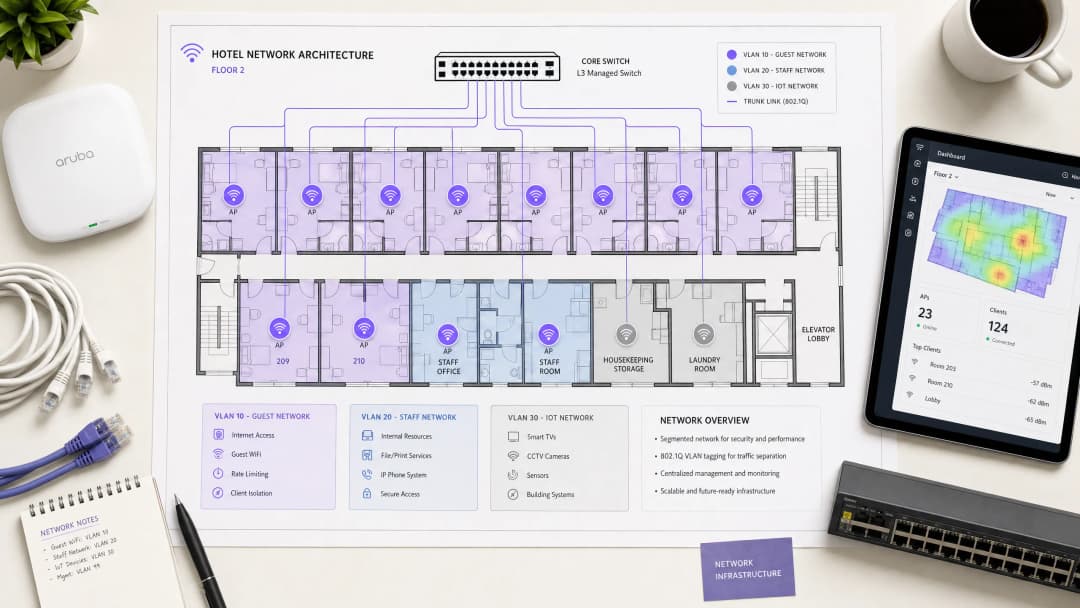
A hospitality network must simultaneously serve guests, staff, and operational technology without compromising the security or performance of any single group. The foundational requirement is logical separation using Virtual Local Area Networks (VLANs) governed by the IEEE 802.1Q standard.

You must isolate traffic at the switch level. Guest WiFi requires its own VLAN, firewalled entirely from internal resources. Staff access should operate on a separate VLAN, secured by 802.1X authentication against a RADIUS server (integrating with identity providers like Microsoft Entra ID or Okta). A third VLAN must isolate IoT devices—smart thermostats, door locks, and CCTV. Finally, any point-of-sale systems must sit on an isolated VLAN to maintain PCI DSS compliance. This segmentation eliminates the lateral movement attack vector, ensuring a compromised guest device cannot probe your property management systems.

Wireless Layer and Access Point Placement

For the radio frequency (RF) layer, Wi-Fi 6 (IEEE 802.11ax) is the baseline standard for new deployments. It introduces Orthogonal Frequency Division Multiple Access (OFDMA), which allows a single access point to serve multiple clients simultaneously. This provides roughly four times the throughput capacity of Wi-Fi 5 and significantly reduces latency in high-density environments.

The physical placement of access points (APs) dictates performance. The traditional model of deploying APs in corridors forces signals to penetrate thick fire doors and bathroom plumbing before reaching the guest. You must deploy an in-room AP model—one AP per room, or one AP per two rooms at minimum. Every AP requires a wired Cat 6A connection back to a PoE switch; mesh backhaul is unsuitable for enterprise hospitality environments.

Property Management System (PMS) Integration

The PMS is the central source of truth for hotel operations. Integrating your WiFi authentication layer with the PMS transforms the guest experience and radically improves data quality.

Authentication via FIAS

When a guest connects to the network, they are redirected to a captive portal. Instead of relying on a generic password or an unverified email form, PMS integration allows the guest to authenticate using their surname and room number. The captive portal platform queries the PMS in real time—typically using the Fidelio Interface Application Specification (FIAS) protocol—to validate the credentials against active reservations. This API validation occurs in under 500 milliseconds.

pms_integration_diagram.png

Session Management and Data Quality

This integration automates session lifecycles. When a guest checks out, the PMS triggers an event that revokes WiFi access immediately. If a guest extends their stay, the network session extends automatically.

More importantly, PMS integration solves the data quality problem. Standard email capture forms often yield error rates of 30%. By validating against the PMS, you capture a verified guest record linked to specific stay data. Purple has processed 440 million logins in 2024, and our data shows that PMS-integrated captive portals achieve validation rates of 70% to 80%. This consented, first-party data flows directly into your CRM, enabling targeted WiFi Analytics and post-stay marketing.

Captive Portal Design and Security

The captive portal is your primary mechanism for data capture and compliance. It operates by assigning a restricted IP address to the guest device and using a DNS intercept to redirect HTTP traffic to the splash page. Once the guest authenticates and accepts the terms, the RADIUS server authorises the MAC address, and full internet access is granted.

Your captive portal must present explicit, granular consent options. Consent to use the network cannot be bundled with consent for marketing communications. Purple's platform handles this natively, tying verifiable consent records to individual user profiles.

Encryption and Client Isolation

You must enable client isolation on the guest SSID. This prevents peer-to-peer communication, stopping one guest device from scanning or accessing another. For encryption, WPA3 is the standard. While WPA3-Enterprise secures the staff network, guest networks should utilise Opportunistic Wireless Encryption (OWE) where supported, providing individualised encryption for open networks without requiring a shared password. For further details on secure access, review our guide on EAP Method WiFi: A Guide to Secure Network Access .

Bandwidth Control and QoS

Bandwidth management is the final pillar of a stable architecture. The primary cause of guest complaints is an under-provisioned internet uplink.

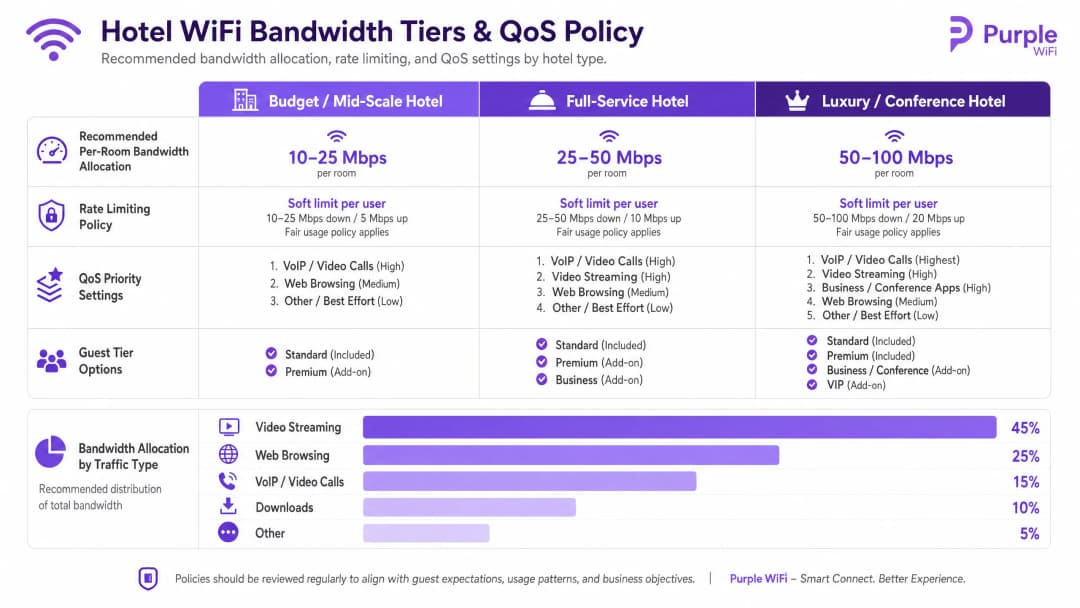
You must provision bandwidth based on peak concurrent demand, not average usage. The recommended allocations are:

  • Budget / Mid-Scale: 10-25 Mbps per room
  • Full-Service: 25-50 Mbps per room
  • Luxury / Conference: 50-100 Mbps per room

For a 200-room property at 80% occupancy, allocating 25 Mbps per room requires a minimum committed uplink of 4 Gbps. A dedicated leased line is mandatory.

Rate Limiting and QoS Policy

To prevent a single user from saturating the uplink, you must enforce per-client rate limiting at the controller level. Whether you deploy Cisco Meraki, HPE Aruba, or Ubiquiti UniFi, configure a hard cap on both downstream and upstream traffic per device.

Above rate limiting sits Quality of Service (QoS). Using the WMM (WiFi Multimedia) standard, you must prioritise traffic into four queues. VoIP and video calls require high priority, ensuring that a guest's Microsoft Teams call is not degraded by another guest downloading a large file on the best-effort queue.

bandwidth_control_chart.png

Implementation Guide

Follow this sequence for a successful deployment:

  1. Conduct an RF Site Survey: Walk the property with a spectrum analyser to identify interference sources before planning AP placement.
  2. Design the VLAN Architecture: Document your Guest, Staff, IoT, and POS VLANs. Configure explicit default-deny firewall rules between them.
  3. Size the Uplink: Calculate peak demand based on the 25 Mbps per room baseline and procure a dedicated leased line.
  4. Deploy the Captive Portal: Integrate the portal with your PMS. Test the authentication flow, consent capture, and session revocation across iOS, Android, and Windows devices.
  5. Monitor and Adjust: Post-deployment, monitor AP association counts and uplink utilisation to identify dead zones or bandwidth bottlenecks.

Troubleshooting & Risk Mitigation

The most frequent failure modes in hotel WiFi deployments stem from poor planning rather than hardware failure.

  • The "Slow WiFi" Complaint: This is rarely an RF issue. First, check your internet uplink utilisation. If the circuit is saturated, no amount of AP tuning will fix the problem. Second, check client distribution across APs; if one AP has 40 clients and an adjacent AP has 5, your band steering configuration requires adjustment.
  • The "Data Silo" Pitfall: Deploying a captive portal without a downstream integration wastes the investment. The data captured at login must flow automatically into your marketing automation tools to drive Retail or hospitality loyalty programmes.
  • The Flat Network Risk: Failing to segment the wired network undermines wireless security. If a guest plugs a laptop into an exposed Ethernet port in a conference room and accesses the staff VLAN, your architecture has failed. Ensure switch ports in public areas are assigned to the guest VLAN or disabled entirely.

ROI & Business Impact

Enterprise WiFi requires significant capital expenditure, but it delivers measurable returns when architected correctly. The ROI is realised through three channels:

  1. Operational Efficiency: PMS integration eliminates manual voucher generation and front-desk troubleshooting, returning hours of staff time per week.
  2. First-Party Data Acquisition: An authenticated captive portal builds a database of verified guest profiles. This data powers direct-booking campaigns, reducing reliance on Online Travel Agencies (OTAs) and their associated commission fees.
  3. Guest Satisfaction: Reliable, high-speed WiFi is a primary driver of positive reviews. A segmented, properly provisioned network eliminates the friction that leads to negative feedback, directly impacting the property's reputation and average daily rate.

关键定义

VLAN (Virtual Local Area Network)

一种逻辑子网,将同一物理基础设施上的一组设备进行分组,将其广播流量与其他 VLAN 隔离。

对于将宾客流量与酒店内部系统隔离并确保 PCI DSS 合规性至关重要。

Captive Portal

一个拦截网络流量的网页,要求用户在获得完全互联网访问权限之前进行身份验证或同意条款。

宾客身份验证、GDPR 同意和第一方数据采集的主要接触点。

FIAS (Fidelio Interface Application Specification)

物业管理系统(如 Oracle Opera)用于与第三方系统进行实时通信的通用协议。

由 Captive Portal 用于根据活跃的 PMS 记录验证宾客的房号和姓氏。

WPA3-Enterprise

最高级别的 WiFi 安全性,要求单个用户或设备通过 RADIUS 服务器 (802.1X) 使用唯一凭据进行身份验证。

用于保障酒店内员工网络和企业设备安全的强制性标准。

Client Isolation

一种无线控制器功能,可防止连接到同一 SSID 的设备之间直接进行通信。

必须在所有宾客网络上启用,以防止点对点攻击并保护宾客隐私。

Rate Limiting

限制单个客户端设备可用的最大带宽(上传和下载速度)的做法。

对于防止单个宾客下载大文件而降低其他所有人的网络体验至关重要。

QoS (Quality of Service) / WMM

对某些类型的流量(如语音或视频)进行优先排序,使其优于对时间不敏感的流量(如文件下载)的网络机制。

确保即使在网络重载的情况下,宾客的 VoIP 通话或员工沟通工具也能可靠运行。

OFDMA

正交频分多址;一种 Wi-Fi 6 功能,允许接入点通过将信道划分为更小的子信道来同时为多个客户端提供服务。

显著提高酒店会议室和前厅等高密度区域的性能并降低延迟。

应用实例

一家拥有 150 间客房的全服务酒店在晚上高峰期(19:00 - 22:00)频繁收到宾客关于 WiFi 慢的投诉。该物业目前拥有 1 Gbps 的宽带连接,并使用带有共享 WPA2 密码的单一扁平网络。

  1. 将互联网上行链路升级为提供至少 3.75 Gbps(150 间客房 * 25 Mbps)的专用专线。2. 实施 VLAN 隔离,将宾客移动到隔离的 VLAN 10。3. 部署一个通过 FIAS 与酒店 Oracle Opera PMS 集成的 Captive Portal,允许宾客使用房号和姓氏进行身份验证。4. 在无线控制器上强制执行单客户端 25 Mbps 下行 / 10 Mbps 上行的速率限制,以防止单个设备占满上行链路。
考官评语: 这种方法解决了根本原因(上行链路饱和),同时解决了扁平网络的安全性漏洞。PMS 集成消除了共享密码的繁琐,同时实现了宝贵的第一方数据采集。

一家奢华度假村需要为用于客房服务和维护的员工平板电脑部署安全的 WiFi,同时确保宾客设备无法访问物业管理系统。

创建一个与宾客 VLAN (VLAN 10) 分离的专用员工 VLAN (VLAN 20)。将员工 SSID 配置为使用 WPA3-Enterprise,通过 802.1X 针对企业 RADIUS 服务器对平板电脑进行身份验证。在防火墙上应用严格的 VLAN 间路由规则:默认拒绝 VLAN 10 和 VLAN 20 之间的所有流量,并且仅允许 VLAN 20 访问客房服务应用程序所需的特定 IP 地址和端口。

考官评语: 如果密码泄露,员工设备依赖 WPA2-PSK 会带来安全风险。采用 802.1X 的 WPA3-Enterprise 可确保设备级身份验证,而严格的防火墙策略可从物理上防止来自宾客网络的横向移动。

练习题

Q1. 一位酒店运营总监希望为宾客和客房内的新智能电视实施单一的开放式 WiFi 网络,以“保持简单”。作为网络架构师,您该如何回应?

提示:考虑横向移动和广播域大小的影响。

查看标准答案

建议不要采用这种方法。宾客设备和 IoT 设备(智能电视)必须隔离到不同的 VLAN 中。将它们放在同一个开放网络中会使电视直接暴露在宾客设备的访问之下,从而产生重大的安全漏洞。此外,这会扩大广播域,从而可能降低整体网络性能。电视应放置在具有严格防火墙规则的隔离 IoT VLAN(例如 VLAN 30)中。

Q2. 在对一家拥有 300 间客房的新物业进行现场勘测期间,布线承包商建议通过在走廊中每四间客房放置一个接入点来节省成本。为什么这会有问题?

提示:考虑酒店环境中的射频衰减和物理障碍。

查看标准答案

走廊放置对酒店来说是一个有缺陷的设计。射频信号必须穿透厚重的防火门、镜面衣柜和瓷砖浴室才能到达客房内的宾客设备,从而导致严重的信号衰减和性能不佳。正确的设计是采用房内 AP 模式——每间客房一个 AP,或者最少每两间客房一个 AP——以保证直视或最小阻碍的覆盖。

Q3. 营销团队希望自动将每个登录 WiFi 的宾客订阅到酒店的每周促销时事通讯。应该如何配置 Captive Portal 来处理这个问题?

提示:考虑 GDPR 关于捆绑同意的要求。

查看标准答案

Captive Portal 必须配置明确的、非捆绑的同意选项。根据 GDPR,访问 WiFi 网络的同意不能以同意营销传播为条件。展示页面必须为时事通讯提供一个单独的、未勾选的加入框。Purple 的平台原生强制执行这种分离,在确保合规的同时捕获可验证的同意记录。